Apple iOS 17 and iPadOS 17 updates for Zoho Desk users
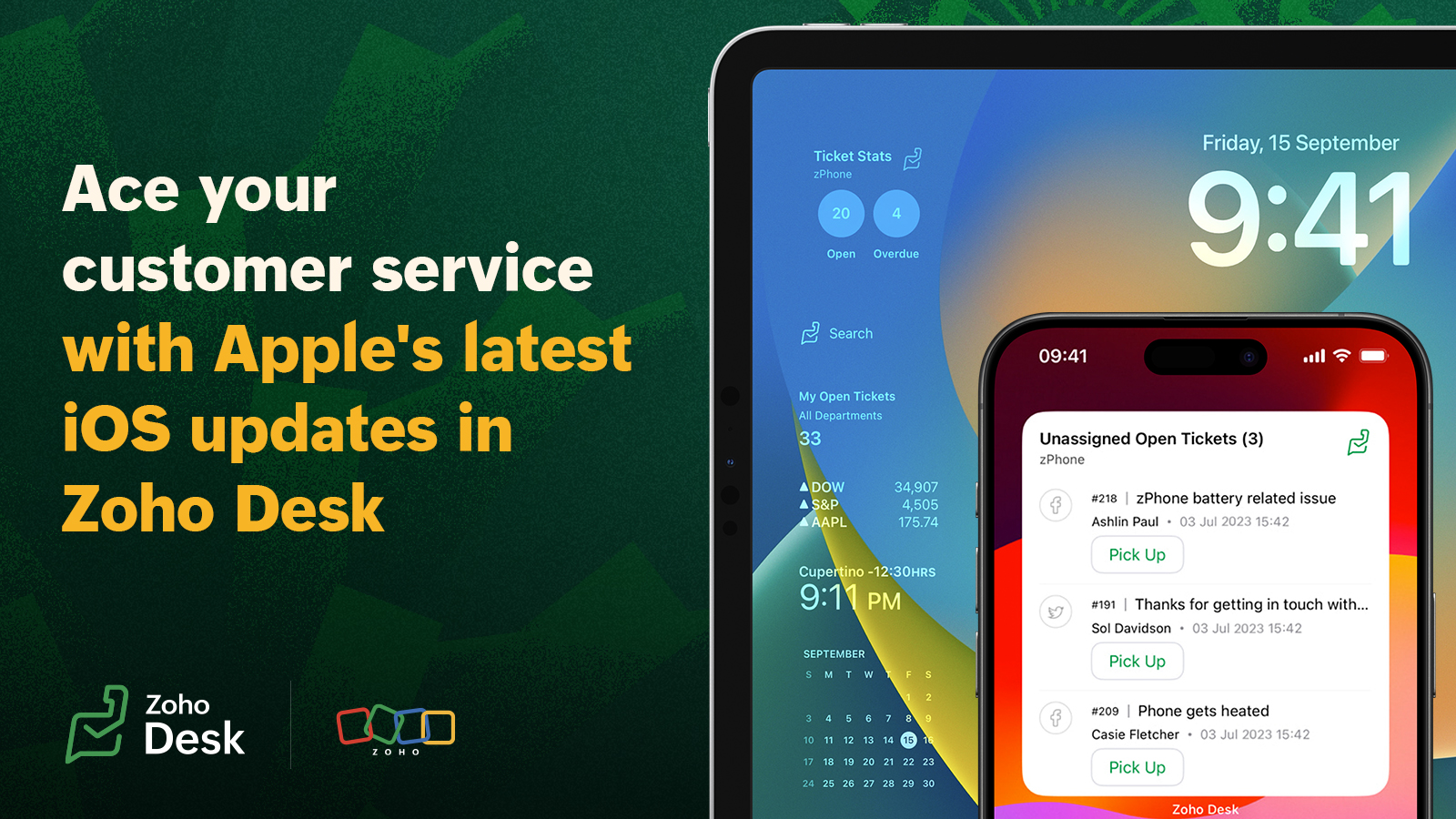
1. Easy and actionable ticketing widgets
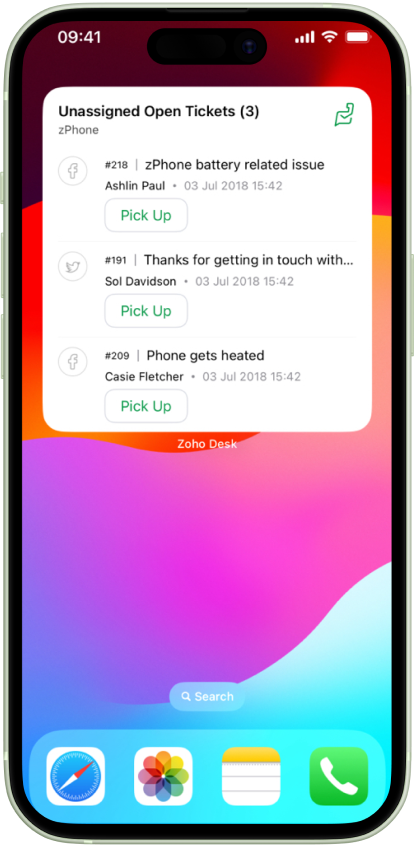
With iOS 17 and iPad OS 17, Apple offers interactive user experiences in your device home screen. Leveraging this enhancement, Zoho Desk has introduced actionable widgets for ticket management.
Support teams have to stay proactive with customer tickets so that they don't get missed. We have introduced two new updates for the Apple device users through this new iOS and iPad OS update.
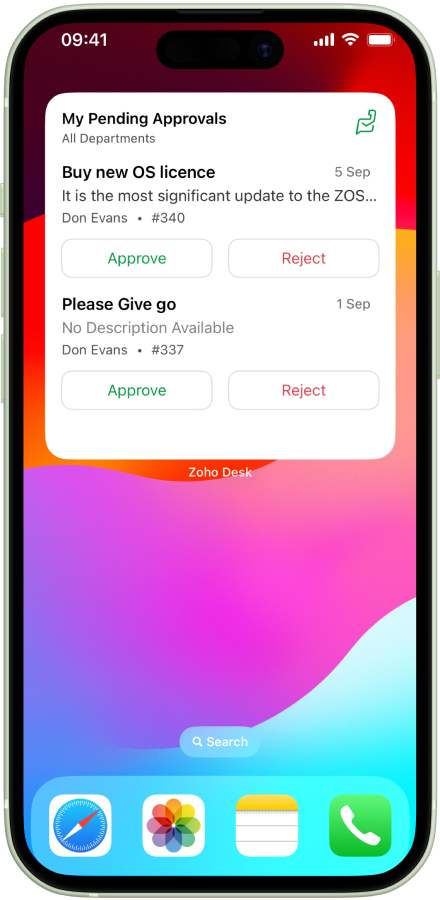
The newly added Pending approval widget will help support supervisors to manage requests from team, from the new widget on their phones.
2. Enhanced Lockscreen Widgets
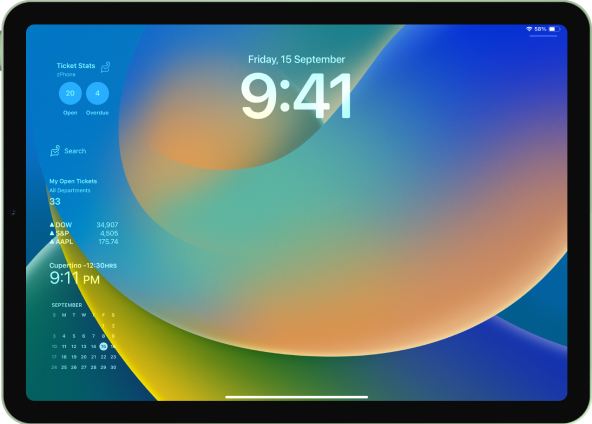
With the new OS enhancement for iPad, users can view updates on locked iPad screens. Zoho Desk users can now take a quick glance at the open ticket count right from their iPad's dormant lock screen.
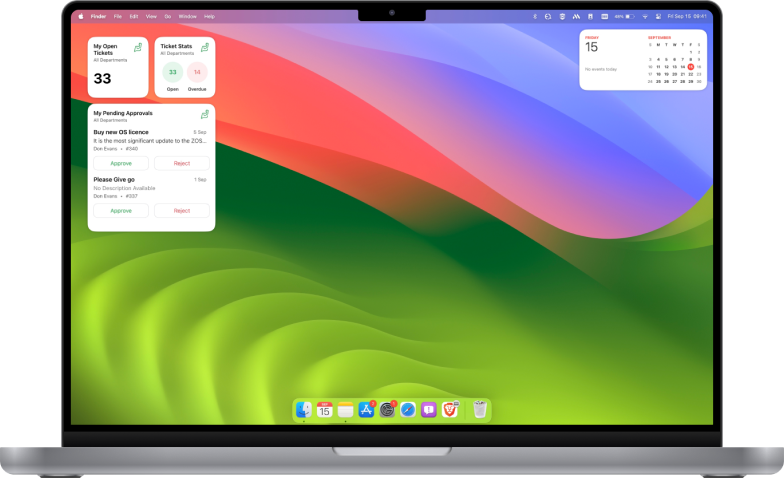
3. Mac Sonoma for Zoho Desk users
With the latest update, support teams can view all crucial info available on their phone via a Mac screen. This will help agents prioritise tasks and schedule their works from laptop, without having to go back and forth between the devices.
4. Update for the StandBy mode
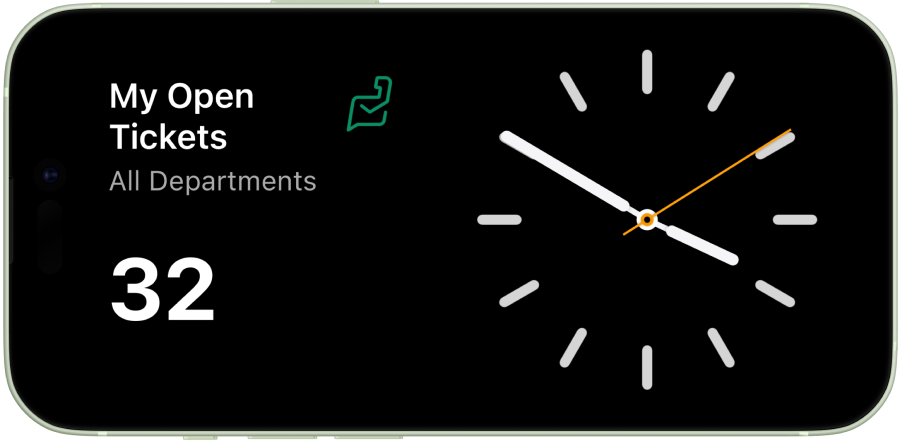
iOS 17 includes StandBy mode, which presents a full-screen display of glanceable information, ideal for viewing notifications, widgets, and more from a distance when your iPhone is on its side and charging.
Taking advantage of this unique capability, Zoho Desk has introduced the Ticket Stat view for StandBy mode.
5. Quick access to help desk info
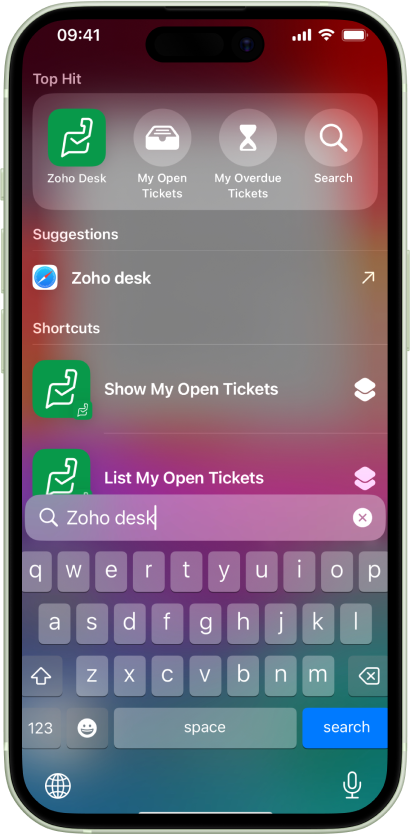
With the release of iOS 17, we have automated our home screen shortcuts. Your support reps can now access crucial info through search, and view open and overdue tickets and help desk notifications from the app shortcuts.
Watch the video for all the updates in action:
Topic Participants
Sangeeta Priyadarshini
Sticky Posts
Zoho Desk Partners with Microsoft's M365 Copilot for seamless customer service experiences
Hello Zoho Desk users, We are happy to announce that Zoho Desk has partnered with Microsoft's M365 to empower customer service teams with enhanced capabilities and seamless experiences for agents. Microsoft announced their partnership during their keynoteWhatsApp pricing changes: Pay per message starting July 1, 2025
Starting July 1, 2025, WhatsApp is shifting from conversation-based pricing to per-message billing. That means every business-initiated message you send will count. Not just the first one in a 24-hour window. Pricing updates on the WhatsApp Business PlatformLive Webinar - Work smarter with Zoho Desk and Zoho Workplace integration
Hello customers! Zoho Desk and Zoho Workplace are coming together for a webinar on 14th May, 2024. Zoho Workplace is a suite of productivity apps for email, chat, docs, calls, and more at one single place. Zoho Desk is closely integrated with a few toolsApple iOS 17 and iPadOS 17 updates for Zoho Desk users
Hello Zoho Desk users! Apple recently announced the release of iOS 17 and iPad OS 17. These latest OS updates will help you stay productive and efficient, through interactive and seamless user experiences. Zoho Desk has incorporated the updates to helpZoho Desk Cheat Sheet For The Year-End
Check out these Zoho Desk best practices to end this year on a high and have a great one ahead! #1 Set Business (Holiday) Hours - If you have limited working hours, please make sure you restrict your business hours or set them as holidays for the coming days. Let your customers know when you will, and won't, be available. #2 Update the Annual Holiday List - Check the holidays for the new year and update the holiday schedule. Usually, holidays from the current year will be carried over for the next
Recent Topics
Change in Zoho CRM API?
Hello, I am using the Zoho API trough the PHP SDK v2.1 Since few days, I noticed that I have to change the way I pass the data to the API when I create, update, or upsert a record. Dates Before I was passing a PHP date object to "$record->addKeyValue(...)",MTA - BAD IP reputation by outlook/hotmail
Messages to Microsoft email servers are bouncing back due to poor reputation. Message: 4.7.650 The mail server [136.143.188.206] has been temporarily rate limited due to IP reputation. For e-mail delivery information see https://postmaster.live.com (S775)QuickBooks Extension for Zoho CRM - Advanced Features -2025
Hello Everyone, We’re happy to announce the latest version of our QuickBooks Extension for Zoho CRM, now officially live on the Zoho Marketplace! This release introduces one-click data sync, a user-friendly UI, enhanced performance, and a powerful setChanging Department often causes the Firefox tab to freeze
Title, it doesn't seem to happen with neither Opera nor Chrome. And even in Firefox, sometimes it just lets me change the department I'm in no problem, even to All Departments which is probably the most, like, resource heavy? But most of the time, theNeed to integrate Zoho Mail Mobile app with Zoho Meeting Mobile App for Android and Apple
Hello Zoho Team, Please bring integration of Zoho Mail Mobile app with Zoho Meeting for Android and Apple Thanks¡Muchas gracias por participar a los Meetups de Usuarios de Zoho! Y Novedades del ecosistema Zoho
¡Hola Comunidad de Zoho en Español! 👋 Después de un breve lapso de tiempo, volvemos con una nueva edición de nuestro Community Digest, donde te contamos las novedades de los productos de Zoho en los últimos meses. Estas mejoras se centran en nuestrosAnyway to move mail from one account to another yet?
Hello, Is there any way to move email from one mailbox account to another mailbox account in zoho yet? Thanks, Ryan.Using a CRM Client Script Button to create a Books Invoice
Hello, I need help handling error messages returned to my client script from a function. The scenario I have setup a client script button which is available from each Deal. This CS executes a crm function, which in turn creates an invoice based on theBuilding Toppings #2 - Learn how to use Bigin's Developer Console to build toppings
Hey Biginners, In our last post, we discussed what toppings are, why they're essential to extending Bigin's capabilities, and how the Bigin Developer Center serves as the starting point for building them. As a cloud platform, the Developer Center empowersProposal for Creating a Unique "Address" Entity in Zoho FSM
The "Address" entity is one of the most critical components for a service-oriented company. While homeowners may change and servicing companies may vary, the address itself remains constant. This constancy is essential for subsequent services, as it providesLinks are incorrect when sent out
I'm adding in hyperlinks into my eDM. When I send a test email, it's all correct. However, when I send out the eDM, all the hyperlinks jump up one space so none of the links are opening to the correct page. Why is this happening and how can I fix it?Tip of the week #16 - Search and filter threads based on criteria
Zoho TeamInbox lets you search and filter threads with any information that you have about the thread. You just have to input the criteria and Zoho TeamInbox will list all the threads that match the condition. Firstly, there is a global search you canIntroducing recipient authentication via Stripe Identity in Zoho Sign
Hi everyone! It's important to authenticate your recipient's identity before they access and sign important documents to ensure the highest level of compliance. Zoho Sign already helps businesses do this with various authentication methods: SMS OTP EmailIntroducing Multi-Asset Support in Work Orders, Estimates, and Service Appointments
We’re excited to announce a highly requested enhancement in Zoho FSM — you can now associate multiple assets with Work Orders, Estimates, and Service Appointments. This update brings more clarity, flexibility, and control to your field service operations,CRM: hosting a single html file in Zoho and displaying it as a widget
I have seen that CRM offers the option of uploading a web project to Zoho itself and displaying it as a widget in CRM. The instructions then talk about setting a development environment with Node and developing an application to upload to Zoho. But IKeep Converted Leads
How do I keep the converted leads in the Leads Module after conversion (converting it to account, contact, deal). I want to add it in a converted stage in the leads module in order to get a report or dashboard and see all converted leads from my pipCustomizing Global Search Settings for All Users
Hi Our team use the brilliant global search functionality within CRM many many times daily. But, we struggle with the out-of-the box columns that CRM gives you. We are always telling users to customize this look to more suit our business, to show theIntroducing Formula Fields for performing dynamic calculations
Greetings, With the Formula Field, you can generate numerical calculations using provided functions and available fields, enabling you to derive dynamic data. You can utilize mathematical formulas to populate results based on the provided inputs. ThisFrom Zoho CRM to Paper : Design & Print Data Directly using Canvas Print View
Hello Everyone, We are excited to announce a new addition to your Canvas in Zoho CRM - Print View. Canvas print view helps you transform your custom CRM layouts into print-ready documents, so you can bring your digital data to the physical world withTip of the Week #77– Stay informed of the activities happening in your organization
Whenever a message is handled in Zoho TeamInbox, every action is recorded in the Activity Log. This ensures you always know what’s happening across your teams and inboxes. To access it, simply click the Audits icon on the left pane’s top bar after loggingZoho Logs - Not seeing logs since 30 Nov
Hi, we have a few functions running, I am testing some new ones and noticed that although I can see executions, I cannot see any logs, even when the first line on the functions is a log. I reviewed some existing functions, one of which is invoked on aWorkdrive MS Office integration
Have installed subscribed version of Zoho WorkDrive VSTO runtime not found is the error when I try to install Zoho_WorkDrive_For_Office Unable to open work files in Excel and Word Urgent, since I have migrated all my OneDrive files to work drive alreadyHow do I create an update to the Cost Price from landed costs?
Hi fellow Zoho Inventory battlers, I am new to Zoho inventory and was completely baffled to find that the cost price of products does not update when a new purchase order is received. The cost price is just made up numbers I start with when the productHow to change Zoho Vault password
I am searching where I can change the Vault Password after having changed the Zoho account password. I don't see this option anywhere in my account. It should be simple and accessible! Please help. Thanks!Zoho Workdrive - Communication / Chat Bar
Hi Team, Please consider adding an option to allow admins to turn on or off the Zoho Communication Bar. Example of what I mean by Communication Bar: It's such a pain sometimes when I'm in WorkDrive and I want to share a link to a file with a colleaguePrefered Bin Missing in android APP
Andoroid app dosent show preferred bin in the picklist. The workaround support reccomend is to use the computre to create the picklist. it shuld be information to be shown aas basic for the pciker.When Marking a Multiple Choice Answer Exclusive - Not Following My Survey Disqualification Logic
Using a multiple choice (many answers) question and I created survey disqualification logic that was working as intended. My question: Disqualification page logic is: If (QUESTION) is "any one of the following" then (OPTIONS) - a custom message populatesWhere to Add Machines as Products to Map with Assets in Zoho FSM?
implementing Zoho FSM for a clinical equipment supply company. The business sells and installs clinical machines in hospitals and clinics, and they also handle service requests, scheduled maintenance, calibration visits, and general machine upkeep. InShow Zoom Link in Recipient's Calendar
We set up meetings within a record, selecting the "Make this an online meeting". We use Zoom. Most of the recipients go to their calendar (usually Gmail or Outlook, corporate) to join the Zoom meeting, but there is no Zoom link in the calendar. Can thisPassing the CRM
Hi, I am hoping someone can help. I have a zoho form that has a CRM lookup field. I was hoping to send this to my publicly to clients via a text message and the form then attaches the signed form back to the custom module. This work absolutely fine whenZoho CRM for Everyone's NextGen UI Gets an Upgrade
Hello Everyone We've made improvements to Zoho CRM for Everyone's Nextgen UI. These changes are the result of valuable feedback from you where we’ve focused on improving usability, providing wider screen space, and making navigation smoother so everythingZoho Bigin - should be able to link a "contact" to multiple "companies"
Hello Support, I called into telephone support and was told that a contact can only be linked to one company. We have situations were director are contacts of and directors of multiple companies so that seems a basic weakness in Bigin. When go to addDoes Thrive work with Zoho Billing (Subscriptions)?
I would like to use Thrive with Zoho Billing Subscriptions but don't see a way to do so. Can someone point me in the right direction? Thank youRadio button data won't update
Wondering if anyone is experiencing the same problem. I tried bulk updating our data on Zoho Creator using API and noticed that the radio button field wasn't updated. I have tried updating it manually, it didn't work. When I tried updating a text fieldRegister the 'Contact Role' addition and change as a Potential edition so it can trigger Workflows
We are trying to use "Contact Roles" in Potentials. Contact Roles are special and different than the other Related lists, so, it may have a special behavior. Something to keep in mind is that you will never have 100 Contact Roles as you can have 100 Tasks, Calls, or any other Related list. In our case we will have 2 in average and up to 4 or 5 maximum. The problem is that we need to bring information from 3 key Contact Roles to the Potential and adding a Contact to the Contacts Roles area never triggerSynchronise item image between Zoho Commerce and Zoho Books/Inventory/CRM
Here is a blindingly simple idea to tie several Zoho products together. Zoho - please include a method to synchronise the item image (or images) from one Zoho application to another. For example, if you upload an item image in Zoho Inventory, a user shouldAccessing shared mailboxes through Trident (Windows)
Hi, I have a created a couple of shared mailboxes. The mailboxes are showing up on the browser based Zoho workplace, but I cannot seem to figure out how to access my shared inboxes through Trident (Windows). Am I missing something or is this feature notIntroducing Global Sets for easy management of similar picklists in CRM
Latest update (December 2025): You can now apply color coding to the values inside a global set, the same way you color code values in regular picklist fields. Update (Sep 2024): We've increased the maximum count limit for global sets. These new limitsUploading a signed template from Sign to Creator
Good day, Please help me on how to load a signed document back into Creator after the process has been completed in Sign. Below is the code that I am trying, pdfFile = response.toFile("SignedDocument_4901354000000372029.pdf"); info pdfFile; // AttachNo Ability to Rename Record Template PDFs in SendMail Task
As highlighted previously in this post, we still have to deal with the limitation of not being able to rename a record template when sent as a PDF using the SendMail Task. This creates unnecessary complexity for what should be a simple operation, andNext Page