Automating Attendance Tracking with Zoho Cliq Developer Platform
I wish remote work were permanently mandated so we could join work calls from a movie theatre or even while skydiving! But wait, it's time to wake up! The alarm has snoozed twice, and your team has already logged on for the day.

How does this solution benefit a business?
- Real-time reminders reduce instances of ghost check-ins and ensure accurate recording of everyone's logged hours.
- Essential for attendance tracking, payroll accuracy, compliance with labour laws, and audits.
- The entire team stays informed, fostering a cohesive workflow that eliminates the need for micromanagement.
Before beginning to script the code below, we must create a connection in Cliq with Zoho People. Once a connection is created and connected, you can use it in Deluge integration tasks and invoke URL scripts to access data from the required service.
Create a Zoho People default connection with any unique name with the scopes - ZohoPeople.Attendance.ALL , ZohoPeople.forms.ALL and ZohoPeople.leave.ALL
ⓘ Document for reference : Connections in Cliq
How to obtain or locate the channel unique name in Cliq?
Navigate to the top right corner of the channel and locate the three dots. Click it.
In the menu that appears, select "Channel info" and a pop-up will open, displaying detailed channel information.
- After a successful login in Cliq, hover to the top right corner and click your profile. Post clicking, navigate to Bots & Tools > Schedulers.
- On the right, click the "Create Scheduler" button.
- To learn more about schedulers and their purposes, refer to the Introduction to Schedulers.
- Create a scheduler using your preferred name. Specify the following details: the scheduler name and a description.

- For the recurring period, choose the type "Weekly." Select Monday through Friday and set the time of execution to 11 AM or any other time that aligns with your company's check-in time, or customise the recurring period based on your specific use case.
- Finally, click "Save & edit code" and paste the following code.
- currentDate = zoho.currentdate;
- currentDateString = currentDate.toString("dd-MMM-yyyy");
- fromIndex = 1;
- toIndex = 200;
- // Get all active users
- users = zoho.people.getRecords("employee",fromIndex,toIndex,{},"{CONNECTION_LINK_NAME}");
- usersList = List();
- usersList.addAll(users);
- iterations = {1,2,3,4,5,6,7,8,9,10,11,12,13,14,15,16,17,18,19,20,21,22,23,24,25};
- // Get All Employees ( 4000 MAX )
- if(users.size() == 200)
- {
- for each iteration in iterations
- {
- fromIndex = fromIndex + toIndex;
- toIndex = toIndex + 200;
- users = zoho.people.getRecords("employee",fromIndex,toIndex,{},"{CONNECTION_LINK_NAME}");
- if(users.size() > 0 && users.size() == 200)
- {
- usersList.addAll(users);
- }
- else if(users.size() > 0 && users.size() < 200)
- {
- usersList.addAll(users);
- break;
- }
- else
- {
- break;
- }
- }
- }
- // Get all the employees checkedin from the morning.
- getAttendenceEntries = invokeurl
- [
- url :"https://people.zoho.com/api/attendance/fetchLatestAttEntries?duration=240"
- type :GET
- connection:"{CONNECTION_LINK_NAME}"
- ];
- latestAttendanceRecords = getAttendenceEntries.get("response").get("result");
- checkedInUsers = List();
- for each userRecord in latestAttendanceRecords
- {
- checkedInEmployeeEmail = userRecord.get("emailId");
- checkedInUsers.add(checkedInEmployeeEmail);
- }
- // Get all the employees who applied for leave both approved and pending ( Remove PENDING to exclude only the leave approved employees )
- leaveApprovedEmployees = invokeurl
- [
- url :"https://people.zoho.com/api/v2/leavetracker/leaves/records?from=" + currentDateString + "&to=" + currentDateString + "&dateFormat=dd-MMM-yyyy&approvalStatus=[APPROVED,PENDING]"
- type :GET
- connection:"{CONNECTION_LINK_NAME}"
- ];
- info leaveApprovedEmployees;
- leaveApprovedEmployeesList = List();
- for each member in leaveApprovedEmployees.get("records")
- {
- leaveApprovedEmployeesList.add(member.get("EmployeeId"));
- }
- info leaveApprovedEmployeesList;
- // Add the users to yet to checkin list if they are not checked from the morning and not applied for leave
- usersYetToCheckIn = list();
- for each user in usersList
- {
- employeeEmail = user.get("EmailID");
- employeeId = user.get("EmployeeID");
- employeeStatus = user.get("Employeestatus");
- if(!checkedInUsers.contains(employeeEmail) && !leaveApprovedEmployeesList.contains(employeeId) && employeeStatus.equals("Active"))
- {
- usersYetToCheckIn.add(employeeEmail);
- }
- }
- // Mention the list of users in the channel.
- if(usersYetToCheckIn.size() == 0)
- {
- info "No users were found yet to checked-in at 11 PM today. Great to see everyone wrapping in on time! ✅";
- }
- else
- {
- usersYetToCheckInString = "";
- for each user in usersYetToCheckIn
- {
- usersYetToCheckInString = usersYetToCheckInString + "[" + user + "](mail:" + user + ") \n";
- }
- usersYetToCheckInString = usersYetToCheckInString.subString(0,usersYetToCheckInString.length() - 2);
- response = Map();
- card = Map();
- card.put("title","Employees who haven’t checked in yet ( " + usersYetToCheckIn.size() + " )");
- card.put("thumbnail","https://i.pinimg.com/originals/85/e9/f3/85e9f3f5ac31fc5aab586e208297f43d.gif");
- card.put("theme","modern-inline");
- response.put("card",card);
- response.put("text",usersYetToCheckInString);
- info zoho.cliq.postToChannel("{CHANNEL_UNIQUE_NAME}",response);
- }
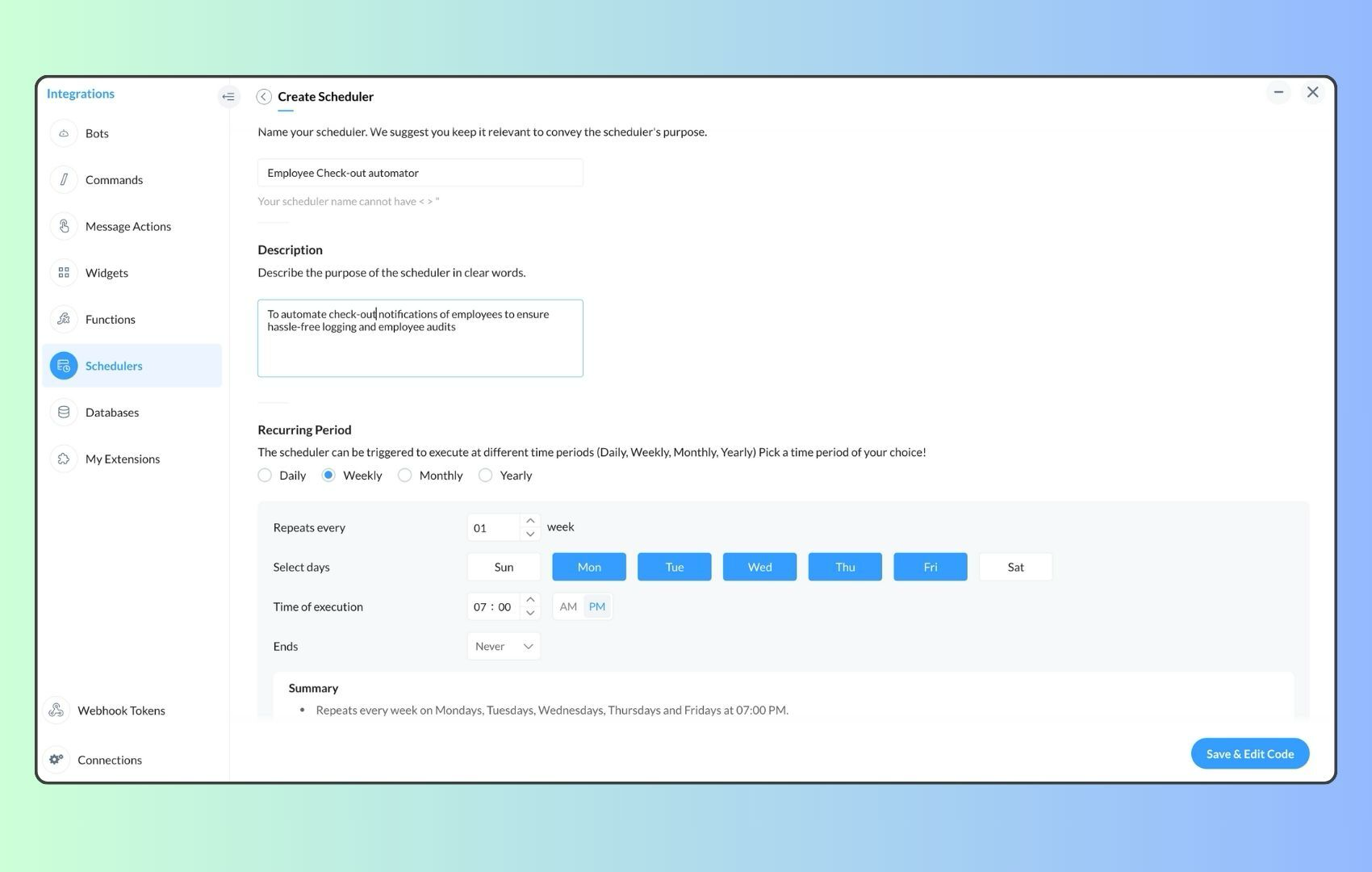
- Now, let's follow the same steps and create a scheduler for checkout reminders. Under the recurring period, choose the type as "Weekly." Select Monday through Friday and set the time of execution to 7 PM or any other time that aligns with your company's checkout time, or customise the recurring period based on your specific use case.
- Click "Save & edit code" and paste the following code.
- attendanceResponse = invokeurl
- [
- url :"https://people.zoho.com/api/attendance/fetchLatestAttEntries?duration=600"
- type :GET
- connection:"{CONNECTION_LINK_NAME}"
- ];
- info attendanceResponse;
- todayDate = zoho.currenttime.toString("YYYY-MM-dd");
- latestAttendanceRecords = attendanceResponse.get("response").get("result");
- usersWithoutCheckout = list();
- if(latestAttendanceRecords.size() > 0)
- {
- for each userRecord in latestAttendanceRecords
- {
- userEmail = userRecord.get("emailId");
- dailyEntries = userRecord.get("entries");
- for each dailyEntry in dailyEntries
- {
- if(dailyEntry.containsKey(todayDate))
- {
- todayEntryDetails = dailyEntry.get(todayDate);
- attendanceLogs = todayEntryDetails.get("attEntries");
- for each logEntry in attendanceLogs
- {
- if(!logEntry.containsKey("checkOutTime"))
- {
- usersWithoutCheckout.add("{@" + userEmail + "}");
- }
- }
- }
- }
- }
- }
- usersWithoutCheckoutString = usersWithoutCheckout.toString("\n");
- if(usersWithoutCheckoutString.trim().length() == 0){
- usersWithoutCheckoutString = "No users were found checked-in after 7 PM today. Great to see everyone wrapping up on time! ✅";
- }
- response = Map();
- card = Map();
- card.put("title","List of users who remain checked in ( " + usersWithoutCheckout.size() + " )");
- card.put("thumbnail","https://media.tenor.com/Hd8nLZZTPRYAAAAi/alarm-clock-alarm.gif");
- card.put("theme","modern-inline");
- response.put("card",card);
- response.put("text",usersWithoutCheckoutString);
- info zoho.cliq.postToChannel("{CHANNEL_UNIQUE_NAME}",response);
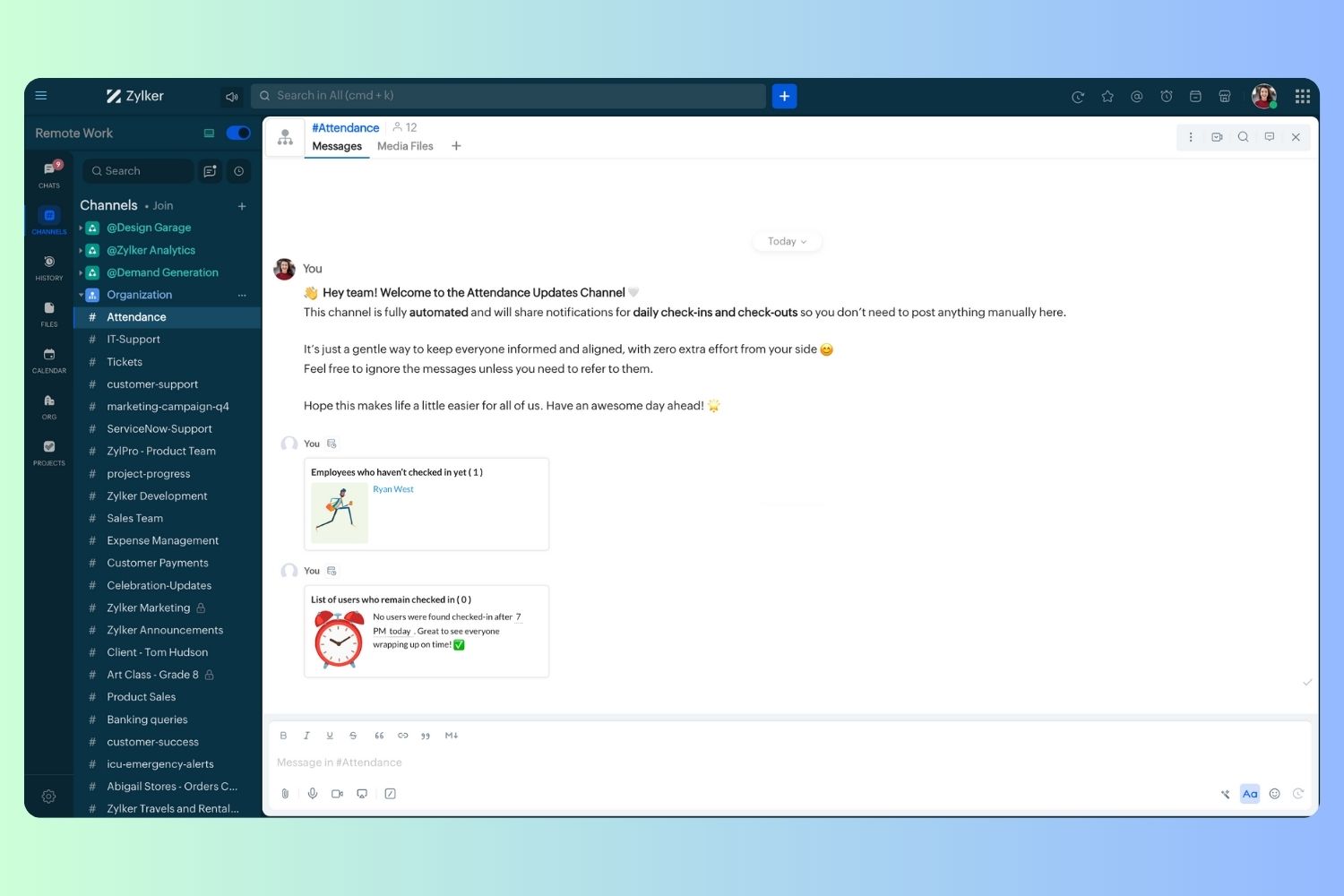
Wrapping up and checking out for the day, hopefully
Topic Participants
Harsha SS
Ram Freedman
Sticky Posts
Automate attendance tracking with Zoho Cliq Developer Platform
I wish remote work were permanently mandated so we could join work calls from a movie theatre or even while skydiving! But wait, it's time to wake up! The alarm has snoozed twice, and your team has already logged on for the day. Keeping tabs on attendanceAutomating Employee Birthday Notifications in Zoho Cliq
Have you ever missed a birthday and felt like the office Grinch? Fear not, the Cliq Developer Platform has got your back! With Zoho Cliq's Schedulers, you can be the office party-cipant who never forgets a single cake, balloon, or awkward rendition ofCustomer payment alerts in Zoho Cliq
For businesses that depend on cash flow, payment updates are essential for operational decision-making and go beyond simple accounting entries. The sales team needs to be notified when invoices are cleared so that upcoming orders can be released. In contrast,Accelerate Github code reviews with Zoho Cliq Platform's link handlers
Code reviews are critical, and they can get buried in conversations or lost when using multiple tools. With the Cliq Platform's link handlers, let's transform shared Github pull request links into interactive, real-time code reviews on channels. ShareApp Spotlight : PagerDuty for Zoho Cliq
App Spotlight brings you hand-picked apps to enhance the power of your Zoho apps and tools. Visit the Zoho Marketplace to explore all of our apps, integrations, and extensions. In today's fast-paced world, seizing every moment is essential for operational
Recent Topics
WorkDrive API Documentation
WorkDrive provides users and developers an extensive set of APIs to help integrate functionalities of Zoho WorkDrive with other Zoho applications and third-party tools. We have published the official WorkDrive API Documentation page for all external users.March 15, 2023: Zoho Docs is discontinued
As of today (March 15, 2023) Zoho Docs is discontinued for all users. We would like to thank our customers for trusting us for so many years! Going forward, we're confident you'll enjoy using Zoho WorkDrive for all your advanced file management and collaborationIntroducing WorkDrive 4.0: Enhanced productivity. Advanced data administration. (Phase 1)
Hello All, We're excited to share the release of WorkDrive 4.0, which includes important new features and enhancements focused primarily on productivity, secure collaboration, data administration, integrations, and user experience. Read the official announcementExternal download link limit
Can You please help us to understand this For Zoho WorkDrive external users, the download limit is a maximum of 5 GB total download size and a maximum of 50 first-level files and folders What is the meaning of first level? We are using these files inDynamically catching new file creations
I have a team folder with many subfolders, and in those folders we add new documents all the time. I'd like to have a workflow or script to notify me (and then take other actions) when a file is added anywhere in that structure that ends in "summary.txt".Rotate an Image in Workdrive Image Editor
I don't know if I'm just missing something, but my team needs a way to rotate images in Workdrive and save them at that new orientation. For example one of our ground crew members will take photos of job sites vertically (9:16) on his phone and uploadWorkflow workdrive rollout
Hi! When will workflow be rolled out to all users? Thanks.Creating and managing a Team Folder using WorkDrive TrueSync
Hello everyone, Are you tired of constantly switching between your Desktop TrueSync app and the WorkDrive web app to create and manage Team Folders? We’ve made things easier for you. You can now create and manage Team Folders directly within the TrueSyncEdit images seamlessly with WorkDrive's built-in Image Editor
Are you tired of switching between multiple tools just to make simple edits to your images? We understand the hassle, which is why Zoho WorkDrive now comes with a built-in image editing tool, powered by Zoho Annotator. This tool allows you to edit imagesSupercharge your email workflow with WorkDrive's add-in for Microsoft Outlook
Consider this: You’re handling a critical project, and your inbox is packed with important attachments, email threads, and client communications. The back-and-forth routine of downloading files to your computer, uploading them to WorkDrive, and manuallySecure and promote your content with Custom Watermarking
Imagine this: You’re a professional photographer who regularly shares your work online with potential clients and collaborators. Recently, you notice that some of your images have been reposted without any credit or permission. This not only impacts yourJoin us in Singapore for the Zoho WorkDrive User Group meetup!
Hello, everyone! Exciting news! We'll be hosting an upcoming Zoho WorkDrive user group meetup in the beautiful city of Singapore this November. At this Zoho User Group meetup, we'll guide you through ways to use WorkDrive as a platform and build customWorkDrive TrueSync now supports ARM64-based Windows devices!
We’re excited to announce that the Zoho WorkDrive TrueSync app now fully supports Windows devices with ARM64 architecture! Whether you're working on an ARM-based device or an x64 processor, you can now enjoy the same seamless file synchronization experienceOption to Disable Download for Documents Shared via Permalink
Dear Zoho Writer Team, Currently, when sharing a Writer document using the regular permalink (Collaborators with external users), there is no option to restrict the ability to download the document. While the external share link allows such restrictions,How to Download a File from Zoho WorkDrive Using a Public Link
How to Download a File from Zoho WorkDrive Using a Public Link If you're working with Zoho WorkDrive and want to download a file using a public link, here's a simple method to do so using API or a basic script. This approach helps developers or teamsdomain not verified error
Hi when i try to upload a video from zoho creator widget to zoho work drive iam getting domain not verified error.I don't know what to do .In zoho api console this is my home page url https://creatorapp.zoho.com/ and this is my redirect url:www.google.com.IamLive Webinar: Getting Started with Zoho WorkDrive - A Complete Overview
Hello everyone, We’re excited to invite you to our upcoming live webinar! Discover how to set up your team, bring in your data, and make the most of WorkDrive’s collaboration, organization, AI, and security capabilities. This session is perfect for anyoneCalendly One-way sync- Beta Access
Hello Community, Many of our Zoho Calendar users have expressed their interests in Zoho Calendar and Calendly integration. We've been tightly working on with Calendly team to provide a two-way sync between Calendly and Zoho Calendar. However, there haveThe year that was at Zoho Calendar 2023- Part 2
In continuation with our previous post on all the exciting updates and improvements that have shaped Zoho Calendar over the past 12 months, Lets delve into more: Bring your calendars together- Introducing Zoho Calendar and Outlook calendar synchronisationTip of the week #18: Change the event organizer in Zoho Calendar.
We cannot always be available to conduct an event when we organise one. In these circumstances, you can use Zoho Calendar to change the event organizer at any moment before the event begins. This way, you can avoid cancelling the event while still takingTip of the week #20: Create and manage multiple personal calendars.
Zoho Calendar provides users with the facility to create and manage as many calendars as required. All these calendars can be managed and edited as per user requirements. You can alter the calendar view, make changes to the calendar theme, share the calendarTip of the week #24: Subscribe to the calendars of a Zoho Calendar user.
Calendars that are created by Zoho Calendar users can also be added to your Zoho calendar. All public calendars listed by the users will be available when you enter the email address. You can choose the calendar you need to subscribe to. Once the emailRemoving calendar for zoho email group
How do I make it so that an email group created in Zoho Mail does NOT have a calendar? I have a couple groups for our phone systems voicemails - one for each department. Voicemail recordings are sent to this groups email address so they have access toTip of the week #27: Edit personal calendars in Zoho Calendar.
In Zoho Calendar, the personal calendars you create can be edited to make changes you need to make. Edit a Personal Calendar The following changes can be made to the personal calendar by editing it: Calendar title Calendar color Reminders and DescriptionTip of the week #28: Show/ hide, enable/ disable and empty/ delete your calendars in Zoho Calendar.
The popularity of online calendars has soared in recent years. It's used both for personal and professional reasons. Calendars have evolved into an effective productivity tool in our lives, from creating events for birthdays and anniversaries to schedulingTip of the week #30: Share calendars publicly in Zoho Calendar.
In Zoho Calendar, calendars that are created under My Calendars can be shared publicly. Making your calendar public allows others to view it. When you need to share your calendar with a larger group, public sharing can help. You can restrict others fromTip of the week #31: Share your personal calendars within organization.
Keep your Organization members aware of what's happening. In Zoho Calendar, you can share your personal calendar with all the members in your organization using the Share with org option.When you enable org sharing for a particular personal calendar,Tip of the Week #33: Appointment scheduler in Zoho Calendar.
In Zoho Calendar, you can use the Schedule Appointment option to share your appointment request form with the public, allowing people to fill out the form to request an appointment with you. This form can be embedded on your website or blog. VisitorsTip of the Week #34: Embed Calendars using Zoho Calendar
You can make your calendars public and visible to the general public by embedding them in your websites/blogs using Zoho Calendar. You can use the embed code to add your own calendars to your website's/ blog's HTML code, and the calendar will appear onTip of the week #35: Migrate to Zoho Calendar from Google Calendar.
If you are looking to move your Google Calendar events to Zoho Calendar, never worry about missing out the events from your Google Calendar. You can migrate the events from Google Calendar using the export option and import it to Zoho Calendar and manageTip of the week #36: Migrate to Zoho Calendar from Outlook Calendar.
If you've been using Outlook calendar and looking to migrate to Zoho Calendar, you can seamlessly export your calendars from Outlook and import them into Zoho Calendar without losing any events, participants, and the reminders set for each event. To migrateShared calendar issues and duplications
Apparently there was a calendar update? Now when I schedule an event for a team member that has shared his calendar with me, the event makes me the organizer and adds the event to my calendar as well. Previous to this "update" I would scheduled an eventSubscribed Calendar
Hi i have subscribed to a calendar for Holidays in Canada it shows all the holidays perfectly but every one of them has the word Canada before the rest of the name is there a way to remove that word Canada? It takes up a lot of space in the square onThe year that was at Zoho Calendar 2023- Part 1
Hello, amazing community members! Happy new year from all of us here at Zoho Calendar. As we begin the new year, we'd like to thank each and everyone of our community members for your unwavering support and love that you have shown for Zoho Calendar.Zoho Calendar 2024: A Year in Review
Hello, community members! Happy new year from all of us here at Zoho Calendar. As we turn the page to a new year, we extend our heartfelt gratitude to every member of our Zoho Calendar community for your continued support and enthusiasm. Your feedbackZoho Calendar not syncing correctly with personal Google Calendar
Coming to this forum as Zoho Calendar support team is not responding, any more. For the past 8 weeks, I have been having an issue with Zoho Calendar not syncing with my personal Google Calendar correctly. I subscribed to Zoho Calendar iCal in my personalZeptomail API error 500 internal server error
Hi Everyone, getting this eror continuously! Can anyone please guide around the same! Zeptomail API error 500 internal server error Best RegardsWaiting multiple days to buy credits, causing my website to suffer
So I own a fairly large website that gets a lot of registered users. I use transmail send activation emails, and also forgot password emails. I sent an email to zoho's presales team when I was only at 4K/10K emails sent, hoping to buy more credits beforeFollow up
Hello, I sent a message 2 days ago but I don't receive any response and I cannot find my ticket here. this is the ticket: Your ticket has been created with the ticket ID 68925465 and subject "Fwd: Fishing-alert" looking forward to seeing your response.What's new in TransMail!
Note: TransMail is now ZeptoMail. Click here to know more. Hello again, everyone! We've recently crossed the 6 months mark of TransMail's launch. In this time post our launch, we have been constantly working on updating our platform and adding new featuresNext Page