Automation#23: Automate Guided Conversations in Zoho Desk with Business Hours

Hello Everyone,
This week's edition introduces a custom function designed to automate Guided Conversations in Zoho Desk, based on your business hours. With this feature, you can align the bot's behavior with your business schedule, ensuring a smooth and professional customer experience.
This week's edition introduces a custom function designed to automate Guided Conversations in Zoho Desk, based on your business hours. With this feature, you can align the bot's behavior with your business schedule, ensuring a smooth and professional customer experience.
Self-service platforms are now a cornerstone of effective customer service, improving productivity for both customers and support agents. With the evolving nature of customer support, self-
service has become indispensable. It saves time and provides quick access to solutions, empowering customers to address their concerns efficiently.
Zoho Desk's Guided Conversations serves as a robust self-service tool, offering Tier-1 solutions to customers through an intuitive interface. For more complex or escalated queries, the bot seamlessly connects customers to a live agent, ensuring both self-service and human assistance for effective issue resolution.
However, businesses often have non-working hours, such as weekends or holidays, when agents are unavailable. In such cases, configuring your Guided Conversations based on your business hours is essential. During non-working hours, the bot can:
- Notify customers that your business is currently closed, along with your operating hours.
- Provide an option for customers to submit a ticket, ensuring their query is addressed promptly during working hours.Configure your Guided Conversations today and streamline your customer support process!
How to incorporate this custom function within your GC flow?
1. Go to Setup (S) >> Self-Service >> Guided Conversation.
2. Choose the Department and click on Create Flow.
(If you would like to add this to your existing flow, click on the ellipsis icon under Published Flows and click on the Edit button.)
3. Select the channels, give a Name and Description, and click Next.
4. Click on the + icon, add the Webhook block, under Perform Actions.
5. Enter the Block name as Business Hours, Choose Get under Method.
 Note: In the Business Hours URL, replace .com with .in/.eu/.ca/.sa based on your DC
How to fetch the Business Hour Id?
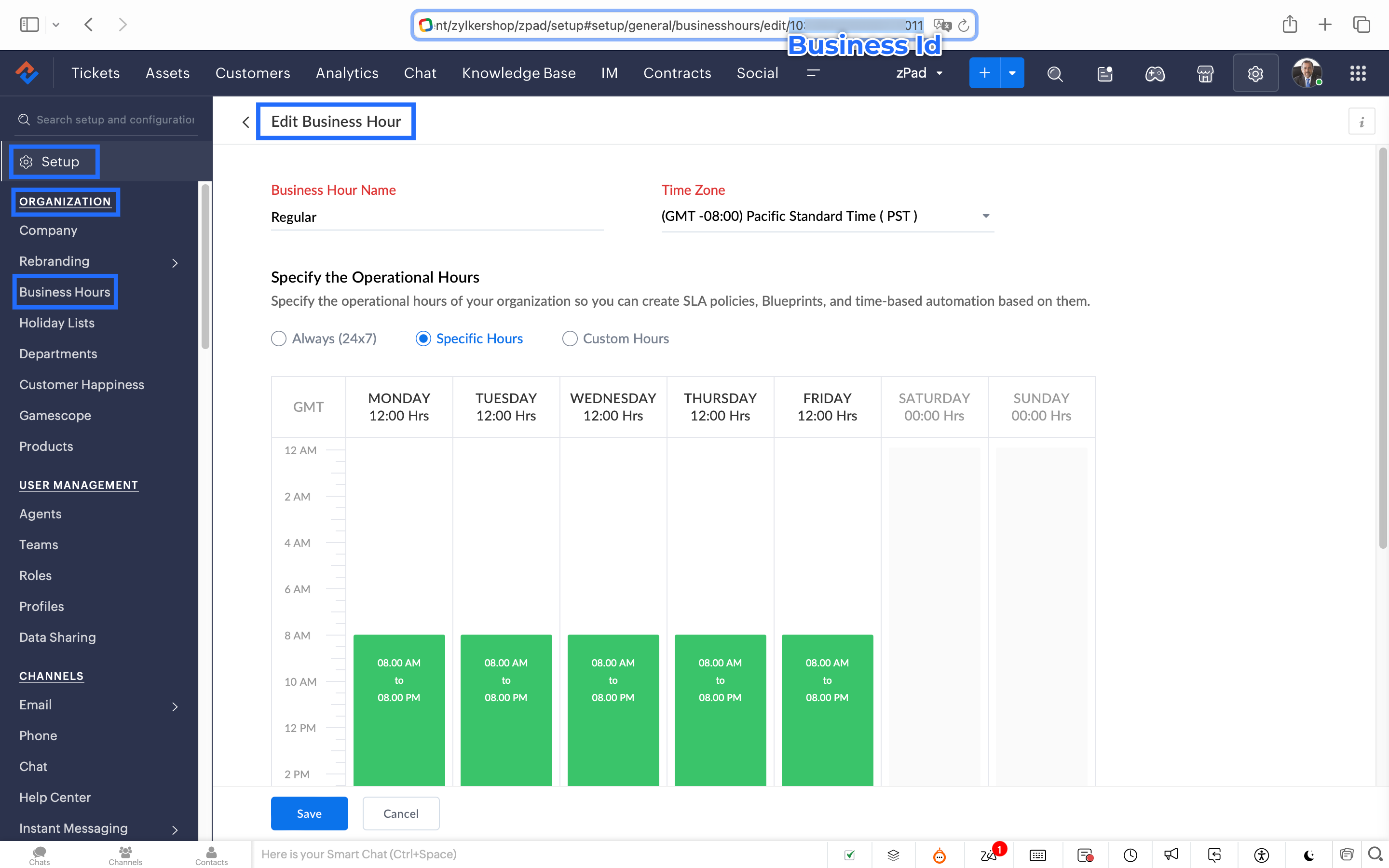
6.1 To fetch the Business Id, Go to Setup (S) >> Organization >> Business Hours.6.2 Click on the Business Hours configured within your Zoho Desk Account. Go to the URL of the specific Business Hours, and you can fetch the business Id from the URL.
7. After entering the URL, do not make changes to the Query Params and Headers.
8. Under Connections, click on Add.
To Create a connection
8.1 Click Create Connection.
8.2 Select Zoho Desk under Default Services.
8.3 Give a connection name (let's say configureBusiness Hours).
8.4 Disable the toggle for User Credentials of Login User.
8.5 Under Scope, choose the below scope values:
Desk.settings.READ
8.6 Click Create and Connect.
8.7 Click Connect and click Accept.
Connection is created successfully.

9. After creating the connection, click on Refresh and then click on the drop down arrow and select the connection (configureBusiness Hours) created.
10. Click on the gear icon in the Formatter option and paste the below code in the Deluge window:
- dayMAp = {"SUNDAY","MONDAY","TUESDAY","WEDNESDAY","THURSDAY","FRIDAY","SATURDAY"};
- businessTimes = response.get("businessTimes");
- timez = response.get("timeZone").get("id");
- response = Collection();
- createdTime = zoho.currenttime.toString("yyyy-MM-dd HH:mm:ss",timez).toDateTime();
- createdDay = createdTime.getDay();
- //get this from above created time
- createdHour = createdTime.getHour();
- //get this from above created time
- createdMinute = createdTime.getMinutes();
- //get this from above created time
- createdWeekDay = createdTime.getDayOfWeek();
- //get this from above created time
- createdWeekDay = dayMAp.get(createdWeekDay - 1);
- for each businessTime in businessTimes
- {
if(businessTime.get("day") == createdWeekDay)
{
businessTimeStartHour = businessTime.get("startTime").getPrefix(":").toLong();
businessTimeEndHour = businessTime.get("endTime").getPrefix(":").toLong();
businessTimeStartMinute = businessTime.get("startTime").getSuffix(":").toLong();
businessTimeEndMinute = businessTime.get("endTime").getSuffix(":").toLong();
if((createdHour > businessTimeStartHour || createdHour == businessTimeStartHour && createdMinute >= businessTimeStartMinute) && (createdHour < businessTimeEndHour || createdHour == businessTimeEndHour && createdMinute <= businessTimeEndMinute))
{
response.insert({"status":"true"});
}
else
{
response.insert({"status":"false"});
}
}- }
- return response.get(0).get("status");
11. Click Save after pasting the code.
12. Click on the gear icon in the Response icon.
12.1 Click on the gear icon on the Status Code.12.2 Give Status Code as 200, Flow Variables as status, Response Value as /.12.3 Let the Type be single element and the Data Type be String. Click Save. Click Save for the Response List with the updated status.
13. Disable the toggle for the Multi Path.
14. Choose a Request timeout if required. This sets a response waiting time from the server.
15. Set the Error message if required to display in case waiting time exceeds the response time.
16. Click Save.
This is the configuration for setting the business hours through a custom function.
17. After the Webhook, click on the + icon and add the Fork block under the Perform Actions.

18. Give the Block Name as Check, Enter Path list : name it as Check.
Under Criteria 1, click on the drop-down arrow, and enter choose Status under Block variables, from the drop-down menu. Choose operation: contains and give the value : True.
19. Do not add an else path.
20. Click Save.
In the Fork block, under Check, you can add the Transfer to agent block from the Zoho Desk Blocks. Under Else, you can add a text icon/ info card stating you are out of business hours.
Note: This custom function does not include the Holiday Lists configured within Zoho Desk.
You can seamlessly integrate this Guided Conversation flow into your self-service platform to ensure you never miss a customer, even during non-working hours. Keep your customer support running smoothly!
See you next week!
Regards,
Lydia | Zoho Desk
Topic Participants
Lydia | Zoho Desk
Dikka
Shivani | Zoho Desk
Sticky Posts
Register for Zoho Desk Beta Community
With the start of the year, we have decided to take a small step in making the life of our customers a little easier. We now have easy access to all our upcoming features and a faster way to request for beta access. We open betas for some of our featuresShare your Zoho Desk story with us!
Tell us how you use Zoho Desk for your business and inspire others with your story. Be it a simple workflow rule that helps you navigate complex processes or a macro that saves your team a lot of time; share it here and help the community learn and grow with shared knowledge.Tip #1: Learn to pick the right channels
Mail, live chat, telephony, social media, web forms—there are so many support channels out there. Trying to pick the right channels to offer your customers can get pretty confusing. Emails are most useful when the customer wants to put things on record. However, escalated or complicated issues should not be resolved over email because it's slow and impersonal. When you need immediate responses, live chat is more suitable. It's also quick and convenient, so it's the go-to channel for small issues.Welcome to Zoho Desk Community - Say hello here!
Hello everyone! Though we have been here for a while, it’s time to formally establish the Zoho Desk Community; we’re really happy to have you all here! This can be the place where you take a moment to introduce yourself to the rest of the community. We’d love to hear all about you, what you do, what company or industry you work for, how you use Zoho Desk and anything else that you will like to share! Here’s a little about me. I am Chinmayee. I have been associated with Zoho since 2014. I joined hereWebinar 1: Blueprint for Customer Service
With the launch of a host of new features in Zoho Desk, we thought it’ll be great to have a few webinars to help our customers make the most of them. We’re starting off with our most talked about feature, Blueprint in Zoho Desk. You can register for the Blueprint webinar here: The webinar will be delivered by our in-house product experts. This is a good opportunity to ask questions to our experts and understand how Blueprint can help you automate your service processes. We look forward to seeing
Recent Topics
Password Assessment Reports for all users
I'm the super admin and looking at the reporting available for Zoho Vault. I can see that there is a Password Assessment report available showing the passwords/weak and security score by user. However I'm confused at the 'report generated on' value. MonitorSpeak Your Customers' Language: SalesIQ's chatbots now support 30 languages 🤖
We're unveiling some major upgrades to our chatbot that are set to revolutionize your experience! Now SalesIQ support 30 languages for both Zobot and Answer bot. By speaking your customers' language, you can enhance engagement, improve customer satisfaction,record submitted from creator and invoice is creating in books , but the workflow of books is not tiggering on create of record in books
record submitted from creator and invoice is creating in books , but the workflow of books is not tiggering on create of record in books headermap = Map(); headermap.put("X-ZOHO-Execute-CustomFunction","true"); response_inv = invokeurl [ url :"https://www.zohoapis.com/books/v3/invoices/fromsalesorder?salesorder_id="Repeat Column merge in ZOHO writer columns doesn't allow to set max columns per row
I'm using ZOHO writer to merge data from a ZOHO CRM subform and I want it to make a table. We're using Insert Table for Column Repeat, because this is what we need. (Name of column (Teamname) and underneath that a list of names of teammembers). It worksZMA shows as already connected to Zoho CRM, but integration not working
When I try to connect ZMA with Zoho CRM, it shows as already connected, but the integration doesn’t seem to be working. I’ve attached the screen recording for reference.Persisting email signals to contact timeline?
Hello there. Regarding the email signals that are logged when a contact opens an email, am I correct that these signals are not logged to a contact's timeline? Ideally, I would like to have this context available for future follow-ups, if the contactTrouble with using Apostrophe in Name of Customers and Vendors
We have had an ongoing issue with how the system recognizes an apostrophe in the name of customers and vendors. The search will not return any results for a name that includes the mark; ie one of our vendors names is "L'Heritage" and when entering theHow do I migrate OLM file to Gmail?
Migrating emails from Outlook for Mac to Gmail can be challenging because Gmail does not support OLM files directly. This limitation often causes confusion and delays, especially when users need quick access to important emails and mailbox data on a web-basedReally want the field "Company" in the activities module!
Hi team! Something we are really missing is able to see the field Company when working in the activities module. We have a lot of tasks and need to see what company it's related to. It's really annoying to not be able to see it.🙈 Thx!Long table name (sync from Zoho Creator)
Dears, How can I remove the suffix in parentheses? These tables are synced from Zoho Creator and are treated as system tables, so their names cannot be changed. This issue makes the aggregation formulas look awful.Unable to Assign Multiple Categories to a Single Product in Zoho Commerce
Hello Zoho Commerce Support Team, I am facing an issue while assigning categories to products in Zoho Commerce. I want to assign multiple categories to a single product, but in the Item edit page, the Category field allows selecting only one categoryUpcoming update to Google Drive integration in Zoho Creator
Hello everyone, We're writing to inform you about an upcoming update to how Zoho Creator integrates with Google Drive. In Zoho Creator, during actions like importing files to create an app or attaching files to fields, you can choose files directly fromManaging Scheduled Replies
Communication is most effective when the intended message reaches the right person at the right time. However, this can be challenging when communication occurs across different time zones. By scheduling replies, businesses can ensure that responses reachShow price book list price
When using price books, once you add products to the price book in the Products related list you can display the Unit price which is the default list price; however, there is no option to show the price book list price. To see the price book list priceAllow Attaching Quartz Recordings to Existing Zoho Support Tickets
Hi Zoho Team, We would like to request an enhancement to how Zoho Quartz recordings integrate with Zoho Support tickets. Current Behavior: At the moment, each Quartz recording automatically creates a new support ticket. However, in many real-world scenarios:Issue with open-rate reporting in Zoho Campaigns
Hello, Since yesterday I’ve been experiencing an issue with the open-rate reports in Zoho Campaigns. The campaigns I send appear in the reports as if none of the emails have been opened, even though I know they have. To verify this, I replicated the campaignCan I hide empty Contact fields from view?
Some contacts have a lot of empty fields, others are mostly filled. Is there a way I can hide/show empty fields without changing the actual Layout? I would like to de-clutter my view, and also be able to add information later as I am able. I would beManage user roles and profiles from the Bigin app (iOS and macOS)
Hello everyone! We're happy to announce that you can manage user roles and profiles from the Bigin mobile app. The Users & Controls section has three subsections: Users, Profiles, and Roles. Users Employees who belong to your Bigin organization are calledSupport Bots and Automations in External Channels
Hello Zoho Cliq Team, How are you? We actively use Zoho Cliq for collaboration, including with our external developers. For this purpose, external channels are a key tool since they work seamlessly within the same interface as all of our other channelsZoho Books Sandbox environment
Hello. Is there a free sandbox environment for the developers using Zoho Books API? I am working on the Zoho Books add-on and currently not ready to buy a premium service - maybe later when my add-on will start to bring money. Right now I just need aForm to PDF template
I am looking to create a Form and when information is inputted, it will merge it into a PDF template we already have. There could be multiple lines in the form and each line inputs information into a new page of a PDF template.Using gift vouchers
We would like to be able to offer a limited number of gift vouchers, of varying values, to our customers, and are looking for the best way to do this. We have looked at Coupons and Gift Certificates, but neither seem to fit the bill perfectly. Coupons:Please verify my account
Hi, We have just launched our website and received media coverage in our country. Hundreds of users are signing up for our platform every day. We would like to send them a welcome email, but we are unable to do so because our ZeptoMail account has notSubject character limit increase
We have an occasional user case where subject lines exceed 500 characters which is the ZeptoMail imposed limit. While I understand long subject lines are not "best practice", these are particular notification emails with specific information for clientAccount blocked
Yesterday I got my Zeptomail account blocked due to too many hard bounces. My account is used exclusively for sending transactional emails (eg. your order has been shipped, a form has been filled, etc) and the sudden blocking impacted hundreds of websitesNested notebooks
Dear Sir/Madam, I would like to know if it is possible to nest notebooks. It would be very helpful when there are too many, as it would improve organization. Thank you for your response. Best regards.Whats that
Price?Proactive Alert for Existing Open Tickets per Contact / Account
Hello Zoho Desk Team, Greetings, and hope you’re doing well. We would like to submit a feature request aimed at improving agent awareness and efficiency when handling tickets in Zoho Desk. Use case When an agent opens a ticket (new or existing), it isShift-Centric View for Assigning and Managing Shifts in Zoho People
Hello Zoho People Product Team, Greetings and hope you are doing well. This feature request is related to Zoho People - please don't move it to zoho one! We would like to submit a feature request regarding the shift assignment and management view in ZohoAdd the ability to Hide Pages in Page Rules
Hi, We have Field Rules to show and hide fields and we have page Rules, but we can't hide a page in Page Rules so it isn't completed before the previous page (And then have the Deny Rules to prevent submitting without both pages completed), we can onlyTicket resolution field - can you add links, video, and images?
Seems like the ticket resolution fields is just a text field. Any plans to add the ability to add links, images...the same functionality in the problem description box? I would like to send the customer a link to a KB article, a link to our Wiki, embedTicket Resolution - Add rich formatting, screenshots and attachments
The resolution field only allows plain text at the moment. Many of our resolutions involve posting screenshots as evidence, it would be great for us to be able to have rich text formatting, be able to paste screenshots and add attachments in the solutionRemove the “One Migration Per User” Limitation in Zoho WorkDrive
Hi Zoho WorkDrive Team, Hope you are doing well. We would like to raise a critical feature request regarding the Google Drive → Zoho WorkDrive migration process. Current Limitation: Zoho WorkDrive currently enforces a hard limitation: A Zoho WorkDriveSetting certian items to be pickup only
How do we have some items that are pickup only? I have several items in my item's list that I do not ship. But they need to be on the website to be sold, and picked up in store. Need to be able to do this as one of these products is a major seller forDeprecation Notice: OpenAI Assistants API will be shut down on August 26, 2026
I recieved this email from openAI what does it means for us that are using the integration and what should we do? Earlier this year, we shared our plan to deprecate the Assistants API once the Responses API reached feature parity. With the launch of Conversations,CRUD actions for Resources via API
Hello, is it possible to perform CRUD actions through the API for Resources? We want to create a sync from Zoho CRM Car record to Bookings resources to create availabilities for Car bookings. For Test drives, not only the sales person needs to be available,Feature Request - The Ability to Link A Customer with a Vendor
Hi Finance Suite Team, Many businesses buy and sell products from the same companies or individuals. For example, a car sales business may buy a car from a member of the public, and that member of the public may also buy a new car from us. This makesKaizen #140 - Integrating Blog feed scraping service into Zoho CRM Dashboard
Howdy Tech Wizards! Welcome to a fresh week of kaizen. This week, we will look at how to create a dashboard widget that displays the most recent blog post of your preferred products/services, updated daily at a specific time. We will leverage the potentialDeluge Learning Series – Client functions in Deluge | January 2026
We’re excited to kick-start the first session of the 2026 Deluge Learning Series (DLS) with Client functions in Deluge. For those who are new to DLS, here’s a quick overview of what the series is all about: The Deluge Learning Series takes place on theConvert Lead Automation Trigger
Currently, there is only a convert lead action available in workflow rules and blueprints. Also, there is a Convert Lead button available but it doesn't trigger any automations. Once the lead is converted to a Contact/Account the dataset that can be fetchedNext Page