Building extensions #5: Integrating applications with Zoho Projects through Connections
In our last post, we discussed the essential features that a Zoho Projects extension can provide. Starting with this post andin every subsequent post going forward, we'll go through each of those features in depth, one by one, with an example use case.
In this post, we'll explore the Connections feature in detail.
Connections: When and why?
Creating a tightly coupled integration requires the establishment of a secure connection between applications. To achieve this secured connection, the Sigma platform provides the Connection feature that can be used to establish a secure link and perform data operations across applications seamlessly and efficiently through an extension.
Use case
Working on development-related tasks might require dealing with a variety of files, such as code snippets, help documents, or service level agreements. While several file management applications are available to securely store and organize data, manually handling file storage between applications remains challenging.
For our example, let's use Zoho Projects to manage all tasks, and Dropbox to manage and store data.
What is the difficulty faced?
Dropbox offers a file request feature that allows you to collect files and organize them into folders. However, as we talked about in our previous post, manually categorizing and uploading task-related files to their respective file request folders in Dropbox would be a time-consuming and laborious activity. Instead, it would be more efficient to integrate Dropbox with Zoho Projects so that uploading task files to Dropbox file request folders can be done instantly from within Zoho Projects.
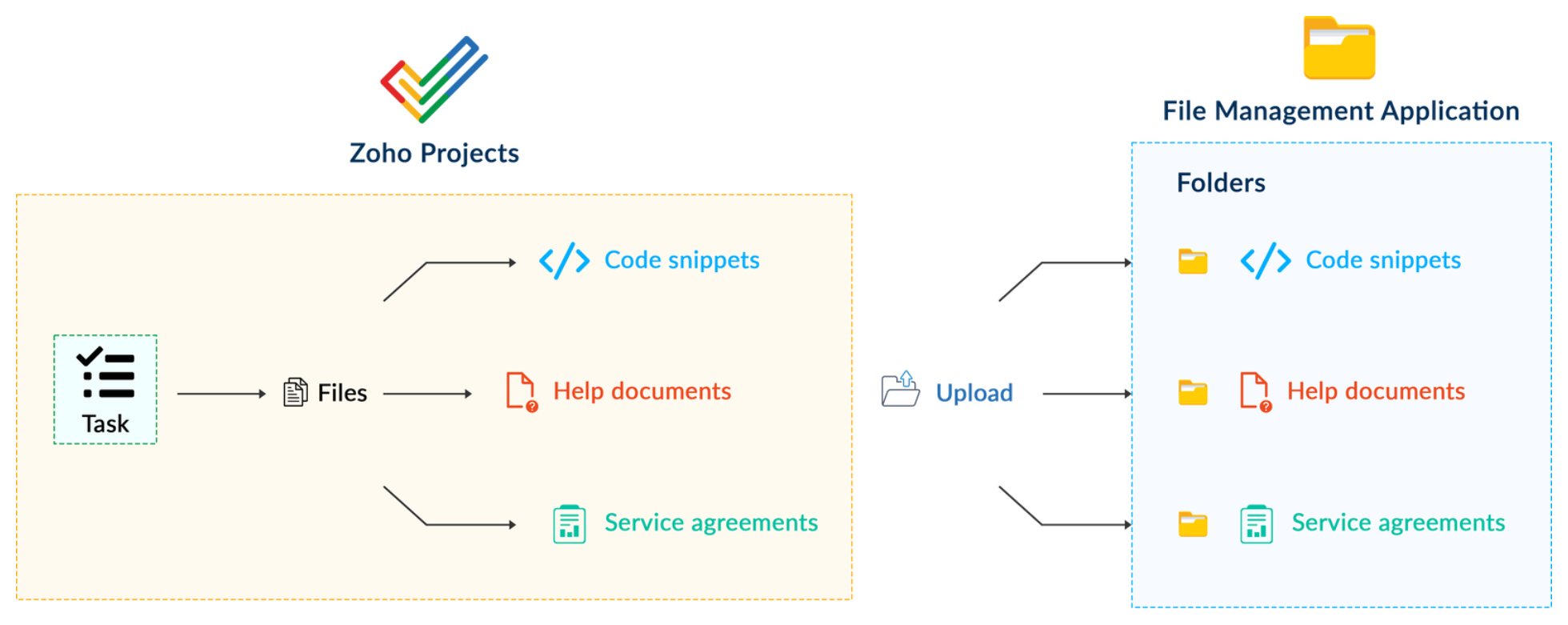
How can it be sorted?
You can create a connection between Zoho Projects and Dropbox. With the secure connection setup, the file request folders available in Dropbox can be listed on the task details page of Zoho Projects through an extension. You may then easily upload files from Zoho Projects to their corresponding folders in Dropbox, saving time and making you more organized.
What are the components required to achieve this use case?
- A connection between Zoho Projects and Dropbox.
- An extension configuration that includes:
- Creating an extension
- Configuring the plugin manifest
- Setting up the widget code to display the Dropbox file request folders inside the Zoho Projects task details page.
Now, let's see how we can achieve each of these components.
1. Creating a secure connection using the Connection feature
- Log in or sign up into developer.zoho.com.
- Go to Sigma and access your workspace.
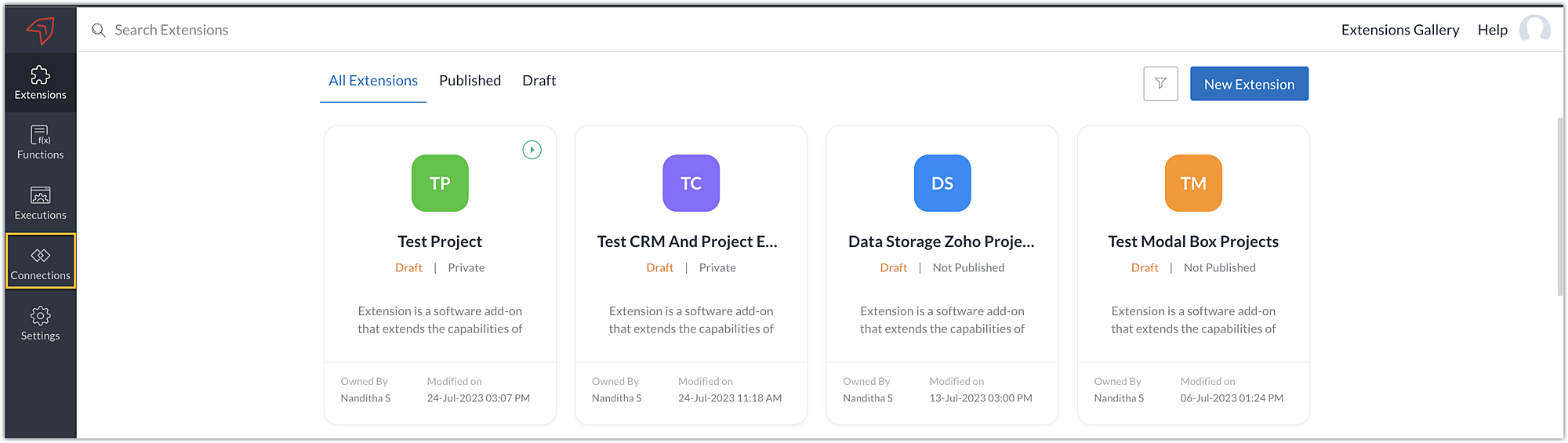
- Once you enter your workspace, select the Connections section in Sigma.
Note: Connections created in Zoho Projects are also accessible within the Connections section in Sigma. These connections can be used in extensions to connect with other applications.
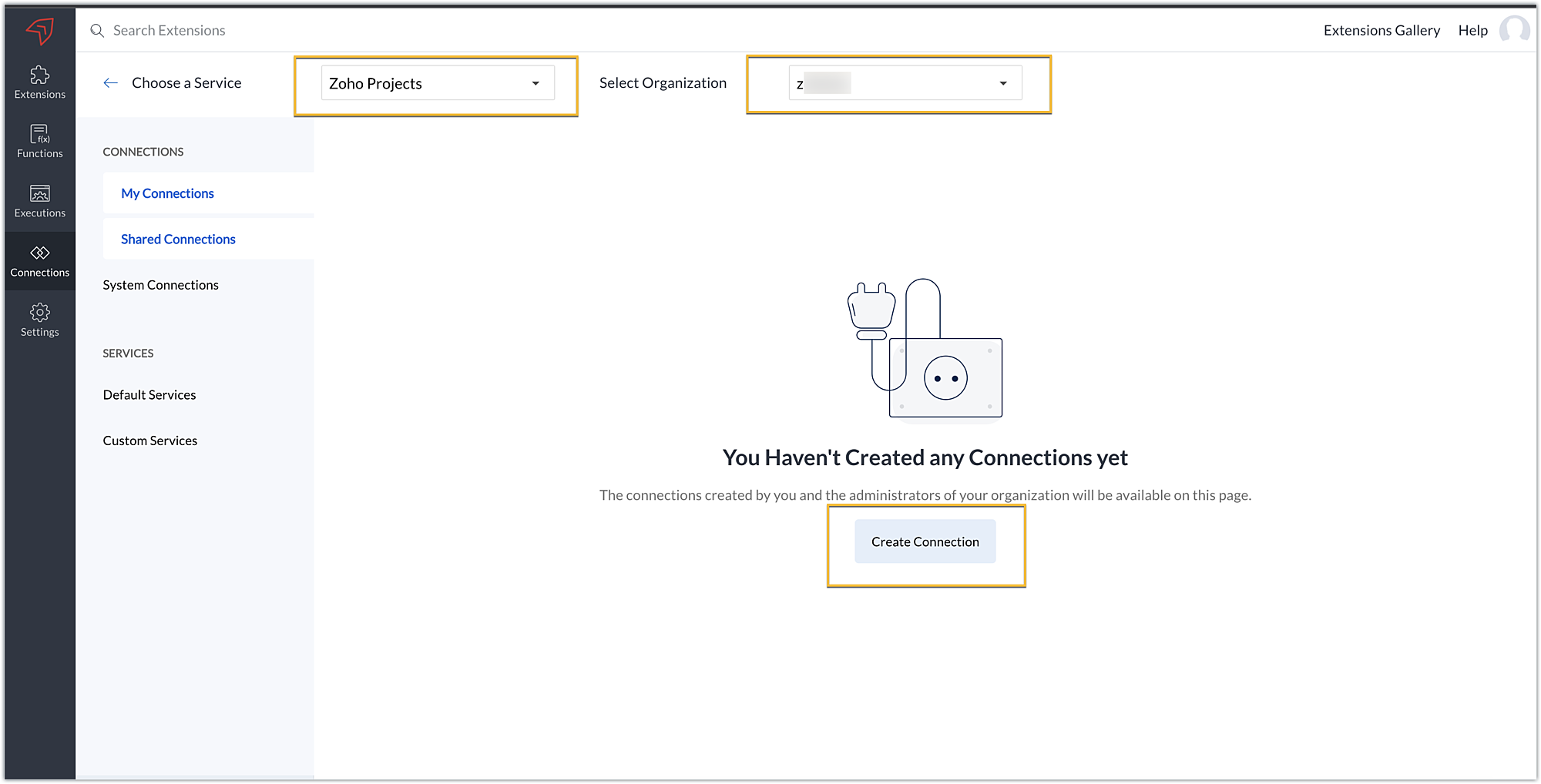
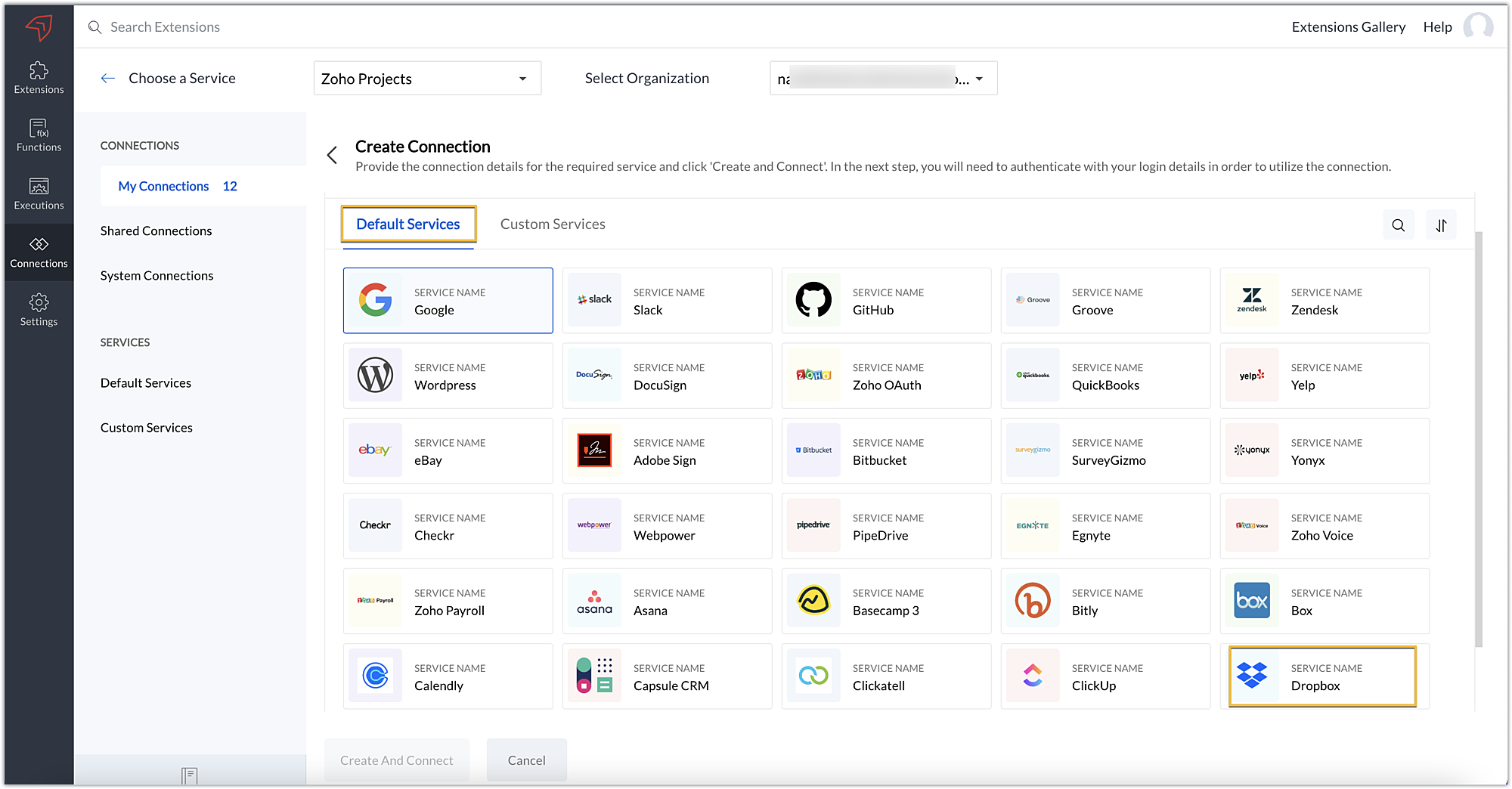
- Choose the service as Zoho Projects and select your Zoho Projects organization. Click on Create Connection.
- Sigma offers a list of default services from which you can choose and easily connect with Zoho Projects. If the application you want to integrate isn’t in the default list, you can add and build a connection with it using the custom services option.
Note: If you’re looking to connect Zoho Projects with another Zoho Product that also follows the OneAuth authentication mechanism, select the service Zoho OneAuth from the Default Services list to create the connection.
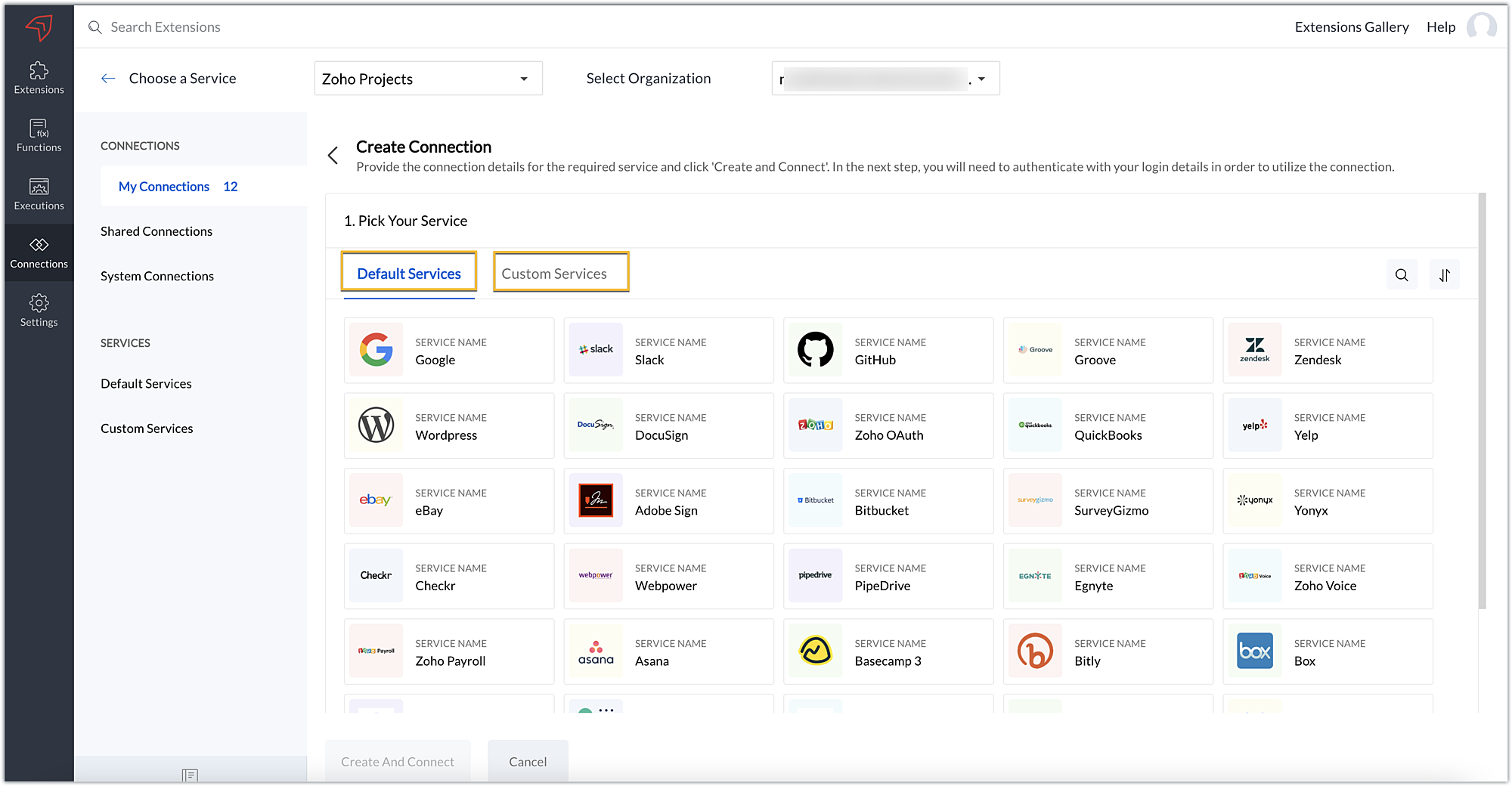
- In our example, the application to connect with Zoho Projects is Dropbox, and because it’s in the Default Services list, go ahead and choose Dropbox.
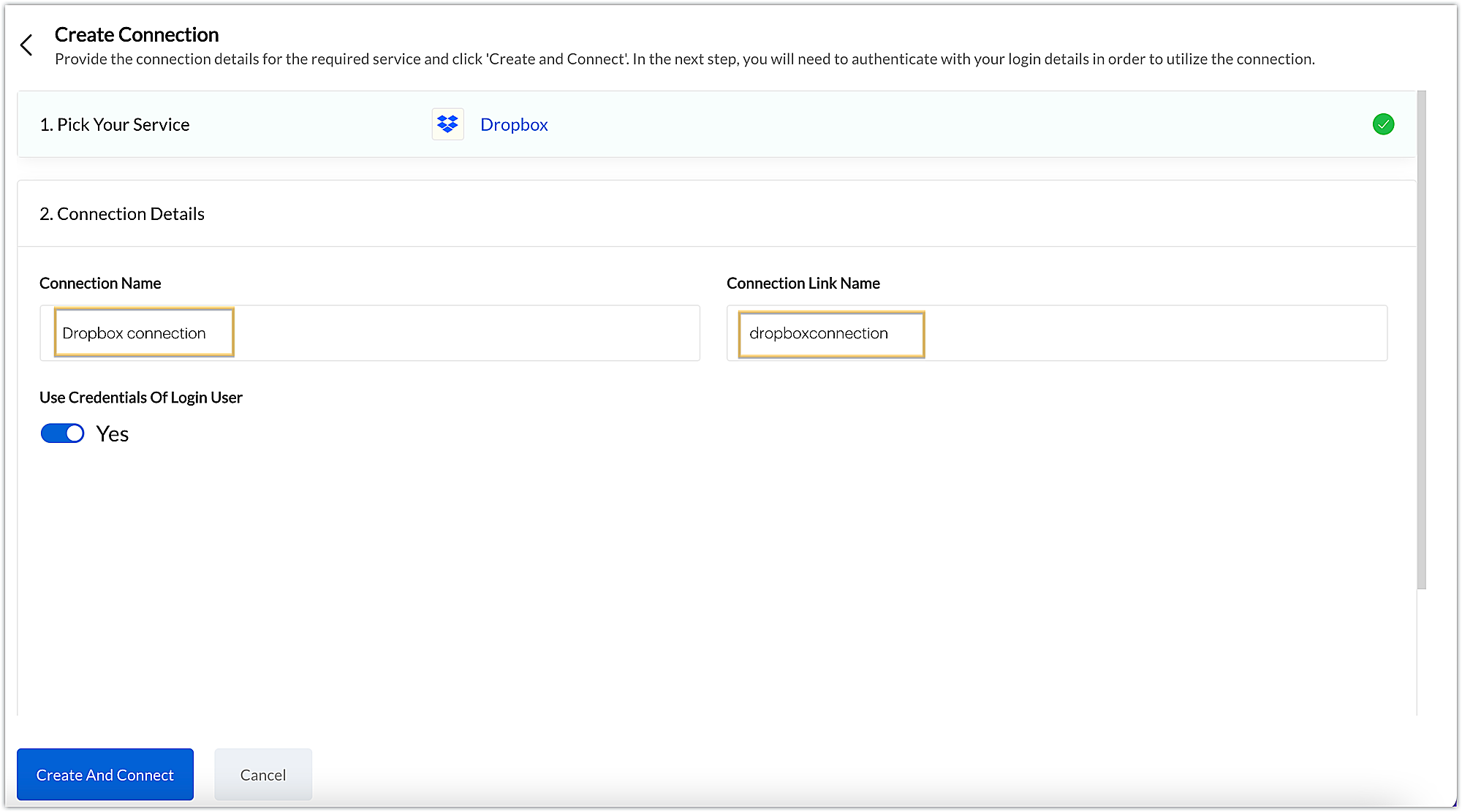
- After choosing the service, enter the connection name. A connection link name will be populated automatically.
- Toggle Use credentials of login user to Yes if you want every user installing the extension to access the connection using their own login credentials, or No if admin credentials are enough to access the connection.
- In our example, we'll proceed with the former. So toggle to Yes, and then click Create and connect.
Note: For services in which the option to choose the scopes is displayed, choose the necessary scopes, and then click Create and connect.
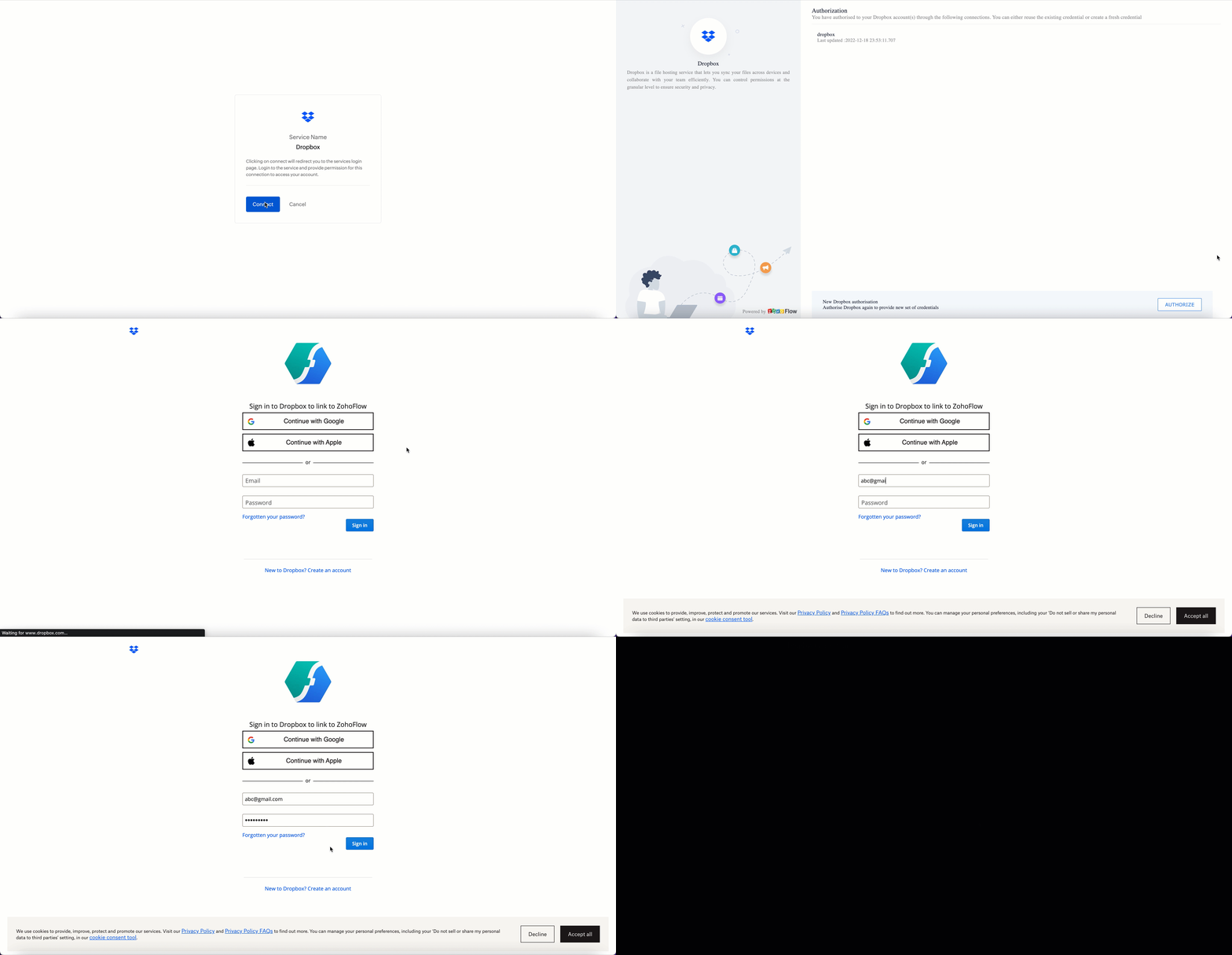
- You’ll be directed through a series of authorization steps before being prompted to connect with Dropbox by entering your login information.
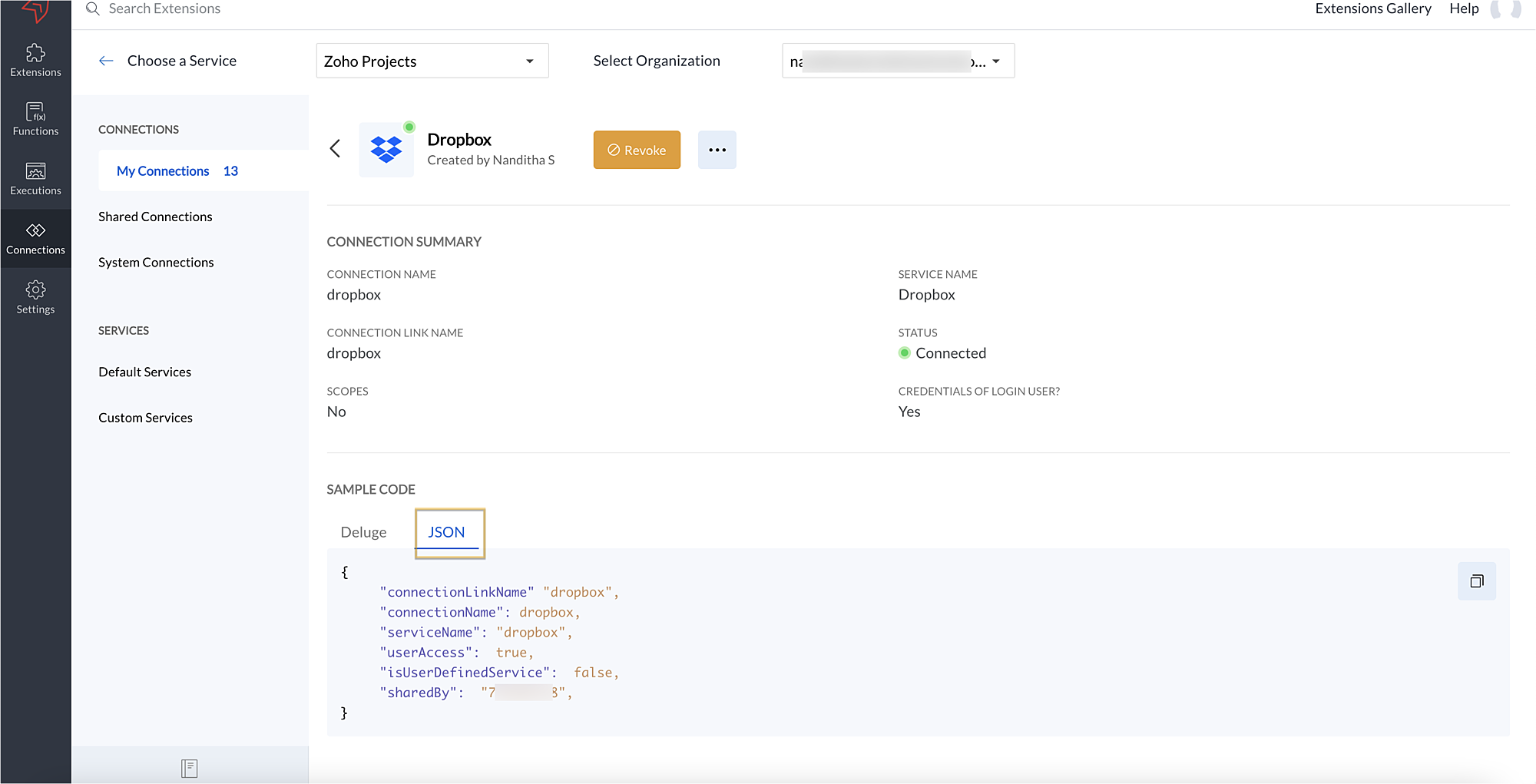
- The connection will be established successfully once you sign in with Dropbox, and you will be redirected to the Connection Summary details page in Sigma.
- To access this connection as part of an extension, you’ll need to configure the sample code provided under the JSON section in the plugin-manifest.json file. We’ll explore this in the next section.
2. Extension configuration
Now that we've successfully established our connection, let's look at how we can achieve our use case feature of displaying the Dropbox file request folder within the Zoho Projects task detail page. As mentioned earlier, to accomplish this, we’ll need to implement the following measures.
A. Create an extensionB. Configure the plugin-manifest.json fileC. Set up the widget code
Let's explore these steps in order.
A. Create an extension
- Create an extension for Zoho Projects using the Sigma cloud editor.
B. Configure the plugin-manifest.json file
- As previously stated, to access the connection established between Zoho Projects and Dropbox, the connection must first be configured in the plugin-manifest.json file.
- Copy the JSON sample code from the Connection Summary Details page and paste it into the plugin-manifest.jsonfile as the value for the connections key.
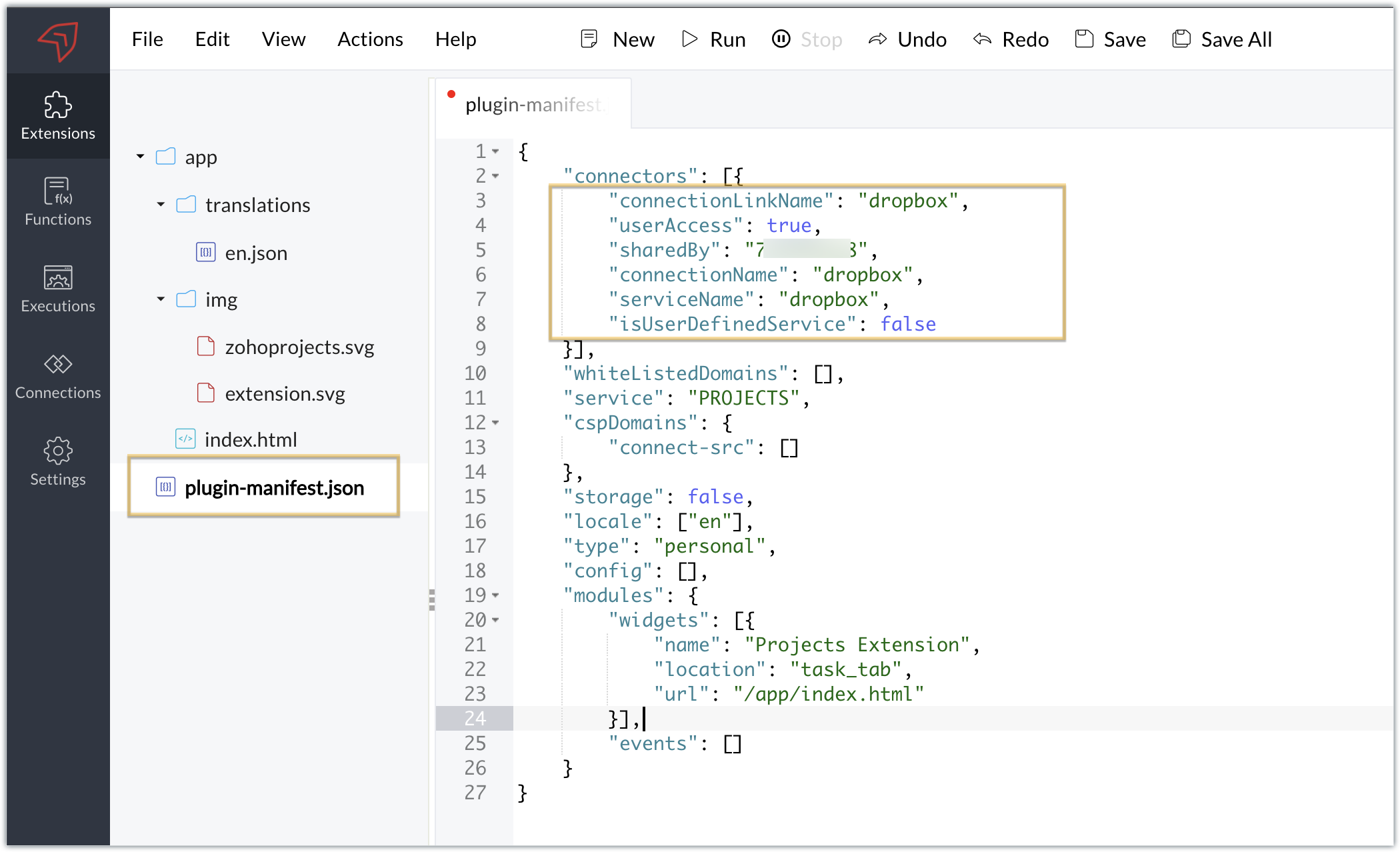
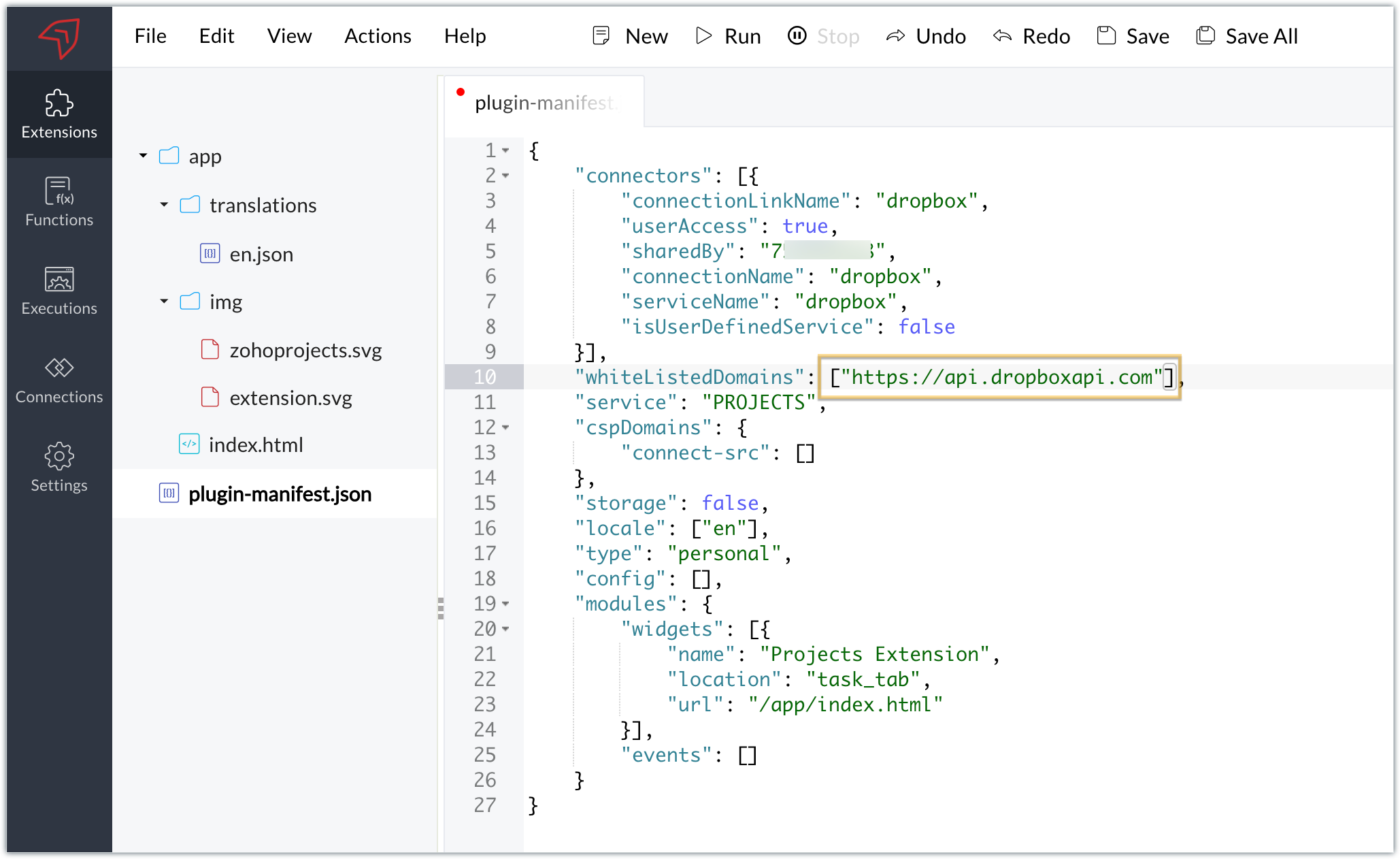
- You will also need to white list the Dropbox domain for Dropbox calls to be processed without being blocked.
- Include the domain in the plugin-mainfest.json file as the value for the whiteLitsedDomains key.
- As we saw in our earlier post, the plugin-manifest.json file includes a widget called Projects Extension by default. For our example, because we’re connecting with Dropbox and constructing a widget that will include Dropbox request folders to upload files, enter the widget name and location.
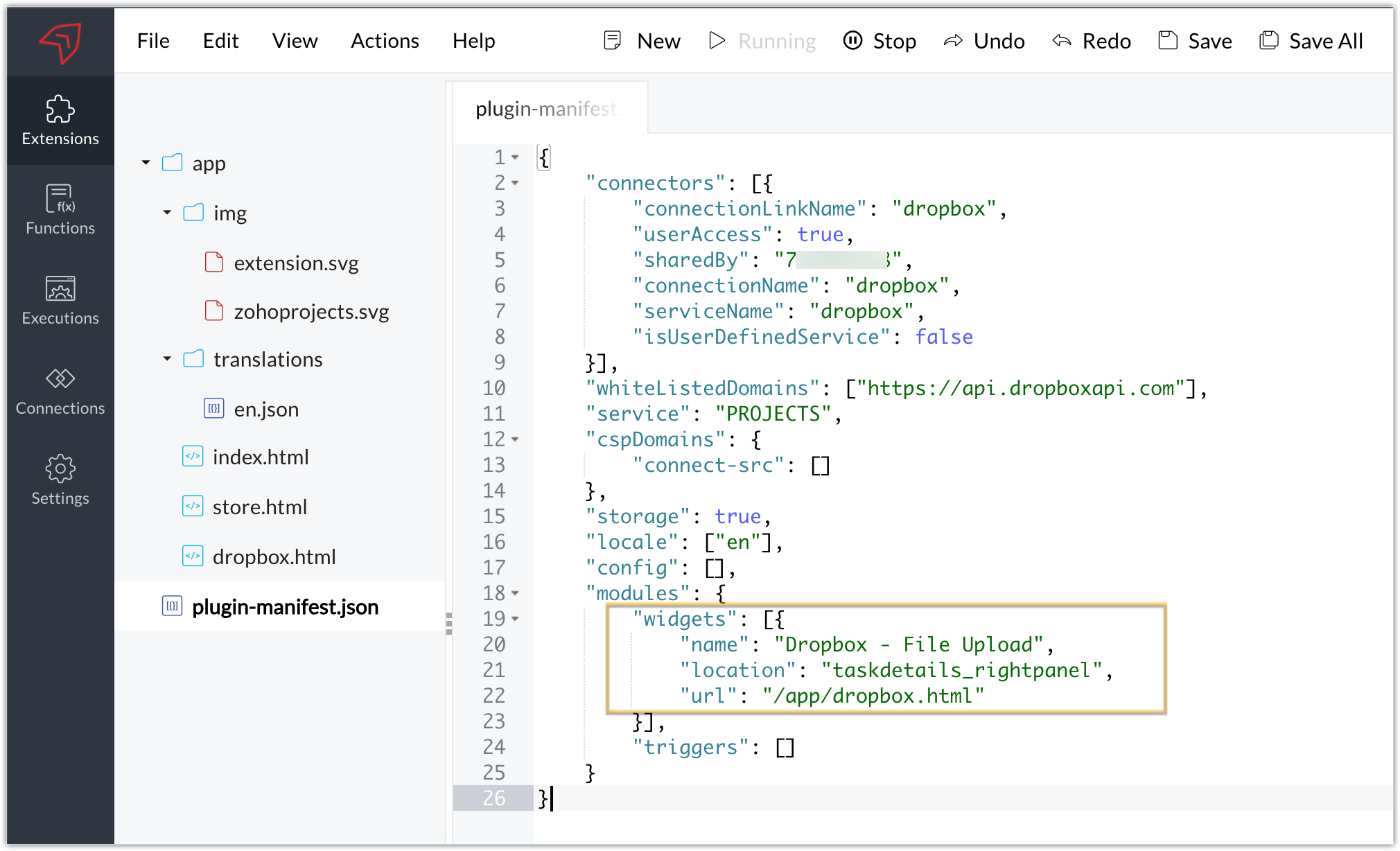
- The final configured plugin-manifest.json file for our example would be as follows:
- {
- "connectors": [{
- "connectionLinkName": "dropbox",
- "userAccess": true,
- "sharedBy": "xxxxxxx",
- "connectionName": "dropbox",
- "serviceName": "dropbox",
- "isUserDefinedService": false
- }],
- "whiteListedDomains": ["https://api.dropboxapi.com"],
- "service": "PROJECTS",
- "cspDomains": {
- "connect-src": []
- },
- "storage": true,
- "locale": ["en"],
- "config": [],
- "modules": {
- "widgets": [{
- "name": "Dropbox - File Upload",
- "location": "taskdetails_rightpanel",
- "url": "/app/dropbox.html"
- }],
- "triggers": []
- }
- }
C. Setting up the widget code
Now, that we’ve created an extension and configured the plugin manifest file, let's finally set up the widget code in order to display all Dropbox file request folders inside our task details right panel.
Dropbox.html widget code: Please find the widget code snippet as an attachment in this post.
- In this widget code, we’ve invoked the Dropbox API to list file request folders by constructing and passing the required data along with the connection we had established for Dropbox.
- The API will be invoked and return all of the file request folders in the task details right panel, from which users can click on the link and directly upload files to Dropbox from within a task in Zoho Projects itself.
Sample output
- Once the code is setup, publish and install the extension to check the functionality in the Zoho Projects portal.
- Enter a task and click the extensions icon in the right panel.
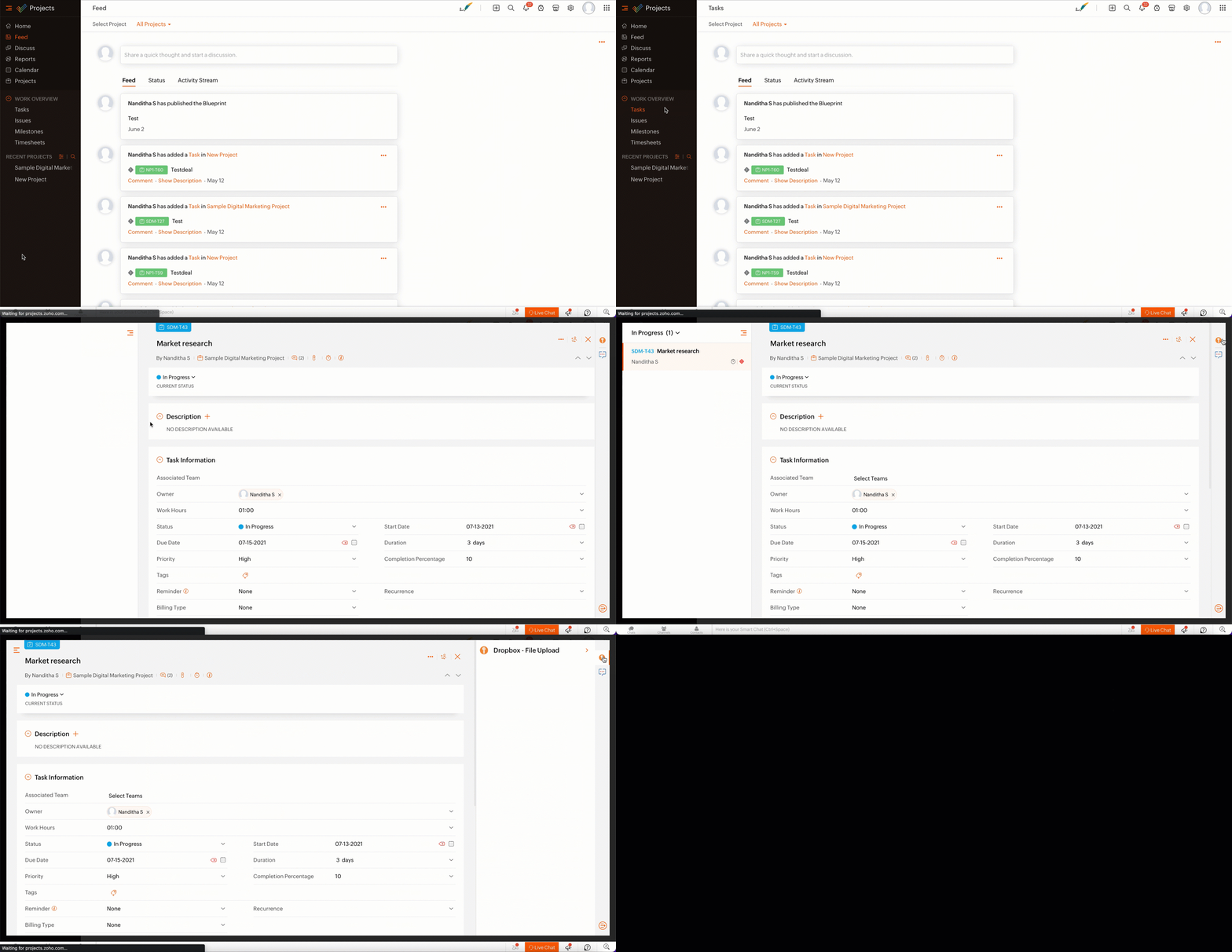
- From the lists of your Dropbox file requests, select the requests to which you wish to upload files.
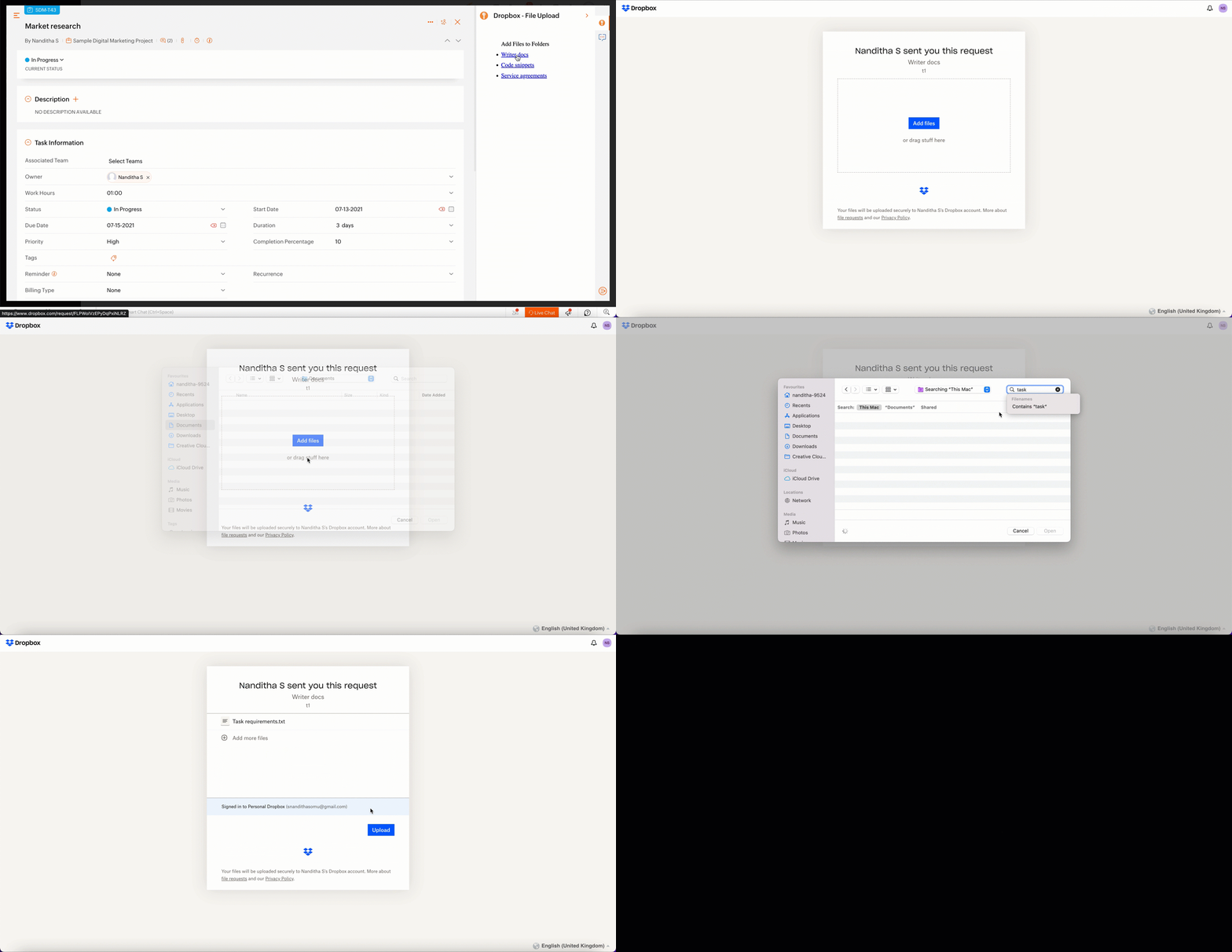
- The file will be successfully uploaded in the respective Dropbox file request.
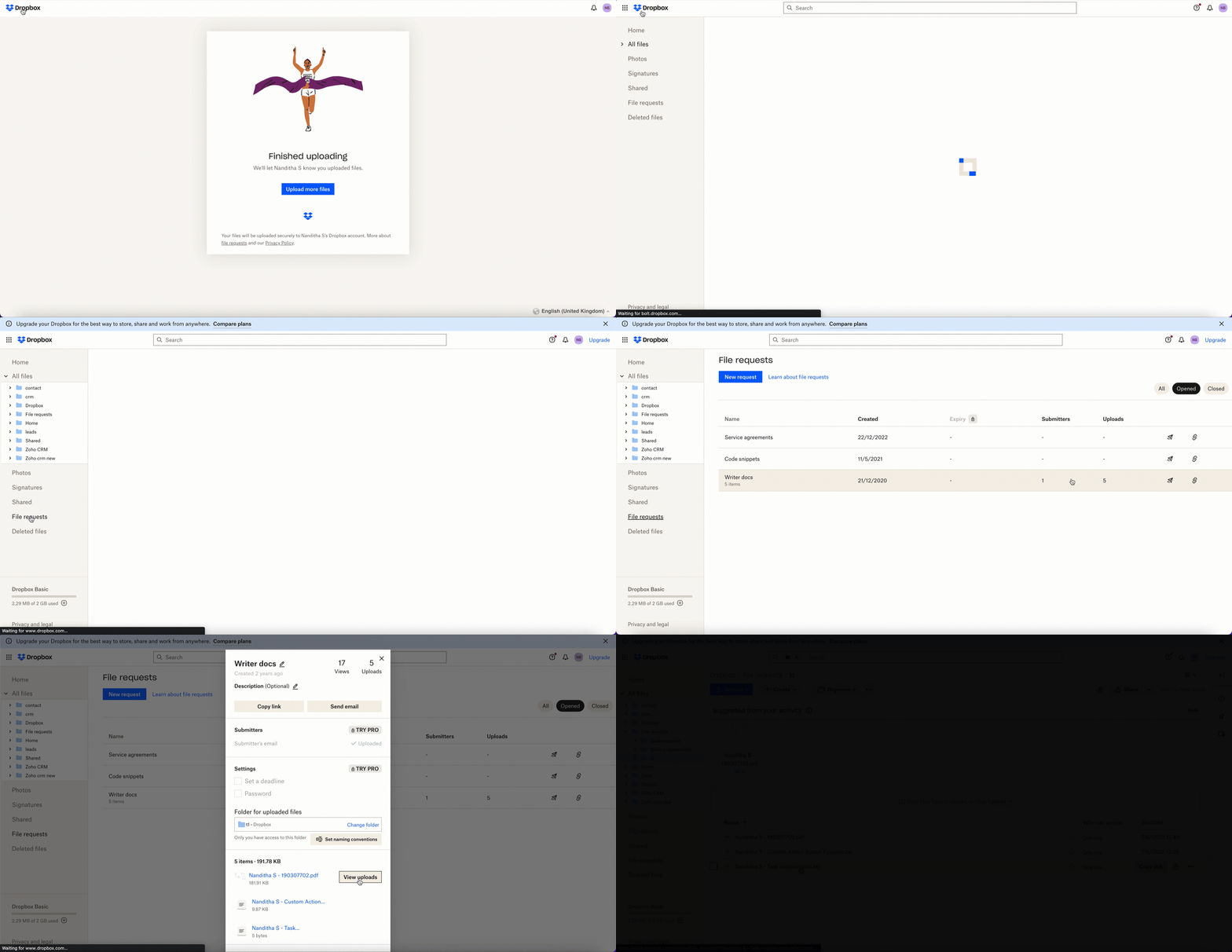
We’ve demonstrated how to upload files directly to Dropbox file request folders from within Zoho Projects in this example. As part of your extension, you can use the Connections feature to do a variety of tasks, some of which are highlighted below.
- View and update files associated with a certain request.
- Create Dropbox folders and share them with collaborators.
Connections, therefore serves as a powerful tool that assists you in establishing a connection with other apps and performing smooth data transactions across your applications, thereby improving business functions and optimizing your work.
We hope this information was useful to you. Continue to follow us for further updates!

Sign up for a Zoho Developer account and start developing extensions for Zoho products using Sigma.
SEE ALSO
Topic Participants
Nanditha Somasundaram Somasundaram
Sticky Posts
Building extensions #10: Fetch customized user inputs, store them globally at the app level, and access them across entities
This data storage concept enables you to store data related to your extension for both entity properties and extension properties. In our previous piece, we looked at how to store data for entities using entity properties. In this post, we'll look atBuilding extensions #9: Store, retrieve, and access entity-specific data in widgets using data storage
Data storage - Overview Storing data related to the extension you are working on is essential. It can be saved as key-value pairs for an entity or extension, known as entity and extension properties, respectively. Data can be saved for the following entitiesBuilding extensions #7: Create custom widgets for a simplified end-user experience
Discover the benefits of using widgets! We explored the significance of widgets, prerequisites, and the availability of JS SDK methods as part of our previous post. In this post, let's go over a detailed example of using widgets along with certain ZohoBuilding extensions #6: Custom user interfaces with Widgets
Welcome to our post on Widgets for Zoho Projects! In our last post, we explored the significance of the connections feature, showed how to use it, and provided an example use case. In this article, we'll look at the importance of widgets, another featureBuilding extensions #5: Integrating applications with Zoho Projects through Connections
In our last post, we discussed the essential features that a Zoho Projects extension can provide. Starting with this post andin every subsequent post going forward, we'll go through each of those features in depth, one by one, with an example use case.
Recent Topics
How can we add products using a Wizard?
We want to create a Wizard to add products. Why is there no possibility to use the products module when creating a wizard?Orphan email alias blocking user creation – backend cleanup required
Hello Zoho Mail Support, I´m unable to assign or create the address xx@iezzimatica.ar in my organization. Current situation: Alias cannot be assigned to any user (system says it is already in use) New user with this address cannot be created Address doesDirect Access and Better Search for Zoho Quartz Recordings
Hi Zoho Team, We would like to request a few enhancements to improve how Zoho Quartz recordings are accessed and managed after being submitted to Zoho Support. Current Limitation: After submitting a Quartz recording, the related Zoho Support ticket displaysEnsure Consistent Service Delivery with Comprehensive Job Sheets
We are elated to announce that one of the most requested features is now live: Job Sheets. They are customizable, reusable forms that serve as a checklist for the services that technicians need to carry out and as a tool for data collection. While onSomething wrong with client script??
Someone have the same feeling? Client script behavior become very strange..API 500 Error
Hello amazing ZOHO Projects Community, I get this message. How can we solve this? { "error": { "status_code": "500", "method": "GET", "instance": "/api/v3/portal/2010147XXXX/projects/2679160000003XXXX/timesheet", "title": "INTERNAL_SERVER_ERROR", "error_type":Polish signer experience to compete with docusign
I would like to suggest that someone spend the little bit of time to polish the signer experience, and the email templates to more of a modern professional feel. They are currently very early 2000s and with some simple changes could vastly improve thehow to change the page signers see after signing a document in zoho sign
Hello, How can I please change the page a signer sees after signing a document in Zoho Sign? I cannot seem to find it. As it is now, it shows a default landing page "return to Zoho Sign Home". Thanks!Digest Janvier - Un résumé de ce qui s'est passé le mois dernier sur Community
Bonjour chers utilisateurs, Le premier mois de l’année est déjà derrière nous ! Découvrons ensemble comment s'est passé janvier pour Zoho Community France. Nous avons démarré le mois avec une nouvelle intégration entre Zoho Desk et Zoho Contracts. Cettecontact support
I have 2 request for a phone call and not received one call as promise!Can we fetch Deal owner and Deal owner email with COQL?
While fetching deal deatils with coql api and while fetching deal owner name and email it is just giving owner id not ginving name and email https://www.zohoapis.in/crm/v2/coqlZoho Social - Cliq Integration / Bot
Dear community / zoho, I am looking for a way to create a bot within Zoho Cliq to update my colleagues about our Zoho Social activities. For example, if a new post is published, it would be great if this post automatically would be shared in our socialComment to DM Automation
Comment to DM automation feature in Zoho Marketing Automation, similar to what tools like ManyChat offer. Use case: When a user comments on a social media post (Instagram / Facebook), the system should automatically: Send a private DM to the user CaptureSend / Send & Close keyboard shortcuts
Hello! My team is so close to using Zoho Desk with just the keyboard. Keyboard shortcuts really help us to be more efficient -- saving a second or two over thousands of tickets adds up quickly. It seems like the keyboard shortcuts in Desk are only forHandling Agent Transfer from Marketing Automation Journey to SalesIQ WhatsApp
We are currently using Marketing Automation for WhatsApp marketing, and the features are great so far We have a scenario where, during a campaign or journey, we give customers an option to chat with our sales team. For this, we are using SalesIQ WhatsAppWebinar - Getting Started with Zoho LandingPage
Want to launch landing pages that support real marketing goals? This webinar is designed to help you understand the role landing pages play in your overall campaigns and how they contribute to lead generation and conversions. During this session, you’llIncrease Round Robin Scheduler Frequency in Zoho Desk
Dear Zoho Desk Team, We hope this message finds you well. We would like to request an enhancement to the Round Robin Scheduler in Zoho Desk to better address ticket assignment efficiency. Current Behavior At present, the Round Robin Scheduler operatesZoho mail to contacts and leads, but not to accounts?
We use the accounts tab a lot for our business because they can be linked to the sales orders. Now we want to use the mail add on to link communication of our emails to our accounts. However this is only possible for contacts and leads? It would be convenientMarketing Tip #19: Upsell on product page to increase order value
Upselling doesn’t have to feel pushy. It can actually feel helpful when done right. Think "people also bought", upgrades, add-ons, or complementary items. A smart upsell increases your average order value and improves the customer experience by makingCRM limit reached: only 2 subforms can be created
we recently stumbled upon a limit of 2 subforms per module. while we found a workaround on this occasion, only 2 subforms can be quite limiting in an enterprise setting. @Anonymous User I've read about imminent increase of other components (e.Kaizen #198: Using Client Script for Custom Validation in Blueprint
Nearing 200th Kaizen Post – 1 More to the Big Two-Oh-Oh! Do you have any questions, suggestions, or topics you would like us to cover in future posts? Your insights and suggestions help us shape future content and make this series better for everyone.オンライン勉強会のお知らせ Zoho ワークアウト (2/19 参加無料)
ユーザーの皆さま、こんにちは。コミュニティチームの中野です。 2月開催のZoho ワークアウトについてお知らせします。 今回はZoomにて、オンライン開催します。 ▶︎参加登録はこちら(無料) https://us02web.zoom.us/meeting/register/6AyVUxp6QDmMQiDGXGkxPA ━━━━━━━━━━━━━━━━━━━━━━━━ Zoho ワークアウトとは? Zoho ユーザー同士で交流しながら、サービスに関する疑問や不明点の解消を目指すイベント「ZohoRemoving Tables from HTML Inventory Templates - headers, footers and page number tags only?
I'm a bit confused by the update that is coming to HTML Inventory Templates https://help.zoho.com/portal/en/kb/crm-nextgen/customize-crm-account/customizing-templates/articles/nextgen-update-your-html-inventory-templates-for-pdf-generator-upgrade It saysAbility to Link Reported Issues from Zoho Desk to Specific Tasks or Subtasks in Zoho Projects
Hi Zoho Desk Team, Hope you're doing well. When reporting a bug from Zoho Desk to Zoho Projects, we’ve noticed that it’s currently not possible to select an existing task or subtask to associate the issue with. However, when working directly inside ZohoHow do i move multiple tickets to a different department?
Hello, i have several tickets that have been assigned to the wrong department. I am talking about hundreds of automatically generated ones that come from a separate system. How can i select them all at once to move them to another department in one go? I can select them in "unsassigned open tickets view" but i can't find a "move to another department" option. I also can't seem to assign multiple tickets to the same agent in that same view. Could somebody advice?Set Default Status of Assembly to "Assembled" When Entered in UI
I've just discovered the new "confirmed" status of Assemblies within Inventory. While I understand the intent of this (allowing for manufacturing planning and raw material stock allocation), it was initially confusing to me when manually entering someHow to apply customized Zoho Crm Home Page to all users?
I have tried to study manuals and play with Zoho CRM but haven't found a way how to apply customized Zoho CRM Home Page as a (default) home page for other CRM users.. How that can be done, if possible? - kipi Moderation Update: Currently, each user hasPlug Sample #14: Automate Invoice Queries with SalesIQ Chatbot
Hi everyone! We're back with a powerful plug to make your Zobot smarter and your support faster. This time, we're solving a common friction point for finance teams by giving customers quick access to their invoices. We are going to be automating invoiceEnrich your contact and company details automatically using the Data Enrichment topping
Greetings, I hope you're all doing well. We're happy to announce the latest topping we've added to Bigin: The Data Enrichment topping, powered by WebAmigo. This topping helps you automatically enhance your contact and company records in Bigin. By leveragingZoho Billing Partial Proration...
Hi, In Zoho billing, we offer upgrades, downgrades, suspends, and resumes. We use online payment for most subscriptions, but have only a few that are offline, but we treat them the same either way.. We prorate only parts of these changes.. Right now zohoAny update on adding New Customer Payment Providers who support in store terminal devices?
Currently there is only one Customer payment provider listed for terminal devices in USA- Everyware. They charge a monthly fee of almost $149 minimum. Will you add other providers - like Zoho Payments or Stripe or Worldpay that would allow integratedGetting Subform Fields to Display Top to Bottom
I have a form where the fields are all in one column. I want to insert a subform where the fields are stacked in one column as well. I have built both the form and subform but the subform displays the fields from left to right instead of a stacked column. This will cause a problem displaying the subform correctly on mobile apps. How can I do this please?' Here is my form with subform now. As you can see the subform "Follow Up Activity" is displaying the fields left to right. I need them to go top[Feature Deprecated] Gamescope in Zoho Projects
This feature is no longer available. All work and no play makes Jack a dull boy. Well, yes. That's true! Tiring work, buzzing coffee makers, busy turnstiles , occupied meeting rooms, back-to-back status updates and what not. Your everyday routine need not have to be this hectic. It can be more rewarding. It can be more fun. Zoho Projects believes in this fact and hence has launched Gamescope - A module that turns every project into an exciting game and boosts the spirit of your team by leaps andCreating a task, i can not work out how to get ID for What_Id
hi From Module A function I map Module B record reference membershipid (ours). I need Module B Zoho ID to create the related to on task. All examples i've seen start with the Zoho ID. void automation.LTM_Assign_Dispute_Task(String membershipid) { tryCan't connect to POP and SMTP over VPN
I use Thunderbird to access Zoho Mail via POP and SMTP. I have configured an app-specific password for Thunderbird to use. Everything is properly configured and works correctly — until I enable my VPN. I'm using a paid commercial VPN service (Mullvad).my zoho mail is hacked
my email is sending my username and password to people i dont knowSuministrar accesos
Asunto: Enable UPLOAD_RULE for API Attachments Mensaje: Hola, Necesito habilitar la capacidad de subir attachments vía API en Zoho Mail. Actualmente recibo el error: "UPLOAD_RULE_NOT_CONFIGURED" al usar el endpoint: POST /api/accounts/{accountId}/messages/attachmentsIntroducing real-time document commenting and collaboration in Zoho Sign
Hi, there! We are delighted to introduce Document commenting, a feature that helps you communicate with your recipients more efficiently for a streamlined document signing process. Some key benefits include: Collaborate with your recipients easily withoutTicket Loop from Auto Responce
We’re seeing an issue where a client’s help desk triggers a ticket loop. When they email us, our system creates a ticket and sends the acknowledgement. Their system then creates a ticket from that acknowledgement and sends one back to us, which createsHow to make rule to filter out some emails from receiving the notification "Receiving a new ticket"?
Good Morning, We are currently using the "Receiving a new ticket" notification rule to provide that auto reply template to a customer that emails us for support. However, there are some emails we don't want to receive this auto-reply. Where can I setNext Page