Building extensions #8: Improve and enhance user experience with modal boxes
Modal box - What is it and where can you use it?
A modal box is a user interface pop-up window or dialog box that appears over the currently active UI screen. When prompted, the modal box deactivates all other page content until the user closes it. The modal box feature is commonly used to display information based on user input or to engage the user in some activity, such as an attachment picker, where they can proceed only after selecting an attachment.
Support offered in Zoho Projects for modal boxes
Zoho Projects provides support for modal boxes through extension development, which includes methods for opening and closing modal boxes, passing and receiving data to and from modal boxes, and so on. You can view the various methods offered by Zoho Projects to use modal boxes in this document.
In this post, we'll go over an example scenario for using a modal box in depth.
Scenario
A Zoho Desk ticket agent handles issue/feature request tickets in Zoho Projects to work on development-related requests. When the development in Zoho Projects is completed, the Desk agent provides a solution to the customer. In this case, it would be beneficial for the Desk agent to have all open Desk tickets associated with them displayed in a single, dedicated tab within Zoho Projects.
Goal
Improve, enhance, and simplify an agent's work in Zoho Projects by:
➤ Showcasing all open Desk tickets within a single tab.➤ Providing them with ticket-specific details, allowing them to view ticket details and prioritize the Zoho Projects task associated with that ticket accordingly.
Solution
To accomplish this goal, use the modal box feature as part of the widgets concept discussed earlier. A Project tab widget labeled "Desk open tickets" can be created to display all open Desk tickets associated with an agent. When a specific ticket is selected, the agent can access all relevant information about the ticket, such as its status, priority, and so on. This will allow them to prioritize and work on the appropriate task in Zoho Projects that is associated with that ticket.
Now, let's go ahead and see the components that would be required to achieve this use case solution as part of an extension.
Required components
- In order to establish a secure integration between Zoho Projects and Zoho Desk for a seamless data transfer, a connection between Zoho Projects and Zoho Desk has to be established.
- An extension configuration process includes:
- Creating an extension.
- Configuring the plugin manifest.
- Setting up the widget code.
- Display all open Zoho Desk tickets associated with an agent in a tab called "Desk open tickets."
- Incorporate the modal box feature to display ticket-specific details while the agent chooses a ticket from the list of open desk tickets.
We have already explored the steps to establish a connection, create an extension, and configure the plugin-manifest.json file as part of our earlier posts. You can refer to those resources for detailed guidance. In this case, we have already completed most of these steps (screenshots below).
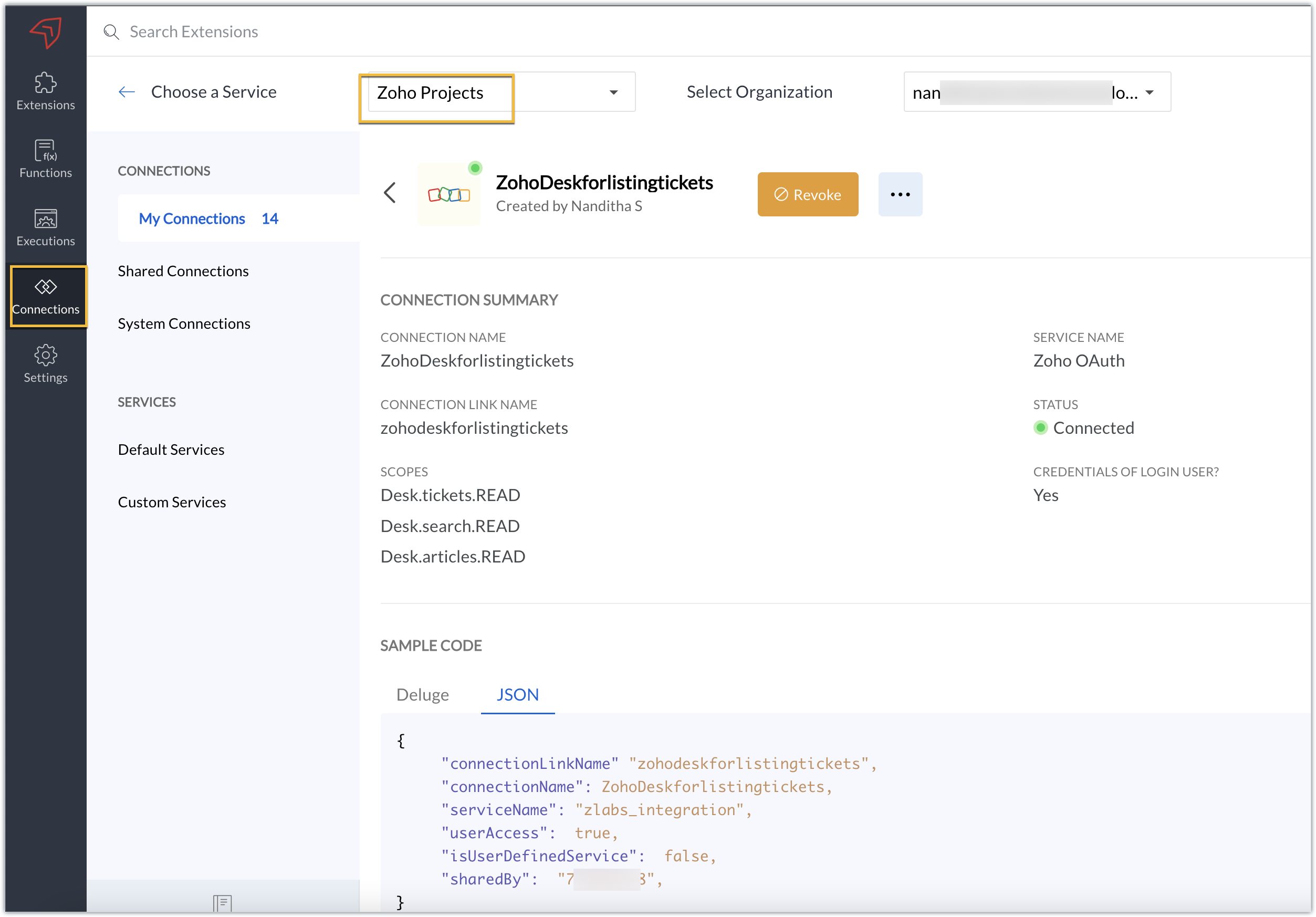
Connection
We have created a connection to establish a secure integration between Zoho Projects and Zoho Desk.
Extension configuration
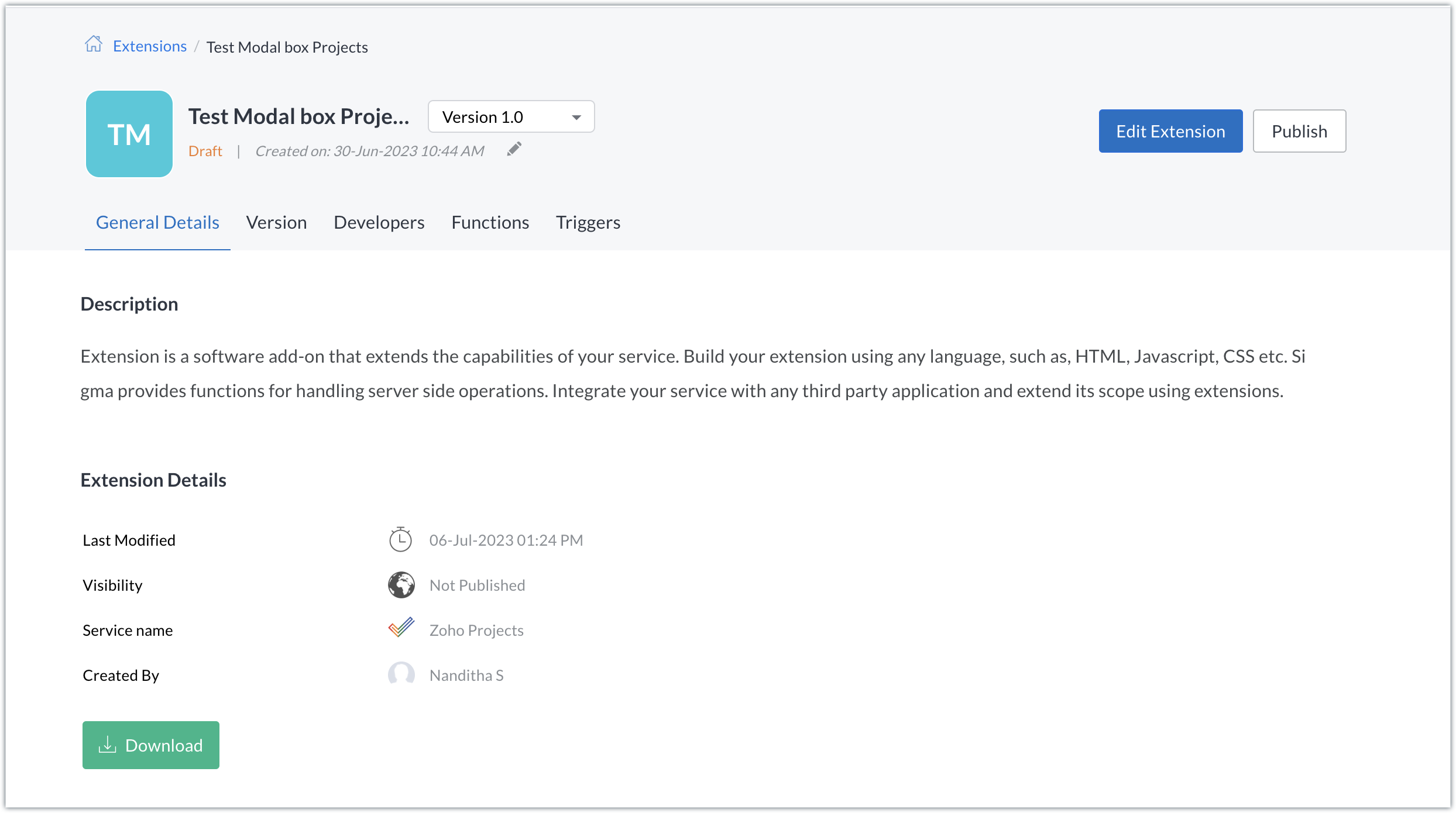
Extension creation: We have created a new extension for Zoho Projects.
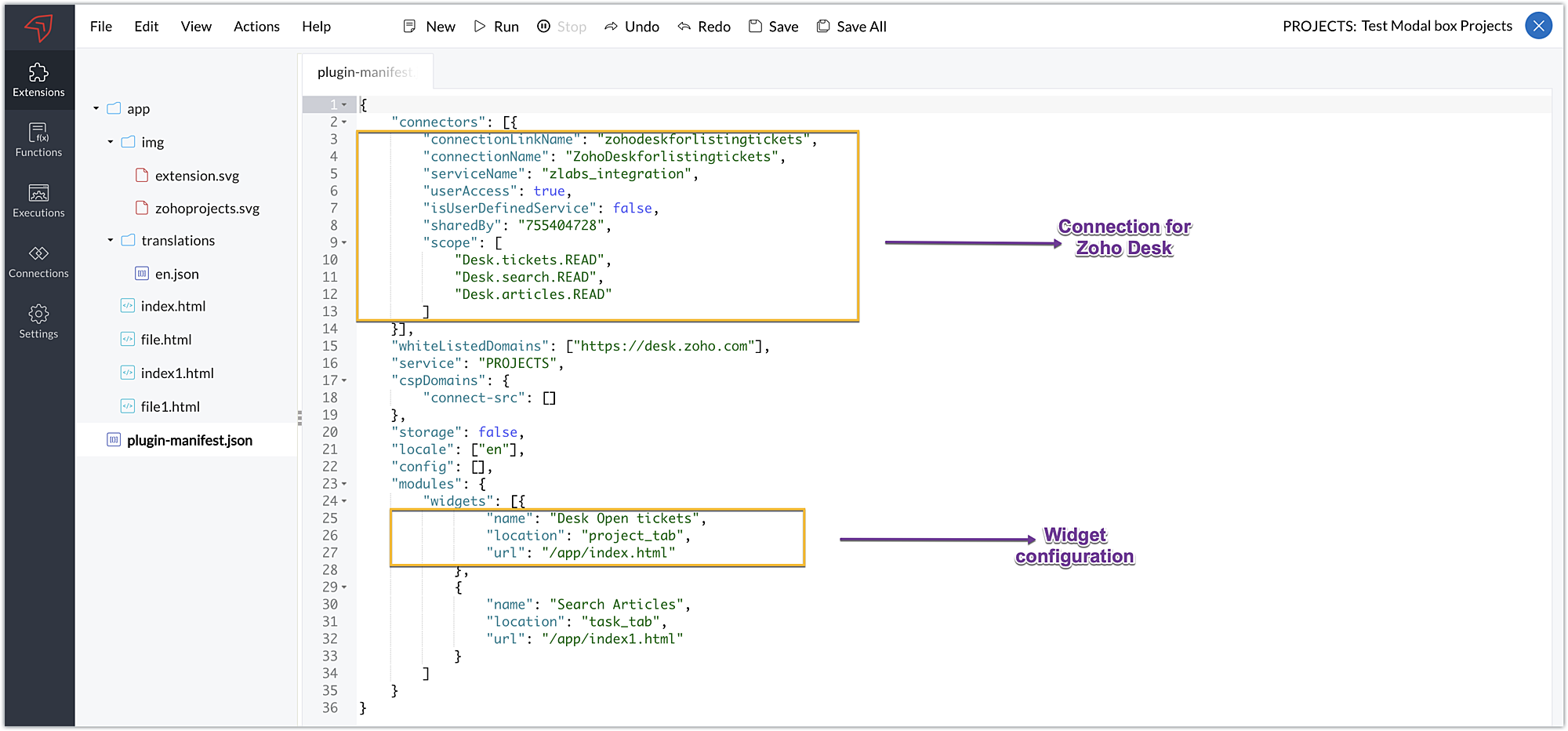
Plugin-manifest.json configuration: Once the extension was created, we configured the plugin-manifest.json file to include the created connection and a widget.
For our extension use case, the plugin-manifest.json file is configured as shown in the below screenshot.
Setting up the widget code
Now that we've set up the other components, let's move on to writing our widget code and incorporating the modal box feature.
Displaying open tickets in "Desk open Tickets" tab code snippet - index.html (find attachment in post)
- In the code snippet, the Zoho Desk API to list all associated tickets is invoked using the Zoho Projects request JS SDK method to get associated desk tickets.
- Certain mandatory parameters must be passed to the Zoho Projects Request Method, such as the third-party URL, data object, and connection. The details for the mentioned parameters in our use case are as follows:
➤ Data object - The data that must be constructed in order to invoke the third-party URL.➤ Connection - The name of the secure connection link created and configured in the plugin-mainfest.json file, as described in the previous section.
- A dropdown list displaying all open and associated desk tickets is created using the Zoho Desk API response.
- The dropdown list value selected by the end-user (i.e. the chosen ticket) is then fetched and stored in a variable called "selected ticket ID."
- Upon clicking Get Ticket Details, a modal box instance is created and opened using the modal.create and instance methods. The selected ticket ID value is emitted using the emit method with the keyword "stored-files" when the modal box is opened.
If you require further details on how the Zoho Projects Request method works, you can refer to our earlier post which explains the working and the required parameters for invoking this method in detail.
Modal box to display the details of the chosen ticket - file.html (find attachment in post)
- In the code snippet, the value emitted using the emit method for the keyword "stored-files" is received by the on method in the modal box UI. Using the received value, a hit is made to the Zoho Desk Get tickets API using the Zoho Projects Request Method again.
- From the ticket-specific details returned as the response of the Zoho Desk Get tickets API, the necessary details are fetched and then displayed to the agent for their reference. These details help them check on the status and prioritize the relevant Zoho Projects task related to that ticket.
Now, that we have completed the setup and have all the extension components ready, let's go ahead and see the output.
Sample output:
- Enter the Zoho Projects portal and select a project.
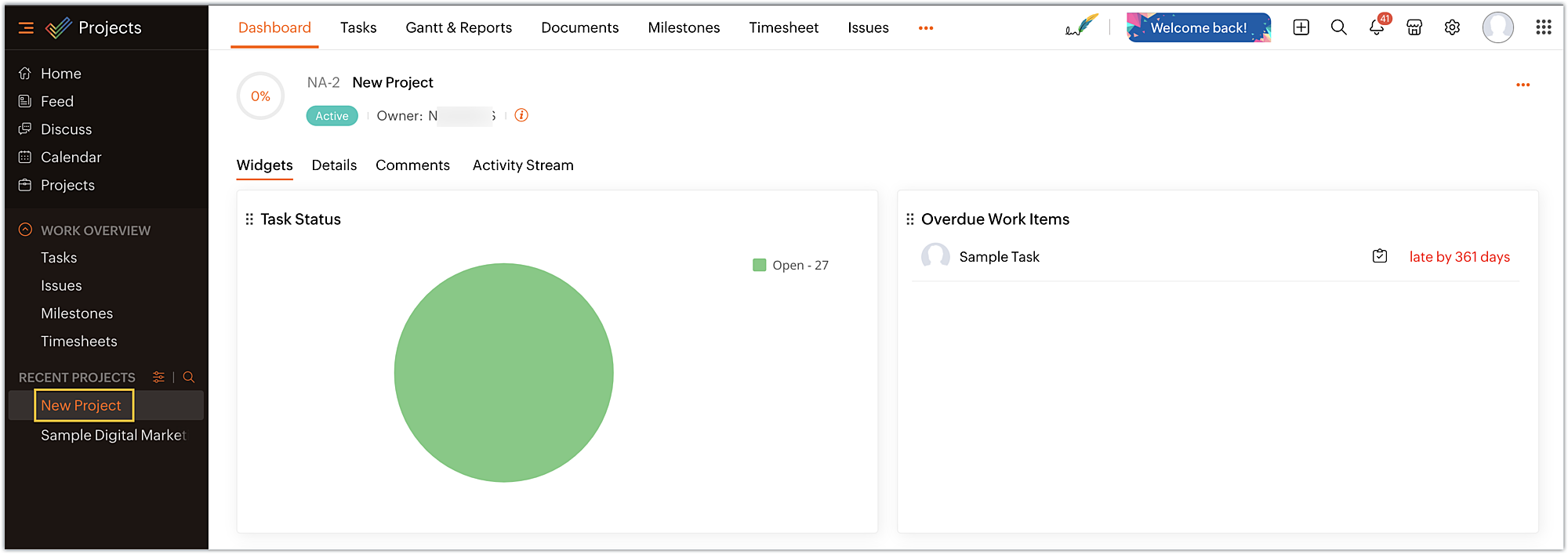
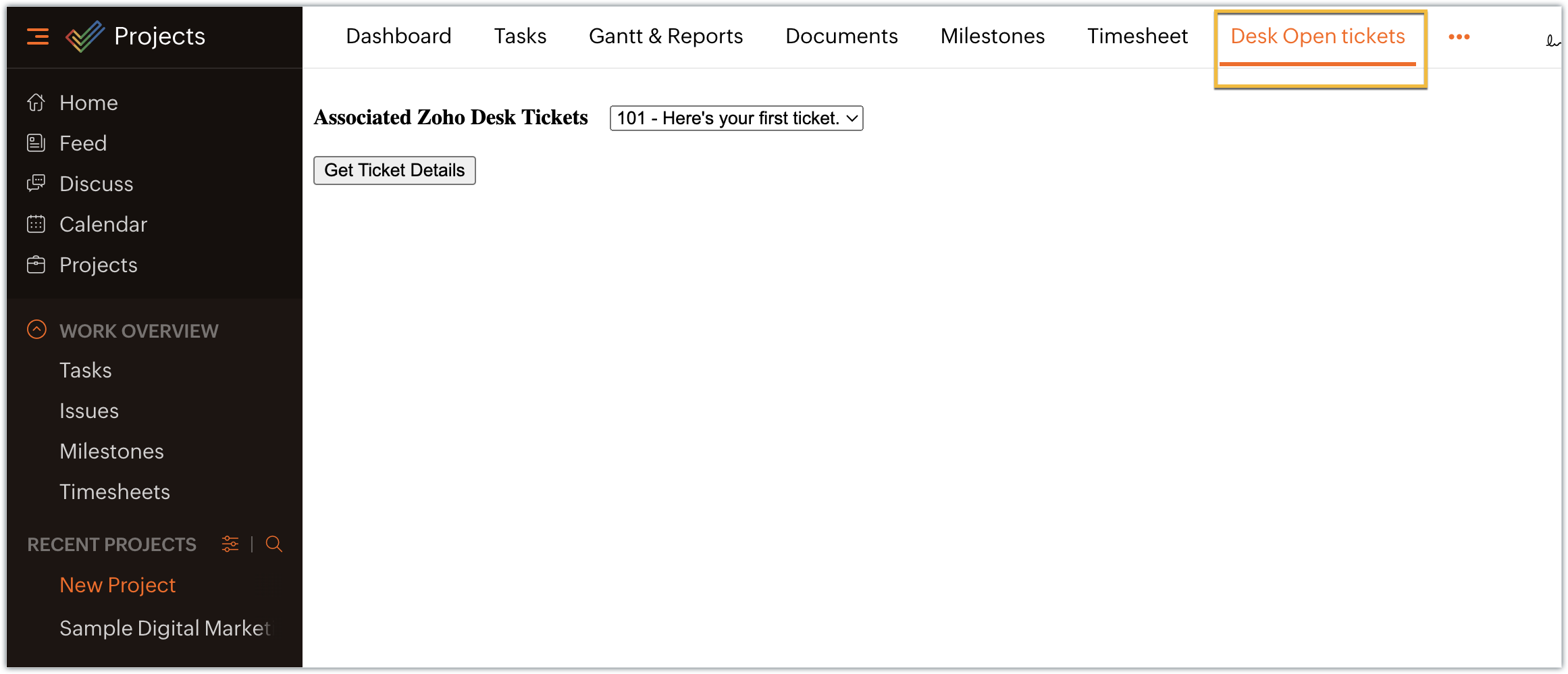
- Select the Desk open tickets option under the Projects tab. The dropdown menu appears, displaying a list of associated open tickets. Choose the ticket for which you want more details and click on Get Ticket Details.
- The selected ticket details are displayed in the modal box.
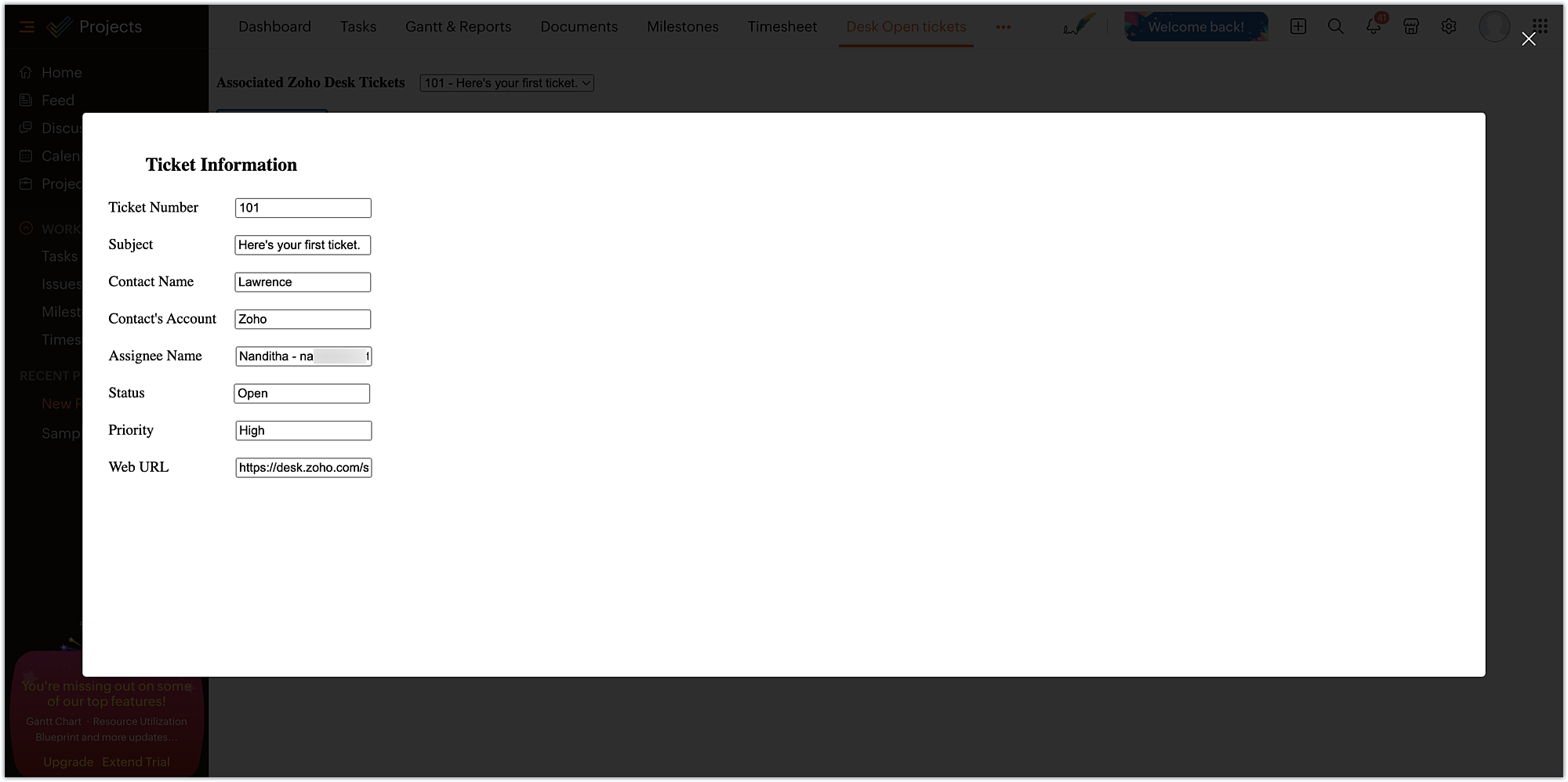
In this example, we have used the modal box feature to display some information based on user input. Similarly, a modal box can also be used to engage the user in performing some activity, like an attachment picker, wherein they can proceed further only after choosing an attachment. We hope you found this information useful. Keep following this space for more insights!
 Sign up for a Zoho Developer account and start developing extensions for Zoho products using Sigma.
SEE ALSO
Topic Participants
Nanditha Somasundaram Somasundaram
Sticky Posts
Building extensions #10: Fetch customized user inputs, store them globally at the app level, and access them across entities
This data storage concept enables you to store data related to your extension for both entity properties and extension properties. In our previous piece, we looked at how to store data for entities using entity properties. In this post, we'll look atBuilding extensions #9: Store, retrieve, and access entity-specific data in widgets using data storage
Data storage - Overview Storing data related to the extension you are working on is essential. It can be saved as key-value pairs for an entity or extension, known as entity and extension properties, respectively. Data can be saved for the following entitiesBuilding extensions #7: Create custom widgets for a simplified end-user experience
Discover the benefits of using widgets! We explored the significance of widgets, prerequisites, and the availability of JS SDK methods as part of our previous post. In this post, let's go over a detailed example of using widgets along with certain ZohoBuilding extensions #6: Custom user interfaces with Widgets
Welcome to our post on Widgets for Zoho Projects! In our last post, we explored the significance of the connections feature, showed how to use it, and provided an example use case. In this article, we'll look at the importance of widgets, another featureBuilding extensions #5: Integrating applications with Zoho Projects through Connections
In our last post, we discussed the essential features that a Zoho Projects extension can provide. Starting with this post andin every subsequent post going forward, we'll go through each of those features in depth, one by one, with an example use case.
Recent Topics
ATE Session on Payment Gateways: Our experts are live now. Post your questions now!
Hello everyone, Our experts are all excited to answer all your questions related to payment workflows. Please feel free to join this session and learn more about this topic. If you have a query at anytime, please post them here.Upload data deleted all Zoho form data that we manage
Good morning. Let me introduce myself, I'm Iky from Indonesia. I'm experiencing an error or problem using Zoho Forms. I manage Zoho Forms, but I previously encountered an error when I misclicked the delete button in the upload format. It apparently deletedZOHO FORMにURL表示ができない
初心者です。 ZOHO FORM で宿泊者名簿を作っています。 ゲストが、URLをクリックするとStripeで支払いができるようにURLを表示をしたいのですが、 上手くできません。 やり方が分かる方、ぜひ教えてください。Custom module - change from autonumber to name
I fear I know the answer to this already, but thought I'd ask the question. I created a custom module and instead of having a name as being the primary field, I changed it to an auto-number. I didn't realise that all searches would only show this reference.No Automatic Spacing on the Notebook App?
When I'm adding to notes on the app, I have to add spaces between words myself, rather than it automatically doing it. All my other apps add spacing, so it must be something with Zoho. Is there a setting I need to change, or something else I can do soHolidays - Cannot Enter Two Holidays on Same Day
I have a fairly common setup, where part-time employees receive 1/2 day's pay on a holiday and full-time employees receive a full day's pay. Historically, I've been able to accommodate this by entering two separate holidays, one that covers full-timeZoho Bookings and Survey Integration through Flow
I am trying to set up flows where once an appointment is marked as completed in Zoho Bookings, the applicable survey form would be sent to the customer. Problem is, I cannot customise flows wherein if Consultation A is completed, Survey Form A would beCampaigns set up and execution assistance
Hello Community, Can someone recommend a professional who can assist with the completion of my set up and deployment of Campaigns? Looking for a person or company that is not going to ask for big dollars up-front without a guarantee of performance toZobot with Plugs
Hello, I am having a problem with Zobot using Plugs. Here is my current flow: When I run the flow, I should immediately see the messages from the initial cards (Send Message cards), then after running the plug, and finally, see the messages after theKaizen #223 - File Manager in CRM Widget Using ZRC Methods
Hello, CRM Wizards! Here is what we are improving this week with Kaizen. we will explore the new ZRC (Zoho Request Client) introduced in Widget SDK v1.5, and learn how to use it to build a Related List Widget that integrates with Zoho WorkDrive. It helpsRemove Powered by Zoho at the footer
Hi, I've read two past tickets regarding this but it seems that the instructions given are outdated. I assume the layout keeps on changing, which makes it frustrating for me to search high and low. Please let me know how exactly do I do this now? ThError AS101 when adding new email alias
Hi, I am trying to add apple@(mydomain).com The error AS101 is shown while I try to add the alias.No Need To Fix Something That Is Working
Zoho Books is a great financial tool which helps businesses to become more efficient and productive with day-to-day operations. As such, every change, upgrade, improvement needs to be carefully thought before implemented in the software and I'm sure ZohoUsing email "importance" as workflow-criteria
I'd like to set up a workflow that triggers if an incoming email has been flagged as "high importance" but I'm not seeing any way to do that. Hopefully I'm just missing something obvious...?This domain is not allowed to add. Please contact support-as@zohocorp.com for further details
I am trying to setup the free version of Zoho Mail. When I tried to add my domain, theselfreunion.com I got the error message that is the subject of this Topic. I've read your other community forum topics, and this is NOT a free domain. So what is theWhat is Resolution Time in Business Hours
HI, What is the formula used to find the total time spent by an agent on a particular ticket? How is Resolution Time in Business Hours calculated in Zohodesk? As we need to find out the time spent on the ticket's solution by an agent we seek your assistanceCheck & Unchecked Task Segregation in Export
It must have a feature to represent checked and unchecked tasks as [ ] and [✅] respectively when exporting it to Arratai or WhatsApp ; as Keep Notes by Google contains…WorkDrive Download Issue
My client has been sending me files via WorkDrive, which generally has worked fine. Recently files won't download at all. If you try and individually select and download a file, a popup will appear in the bottom right saying it's preparing and then itResolution Time Report
From data to decisions: A deep dive into ticketing system reports What are time-based reports? Time-based reports are valuable tools that help us understand how well things are going by breaking down key metrics over specific periods. By tracking, measuring,Support Custom Background in Zoho Cliq Video Calls and Meetings
Hello Zoho Cliq Team, We hope you are doing well. We would like to request an enhancement to the video background capabilities in Zoho Cliq, specifically the ability to upload and use custom backgrounds. Current Limitation At present, Zoho Cliq allowsAdd RTL (Right-to-Left) Text Direction Button in Zoho Cliq
Greetings Zoho Team, We would like to request the addition of an RTL (Right-to-Left) text direction button in Zoho Cliq, similar to what is already available in other Zoho apps like Zoho Desk. Currently, while using Zoho Cliq with the English interface,Enable Backgrounds and Video Filters for 1:1 Cliq Calls Across All Zoho Entry
Hello Zoho Cliq Team, We hope you are doing well. We would like to request an enhancement related specifically to 1:1 video calls in Zoho Cliq. Current Behavior Zoho Cliq currently provides background and video filter options in the following scenarios:Zoho Flow: Stripe a Zoho Marketing Automation
Hola! Quiero hacer un flujo con Zoho Flow, para que cuando se haga un pago en Stripe, añada el lead en Zoho Marketing Automation. Lo he configurado, configurando el disparador como "Payment created" y mapeando el campo de Stripe "Receipt email address".Not able to delete a QC nor able to revert or create a cycle of manufacturing for QC failed Jobs
Not able to delete a QC nor able to revert or create a cycle of manufacturing for QC failed JobsNeed Customer Item Inward Module along with QC
Need Customer Item Inward Module along with QC 1. Using Transfer Orders hit the item balance sheet 2. Items without inventory it becomes difficult for tracking purpose. 3. Custom Modules become tedious to capture multiple items, item subforms are notLESS_THAN_MIN_OCCURANCE - code 2945
Hi I'm trying to post a customer record to creator API and getting this error message. So cryptic. Can someone please help? Thanks VarunZoho email
I need a list of email addresses of all contacts on my zohoShift-Centric View for Assigning and Managing Shifts in Zoho People
Hello Zoho People Product Team, Greetings and hope you are doing well. This feature request is related to Zoho People - please don't move it to zoho one! We would like to submit a feature request regarding the shift assignment and management view in ZohoZoho Sheet for Desktop
Does Zoho plans to develop a Desktop version of Sheet that installs on the computer like was done with Writer?Introducing parent-child ticketing in Zoho Desk [Early access]
Hello Zoho Desk users! We have introduced the parent-child ticketing system to help customer service teams ensure efficient resolution of issues involving multiple, related tickets. You can now combine repetitive and interconnected tickets into parent-childcant upload images in signature- urgent help needed. ta!
HI, I have been trying to insert the company logo in the signature. i have tried it several times since yesterday, the longest I waited was 1 hour and 12 minutes for the pop up window to upload a 180 KB .jpg file. what am i doing wrong.. an urgent replyAdd Ticket button in Home view
When I go to the My Tickets or the Knowledge Base view in our Help Centre, the Add Ticket button is available, but not in the Home view. I would really like for it to be displayed in the Home view as well. Is this possible? Thanks.Problem using Zoho Desk API
Goodmorning, I am trying to use the Zoho Desk API to create a dashboard in Grafana, but I am having a problem. Following the instructions in the API documentation, I created the API Console application (server-based application). Then I created the stringAdd zoho calendar to google calendar
Hi I keep seeing instructions on how to sync Zoho CRM calendar with google calendar but no instructions on how to view Zoho calendar in my google calendar.How to print a label from zoho creator app?
Hello, I would like to print a label from zoho creator app record similar to attached one. Size 74mm x 102mm. I tried record template. It leaves plenty of space around the content and also I couldn't set the height of the page. So it is not printing properly. Could someone please direct me to right direction for this requirement?City field suggestion in Zoho Books
Hi team, We are using Customers module in Zoho Books. In the Address section, we want to understand whether the City field can show suggestions while typing using any API or built-in feature. For example, if a user types “Mum”, can the system suggestNon-responsive views in Mobile Browser (iPad)
Has anyone noticed that the creator applications when viewed in a mobile browser (iPad) lost its responsiveness? It now appears very small font size and need to zoom into to read contents. Obviously this make use by field staff quite difficult. This is not at all a good move, as lots of my users are depending on accessing the app in mobile devices (iPads), and very challenging and frustrating.How can I check all announce?
Hiii, May I ask how can I check all the announce based on broadcast date instead of reply date based So that I will not will miss out any new functionWhat are the create bill API line item requiered fields
While the following documentation says that the line items array is requiered it doesn't say what if any files are requiered in the array. Does anyone know? API documentation: https://www.zoho.com/inventory/api/v1/bills/#create-a-bill I'm trying to addThis user is not allowed to add in Zoho. Please contact support-as@zohocorp.com for further details
Hello, Just signed up to ZOHO on a friend's recommendation. Got the TXT part (verified my domain), but whenever I try to add ANY user, I get the error: This user is not allowed to add in Zoho. Please contact support-as@zohocorp.com for further details I have emailed as well and writing here as well because when I searched, I saw many people faced the same issue and instead of email, they got a faster response here. My domain is: raisingreaderspk . com Hope this can be resolved. Thank youNext Page