Bulk user onboarding for Cliq Channels in a jiffy
As developers, we frequently switch between coding, debugging, and optimizing tasks. The last thing we want is to be burdened by manual user management. Adding users one by one to a channel is tedious and prone to errors, taking up more time than we could devote to actual development.

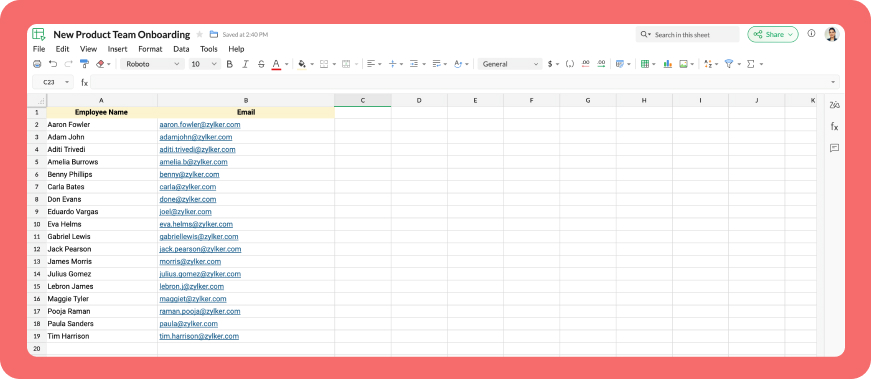
Let's explore how to create a custom workflow using Cliq's platform components to streamline the process of bulk-adding users to a channel via a Zoho Sheet or CSV file. This approach facilitates a smooth onboarding experience without the need for manual effort.
Pre-requisite :
Before beginning to script the code below, we must create a connection with Zoho Cliq. Once a connection is created and connected, you can use it in Deluge integration tasks and invoke URL scripts to access data from the required service.
Create a Zoho Oauth default connection with any unique name and the scopes - ZohoCliq.Channels.All and ZohoSheet.dataApi.ALL
Refer to the below links to learn more :
Step 1 : Creation of slash command
- After a successful login in Cliq, hover to the top right corner and click your profile. Post clicking, navigate to Bots & Tools > Commands.
- At your right, click the button - Create Command.
- To know more about slash commands and their purposes, refer to Introduction to slash commands.
- Create a slash command using your preferred name. Specify the following details: the command name, a hint (to give users an idea of what the command is for), and the access level.
- Finally, click "Save & edit code".

- inputs = List();
- inputs.add({"name":"channels","label":"Pick a channel","placeholder":"Choose a channel where you need to add members","max_selections":"1","multiple":false,"mandatory":true,"type":"native_select","data_source":"channels"});
- inputs.add({"name":"headername","label":"Header name","placeholder":"Email ID","hint":"In which the Email ID is present","min_length":"0","max_length":"25","mandatory":true,"type":"text"});
- inputs.add({"type":"radio","label":"Import type","name":"import_Type","hint":"Choose a type that you need to import users","options":[{"label":"CSV","value":"csv"},{"label":"Zoho sheet","value":"zohosheet"}],"trigger_on_change":"true"});
- return {"name":"addbulkuser","type":"form","title":"Add bulk users","hint":"To add maximum of upto 1000 users in a channel.","button_label":"Add Users","inputs":inputs,"action":{"type":"invoke.function","name":"addbulkusers"};
Step 2 : Scripting form function
- We need to create a function for the form that manages submission responses, including the Zoho Sheet link or CSV file, the name of the column containing the email addresses, and the channel details where users should be added in bulk.
- Hover to the top right corner and click your profile. After clicking, navigate to Bots & Tools > Functions.
- To your right, click the Create Function button.
- Name the function "addbulkusers," provide a description as desired, and select "form" as the function type. Then, click "Save and edit code," and paste the following code.
- emailIdList = list();
- successlist = list();
- failedlist = list();
- try
- {
- info form;
- formValues = form.get("values");
- columnName = formValues.get("headername");
- headerName = formValues.get("headername");
- if(formValues.get("import_Type").get("value") == "zohosheet")
- {
- url = formValues.get("url");
- spreadSheetId = url.getPrefix("?").getSuffix("open/");
- sheetName = url.getSuffix("?").getPrefix("&").getSuffix("=");
- worksheetname = sheetName.replaceAll(" ","%20");
- columnName = columnName.replaceAll(" ","%20");
- allDatas = list();
- params = Map();
- params.put("column_names",columnName);
- params.put("method","worksheet.records.fetch");
- params.put("worksheet_id",sheetName + "#");
- sheetDetails = invokeurl
- [
- url :"https://sheet.zoho"+environment.get("tld")+"/api/v2/" + spreadSheetId
- type :GET
- parameters:params
- connection:"addbulkusers"
- ];
- info sheetDetails;
- if(sheetDetails.get("status") == "success" && sheetDetails.get("records").size() <= 1000)
- {
- allDatas.addAll(sheetDetails.get("records"));
- }
- else if(sheetDetails.get("status") == "success" && sheetDetails.get("records").size() > 1000)
- {
- return {"type":"form_error","text":"I can only able to add 1000 user. Kindly try passing with 1000 records in the sheet!!!"};
- }
- else
- {
- return {"type":"form_error","text":"I can't find any email ids. Kindly re-check the column name and header row!!!"};
- }
- info "allData: " + allDatas.size();
- if(allDatas.size() > 1000)
- {
- return {"type":"form_error","text":"I can only able to add 1000 user. Kindly try passing with 1000 records in the sheet!!!"};
- }
- for each data in allDatas
- {
- if(data.get(formValues.get("headername")) == null)
- {
- return {"type":"form_error","text":"I can't find any email ids. Kindly re-check the column name and header row!!!"};
- }
- emailIdList.add(data.get(formValues.get("headername")));
- if(emailIdList.size() == 100)
- {
- channelID = formValues.get("channels").get("id");
- params = {"email_ids":emailIdList};
- info "Params: " + params;
- addUsers = invokeurl
- [
- url :environment.get("base_url") + "/api/v2/channels/" + channelID + "/members"
- type :POST
- parameters:params.toString()
- detailed:true
- connection:"addbulkusers"
- ];
- info "Adduser: " + addUsers;
- if(addUsers.get("responseCode") == "204")
- {
- successlist.addAll(emailIdList);
- }
- else
- {
- failedlist.addAll(emailIdList);
- }
- info "100: " + emailIdList.size();
- emailIdList = list();
- }
- }
- if(emailIdList.size() > 0)
- {
- channelID = formValues.get("channels").get("id");
- params = {"email_ids":emailIdList};
- info "Params: " + params;
- addUsers = invokeurl
- [
- url :environment.get("base_url") + "/api/v2/channels/" + channelID + "/members"
- type :POST
- parameters:params.toString()
- detailed:true
- connection:"addbulkusers"
- ];
- info "Adduser: " + addUsers;
- if(addUsers.get("responseCode") == "204")
- {
- successlist.addAll(emailIdList);
- }
- else
- {
- failedlist.addAll(emailIdList);
- }
- info "Email id: " + emailIdList;
- }
- info "Successlist: " + successlist;
- info "Failedlist: " + failedlist;
- if(successlist.size() > 0 && failedlist.size() > 0)
- {
- postMessage = {"text":"Successfully added " + successlist.size() + " member(s) and failed for " + failedlist.size() + " Member(s)"};
- }
- else if(successlist.size() > 0 && !failedlist.size() > 0)
- {
- postMessage = {"text":"Successfully added " + successlist.size() + " member(s)"};
- }
- else if(!successlist.size() > 0 && failedlist.size() > 0)
- {
- postMessage = {"text":"Adding members in channel failed for " + failedlist.size() + " member(s)"};
- }
- info zoho.cliq.postToChat(chat.get("id"),postMessage);
- }
- else
- {
- csvFile = formValues.get("csvFile");
- csvFile = csvFile.getfilecontent();
- allDatas = csvFile.toList("\n");
- i = 0;
- indexValue = 0;
- indexBoolean = false;
- for each data in allDatas
- {
- if(i == 0)
- {
- headers = data.toList(",");
- for each header in headers
- {
- info header;
- if(headerName == header)
- {
- indexBoolean = true;
- indexValue = headers.indexOf(headerName);
- }
- }
- if(indexBoolean == false)
- {
- return {"type":"form_error","text":"I can't find any email ids. Kindly re-check the column name and header row!!!"};
- }
- }
- else
- {
- emailIdList.add(data.get(indexValue));
- }
- i = i + 1;
- if(emailIdList.size() == 100)
- {
- channelID = formValues.get("channels").get("id");
- params = {"email_ids":emailIdList};
- info "Params: " + params;
- addUsers = invokeurl
- [
- url :environment.get("base_url") + "/api/v2/channels/" + channelID + "/members"
- type :POST
- parameters:params.toString()
- detailed:true
- connection:"addbulkusers"
- ];
- info "Adduser: " + addUsers;
- if(addUsers.get("responseCode") == "204")
- {
- successlist.addAll(emailIdList);
- }
- else
- {
- failedlist.addAll(emailIdList);
- }
- info "100: " + emailIdList.size();
- emailIdList = list();
- }
- }
- if(emailIdList.size() > 0)
- {
- channelID = formValues.get("channels").get("id");
- params = {"email_ids":emailIdList};
- info "Params: " + params;
- addUsers = invokeurl
- [
- url :environment.get("base_url") + "/api/v2/channels/" + channelID + "/members"
- type :POST
- parameters:params.toString()
- detailed:true
- connection:"addbulkusers"
- ];
- info "Adduser: " + addUsers;
- if(addUsers.get("responseCode") == "204")
- {
- successlist.addAll(emailIdList);
- }
- else
- {
- failedlist.addAll(emailIdList);
- }
- }
- info "Successlist: " + successlist;
- info "Failedlist: " + failedlist;
- if(successlist.size() > 0 && failedlist.size() > 0)
- {
- postMessage = {"text":"Successfully added " + successlist.size() + " member(s) and failed for " + failedlist.size() + " Member(s)"};
- }
- else if(successlist.size() > 0 && !failedlist.size() > 0)
- {
- postMessage = {"text":"Successfully added " + successlist.size() + " member(s)"};
- }
- else if(!successlist.size() > 0 && failedlist.size() > 0)
- {
- postMessage = {"text":"Adding members in channel failed for " + failedlist.size() + " member(s)"};
- }
- info zoho.cliq.postToChat(chat.get("id"),postMessage);
- }
- }
- catch (e)
- {
- info e;
- return {"type":"form_error","text":"I can't find any email ids. Kindly re-check the column name and header row!!!"};
- }
- return Map();
Step 3 : Configuring form change handler
- After copying and pasting the code into the form submission handler, navigate to the form change handler for the created form function.
- You can find this in the top left corner of the editor, where you will see an arrow next to the form submission handler. Clicking on this arrow will display the form change handler in a dropdown menu.
- Click it to edit the code in the form change handler, which is necessary for real-time modifications to a form's structure or behaviour based on user input in a specific field.
- targetName = target.get("name");
- info targetName;
- inputValues = form.get("values");
- info inputValues;
- actions = list();
- if(targetName.containsIgnoreCase("import_Type"))
- {
- fieldValue = inputValues.get("import_Type").get("value");
- info fieldValue;
- if(fieldValue == "csv")
- {
- actions.add({"type":"add_after","name":"import_Type","input":{"label":"CSV File","name":"csvFile","placeholder":"Please upload a zCSV File","mandatory":true,"type":"file"}});
- actions.add({"type":"remove","name":"url"});
- }
- else if(fieldValue == "zohosheet")
- {
- actions.add({"type":"add_after","name":"import_Type","input":{"name":"url","label":"Enter the sheet url","placeholder":"https://sheet.zoho.com/sheet/open/6xhgb324f142e91d845e5b4b472f7422379c9","min_length":"0","max_length":"400","mandatory":true,"type":"text","format":"url"}});
- actions.add({"type":"remove","name":"csvFile"});
- }
- }
- return {"type":"form_modification","actions":actions};
Business use cases:
- HR onboarding: Seamlessly add new employees to internal communication channels.
- Event management: Quickly invite attendees to event-specific channels.
- Education platforms: Enroll students in course groups in one go.
- Community building: Grow large communities by importing member lists effortlessly.
Bottom line
Bulk user addition in Cliq channels through Zoho Sheet or CSV files allows us to eliminate tedious tasks, reduce errors, and manage large-scale data effortlessly. Is onboarding consuming too much of your valuable development time? If so, it might be time to shake things up with a customized workflow!
Topic Participants
Harsha SS
Sticky Posts
Cliq Bots - Post message to a bot using the command line!
If you had read our post on how to post a message to a channel in a simple one-line command, then this sure is a piece of cake for you guys! For those of you, who are reading this for the first time, don't worry! Just read on. This post is all about howAdd Claude in Zoho Cliq
Let’s add a real AI assistant powered by Claude to your workspace this week, that your team can chat with, ask questions, and act on conversations to run AI actions on. This guide walks you through exactly how to do it, step by step, with all the codeAutomating Employee Birthday Notifications in Zoho Cliq
Have you ever missed a birthday and felt like the office Grinch? Fear not, the Cliq Developer Platform has got your back! With Zoho Cliq's Schedulers, you can be the office party-cipant who never forgets a single cake, balloon, or awkward rendition ofAutomate attendance tracking with Zoho Cliq Developer Platform
I wish remote work were permanently mandated so we could join work calls from a movie theatre or even while skydiving! But wait, it's time to wake up! The alarm has snoozed twice, and your team has already logged on for the day. Keeping tabs on attendanceCustomer payment alerts in Zoho Cliq
For businesses that depend on cash flow, payment updates are essential for operational decision-making and go beyond simple accounting entries. The sales team needs to be notified when invoices are cleared so that upcoming orders can be released. In contrast,
Recent Topics
Figma in Zoho Creator
Hi Team, I’m creating a form using Figma and would like to know how to add workflows like scheduling, custom validation, and other logic to it. Can anyone help me understand how to set this up for a Figma-based Creator UI form?Not receiving Gmail confirmation email to send emails as Zoho account from Gmail
Hello! I'm having an issue with the "Send mail as" option on Gmail. I am not receiving the confirmation email on my Zoho Mail account. A few days ago, it worked, then it stopped, and now when I try to fix it, I simply don't receive the confirmation emailRestore lost Invoice!
Some time ago I tried to Upgrade from Invoice to Books. I not upgraded and staid n Invoice. Now i tried again and first i deleted the old trial of books. But now all is gone, PLEASE HELP!! i have no backup and i have to have at least 7 years data retention by law.Zoho Desk Down
Not loadinglookup and integrated forms
I might be misunderstanding things but I wanted to integrate our zoho crm contacts into creator. I imagined that when I used the integration it would mirror into creator. It did brilliant. BUT We have a ticket form in creator that we want to use a lookupPartially receive PO without partial Bill?
Most of our inventory is pre-paid. Let's say we purchase 30 pieces of 3 different items for a total of 90 pieces. It is common for our supplier to send us the items as they are ready. So we will receive 30 pieces at a time. How can I partially receive2 users editing the same record - loose changes
Hello, I'm very new to Zoho so apology if this has been addressed somewhere i can't find. I have noticed the following: If we have 2 users put an inventory item in edit mode at the same time: say user1 click on edit and user2 while user1 is still in edit,How to get the Dashboard page to be the first page when you open the app
So when it opens on a tablet or phone it opens on the welcome page, thanks.How I set default email addresses for Sales Orders and Invoices
I have customers that have different departments that handle Sales Orders and Invoices. How can i set a default email for Sales Orders that's different than the default email for Invoices? Is there a way I can automate this using the Contact Persons DepartmentsFormula fields not refreshing until page is reloaded
I need help/advice about the formula fields and how I can refresh the information in real-time. We have two formula fields on our deals page which show calculated prices: One formula is in a subform which calculates the subform total + 1 other field amountHow can I setup Zoho MCP with Chat GPT
I can set up custom connections with Chat GPT but I cat an error when I try to set it up. The error is: "This MCP server can't be used by ChatGPT to search information because it doesn't implement our specification: search action not found" Thoughts?API ZOHO CRM Picket list with wrong values
I am using Zoho API v.8. with python to create records in a custom module named "Veranstaltung" in this custom module I've got a picket list called "Email_Template" with 28 Values. I've added 8 new values yesterday, but if I try to use on of those valuesGroup Emails
I have synced Zoho CRM to Campaigns but there are certain email not synced. showing it is Group Emails, but this email ids belongs to different individuals. please provide a solution as i nedd to sync the same.Enable Password Import option in ulaa browser
Dear Ulaa Team, I noticed that the Ulaa Password Manager currently offers an option to export passwords, but not to import them. This limitation poses a challenge for users like me who have stored numerous credentials in browsers like Chrome. Manually"Is Zoho CRM customer" vs "Is linked with Zoho CRM"
Recently while building a Flow, I was setting up a Decision action following a Zoho Invoice Fetch record action. There were 2 choices that I had not seen as something I could manually action in Zoho Invoice: "Is Zoho CRM customer" and "Is linked withClient Script | Update - Introducing ZRC: Simplified HTTP request library
Hello Developers! Are you tired of juggling different methods to make API calls? Are you confused with multiple syntaxes and version restrictions? Have you ever wished for one simple way to make all API calls in CRM? We heard you :) Here comes ZRC (ZohoSelection Filed for Data Export section
Hi FSM Team, I hope you are all doing well. I would like to share an idea for future development based on my experience. Currently, in FSM, we can only download up to 5,000 records at a time. If the development team could add a selection option to chooseWhat if I dont see contacts on the left side list
My CRM does not show the contacts tab. In order to create list this is needed and I cant find it.Comments Vs. Replies
I'm curious as to the difference between a "Reply" and a "Comment" on a ticket. It appears that "Replies" are what's used to determine response time SLA's and there are also used to automatically re-open tickets. I'm just trying to understand the key differences so I can educate both our clientele and our back-end users on which function/feature to use to better improve the ticket lifecycle. If anyone has any insight it would be appreciated. Thanks!Transitioning to API Credits in Zoho Desk
At Zoho Desk, we’re always looking for ways to help keep your business operations running smoothly. This includes empowering teams that rely on APIs for essential integrations, functions and extensions. We’ve reimagined how API usage is measured to giveCan you prevent closing Ulaa window when the last tab is closed (inadvertently)?
Most browsers have started to bring this feature in to prevent closing their windows when the last tab is closed (inadvertently). I hope Ulaa should get this in too.Microsoft Phone Link
Does anyone know if you can use Microsoft Phone Link to make calls through Zoho?Voip Phone system that integrates with Zoho
Just checking to see if anyone could tell me what phone system they are using with Zoho that is on the list of systems that integrate with Zoho. I use Vonage and have been with them for quite a few years but their service has really gone down hill andRemoving Related Modules Lookup Fields Assignment / Relationship
Issue: When creating a related list, I accidently selected module itself creating a circle reference. See attached. Situation: I wish to relating a custom module called "Phone Calls" to Leads and Contacts. Outcome: 1) I either want to remove the thisMultiple email accounts, one phone
Hi, I have my own businesses that use Zoho mail, now I would like to use zoho mail also for a local charity. But I noticed adding a phone number is compulsory for registering an account, and I only have one phone. This means I can not open an account because my phone number is already in use for another account. Can this be fixed? Thanks VincentAttendance | Flexible Working Hours
hi there, we are a small digital business working with flexible working hours and we are having a hard time setting up zoho people for attendance tracking. everyone of us has an individual agreement with the company regarding weekly hours (e.g. 40 hours/week,Seriously - Create multiple contacts for leads, (With Company as lead) Zoho CRM
In Zoho CRM, considering a comapny as a lead, you need us to allow addition of more than one contact. Currently the Lead Section is missing "Add contact" feature which is available in "Accounts". When you know that a particular lead can have multiplecan I link a contacts to multiple accounts
can I link a contacts to multiple accountsFree webinar! Digitize recruitment and onboarding with Zoho Sign and Zoho Recruit
Hello, Tired of being buried in onboarding paperwork? With the integration between Zoho Sign and Zoho Recruit, a powerful applicant tracking system, you can digitize and streamline the entire recruitment and onboarding process, all from one platform.Open Activities view.
I really like the new views for the open and closed activities inside the deals. But when you are in the tab view instead of the column view you can only complete and edit the open activity there isn't the 3 dot option to be able to delete the activPotentially Outdated and Vulnerable Chromium Engine Installed by Ulaa Browser Installer
I just installed Ulaa Browser a few minutes ago. Whats My Browser page shows I am using an outdated Chromium engine meaning I might be vulnerable for security exploits that might have got fixed in the new version.Potentially hardcoded list of Browsers to import from (after Ulaa Setup)
I have just installed Ulaa Browser and found that the list of browser to import data is potentially hardcoded ones rather than looking at the system. I do not have FF, IE and Edge is not my default itself. I would appreciated if Ulaa detected my browsersFrom Layout to Code: Finding Custom Field IDs in Zoho Projects.
Hello everyone! Ever found yourself wondering how to get the API names and IDs of custom fields in Zoho Projects while working on custom functions? Here’s a simple and effective way to do it! This method makes it super easy to locate the right field detailsCan I create multiple Zoho mail accounts?
Hey there I've searched the FAQ for this but didn't find the answer I was looking for. I like to have a different e-mail address for personal stuff, for creating account on websites, and for online banking / e-commerce. Is it allowed to create three accounts for one person on Zoho? I already have one personal e-mail address, can I sign up two more times from the homepage? ThanksEmployee type and source translation
In Zoho People, when I fill in the employee’s information, there is the option to determine the type of employment (employee type) and the hiring source. Both options ALWAYS appear in English. It is extremely inconvenient to deal with poorly translatedSync Issue Between Zoho Notebook Web App on Firefox (PC) and Android App
Hi Zoho Notebook Community, I'm facing a sync problem with Zoho Notebook. When I use the web version on Mozilla Firefox browser on my PC, I create and save new notes, and I've synced them successfully. However, these new notes aren't showing up in myRequest for Clarity on Timeline for True GPT/Zia Auto-Response Capabilities
I appreciate Zoho’s steady innovation, but I’m concerned that Desk and Zia remain well behind modern AI capabilities. For years, GPT-based tools have been able to generate and send contextual responses, yet Zoho Desk only supports summarization or suggestedNotebook audio recordings disappearing
I have recently been experiencing issues where some of my attached audio recordings are disappearing. I am referring specifically to ones made within a Note card in Notebook on mobile, made by pressing the "+" button and choosing "Record audio" (or similar),Has anyone built a ticket export that allows Help Center users to export the tickets shown in the My Area list they are looking at?
Hi, We are moving to Zoho Desk soon. Our current support system displays an option in our help center allowing customers to export their Open, Closed, or all tickets based on which list they are looking at. We need to offer the same in Zoho Desk helpZoho Desk: Q2 2025 | What's New
Hello everyone, We are excited to announce Zoho Desk's 2025 Autumn updates. This release brings new features and enhancements that improve work management and enable businesses to provide a better overall support experience. Spanning from Zia Agents toNext Page