Bulk user onboarding for Cliq Channels in a jiffy
As developers, we frequently switch between coding, debugging, and optimizing tasks. The last thing we want is to be burdened by manual user management. Adding users one by one to a channel is tedious and prone to errors, taking up more time than we could devote to actual development.

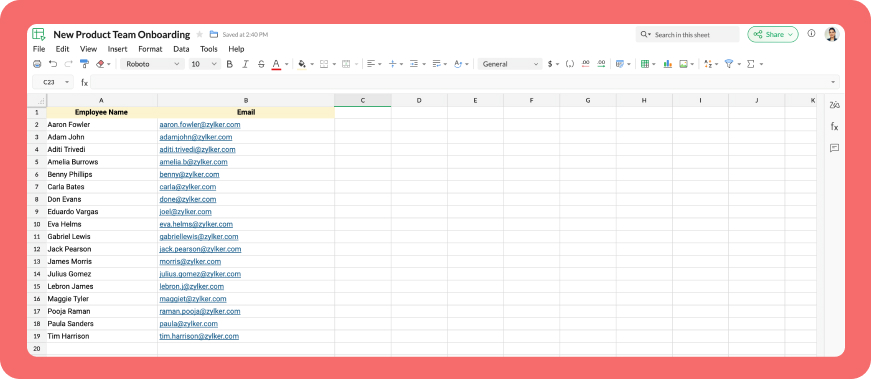
Let's explore how to create a custom workflow using Cliq's platform components to streamline the process of bulk-adding users to a channel via a Zoho Sheet or CSV file. This approach facilitates a smooth onboarding experience without the need for manual effort.
Pre-requisite :
Before beginning to script the code below, we must create a connection with Zoho Cliq. Once a connection is created and connected, you can use it in Deluge integration tasks and invoke URL scripts to access data from the required service.
Create a Zoho Oauth default connection with any unique name and the scopes - ZohoCliq.Channels.All and ZohoSheet.dataApi.ALL
Refer to the below links to learn more :
Step 1 : Creation of slash command
- After a successful login in Cliq, hover to the top right corner and click your profile. Post clicking, navigate to Bots & Tools > Commands.
- At your right, click the button - Create Command.
- To know more about slash commands and their purposes, refer to Introduction to slash commands.
- Create a slash command using your preferred name. Specify the following details: the command name, a hint (to give users an idea of what the command is for), and the access level.
- Finally, click "Save & edit code".

- inputs = List();
- inputs.add({"name":"channels","label":"Pick a channel","placeholder":"Choose a channel where you need to add members","max_selections":"1","multiple":false,"mandatory":true,"type":"native_select","data_source":"channels"});
- inputs.add({"name":"headername","label":"Header name","placeholder":"Email ID","hint":"In which the Email ID is present","min_length":"0","max_length":"25","mandatory":true,"type":"text"});
- inputs.add({"type":"radio","label":"Import type","name":"import_Type","hint":"Choose a type that you need to import users","options":[{"label":"CSV","value":"csv"},{"label":"Zoho sheet","value":"zohosheet"}],"trigger_on_change":"true"});
- return {"name":"addbulkuser","type":"form","title":"Add bulk users","hint":"To add maximum of upto 1000 users in a channel.","button_label":"Add Users","inputs":inputs,"action":{"type":"invoke.function","name":"addbulkusers"};
Step 2 : Scripting form function
- We need to create a function for the form that manages submission responses, including the Zoho Sheet link or CSV file, the name of the column containing the email addresses, and the channel details where users should be added in bulk.
- Hover to the top right corner and click your profile. After clicking, navigate to Bots & Tools > Functions.
- To your right, click the Create Function button.
- Name the function "addbulkusers," provide a description as desired, and select "form" as the function type. Then, click "Save and edit code," and paste the following code.
- emailIdList = list();
- successlist = list();
- failedlist = list();
- try
- {
- info form;
- formValues = form.get("values");
- columnName = formValues.get("headername");
- headerName = formValues.get("headername");
- if(formValues.get("import_Type").get("value") == "zohosheet")
- {
- url = formValues.get("url");
- spreadSheetId = url.getPrefix("?").getSuffix("open/");
- sheetName = url.getSuffix("?").getPrefix("&").getSuffix("=");
- worksheetname = sheetName.replaceAll(" ","%20");
- columnName = columnName.replaceAll(" ","%20");
- allDatas = list();
- params = Map();
- params.put("column_names",columnName);
- params.put("method","worksheet.records.fetch");
- params.put("worksheet_id",sheetName + "#");
- sheetDetails = invokeurl
- [
- url :"https://sheet.zoho"+environment.get("tld")+"/api/v2/" + spreadSheetId
- type :GET
- parameters:params
- connection:"addbulkusers"
- ];
- info sheetDetails;
- if(sheetDetails.get("status") == "success" && sheetDetails.get("records").size() <= 1000)
- {
- allDatas.addAll(sheetDetails.get("records"));
- }
- else if(sheetDetails.get("status") == "success" && sheetDetails.get("records").size() > 1000)
- {
- return {"type":"form_error","text":"I can only able to add 1000 user. Kindly try passing with 1000 records in the sheet!!!"};
- }
- else
- {
- return {"type":"form_error","text":"I can't find any email ids. Kindly re-check the column name and header row!!!"};
- }
- info "allData: " + allDatas.size();
- if(allDatas.size() > 1000)
- {
- return {"type":"form_error","text":"I can only able to add 1000 user. Kindly try passing with 1000 records in the sheet!!!"};
- }
- for each data in allDatas
- {
- if(data.get(formValues.get("headername")) == null)
- {
- return {"type":"form_error","text":"I can't find any email ids. Kindly re-check the column name and header row!!!"};
- }
- emailIdList.add(data.get(formValues.get("headername")));
- if(emailIdList.size() == 100)
- {
- channelID = formValues.get("channels").get("id");
- params = {"email_ids":emailIdList};
- info "Params: " + params;
- addUsers = invokeurl
- [
- url :environment.get("base_url") + "/api/v2/channels/" + channelID + "/members"
- type :POST
- parameters:params.toString()
- detailed:true
- connection:"addbulkusers"
- ];
- info "Adduser: " + addUsers;
- if(addUsers.get("responseCode") == "204")
- {
- successlist.addAll(emailIdList);
- }
- else
- {
- failedlist.addAll(emailIdList);
- }
- info "100: " + emailIdList.size();
- emailIdList = list();
- }
- }
- if(emailIdList.size() > 0)
- {
- channelID = formValues.get("channels").get("id");
- params = {"email_ids":emailIdList};
- info "Params: " + params;
- addUsers = invokeurl
- [
- url :environment.get("base_url") + "/api/v2/channels/" + channelID + "/members"
- type :POST
- parameters:params.toString()
- detailed:true
- connection:"addbulkusers"
- ];
- info "Adduser: " + addUsers;
- if(addUsers.get("responseCode") == "204")
- {
- successlist.addAll(emailIdList);
- }
- else
- {
- failedlist.addAll(emailIdList);
- }
- info "Email id: " + emailIdList;
- }
- info "Successlist: " + successlist;
- info "Failedlist: " + failedlist;
- if(successlist.size() > 0 && failedlist.size() > 0)
- {
- postMessage = {"text":"Successfully added " + successlist.size() + " member(s) and failed for " + failedlist.size() + " Member(s)"};
- }
- else if(successlist.size() > 0 && !failedlist.size() > 0)
- {
- postMessage = {"text":"Successfully added " + successlist.size() + " member(s)"};
- }
- else if(!successlist.size() > 0 && failedlist.size() > 0)
- {
- postMessage = {"text":"Adding members in channel failed for " + failedlist.size() + " member(s)"};
- }
- info zoho.cliq.postToChat(chat.get("id"),postMessage);
- }
- else
- {
- csvFile = formValues.get("csvFile");
- csvFile = csvFile.getfilecontent();
- allDatas = csvFile.toList("\n");
- i = 0;
- indexValue = 0;
- indexBoolean = false;
- for each data in allDatas
- {
- if(i == 0)
- {
- headers = data.toList(",");
- for each header in headers
- {
- info header;
- if(headerName == header)
- {
- indexBoolean = true;
- indexValue = headers.indexOf(headerName);
- }
- }
- if(indexBoolean == false)
- {
- return {"type":"form_error","text":"I can't find any email ids. Kindly re-check the column name and header row!!!"};
- }
- }
- else
- {
- emailIdList.add(data.get(indexValue));
- }
- i = i + 1;
- if(emailIdList.size() == 100)
- {
- channelID = formValues.get("channels").get("id");
- params = {"email_ids":emailIdList};
- info "Params: " + params;
- addUsers = invokeurl
- [
- url :environment.get("base_url") + "/api/v2/channels/" + channelID + "/members"
- type :POST
- parameters:params.toString()
- detailed:true
- connection:"addbulkusers"
- ];
- info "Adduser: " + addUsers;
- if(addUsers.get("responseCode") == "204")
- {
- successlist.addAll(emailIdList);
- }
- else
- {
- failedlist.addAll(emailIdList);
- }
- info "100: " + emailIdList.size();
- emailIdList = list();
- }
- }
- if(emailIdList.size() > 0)
- {
- channelID = formValues.get("channels").get("id");
- params = {"email_ids":emailIdList};
- info "Params: " + params;
- addUsers = invokeurl
- [
- url :environment.get("base_url") + "/api/v2/channels/" + channelID + "/members"
- type :POST
- parameters:params.toString()
- detailed:true
- connection:"addbulkusers"
- ];
- info "Adduser: " + addUsers;
- if(addUsers.get("responseCode") == "204")
- {
- successlist.addAll(emailIdList);
- }
- else
- {
- failedlist.addAll(emailIdList);
- }
- }
- info "Successlist: " + successlist;
- info "Failedlist: " + failedlist;
- if(successlist.size() > 0 && failedlist.size() > 0)
- {
- postMessage = {"text":"Successfully added " + successlist.size() + " member(s) and failed for " + failedlist.size() + " Member(s)"};
- }
- else if(successlist.size() > 0 && !failedlist.size() > 0)
- {
- postMessage = {"text":"Successfully added " + successlist.size() + " member(s)"};
- }
- else if(!successlist.size() > 0 && failedlist.size() > 0)
- {
- postMessage = {"text":"Adding members in channel failed for " + failedlist.size() + " member(s)"};
- }
- info zoho.cliq.postToChat(chat.get("id"),postMessage);
- }
- }
- catch (e)
- {
- info e;
- return {"type":"form_error","text":"I can't find any email ids. Kindly re-check the column name and header row!!!"};
- }
- return Map();
Step 3 : Configuring form change handler
- After copying and pasting the code into the form submission handler, navigate to the form change handler for the created form function.
- You can find this in the top left corner of the editor, where you will see an arrow next to the form submission handler. Clicking on this arrow will display the form change handler in a dropdown menu.
- Click it to edit the code in the form change handler, which is necessary for real-time modifications to a form's structure or behaviour based on user input in a specific field.
- targetName = target.get("name");
- info targetName;
- inputValues = form.get("values");
- info inputValues;
- actions = list();
- if(targetName.containsIgnoreCase("import_Type"))
- {
- fieldValue = inputValues.get("import_Type").get("value");
- info fieldValue;
- if(fieldValue == "csv")
- {
- actions.add({"type":"add_after","name":"import_Type","input":{"label":"CSV File","name":"csvFile","placeholder":"Please upload a zCSV File","mandatory":true,"type":"file"}});
- actions.add({"type":"remove","name":"url"});
- }
- else if(fieldValue == "zohosheet")
- {
- actions.add({"type":"add_after","name":"import_Type","input":{"name":"url","label":"Enter the sheet url","placeholder":"https://sheet.zoho.com/sheet/open/6xhgb324f142e91d845e5b4b472f7422379c9","min_length":"0","max_length":"400","mandatory":true,"type":"text","format":"url"}});
- actions.add({"type":"remove","name":"csvFile"});
- }
- }
- return {"type":"form_modification","actions":actions};
Business use cases:
- HR onboarding: Seamlessly add new employees to internal communication channels.
- Event management: Quickly invite attendees to event-specific channels.
- Education platforms: Enroll students in course groups in one go.
- Community building: Grow large communities by importing member lists effortlessly.
Bottom line
Bulk user addition in Cliq channels through Zoho Sheet or CSV files allows us to eliminate tedious tasks, reduce errors, and manage large-scale data effortlessly. Is onboarding consuming too much of your valuable development time? If so, it might be time to shake things up with a customized workflow!
Topic Participants
Harsha SS
Sticky Posts
Cliq Bots - Post message to a bot using the command line!
If you had read our post on how to post a message to a channel in a simple one-line command, then this sure is a piece of cake for you guys! For those of you, who are reading this for the first time, don't worry! Just read on. This post is all about howAdd Claude in Zoho Cliq
Let’s add a real AI assistant powered by Claude to your workspace this week, that your team can chat with, ask questions, and act on conversations to run AI actions on. This guide walks you through exactly how to do it, step by step, with all the codeAutomating Employee Birthday Notifications in Zoho Cliq
Have you ever missed a birthday and felt like the office Grinch? Fear not, the Cliq Developer Platform has got your back! With Zoho Cliq's Schedulers, you can be the office party-cipant who never forgets a single cake, balloon, or awkward rendition ofAutomate attendance tracking with Zoho Cliq Developer Platform
I wish remote work were permanently mandated so we could join work calls from a movie theatre or even while skydiving! But wait, it's time to wake up! The alarm has snoozed twice, and your team has already logged on for the day. Keeping tabs on attendanceCustomer payment alerts in Zoho Cliq
For businesses that depend on cash flow, payment updates are essential for operational decision-making and go beyond simple accounting entries. The sales team needs to be notified when invoices are cleared so that upcoming orders can be released. In contrast,
Recent Topics
Sheet View in CRM portal
Hi, When will it be possible for my CRM portal users to edit/add records with Sheet View? GeorgeWhat's New in Zoho Invoice | July - September 2025
Hello everyone! We’re back with the latest updates and enhancements we’ve rolled out in Zoho Invoice from July to September 2025. Here’s what’s new this quarter: Introducing the Singapore Edition in Zoho Invoice Share Invoices through WhatsApp GST 2.0Alert: Audio Call Support to be discontinued for Old Live Chat Widget from December 31, 2025
Action Required: Upgrade to the New SalesIQ Live Chat Widget We're reaching out with an important update regarding the SalesIQ Live Chat Widget that requires your immediate attention. Effective December 31, 2025, audio call functionality will no longermultiple contacts for one account
We currently use Zoho CRM where each Account represents a club or organization, and each Contact represents a manager or owner. However, some of our managers own or manage multiple clubs, and Zoho only allows a contact to be linked to one account at aRich text Merge field - Not using font specified in HTML
I have a rich text merge field in a writer template which is creating a table. I have chosen to use this method instead of a repeat region because I need to specify specific cell background colours which change every time the document is created. Theヒートマップ詳細設定について
はじめまして マーケティング担当の浅田です。 PageSenceのヒートマップ設定について質問です。 単一ページ毎の設定は上手くできるのですが 詳細設定にて、トップページのURLを含ませ全体のヒートマップを計測できないか試したところ お知らせ:データを受信していません。と表示されてしまいます。 トップページURLで始まるページの条件も試しております。 全頁を反映させたいと思い、詳細設定を上手く設定できたらと考えております。 どなたか詳しい方がいらっしゃいましたら、教えて頂けませんでしょうか 宜Automatic category assignment
Hi, I’d like to ask if there is a way to automatically assign an expense category based on the recognized Merchant. What would be the simplest way to set up automatic category assignment? Alternatively, is there an option to first choose the categoryExperience with Zoho Vertical Studio
I'm considering Zoho Vertical and would love to hear from some devs who've been using it. The Zoho ecosystem is pretty solid, so I assume the experience has been pretty good, but sometimes Zoho has its quirks. Overall, has your experience been positive?LinkedIn Chrome Extension
Hello - I believe it is a known issue that the LinkedIn extension Resume Extractor has stopped working and they are working on potential fixes. Wondering how others users are finding this issue and if there are any better workarounds for this issue? ItAdvance PDF creation from CRM data
I'm trying to create a PDF export of data in the CRM. My problem is I want a pretty complicated format for the data. I'm trying to export multiple modules worth of data, with nested one-to-many relationships between the modules. Along with that, I wantMore Formula Functions
Hi, I would like for example to be able to have a Date Field and Formula Fields, and then in the Formula Fields I would like to grab just the Month of the above Date Field or the Week Number of the above Date Field. So more "Functions" than the currentFile upload size limits
I am designing a contact form in Zoho Creator with File upload facility. I am not sure where and how to set the following properties for the same: Allowed File Types Maximum Size of the Attachment Number of AttachmentsComposite Services and Account Tracking
I am looking to garner support/request the ability to make composite services. A quick search in the forums brings up multiple requests for this feature. I fail to see why an item is mandatory while services are optional. I also would like to see theAll operation codes getting Not applied in WO-TT22J1025WOR0471, SR-TT22J1025PRE0423,FOR VIN-W1K6G2AB2SL005130.
Dear Support Team, Please refer attached screenshot. All operation codes getting not applied in work order. Request you to please check and update ASAP.Exclude Segment from Campaign Recipients
I've created two Segments in order to separate Non-Marketing Contacts from Marketing Contacts. I'd like to send an Eblast to all Marketing contacts in my lists, but when I go to select Recipients, I have two options: 1. To Choose Lists to Send to; 2.Reschedule Multiple/Mass Calls at Once
When we go into a Call record, we have the option to "Reschedule Call." How can we select multiple Calls at once from the Activities tab and Reschedule them? The big use case for us: We have many leads that our reps are supposed to call on a daily basis.Option to Empty Entire Mailbox or Folder in Zoho Mail
Hello Zoho Mail Team, How are you? We would like to request an enhancement to Zoho Mail that would allow administrators and users to quickly clear out entire folders or mailboxes, including shared mailboxes. Current Limitation: At present, Zoho Mail onlyI want to Make the due date of the project appears automatically
hello everyone I want to know if the zoho projects app can add automatically the END DATE of the project I added the duration, start after dates of each tasks in the project template & the starting date of the project itself and the end date of it doesn'tDeluge Tips & Tricks: Mastering dates and times
Hello everyone! We're bringing back our Deluge Tips & Tricks series, where we show you how to make the most of Deluge for achieving a wide range of use cases. Working with dates and times is a fundamental part of almost any business application. WhetherAdding a Button in a Form in Zoho Creator App
Hi I want to know how can I add a Button in Zoho Creator form. I have options that I select from a multiselect options and I want the button to add those selected options in a Subform. I do not want to add on a Page Builder I want it inside a specificInternal Exception for Creator function
I have been running a script successfully for several days using the scheduler in my application. Now today it suddenly creates and Internal Exception error. Nothing has changed about the script. The data is still retrievable from the web service it is using. Why would this suddenly be happening for no apparent reason? Also noticed that my usage logs are not up to date. Is something changing behind the scenes?How to Set Up a Custom Domain and Customize Homepage
Hello, I am experimenting with Zoho Creator to build applications for my own use case and have encountered a couple of issues: 1. Custom Domain Access: Is it possible to access my Zoho Creator application through a domain that I own? If so, how does theAnnouncing new features in Trident for Mac (1.26.0)
Hello everyone! Trident for macOS (v1.26.0) is here with new updates to securely manage your passwords, locally save your emails, and protect against emails with suspicious URLs. Let's take a quick look at them. Manage passwords with Zoho Vault eWidget.Default Value on a Number
Hi, I would be nice to also be able to set the Default Value for a Number Field, not just the Initial Value shown, so if not on the screen so not enetred it can have a value of 0 for example. Thanks DanI can't set office hours in SalesIQ.
I can't find the option to enable business hours in SalesIQ. Can someone please help me? Thank you.Tip#45: Custom Tags and Cluster Tags
Tagging your work items helps categorize and label work items within your Zoho Sprints workspace. Now, this feature is expanded across multiple modules, along with the introduction of cluster tags that offer an advanced tagging mechanism. Manage Tags[Free Webinar] User Management in Zoho Creator - Creator Tech Connect
Hello Everyone! We welcome you all to the upcoming free webinar on the Creator Tech Connect Series. The Creator Tech Connect series is a free monthly webinar that runs for around 45 minutes. It comprises technical sessions in which we delve deep intoA couple of minor enhancements to Workflows
Last updated on September 17, 2024: These enhancements were initially available for early access, and we've now enabled them for all users. We are elated to announce a couple of enhancements to custom functions in our Workflows! Say hello to: "Source"Business Continuity - Disaster Recovery
I know about the Zoho CRM backup .zip files, however, this doesn't include any of the infrastructure with like custom fields or custom modules. I am curious on what everyone has in place for a true backup or what your plan is if your Zoho instance wereNarrative 11: Are your customers happy?
Behind the scenes of a successful ticketing system: BTS Series Narrative 11: Are your customers happy? Happiness isn't just something you experience; it's something you remember. Hear your customers' voices by enabling customer happiness ratings in ZohoDon't understand INVALID_REQUEST_METHOD when I try to post up an attachment
When I make the POST request (using python requests.post() for files): https://www.zohoapis.com/crm/v8/Calls/***************01/Attachments I get this response: r:{ "code": "INVALID_REQUEST_METHOD", "details": {}, "message": "The http request method typeSignature field is showing black
Hello, When customer signed the service form, it is showing as below picture Phone model: iPhone 16 Pro We tried delete and install application, but it not solved. This has on phone of a few person. There is any advice to solve this?Zoho CRM Android app updates: record sharing, user image upload, Zoho Survey integration, and more
Hello everyone, We've made some important improvements to Zoho CRM's Android app, and we'd like to walk you through the latest updates. Here's what's new: Record sharing with org users User image upload Zoho Survey integration support Venue preferenceHow to Delete/hide Google adwords section from Layout?
Hi people, maybe someone can tell me how to remove or hide the Google adwords section from my layout? Im not using it and it takes too much space.WIDGET in related record list ZOHO CRM; how to get and put data to subform custom fields?
he need: Read and write two custom subform line-item fields on Quotes: Segment_wyceny (picklist/text) and W_pakiecie (number). Write works; read does not return these fields via SDK. Environment Zoho CRM Widget Zoho Embedded App SDK v1.2 Module: QuotesOutgoing emails to btinternet blocked.
ERROR_CODE :421, ERROR_CODE :Too many messages (1.5.6.1) from 74.201.84.163I have been having problems sending to btinternet.com and btopenworld.com for the past week. First 'email delayed' message, and then 'delivery failed', as above. Looks as though someone is spamming from the ZOHO email server 'sender163-mail.zoho.com' Surely this is abuse of your system, and you should be able to trace who it is (if it is a registered user of Zoho mail?) and block their account. An email system is really noWay to update CRM records in quik view
I have custom module in zoho crm and that module have 500 records. I want a quick way or UI so that user can easily update the record information in quick view without going to record detail view or edit view. I tried zoho sheet option but in zoho sheetWhere to integrate Price Book and Product List Price
Hello, We sync zoho crm all modules with all data to zoho analytics. In zoho crm, we have "Price Books" and "Products" modules, where each product is assigned to a few price books with different list prices. From zoho crm, I am able to export a datasetForm / CRM Integration Not entering into workflow
I have a simple form setup with company name, first name, last name and lead source. Each of the fields are mapped to CRM Leads module. When the form is submitted, the lead is populated properly. I also have a workflow created that when the lead sourceZoho Slowness - Workarounds
Hi all, We've been having intermittent slowness and Zoho just asks for same stuff each time but never fix it. It usually just goes away on it's own after a couple weeks. Given that speed is a very important thing for companies to be able to keep up withNext Page