Bulk user onboarding for Cliq Channels in a jiffy
As developers, we frequently switch between coding, debugging, and optimizing tasks. The last thing we want is to be burdened by manual user management. Adding users one by one to a channel is tedious and prone to errors, taking up more time than we could devote to actual development.

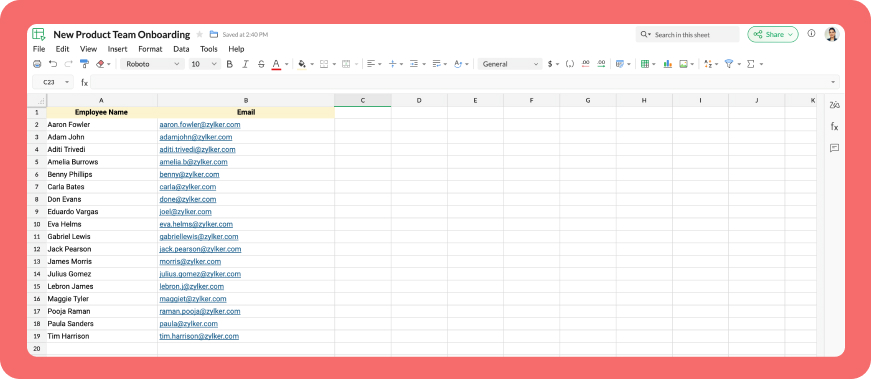
Let's explore how to create a custom workflow using Cliq's platform components to streamline the process of bulk-adding users to a channel via a Zoho Sheet or CSV file. This approach facilitates a smooth onboarding experience without the need for manual effort.
Pre-requisite :
Before beginning to script the code below, we must create a connection with Zoho Cliq. Once a connection is created and connected, you can use it in Deluge integration tasks and invoke URL scripts to access data from the required service.
Create a Zoho Oauth default connection with any unique name and the scopes - ZohoCliq.Channels.All and ZohoSheet.dataApi.ALL
Refer to the below links to learn more :
Step 1 : Creation of slash command
- After a successful login in Cliq, hover to the top right corner and click your profile. Post clicking, navigate to Bots & Tools > Commands.
- At your right, click the button - Create Command.
- To know more about slash commands and their purposes, refer to Introduction to slash commands.
- Create a slash command using your preferred name. Specify the following details: the command name, a hint (to give users an idea of what the command is for), and the access level.
- Finally, click "Save & edit code".

- inputs = List();
- inputs.add({"name":"channels","label":"Pick a channel","placeholder":"Choose a channel where you need to add members","max_selections":"1","multiple":false,"mandatory":true,"type":"native_select","data_source":"channels"});
- inputs.add({"name":"headername","label":"Header name","placeholder":"Email ID","hint":"In which the Email ID is present","min_length":"0","max_length":"25","mandatory":true,"type":"text"});
- inputs.add({"type":"radio","label":"Import type","name":"import_Type","hint":"Choose a type that you need to import users","options":[{"label":"CSV","value":"csv"},{"label":"Zoho sheet","value":"zohosheet"}],"trigger_on_change":"true"});
- return {"name":"addbulkuser","type":"form","title":"Add bulk users","hint":"To add maximum of upto 1000 users in a channel.","button_label":"Add Users","inputs":inputs,"action":{"type":"invoke.function","name":"addbulkusers"};
Step 2 : Scripting form function
- We need to create a function for the form that manages submission responses, including the Zoho Sheet link or CSV file, the name of the column containing the email addresses, and the channel details where users should be added in bulk.
- Hover to the top right corner and click your profile. After clicking, navigate to Bots & Tools > Functions.
- To your right, click the Create Function button.
- Name the function "addbulkusers," provide a description as desired, and select "form" as the function type. Then, click "Save and edit code," and paste the following code.
- emailIdList = list();
- successlist = list();
- failedlist = list();
- try
- {
- info form;
- formValues = form.get("values");
- columnName = formValues.get("headername");
- headerName = formValues.get("headername");
- if(formValues.get("import_Type").get("value") == "zohosheet")
- {
- url = formValues.get("url");
- spreadSheetId = url.getPrefix("?").getSuffix("open/");
- sheetName = url.getSuffix("?").getPrefix("&").getSuffix("=");
- worksheetname = sheetName.replaceAll(" ","%20");
- columnName = columnName.replaceAll(" ","%20");
- allDatas = list();
- params = Map();
- params.put("column_names",columnName);
- params.put("method","worksheet.records.fetch");
- params.put("worksheet_id",sheetName + "#");
- sheetDetails = invokeurl
- [
- url :"https://sheet.zoho"+environment.get("tld")+"/api/v2/" + spreadSheetId
- type :GET
- parameters:params
- connection:"addbulkusers"
- ];
- info sheetDetails;
- if(sheetDetails.get("status") == "success" && sheetDetails.get("records").size() <= 1000)
- {
- allDatas.addAll(sheetDetails.get("records"));
- }
- else if(sheetDetails.get("status") == "success" && sheetDetails.get("records").size() > 1000)
- {
- return {"type":"form_error","text":"I can only able to add 1000 user. Kindly try passing with 1000 records in the sheet!!!"};
- }
- else
- {
- return {"type":"form_error","text":"I can't find any email ids. Kindly re-check the column name and header row!!!"};
- }
- info "allData: " + allDatas.size();
- if(allDatas.size() > 1000)
- {
- return {"type":"form_error","text":"I can only able to add 1000 user. Kindly try passing with 1000 records in the sheet!!!"};
- }
- for each data in allDatas
- {
- if(data.get(formValues.get("headername")) == null)
- {
- return {"type":"form_error","text":"I can't find any email ids. Kindly re-check the column name and header row!!!"};
- }
- emailIdList.add(data.get(formValues.get("headername")));
- if(emailIdList.size() == 100)
- {
- channelID = formValues.get("channels").get("id");
- params = {"email_ids":emailIdList};
- info "Params: " + params;
- addUsers = invokeurl
- [
- url :environment.get("base_url") + "/api/v2/channels/" + channelID + "/members"
- type :POST
- parameters:params.toString()
- detailed:true
- connection:"addbulkusers"
- ];
- info "Adduser: " + addUsers;
- if(addUsers.get("responseCode") == "204")
- {
- successlist.addAll(emailIdList);
- }
- else
- {
- failedlist.addAll(emailIdList);
- }
- info "100: " + emailIdList.size();
- emailIdList = list();
- }
- }
- if(emailIdList.size() > 0)
- {
- channelID = formValues.get("channels").get("id");
- params = {"email_ids":emailIdList};
- info "Params: " + params;
- addUsers = invokeurl
- [
- url :environment.get("base_url") + "/api/v2/channels/" + channelID + "/members"
- type :POST
- parameters:params.toString()
- detailed:true
- connection:"addbulkusers"
- ];
- info "Adduser: " + addUsers;
- if(addUsers.get("responseCode") == "204")
- {
- successlist.addAll(emailIdList);
- }
- else
- {
- failedlist.addAll(emailIdList);
- }
- info "Email id: " + emailIdList;
- }
- info "Successlist: " + successlist;
- info "Failedlist: " + failedlist;
- if(successlist.size() > 0 && failedlist.size() > 0)
- {
- postMessage = {"text":"Successfully added " + successlist.size() + " member(s) and failed for " + failedlist.size() + " Member(s)"};
- }
- else if(successlist.size() > 0 && !failedlist.size() > 0)
- {
- postMessage = {"text":"Successfully added " + successlist.size() + " member(s)"};
- }
- else if(!successlist.size() > 0 && failedlist.size() > 0)
- {
- postMessage = {"text":"Adding members in channel failed for " + failedlist.size() + " member(s)"};
- }
- info zoho.cliq.postToChat(chat.get("id"),postMessage);
- }
- else
- {
- csvFile = formValues.get("csvFile");
- csvFile = csvFile.getfilecontent();
- allDatas = csvFile.toList("\n");
- i = 0;
- indexValue = 0;
- indexBoolean = false;
- for each data in allDatas
- {
- if(i == 0)
- {
- headers = data.toList(",");
- for each header in headers
- {
- info header;
- if(headerName == header)
- {
- indexBoolean = true;
- indexValue = headers.indexOf(headerName);
- }
- }
- if(indexBoolean == false)
- {
- return {"type":"form_error","text":"I can't find any email ids. Kindly re-check the column name and header row!!!"};
- }
- }
- else
- {
- emailIdList.add(data.get(indexValue));
- }
- i = i + 1;
- if(emailIdList.size() == 100)
- {
- channelID = formValues.get("channels").get("id");
- params = {"email_ids":emailIdList};
- info "Params: " + params;
- addUsers = invokeurl
- [
- url :environment.get("base_url") + "/api/v2/channels/" + channelID + "/members"
- type :POST
- parameters:params.toString()
- detailed:true
- connection:"addbulkusers"
- ];
- info "Adduser: " + addUsers;
- if(addUsers.get("responseCode") == "204")
- {
- successlist.addAll(emailIdList);
- }
- else
- {
- failedlist.addAll(emailIdList);
- }
- info "100: " + emailIdList.size();
- emailIdList = list();
- }
- }
- if(emailIdList.size() > 0)
- {
- channelID = formValues.get("channels").get("id");
- params = {"email_ids":emailIdList};
- info "Params: " + params;
- addUsers = invokeurl
- [
- url :environment.get("base_url") + "/api/v2/channels/" + channelID + "/members"
- type :POST
- parameters:params.toString()
- detailed:true
- connection:"addbulkusers"
- ];
- info "Adduser: " + addUsers;
- if(addUsers.get("responseCode") == "204")
- {
- successlist.addAll(emailIdList);
- }
- else
- {
- failedlist.addAll(emailIdList);
- }
- }
- info "Successlist: " + successlist;
- info "Failedlist: " + failedlist;
- if(successlist.size() > 0 && failedlist.size() > 0)
- {
- postMessage = {"text":"Successfully added " + successlist.size() + " member(s) and failed for " + failedlist.size() + " Member(s)"};
- }
- else if(successlist.size() > 0 && !failedlist.size() > 0)
- {
- postMessage = {"text":"Successfully added " + successlist.size() + " member(s)"};
- }
- else if(!successlist.size() > 0 && failedlist.size() > 0)
- {
- postMessage = {"text":"Adding members in channel failed for " + failedlist.size() + " member(s)"};
- }
- info zoho.cliq.postToChat(chat.get("id"),postMessage);
- }
- }
- catch (e)
- {
- info e;
- return {"type":"form_error","text":"I can't find any email ids. Kindly re-check the column name and header row!!!"};
- }
- return Map();
Step 3 : Configuring form change handler
- After copying and pasting the code into the form submission handler, navigate to the form change handler for the created form function.
- You can find this in the top left corner of the editor, where you will see an arrow next to the form submission handler. Clicking on this arrow will display the form change handler in a dropdown menu.
- Click it to edit the code in the form change handler, which is necessary for real-time modifications to a form's structure or behaviour based on user input in a specific field.
- targetName = target.get("name");
- info targetName;
- inputValues = form.get("values");
- info inputValues;
- actions = list();
- if(targetName.containsIgnoreCase("import_Type"))
- {
- fieldValue = inputValues.get("import_Type").get("value");
- info fieldValue;
- if(fieldValue == "csv")
- {
- actions.add({"type":"add_after","name":"import_Type","input":{"label":"CSV File","name":"csvFile","placeholder":"Please upload a zCSV File","mandatory":true,"type":"file"}});
- actions.add({"type":"remove","name":"url"});
- }
- else if(fieldValue == "zohosheet")
- {
- actions.add({"type":"add_after","name":"import_Type","input":{"name":"url","label":"Enter the sheet url","placeholder":"https://sheet.zoho.com/sheet/open/6xhgb324f142e91d845e5b4b472f7422379c9","min_length":"0","max_length":"400","mandatory":true,"type":"text","format":"url"}});
- actions.add({"type":"remove","name":"csvFile"});
- }
- }
- return {"type":"form_modification","actions":actions};
Business use cases:
- HR onboarding: Seamlessly add new employees to internal communication channels.
- Event management: Quickly invite attendees to event-specific channels.
- Education platforms: Enroll students in course groups in one go.
- Community building: Grow large communities by importing member lists effortlessly.
Bottom line
Bulk user addition in Cliq channels through Zoho Sheet or CSV files allows us to eliminate tedious tasks, reduce errors, and manage large-scale data effortlessly. Is onboarding consuming too much of your valuable development time? If so, it might be time to shake things up with a customized workflow!
Topic Participants
Harsha SS
Sticky Posts
Automating Employee Birthday Notifications in Zoho Cliq
Have you ever missed a birthday and felt like the office Grinch? Fear not, the Cliq Developer Platform has got your back! With Zoho Cliq's Schedulers, you can be the office party-cipant who never forgets a single cake, balloon, or awkward rendition ofAutomate attendance tracking with Zoho Cliq Developer Platform
I wish remote work were permanently mandated so we could join work calls from a movie theatre or even while skydiving! But wait, it's time to wake up! The alarm has snoozed twice, and your team has already logged on for the day. Keeping tabs on attendanceCustomer payment alerts in Zoho Cliq
For businesses that depend on cash flow, payment updates are essential for operational decision-making and go beyond simple accounting entries. The sales team needs to be notified when invoices are cleared so that upcoming orders can be released. In contrast,Accelerate Github code reviews with Zoho Cliq Platform's link handlers
Code reviews are critical, and they can get buried in conversations or lost when using multiple tools. With the Cliq Platform's link handlers, let's transform shared Github pull request links into interactive, real-time code reviews on channels. ShareApp Spotlight : PagerDuty for Zoho Cliq
App Spotlight brings you hand-picked apps to enhance the power of your Zoho apps and tools. Visit the Zoho Marketplace to explore all of our apps, integrations, and extensions. In today's fast-paced world, seizing every moment is essential for operational
Recent Topics
Understanding Zoho Contracts
Effective contract management relies on systems that are structured, organized, and reliable. Every feature, workflow, rule, and restriction in Zoho Contracts are designed the way they are to ensure consistency, compliance, and control across every stageTip of the Week #76– Automate your inbox during vacation in Zoho TeamInbox
When you're on vacation or away from your desk, the last thing you want is for important emails to be missed or left unanswered. The good news is, you can easily set up rules in Zoho TeamInbox to assign incoming messages automatically to a teammate who'sDomain restriction for User Management actions in Zoho One
Greetings, Zoho One Admins! To strengthen account security further and safeguard user management settings, we are imposing domain-based restrictions for user account-focused admin actions in Zoho One. In addition to password reset of user, organizationZoho Mail iOS app update: Signature
Hello everyone! In the latest version(3.1.7) of the Zoho Mail app update, we have brought in support to create, edit and remove signature within the app. You can create signature from the compose screen as well as from within the Settings module(insideDesktop app doesn't support notecards created on Android
Hi, Does anybody have same problem? Some of last notecards created on Android app (v. 6.6) doesn't show in desktop app (v. 3.5.5). I see these note cards but whith they appear with exclamation mark in yellow triangle (see screenshot) and when I try toApproval Button in Subform
Hi Team, I’m working on a subform-based requirement where users will submit requests, and these requests must go through approval by multiple team managers. Each line item in the subform needs to be individually approved or declined based on the user'sSetting checkbox value on template in Sign from Creator
Good day, Please help me understand how do I set a tick from a checkbox in Creator into a checkbox on a Sign template. Below is the only values on the Sign template and the code from Creator, "field_boolean_data": {}, "field_date_data": {}, "field_radio_data":Zoho Projects - Unread Comment Icon
Hi Projects Team, It would be great if there was a notification I con on the comments icon so it's easy to see which tasks have new comments. Something like a red circle with a number of unread comments would be great. Thanks for considering my feedZoho Projects - Update Feed via API
Hi Projects Team, Please consider adding an API to allow update and retrieval of messages to the Feed. Thank youAutomated log-out/session end
I'm concerned about security of our data. Is it possible to set an automatic time-out for user sessions on Zoho CRM, after a certain period of inactivity or when the session reaches a certain duration (12 hours perhaps)?Subform auto populate values
Hi Team, I’m trying to retrieve values from Zoho People using API functions and dynamically populate them into a subform. For example, I’ve created a form with several fields that users will fill out. Based on their input, I need to fetch records fromWhat is New in CRM Functions?
What is New in CRM Functions? Hello everyone! We're delighted to share that Functions in Zoho CRM have had a few upgrades that would happen in phases. Phase 1 An all new built-in editor for better user experience and ease of use. ETA: In a couple of days.Gantt Chart - Zoho Analytics
Are there any plans to add Gantt Charts capabilities to Zoho Analytics?WhatsApp Calling Integration via Zoho Desk
Dear Zoho Desk Team, I would like to request a feature that allows users to call WhatsApp numbers directly via Zoho Desk. This integration would enable sending and receiving calls to and from WhatsApp numbers over the internet, without the need for traditionalIdentify long running sync jobs/tables
My sync process causes strain on my production database and I'd love some tools/alerts to help me identify which tables are taking the longest. The current screen only shows 3 tables at a time and truncates the last fetch time so that it is very cumbersomeTemporarily rate limited due to IP reputation.
We have suddenly started receiving the following Mail Delivery Status Notification: Diagnostic-Code: 4.7.650 The mail server [136.143.184.12] has been temporarily rate limited due to IP reputation. For e-mail delivery information, see https://aka.ms/postmasterAssociate emails from both primary and secondary contacts to deal
We need to associate emails from multiple contacts to a deal. Please advise how this can be achieved. At present, only emails from primary contacts can be associated. ThanksNew integration: Zoho Sign for Zoho Projects
Hey there! We’re excited to announce the brand-new Zoho Sign integration for Zoho Projects! With this integration, users can now send documents for signatures, track their progress, and manage approvals—all without leaving Zoho Projects. This bridgesUpdate to attachment display in ticket threads
This enhancement will provide faster access for support teams and end-users, significantly boosting productivity for everyone. Get ready for a more efficient and satisfying experience! Immediate benefits Faster ticket rendering reduces wait times andNarrative 15: Blueprint - Automate, guide, and transform your support processes
Behind the scenes of a successful ticketing system: BTS Series Narrative 15: Blueprint - Automate, guide, and transform your support processes Even organizations that deliver quality products and services can face low customer satisfaction when theirDifferent MRP / Pricing for same product but different batches
We often face the following situations where MRP of a particular product changes on every purchase and hence we have to charge the customer accordingly. This can't be solved by Batch tracking as of now so far as I understand Zoho. How do you manage it as of now?ZOHO BOOKS - RECEIVING MORE ITEMS THAN ORDERED
Hello, When trying to enter a vendor's bill that contains items with bigger quantity than ordered in the PO (it happens quite often) - The system would not let us save the bill and show this error: "Quantity recorded cannot be more than quantity ordered."Refresh frequency
Dear Zoho Team, I really, truly appreciate that Zoho Books gets frequent updates. As a matter of fact this is how a good SaaS company should stay on top. However, I feel that I have to hit refresh almost every day. This was exciting at the beginning butRefund
My plan expired today, and I updated my payment details with a new credit card. At the same time, I wanted to downgrade, but the system wouldn’t allow the downgrade until the payment details were updated. As a result, I was charged for the same plan beforeCalling Function via REST API with API Key gives 401 using Zoho Developer
Hi, I created a couple of functions using the one month trial of Enterprise edition, which I was able to call using the API Key method from Postman and from an external site. Now that my trial has expired, I have created the same functions in the DeveloperError due to - 'Internal Exception' when uploading Sign-generated PDF file to workdrive via Deluge in Zoho CRM
Hi I wasnt getting this error a few days ago and my code had not changed, so I'm wondering if there's a Zoho bug somewhere? I am downloading a PDF file from a Zoho Sign url using invokeurl and then uploading it to a Workdrive folder using zoho.workdrive.uploadFile.Embed CRM record images in email templates
I have email templates that I want to embed dynamic images in their body - not as an attachment. For the context, the image is a QR code individual to each contact. So there are couple of challenges for which I think there is no solution in CRM: 1/ IAssign multiple departments to multiple helpcenters
Hi there! I have a reseller company for a software and I'm using Zoho Desk as my helpcenter and ticket management system. The software is great and I would like to make a suggestion! With multi-branding activated, your departments that visible in helpZoho Desk Training
Hello, We've had Zoho desk for a while now, but we run into issues occasionally, and I was wondering if there was a customer who currently uses it and really enjoys the functionality, that would be wiling to chat with us?PO Based Advance payment to Vendor
We recommend to introduce a provision at PO to make advance payment to vendors and auto apply that advance paid later at the time of Vendor Bill submission for that PO. This will help us track PO-wise Total Payments.How to get Quickbooks Desktop Info into Zoho?
Our team has used Quickbooks desktop for years and is looking at switching to Zoho books in 2026. I want to bring all old sales history over since we use Zoho CRM. I can export Item sales history and generic sales orders from Quickbooks desktop. How doZeptoMail API Request
We tried to send mail using ZeptoMail using Django. Following is my payload {'from': {'address': 'abc@abc.com'}, 'to': [{'email_address': {'address': 'xyz@xyz.in', 'name': 'Bhavik'}}], 'subject': 'Report Name', 'htmlbody': '<p>Test</p>'} Following isMass import of documents into Zoho Writer
I'm using Google's word processor at the moment but feel that Zoho does a better job (on the online apps market). Iwant to move my documents (about 50-70) to Zoho but it seems to me that I have to import them seperately. Is it already possible to upload several documents at a time or is this a forthcoming feature? Cheers Rolli :?:Add home page or dashboard in CRM customer portal
is it possible to add home page or dashboard in CRM customer portal?User Tips: How to change the the label display name of a system defined field
Most users know how to change field label names via Settings > Modules & Fields but if you want to change the name of a system defined field you can’t as there is no “edit properties” option. However with a simple hack you can edit any system definedZoho CRM Community Digest - October 2025 | Part 1
Hello Everyone! Here's a quick recap of first two weeks of October! Product Updates: Zoho CRM Android App Update: Surveys, Blueprints, and Smarter Mobile Features! Zoho CRM’s Android app just got a useful upgrade. You can now share records, upload yourAutomate onboarding emails with CRM Workflow and Accounts module
We’re a B2B SaaS company selling to public-sector organisations. Each organisation is stored as an Account in Zoho CRM, and each organisation typically has multiple associated Contacts. Our backend syncs product-usage data (setup status, user activity,Important update: Enhanced security measures for account operations in Zoho Cliq
Greetings from the Zoho Cliq team! We’d like to share an important security update that has an influence on some admin actions such as password reset, MFA reset, and MFA backup code generation. What’s changing? With our latest security enhancements, theseSales Receipts Duplicating when I run reports why and how do we rectify this and any other report if this happens
find attached extract of my reportNo Functional Autosave or Manual Save Button
Application : Zoho Notebook So I wanted to try Zoho Notebook(On Ubuntu) as an application, I installed the application and went solving my LeetCode problems visually(Drawing mode), at one point the app just stopped saving anything... Every time I triedNext Page