Bulk user onboarding for Cliq Channels in a jiffy
As developers, we frequently switch between coding, debugging, and optimizing tasks. The last thing we want is to be burdened by manual user management. Adding users one by one to a channel is tedious and prone to errors, taking up more time than we could devote to actual development.

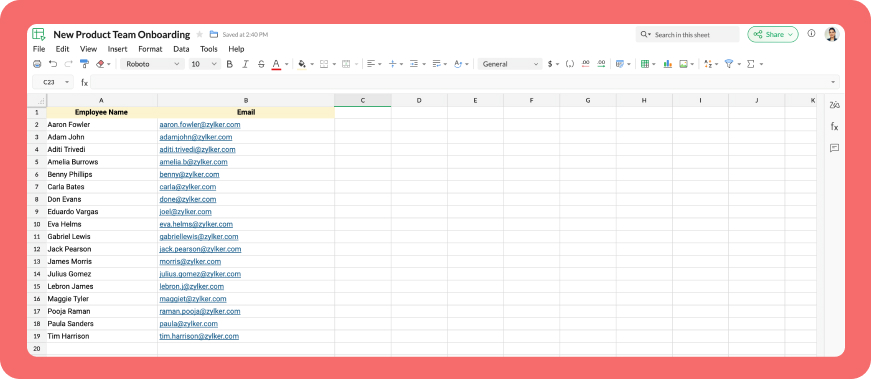
Let's explore how to create a custom workflow using Cliq's platform components to streamline the process of bulk-adding users to a channel via a Zoho Sheet or CSV file. This approach facilitates a smooth onboarding experience without the need for manual effort.
Pre-requisite :
Before beginning to script the code below, we must create a connection with Zoho Cliq. Once a connection is created and connected, you can use it in Deluge integration tasks and invoke URL scripts to access data from the required service.
Create a Zoho Oauth default connection with any unique name and the scopes - ZohoCliq.Channels.All and ZohoSheet.dataApi.ALL
Refer to the below links to learn more :
Step 1 : Creation of slash command
- After a successful login in Cliq, hover to the top right corner and click your profile. Post clicking, navigate to Bots & Tools > Commands.
- At your right, click the button - Create Command.
- To know more about slash commands and their purposes, refer to Introduction to slash commands.
- Create a slash command using your preferred name. Specify the following details: the command name, a hint (to give users an idea of what the command is for), and the access level.
- Finally, click "Save & edit code".

- inputs = List();
- inputs.add({"name":"channels","label":"Pick a channel","placeholder":"Choose a channel where you need to add members","max_selections":"1","multiple":false,"mandatory":true,"type":"native_select","data_source":"channels"});
- inputs.add({"name":"headername","label":"Header name","placeholder":"Email ID","hint":"In which the Email ID is present","min_length":"0","max_length":"25","mandatory":true,"type":"text"});
- inputs.add({"type":"radio","label":"Import type","name":"import_Type","hint":"Choose a type that you need to import users","options":[{"label":"CSV","value":"csv"},{"label":"Zoho sheet","value":"zohosheet"}],"trigger_on_change":"true"});
- return {"name":"addbulkuser","type":"form","title":"Add bulk users","hint":"To add maximum of upto 1000 users in a channel.","button_label":"Add Users","inputs":inputs,"action":{"type":"invoke.function","name":"addbulkusers"};
Step 2 : Scripting form function
- We need to create a function for the form that manages submission responses, including the Zoho Sheet link or CSV file, the name of the column containing the email addresses, and the channel details where users should be added in bulk.
- Hover to the top right corner and click your profile. After clicking, navigate to Bots & Tools > Functions.
- To your right, click the Create Function button.
- Name the function "addbulkusers," provide a description as desired, and select "form" as the function type. Then, click "Save and edit code," and paste the following code.
- emailIdList = list();
- successlist = list();
- failedlist = list();
- try
- {
- info form;
- formValues = form.get("values");
- columnName = formValues.get("headername");
- headerName = formValues.get("headername");
- if(formValues.get("import_Type").get("value") == "zohosheet")
- {
- url = formValues.get("url");
- spreadSheetId = url.getPrefix("?").getSuffix("open/");
- sheetName = url.getSuffix("?").getPrefix("&").getSuffix("=");
- worksheetname = sheetName.replaceAll(" ","%20");
- columnName = columnName.replaceAll(" ","%20");
- allDatas = list();
- params = Map();
- params.put("column_names",columnName);
- params.put("method","worksheet.records.fetch");
- params.put("worksheet_id",sheetName + "#");
- sheetDetails = invokeurl
- [
- url :"https://sheet.zoho"+environment.get("tld")+"/api/v2/" + spreadSheetId
- type :GET
- parameters:params
- connection:"addbulkusers"
- ];
- info sheetDetails;
- if(sheetDetails.get("status") == "success" && sheetDetails.get("records").size() <= 1000)
- {
- allDatas.addAll(sheetDetails.get("records"));
- }
- else if(sheetDetails.get("status") == "success" && sheetDetails.get("records").size() > 1000)
- {
- return {"type":"form_error","text":"I can only able to add 1000 user. Kindly try passing with 1000 records in the sheet!!!"};
- }
- else
- {
- return {"type":"form_error","text":"I can't find any email ids. Kindly re-check the column name and header row!!!"};
- }
- info "allData: " + allDatas.size();
- if(allDatas.size() > 1000)
- {
- return {"type":"form_error","text":"I can only able to add 1000 user. Kindly try passing with 1000 records in the sheet!!!"};
- }
- for each data in allDatas
- {
- if(data.get(formValues.get("headername")) == null)
- {
- return {"type":"form_error","text":"I can't find any email ids. Kindly re-check the column name and header row!!!"};
- }
- emailIdList.add(data.get(formValues.get("headername")));
- if(emailIdList.size() == 100)
- {
- channelID = formValues.get("channels").get("id");
- params = {"email_ids":emailIdList};
- info "Params: " + params;
- addUsers = invokeurl
- [
- url :environment.get("base_url") + "/api/v2/channels/" + channelID + "/members"
- type :POST
- parameters:params.toString()
- detailed:true
- connection:"addbulkusers"
- ];
- info "Adduser: " + addUsers;
- if(addUsers.get("responseCode") == "204")
- {
- successlist.addAll(emailIdList);
- }
- else
- {
- failedlist.addAll(emailIdList);
- }
- info "100: " + emailIdList.size();
- emailIdList = list();
- }
- }
- if(emailIdList.size() > 0)
- {
- channelID = formValues.get("channels").get("id");
- params = {"email_ids":emailIdList};
- info "Params: " + params;
- addUsers = invokeurl
- [
- url :environment.get("base_url") + "/api/v2/channels/" + channelID + "/members"
- type :POST
- parameters:params.toString()
- detailed:true
- connection:"addbulkusers"
- ];
- info "Adduser: " + addUsers;
- if(addUsers.get("responseCode") == "204")
- {
- successlist.addAll(emailIdList);
- }
- else
- {
- failedlist.addAll(emailIdList);
- }
- info "Email id: " + emailIdList;
- }
- info "Successlist: " + successlist;
- info "Failedlist: " + failedlist;
- if(successlist.size() > 0 && failedlist.size() > 0)
- {
- postMessage = {"text":"Successfully added " + successlist.size() + " member(s) and failed for " + failedlist.size() + " Member(s)"};
- }
- else if(successlist.size() > 0 && !failedlist.size() > 0)
- {
- postMessage = {"text":"Successfully added " + successlist.size() + " member(s)"};
- }
- else if(!successlist.size() > 0 && failedlist.size() > 0)
- {
- postMessage = {"text":"Adding members in channel failed for " + failedlist.size() + " member(s)"};
- }
- info zoho.cliq.postToChat(chat.get("id"),postMessage);
- }
- else
- {
- csvFile = formValues.get("csvFile");
- csvFile = csvFile.getfilecontent();
- allDatas = csvFile.toList("\n");
- i = 0;
- indexValue = 0;
- indexBoolean = false;
- for each data in allDatas
- {
- if(i == 0)
- {
- headers = data.toList(",");
- for each header in headers
- {
- info header;
- if(headerName == header)
- {
- indexBoolean = true;
- indexValue = headers.indexOf(headerName);
- }
- }
- if(indexBoolean == false)
- {
- return {"type":"form_error","text":"I can't find any email ids. Kindly re-check the column name and header row!!!"};
- }
- }
- else
- {
- emailIdList.add(data.get(indexValue));
- }
- i = i + 1;
- if(emailIdList.size() == 100)
- {
- channelID = formValues.get("channels").get("id");
- params = {"email_ids":emailIdList};
- info "Params: " + params;
- addUsers = invokeurl
- [
- url :environment.get("base_url") + "/api/v2/channels/" + channelID + "/members"
- type :POST
- parameters:params.toString()
- detailed:true
- connection:"addbulkusers"
- ];
- info "Adduser: " + addUsers;
- if(addUsers.get("responseCode") == "204")
- {
- successlist.addAll(emailIdList);
- }
- else
- {
- failedlist.addAll(emailIdList);
- }
- info "100: " + emailIdList.size();
- emailIdList = list();
- }
- }
- if(emailIdList.size() > 0)
- {
- channelID = formValues.get("channels").get("id");
- params = {"email_ids":emailIdList};
- info "Params: " + params;
- addUsers = invokeurl
- [
- url :environment.get("base_url") + "/api/v2/channels/" + channelID + "/members"
- type :POST
- parameters:params.toString()
- detailed:true
- connection:"addbulkusers"
- ];
- info "Adduser: " + addUsers;
- if(addUsers.get("responseCode") == "204")
- {
- successlist.addAll(emailIdList);
- }
- else
- {
- failedlist.addAll(emailIdList);
- }
- }
- info "Successlist: " + successlist;
- info "Failedlist: " + failedlist;
- if(successlist.size() > 0 && failedlist.size() > 0)
- {
- postMessage = {"text":"Successfully added " + successlist.size() + " member(s) and failed for " + failedlist.size() + " Member(s)"};
- }
- else if(successlist.size() > 0 && !failedlist.size() > 0)
- {
- postMessage = {"text":"Successfully added " + successlist.size() + " member(s)"};
- }
- else if(!successlist.size() > 0 && failedlist.size() > 0)
- {
- postMessage = {"text":"Adding members in channel failed for " + failedlist.size() + " member(s)"};
- }
- info zoho.cliq.postToChat(chat.get("id"),postMessage);
- }
- }
- catch (e)
- {
- info e;
- return {"type":"form_error","text":"I can't find any email ids. Kindly re-check the column name and header row!!!"};
- }
- return Map();
Step 3 : Configuring form change handler
- After copying and pasting the code into the form submission handler, navigate to the form change handler for the created form function.
- You can find this in the top left corner of the editor, where you will see an arrow next to the form submission handler. Clicking on this arrow will display the form change handler in a dropdown menu.
- Click it to edit the code in the form change handler, which is necessary for real-time modifications to a form's structure or behaviour based on user input in a specific field.
- targetName = target.get("name");
- info targetName;
- inputValues = form.get("values");
- info inputValues;
- actions = list();
- if(targetName.containsIgnoreCase("import_Type"))
- {
- fieldValue = inputValues.get("import_Type").get("value");
- info fieldValue;
- if(fieldValue == "csv")
- {
- actions.add({"type":"add_after","name":"import_Type","input":{"label":"CSV File","name":"csvFile","placeholder":"Please upload a zCSV File","mandatory":true,"type":"file"}});
- actions.add({"type":"remove","name":"url"});
- }
- else if(fieldValue == "zohosheet")
- {
- actions.add({"type":"add_after","name":"import_Type","input":{"name":"url","label":"Enter the sheet url","placeholder":"https://sheet.zoho.com/sheet/open/6xhgb324f142e91d845e5b4b472f7422379c9","min_length":"0","max_length":"400","mandatory":true,"type":"text","format":"url"}});
- actions.add({"type":"remove","name":"csvFile"});
- }
- }
- return {"type":"form_modification","actions":actions};
Business use cases:
- HR onboarding: Seamlessly add new employees to internal communication channels.
- Event management: Quickly invite attendees to event-specific channels.
- Education platforms: Enroll students in course groups in one go.
- Community building: Grow large communities by importing member lists effortlessly.
Bottom line
Bulk user addition in Cliq channels through Zoho Sheet or CSV files allows us to eliminate tedious tasks, reduce errors, and manage large-scale data effortlessly. Is onboarding consuming too much of your valuable development time? If so, it might be time to shake things up with a customized workflow!
Topic Participants
Harsha SS
Sticky Posts
Add Claude in Zoho Cliq
Let’s add a real AI assistant powered by Claude to your workspace this week, that your team can chat with, ask questions, and act on conversations to run AI actions on. This guide walks you through exactly how to do it, step by step, with all the codeCliq Bots - Post message to a bot using the command line!
If you had read our post on how to post a message to a channel in a simple one-line command, then this sure is a piece of cake for you guys! For those of you, who are reading this for the first time, don't worry! Just read on. This post is all about howAutomating Employee Birthday Notifications in Zoho Cliq
Have you ever missed a birthday and felt like the office Grinch? Fear not, the Cliq Developer Platform has got your back! With Zoho Cliq's Schedulers, you can be the office party-cipant who never forgets a single cake, balloon, or awkward rendition ofAutomate attendance tracking with Zoho Cliq Developer Platform
I wish remote work were permanently mandated so we could join work calls from a movie theatre or even while skydiving! But wait, it's time to wake up! The alarm has snoozed twice, and your team has already logged on for the day. Keeping tabs on attendanceCustomer payment alerts in Zoho Cliq
For businesses that depend on cash flow, payment updates are essential for operational decision-making and go beyond simple accounting entries. The sales team needs to be notified when invoices are cleared so that upcoming orders can be released. In contrast,
Recent Topics
Extract Archived Projects using Zoho Projects API
In my organization we archive the projects when they are already completed, charged, invoiced, so that only those that are still pending process remain active. I need to access all projects (active and archived) from an external system, but the API v3Ask the Experts: Five-hour live Q&A session with Zoho WorkDrive product experts
Have questions about WorkDrive 5.0? Let’s talk! We recently launched Zoho WorkDrive 5.0, packed with powerful updates to help your team work smarter, stay secure, and get more value from your business content. From content-centric workflows and AI-poweredFile upload support for subforms
Dear All, Subforms help you add and track data related to your CRM records. We've always supported most of the commonly used field types in subforms, so as to cater to your business requirements. Now we're happy to extend support to file upload fields.Circular record relationship in CRM
Given there is a lookup in custom module Transactions creating a related list on the chosen Contact record. I. e. a lookup field on Transactions module points to Contacts. The related list on a Contact record can thus have have many transaction records.Is it possible to pull the Zoho desk data into Zoho analytics in real time
Hi - I am looking to add more dashboards and reports of Zoho Desk in analytics. I see there is a schedule to pull the data into analytics, but I'm wondering if there is an option to pull the data in real time instead of a specific interval?How to set value of dropdown field to variable
For the life of me, I can't figure out why the following code won't set input.status to the previousSelection. Steps to reproduce: 1. Click input.complete 2. input.status dropdown updates from '1-Backlog' to '4-Done' 3. Click input.complete again to deselect[Product Update] TimeSheets module is now renamed as Time Logs in Zoho Projects.
Dear Zoho Analytics customers, As part of the ongoing enhancements in Zoho Projects, the Timesheets module has been renamed to Time Logs. However, the module name will continue to be displayed as Timesheets in Zoho Analytics until the relevant APIs are[WEBINAR][MEA] Learn how to control your inventory and multi-channel sales with the Zoho Inventory & Zoho Books integration
Hello there, We are hosting an exclusive live webinar tailored for businesses across the Middle East and African countries, where you'll learn how to take full control of your inventory and multi-channel sales while keeping your accounting perfectly inLess clicks, more connection – the usability edge of Zoho Desk
Imagine joining a new workplace, eager to prove your skills, partner with peers, learn new tools, and build a strong foundation for your career. The standards you've set could drive pressure into your head. You now discover the organization is using ZohoTip #3 Automating total item weight calculation for your sales orders in Zoho Inventory
Hello, Hope the day is treating you well. Last week, we saw how we could automate the calculation of total shipping charges from numerous shipments for your sales orders and invoices. This week, we will see how you can automate the calculation of total item weight for your sales orders. How does this work? First, you are required to capture the weight of all your items using a custom field. And when you create a sales order, you can either have the system display the individual weights for you orWhy Format section gets disabled when we create Merge Template over PDF
I need some assistance I have a Client who is going to give certificates to users who passes his exam. So, I am using mail merge but in ZOHO writer after I upload the PDF and create merge Template over PDF the format Section gets disabled. My problemHow to calculate separate totals for Product Line Items filtered by category in Quotes?
Hello! I'm working with Quotes in Zoho CRM and need help calculating conditional totals for line items. Current setup: I have two tables in my Quote template (Zoho Writer), both displaying Quoted Line Items Table 1 (top): Shows all products where ProductZoho Desk API Documentation missing a required field
We are trying to create a section using this information. Even after preparing everything based on that page, we still get an error. The error we get is this: {"errorCode":"INVALID_DATA","message":"The data is invalid due to validation restrictions","errors":[{"fieldName":"/translations","errorType":"missing","errorMessage":""}]}Fetch Subform values through a lookup of a lookup
Hi, I'm having an issue fetching the values of a subform through a lookup field through another lookup field. The code works perfectly to show me the subform row ID, but the second I try to get any readable data, it says "Error occurred. Please contactTurn Decision Box to a button
Dear all, I need your help on CSS to turn a Decision Box to a Button. I have a Decision Box like: Turn on/off to refresh the information. (on User Input, either True or False, will refresh the information) Now I want to simulate to treat it like a RefreshEmails not being received from a particular domain
Cannot receive any emails sent from atco.com Domain is in the spam whitelist so should be no reason for it not to be coming through. Have filed a ticket and besides a generic response of we are looking at it - it seems there is no actual support workersStock Count
The stock count is a nice new feature, but we cannot figure out how to: 1. Use it without assigning to a person, we have a team or one of multiple do stock counts as do most any company. 2. Add any extra fields to what the "counter" sees. The most importantSend Whatsapp message from Whatsapp template with custom variables
Hi, I'm trying to do some basic integration for sending WhatsApp messages from Zoho CRM using Zoho Desk whatsapp templates. When creating new whatsapp template in Zoho Desk we can choose ticket related fields as variables but it's not clear how to useOutgoing blocked: Unusual activity detected.
I just made payment for my Zohomail Today and have been debited so i will like to be Unblocked because this is what it says (Outgoing blocked: Unusual activity detected) Thank you i await your swift responsesIntegrating with My Own Application and ZOHO CRM Simultaneously
I have my own WhatsApp bot that uses my WhatsApp business account. I want to use the same phone number to integrate with ZOHO as well. What is the recommended way to do that? Should I integrate my application with ZOHO, forwarding messages whenever theAccount for Cryptocurrency Holdings in Zoho Books/Custom Currencies?
Hello, I've recently started using Zoho to run my small business and I've really been enjoying all of its features. However, I've been struggling to find a way to account for cryptocurrencies in Zoho Books. My company mines a Cryptocurrency token calledTransferring CRM Attachments to Workdrive
relatedrecords = zoho.crm.getRelatedRecords("Attachments","Conditions",conId); attachid = List(); for each ele in relatedrecords { attachementId = ele.get("id"); attachid.add(attachementId); } for each ele in attachid { counter = 1; downloadFile = invokeurl [ url: "https://www.zohoapis.com/crm/v2/Conditions/" + conId + "/Attachments/" + ele type: GET connection : "work_drive" ]; resp2 = zoho.crm.attachFile("Deals",dealId,downloadFile); resp3 = zoho.workdrive.uploadFile(downloadFile, dealWD, "PlaceHolder"+counter+"",New Customization options in the module builder: Quick Create and Detail view
Hello everyone, We have introduced two new components to the module builder: Quick create and Detail view. The Quick Create Component It is a mini form used to create a record and associate it to the parent record from a lookup field. For example, if you have a Deals lookup in the Contacts module, then you can associate existing deals or create a deal and associate it with the contact. You can customize this Quick Create form by adding standard as well as custom fields. There is no limit to the numberunblock my zoho mail account. outlines@zoho.com
please unblock my zoho mail account, outlines@zoho.comSMTP email sending problem
Hello, I've sent emails before, but you haven't responded. Please respond. My work is being disrupted. I can't send emails via SMTP. Initially, there were no problems, but now I'm constantly receiving 550 bounce errors. I can't use the service I paidMailk got blocked / Inquiry About Email Sending Limits and Upgrade Options
Dear Zoho Support Team, My name is Kamr Elsayed I created this account to use for applying for vocational training in Germany. As part of this process, I send multiple emails to different companies. However, after sending only 8 emails today, I receivedForwarder
Hi, I tried to add a forwarder from which emails are sent to my main zoho account email . However, it asks me for a code that should be received at the forwarder email, which is still not activated to send to my zoho emial account. So how can I get theNo chat option
Chat option is not supported.Direct “Add to Google Calendar” Option in Zoho Meeting
Hello Zoho Meeting Team, Hope you are doing well. We would like to request an enhancement related to the “Add to Calendar” functionality in Zoho Meeting. Currently, when we open Zoho Meeting and view our meetings under My Calendar, there is an Add toDKIM cannot be enabled for the domain as no verified default selector present
Hi Support Team, For Domain DKIM record trying to enable status. but showing error "DKIM cannot be enabled for the domain as no verified default selector present" So, please resolve the issue. Thank you.unable to send message reason 554 5.1.8 Email outgoing blocked
unable to send message reason 554 5.1.8 Email outgoing blockedI can't log in to my account on Thunderbird
I've just had to rebuild my PC (calamitous mess from Microsoft with Win10/Win 11 'upgrade' - they confirmed I had to start with a new build). I have used Zoho mail for years via Mozilla Thunderbird, but now I've had to download the latest version of TBird,Should I Use DMARC?
When I configure Zoho Mail's DMARC settings, it's mandatory to fill in the RUA and RUF (Aggregate notification email address*, Forensic notification email address*) addresses. When we enter an email address in these fields, we receive reports from theIntroducing Profile Summary: Faster Candidate Insights with Zia
We’re excited to launch Profile Summary, a powerful new feature in Zoho Recruit that transforms how you review candidate profiles. What used to take minutes of resume scanning can now be assessed in seconds—thanks to Zia. A Quick Example Say you’re hiringBooks API Receiving an Error that Doesn't Make Sense when Creating Credit Note - trying to use 'ignore_auto_number_generation' argument
Hello, I'm working on a newly created routine and I'm getting an error that doesn't make sense when trying to create a new Credit Note. Here is my POST request. Endpoint: https://www.zohoapis.com/books/v3/creditnotes?organization_id=########## Body: {How to move emails to Shared Mailbox?
Hello, I created a Shred Mailbox instead of using a distribution group. But I cannot move previous emails to certain shared mailbox. Is it possible move some emails from inbox to shared mailbox?Collaboration with free plan user.
Hello. Do both users need to be on Pro plan to collaborate? Or can a Pro user share a note with a free plan user with the ability to edit?Analytics Portal
I have the "standard plan" and want to explore the portal option; I activated the 15-day trial but do not see the pricing for the add-on. How can I get the price under "Upgrade add-ons." Thanks RudyCan I filter a Lookup field to only show related records from another Lookup in Zoho CRM?
In our Leads module, we have two Lookup fields: Recruitment Agency – the agency that the lead came from Recruiter – the individual contact from that agency who sent us the lead Both fields link correctly to their respective records in CRM. However, ourHow do I filter contacts by account parameters?
Need to filter a contact view according to account parameter, eg account type. Without this filter users are overwhelmed with irrelevant contacts. Workaround is to create a custom 'Contact Type' field but this unbearable duplicity as the information alreadyNext Page