Introducing Zia GenAI: Zoho's Native Generative AI for Zoho Desk
Hello everyone,

Note: We have updated this announcement on 13th March 2025.
As of 7th March 2025, the following name changes are made with respect to Zia.
- Zia GenAI is updated as Zia
- Zia Powered by GPT is updated as Generative AI
- Native Generative AI is updated as Open Source Models
 Zia is available on Early Access for Zoho Desk Enterprise subscribers. Kindly fill out this Registration Form to request early access.
We are excited to announce the Beta release of Zia Native Generative AI in Zoho Desk, now available through our Early Access program. This model is designed to enhance the efficiency and quality of customer support, and we are inviting you to experience it firsthand.

Important notes
- Zia is currently available in AU, EU, US, and India data centers.
- Zia currently supports 13 languages - English, Spanish, German, Russian, French, Portuguese, Italian, Dutch, Danish, Swedish, Hindi, Arabic, Hebrew. We are actively working on expanding language support even further.
In the fast-paced world of customer support, efficiency, accuracy, and personalization are crucial. With this in mind, we're introducing Zia GenAI in Zoho Desk. While AI is already a key player in the service industry, Zia stands out by leveraging native genAI models to address specific challenges, such as:
- High response times
- Repetitive nature of routine queries
- Inconsistent responses across agents
- Limited contextual understanding of customer issues
- Difficulty of extracting actionable insights from vast amounts of customer data
By tackling these challenges, Zia helps support teams deliver faster, accurate, and personalized customer experiences.
Zia's advanced AI capabilities
Building on the foundation of Zia’s earlier tools—such as sentiment analysis for understanding customer emotions, keyword tagging for better ticket organization, and anomaly prediction for identifying irregular patterns—Zia takes these capabilities to the next level. It offers a more sophisticated contextual grasp of customer interactions, enabling it to provide highly relevant and actionable responses. By streamlining routine tasks and enhancing response quality, Zia empowers agents to focus on more complex customer needs and elevate the overall support experience.
Zia's generative skills
- Contextual ticket summaries
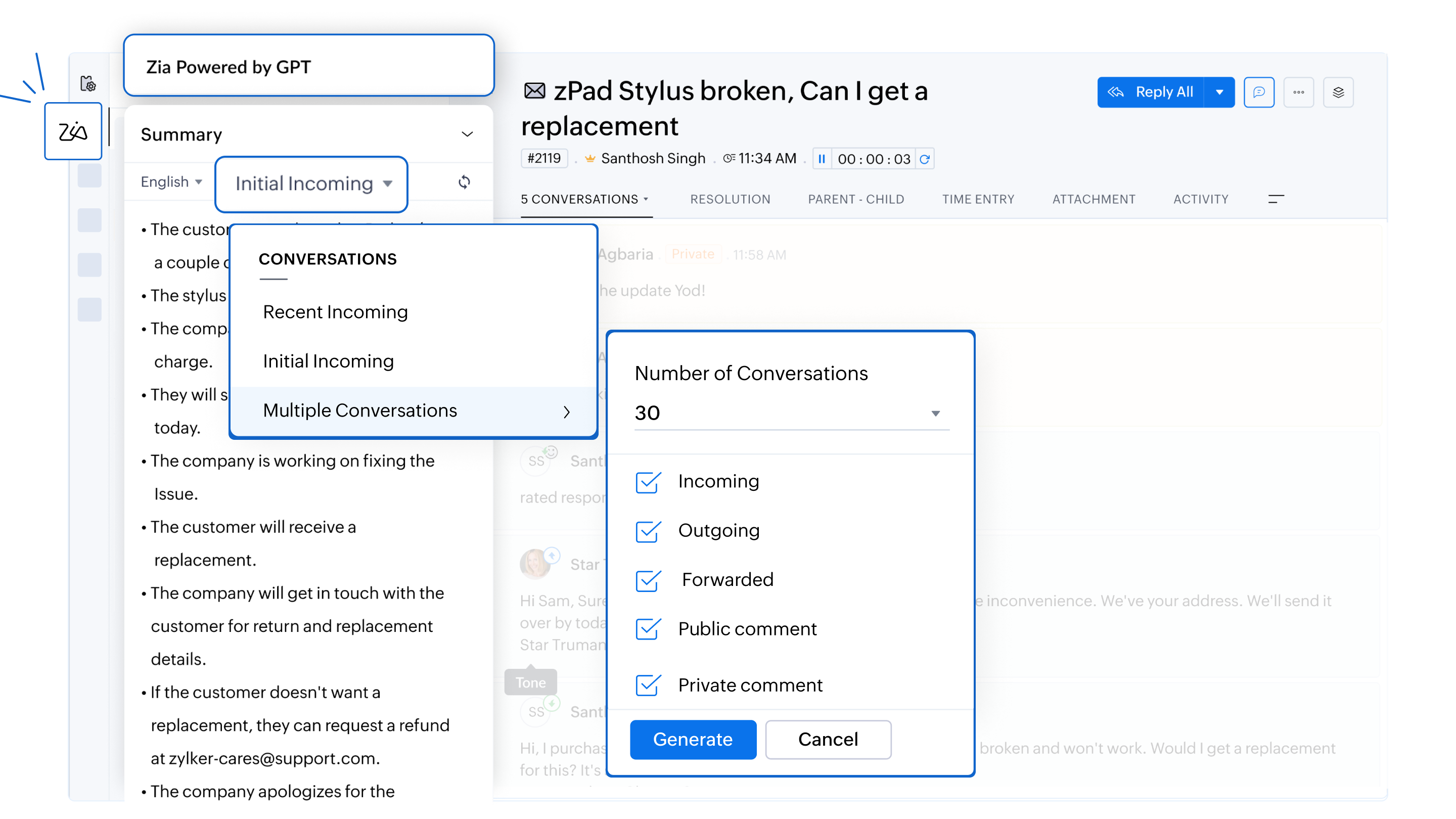
Zia provides concise summaries of incoming inquiries and previous conversations within a ticket. Agents can choose from different options, including recent, initial, or multiple ticket conversations (up to five), which cover all types of interactions—such as incoming, outgoing, forwarded, and public comments. This enables agents to quickly grasp the context and history of complex tickets, which ensures they can deliver informed, relevant, and efficient responses without having to read through lengthy ticket histories.
For example, if an agent is handling a long-running issue, Zia can generate a summary of the latest ticket conversations or earlier interactions within the same ticket, helping the agent provide a more precise response while saving time.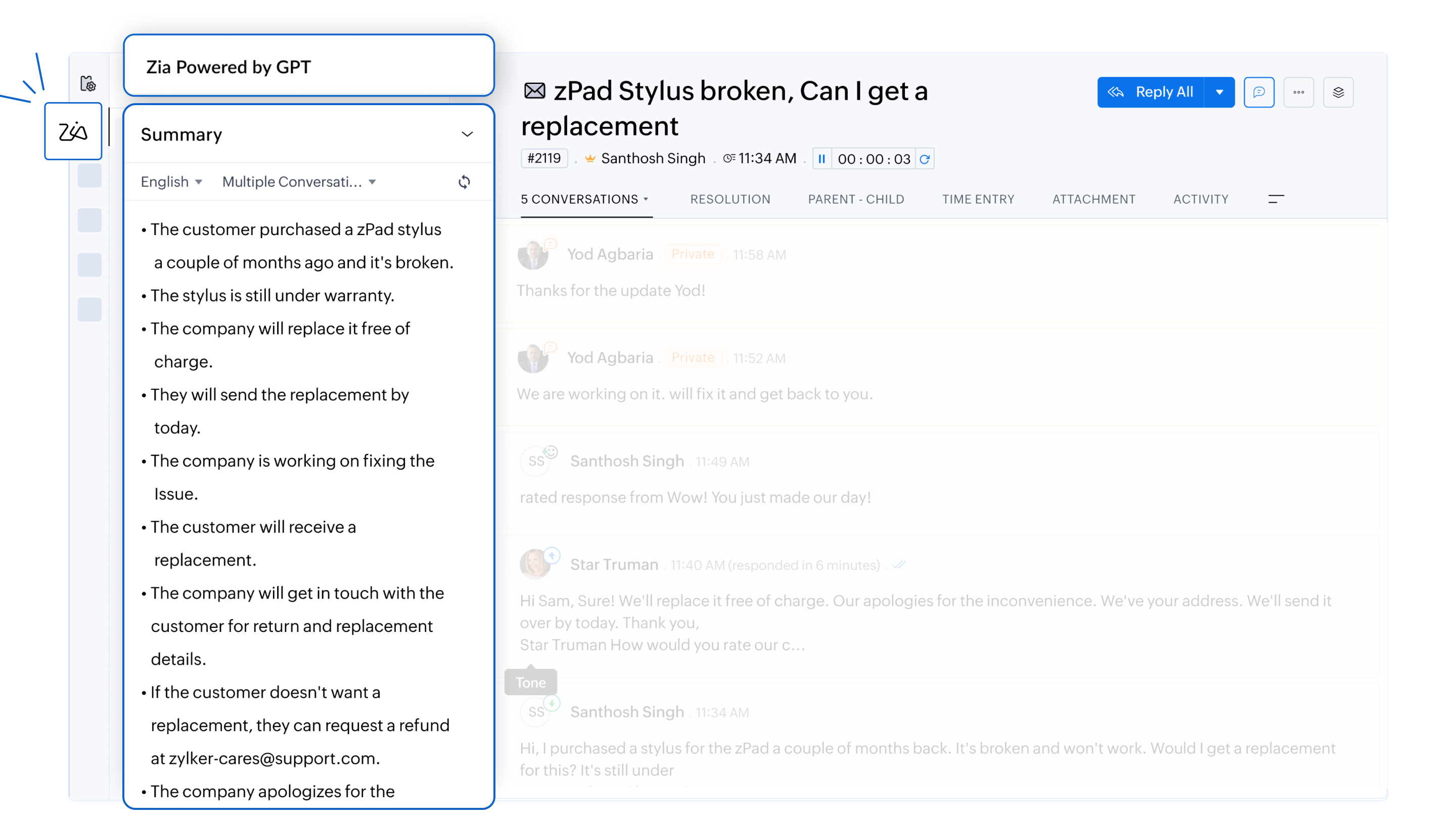
- Efficient responses with AI assistance
Zia analyzes customer inquiries and drafts responses based on the information available in the knowledge base articles. Whether it’s addressing policy-related questions or providing troubleshooting guides, agents can resolve issues faster.
For example, a ticket enquiring about a refund for a recently purchased item can be answered without an agent's intervention. Zia can analyze the tone of the email and draft a formal response with details on how to go about with the refund based on its analysis of the KB articles. It can also include the links to the company's refund policy and commonly asked questions related to the customer's request.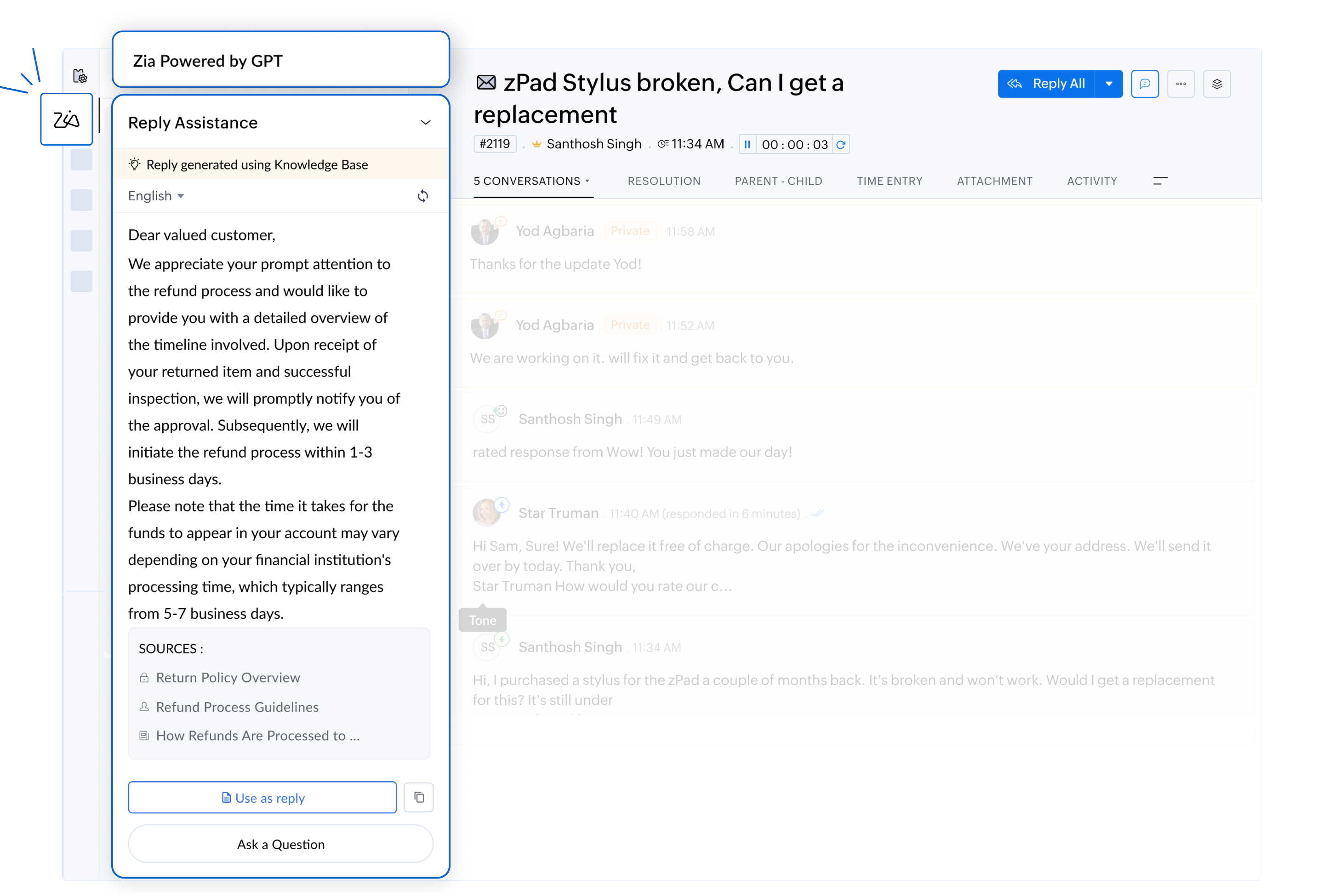
- Personalized and empathetic interactions
By analyzing the tone and sentiment, Zia helps agents draft responses that align with the emotional context of the conversation. Whether the situation requires an apology for a delay or a friendly response to a simple query, Zia ensures every interaction feels personalized.
For example, a customer reporting a delayed refund should receive an empathetic and prompt response. For routine inquiries, Zia will be more likely to suggest a friendly, concise reply.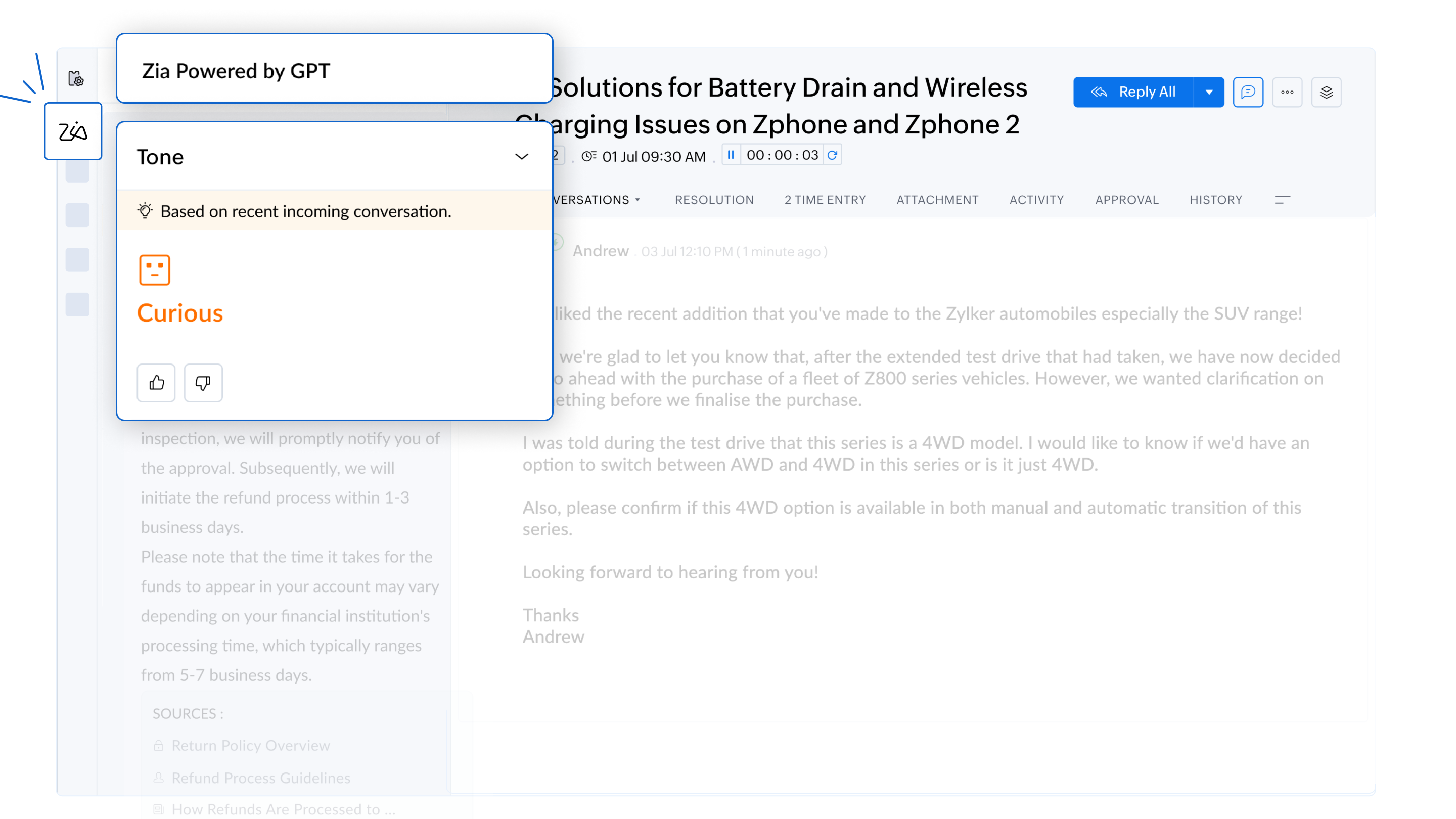
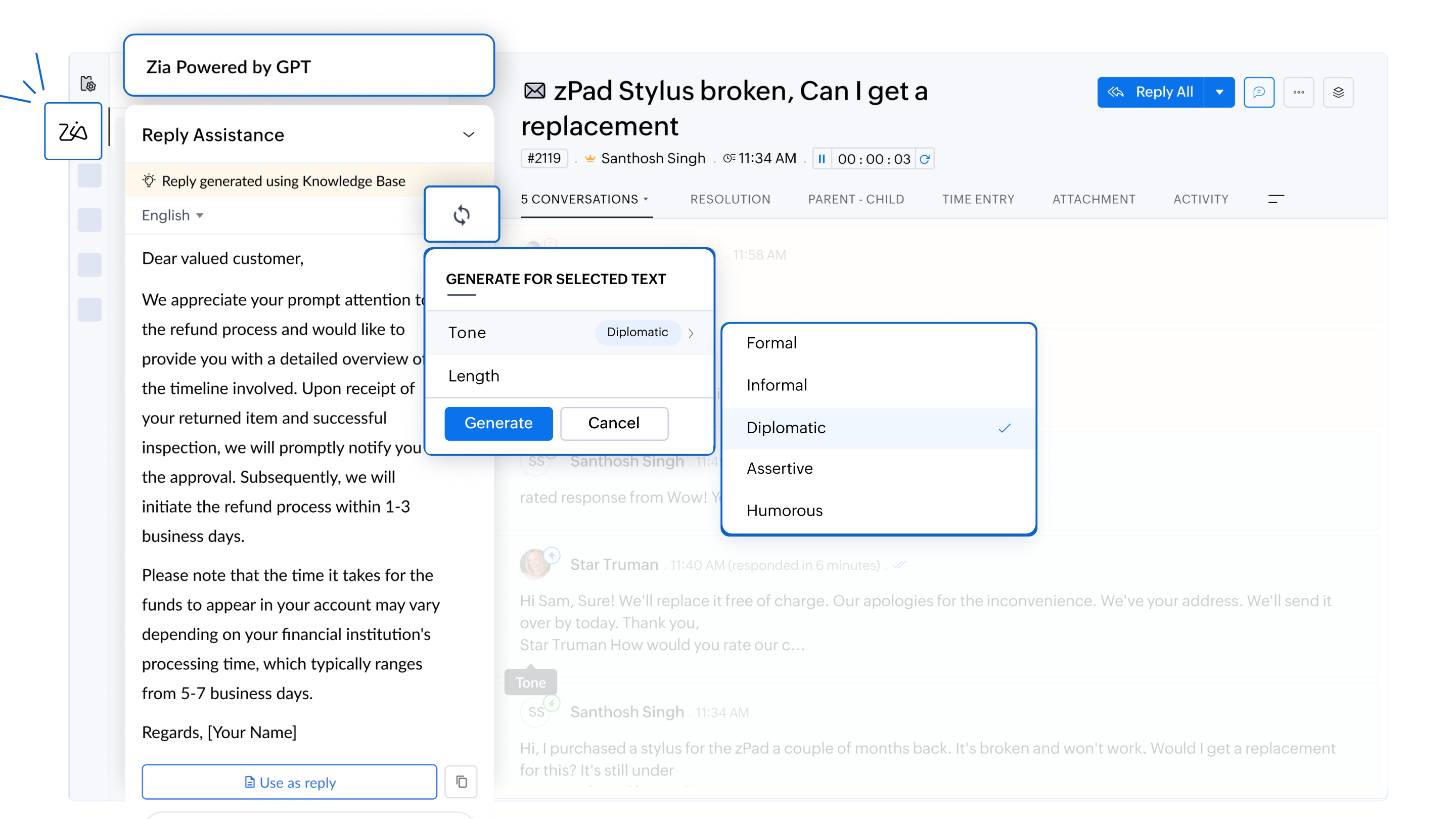
- Customizable response lengths
Zia enable agents to tailor the length of responses to suit customer needs. Whether a customer requires an in-depth explanation or a brief summary, agents can choose the most appropriate format to ensure clarity and efficiency.
For example, when a customer reports a technical error in the software, Zia can generate a detailed explanation to help resolve the issue or provide a concise troubleshooting guide based on the severity of the problem.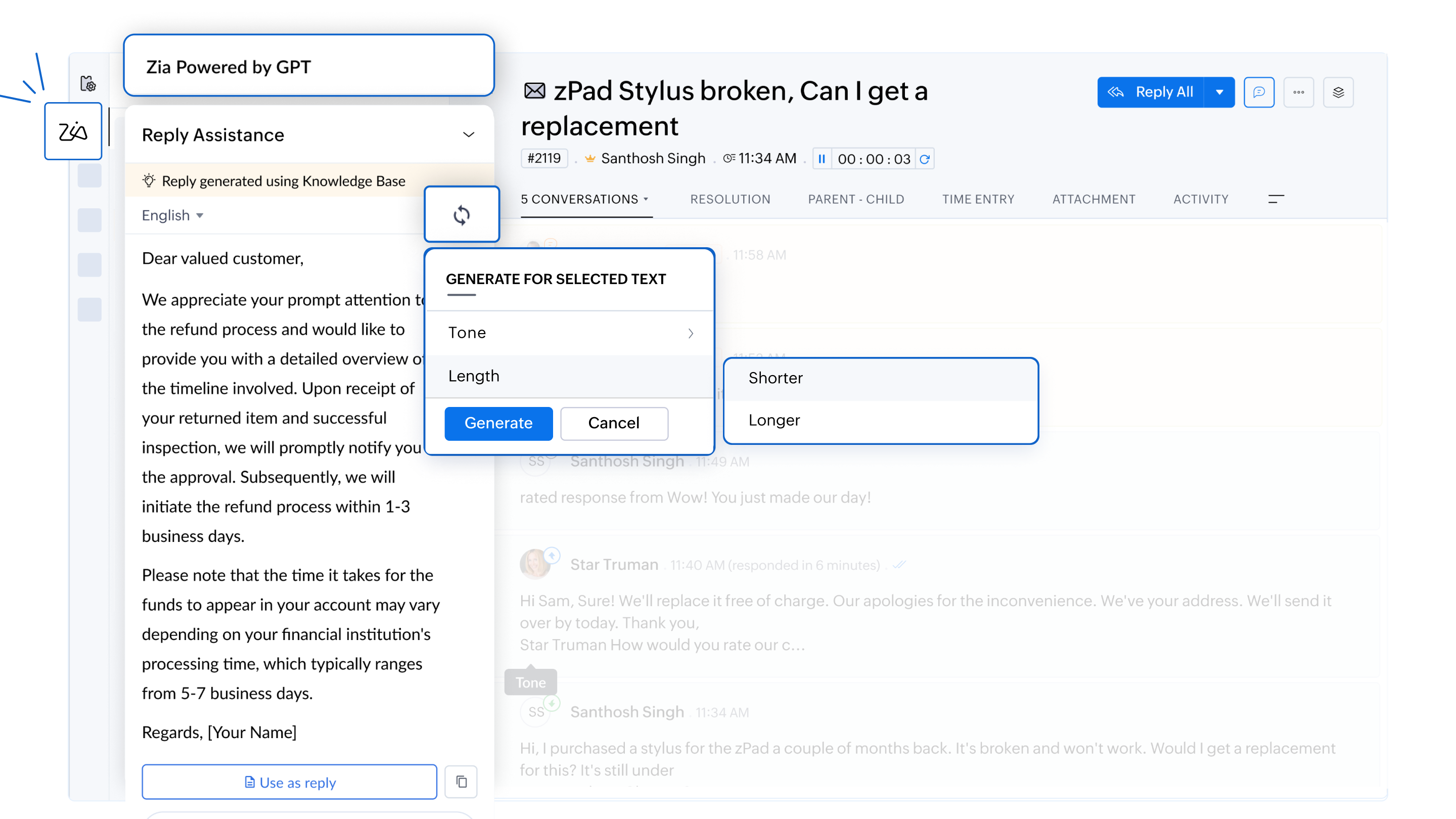
- Proactive knowledge base growth
Zia flags gaps in the knowledge base by identifying customer issues without documented solutions. This helps organizations continuously improve their knowledge repository, equipping teams to address similar issues more effectively in the future.
For example, if an agent encounters a unique issue without an existing solution, Zia notifies the team to create a new knowledge base article, helping future agents resolve similar problems more effectively.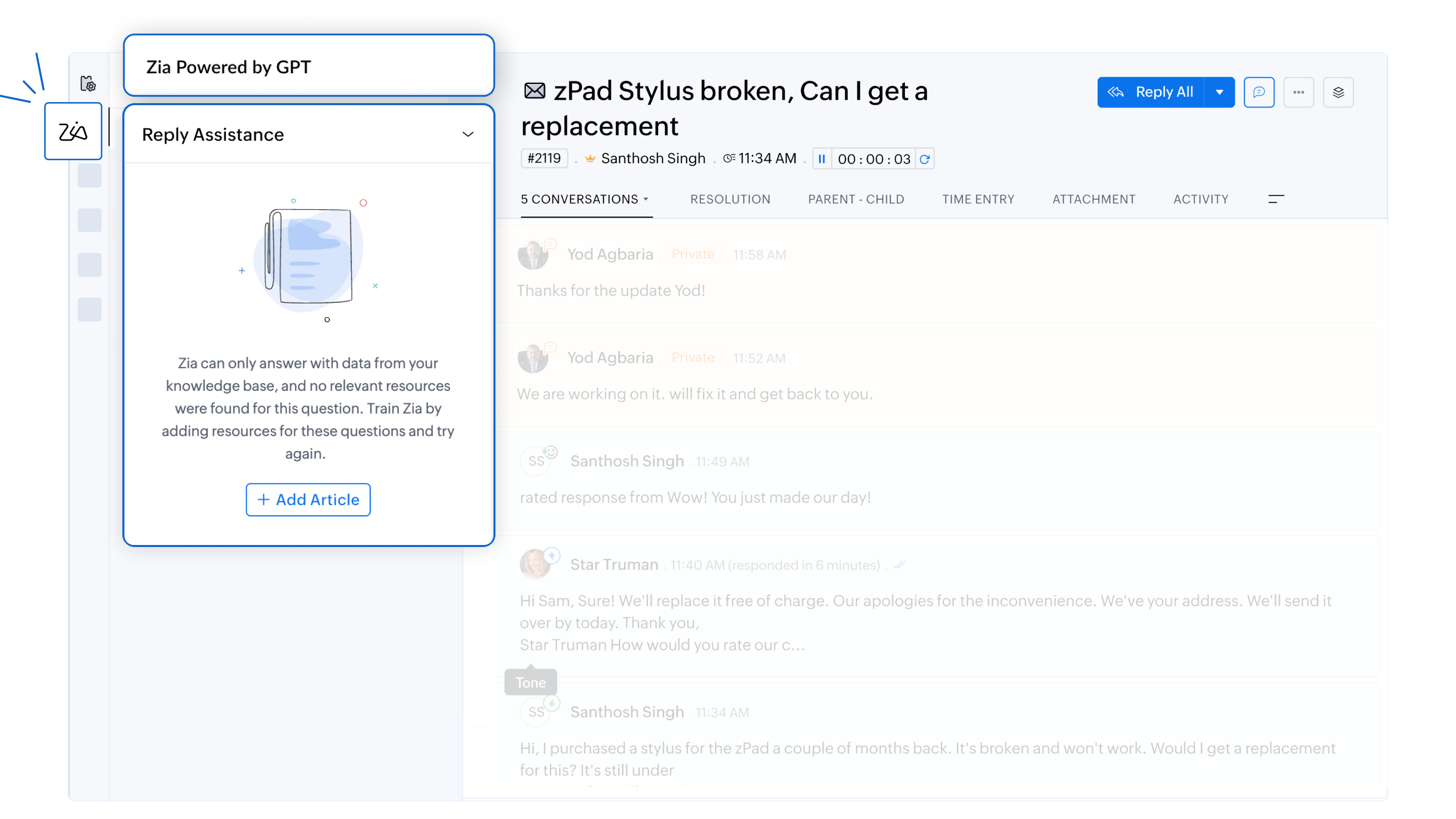
- Data privacy and security
Zia adheres to strict GDPR guidelines to ensure customer information remains secure. All responses are generated solely from the company’s knowledge base, and ticket data is not used for training purposes.
For more information on Zia and how to configure them, please refer to the detailed help documentation on
To enable this feature in your Zoho Desk account, please don't forget to fill out the registration form to request access. We look forward to empowering your support team with the power of AI.
For any questions or assistance, the support team is available via email at support@zohodesk.com, or queries and feedback can be left in the comment section below.
Thank you, and have a great day!
Regards,
Varsha P
Zoho Desk - User Education
Topic Participants
Varsha P
Zohoboy
Shivani | Zoho Desk
as
Alhatab Admin
Sticky Posts
2024 Email Authentication Standards: Elevating Security with Google and Yahoo
In contemporary email communication, email authentication plays a pivotal role in mitigating email fraud, spam, and phishing attacks. Brace yourself for a new level of security. Starting February 2024, Gmail and Yahoo will be implementing robust emailUsing Agent Email Address as From Address
Currently, while replying to a ticket, it is possible for agents to choose their own email addresses as 'from' addresses. Although we built this just for that little extra flexibility, in hindsight, it hasn't figured much in conventional usage. Almost all businesses prefer that responses to their customers' tickets be sent from the common support/service email address and NOT from those of individual agents. During personal interactions at events, some of you have even made passing mentions aboutEdit and Delete options in Comments
A lot of teams have been using ticket comments extensively to collaborate everyday. Notification Center further improved this experience by bringing real-time updates. As we continue to build more improvements to this experience, we've shipped a small-yet-importantWebinar 2: Supercharged customer support for growing business
Join us for this webinar and learn how to step up your support game using a real-time communication platform to generate happier, more successful customers. In this live webinar, we will will discuss the importance of SalesIQ for your support team and how it can help you: Understand your customers better and their journeys to proactively support and engage them even before they ask for help. Integrating real time conversations into Zoho Desk’s Support, providing a conversational customer serviceCustomize Colors of your Customer Self Service Portal
You asked for it. We heard you. We're happy to roll out the most sought after feature request, Customizing the Colors of your Customer Self-service Portal. Now you can set the color of your customer portal to mimic your company's web site, so that your customers visiting the portal will not feel alienated by the default theme. Go ahead and configure the color of the header, tabs, fonts and background according to your needs. You can either choose between default color themes like Blue, Grey, Green
Recent Topics
How exactly does "Reply assistance" work in Zoho Desk? What context is sent to the LLM?
Hi, Im trying to better understand the technical behavior of the feature "Reply assistance" in Zoho Desk, and I couldn’t find detailed information in the current documentation. Specifically, I have questions about what data is actually being sent to theDeletion Workflows
Hello, Unless I missed it, we can't create deletion workflows. My usecase is to auto-delete junk leads. We have field called lead status, and an agent qualify all our new leads. When it's a junk lead she chose the correspondant value in the picklist. My goal is that the system delete them automatically. Is that possible? Planed ?URGENTImpossible to book an appointement
J'essaie plusieurs fois mais aucun créneau n''est disponible Message d'erreur lorsque j'essaie de sélectionner une dateSendpulse SMTP/IMAP Issues
It’s possible Zoho made some changes on their side. Sometimes, even if your regular password works, Zoho requires an app-specific password for external apps like SendPulse to connect via IMAP. You can create this in Zoho’s security settings and use itInsane mail security
I cannot access my email... anywhere. For some reason the password for the Mail app on my Mac is being rejected, it worked yesterday but now it doesn't? Ok let's try the web interface. I can access my general Zoho login with the password but if I wantUI issue with Organize Tabs
When looking at the organize Tabs window (bellow) you can see that some tabs are grayed out. there is also a "Add Module/Web Tab" button. When looking at this screen it's clear that the grayed out tabs can not be removed from the portal user's screenTask list flag Internal/External for all phases
Phases are commonly used in projects to note milestones in the progression of a project, while task lists can be used to group different types of tasks together. It makes sense to be able to define a task list as either internal or external however theHAVING PROBLEM WITH SENDING EMAIL
Hi all, I'm unable to receive emails on info@germanforgirls.eu. I'm getting an error code 550. 5.1.1. invalid email recipients. Moreso, I would like info@germanforgirls.eu to be the default "send from" email and not solomon@germanforgirls.eu. Kindly seeSharing my portal URL with clients outside the project
Hi I need help making my project public for anyone to check on my task. I'm a freelance artist and I use trello to keep track on my client's projects however I wanted to do an upgrade. Went on here and so far I'm loving it. However, I'm having an issue sharing my url to those to see progress. They said they needed an account to access my project. How do I fix this? Without them needing an account.Different Task Layouts for Subtasks
I was wondering how it would be possible for a subtask to have a different task layout to the parent task.Subscription went to default (@zoho.com) address instead for custom domain
Hello! So I bought a lite sub to test things out, wanting to use my own domain. However, after passing through all the verification steps (completed now), it seems that the sub I bought was assigned to the default email that I already had with Zoho andCanvas templates and font-family
i dont understant why its always the smallest things that waste all of my time! why in some videos i see they have tamplates in the Canvas editor and i cant seem to fint it? and why oih why cant i cange the font? i just want simple Arial! help meeeeeeeeeeRe: Ca.gory groups and not all email addresses being added to a group emails
Hi, I have added emails under 'Contacts' into categories but when sending a group email and putting the category name in not all email addresses go onto the email. I have refreshed the page, deleted and redone the info etc with no luck. I only found outIMPORTANT
Dear Zoho Support Team, I am currently experiencing an issue when trying to send emails from my Zoho Mail account. Each time I attempt to send a message, I receive the following error: "Unable to send message; Reason: 554 5.1.8 Email Outgoing Blocked."Able to Send Emails from Zoho but Not Receiving Emails from Gmail
Hello, I am experiencing an issue with my shopify domain email setup and would appreciate your help. Current situation: I can successfully send emails using Zoho. I can receive emails from some services (for example, Facebook). However, I cannot receiveAntispam validation failed for your domain in Accounts
I tried adding a domain to zeptomail.zoho.com, but the “add domain” operation failed. The front‑end error reads: “Domain could not be added. Please contact support@zeptomail.com.” The back‑end API returned: ``` { "error": { "code": "TM_3601", "details":Announcing new features in Trident for Windows (v.1.38.5.0)
Hello Community! Trident for Windows just received a major update, with a range of capabilities that focuses on strengthening and enhancing communication. Let’s dive into what’s new! View complete technical email details. For those who need deeper visibilityWindows Desktop App - request to add minimization/startup options
Support Team, Can you submit the following request to your development team? Here is what would be optimal in my opinion from UX perspective: 1) In the "Application Menu", add a menu item to Exit the app, as well as an alt-key shortcut for these menusAccounting of Amazon
I have recently started selling on Amazon.in and I am facing issues with different types of transactions: What entry to do in case of return? If I had sent two products and customer returned both the products but I had received only one and got the claimCompose Emails Faster Using Templates and Snippet
Hello everyone, We have made an enhancement to the Send as Email option in Tickets. Agents can use templates and snippets to draft their response, which helps save time and maintain consistency. The Send as Email page will display the available templatesCustomize Colors used on graphs and charts according to users desire.
It would be great if we could customize the graph's colors as we see fit. I hate that yellow is always the default color!Emails not integrating
My emails from Hubspot did not integrtate over. How do I fix that?Creating meetings from an email
Hi. Similar to Outlook, it would be helpful if a meeting can be scheduled from an email so that the attendees need not be manually entered every time it's created.Zoho Social API for generating draft posts from a third-party app ?
Hello everyone, I hope you are all well. I have a question regarding Zoho Social. I am developing an application that generates social media posts, and I would like to be able to incorporate a feature that allows saving these posts as drafts in Zoho Social.CRM Percent custom fields: When will it show the % symbol and behave like %?
1. Actually Percent custom fields fail to show the % symbol. 2. When in formulas Percent fields work like number: 100 x 5% = 5 ideal world 100 x 5% = 500 what happens actually 3. When importing Percent fields the % symbol has to be removed and the dataDeprecation of the Zoho OAuth connector
Hello everyone, At Zoho, we continuously evaluate our integrations to ensure they meet the highest standards of security, reliability, and compliance. As part of these ongoing efforts, we've made the decision to deprecate the Zoho OAuth default connectorRouteIQ for Zoho FSM
Beste, Zou wel top zijn dat we een RouteIQ hebben voor FSM aangezien we constant moeten zien wat de beste route is voor onze monteurs. Nu moeten we een speciale aparte programma hebben om de beste route te berrekenen voor onze monteurs aangezien de planningLet us view and export the full price books data from CRM
I quote out of CRM, some of my clients have specialised pricing for specific products - therefore we use Price Books to manage these special prices. I can only see the breakdown of the products listed in the price book and the specialised pricing forChanges to the send mail Deluge task in Zoho CRM
Hello everyone, At Zoho, we continuously enhance our security measures to ensure a safer experience for all users. As part of our ongoing security enhancements, we're making an important update on using the send mail Deluge task in Zoho CRM. What's changing?How to Invoice Based on Timesheet Hours Logged on a Zoho FSM Work Order
Hi everyone, We’re working on optimizing our invoicing process in Zoho FSM, and we’ve run into a bit of a roadblock. Here’s our goal: We want to invoice based on the actual number of hours logged by our technicians on a job, specifically using the timesheetsInclusion is the new engagement
When in a very challenging situation, you may have peers or friends around you saying, “Everything will be okay.” They speak to you in a way that they are connected or in a language or tone that feels close. But your inner voice comes to you in a trulyDKIM verification for Squarespace website - Corrections to instructions
Zoho Campaigns DKIM TXT record instructions for Squarespace show that Host field should show: 22111._domainkey.[domain name, e.g. mywebsite.com] However, after 72hrs, I had to reach out to Squarespace tech support, and they confirmed that the domain namePassing the image/file uploaded in form to openai api
I'm trying to use the OpenAI's new vision feature where we can send image through Api. What I want is the user to upload an image in the form and send this image to OpenAI. But I can't access this image properly in deluge script. There are also some constraintsMy client requires me to have custom pdf file names to except payment for invoices, how can I customize this before emailing.
Hello! I love the program so far but there are a few things that are standing in the way. I hope you guys can code them in so I can keep the program for years to come. My client requires I customize the pdf file names I send in for billing. Can you pleaseDisable All
I want to disable all the fields on the form when it loads. I know there is a way to do this by listing all the fields as follows: disable Name; disable Address; disable City; ... I have over 50 fields on my form and i am wondering if there is a single command or way to just disable all fields on load. On load = disable All Thank you for any help.Migrating my email from GMAIL to ZOHO MAIL..........
I am a long time GMAIL user and I really only understand how they operate, but after reviewing your tutorials and forums online, it is quite unbelievable how much more and how much more streamlined ZOHO mail is, not to mention ZOHO's wonderful, more advanced capabilities. I do have several questions about transitioning over to ZOHO. Primarily, where is the best place to start, what do I do first? And how hard is it actually to move all my business and personal accounts over here? When I sign upiOS Zoho Mail App Crashesruni
Whenever I trying to search emails via the Zoho Mail app on my iPhone the app crashes, I am running the latest version of the app and the latest iOS version. I have all set reset the app and deleted the app and still have the same issue. Thank you inAssessment Answered - Automation (Related List)
Hello everyone, We have linked a candidate assessment to our job posting. When someone applies, they are required to answer all the assessment questions. However, some candidates submit their applications without completing the questions. In such cases,Paid Support Plans with Automated Billing
We (like many others, I'm sure) are designing or have paid support plans. Our design involves a given number of support hours in each plan. Here are my questions: 1) Are there any plans to add time-based plans in the Zoho Desk Support Plans feature? TheCan't change form's original name in URL
Hi all, I have been duplicating + editing forms for jobs regarding the same department to maintain formatting + styling. The issue I've not run into is because I've duplicated it from an existing form, the URL doesn't seem to want to update with the newNext Page