Kaizen #111 : Set default values based on Page Layouts using Client Script
Hello everyone!
Welcome back to another interesting Kaizen post.
In this post, let us discuss how to set default values for fields based on different layouts using Client Script.
In this Kaizen post,
- What are Page Layouts?
- Client Script is specific for each layout
- Use Case
- Solution
- Summary
- Related Links
1. What are Page Layouts?
Page layouts in Zoho CRM enables you to manage the organization and display of fields, sections, and associated details on a record's page. These page layouts are instrumental in personalizing the user interface and optimizing the data entry process to align with your organization's unique requirements. You can assign layouts to user profiles based on your business requirements.
2. Client Script is specific for each layout
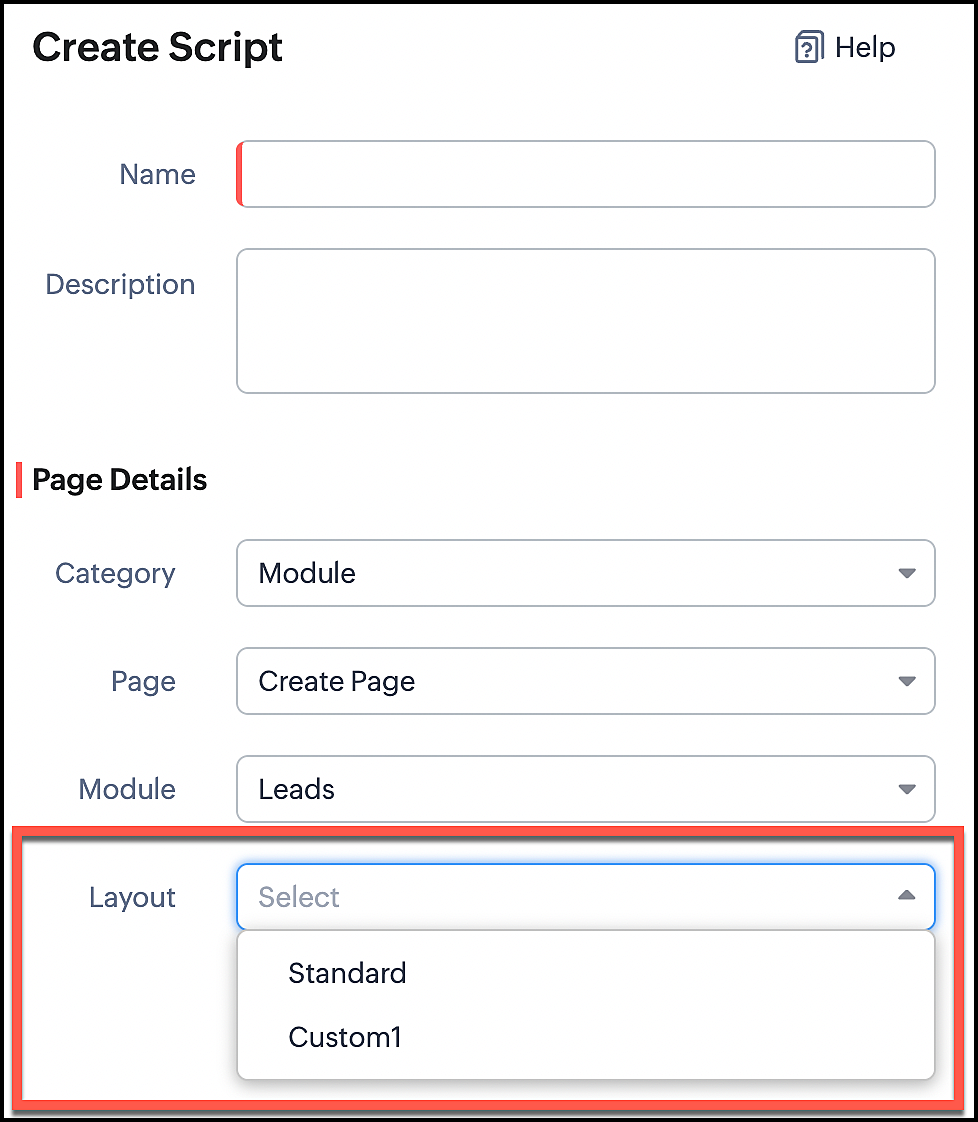
Whenever you create a Client Script, you should mention the layout for which the Client Script should work. So whenever you want to perform actions specific to a particular layout, you can easily accomplish it using Client Script.
In the image below, you can observe that selecting a layout name is a necessary step for configuring a Client Script.
3. Use Case
Consider that Zylker is a manufacturing Company. The customers include both Wholesalers and Retailers. For this purpose, Zylker has two Page Layouts in a custom module named as Orders. One is the Wholesaler-layout and the other is the Retailer-layout. The Wholesaler-layout is assigned to the wholesaler profile and the Retailer-layout is assigned to the retailer profile.
1. Whenever a customer with retailer profile creates an order, the read-only field Account Type should be auto-populated as Retailer. In the Create page of the Orders module, when the value entered in the field "Number of pieces" is more than 100, then the Payment Method should get populated as Prepaid and should be read-only.
2. Whenever the customer with wholesaler profile creates an order, the read-only field Account Type should be auto-populated as Wholesaler and the Payment Method should be populated as Prepaid and should be read-only.
4. Solution
For a particular module, the number of Client Scripts to be created differs based on
The page for which you want the script to work.
The events that should trigger the script.
The layouts for which you want the script to work.
To accomplish this requirement, you need to create three Client Scripts, one for each layout.
- Client Script for Retailer Layout with onLoad Page event
- Client Script for Retailer Layout with onChange Field event
- Client Script for Wholesaler Layout with onLoad Page event
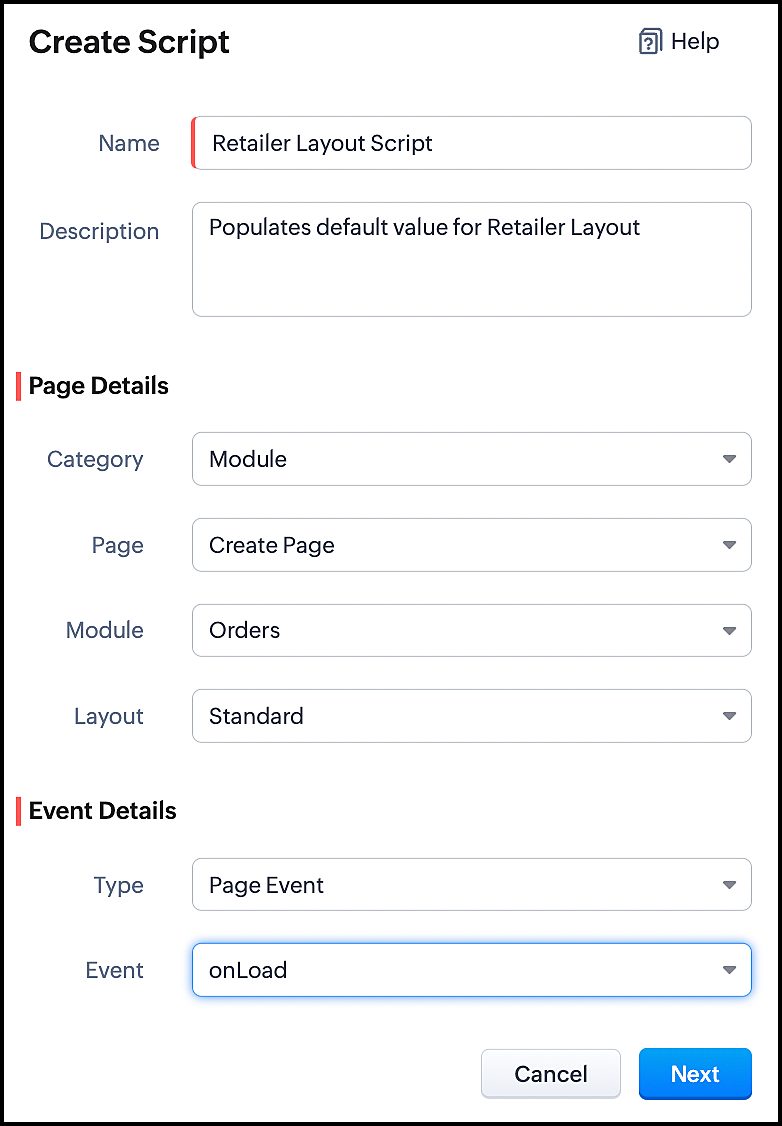
1. Client Script for Retailer Layout with onLoad Page event
- Go to Setup > Developer Space > Client Script. Click +New Script.
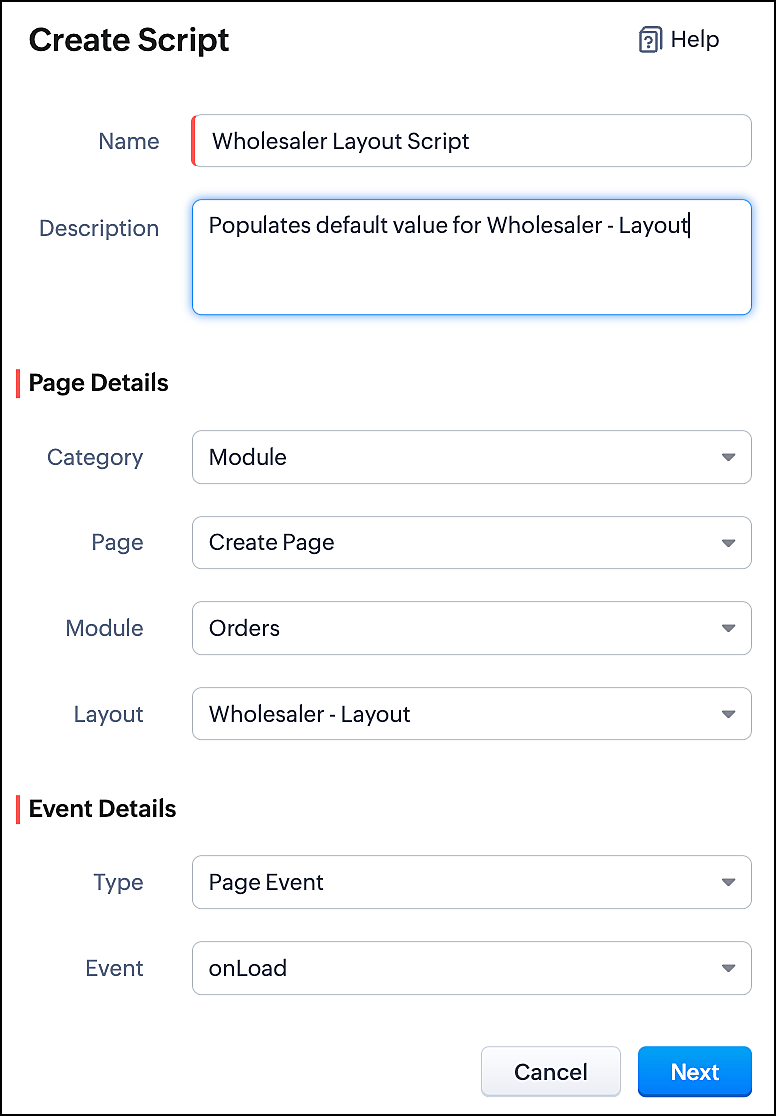
- Specify the details to create a script and click Next.
- Enter the following script and click save.
//To populate default value for Account Type var acc_type = ZDK.Page.getField("Account_Type"); acc_type.setValue("Retailer"); // To make the field "Account Type" read-only acc_type.setReadOnly(true); |
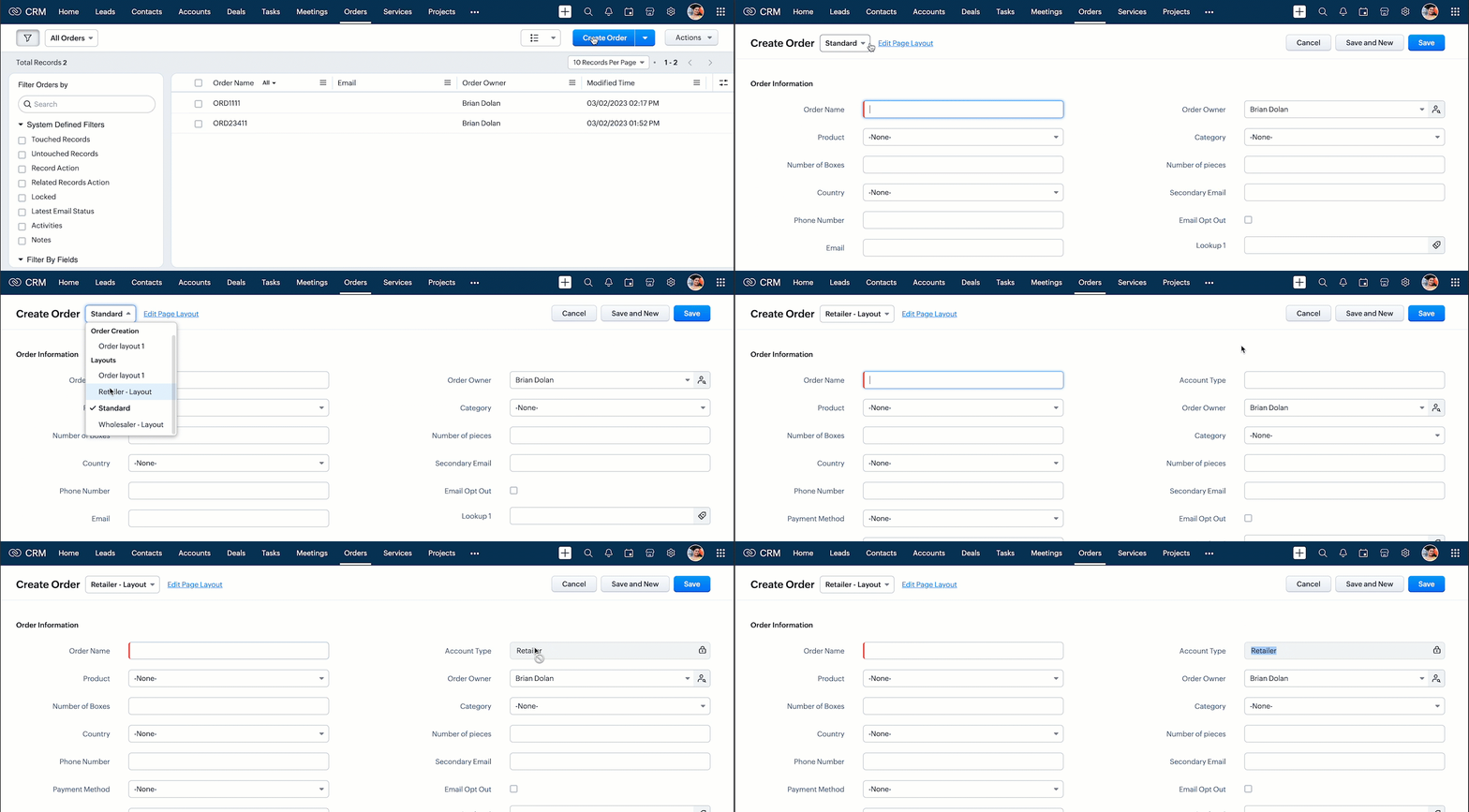
- This script gets executed whenever the Retailer - Layout, Create Page of Orders module gets loaded. The getField ZDK fetches the object details about the field Account Type. The value, Retailer can be populated to this field using setvalue(). You can make Account Type field read-only using setReadOnly().
- Here is how this Client Script works.
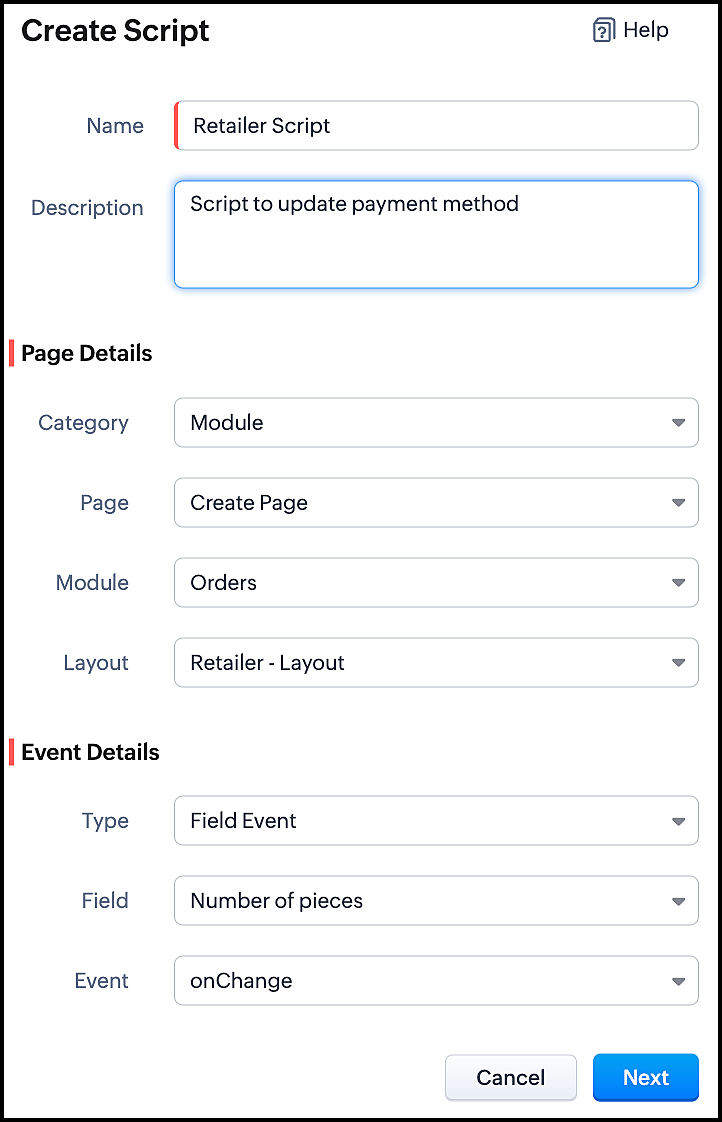
2. Client Script for Retailer Layout with onChange Field event
- Go to Setup > Developer Space > Client Script. Click +New Script.
- Specify the details to create a script and click Next.
- Enter the following script and click save.
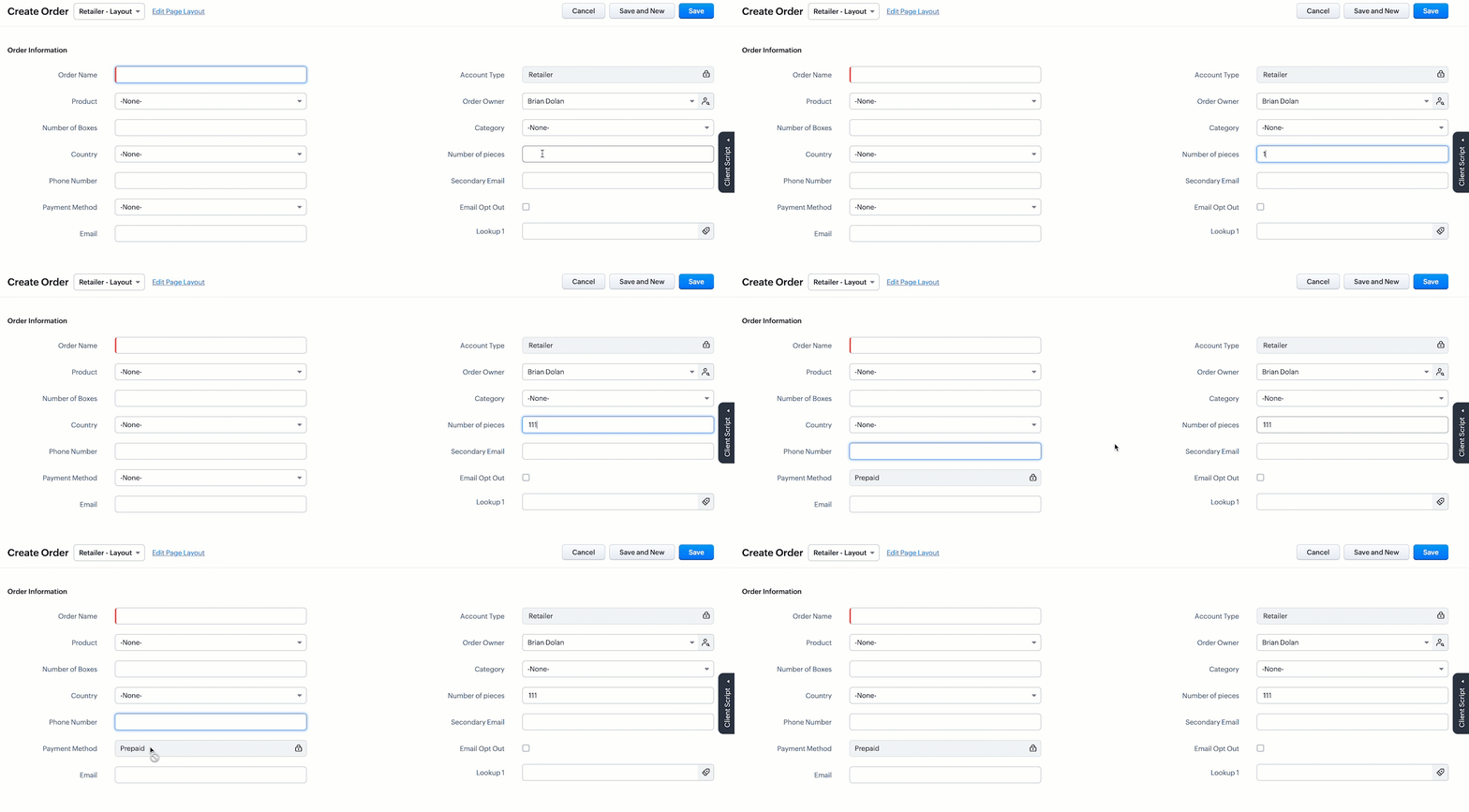
//To populate Payment Method when the quantity is more than 100 var no_of_pieces = ZDK.Page.getField("Number_of_pieces"); var payment_method = ZDK.Page.getField("Payment_Method"); if (no_of_pieces.getValue() > 100) { payment_method.setValue("Prepaid"); // To make the field "Payment Method" read-only payment_method.setReadOnly(true); } |
- This script gets executed whenever the user enters a value in the Number of Pieces field in the Retailer - Layout's Create Page of Orders module. The getField ZDK fetches the object details about the fields Number of Pieces and Payment Method. The value, Prepaid will be populated to Payment Method using setvalue(), whenever the value entered in the Number of Pieces is more than 100. You can use getvalue() to get the value entered in a field. You can make this field read-only using setReadOnly().
- Here is how this Client Script works.
3. Client Script for Wholesaler Layout with onLoad Page event
- Go to Setup > Developer Space > Client Script. Click +New Script.
- Specify the details to create a script and click Next.
- Enter the following script and click save.
//To populate default value for Account Type var acc_type = ZDK.Page.getField("Account_Type"); acc_type.setValue("Wholesaler"); // To make the fiels "Account Type" read-only acc_type.setReadOnly(true); //To populate default value for Payment Method var payment_method = ZDK.Page.getField("Payment_Method"); payment_method.setValue("Prepaid"); // To make the fiels "Payment Method" read-only payment_method.setReadOnly(true); |
- This script gets executed whenever the Wholesaler - Layout, Create Page of Orders module gets loaded. The getField ZDK fetches the object details about the fields Account Type and Payment Method. The value, Wholesaler and Prepaid can be populated to the corresponding fields using setvalue(). You can make Payment Method field read-only using setReadOnly().
- Here is how this Client Script works.
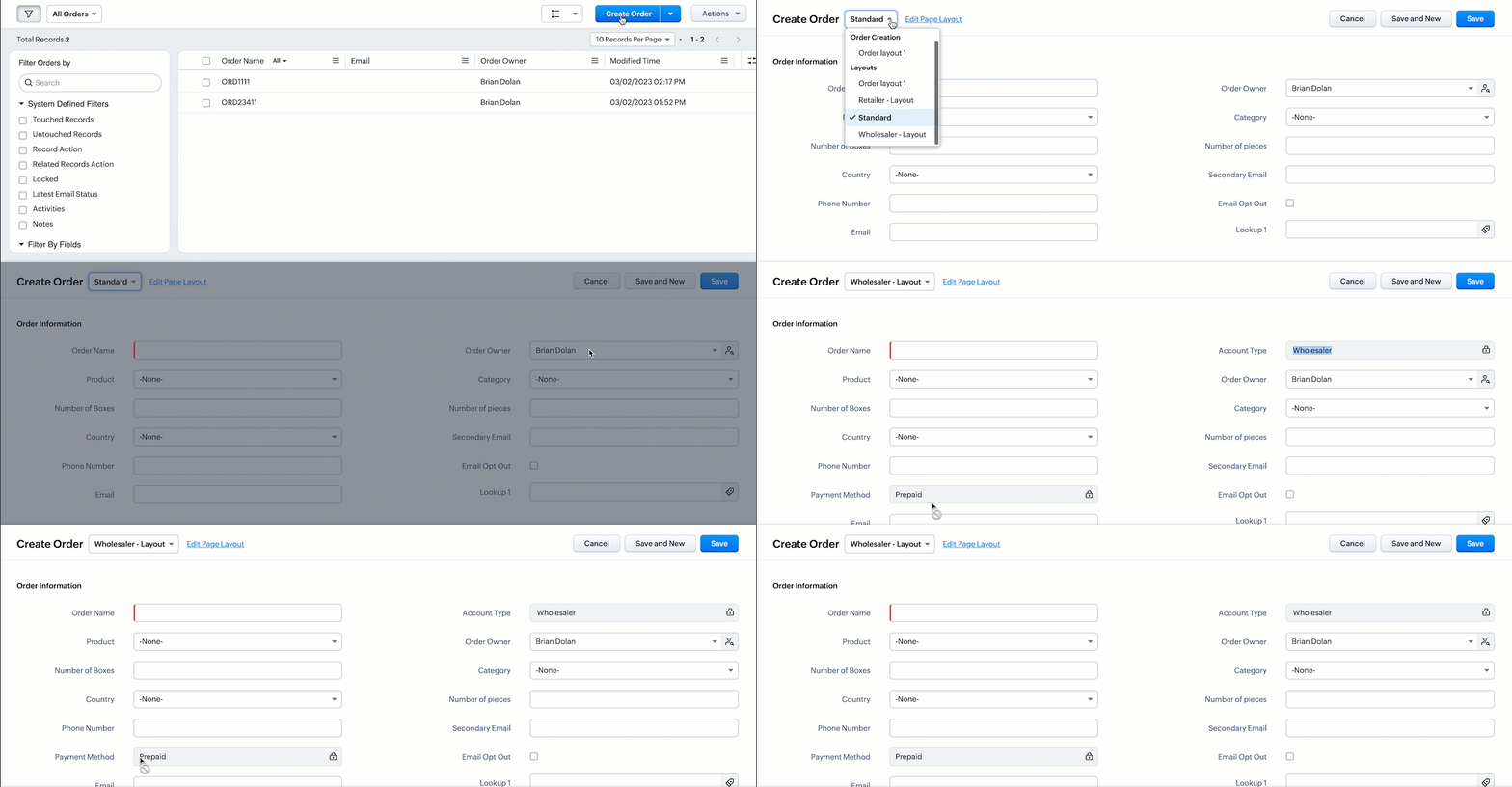
- Thus using Client Script, you can populate different default values for the same fields located in different page layouts, based on custom conditions.

Note :
Alternatively, you can achieve this using workflow rules. However, if you want instant actions i.e., before updating or saving a record, or if you have exceeded the workflow limit, you can implement this using Client Script.
5. Summary
In this post, we have discussed,
1. Configuring Client Script based on Layout.
2. Choosing the type of Event for a requirement.
3. Using setValue & setReadOnly for the ZDK.Page.getField().
We hope you found this post useful. We will meet you next week with another interesting topic!
If you have any questions let us know in the comment section.
Click here for more details on Client Script in Zoho CRM.
6. Related Links
Please take a look at our Kaizen collection here.
Cheers!
Previous Kaizen - Kaizen #110 Record Locking APIs in Zoho CRM
Topic Participants
Maadhari M
Vigneshwaran K
varun
Anamika Prasanth
Ishwarya SG
Sticky Posts
Kaizen #217 - Actions APIs : Tasks
Welcome to another week of Kaizen! In last week's post we discussed Email Notifications APIs which act as the link between your Workflow automations and you. We have discussed how Zylker Cloud Services uses Email Notifications API in their custom dashboard.Kaizen #216 - Actions APIs : Email Notifications
Welcome to another week of Kaizen! For the last three weeks, we have been discussing Zylker's workflows. We successfully updated a dormant workflow, built a new one from the ground up and more. But our work is not finished—these automated processes areKaizen #152 - Client Script Support for the new Canvas Record Forms
Hello everyone! Have you ever wanted to trigger actions on click of a canvas button, icon, or text mandatory forms in Create/Edit and Clone Pages? Have you ever wanted to control how elements behave on the new Canvas Record Forms? This can be achievedKaizen #142: How to Navigate to Another Page in Zoho CRM using Client Script
Hello everyone! Welcome back to another exciting Kaizen post. In this post, let us see how you can you navigate to different Pages using Client Script. In this Kaizen post, Need to Navigate to different Pages Client Script ZDKs related to navigation A.Kaizen #210 - Answering your Questions | Event Management System using ZDK CLI
Hello Everyone, Welcome back to yet another post in the Kaizen Series! As you already may know, for the Kaizen #200 milestone, we asked for your feedback and many of you suggested topics for us to discuss. We have been writing on these topics over the
Recent Topics
Rich-text fields in Zoho CRM
Hello everyone, We're thrilled to announce an important enhancement that will significantly enhance the readability and formatting capabilities of your information: rich text options for multi-line fields. With this update, you can now enjoy a more versatileFont Size 11 - Zoho CRM Email Templates
Our company communicates with our vendors exclusively using Calibri Font Size 11, as this is the standard formatting for professional emails. Since the CRM only allows for the selection of font sizes 10 & 12, we have been unable to utilize the CRM emailError 400 Booking
Added a custom domain to Booking. Am Getting a SSL Error that has some other domain on the SSL and giving a 400 error. Followed instructions and it stated it verified our domain.. However it is not working. Please Help!Error AS101 when adding new email alias
Hi, I am trying to add apple@(mydomain).com The error AS101 is shown while I try to add the alias.New feature request: Allow copy of email message to another folder
Hello Zoho team, This is a suggested new feature to allow copy an email message to either another folder or the same folder. Within the same Zoho account. This is not a support request about "label". This is a suggested new feature to allow copies ofLink Purchase Order to Deal
Zoho Books directly syncs with contacts, vendors and products in Zoho CRM including field mapping. Is there any way to associate vendor purchase orders with deals, so that we can calculate our profit margin for each deal with connected sales invoicesZoho Projects - Email Notifications for Feed Updates
Hi Projects Team, I'm working with a client who wants a simple way to communicate with their customers on projects. Getting the customer to add comments to Tasks or Bug records is not ideal, as we need a way which is easy with minimal training, and hasZoho Analytics Export API
Hi Team, I’m working on some integration tasks and wanted to confirm if it’s possible to retrieve a Zoho Analytics table as JSON data using a Deluge script. I’ve already stored my custom data from multiple sources and combined it into a single source.Loading Project Balances in ZOHO Books for each project
Hello, What is the best method for loading project balances actual and budget into ZOHO books to provide tracking to our project managers. We have projects and federal awards (also treated as projects) which span multiple years. We are converting fromRequest to Remove LinkedIn Verification from My Emai
I would like to submit a complaint regarding my Zoho Mail account. I previously used this email address to verify a LinkedIn account, but that LinkedIn account has now been closed. I need to remove or cancel the verification associated with the closedIntroducing the all-new email parser!
Greetings, We are pleased to introduce to you, a brand-new, upgraded version of the Zoho CRM Email Parser, which is packed with fresh features and has been completely redesigned to meet latest customers needs and their business requirements. On that note,Zoho Projects - Refine Access to Collaboration Menu
Hi Projects Team, I noticed that Calendar, Chat and Meeting menu options in the Collaboration section are visible to client users, even when they don't have access to the features. This could be confusing and frustrating, because if it's there you expectKaizen #217 - Actions APIs : Tasks
Welcome to another week of Kaizen! In last week's post we discussed Email Notifications APIs which act as the link between your Workflow automations and you. We have discussed how Zylker Cloud Services uses Email Notifications API in their custom dashboard.Extracting Images from a Zoho Creator Report into a Pages
If you’ve uploaded images in a form and can see them in your report, you might also want to display those same images inside a Page (custom HTML page). This is useful for dashboards, profile pages, or any place where images should be visible dynamicallyZoho is blocking emails I subscribe to from one sender
About 4 months ago I stopped receiving newsletters that I subscribe to from @thedispatch.com. They tell me that zoho's server is blocking them. I've added them to my contacts list, but they're not even reaching my inbox. I don't know how to troubleshootIntroducing Formula Fields for performing dynamic calculations
Greetings, With the Formula Field, you can generate numerical calculations using provided functions and available fields, enabling you to derive dynamic data. You can utilize mathematical formulas to populate results based on the provided inputs. ThisInactive Items - Make Less Prominent by Default
Currently, when one marks an Item as "Inactive", it really doesn't do much of anything to hide it or get it out of the way. Search and reporting within Finance should, by default, hide inactive Items from standard reports, searches, etc. If one specificallyItems should display under specific warehouse
I have configured the multi warehouse but it show all the items under all warehouse which is not correct according to our business logic, so i want that items should only display under that specific warehouse not under all the warehouses not even with zero quantity. Some items should be common but not all so is there any option for that purpose so i can specific the items to its warehouse. RegardsHow to calculate GST based on "Ship To Address"
We into the interior designing work, providing "Works Contract Services" to our clients across India. We are registered under GST in Maharashtra state. For works contract services as per the GST rule, we need to decide place of supply based on "Ship toI NEED TO NUMBER TO TEXT NO HERE
=NUMBERTEXT NEEEDAuto-fill New Row with Previous Row Values
rowsize = input.Order_Items.count(); for each row1 in input.Order_Items { rowsize = rowsize - 1; if(rowsize == 1) { row.Door_Model = row1.Door_Model; row.Door_Color = row1.Door_Color; row.Materials = row1.Materials;When I click on PDF/PRINT it makes the invoice half size
When I click PDF / Print for my invoice in Zoho Books, the generated PDF appears at half size — everything is scaled down, including the logo, text, and layout. The content does not fill the page as it should. Could someone advise what causes Zoho BooksPython - code studio
Hi, I see the code studio is "coming soon". We have some files that will require some more complex transformation, is this feature far off? It appears to have been released in Zoho Analytics alreadyAPI question - adding a thread to an existing ticket
Hi Is there an API function for the customer to add to an existing ticket thread? example, customer puts in new support ticket. support replies and ask for more details. customer replies with more details -what api function is used for this (will add record append to same ticket number?) ThanksWhy is Zoho Meeting quality so poor?
I've just moved from Office 365 to Zoho Workplace and have been generally really positive about the new platform -- nicely integrated, nice GUI, good and easy-to-understand control and customisation, and at a reasonable price. However, what is going onItems Below Reorder Point Report?
Is there a way to run a report of Items that are below the Reorder Point? I don't see this as a specific report, nor can I figure out how to customize any of the other stock reports to give me this information. Please tell me I'm missing something sCalendar week view: Today + 6
Is there anyway to have the calendar change dynamically based on the date? Due to the amount of events, we only display a week at a time, but towards the end of the week, we can no longer see ahead to next week (without changing it manually every time).How to restrict user/portal user change canvas view
Hi , I would like to restrict user / portal user change their canvas view because I hide some sensitive field for them. I dont want my user switch the canvas view that do not belong to them But seems Zoho do not provide this setting?Introducing parent-child ticketing in Zoho Desk [Early access]
Hello Zoho Desk users! We have introduced the parent-child ticketing system to help customer service teams ensure efficient resolution of issues involving multiple, related tickets. You can now combine repetitive and interconnected tickets into parent-childHow to add to Subforms via Zapier with Zoho Writer?
I have the following layout for a Zoho Writer Document. As you can see there is a repeating subform taking in "Items". I am trying to make a Zapier integration with it, and I can see there is 1 field saying: "Items", but it does not specify how I'm supposedContrôles administratifs granulaires : un atout pour la sécurité des e-mails
La moindre erreur dans votre système de messagerie peut coûter très cher à votre entreprise, tant en argent qu’en conformité et en image de marque. Pour beaucoup d’organisations, ce risque est bien réel. Les e-mails véhiculent quotidiennement des informationsMarketer's Space: Why mobile optimization deserves a place in your email strategy
Hello Marketers, Welcome back to Marketer's Space! Today, we'll talk about the importance of creating mobile-friendly email designs. While mobile phones were once used only to make phone calls, today they're used for almost everything, including texting,Collections Management: #6 Realign Customers who gets back In-Term
Arun stared at the subscription list on his dashboard. Another account had just been moved to Cancelled status after completing the whole dunning process. Nothing unusual, just that payment failures happen, retries fail, and cancellation is the expectedZoho Mail IP Blacklist
I need problems with send mails: Error: junk mail rejected - sender4-op-o10.zoho.com 136.143.188.10, is in RBL. Spamcop. Please remove FQDN for blacklist. Regards.I can receive but not send emails
Hello, I've been not able to send emails for almost a year now. I been using alternate email to do this. I want to know how to fix this so I can use my zoho account normally again.The challenge of 24/7 connectivity: Being present and meeting customer expectations
Before television entered our homes, radio was our window to the world. We had to tune carefully to catch voices from distant places. When television arrived, the world began to grow smaller. We can watch rocket launches, see the goal that wins our favoriteHow to download all attachments from inbox, send, other folders in one go
Hi All, Appreciate if anyone could help me with steps for below requirement. How to download all attachments from inbox, send, other folders in one go. Even mapping to new folder will help me. Thanks in advance.Cannot connect mail accounts to Thunderbird
Hi Support - I'm attempting to add my mail accounts to Thunderbird but I'm getting an unable to login to server error. I tried to use the password associated with my account I received the unable to login error. So I went into Zoho Accounts and generateAlias Email Id already exists
Hi, I just verified my domain sesque (dot) com and now I am trying to create the admin account using admin (at) sesque (dot) com, but I am getting an error saying "Alias Email Id already exists". I used to have another Zoho account with this email address,Unable to connect to smtp server, connection timed out
Hi Team, I am facing below issue, while sending out emails from thunderbird client. It used to work, facing this issue from morning. Error: Sending of the message failed. The message could not be sent because the connection to Outgoing server (SMTP) smtp.zoho.comNext Page