Kaizen #126 - Circuits in Zoho CRM - Part 1
Hello everyone!
Welcome back to another week of Kaizen!
Today, we will discuss an exciting topic—Circuits in Zoho CRM.
For starters, we will discuss what Circuits are, how beneficial they are for businesses, different views of a Circuit, and the different states and flow controls.
In the next post, we will discuss associating a Circuit to a blueprint, workflow, and a button, testing and execution, and see a Circuit in action with an interesting use case.
What are Circuits in Zoho CRM?
We use different microservices to accomplish our business needs, but most of the time, we are forced to switch over to multiple places.
With Circuits in Zoho CRM, you can integrate multiple microservices in a single platform and create automated workflows, all within your CRM!
For example, consider that you have an e-commerce application that involves multiple processes like tracking inventory, payment processing, fulfilling and tracking orders, generating receipts and reports, etc.
Typically, you would code this entire logic and use it to fulfill your business needs. But, with Functions in Zoho CRM, you can write the logic for each of these individual processes and simply orchestrate them using Circuits.
So, for the above example, you can simply create an automated workflow using Circuits and use the functions in the right order. That's not just it! You can re-use these functions elsewhere, too.
Another simple example of a Circuit is when you want to automating sending SMS alerts to users when an event occurs. How this is different from a workflow is that in this circuit, you can have a function that triggers an SMS alert, and also a function that sends an email to the user when the SMS alert ails. This involves circuit's functional states and a decision making state.
Like this, the use cases of circuits are endless.
Advantages of Circuits
- Automate your routines
Convert all your manual routines to automated workflows to save time. Avoid the need to trigger or interrupt applications to control the system flow, as you can create smooth-sailing, smart workflows that control themselves. - Scale fast
Handle any number of requests hassle free as your workflows get executed on cloud. While Zoho Circuit dynamically allocates resources on need, you can focus more on building your applications rather than managing them. - Update in minutes
Building the business logic of your applications in workflows empowers you to update the applications quickly. Swap or reorganize the components easily and build the modified applications in minutes. - Low-code
Create a circuit effortlessly with the visual drag-and-drop interface, which makes it easier for the users with minimum coding knowledge. - Developer-friendly
Circuits help you manage parallel processes, service integrations, spot failures, retry, and view logs, within minutes. Developers can focus on the business logic and not worry about these factors. - Orchestrate CRM Functions
Use various CRM functions on your circuit to integrate multiple third-party apps and Zoho CRM seamlessly. Write functions once, and orchestrate them in circuits to solve different business needs. - Automate IT and business processes within CRM
Create a circuit, associate it with a workflow, blueprint, or button, and automate your entire business process. With high availability, scalability, and fault tolerance, circuits ensure the performance of your workflow remains consistent even with changing states and an increase in frequency. - Diagnose errors and view audit logs
A detailed log of each execution provides the status of each state's task execution, the payload and parameters passed, and the responses and exceptions generated. - Use Existing Functions
From picking functions you've already tried, tested, and are up and running in your CRM account, to using a circuit within another circuit, this flexibility opens up possibilities of handling so much of your out-of-the-box requirements in a single space.
How are Circuits different from Workflow Rules and Blueprints?
Circuits is simply an orchestration of functions with powerful state management capabilities, along with in-built flow controls to automate the business process.
Workflow rules help us automate repetitive tasks and standardize business processes within the CRM system.
Workflow rules are useful in simple automations that the sales person does on a regular basis, like sending an email after record creation.
Builder View and Code View of a Circuit
Builder View
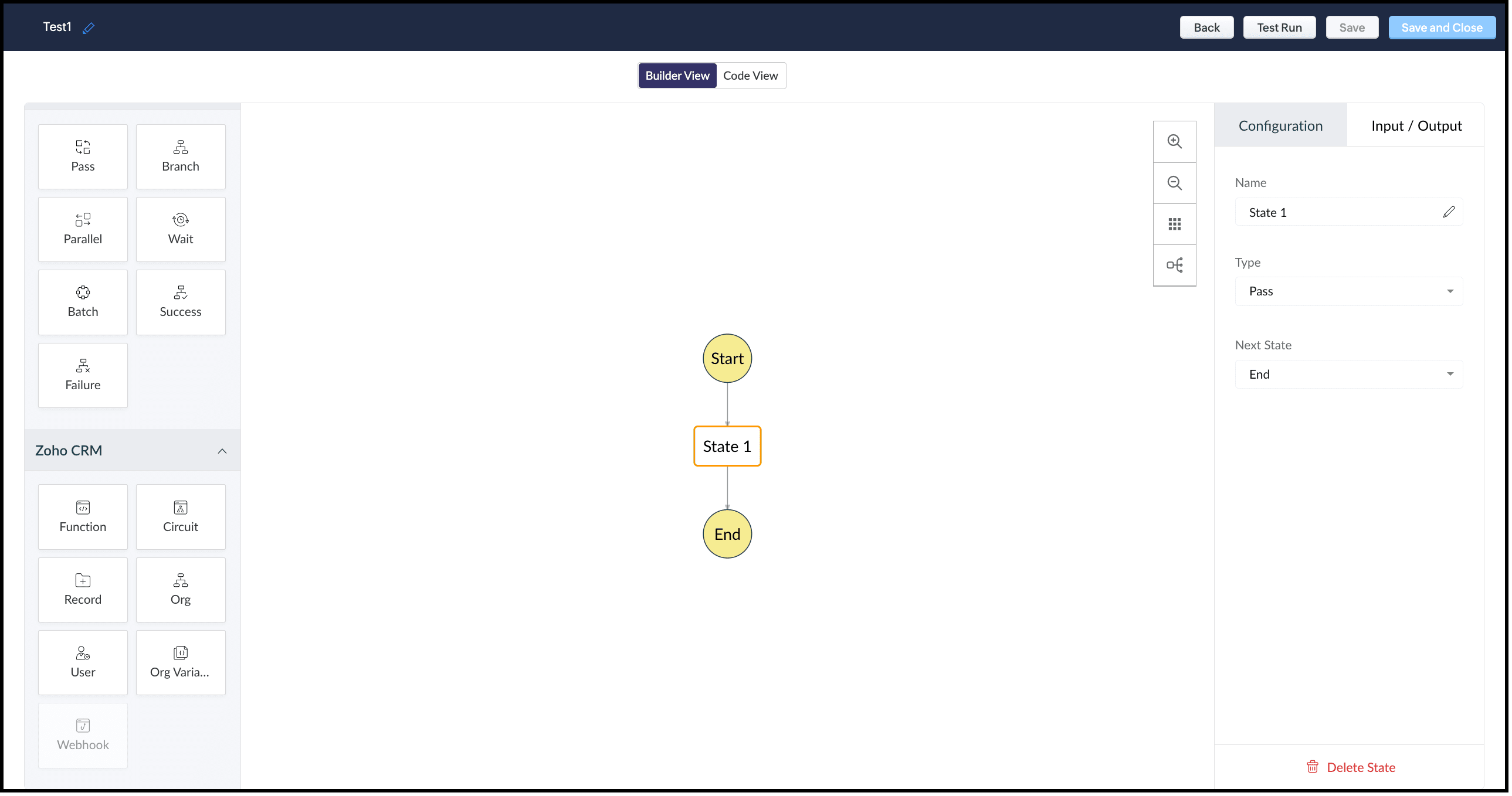
This view offers an easy drag-and-drop interface to build your circuit. The left pane in this view comprises all the states that can be added to a circuit.
The right pane comprises Configuration and Input/Output.
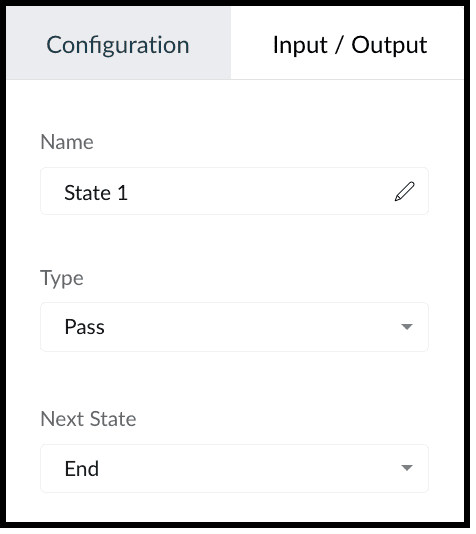
The Configuration tab lets you give a name to the state, choose its type, and select its next state.
The Input/Output tab allows you to control how JSON data must flow from one state to another through Paths.
Paths are strings beginning with $ that identify the components within the JSON. Specific parts of a JSON can be accessed by denoting their attributes in Input Path, Result Path, and Output Path.
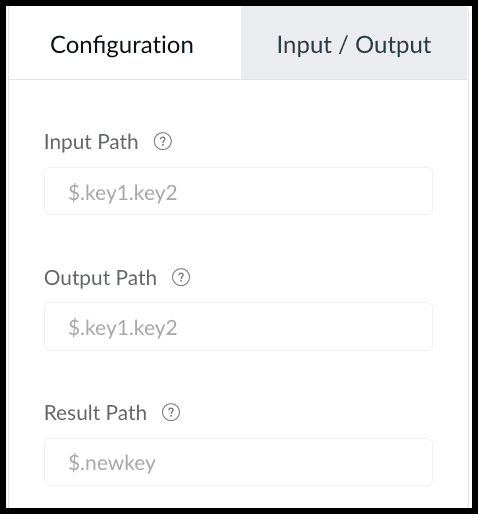
This tab contains the following.
1. Input Path
Input path selects parts of the input JSON to pass to the state. You can also pass parameters to the input as a collection of key-value pairs. The values of Parameters can either be static or parts of the input JSON selected as a Path. For example, if your state's input is
{
"Entry1": {...},
"Entry2": {...}
}
then, you can apply the input path as $.Entry2 within the state definition. So, only the data inside the "Entry2" object will be passed as input to the state.
2. Result Path
After the input is processed by the state, Result Path selects what combination of the state result and the actual state input has to be passed to the output.
3. Output Path
Output Path further filters the data from the Result Path to pass it as state output.
Code View of a Circuit
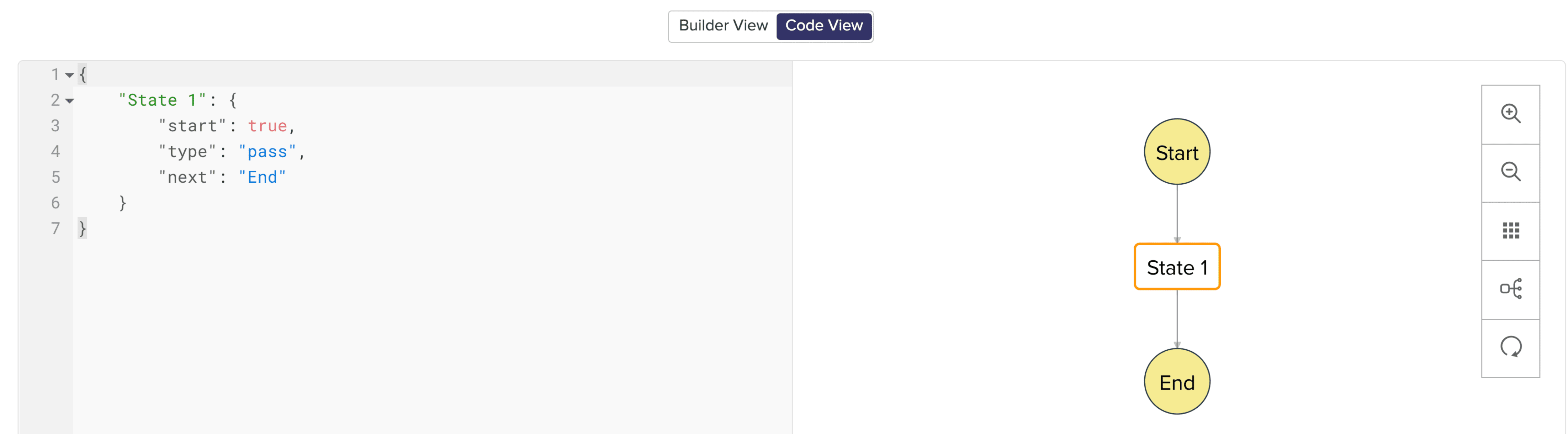
In Code View, you can define your state machine in a simple JSON-based, structured language. Once a circuit is created, a sample workflow with the pass state as 'State 1' is created by default.
States of a Circuit and Flow Controls
Circuits offer a cascading structure to different states in a business process, allowing you to write functions that each feed their output into the next one, or any other one you pre-define, individually. You can also reroute, pause for a certain period, or feed it in batches to enable just about any sort of action.
Simply put, Circuits have different 'functional states' and 'flow controls' that allow you to automate execute your business process.
Flow Controls
Flow Controls let you control the flow of your circuit. To achieve this, Circuits make use of different states that allow you to make the execution, 'Wait' for another state, 'Pass' the input of a state to another, use 'Success' and 'Failure' to stop the execution of the Circuit.
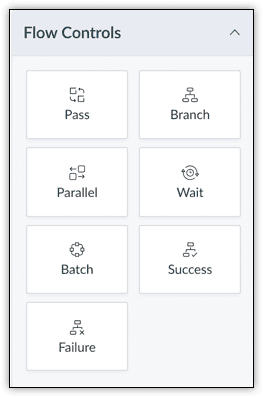
The different states available are:
- Pass: Transfers the input from one state to another.
- Branch: Decides between branches of execution based on input.
- Parallel: Performs simultaneous executions.
- Wait: Inserts a delay for a specific time. The maximum wait time is 30 days.
- Batch: Implements multiple group executions. You can have a maximum of 10 jobs per batch.
- Success: Terminates an execution, returning 'Success'.
- Failure: Terminates an execution, returning 'Failure'.
For more details on states, refer to this article.
Zoho CRM
Zoho CRM states help you execute business logic in circuits with respect to the data available in CRM.
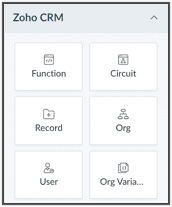
You can write functions in the built-in editor or orchestrate existing ones, get the details of a record as an input to other the states, get the details of your org, user, CRM variables and use them in your Circuit.
You can also trigger another Circuit within a Circuit using the 'Circuit' flow control.
'Function' State
Use this state in your Circuit to use an existing function in CRM. Depending on your need, you can configure the input and output, and control data flow in your circuit. Only the functions that are REST API-enabled are shown here.
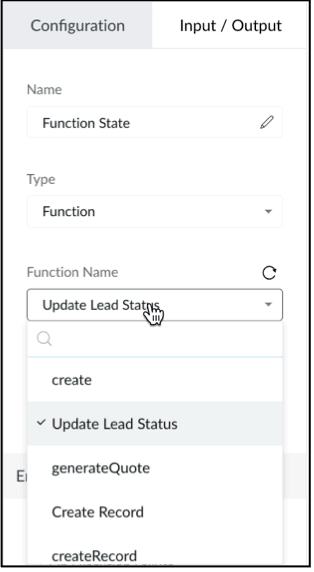
'Circuit' State
You can use another Circuit in one of the states and configure the flow accordingly.
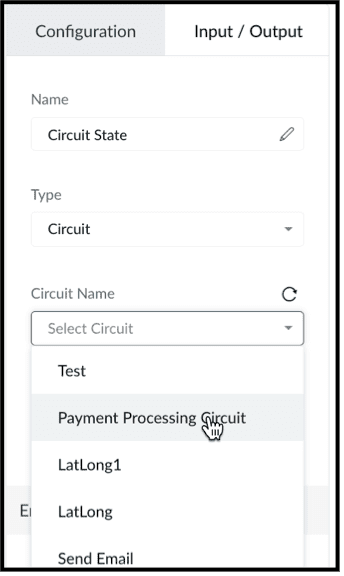
'Record' State
This state fetches the details of a particular record in a module in CRM. You can choose to pass a portion or all of this state's result as an input to the next state in the circuit. Note that the information displayed will be based on the scope provided to the user.
Depending on where the Circuit is associated(Blueprint, Workflow, Button - Create/Clone/Details/Edit View pages, individual record, mass action), the response of the Record State differs.
'Org' State
This state gives you the details of your CRM org that you can use in your circuit.
'User' State
Use this state in your circuit to get the details of the current user in your org and process this information in other states.
'Org Variable'
This state gives you the details of all CRM Variables in your org.
Error Handling
When you use any of the Zoho CRM states, you can also perform error handling as these functional states tend to have runtime errors.
On TimeOut
When a functional state runs longer than the expected time, timeout errors occur. For handling timeout errors in code view, the field value "errorType": "Error.TimeOut" will be added.
On Execution Failure
When a state's execution fails due to some exception that cannot be processed, it can be handled using execution failure. In code view, key-value "errorType": "Error.ExecutionFailure" is appended.
Custom Error
You can also have custom error handling for your states.
Configure Exception Type and Exception Value to set the error handling options based on the error code or error message delivered by the state's output.
Retry the function in case of failure or timeout, set the Attempt (number of retries) and Delay (wait time after failure for every retry attempt).
In case of failure, if the retries fail to fix the error, the State will Fallback the error output to the Next state in the Result field.
We hope you found this post useful. Stay tuned for part 2!
Let us know if you have any questions or suggestions.
Cheers!
Shylaja S
Topic Participants
Shylaja S
Ash-Tech.co.il
Pheranda Nongpiur
Nicolás
Sam Stemp
Sticky Posts
Kaizen #198: Using Client Script for Custom Validation in Blueprint
Nearing 200th Kaizen Post – 1 More to the Big Two-Oh-Oh! Do you have any questions, suggestions, or topics you would like us to cover in future posts? Your insights and suggestions help us shape future content and make this series better for everyone.Kaizen #226: Using ZRC in Client Script
Hello everyone! Welcome to another week of Kaizen. In today's post, lets see what is ZRC (Zoho Request Client) and how we can use ZRC methods in Client Script to get inputs from a Salesperson and update the Lead status with a single button click. In thisKaizen #222 - Client Script Support for Notes Related List
Hello everyone! Welcome to another week of Kaizen. The final Kaizen post of the year 2025 is here! With the new Client Script support for the Notes Related List, you can validate, enrich, and manage notes across modules. In this post, we’ll explore howKaizen #217 - Actions APIs : Tasks
Welcome to another week of Kaizen! In last week's post we discussed Email Notifications APIs which act as the link between your Workflow automations and you. We have discussed how Zylker Cloud Services uses Email Notifications API in their custom dashboard.Kaizen #216 - Actions APIs : Email Notifications
Welcome to another week of Kaizen! For the last three weeks, we have been discussing Zylker's workflows. We successfully updated a dormant workflow, built a new one from the ground up and more. But our work is not finished—these automated processes are
Recent Topics
Creator Simplified #10: Predefine Form Field Values and Make Them Read-Only for Users
Hey Creators, Ready for this week's tip in the Creator Simplified series? Today, we will explore how to have read only fields in a form. Use Case: Assume a scenario where the default value for a Department field needs to be English Literature, but youZoho Mail : Email Outgoing Blocked
I suddenly received the following message yesterday. I cannot send any mail. Please resolve as soon as possible, I cannot work without sending email. Dear User, We regret to inform you that your email outgoing has been blocked and you will not be ableCreator and Tables
Good day. I am trying to create my first application. I have imported my data into Tables and am creating my app in Creator. I do not see my tables and cannot see how to write forms data to a table. Even the Workflow just uses the form. In one of thecustomer Name and address details
i created one application there is no customer details in that . how to add customer details andRecalculate every row in the subform
Hello, Can anyone help me with a script, please? I have an issue. Sometimes it happens, that in a multi row subform one of the rows show an incorrect row total value. Not really understand how it can happen, if I have a 20 row subform, 19 rows show correctCreating Repeat Forms that remove redundancies
I wanted to understand if you can make multi-layer forms that reduce the need for users to input information in again and again. We want a form that our suppliers fill out per ingredient they sell, and the end result should have the Ingredient (SectionWhat is the difference between the free plan and the mail lite plan?
What is the difference between the free plan and the mail lite plan? How many emails can I send per day?Unblock email
Hi The outgoing mail from a client of me is blocked. I already made tickets and tickets are send to the EU desk but nobody is responding. The problem is already 4 days! There is absolutely no help from the support. I am really not satisfied at all! CanDomain verification failure
Hello Zoho Support, I purchased my domain directly through Zoho Mail, but the domain verification keeps failing with the message “TXT verification failed.” I’ve already waited and retried several times, but it still won’t verify. Could you please manuallyUnable to send message;Reason:554 5.1.8 Email Outgoing Blocked.
My email account is unable to send emails, and I urgently need to use it. How can I resolve this?If there is anything we have done wrong, please let us know in advance so we can actively cooperate to improve. User ID: 850482493URGENT: Email stopped workin - can't access admin panel
For some reason email sending stopped working. When I try to send an email it fails with "Unable to send message;Reason:451 4.7.1 Temporary system error" I can receive email just fine I see in my notifications some errors about the MX records, howeverCan I associate an invoice to a Project after the fact?
We have generated an invoice but would like to assoicate it to a Zoho Project after the fact. Is there any way to accomplish that? Thanks, ScottEmails I send as a cc or bcc NEVER GO THROUGH TO THA RECEIVER !!
every time i send a cc or bcc copy of an email to anyone when I’m using my zohomail.com email - no one ever gets the cc of bcc copy if the email: why???? And i triple check that the email addresses are correct; then i get back an email message (EVERYTIME)Add Support for Authenticator App MFA in Zoho Desk Help Center
Hello Zoho Desk Team, We hope you are doing well. We would like to request an enhancement related to security for the Zoho Desk Help Center (customer portal). Currently, the Help Center supports MFA for portal users via SAML, JWT, SMS authentication,Auto-fill Contacts in Zoho Mail not working for me
We just switched to Zoho Mail for our company, and I am noticing that the "auto fill" feature when composing an email -- where the "to" field is autofilled (like in the attachment) from Contatcts works for everyone except me. Any way I might have madeHow to unlink a SAML user from the existing Zoho Desk user (domain change case)
Hi everyone, I’m trying to understand how to handle a situation where a customer changes their company domain. In our setup, users authenticate via SAML, so when the domain changes, the SAML system treats them as a new user. However, in Zoho Desk, I’dPrice Managment
I have been in discussions with Zoho for some time and not getting what I need. Maybe someone can help explain the logic behind this for me as I fail to understand. When creating an item, you input a sales rate and purchase rate. These rates are justRelated to zoho survey
Hi team. I want to know something regarding zoho survey question builder. I have two questions each of dropdown (One answer) - question type. In the first question, there are 16 answer choices and in the second question, there are 3 answer choices. ForText Message
When trying to sent a text message, it says its an error i should contact a zoho agentZoho POS is now available for Canadian retailers
Hey everyone, We're excited to introduce the all-new Canadian edition of Zoho POS, which helps retail businesses simplify and manage their end-to-end business operations. Start by signing up and exploring the 15-day free trial. Sign up now How does ZohoPayroll In Canada
Hi, When can we expect to have payroll in Canada with booksMass update to change or shift all project dates and keep project structure + shift all sub-tasks dates with main tasks
Most users would expect that if they change the start date of their project then that will be reflected inside the actual project and any project structure would be retained. Additionally if a task list with associated sub-tasks is moved, most users would expect that those sub-tasks would also be moved along with their parent task. This is not the case. For a total Project shift of dates: * the start and end date from > "Edit Project" page can have a radio button added to "shift all project tasksClosing Accounting Periods - Invoice/Posting dates
Hi, I have seen in another thread but I'm unsure on how the 'transaction locking' works with regards to new and old transactions. When producing monthly accounts if I close December 24 accounts on 8th Jan 25 will transaction locking prevent me from postingIn-person ZUG Meetups for Real Estate Professionals - US Q1 2026
The Real Estate Zoho User Group is going on a multi-city, in-person meetup tour across the US, and we’d love to see you there! These meetups are a great opportunity to: Connect with fellow real estate professionals using Zoho Share challenges and discoverZoho CRM custom fields not showing in zoho creator
Hi Team, I have created a Products form with Zoho CRM integration and connected it to Products module of CRM. But when I see the reports of Products in Zoho creator then I am not able to see custom fields of Products module. Only standard fields of ProductsSending email notifications based on language
Hello. I would like to know how we can bypass the default notifications (which are just in English) for when a ticket is created/replied to/closed, to be in other languages, based on the language field in the ticket? I can create other email templates,Zoho Error: This Operation has been restricted. Please contact support-as@zohocorp.com for further details
Hello There, l tried to verify my domain (florindagoreti.com.br) and its shows this error: This Operation has been restricted. Please contact support-as@zohocorp.com for further details. Screenshot Given Below - please check what went wrong. ThanksDownload a file from within a zoho creator widget
I have a widget running in Zoho Creator , it displays uploaded documents in a table file, and I have added a download link in the view. ( The widget is created with html, css and javascript). I do not succeed in getting the download working. Do I haveZoho / Outlook Calendar sync
The current Marketplace -> Microsoft -> Meetings integration needs 2 changes. 1. The current language for the Two-Way sync option should be changed. It currently states, "Sync both your Zoho CRM Calendar and Office 365 Calendar meetings with each other."Email content just contain 'OK' ,not what we expect
create campaign API URL: https://campaigns.zoho.com/api/v1.1/createCampaign req params: {'campaignname': 'General_Outreach_d0cfc415-43aa-4b96-bb09-558e76a3dda3_50_20251117_214806_660', 'from_email': 'admin@allinmedia.ai', 'subject': 'ALL IN MEDIA', 'list_details':Reopen ticket
Hello! Can I reopen a ticket just using the API ticket/sendReply ? What's the rules to do it? I'm trying but it doesn't reopen the ticket, it just send the replyAllow Admins to Transfer Ownership of Their Own Files & Folders
Hi Zoho WorkDrive Team, Hope you are doing well. We would like to request an important enhancement to the ownership-transfer functionality in Zoho WorkDrive, specifically regarding administrator capabilities. As administrators, we have the ability toTip#46: Capture accurate log hours
Hello everyone, Use the newly introduced timer settings that will streamline the usage of timers and help admins or workspace owners to manage the time entries of the workspace users better. Check out the below mentioned timer settings added to the TimesheetMoving to app-specific authentication for Google integrations
Hello everyone, We’re making an important change to how Google integrations work in our platform. Until now, we used a common Google project across Zoho to enable integrations like Google Drive, Calendar, and more. Going forward, we’ll be moving to anLost the ability to sort by ticket owner
Hi all, in the last week or so, we have lost the ability to sort tickets by Ticket Owner. Unlike the other columns which we can hover over and click on to sort, Ticket Owner is no longer clickable. Is it just us, or are other customers seeing this too?How Can i put a form in Zobot
Hi,how can i integrate a form which has a multiple options to choose from.the form should be opened or displayed by zobot after it meets a requirement in the conversation. Thanks in advance !Playback and Management Enhancements for Zoho Quartz Recordings
Hello Zoho Team, We hope you're all doing well. We would like to submit a feature request related to Zoho Quartz, the tool used to record and share browser sessions with Zoho Support. 🎯 Current Functionality As of now, Zoho Quartz allows users to recordZoho Analytics - Feature Request For Time Based Data Source Fetch
Hi Analytics Team, I have a client using Zoho CRM and they want a weekly report at 4:30pm every Friday, emailed to the sales team showing a pie chart of Closed Won Deals for that week. This is easy to achieve in Analytics but not so easy to ensure theWhich user's capacity is used for Shared Mailbox storage?
We use shared mailboxes at our company, and their size is increasing daily. Which user(s)'s total mailbox limit is being used up by this space?Inserting the current date / time
I'd like to use Zoho Notebook as a log - so it would be great to be able to insert the current date and time at the beginning (or end) of each my log/journal entries - or wherever I want. Something simple, like pressing a button/icon to insert it wherever my text cursor is. It could be formatted like "Mon Dec 11, 2017 - 11:43p".Next Page