Kaizen #182 - Queries in Canvas List View

Hello everyone!
Welcome to another week of Kaizen!
We're back with another post in this series on Queries in Canvas List View.
Queries in Zoho CRM allow you to dynamically retrieve data from CRM as well as third-party services directly within the CRM platform.
You can construct a query of one of the following types:
- CRM Module type query to retrieve data from CRM modules.
- COQL type query to construct a query using the COQL API.
- REST API type query to fetch data from an external service and use it in Zoho CRM.
You can associate a query with the 'Decision' component of Kiosk, Canvas Detail View, or Canvas List View.
In this post, we will take up a use case and see how you can associate a query with Canvas List View.
Use case
Sales and support teams often need quick access to Zoho Desk tickets related to a contact in Zoho CRM. To avoid switching between apps to check ticket statuses, we can use the Queries feature to fetch the latest Zoho Desk ticket's details of a contact dynamically and display them on the Canvas List View page of the Contacts module.
This ensures that CRM users can instantly view the most recent ticket linked to a contact without leaving Zoho CRM.
Follow along to see how you can achieve this!
Step 1 - Add a Source
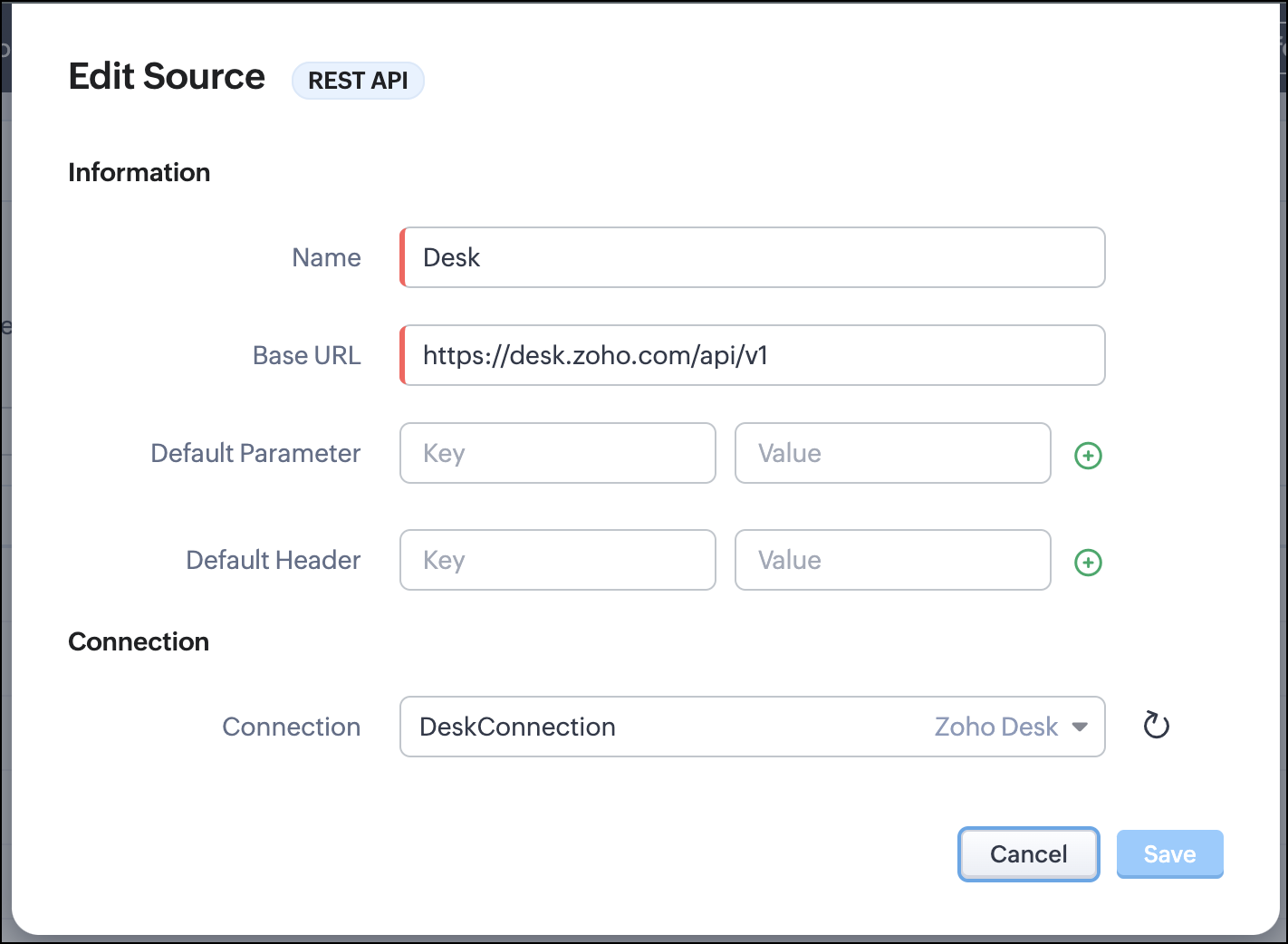
- Go to Setup > Developer Hub > Queries > Sources > Add Source.
- Under Information,
- Give a name for the source and its Base URL. Queries will make API calls to this URL to fetch data. Ensure to add this to Trusted Domain.
- Specify any default parameters and headers for this base URL.
- Under Connection, choose the connection you have created with Zoho Desk with the necessary scopes. If you haven't, create one.
- Click Save.

Note
Queries will make API calls to the URL you add in the Source and consume credits that are applicable in that service. Ensure you monitor your API usage in your source provider.
Step 2 - Create a REST API Query
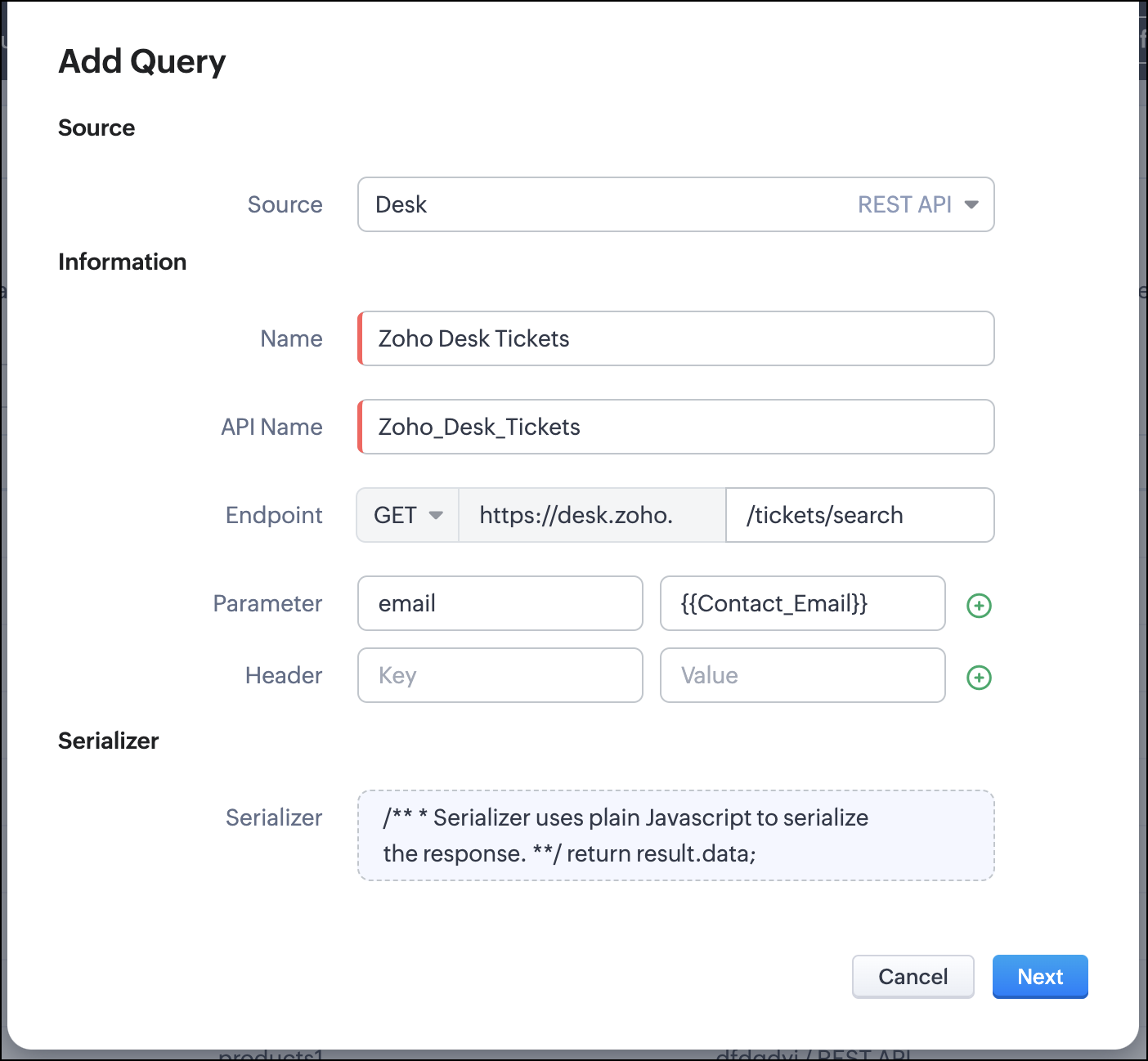
- Go to Setup > Developer Hub > Queries > Add Query.
- Under Source, choose the source you created in step 1.
- Under Information,
- Enter the Name, API Name, and the Endpoint of the query.
- Specify the parameter email that takes the dynamic variable {{Contact_Email}} as its value. This is to fetch the latest ticket from Zoho Desk for a contact with the email in this variable during runtime. Refer to our Kaizen post on Handling Query Variables in Zoho CRM for additional details.
- Specify Headers, if any.
- You can serialize the output to fit your needs using JavaScript in the Serializer.
- Click Next.
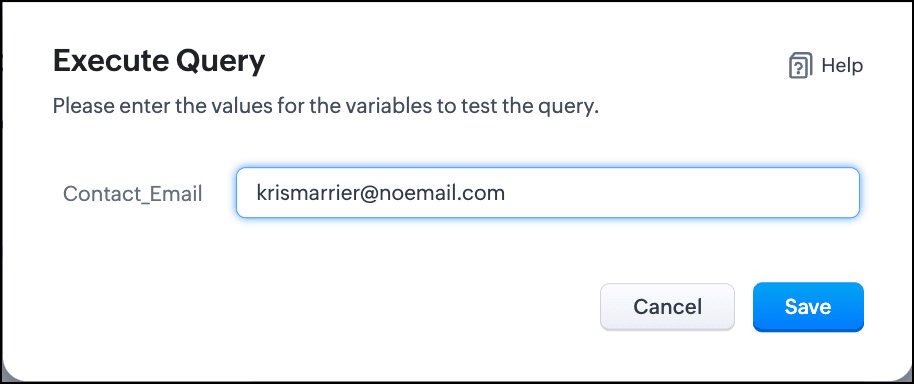
- Enter an email address in the box to test the query.
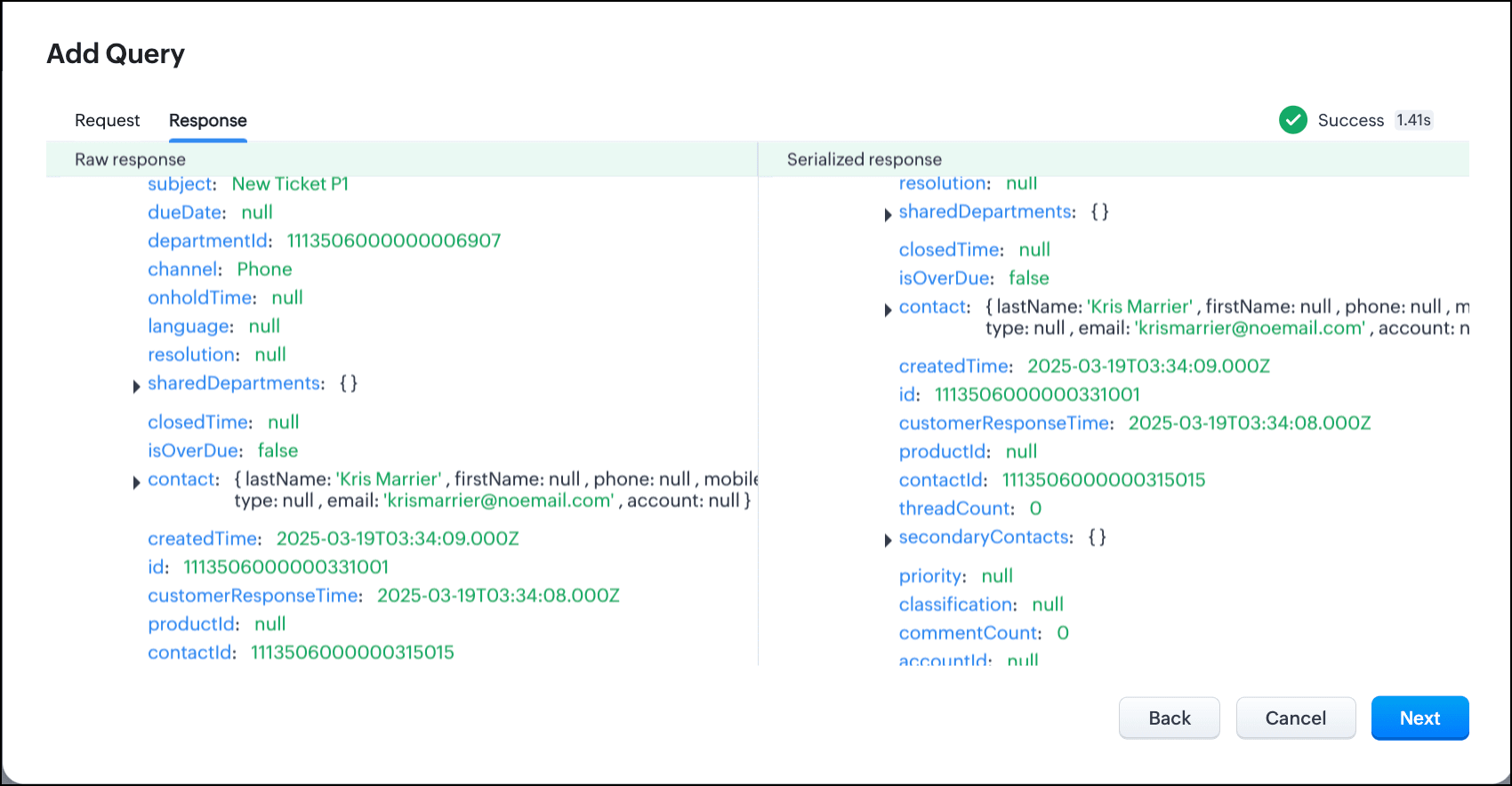
- Click Save. You can see the response of the query and the serialized response if you had serialized the output.
- Click Next.
- You can see the Schema of the query. The Schema acts as a bridge/mapping layer between external API responses and Zoho CRM's internal data structure. For example, the response of the Desk API returns result[].assignee.firstName, which is mapped to CRM as Assignee > FirstName. Schema ensures that the CRM UI knows how to display the field correctly.
With the right mapping in the schema, you can avoid manual data entry or syncing, and use the API data in workflows, reports, and dashboards.
You can change the CRM Field Type and Label to suit your needs. Refer to our Kaizen post on Serialization and Schema Management for more details. - Click Save to save the query.
Now that our query and fetching data from Zoho Desk is sorted, let's move on to the Canvas.
The Custom List view in Canvas enables you to stack records horizontally, one above the other.
Follow the steps in the How to Work with Canvas? guide to create a Custom List View Canvas for the Contacts module.
- On the Canvas, click the database icon for the Queries component.
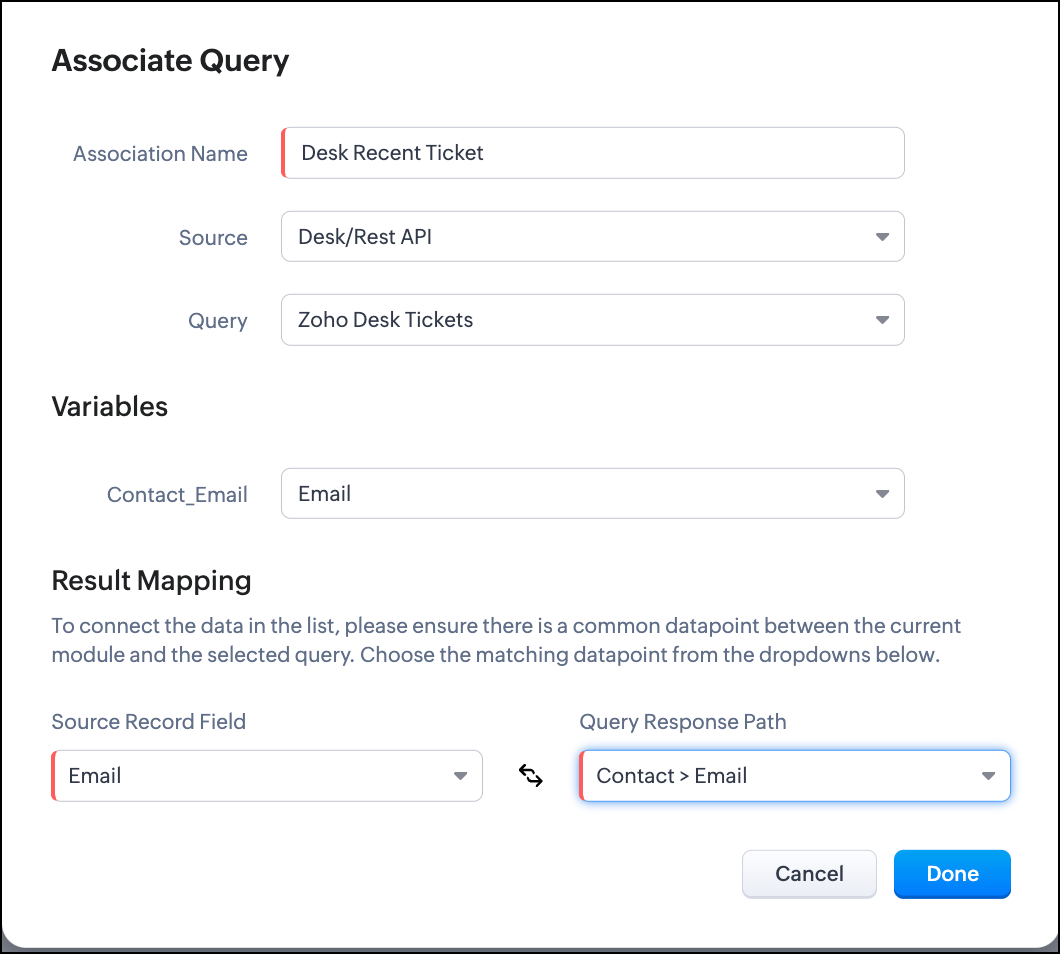
- Click Associate Query.
- Give an Association Name and select the Source(added in step 1) for the query.
- Under Query, select the query you created.
- The Variables section will contain the variables in the query. The drop-down displays all fields in the Contacts module. Select the Email field.
- Under Result Mapping, choose Email as the Source Record Field and Contact > Email as the Query Response Path. The Query Response Path is populated from the schema of the query.
- Click Done to associate the query with the canvas.
- You can see all the fields of the query on the left. Drag and drop the required fields on the canvas.
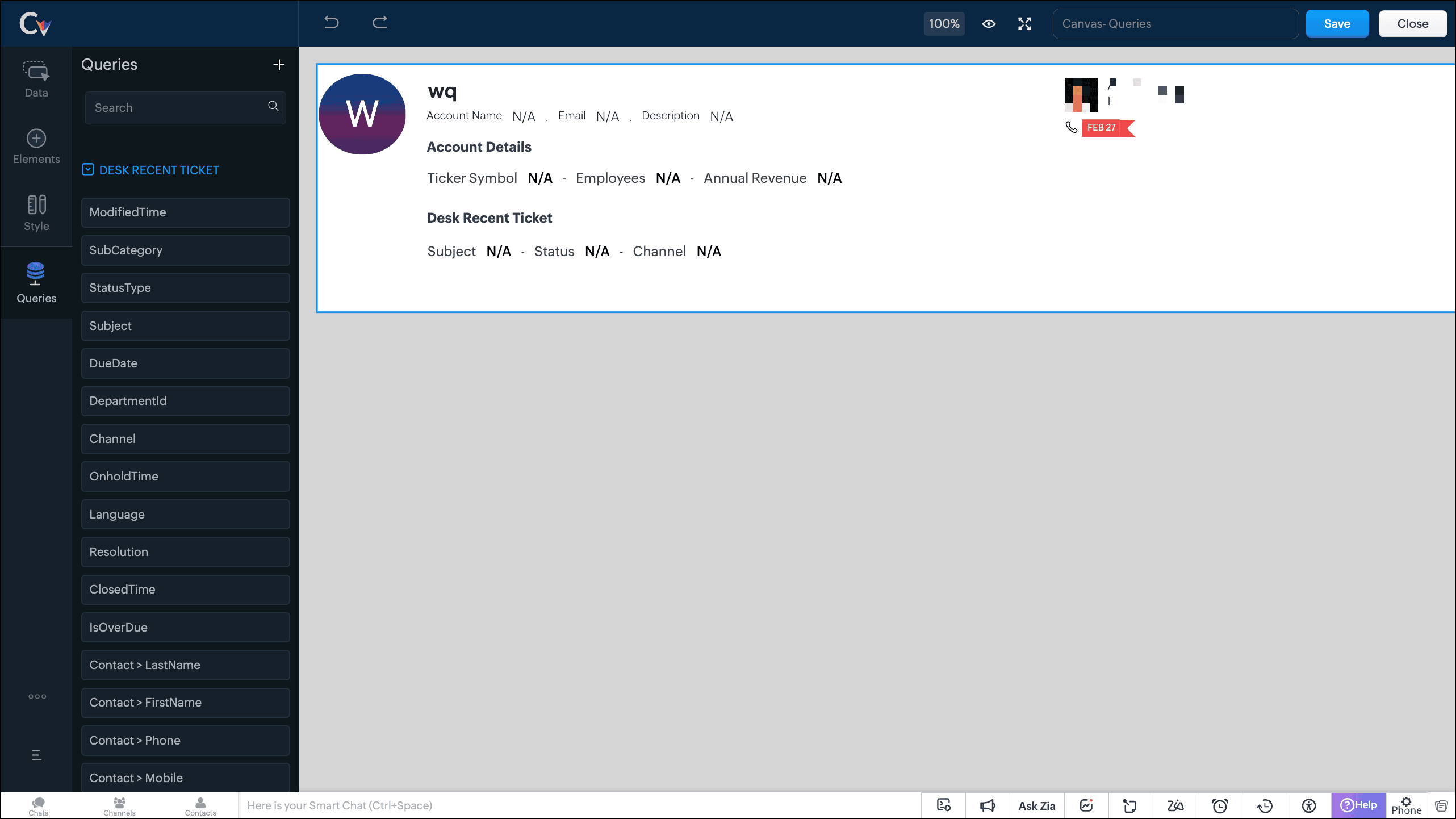
- Save the canvas.
Time for the big reveal!
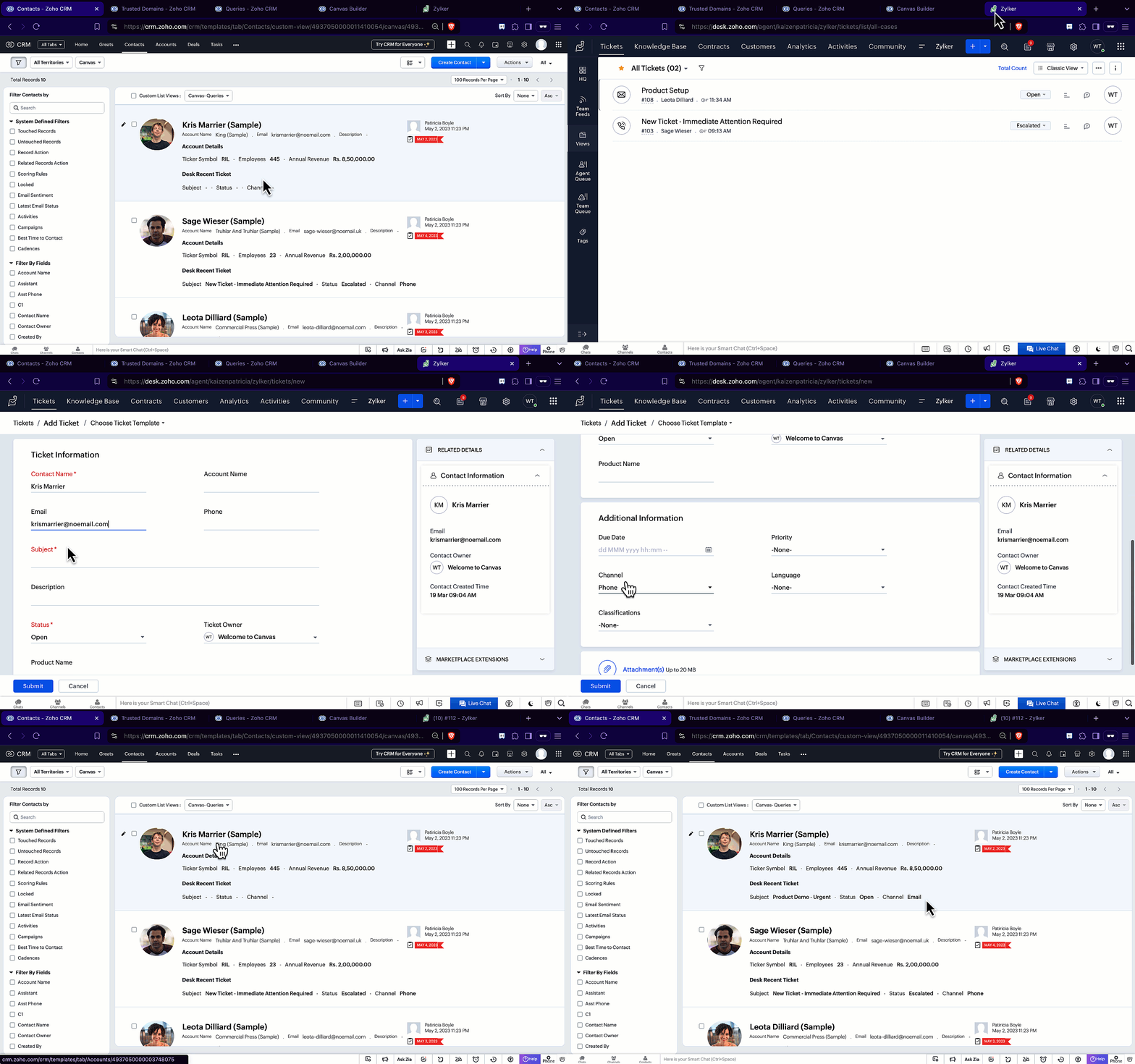
The following GIF shows how the ticket details from Zoho Desk are populated on the Canvas List View of the Contacts module.

Note that every time you reload the canvas, the query underneath makes an API call to the source provider to fetch data for the contacts in Zoho CRM. Ensure your API calls are monitored to avoid exhasuting your credits.
We hope you liked this post.
Topic suggestions are welcome! See you all next week!
Cheers!
----------------------------------------------------------------------------------------------------------------------------------------

See Also
Topic Participants
Shylaja S
Sticky Posts
Kaizen #217 - Actions APIs : Tasks
Welcome to another week of Kaizen! In last week's post we discussed Email Notifications APIs which act as the link between your Workflow automations and you. We have discussed how Zylker Cloud Services uses Email Notifications API in their custom dashboard.Kaizen #216 - Actions APIs : Email Notifications
Welcome to another week of Kaizen! For the last three weeks, we have been discussing Zylker's workflows. We successfully updated a dormant workflow, built a new one from the ground up and more. But our work is not finished—these automated processes areKaizen #152 - Client Script Support for the new Canvas Record Forms
Hello everyone! Have you ever wanted to trigger actions on click of a canvas button, icon, or text mandatory forms in Create/Edit and Clone Pages? Have you ever wanted to control how elements behave on the new Canvas Record Forms? This can be achievedKaizen #142: How to Navigate to Another Page in Zoho CRM using Client Script
Hello everyone! Welcome back to another exciting Kaizen post. In this post, let us see how you can you navigate to different Pages using Client Script. In this Kaizen post, Need to Navigate to different Pages Client Script ZDKs related to navigation A.Kaizen #210 - Answering your Questions | Event Management System using ZDK CLI
Hello Everyone, Welcome back to yet another post in the Kaizen Series! As you already may know, for the Kaizen #200 milestone, we asked for your feedback and many of you suggested topics for us to discuss. We have been writing on these topics over the
Recent Topics
Business hours in reports
Hi. If I activate the business hours for my tickets. Does it affect in reports? I mean, if before, without working hours a ticket comes in on a Monday and closes the following Monday, in the resolution time in working hours I get 7 days. I want to knowZia Field Prediction - Unable to Validate Dataset Entries
Lastly, whenever we want to create a new field prediction, the status gets stuck in Incomplete and when I try to annotate tickets, I get an error message saying "Unable to validate dataset entries." I've tried deleting and recreating the prediction, butUsing an article already existing in Zoho Desk KB as a resolution for another tickets
Hi, I've read about the Resolution tab of the Tickets and the ability of adding a Resolution to the Knowledge Base so that both agents and customers be able to access this information. However, and considering several tickets may be solved by following the same procedure, here's my question: if, for a ticket, I solved it and added the way I solved it as an article in our KB, is it possible to grab that article and use it as a resolution for another tickets with similar characteristics? If it's not,How to create knowledge base article from api?
How to create knowledge base article from api?Disabling Smart Writing Assistant
Hello, I've found this article when looking to disable the Zoho Smart Writing Assistant in our Zoho Desk environment. I appreciate that the article is for another Zoho solution, however, I was still unable to disable this feature! Could we please haveAppend tags to records on import
Dear Customers, We hope you're well! Tags in Zoho CRM are humble labels you can earmark your records with for quick classification and recognition. You can tag records one by one when you have only a few records to update; you can automate tagging when"Recently Changed Payload Format" for webhooks in Zoho Billing
We are seeing a message about recently changed payload format for webhooks in zoho billing. I cannot find any notification about this change can you give me more information on this?Kaizen #198: Using Client Script for Custom Validation in Blueprint
Nearing 200th Kaizen Post – 1 More to the Big Two-Oh-Oh! Do you have any questions, suggestions, or topics you would like us to cover in future posts? Your insights and suggestions help us shape future content and make this series better for everyone.Zoho People Created a UBO/Group CEO Profile to view all employees
Hello All I have created a specific role UBO/ Group CEO Profile that is able to access to view all employees information Applicability i have input all the legal entity, business unit and division which most employees are added. I have also given accessWe've updated the webhook payload format
We’ve updated the default payload format for webhooks as part of our ongoing efforts to standardize the webhook format across Zoho Finance suite of applications. Note: This change is also applicable for the webhooks configured from the Developer Portal.Zoho People > Access of Left Menu
Hello All May I check how do i activate or de-activate of the left menu for users do i control via role or specific role? I have assign a user to Team memberCustom Button - Location Choice is not changeable in creation
I created a custom button for the Tasks module that calls a function to streamline mass updates of closing tasks as "complete". I want to place it in either the utility menu or the mass action menu, but when I create the button the "select page" fieldWorkflow on Clone
Hello. I'm interested on creating a workflow on a clone of a record in the Price_Books module that will clone also all the related Products and associate the new ones with the new Price_Book. My problem starts with that there's no On Clone event, onlyHow can I create a button in a widget that pops up a form created in ZOHO Creator when clicked?
I know that using HTML snippets, clicking the button can pop up the form. However, the same code does not work in the widget. <button><a href="#Form:form2?zc_LoadIn=dialog">Add</a></button>Introduce an option to hide the form title
My feature request is to include an option to hide the form title. At the moment it is possible to hide the header. In some cases I do want to show a logo image in the header but not the form title. As a workaround I have tried disabling the header and関連トピックから配信リストをつくる
ZOHOキャンペーンの既存の連絡先リストを関連トピックで絞り込んで、配信リストを作成する方法があれば、教えてください。Zoho Mail not working
Anyone else had the issue where emails wont send from either the desktop CRM or the mail app? It just says "syncing" then "failed". I deleted it and tried to access emails through the CRM on my phone (fold) but they dont show. It seems it is impossibleShorten one URL but not all
I have read that I should be able to click on the shorten link button at the bottom of the post window and shorten just one URL. But it does all of the URLs in my post. I want only one shortened. Not sure what I'm missing. Any help appreciated.What is Zoho Marketing Plus?
As if there wasn't enough confusion with SalesIQ, CRM, Campaigns and Marketing Automation, now we have Marketing Plus too. Can somebody from Zoho please give us a comparative list of features that are in Marketing Plus compared to what's in MarketingCreating a new deal with specific layout and pipeline
I am trying to create a button which creates a new deal for a particular account. It needs to be assigned a specific layout and pipeline. It seems like it should be really simple but I've been struggling to get this to work all day, can anyone help?!Announcing New Features in Trident for macOS (v.1.21.0)
Hello everyone! Trident for macOS is here with interesting features to elevate your workplace communication and productivity. Let's take a quick look at them. Get better visibility for concurrent events. Quickly compare and manage simultaneous eventsModifying Product Details
I am in the process of setting up new products in Zoho Commerce and have encountered a few problems: 1) Tabs It seems that Product Details pages do not have the ability to create Tabs. eg: https://www.thedebugstore.com/tp240141-aardvark-usb-i2c-spi-host-adapter-total-phase.htmlZoho Commerce B2B
Hello, I have signed up for a Zoho Commerce B2B product demo but it's not clear to me how the B2B experience would look for my customers, in a couple of ways. 1) Some of my customers are on terms and some pay upfront with credit card. How do I hide/showCreating a custom CSV file using deluge script/
I have an application I have developed and the client wants us to place an export file in csv onto an ftp server daily. Now I don't see au options in creator to change the separator to anything else. The client wants the separator to be the pipe symbol "|" I think i would be able to create schedule with some code to create the appropriate data in a string using deluge script but I haven't seen any functionality that would allow me to deposit that data as a file anywhere or attach it to an emailHow can I get a nested value attributes inside a key par?
Hello! Im getting the following output when reviewing a record I am after. I am trying to put some conditions based on a data value that is inside another data. For example, lets grab the below output. Info {"Account_Name":{"name":"Liberty ConstructionInvoices not arriving and mail server settings
I am having an issue where some clients are not receiving invoices. I have configured Zoho Books to send on my behalf and configured the appropriate SPF, DKIM and DMARC settings on my mail server and tested these as working. I get the CC'd copies so IMulti Line Text Character Limit
I want to export my Help Center articles but I realized that the text in the Answer column is being cut off. I'm guessing there is a character limit for multi line text fields. How can I get around this?Emails bouncing to Hotmail / Outlook.com
Today I have seen multiple emails bouncing all to Hotmail and outlook.com mailboxes, all other emails are being delivered. Is it just me or is this a widespread issue with Zoho Books ? Bounce Reason : uncategorized-bounceBe careful if you want to purchase zoho one
Hi, just to add one more complain to the other similar complains. When I purchased zoho one, Divith, my account manager told me (by email) that I would be able to keep different emails that I have inside the company (contact, privacy, etc.). During theSchedule Timeout 5 minutes vs. stated 15 minutes
I am running into a function run timeout error after 5 minutes for my schedules. The Functions - Limits documents states it should be 15 minutes: Functions - Limits | Online Help - Zoho CRM. What should it actually be? Due to the 5 minute timeout, I'mImporting invoices in bulk using the xls file template - still posting as draft - Is there a way to skip "mark as sent" and post it directly?
Hello everyone, as the title say, is there a way that when I upload from the template file, it will post automatically? I tried changing the "Invoice Status" from draft to approved but it is still appearing as draft and is making me go to invoices soHow to set Sales Order Payment Terms when creating a Sales Order via the Zoho Books API
I am creating Sales Orders via the Zoho Books API. I would like to set the Payment Terms to a particular value from the list of allowed values. Is that possible? I was able to get the list of payment terms via this API call: https://books.zoho.com/api/v3/settings/paymentterms?organization_id=XXXX"Function and workflow to create customer payment and send receipt
I am attempting to set up a workflow/custom function for the automatic creation of a customer payment and sending the email receipt, but am receiving the error "Improper Statement Error might be due to missing ';' at end of the line or incomplete expression" I've been over everything several times and cannot see where the error is (code is copied into the attached document). I haven't used custom functions before with Deluge, so it's very likely something very simple, or I've completely muckedHow to rename the Submit Button by using deluge script
Hi everyone, As we know, the Submit button can be renamed in the form builder setting. But I have scenario where I need the Submit Button to be renamed differently according to condition. Anyone knows how to do it? Thank YouBanking: Transfer from another account without base currency
Scenario: A banking line item shall be categorised as an "internal transfer" from another bank account. This is a USD to EUR transfer. Our base currency is CHF. What we tried: Category: "Transfer from another account" From: Our USD account To: Our EURItem cost price - How to accomodate changing cost prices
I am in urgent need of assistance with how to accommodate changing cost prices for items, not manually. We import items so their landed cost is always changing. This cost is NOT reflected however in the item cost price. This is going to cause us someMarketer's Space: Targeted messaging : Leveraging Zoho Campaigns for Effective Communication
Hello Marketers, Welcome back to Marketers’ Space! Targeted messaging ensures your communication reaches the right audience - boosting engagement, conversions, and overall campaign success. In this post, we’ll be looking at targeted messaging to create:between: conditions in search?criteria
Hello, please help solve problem I try to select deals by Creater_Time between dates i send this GET request /crm/v4/deals/search?criteria=(Created_Time:between:(2024-02-01T18:52:56,24-02-17T18:52:56)) encoded to /crm/v4/deals/search?criteria=%28Created_Time%3Abetween%3A%282024-02-01T18%3A52%3A56%2C24-02-17T18%3A52%3A56%29%29Zoho Creator : Updating Records via Import. Can't use Autonumber or ZohoRecordID ?
Hi, I am trying to use the function to update a report with an import. I'm running in to the error : "unable to update because the form has no column with unique values" In the release notes it says Only field with unique values can be used to compare💡 Feature Request: Custom App Bundle Plan (Pick Only the Apps You Need)
Request: Allow Users to Build a Custom App Bundle (Choose Only the Apps They Need) Hi Zoho Team, I appreciate the value that Zoho One and the Plus Bundles (CRM Plus, Finance Plus, etc.) offer. However, I’m finding it difficult to get the best fit forNext Page