Kaizen #182 - Queries in Canvas List View

Hello everyone!
Welcome to another week of Kaizen!
We're back with another post in this series on Queries in Canvas List View.
Queries in Zoho CRM allow you to dynamically retrieve data from CRM as well as third-party services directly within the CRM platform.
You can construct a query of one of the following types:
- CRM Module type query to retrieve data from CRM modules.
- COQL type query to construct a query using the COQL API.
- REST API type query to fetch data from an external service and use it in Zoho CRM.
You can associate a query with the 'Decision' component of Kiosk, Canvas Detail View, or Canvas List View.
In this post, we will take up a use case and see how you can associate a query with Canvas List View.
Use case
Sales and support teams often need quick access to Zoho Desk tickets related to a contact in Zoho CRM. To avoid switching between apps to check ticket statuses, we can use the Queries feature to fetch the latest Zoho Desk ticket's details of a contact dynamically and display them on the Canvas List View page of the Contacts module.
This ensures that CRM users can instantly view the most recent ticket linked to a contact without leaving Zoho CRM.
Follow along to see how you can achieve this!
Step 1 - Add a Source
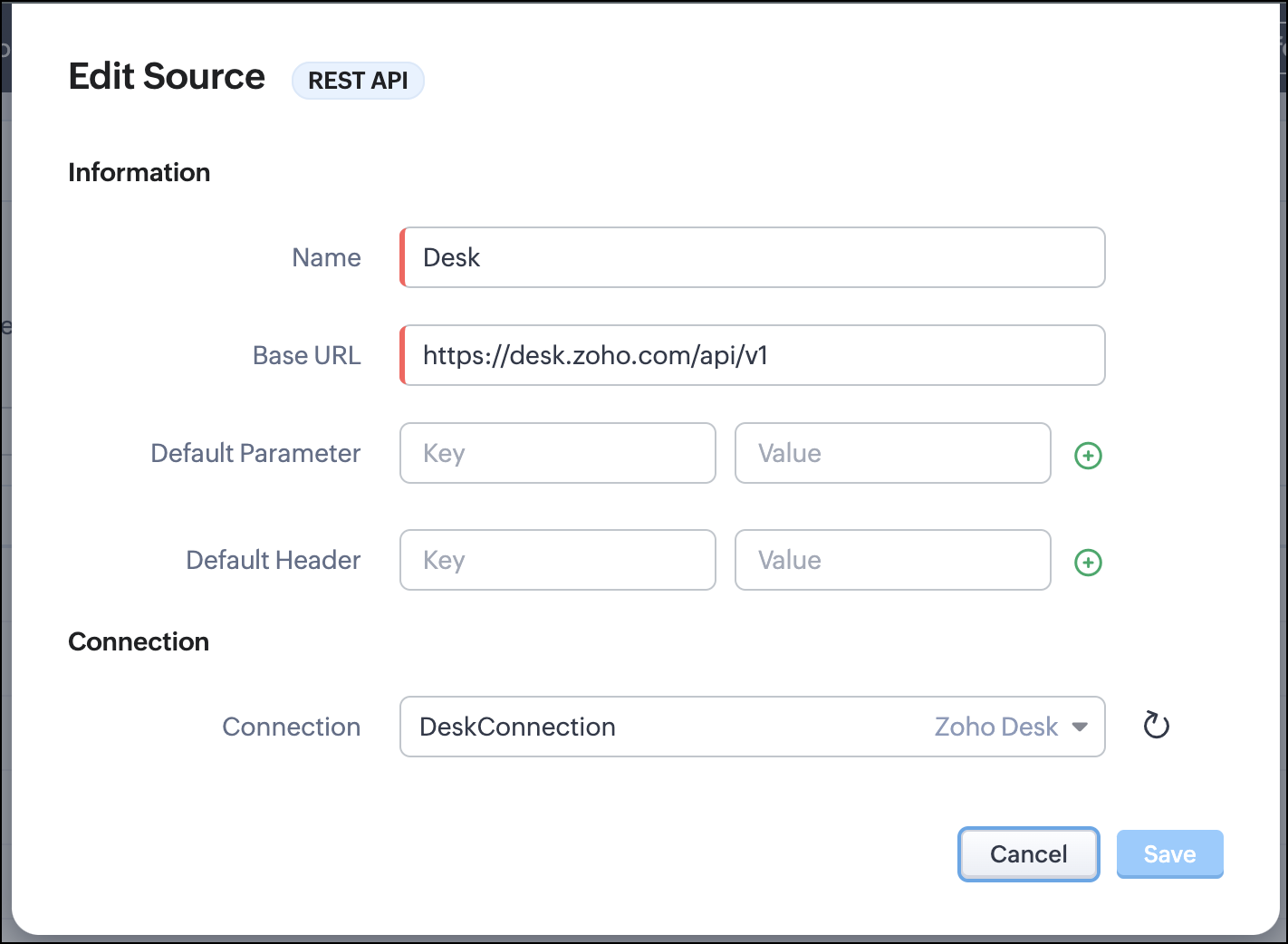
- Go to Setup > Developer Hub > Queries > Sources > Add Source.
- Under Information,
- Give a name for the source and its Base URL. Queries will make API calls to this URL to fetch data. Ensure to add this to Trusted Domain.
- Specify any default parameters and headers for this base URL.
- Under Connection, choose the connection you have created with Zoho Desk with the necessary scopes. If you haven't, create one.
- Click Save.

Note
Queries will make API calls to the URL you add in the Source and consume credits that are applicable in that service. Ensure you monitor your API usage in your source provider.
Step 2 - Create a REST API Query
- Go to Setup > Developer Hub > Queries > Add Query.
- Under Source, choose the source you created in step 1.
- Under Information,
- Enter the Name, API Name, and the Endpoint of the query.
- Specify the parameter email that takes the dynamic variable {{Contact_Email}} as its value. This is to fetch the latest ticket from Zoho Desk for a contact with the email in this variable during runtime. Refer to our Kaizen post on Handling Query Variables in Zoho CRM for additional details.
- Specify Headers, if any.
- You can serialize the output to fit your needs using JavaScript in the Serializer.
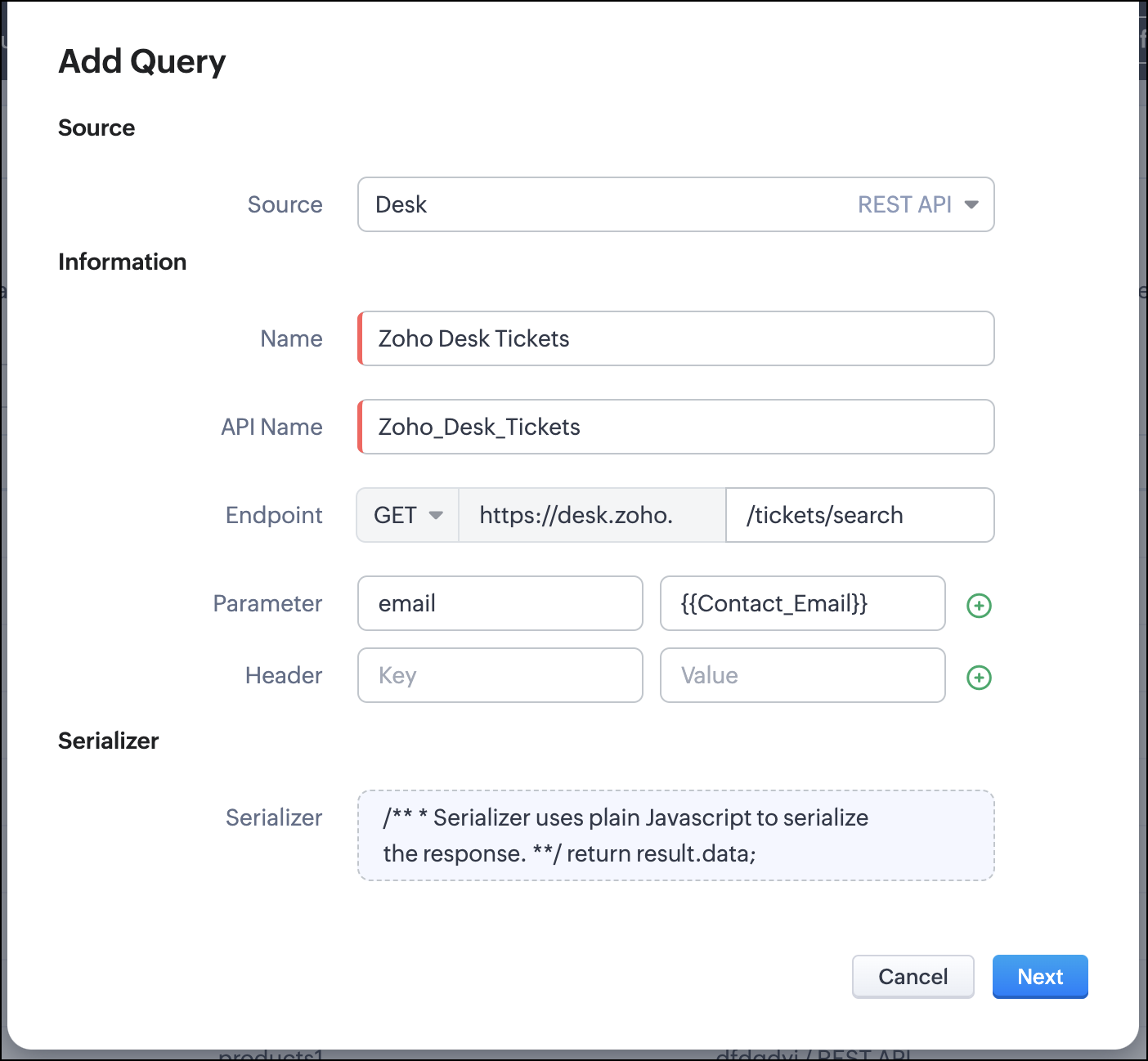
- Click Next.
- Enter an email address in the box to test the query.
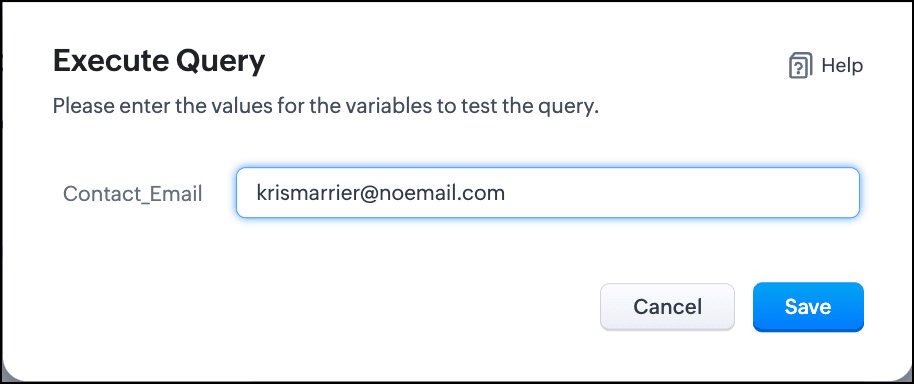
- Click Save. You can see the response of the query and the serialized response if you had serialized the output.
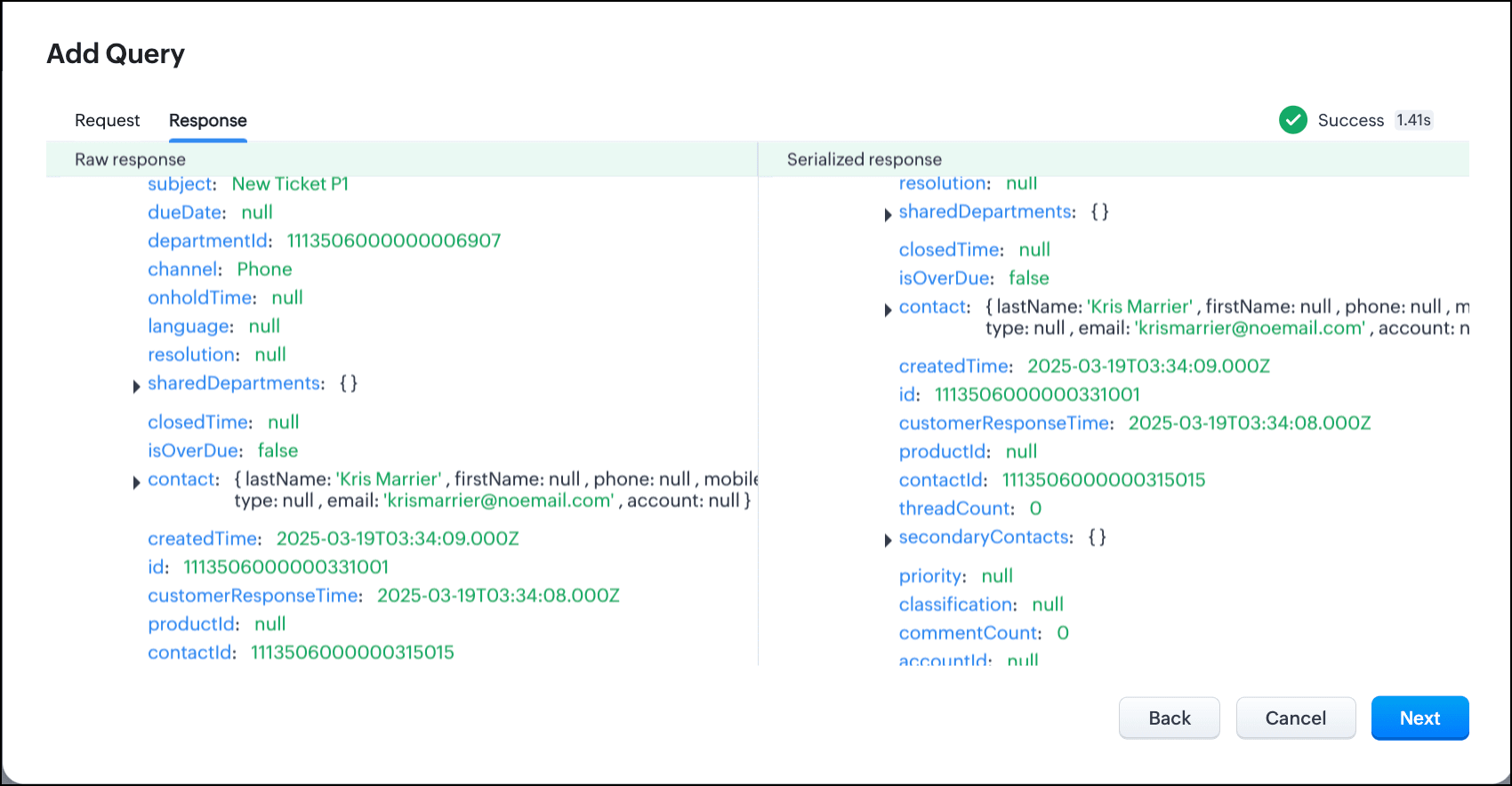
- Click Next.
- You can see the Schema of the query. The Schema acts as a bridge/mapping layer between external API responses and Zoho CRM's internal data structure. For example, the response of the Desk API returns result[].assignee.firstName, which is mapped to CRM as Assignee > FirstName. Schema ensures that the CRM UI knows how to display the field correctly.
With the right mapping in the schema, you can avoid manual data entry or syncing, and use the API data in workflows, reports, and dashboards.
You can change the CRM Field Type and Label to suit your needs. Refer to our Kaizen post on Serialization and Schema Management for more details. - Click Save to save the query.
Now that our query and fetching data from Zoho Desk is sorted, let's move on to the Canvas.
The Custom List view in Canvas enables you to stack records horizontally, one above the other.
Follow the steps in the How to Work with Canvas? guide to create a Custom List View Canvas for the Contacts module.
- On the Canvas, click the database icon for the Queries component.
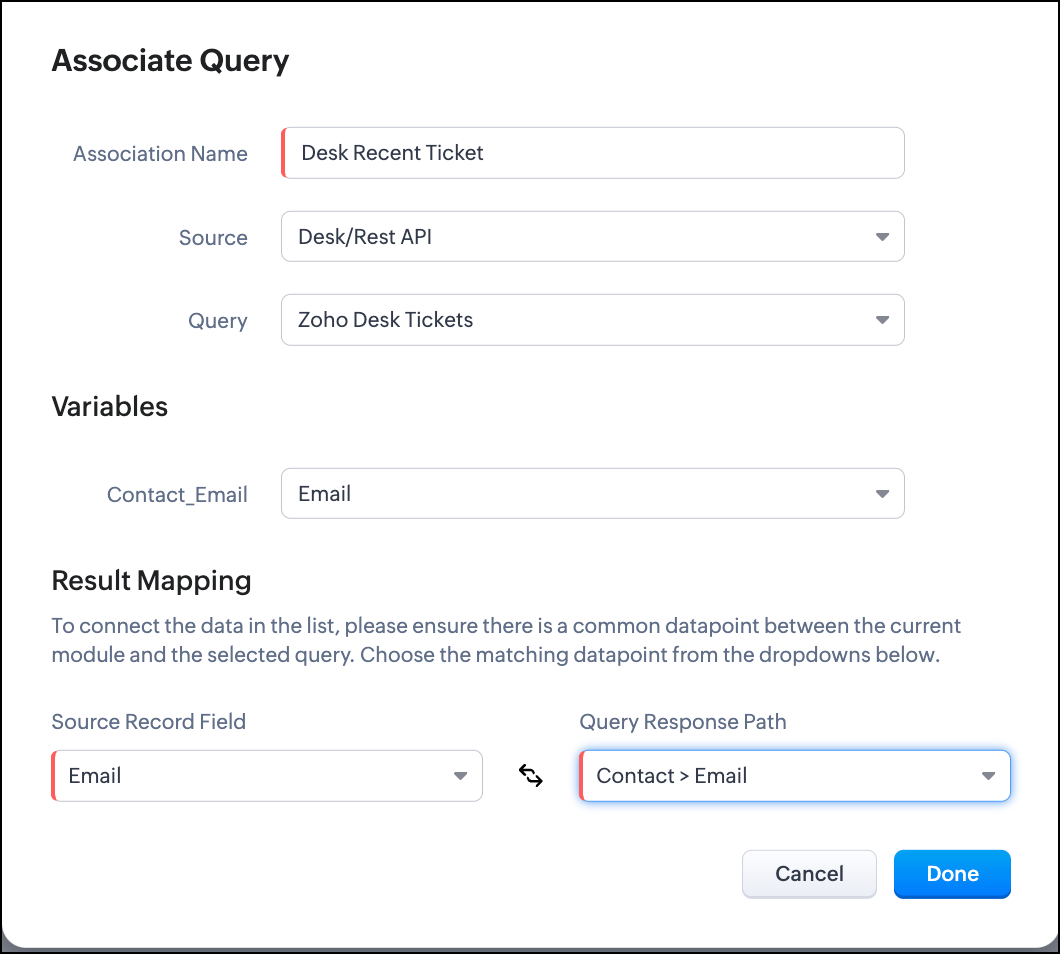
- Click Associate Query.
- Give an Association Name and select the Source(added in step 1) for the query.
- Under Query, select the query you created.
- The Variables section will contain the variables in the query. The drop-down displays all fields in the Contacts module. Select the Email field.
- Under Result Mapping, choose Email as the Source Record Field and Contact > Email as the Query Response Path. The Query Response Path is populated from the schema of the query.
- Click Done to associate the query with the canvas.
- You can see all the fields of the query on the left. Drag and drop the required fields on the canvas.
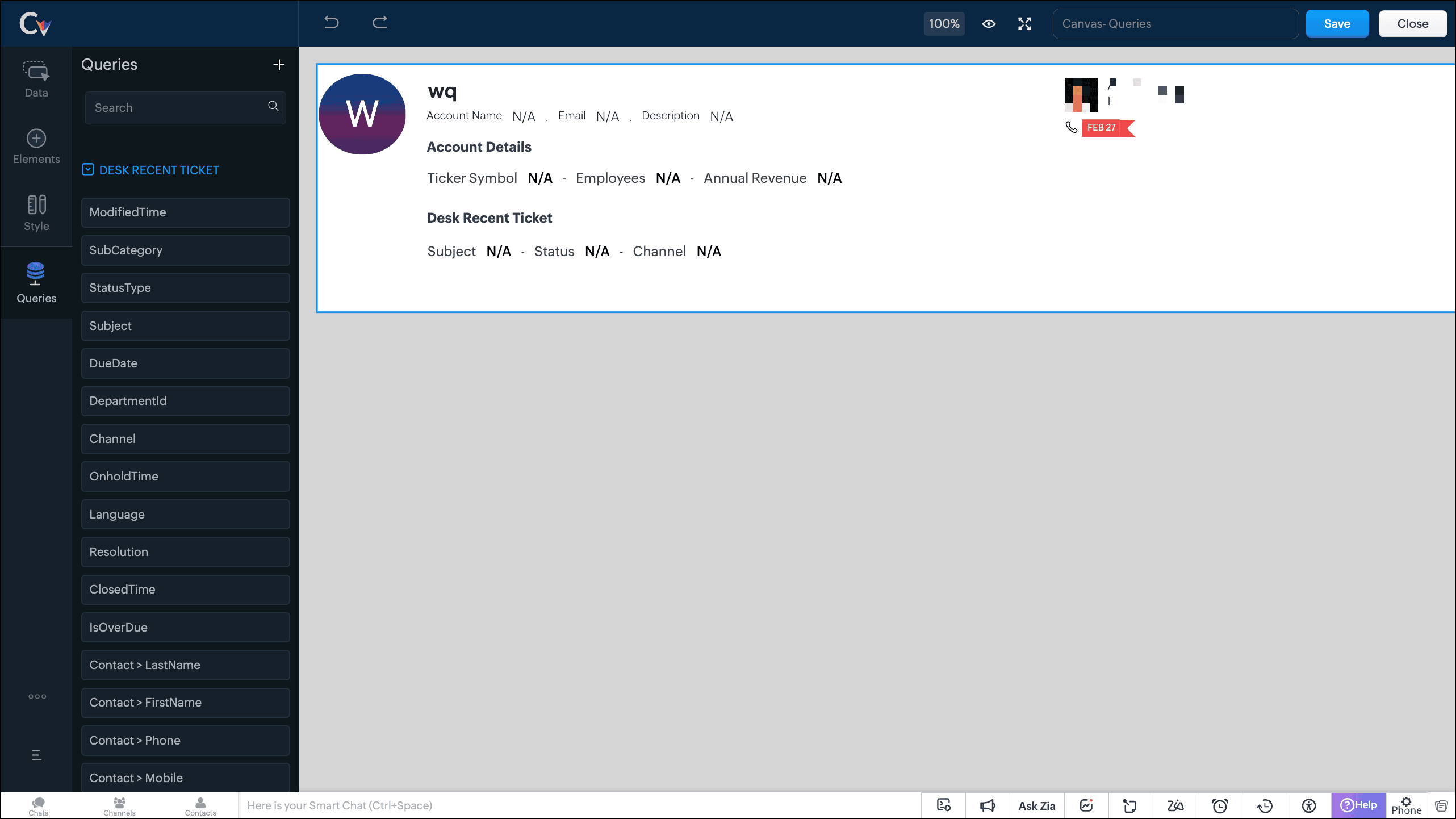
- Save the canvas.
Time for the big reveal!
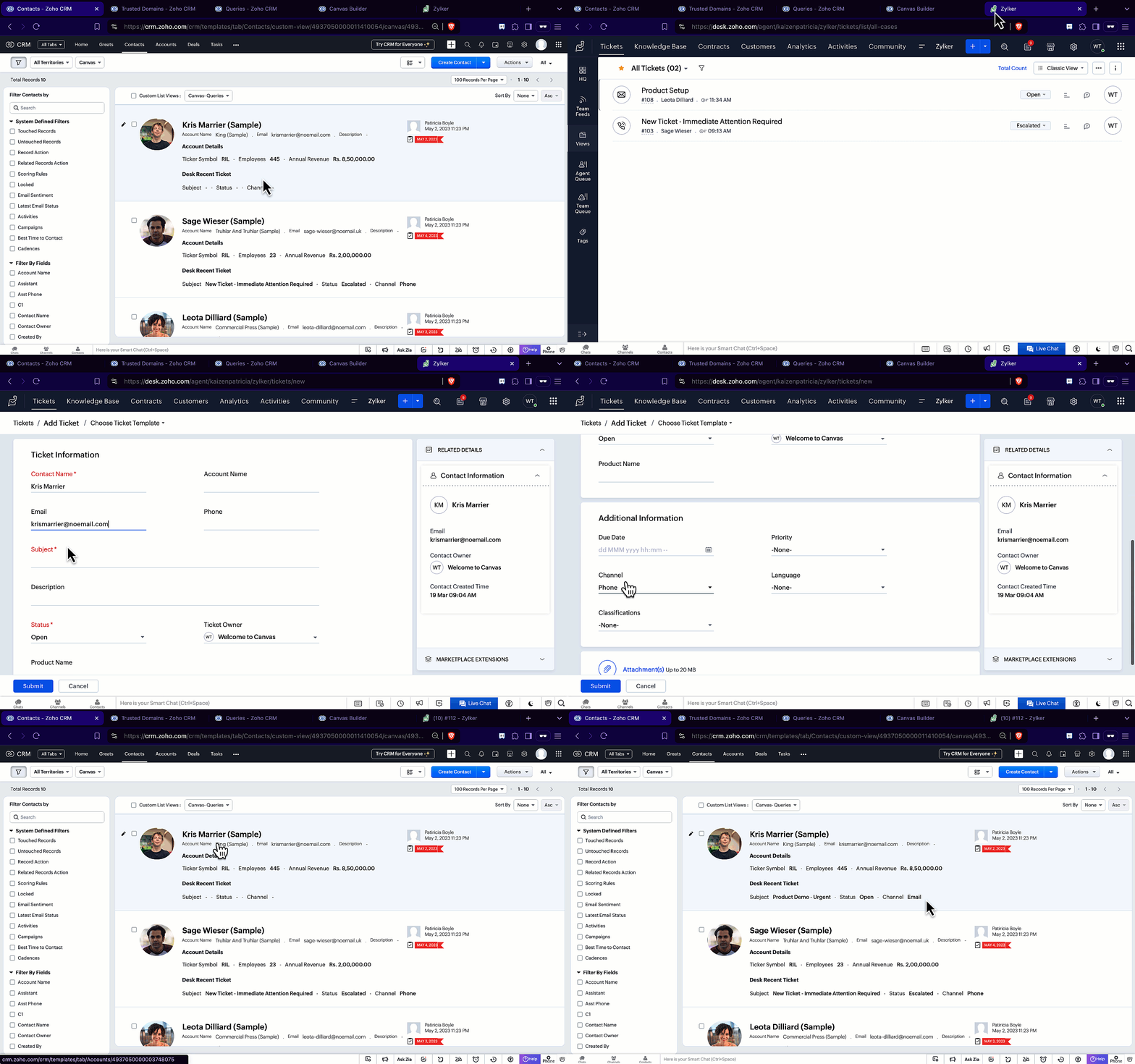
The following GIF shows how the ticket details from Zoho Desk are populated on the Canvas List View of the Contacts module.

Note that every time you reload the canvas, the query underneath makes an API call to the source provider to fetch data for the contacts in Zoho CRM. Ensure your API calls are monitored to avoid exhasuting your credits.
We hope you liked this post.
Topic suggestions are welcome! See you all next week!
Cheers!
----------------------------------------------------------------------------------------------------------------------------------------

See Also
Topic Participants
Shylaja S
Sticky Posts
Kaizen #217 - Actions APIs : Tasks
Welcome to another week of Kaizen! In last week's post we discussed Email Notifications APIs which act as the link between your Workflow automations and you. We have discussed how Zylker Cloud Services uses Email Notifications API in their custom dashboard.Kaizen #216 - Actions APIs : Email Notifications
Welcome to another week of Kaizen! For the last three weeks, we have been discussing Zylker's workflows. We successfully updated a dormant workflow, built a new one from the ground up and more. But our work is not finished—these automated processes areKaizen #152 - Client Script Support for the new Canvas Record Forms
Hello everyone! Have you ever wanted to trigger actions on click of a canvas button, icon, or text mandatory forms in Create/Edit and Clone Pages? Have you ever wanted to control how elements behave on the new Canvas Record Forms? This can be achievedKaizen #142: How to Navigate to Another Page in Zoho CRM using Client Script
Hello everyone! Welcome back to another exciting Kaizen post. In this post, let us see how you can you navigate to different Pages using Client Script. In this Kaizen post, Need to Navigate to different Pages Client Script ZDKs related to navigation A.Kaizen #210 - Answering your Questions | Event Management System using ZDK CLI
Hello Everyone, Welcome back to yet another post in the Kaizen Series! As you already may know, for the Kaizen #200 milestone, we asked for your feedback and many of you suggested topics for us to discuss. We have been writing on these topics over the
Recent Topics
Automation #6 - Prevent Re-opening of Closed Tickets
This is a monthly series where we pick some common use cases that have been either discussed or most asked about in our community and explain how they can be achieved using one of the automation capabilities in Zoho Desk. Typically when a customer submitsNot able to list or add contacts
I am not able to get a list of contacts via api request. Tickets for example are listed via api even without orgId, so it shoud be similar. What is missing to reach the requirement. My aim ist to add a contact via API and then add a ticket with the contactSee contrat information from an account under the ticket
Hi there, How can I program something to display created and selected contract on the ticket itself so my agents see it and can support correctly according to the contract and SLA ? Thank you :)Weekly time log view
The Weekly Time Log view is pretty nice. My users really like it when I show it to them. They like being able to pin ongoing tasks. Anyway, it's sort of hard to find. It is grouped with the Add Time Log button as a pull down. In my opinion, it shouldAny Impact of Amazon Listings API on E-commerce Integration?
Amazon sent the following message about changes to their APIs. Our only Amazon app / integration is Zoho Inventory's eCommerce for Amazon US, so the message below in bold gives us concerns about if Amazon's warning is referencing Zoho's Amazon US integration.Working with Products that are non-tangible
How does one create a 'service' in products? Is there a way to disable inventory functions for things like Sofware as a service? The services module doesn't look to be much help either. Not sure how to do this in CRMePOD Devices
Has anyone tried and tested and devices that deliver ePOD (electronic proof of delivery)? We would like our drivers to use an ePOD device to get the customer signature The app should then be capable of updating the sales order to show delivery.API Integration
Why are we unable to do API Integration for Job boradsRemind/Recall Document API
When I recall a document through the Sign API, I would like to be able to specify the reason that gets sent in the user notification email. Same with including a unique message when sending a document reminder through the API. Is there a way to includeZoho Books API Creating Invoice and Address API
I'm trying to create an invoice with zoho books api and i get the following error: Error creating invoice in Zoho Books: { message: 'Request failed with status code 400', details: { code: 15, message: 'Please ensure that the "billing_address" has lessConvert Multiple PO in 1 Bill
Does anyone know how to convert multiple POs in 1 Bill? Thank youmerge the Multiple POs to single PO if Vendor of PO"s --in Zoho Inventory
HI Merge the Multiple POs to single PO if Vendor of PO"s are Same ----in Zoho inventory Please provide any work around to achive this .How to add categories to community
In my Community, I would like to add several Categories but I don't readily see how this is accomplished. Currently, I have one category in my community with several forums. But I would like to add more categories. Thanks.Knowledgeable Image Quality is very poor, any recommendations how to improve this?
Hi All, We are looking at migrating our current knowledge base to Zoho so it can be kept in one location. Our current KB utilises a lot of images to try and make it easier for users and less wordy. Unfortunately, when I upload an image within an article,Assistance Required: Displaying Dynamic HTML Table in Zoho Creator Dashboard Page
I am currently stuck while creating a custom dashboard page in Zoho Creator. I want to display a designed HTML table showing Teacher Registration data with this condition: If Total Allowed Leaves < 10, display those teachers in the table. Page ScriptsVisibility of Custom Questions in the Question Pool
A colleague is adding our own questions in the question pool for our Employee Engagement survey, but I can't see the questions she has entered, even after refreshing the webpage. Are the custom questions in the question pool only visible to the one whocampaigns contact lists not exporting
I'm trying to export a specific lead source from my contract list in 'campaigns'. Every time I have to do this the contacts won't export. I have done a search and selected the specific contacts I want to export. The box appears to choose the file type,Recipient Field on replies doesn't update with Contact change
Some emails that come into our system come from an online form and the sender address is a noreply@whateverthedomainis.org So in order to reply to the original sender, we need to update/change the contact for the tickets. However, after we change theMulticolumns fields for native forms
It would be nice to be able to create forms with multiple columns. Currently, each field occupies a single column, which makes a fairly complex form seem too long.Assign values to hidden fields in native forms
It would be great to be able to assign values (static or dynamic) to hidden fields in a form. Currently, I can only assign a value via the URL. I currently have a form integrated with a webhook, but I don't have a way to send useful form data as parameters,Migrating Email Content to a Shared Mailbox Address
I am moving my email to Zoho Mail (currently hosted through GoDaddy). I have created a user (me) and I have also created a "Shared Mailbox" Group (through the admin panel) with an email address I will be using as an organization address. My personal emailLive webinar: Mastering financial presentations with Zoho Show
Hey there finance professionals! We know many of you are currently knee-deep in report creation mode to wrap up the fiscal year for your organization. Creating a presentation to communicate essential financial data isn’t simple, with all the calculations,Zoho Desk Android app update: Accessing the guided conversation bots in the IM module
Hello everyone! In the latest version(v2.9.8) of the Zoho Desk Android app update, we have brought in support for Guided conversation bots within the IM Module. These bots use predefined conversation flows to automate initial responses, handle routineZoho Analytics Embed - Zoomed Right In?
Hey all, I am using the Zoho Show app on an android TV and cannot figure out why, but the Zoho Analytics embed is zoomed right in. When I preview on my laptop it looks fine, when I go in and edit the code, it looks zoomed? Then when it displays on theAssistance with Image File Upload in Zoho Creator
Hi , I'm building an application for storyboard creation using Zoho Creator, integrating Gemini AI for automated image generation. In the "Generate Frame" form, user inputs are collected to construct image prompts. Current Workflow: On Validation (FormMigrating all email accounts from cpanel shared hosting and email boxes to zoho
I have already read previous articles posted on this forum but none of them suit my needs.So i am currently working for a small company. The company website runs on cPanel shared hosting and the company page is a WordPress website. I recently redesignedDomain Change from apkbark.com to apkbark.io – Do I Need to Setup Zoho Mail Again?
I recently migrated my website from the old domain https://apkbark.com to the new domain https://apkbark.io. The Zoho Mail setup was previously configured and working perfectly on the old domain. Now I would like to know: Will my Zoho Mail setup automaticallyHow to add different type of revenue under sales ?
How to add different type of revenue under sales ?Types of Revenue
i have different types of revenue , I want to see under sales in different categories , while preparing invoice I want to allocated if possibleZoho books account recovery
I had submitted a request to restore zohobooks account, but I am yet to get a feedback till now. The email addresses used to access the zohobooks can not access it again. I don't know what went wrong. I need quick attention to this. More details are providedPayments calendar for receivables and liabilities by due dates
Hello guys! What method can you recommend for tracking and planning future payments against expected income? We operate on the principle - we expect some income this month, then we look at what expenses are due this month and pay accordingly. I've seenEmail Search
Has search stopped working for people? Searched on Zoho email content, I get nothing back. Signed out and back in, still same issuesZoholics Europe 2025: Your Ultimate Data Analysis (Zoho Analytics) Workshop Experience
Why should you attend? This year, Zoholics Europe 2025 is putting data analysis centre stage. With a dedicated workshop designed to answer all your data-related questions, you’ll gain practical skills, real-time solutions, and expert insights that youhow i can update client_secret or refresh_token in case if my was stolen?
i want to know how i can protect my data on this case[Webinar] CoCreator – Generative AI-Assisted Application Development in Zoho Creator
Hello Creators! The Zoho Developer Community is hosting a webinar on CoCreator – Generative AI-Assisted Application Development to showcase our latest AI capabilities. What's this about? It's all about our latest AI capabilities in Zoho Creator. Insteadcustom fields not populating from deluge script into invoice
Hello, I've created some Deluge script that is meant to take a few inputted invoice custom fields and calculate a few others. I can see when I execute the function that my inputted custom fields are being passed, yet im still ending up with all "null"Using English But Dropdowns in Thai
We have selected English in Settings but all of the dropdown boxes are in Thai. How do i change this? The organization is based in Thailand and we are using the THB as our currency, but need the dropdowns to be in English. Please help! 🙏Introducing Import Contract API
We are excited to introduce the Import Contract API in Zoho Contracts. Here's a brief overview: Import Contract API The Import Contract API allows you to import contracts directly into Zoho Contracts in any of the following states: Draft Signed ActiveCambio de Plane
Tenia un plan gratuito, hice una actualización a un plan de pago, salí por completo y entre nuevamente, pero no me deja corregir, pagar o modificar las facturas que había realizado en el modo de prueba. Me da el siguiente error: Factura de proveedor seBetter integration between Zoho CRM and Zoho Bookings
I've noticed that when a meeting which was created in Zoho Bookings is updated by a sales person in Zoho CRM, the change is not reflected back into Zoho Bookings. I have raised this with support who advised that meetings created in Bookings need to beNext Page