Kaizen #182 - Queries in Canvas List View

Hello everyone!
Welcome to another week of Kaizen!
We're back with another post in this series on Queries in Canvas List View.
Queries in Zoho CRM allow you to dynamically retrieve data from CRM as well as third-party services directly within the CRM platform.
You can construct a query of one of the following types:
- CRM Module type query to retrieve data from CRM modules.
- COQL type query to construct a query using the COQL API.
- REST API type query to fetch data from an external service and use it in Zoho CRM.
You can associate a query with the 'Decision' component of Kiosk, Canvas Detail View, or Canvas List View.
In this post, we will take up a use case and see how you can associate a query with Canvas List View.
Use case
Sales and support teams often need quick access to Zoho Desk tickets related to a contact in Zoho CRM. To avoid switching between apps to check ticket statuses, we can use the Queries feature to fetch the latest Zoho Desk ticket's details of a contact dynamically and display them on the Canvas List View page of the Contacts module.
This ensures that CRM users can instantly view the most recent ticket linked to a contact without leaving Zoho CRM.
Follow along to see how you can achieve this!
Step 1 - Add a Source
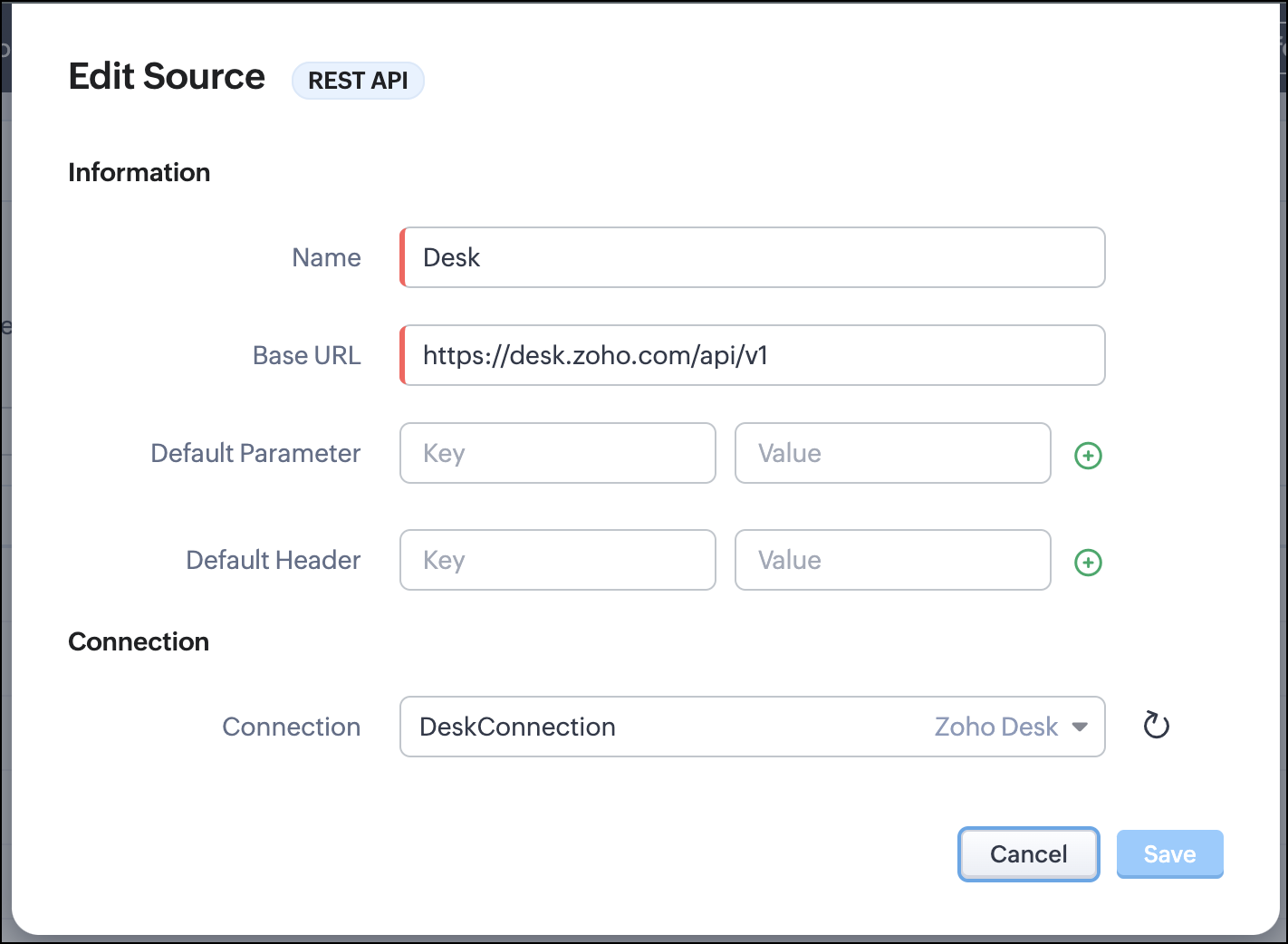
- Go to Setup > Developer Hub > Queries > Sources > Add Source.
- Under Information,
- Give a name for the source and its Base URL. Queries will make API calls to this URL to fetch data. Ensure to add this to Trusted Domain.
- Specify any default parameters and headers for this base URL.
- Under Connection, choose the connection you have created with Zoho Desk with the necessary scopes. If you haven't, create one.
- Click Save.

Note
Queries will make API calls to the URL you add in the Source and consume credits that are applicable in that service. Ensure you monitor your API usage in your source provider.
Step 2 - Create a REST API Query
- Go to Setup > Developer Hub > Queries > Add Query.
- Under Source, choose the source you created in step 1.
- Under Information,
- Enter the Name, API Name, and the Endpoint of the query.
- Specify the parameter email that takes the dynamic variable {{Contact_Email}} as its value. This is to fetch the latest ticket from Zoho Desk for a contact with the email in this variable during runtime. Refer to our Kaizen post on Handling Query Variables in Zoho CRM for additional details.
- Specify Headers, if any.
- You can serialize the output to fit your needs using JavaScript in the Serializer.
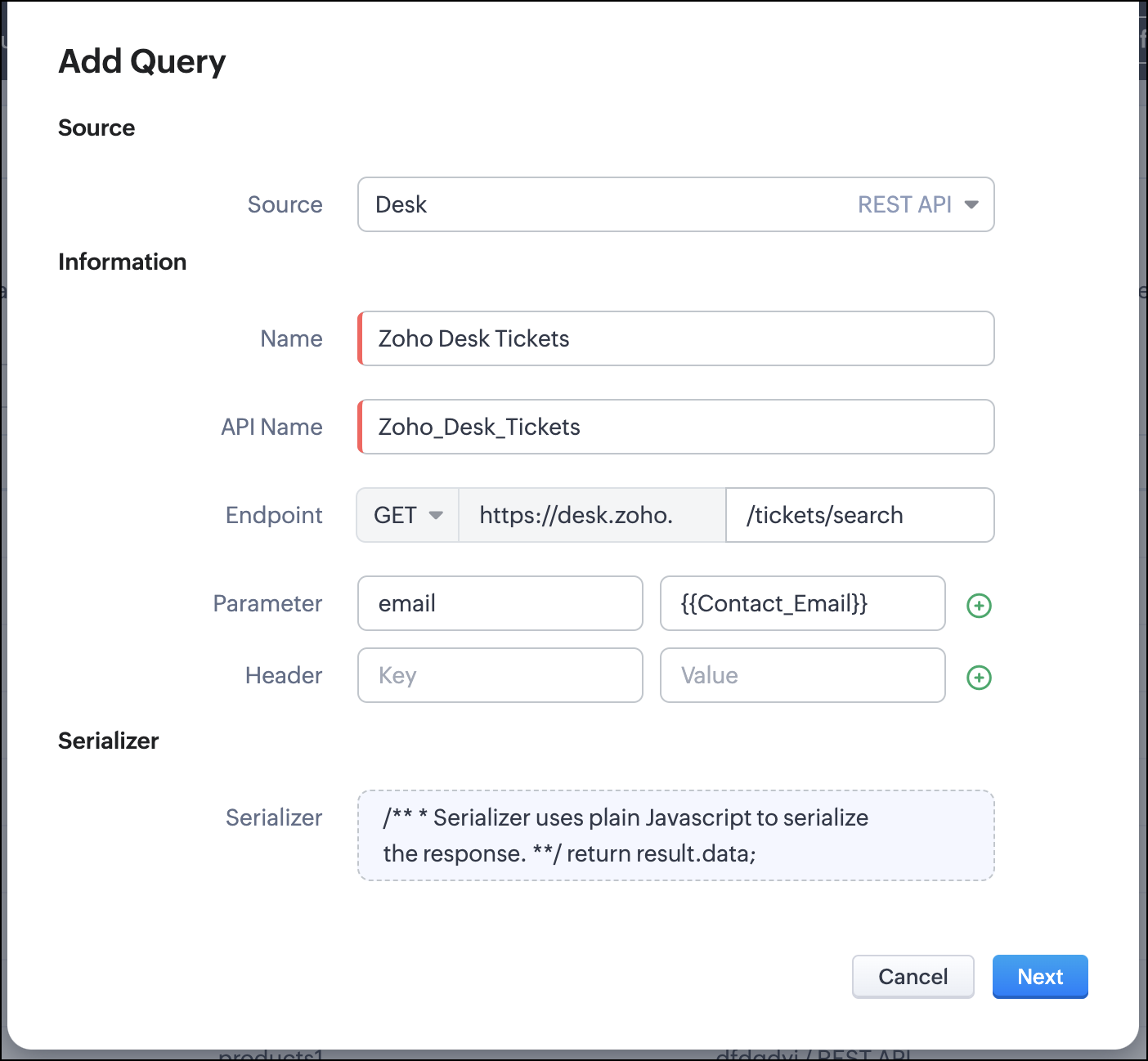
- Click Next.
- Enter an email address in the box to test the query.
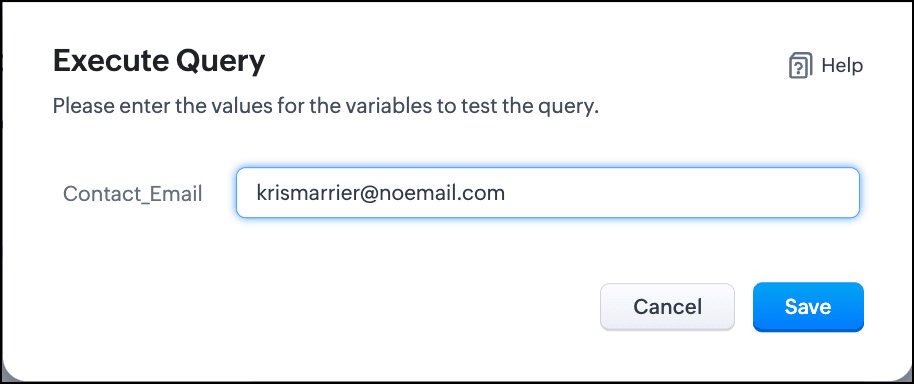
- Click Save. You can see the response of the query and the serialized response if you had serialized the output.
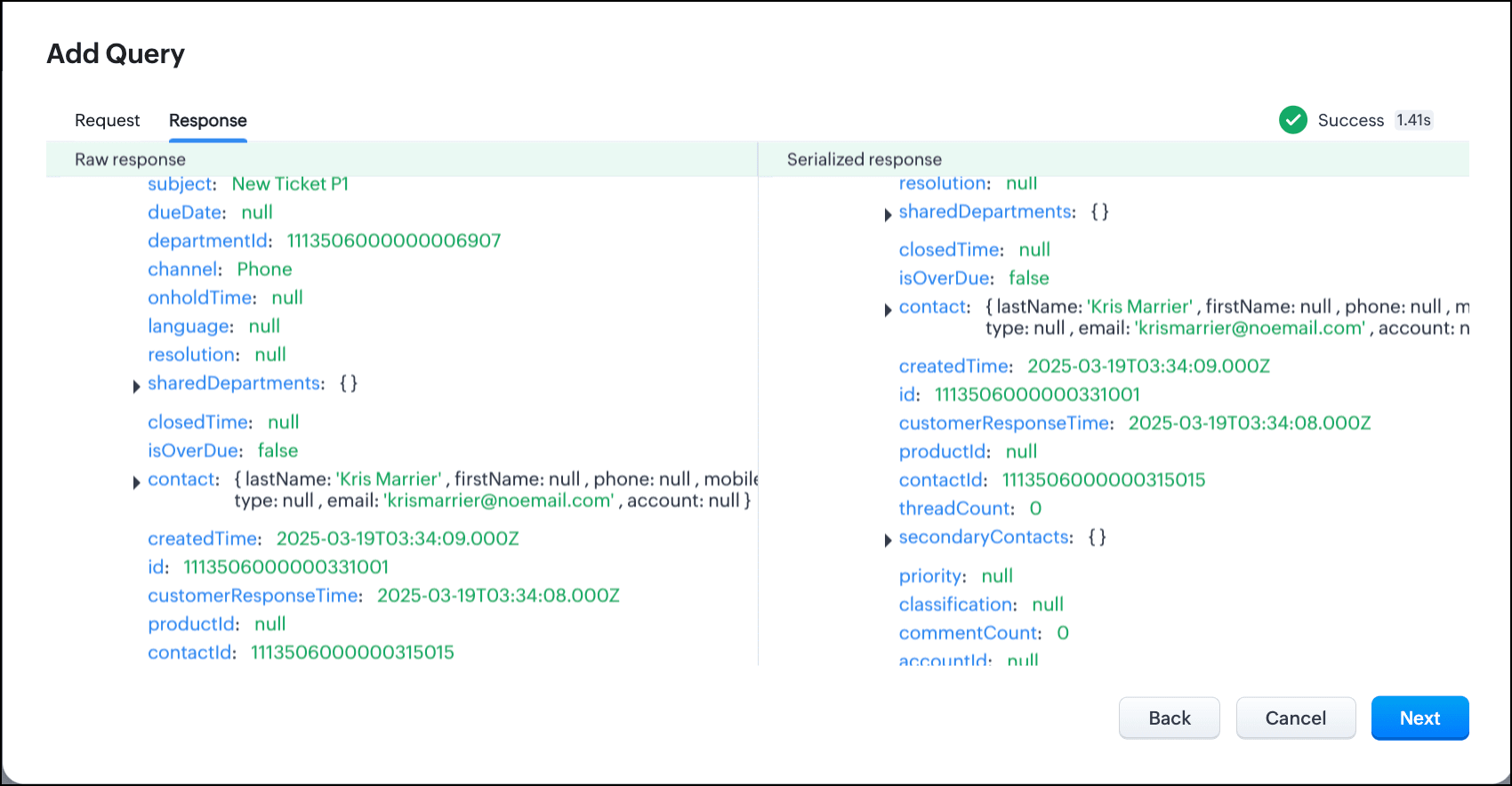
- Click Next.
- You can see the Schema of the query. The Schema acts as a bridge/mapping layer between external API responses and Zoho CRM's internal data structure. For example, the response of the Desk API returns result[].assignee.firstName, which is mapped to CRM as Assignee > FirstName. Schema ensures that the CRM UI knows how to display the field correctly.
With the right mapping in the schema, you can avoid manual data entry or syncing, and use the API data in workflows, reports, and dashboards.
You can change the CRM Field Type and Label to suit your needs. Refer to our Kaizen post on Serialization and Schema Management for more details. - Click Save to save the query.
Now that our query and fetching data from Zoho Desk is sorted, let's move on to the Canvas.
The Custom List view in Canvas enables you to stack records horizontally, one above the other.
Follow the steps in the How to Work with Canvas? guide to create a Custom List View Canvas for the Contacts module.
- On the Canvas, click the database icon for the Queries component.
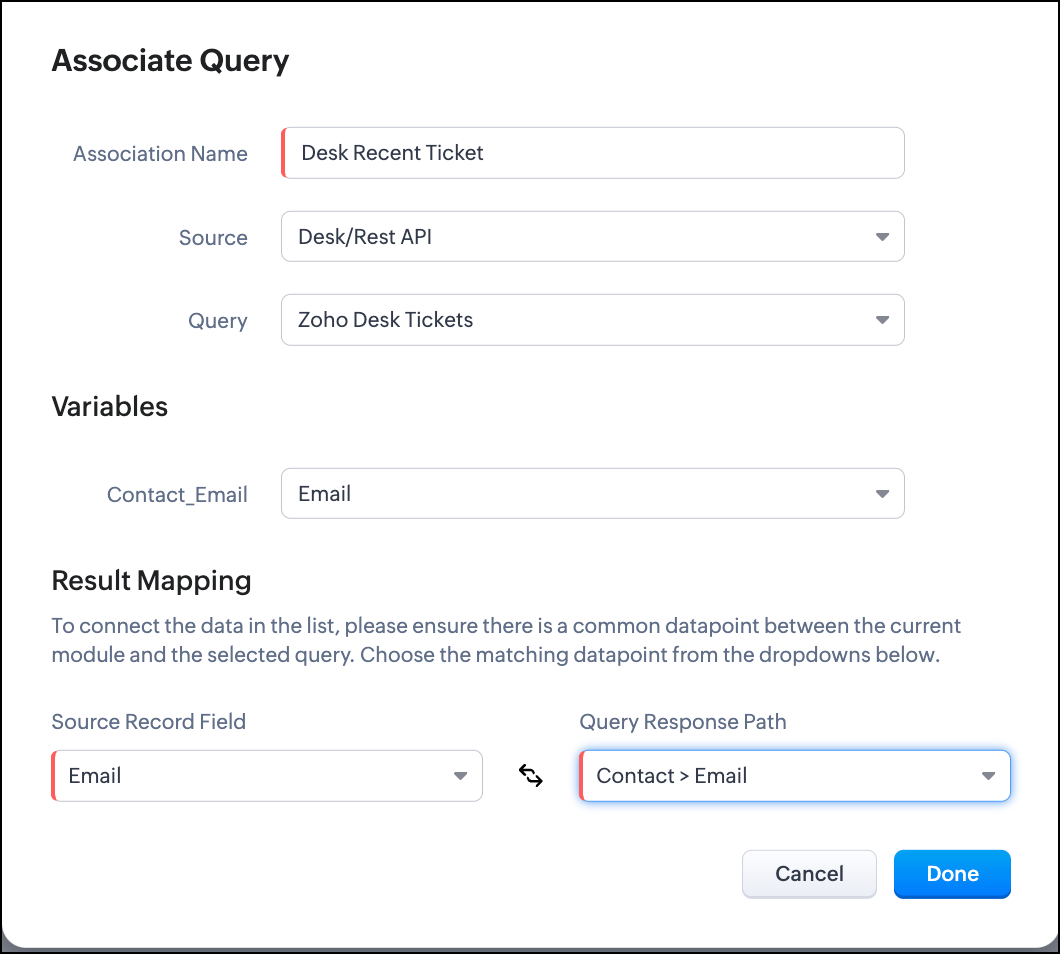
- Click Associate Query.
- Give an Association Name and select the Source(added in step 1) for the query.
- Under Query, select the query you created.
- The Variables section will contain the variables in the query. The drop-down displays all fields in the Contacts module. Select the Email field.
- Under Result Mapping, choose Email as the Source Record Field and Contact > Email as the Query Response Path. The Query Response Path is populated from the schema of the query.
- Click Done to associate the query with the canvas.
- You can see all the fields of the query on the left. Drag and drop the required fields on the canvas.
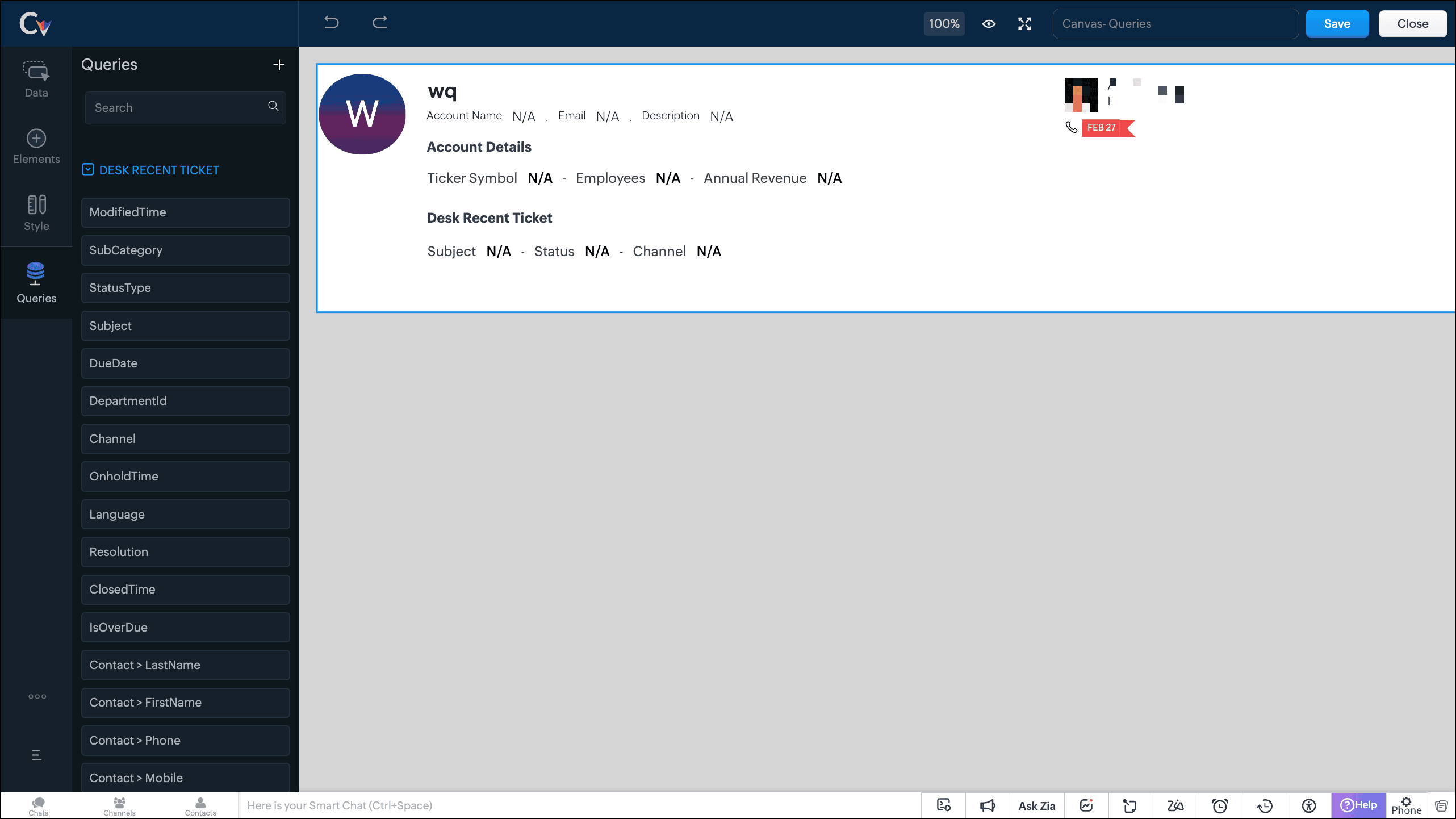
- Save the canvas.
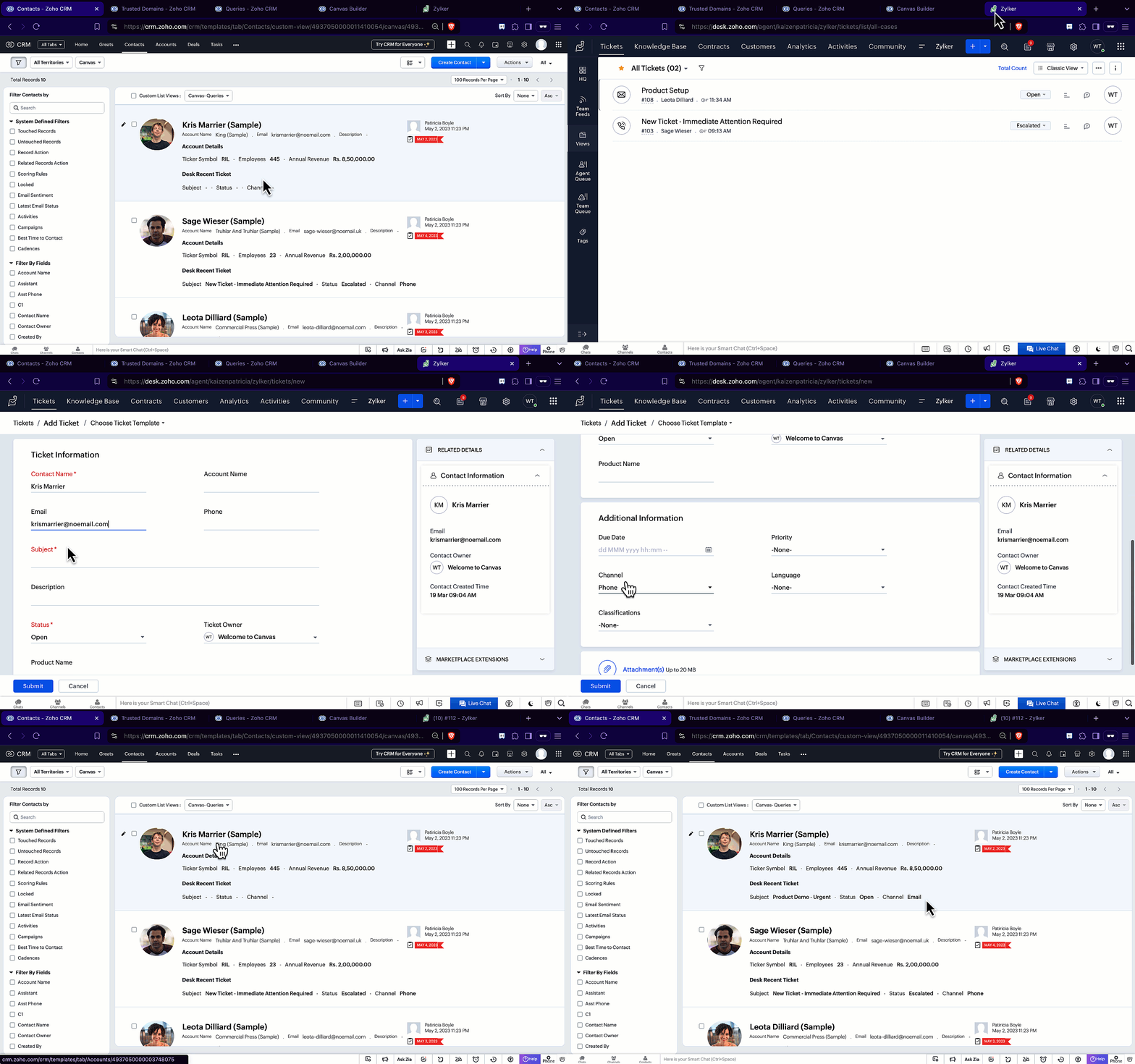
Time for the big reveal!
The following GIF shows how the ticket details from Zoho Desk are populated on the Canvas List View of the Contacts module.

Note that every time you reload the canvas, the query underneath makes an API call to the source provider to fetch data for the contacts in Zoho CRM. Ensure your API calls are monitored to avoid exhasuting your credits.
We hope you liked this post.
Topic suggestions are welcome! See you all next week!
Cheers!
----------------------------------------------------------------------------------------------------------------------------------------

See Also
Topic Participants
Shylaja S
Sticky Posts
Kaizen #217 - Actions APIs : Tasks
Welcome to another week of Kaizen! In last week's post we discussed Email Notifications APIs which act as the link between your Workflow automations and you. We have discussed how Zylker Cloud Services uses Email Notifications API in their custom dashboard.Kaizen #216 - Actions APIs : Email Notifications
Welcome to another week of Kaizen! For the last three weeks, we have been discussing Zylker's workflows. We successfully updated a dormant workflow, built a new one from the ground up and more. But our work is not finished—these automated processes areKaizen #152 - Client Script Support for the new Canvas Record Forms
Hello everyone! Have you ever wanted to trigger actions on click of a canvas button, icon, or text mandatory forms in Create/Edit and Clone Pages? Have you ever wanted to control how elements behave on the new Canvas Record Forms? This can be achievedKaizen #142: How to Navigate to Another Page in Zoho CRM using Client Script
Hello everyone! Welcome back to another exciting Kaizen post. In this post, let us see how you can you navigate to different Pages using Client Script. In this Kaizen post, Need to Navigate to different Pages Client Script ZDKs related to navigation A.Kaizen #210 - Answering your Questions | Event Management System using ZDK CLI
Hello Everyone, Welcome back to yet another post in the Kaizen Series! As you already may know, for the Kaizen #200 milestone, we asked for your feedback and many of you suggested topics for us to discuss. We have been writing on these topics over the
Recent Topics
Better integration between Zoho CRM and Zoho Bookings
I've noticed that when a meeting which was created in Zoho Bookings is updated by a sales person in Zoho CRM, the change is not reflected back into Zoho Bookings. I have raised this with support who advised that meetings created in Bookings need to beWhy is there a limit to JSONString of less 100 characters
having this problem.Enhanced crash reporting in Zoho Apptics
All app crashes have the same sad ending: The app dies while the user still wants to use it. But the reason behind each crash? They vary every time. Identifying the root cause and fixing it is already hard work for your dev team. What makes it harder?Description column in the "all expenses" overview page?
Hi! I'm new to Zoho Books and accounting. I'm surprised there doesn't seem to have a proper "description" field for the expenses, only "notes", and that I can't have such a description visible on the overview page. So that I can quickly visualize my expenses...Only Default Administrator Profile can Convert Estimates Zoho Finance
In Zoho Finance Only the Default Administrator Profile can convert the Estimates A different Profile with the Admin level permission cannot convert the Estimate of someone else to a Sales Order, Only and only the default Administrator Profile Why is thatZoho Notebook suddenly running very slow on long notes
I have been a longtime user of Zoho Notebook. Historically, it has run quite well, but I've noticed over the last few days that it has begun to run unbearably slow when typing in large notes, to the point where I can type four words and have to wait forIs there a way to pass the source of the chat from SalesIQ to the CRM lead creation?
Currently when I update the values of the visitor and the lead is automatically generated in the CRM it says that the lead source is Chat, but in reality it was from either Facebook, Instagram or WhatsApp. Is there a way to make sure that the correctImported tasks
Good afternoon, I have recently setup a test instance of Zoho CRM and am currently working through a data migration from Hubspot usine the API migration tool. I needed to get a feel for how seamless this process was but I am running into an issue. ItAssigning Leads to Queues
Do you support Queues as Lead Owner? This is a basic function in any CRM. Assign Lead to a Queue group where any member can take ownership by him self.Migration of emails from Yandex to Zoho
I am trying to migrate an yandex mail account to zoho mail account. I am confused with all the related articles/informations in the net. Could someone please outline the process to do it, just thinking about me as a novice with limited knowledge or experience. A couple of questions from the knowledge gained. 1. I believe we have to delete the yandex current MX from the website records and add Zoho MX. What happens to the emails as we remove the mail exchange record. Yandex stops updating emails andCelebrating 200 posts of Kaizen! Share your ideas for the milestone post
Hello Developers, We launched the Kaizen series in 2019 to share helpful content to support your Zoho CRM development journey. Staying true to its spirit—Kaizen Series: Continuous Improvement for Developer Experience—we've shared everything from FAQsZoho Sheets working offline
Hi, I am looking for the ability to work offline in Zoho Sheets, but currently I cannot find the process to complete this. Does someone have any ideas or steps I might have missed? Also does Zoho Sheets have the "Format as Tables" function as is currentlyFetching whole month availability via API
We are currently building a custom calendar component that books directly into our client's Zoho Bookings instance. The challenge we are facing is that your API only allows fetching availability one day at a time, which is problematic. Our second workaroundreCAPTCHA
Is the Bookings form protected by reCAPTCHA, or some mechanism to ensure submission of the appointment request form is made by a human vs. bot?Recent enhancements to Bigin's workflows and Associated Products
Greetings, I hope all of you are doing well! We're happy to announce a few recent enhancements we've made to Bigin. Let's go over each one in detail. Enhancement to workflows Trigger workflows when specific fields are modified to specific values Previously,Zoho Survey Goes to Junk Folder
Hello, My company is wanting to use Zoho Survey to send out a customer satisfaction survey, and we were wondering if Zoho Campaigns allows the emails to not go into their junk folder. We sent out a test email campaign to our team and for some people it went to their inbox and for others it went to their junk folder. Is there a way to eliminate this from happening? Hope to hear from you soon! Thanks!Nifty enhancements to Reports in Zoho CRM
Dear Customers, We hope you’re well! We are here with a line of useful enhancements to Reports in Zoho CRM that are readily available to access. Include or exclude Record ID in the report export Display currency fields in record currency Capture reportneed a formula to return value as shown (zoho sheet)
Dear folks, What should be the formula in cell B3 to get that output, based on input sheet data.need a formula to return value as shown (zoho sheet)
Hello folks, what should be the formula in B3, to get the value shown based on input sheet ranges. thanks in advance.Playground: An exclusive test environment to analyze Field Prediction accuracy
Hello everyone, We are introducing Playground: an exclusive proactive testing environment for businesses to analyze Zia's prediction accuracy. This allows admins and agents to: Run predictions on actual tickets or specific content for realistic test conditions.Attention: Upcoming changes to Zoho Assist support for older windows versions
At Zoho Assist, our goal is to provide you with secure, reliable, and feature-rich remote support experiences. To maintain this standard, we periodically align our platform with the latest technology and security updates from the broader software ecosystem.Send again email with link for signup
Hello, I have a lot of problem to send contract my email, also missing the features "share link". How can I send again email to client and me wit link for signup a contract? Everytime it's a disaster!How do I synchronize a quote to an opportunity?
Hi everyone, We don't quote anything via Zoho but we use it to track services/products so that I can see what was actually sold, vs an opportunity with just shows an amount. We use the quotes for other purposes, mostly to request a quote from Salesforce but we don't invoice or do sales orders or anything. (Basically a user makes a quick quote in Zoho, adds items and pricing, and then exports to PDF which gets emailed to our Quote Desk who then enters the request into Salesforce). Just wonderingZoho Sprints Android app update: Tags and Epic search
Hello everyone! We are excited to introduce tags and an option to search items within Epic module on the latest Android version(v2.0.2) of the Zoho Sprints mobile app. Let's take a look at these features: Tags You can now create, edit, and delete tags,Zoho CRM Webhooks - Dynamic URL
Hi Zoho, We've noted a gap in the webhooks function that if improved would increase use cases significantly. The "URL to Notify" field in "Create a Webhook" only supports static information. We have a number of use cases where we could use webhooks moreTracking on Zoho Booking
Hi We want to use Zoho Booking for our appointment management. We're using Calendly as of now that lets us track sources of the appointments made including UTM parameters. Is there a way for us to do same with Zoho Bookings?Pre-created Popular Zoho Flows returns with 404 Error
Your popular Zoho Flows are returning with a 404 page error. This applies to all work flows in your Gallery Space. See video here for further clarification. When will this be fixed? https://drive.google.com/drive/folders/1kDl4ni5EQeLHWeaoIDdtRqoUbW8FNLfO?usp=sharingCRM Feature Request
When enabling Translation in Zoho CRM I would like to see the ability to remove the language "English (US)". I have encountered a user experience issue with a client recently. The client uses English (UK) but they are based in Spain, so they have activatedImport your Google Docs Spreadsheets into Zoho Sheet
You can now import your Google spreadsheet into Zoho Sheet. This will be useful if you want to switch to Zoho Sheet or if you want to simply try out Zoho Sheet. If you don't have an account with Zoho, you can still try this by signing in with your Google account. Here is a video on how to do this. Note: Existing charts won't appear in spreadsheets you import from Google Docs as the Export functionality of Google Docs doesn't give out the charts. Check out the announcement in our blog: https://blogs.zoho.com/general/import-google-docs-into-zoho-productivity-suiteSupport Mixed Visibility Settings in Knowledge Base Categories
Hello Zoho Desk Team, We hope you're all doing well. We’d like to submit a feature request regarding visibility settings in the Knowledge Base module. 🎯 Current Limitation As of today, when a category is set to a specific visibility level (e.g., Public),Will a campaign send duplicates is same email is on two separate lists
Hi I have two lists to which I want to send campaign. One list is ALL leads and other is list of opportunities and current students. There is overlap between the two lists My question is if I send one campaign to all, will zoho automatically know only to send the email once to the duplicate email?Time Based Report / Dashboard
We measure our support agent's KPI based on their response time and resolution time from the time the ticket is assigned to them The time based dashboard should provide this information however there is a problem with us referring to this dashboard WeZoho Learn API Access?
We love using Zoho Learn to manage our internal trainings and knowledge base. What we'd really love is to be able to query Learn via API so that in Zoho Projects, Zoho Creator, or Zoho Desk, we can recommend relevant Learn articles and manuals to teamcreating buttons in zoho site
the connection between zoho site and zoho learn will be awesome and amazing feature so the user instead of registering himself twice just one time register on zoho site will be enough and creating accout on zoho learn instead of registering on zoho learnTwo Problems with the Description Field
Our ticket workflow is often like this. Client calls or emails (to a personal email address) reporting a problem. We create a ticket and enter a description. Problems: 1. By my way of thinking when we enter a description, that is an internal comment (unless we mark it public). Yet it seems there is no way to mark it internal, and Desk just starts inserting it into communications. 2. Additionally, in the conversation view it makes it appear it was emailed by the customer and inserts their name onLookup Field limitations
Good day all, Is anyone else frustrated with the lookup field limitation? I have an enterprise license, but I only get 10 lookups. Additionally, the custom module has been available for a while and is still in diapers. If you want good reporting, youDynamically Sync zoho.adminuserid with Current App Admin
Hello Zoho Team, We hope you're doing well. We’d like to request an important enhancement to the Deluge sendmail task functionality. As per the current behavior, in most Zoho services (excluding Zoho Cliq, Zoho Connect, Zoho Mail, and Zoho Sheet), the"Improper Statement" Error on Deluge Loops (while/for) when Processing a Date Range
Hello, Zoho Community, I'm facing a very specific issue with a Deluge script and would appreciate any insights from the community. The Goal: I have a form (ausencia_visitadoras) where a user inputs a start date and an end date for a period of absence.Automating Daily Lottery Result Publishing with Zoho Creator or Flow – Any Best Practices?
Hello Zoho Community, I run a results-based informational website in Brazil called CaminhoDaSorte.com, where we publish daily Jogo do Bicho results. Right now, we're doing this process manually every day — but we’re looking to automate the backend usingissues with manually shipping sales orders - advise needed please
we are new to zoho inventory. we are going to roll the program out to our company within a couple of weeks and during the implementation process we have come into a roadblock with manually packaging and shipping sales orders. its important to note importantNext Page