Kaizen 231 - Embedding Zoho Desk Tickets in Zoho CRM

Hello, CRM Wizards!
We will use the Zoho Request Client inside a Related List widget to display open Zoho Desk tickets directly within the Contact record in Zoho CRM. This integration allows Sales and Support teams to access active support issues without switching applications.
Business Problem
At Zylker, a manufacturing company that manages high-value distributors and enterprise buyers, sales operations run in Zoho CRM while customer support manages warranty claims and service issues in Zoho Desk.
This separation creates operational friction during critical customer interactions.
1. Lack of visibility into open support tickets
Sales representatives cannot see ongoing support tickets when interacting with customers in CRM. This results in:
- Sales conversations happening without awareness of active complaints.
- Poor customer experience when unresolved issues surface unexpectedly.
- Reduced productivity due to frequent system switching between CRM and Desk.
2. No Controlled Escalation Mechanism
There is no structured way to initiate ticket escalations from within Zoho CRM.
Solution
This week we will focus on solving the visibility gap.
We will embed a related list widget within Contact detail page and provide real-time visibility of open tickets.
Prerequisites
2. A two-way sync between Zoho CRM and Zoho Desk is required to keep Contacts and Accounts consistent across both applications.
With this support, any change made to a Contact or Account in either application is automatically reflected in the other.
Additionally, each record in Zoho Desk stores the corresponding Zoho CRM record ID. This allows you to reference the CRM record directly and perform further customizations or integrations using that unique ID.
Follow the steps to create the two-way sync:
- Log into Zoho Desk.
- Go to Settings > Integration > Zoho.
- Choose Zoho CRM and click Integrate.
- On the Authentication page:
- Enter your email address.
- Choose the CRM organization you want to integrate with.
- Click Authorize.
- Once authenticated, the sync configuration page opens.
- Select the sync type as Two-way Sync.
- Map the fields of Accounts and Contacts modules between Zoho Desk and Zoho CRM.
- Click Start Sync to initiate the integration.

Refer to the Integrating Zoho Desk with Zoho CRM help page for more details.
3. Create a Zoho Desk connection in Zoho CRM with Desk.tickets.READ and Desk.contacts.READ scopes.
Refer to the Connections help doc for more information. Store the Connection Link Name to use while making API calls.

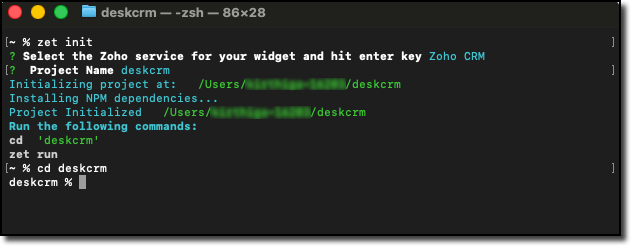
4. Create a local project folder for widget using Zoho CLI as mentioned in Creating your First Widget help guide.
Step-by-Step Implementation
In the widget project directory, code the following logic in the widget.html file.
Step - 1: Get the Current CRM Contact ID
On page load, you can capture the entity ID with the help of PageLoad event listener.
Also create a reusable ZRC instance configured with the Zoho Desk base URL and OAuth connection name.
// Initialize the embedded app ZOHO.embeddedApp.on("PageLoad", async function(data) { console.log("PageLoad data:", data); // Step 1: Get the entity (module) and entity ID (Contact record ID) if (data && data.Entity && data.EntityId) { entityModule = data.Entity; entityId = data.EntityId; console.log("Entity:", entityModule); console.log("Entity ID (CRM Contact ID):", entityId); // Create reusable ZRC instance for Zoho Desk API deskZrc = zrc.createInstance({ baseUrl: 'https://desk.zoho.com/api/v1', connection: 'desk_oauth_connection' }); await loadTickets(); } else { showError("No contact context found"); } }); ZOHO.embeddedApp.init(); |
Step - 2: Fetch Desk Contacts and Match the CRM Contact ID
Make a GET Contacts API call to the Zoho Desk API using the ZRC instance. Loop through the returned contacts and find the one whose zohoCRMContact.id matches the current CRM Contact ID.
// Step 2: Make GET contacts API call to Desk using ZRC const contactsResponse = await deskZrc.get('/contacts', { params: { limit: 100 } }); console.log("Desk Contacts Response:", contactsResponse); if (contactsResponse && contactsResponse.data) { // Parse the response data const contactsData = typeof contactsResponse.data === 'string' ? JSON.parse(contactsResponse.data) : contactsResponse.data; // Find the object where zohoCRMContact.id matches Contact record ID if (contactsData && contactsData.data && Array.isArray(contactsData.data)) { const matchingContact = contactsData.data.find(function(contact) { return contact.zohoCRMContact && contact.zohoCRMContact.id && contact.zohoCRMContact.id === entityId; }); if (matchingContact) { // Pick the id (Desk contact record ID) const deskContactId = matchingContact.id; console.log("Desk Contact ID:", deskContactId); // Proceed to fetch tickets await fetchTickets(deskContactId); } else { showEmptyState("No Desk contact found linked to this CRM contact"); } } } |
Step - 3: Fetch Open Tickets and Filter by Desk Contact ID
Make a GET Tickets API call to Zoho Desk with the following parameters:
- Specify status with Open value to retrieve only open tickets.
- Specify include with value set to contacts fetch each ticket details with its associated contact details.
Filter the API response with the matched Desk Contact ID and render the results.
async function fetchTickets(deskContactId) { try { // Step 3: Make GET Tickets API call using ZRC const ticketsResponse = await deskZrc.get('/tickets', { params: { include: 'contacts', status: 'Open', limit: 100 } }); console.log("Tickets Response:", ticketsResponse); if (ticketsResponse && ticketsResponse.data) { const ticketsData = typeof ticketsResponse.data === 'string' ? JSON.parse(ticketsResponse.data) : ticketsResponse.data; // Filter tickets where contact matches deskContactId if (ticketsData && ticketsData.data && ticketsData.data.length > 0) { const matchingTickets = ticketsData.data.filter(function(ticket) { return ticket.contact && ticket.contact.id === deskContactId; }); if (matchingTickets.length > 0) { renderTickets(matchingTickets); } else { showEmptyState("No open tickets found for this contact"); } } else { showEmptyState("No open tickets found"); } } } catch (error) { console.error("Error fetching tickets:", error); showError("Failed to fetch tickets: " + (error.message || error.toString())); } } |
Step - 4: Validate and Pack the Widget
Follow the steps given in the Widget help page to validate and package the widget. A complete working code sample is provided as attachment at the end of this post.
Creating a Related List Widget
1. Go to Zoho CRM > Setup > Developer Hub > Widgets and click Create New Widget.
2. Fill in the required details such as:
- Name: Zoho WorkDrive
- Type: Related List
- Hosting: Zoho
- File Upload: Upload the ZIP created in the dist folder within the widget project directory after packaging in the Step 4.
- Index page: /widget.html

3. Go to Customization > Modules and Fields > Contacts > Standard > Detail View. Then, create and associate the related list widget.
Refer to the Customize Related Lists help page for more information on creating a related list.

Try it Out!
Let us look at the output from the Contacts detail page in Zoho CRM.


Key Points to Remember
- Two-way sync is mandatory to link Desk contacts with CRM contacts.
- Connection setup in Zoho CRM for Desk is mandatory with Desk.tickets.READ and Desk.contacts.READ scopes. Ensure to replace the connection name in line 21.
- If the account has a large number of contacts or tickets, implement pagination using from and limit parameters to ensure all records are evaluated.
- Ensure to replace the Desk URL to ticket in line 181 with your portal name and company name.
We hope this Kaizen helps your sales team to see active issues instantly. Next week, we will look at how to establish a ticket escalation mechanism from Zoho CRM.
Have questions or suggestions? Drop them in the comments or write to us at support@zohocrm.com.
On to Better Building!
-----------------------------------------------------------------------------------------------------------
Related Reading
1. Widgets - An Overview, CLI Installation, Working with Widgets, ZRC Methods, Mobile Compatibility of Widgets and Kaizens
2. Connections - An Overview
3. CRM Customizations - Related Lists
4. Desk APIs - GET Tickets API and GET Contacts API
5. Desk Customizations - Integrate Zoho Desk with Zoho CRM
5. Desk Customizations - Integrate Zoho Desk with Zoho CRM
-----------------------------------------------------------------------------------------------------------

Previous Kaizen: Smart Discount-Based Quote Approvals Using CRM Functions and Approval Process | Kaizen Collection: Directory
Topic Participants
Kiruthiga G
Sticky Posts
Kaizen #198: Using Client Script for Custom Validation in Blueprint
Nearing 200th Kaizen Post – 1 More to the Big Two-Oh-Oh! Do you have any questions, suggestions, or topics you would like us to cover in future posts? Your insights and suggestions help us shape future content and make this series better for everyone.Kaizen #226: Using ZRC in Client Script
Hello everyone! Welcome to another week of Kaizen. In today's post, lets see what is ZRC (Zoho Request Client) and how we can use ZRC methods in Client Script to get inputs from a Salesperson and update the Lead status with a single button click. In thisKaizen #222 - Client Script Support for Notes Related List
Hello everyone! Welcome to another week of Kaizen. The final Kaizen post of the year 2025 is here! With the new Client Script support for the Notes Related List, you can validate, enrich, and manage notes across modules. In this post, we’ll explore howKaizen #217 - Actions APIs : Tasks
Welcome to another week of Kaizen! In last week's post we discussed Email Notifications APIs which act as the link between your Workflow automations and you. We have discussed how Zylker Cloud Services uses Email Notifications API in their custom dashboard.Kaizen #216 - Actions APIs : Email Notifications
Welcome to another week of Kaizen! For the last three weeks, we have been discussing Zylker's workflows. We successfully updated a dormant workflow, built a new one from the ground up and more. But our work is not finished—these automated processes are
Recent Topics
File Upload field automatically replaces spaces with underscores – support experience
Hi everyone, I want to share my recent experience regarding the File Upload field behavior in Zoho Creator and my interaction with the Zoho support team. When a user uploads a file, the system automatically renames the document by replacing spaces inWe Asked, Zoho Delivered: The New Early Access Program is Here
For years, the Zoho Creator community has requested a more transparent and participatory approach to beta testing and feature previews. Today, I'm thrilled to highlight that Zoho has delivered exactly what we asked for with the launch of the Early AccessQueries on Project-Based Inventory Consumption and Proforma Invoice in Zoho ERP
We would appreciate your clarification on how Zoho ERP plans to handle the following: Project-based inventory consumption without itemized sales orders Accurate project cost tracking along with inventory reduction Proforma Invoice usage We look forwardApplying Excess Payments & Conflict Invoices Due to Cancelled Items
I’m running into several issues that appear to stem from deeper-than-expected overlap between Zoho Finance (Books/Inventory) and Zoho POS. The level of coupling between these systems seems greater than what was originally communicated, and it’s leadingZoho Sprint Backlog View, filter by item status
Hello, In Zoho Sprints, it would be great to be able filter out specific items in the Backlog based on their status. We would like to track items that were Removed from our backlog without seeing them constantly in the Backlog view, as this view shouldWATERFALL CHART IN ZOHO ANALYTICS
Hi Team, I would like to know whether Zoho Analytics currently supports a Waterfall Chart as a built-in visualization type. If yes, could you please share the steps to create one? If not, is there any workaround or recommended method to build a WaterfallExport contacts from Bigin's mobile app to your Android device
Hello everyone! We're happy to announce that you can now export customer contacts from the Bigin mobile app to your device. Scenario A small-scale business owner has two pipelines in Bigin—one for procuring raw materials and the other for selling hisASAP iOS SDK – Xcode Compatibility Update
Hello everyone, We have been delivering the ASAP iOS SDK developed using Xcode 16.1 to provide Help Center support within mobile applications. Thus, ASAP iOS SDK versions upto 4.5.8 are compatible with development environments running in Xcode 16.1 andSub form auto field population based on parent form
I have a parent form called "Sites" with a text field called "Site". I have a subform called "Design Comments" (actual form name "Review Comments") with a lookup field name "Sites1" that looks up from the Sites form. I want the Sites1 lookup field toNot able to import transactions from Razorpay
Hi, tried implementing Razorpay integration with books,also added a webhook, but while this added a razorpay clearing account it does not have any data in it. Neither is it getting updated with new transactions happening on Razorpay. This problem is compoundedA note-taking app right inside your project management space
How do you feel when you check off the last task from your to-do list after a long day at work? Euphoric, blissful, satisfied? Now, imagine completing the same checklist from your PM platform, without juggling tools. Sounds simple and handy? That’s exactlyEmail Forwarding: Maintain business continuity
As an administrator, ensuring uninterrupted email communication is critical when a role-based employee is unavailable due to extended leave or a temporary role change. Emails from customers, partners, and internal teams must continue to be received andTip #61- Collaborate live with Invite Technician- 'Insider Insights'
Hello Zoho Assist Community! From the series of Technician Console, we will be exploring Session. Let's jump right into a brief overview. We’ve all been there: you’re deep into a complex remote session, and you realize you need a second pair of eyes.How to integrate Zoho CRM, Zoho Forms and a WIX Web Site
Attached video demonstrates how to use Zoho Forms included in Zoho One, to design a Contact Us form to be embedded into a WIX web site and integrated into Zoho CRM.Bug Causing Major Sync & SO Access Failures in Zoho POS
We are experiencing critical and recurring issues in Zoho POS that all trace back to role-permission handling defects in the latest POS app version. These issues directly affect syncing, login ability, and Sales Order access for role-restricted usersAdd Custom Reports To Dashboard or Home Tab
Hi there, I think it would be great to be able to add our custom reports to the Home Tab or Dashboards. Thanks! Chad Announcement: The feature is being rolled out across DC's and Edition in phases. To know more refer to the announcement post here.How to block whole domain?
I am getting at least 50-75sometimes over 100 spams emails a day. I see a lot of the spam is coming from .eu domains. I would like to block /reject all email coming for the .eu domain. I do not have any need for email from .EU domains. Why won't the BlackListHiding Pre-defined Views
You can enhance Zoho with custom views - but you cannot hide the pre-defined views. Most users focus on 4 or 5 views. Right now for EVERY user EVERY time they want to move to one of their 4 or 5 views - they have to scroll down past a long list of pre-definedwhy can't agent see accounts & contacts
My new user, with 'Agent' privileges, cannot see records that don't belong to them. How can I give them access? Why isn't this the default configuration in Zoho?Sender Email Configuration Error.
Hello Team, Hope you are all doing well. We are in the process of creating the Zoho FSM environment in the UAE. When we try to add the sender email address “techsupportuae@stryker.com”, we receive the error message: “Error occurred while sending mail【Zoho CRM】フィルター機能のアップデート:ルックアップ項目を使ったデータフィルタリング
ユーザーの皆さま、こんにちは。コミュニティチームの藤澤です。 今回は「Zoho CRM アップデート情報」の中からフィルター機能のアップデートをご紹介します。 ルックアップ項目を使ったデータフィルタリングがより詳細に行えるようになりました。 この機能は詳細フィルターとカスタムビューで利用でき、必要な情報を正確に取得できます。 これにより、タブ間を移動することなく、より深く正確な方法でデータを絞り込むことが可能になります。 ◉できること 詳細フィルターとカスタムビューで、ルックアップ先タブの項目が選択可能This will be long, Please bear with me - Next Gen Layout - Search
In general, I think that Zoho are going in the right direction with the Next Gen UI. The latest update brings some nice improvements and all-in-all from a user's perspective I think the improvements are generally very good. However, there are some areasZoho Books | Product updates | July 2025
Hello users, We’ve rolled out new features and enhancements in Zoho Books. From plan-based trials to the option to mark PDF templates as inactive, explore the updates designed to enhance your bookkeeping experience. Introducing Plan Based Trials in ZohoZoho Books | Product updates | August 2025
Hello users, We’ve rolled out new features and enhancements in Zoho Books. From the right sidebar where you can manage all your widgets, to integrating Zoho Payments feeds in Zoho Books, explore the updates designed to enhance your bookkeeping experience.Weekly Tips: Protect Confidential Information with PGP in Zoho Mail
We deal with confidential information almost every day, whether it is being sent out or received. Though emails sent using Zoho Mail are encrypted both during transit and at rest, attempts to access and steal your sensitive data are always a threat thatQuotes Approval
Hey all, Could you please help in the following: When creating quotes, how to configure it in a way, that its approval would work according to the quoted items description, not according to quote information. In my case, the quote should be sent to approvalImportant Update: Facebook Pages API Deprecation
Dear Zoho Analytics users, As of January 26, 2026, Facebook has officially deprecated Facebook Pages API version 18. This update involves the removal of several metrics that were previously supported by the API. As a result, these changes will affectAdding a Deal to and Existing Contact
I want to easily add a Deal to an existing Contact. If I click on New Deal on the Contact page this currently this is what happens: All of the mandatory field (and other field) information exists within the Contact. Is there a simple way for it to automaticallyCustom SMTP is now available in Zoho Sign
Hi there! Want to send Zoho Sign emails from your organization's or personal email server? Look no further! Zoho Sign has introduced custom Simple Mail Transfer Protocol (SMTP) for Enterprise users across all data centers. By enabling custom SMTP, youDeleting a memorized email address
How can I delete a memorized email address? Even though the address has been deleted from Contacts, Zoho mail still auto suggests the address when typing it into the TO field. Thanks!Email was sent out without our permission
Hi there, One customer just reached out to us about this email that we were not aware was being sent to our customers. Can you please check on your end?Flexible Partial-Use Coupons (Stored Value Credits)
Subject: Feature Request: Ability for users to apply partial coupon balances per transaction Problem Statement Currently, our coupons are "one-and-done." If a user has a $50 coupon but only spends $30, they either lose the remaining $20 or are forcedPrevent accidental duplicate entry of Customer Ordersome
Zoho Support has confirmed that Zoho currently does not have any method (using Deluge, flow or any other method) to alert a user when a sales order has been entered twice using the same customer reference number (i.e. a duplicate). Most ERP platformsMigrating Brevo Automation Logic to Zoho Campaigns
Hello Zoho Campaigns Support Team, I am in the process of migrating my email marketing from Brevo to Zoho Campaigns. I have around 10,000 contacts, which I have already successfully exported from Brevo and imported into Zoho Campaigns. I now need guidanceIs there a way to delete workspaces?
I want to remove one of the workspaces in my Campaigns account. I don't see any obvious way to do this. Am I missing something?New Custom View -Sorting the Custom fields
While creating a New Custom View in invoice , Customers, Bills ,expense etc , the sorting of custom fields are not available , a query function "order by / sort by " may also be included in Define new criteria module which will be more beneficial toMake CAMPAIGNS email look as simple as possible
Hi there I'm trying to make my Campaigns email look as much like a normal email as possible. I'm a bit stuck with the "justification" of the email email block. Can I LEFT JUSTIFY the "whole email" to make it look "normal"? (Please see screenshot attached)Canadian Banks ?
Can you advise which Canadian Banks can be used to fully sync credit cards and bank accounts? ThanksSorry! we encountered some problems while sending your campaign. It will be sent automatically once we are ready. We apologize for the delay caused.
Hello. Lately we are having problems with some campaigns, which show us this error message. Sorry! we encountered some problems while sending your campaign. It will be sent automatically once we are ready. We apologize for the delay caused. We can't findCan I remove or divert certain contacts from an active Campaigns workflow?
I have created a workflow in Zoho Campaigns, which sends different emails, once contacts have been added to a mailing list. To choose which email to send to the contacts, there are conditions, which divert contacts based on their company type and their company size. There was a subsection of this workflow, where company size wasn't selected correctly, and some contacts have been sent down the wrong path and received the wrong email. The workflow contains a reminder loop and a further series of emails.Next Page