Narrative 14: The magic bazaar of Desk

Narrative 14: The magic bazaar of Desk

Behind the scenes of a successful ticketing system: BTS Series 

Narrative 14: The magic bazaar of Desk

Marketplace is a centralized platform where users can discover Zoho and third-party applications that can be integrated with their Desk account to facilitate various business processes. It's straightforward: Admins can search for, install, and manage the installed extensions directly from the Marketplace.

How extensions empower teams that use Desk

A popular customer service company began using Desk to help business clients deliver exceptional service. As more companies adopted Zoho Desk for its powerful ticketing and multichannel messaging tools, managers and agents discovered a hidden challenge: every team worked a little differently. One day, a curious help desk manager named Ananya wished she could connect Desk to her favorite CRM, translate messages instantly, and automate ticket follow-up with just a tap. Still, these features were nowhere to be found.

Determined to find a solution, Ananya embarked on a quest. She soon stumbled upon the Marketplace, a lively bazaar filled with hundreds of extensions, like magical artifacts, each crafted by developers around the globe. In the Marketplace, Ananya discovered tools that extended Your Desk’s capabilities beyond her imagination: integrations with web products and ERP systems, project management widgets, private apps designed specifically for her company, and even connectors to keep up with customer reviews on social channels like TripAdvisor and Instagram.

Ananya's team quickly installed helpful extensions: a translation app to respond to international customers, a calendar sync never to miss a follow-up, and a ticket insights tool to visualize performance trends with a single click. Every challenge she faced now had a ready-made solution, and her agents rejoiced as work became easier, customers were happier, and collaboration was more enjoyable. 

Thanks to the ever-growing Marketplace, Ananya turned her help desk into a central hub where everything connected, every workflow flowed smoothly, and every customer felt listened to and valued.

Moreover, the story continues. As more businesses join Your Desk, the Marketplace grows richer, with new integrations appearing each season, each one a step closer to the perfect help desk experience, limited only by the imagination of the people who use it.

How to explore Desk's Marketplace  

The Marketplace home page is a library of applications that users can install to amplify their business processes. 
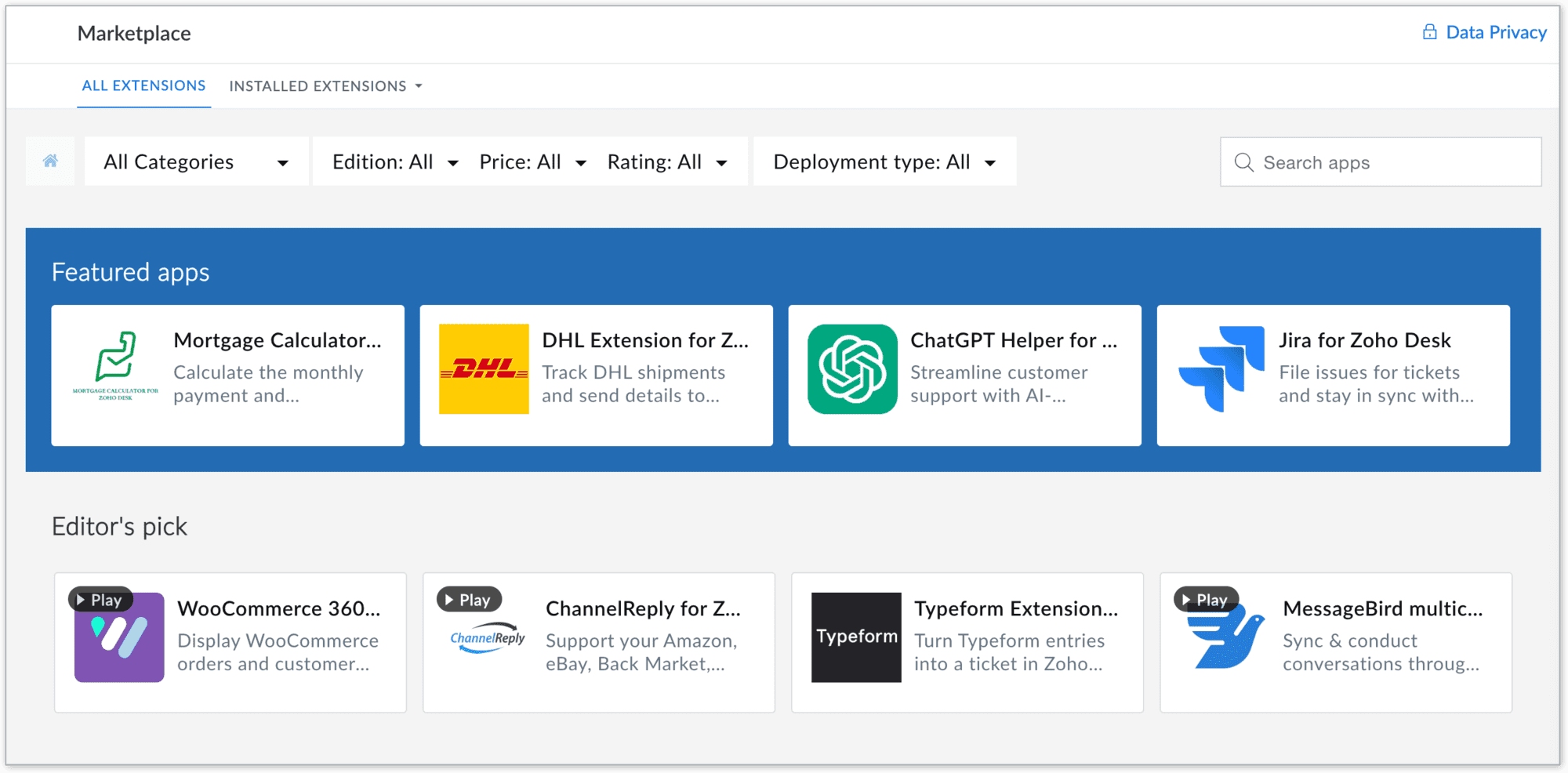
To navigate to the Desk Marketplace home page, go to Setup > Marketplace > All

Marketplace benefits

For users

  • Provide a wide range of solutions to access hundreds of ready-to-use apps and extensions across categories like CRM, finance, IM, HR management, marketing and analytics, catering to your business needs
  • Quick integrations: All the apps are designed for seamless integration with simplified workflows, eliminating the need for complex development or switching between platforms
  • Easy automation of routine tasks, breaking data silos, streamlining processes, and improving team collaboration, resulting in better productivity
  • Apps in Zoho Desk Marketplace are thoroughly vetted for quality and security, ensuring that your business data remains safe and reliable
  • Enables easy customization and deployment of new functionalities to address unique requirements without requiring coding expertise
  • Reduce time and cost by providing out-of-the-box integrations and reducing dependency on expensive custom solutions

For developers

  • Showcase expertise by creating solutions for various business needs and industries, enhancing credibility and opportunities
  • Access developer resources, sandbox environments, and a streamlined publishing process for hassle-free app deployment

Takeaway

In summary, Zoho Desk's Marketplace is a central hub where businesses can discover, install, and manage apps that extend the functionality of their business, making it easier to meet their diverse needs while unlocking opportunities for growth and increased efficiency.


Please stay tuned for more in the Desk behind-the-scenes series.


Regards,


Kavya Rao

The Zoho Desk Team

    • Recent Topics

    • Zoho reply to not working. just reply to my self

      Hello. i using on my wordpress website a contact form from Wsform. i can set the reply to email there. normally it works. but since i am using your wordpress plugin zoho mail it doesn`t work. its not using the reply to (email from customer). I just can
    • Painfully Slow Zoho mail

      Since yesterday Zoho Mail seems to have starting functioning very slowly and having a few bugs. It's slow to open mails, slow to send, slow to change between email accounts. Sometimes clicking on a particular folder (eg Sent folder) stops working and
    • Can't receive any email from other platform

      Hello,everyone, i'm just join zoho and create two email accounts for my own business. I was using it to get a verified email from stripe, but can't receive it. and I use my private gmail account to send test email twice, first time show below reply, but
    • Weekly Tips: Secure your attachment downloads with Zoho Mail

      Safety is one of our main concerns, whether it’s about device security or online protection. We use tools like fingerprint scanners, facial recognition, and two-factor authentication to keep our devices and email accounts secure. We use methods like OTP
    • Your Incoming has been blocked and the emails will not be fetched in your Zoho account and POP Accounts

      Can some on help me regarding our account . thank you so much
    • Zoho Creator integration with Sage 50

      Hi, Wondering if anyone has had any experience connecting Zoho to Sage 50 and could share any information on this matter. Thank you.
    • Dropshipping Address - Does Not Show on Invoice Correctly

      When a dropshipping address is used for a customer, the correct ship-to address does not seem to show on the Invoice. It shows correctly on the Sales Order, Shipment Order, and Package, just not the Invoice. This is a problem, because the company being
    • Conditional Email Forwarding

      How can I set conditional email forwarding of the users? For example: Mail should be forwarded to a address only if it comes from a particular sender. So, I want such email forwarding, which forwards mails based on particular conditions, like the incoming
    • Incoming emails not appearing in Inbox

      Hello, I have an issue with incoming emails sent from my website (domain: h2ostop.si). Emails are visible in the Sent folder, which means they are successfully sent through Zoho SMTP, but they never appear in my Inbox. Nothing arrives in Inbox, Spam,
    • Automatic Matching from Bank Statements / Feeds

      Is it possible to have transactions from a feed or bank statement automatically match when certain criteria are met? My use case, which is pretty broadly applicable, is e-commerce transactions for merchant services accounts (clearing accounts). In these
    • Email Opt Out Question

      Has the problem where if a customer is emailed opt out prevents you sending standard emails? For me this feature is simply to stop any email marketing and should not block people from receiving emails via Zoho mobile, which makes no sense.
    • Can No Longer Access Zoho Email Accounts from iPhone or iPad Apple Mail Apps ,.

      Keeps asking for password, Says ID or password incorrect. Tried creating a new app specific password. Same result. Is this possibly related to the server maintenance. Have verified all email settings, userid and password. This has worked for years until
    • Latest update caused issue in using marathi typingzoho

      With latest update now marathi typing does Not work in zohonotebook. I preferred zoho over other because it was supporting marathi font without any distortion.. But after new update,keyborad simply does not work
    • Login verification emails never received.

      I can't login to my account. You send a verification email, but it never arrives. This is a common problem, frequently caused by some relay point out there classifying the sender as a spammer. Is there anything I can do to bypass this? Maybe get a text
    • Global lists for Multi select

      It would be great if I could select a global list to use for a multi select dropdown filed.
    • Yahoo is rejecting e-mails sent from a Zoho server

      Diagnostic-Code: 4.7.0 [TSS04] Messages from 136.143.169.51 temporarily deferred due to unexpected volume or user complaints - 4.16.55.1; see https://postmaster.yahooinc.com/error-codes Remote-MTA: dns; mta5.am0.yahoodns.net
    • Yahoo blocks e-mail sent from Zoho servers

      Getting this for a bunch of Yahoo addresses. Do you know if some of your servers got blacklisted? Diagnostic-Code: 4.7.0 [TSS04] Messages from 136.143.169.51 temporarily deferred due to unexpected volume or user complaints - 4.16.55.1; see https://postmaster.yahooinc.com/error-codes
    • Working with dates and Function Field

      Hello friends! I'm trying to add days to a date, however the field function will always shows 00:00:00 after the resultant date. How can I display only the date, whithout the time? toDate(input.request_date.addDay(input.Prazo_acordado),"MM,d,yyyy") The code above will result something like "11-Feb-2020 00:00:00", but I want to display only "11-Feb-2020"
    • What's New in Zoho Analytics - November 2025

      We're thrilled to announce a significant update focused on expanding your data connectivity, enhancing visualization capabilities, and delivering a more powerful, intuitive, and performant analytics experience. Here’s a look at what’s new. Explore What's
    • Unable to send message;Reason:550 5.4.6 Unusual sending activity detected. Please try after sometime.

      Please help my account got blocked automatically, can you help me how to avoid it? Thanks so much
    • Unusual activity detected from this IP. Please try again after some time

      When i try to create new addresses on my account i am getting this error, it has been 24 hours now and i am still getting this error can anyone help
    • temporary system errorlouis

      J'essaye d'envoyer des mails avec mes 2 adresses mail qe nous avons sur le compte arthur@lepunch.fr et louis@lepunch.fr mais j'ai toujours le message temporaire system error, je reçois les mails mais impossible d'en envoyer a qui que ce soit
    • How to Cancel/Delete Queued Mail Merge?

      Hi. I just tried to do a mail merge before realizing there's a limit on number of sends. I accidentally sent one of my lists twice, and all of those emails are currently queued. Is there any way to cancel or delete a queued mail merge? Would love to be
    • Need to add a new admin for my domain

      Hello Zoho Support, I am the owner of the domain localeistanbul.com. The current super admin account (admin@localeistanbul.com) is not accessible. I do not want to reset or delete the existing account because I need to keep all existing emails. Please
    • Possible Fraud Site.

      Hello. I received a text with the sender's name as zoho, claiming that my account was at risk and that I should sign in at https://verify.zohomails.ru/signin to verify my account. I signed in on the web address above, and a few days later someone hacked
    • Zoho mail to Teaminbox

      Hello, We're searching for new mail program. Now I'm testing a bit with zoho mail and team inbox. My findings in the research: Pop mail throught zoho mail is almost instant. Any pop or imap via external provider takes a couple minutes to 15 minutes before
    • Crear tarea CRM con recordatorio desde Zoho Flow

      Hola, estoy intentando crear desde Zoho Flow una tarea en CRM. Lo he logrado hacer pero sin recordatorio, ya que no se como se debe escribir el string adecuado. He probado varias alternativas, pero ninguna me funcionó hasta ahora. - FREQ=NONE;ACTION=EMAIL;TRIGGER=DATE-TIME:${FechaVto}
    • Inquiry Regarding Automated Assignment of Zoho TeamInbox Messages using Zoho Flow and Deluge

      Hello, Our company is currently using Zoho TeamInbox, and we are interested in automating the assignment of responsible parties using tools such as ZOHO Flow and Deluge. Is it possible to achieve this? Allow me to provide more details. Currently, when
    • Upgrade Zoho Desk Agent-Side Answer Bot to GenAI

      Hello Zoho Desk Team, We hope you're doing well. Following the recent announcements and rollout of the GenAI-based Answer Bot in Zoho SalesIQ (Nova '25), we’d like to formally request a similar upgrade for the Answer Bot used by agents inside Zoho Desk.
    • Marketers' Space: The importance of warming up your sender domain

      Hello Marketers, Welcome back to yet another post! Today, we'll talk about why warming up your sender domain matters. Imagine you've recently started a business and want to share the news with your customers. You've designed a great email campaign using
    • An Exclusive Session for Zoho Desk Users: AI in Zoho Desk

      A Zoho Community Learning Initiative Hello everyone! This is an announcement for Zoho Desk users and anyone exploring Zoho Desk. With every nook and corner buzzing, "AI's here, AI's there," it's the right time for us to take a closer look at how the AI
    • Search Just Got Smarter in Notebook

      Hello there! Introducing Our New & Improved Search Experience! We heard your feedback! Many of you shared that our previous search had some challenges like • Inconsistent results across different clients • Limited accuracy in finding the right content
    • Zoho Desk app update - AI Integration for IM Chats

      Hello everyone! We have now introduced AI integration for IM Chats within the Zoho Desk mobile app. To access the feature, please enable the 'Generative AI' settings on the desktop site(desk.zoho.com). Please refer to the help link attached below: Zoho
    • Open A.I assistant Connect with Zoho Desk instant Message Conversations

      I would like to know how do I connect my instant messenger in Zoho desk with my Open A.I Gpt Assistant. this is very easy to setup using the Salesiq Zobot but when it comes to Zoho Desk i cannot figure how to make the connection. Ideal workflow Customers
    • Cannot upgrade subscription plan due to payment error message

      Hi Zoho team, This is to request support on an issue I am facing during an upgrade I am trying to make to our company's yearly Zoho subscription. I am trying to add 3 more license to my plan and during the payment phase I get the below error as in the
    • Enhancing Zia's service with better contextual responses and article generation

      Hello everyone, We are enhancing Zia's Generative AI service to make your support experience smarter. Here's how: Increased accuracy with Qwen One of the key challenges in AI is delivering responses that are both contextually accurate and empathetic while
    • Zoho Desk app update: AI powered features

      Hello everyone! We’ve introduced various AI-powered services on the Zoho Desk app. Let's take a look at what's new. Generate Content: Generate Content uses AI to formulate responses based on the your query and provides a ready-to-use reply which can be
    • Bulk update Archived Ticket

      Dear All We would like to update the "Category" values to the new filed. We found the archived Ticket seems to be don't support the bulk action. Do we have any way to update it. Finally, we would to generate a report for our ticket system. Regards I
    • Channel Configuration and Default Channels

      There are some of the default fields that cannot be removed or changed. Examples are the social media ones, such as Facebook. It would be nice to be able to remove these fields as it would be confusing if someone selected this but it's not configure
    • Automating Employee Birthday Notifications in Zoho Cliq

      Have you ever missed a birthday and felt like the office Grinch? Fear not, the Cliq Developer Platform has got your back! With Zoho Cliq's Schedulers, you can be the office party-cipant who never forgets a single cake, balloon, or awkward rendition of
    • Next Page