Pré-recrutement - Créer une offre d'emploi

Nous avons vu jusqu'à présent les différents paramètres à configurer sur votre application Zoho Recruit. Nous poursuivons aujourd'hui avec comment programmer un post à pourvoir, publier sur les sites d'emploi et le site-web carrière.
Poste à pourvoir
Page d'accueil
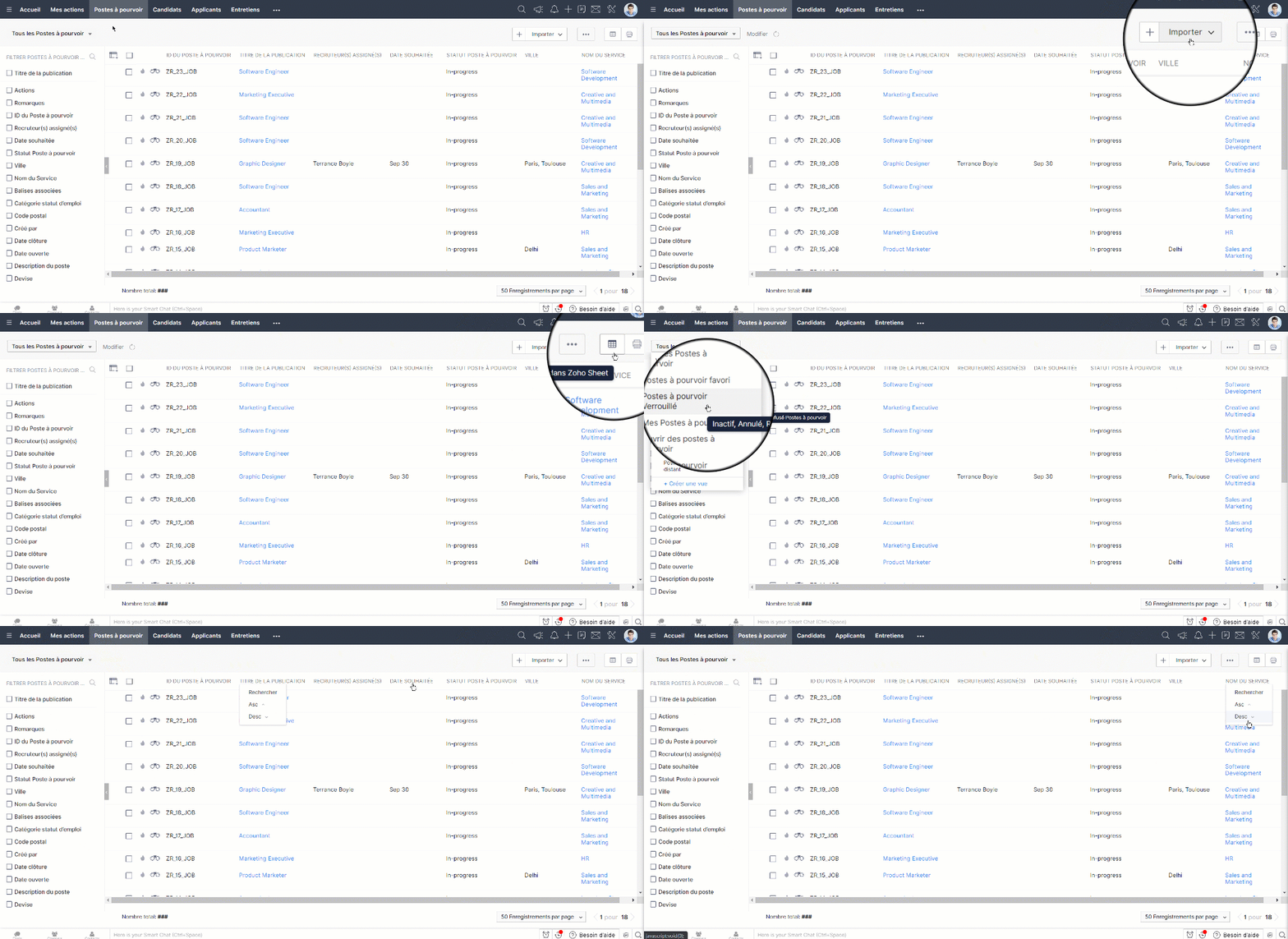
La page d'accueil du module "Poste à pourvoir" vous permet de faire les activités suivantes:
- Les enregistrements sont affichés dans des vues de liste. Définissez vos propres vues personnalisées en fonction de vos besoins. Certaines vues de liste définies par le système sont déjà disponibles, telles que "Tous les postes à pourvoir, postes à pourvoir récents, Postes à pourvoir à distance", etc.
- L'onglet "Créer une vue" vous permet de personnaliser un vue en fonction de votre besoin.
- Sélectionner les enregistrements en cochant le cas : vous pouvez faire les activités telles que "Ajouter une balise", "Créer une tâche" ou "Supprimer les enregistrements".
- Trier les enregistrements par ordre alphabétique ou selon les autres critères disponibles.
- Imprimer les postes à pourvoir avec les détails nécessaires.
Créer un poste à pourvoir
Zoho Recruit vous permet de créer des postes à pourvoir en :
- Saisissant des données dans le formulaire des détails manuellement.
- Important des offres d'emploi à partir des fichiers CSV ou XLS.
Créer un poste à pourvoir de manière manuelle
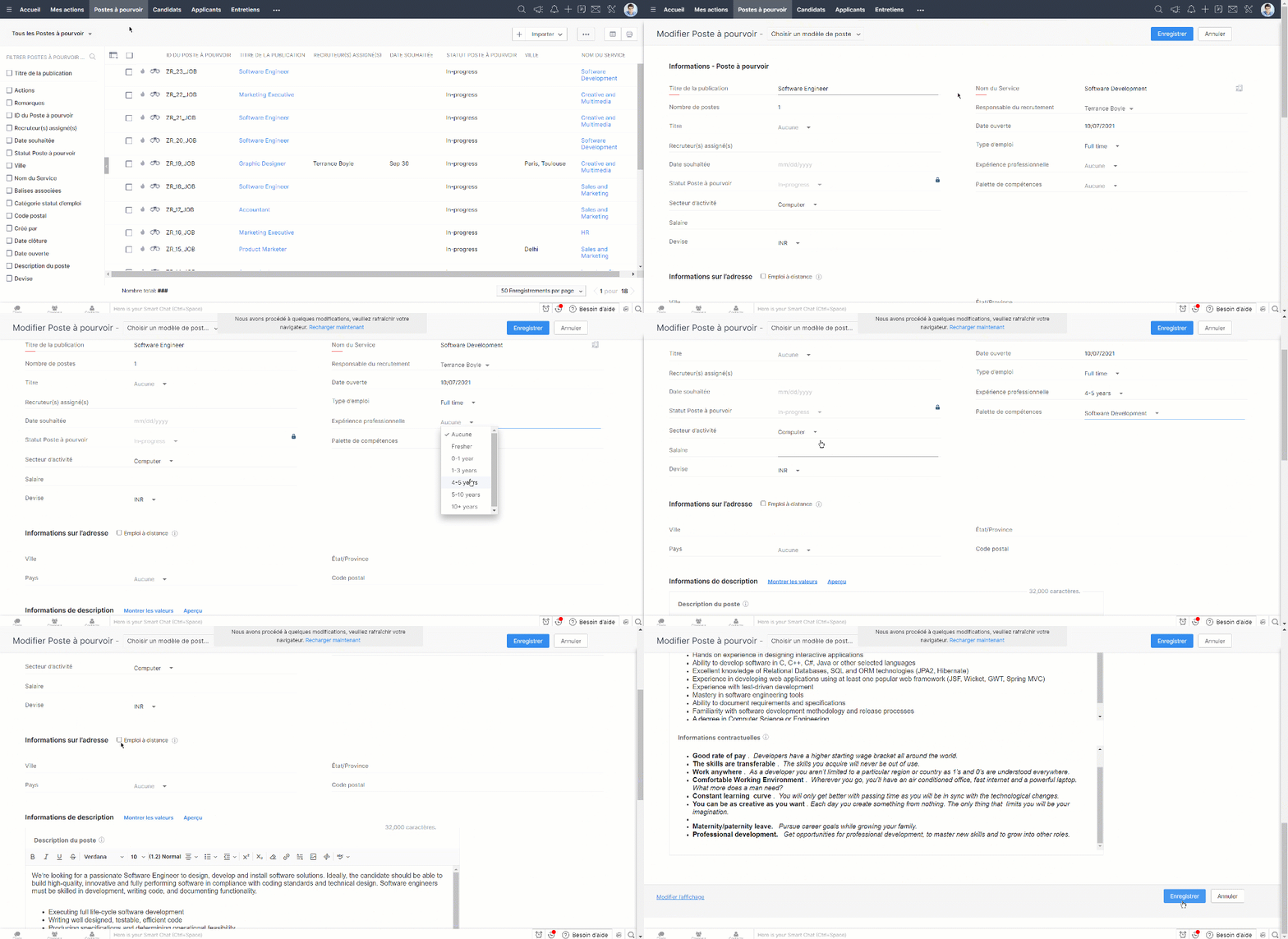
- Cliquez sur " + " et saisissez les détails affichés sur l'écran et enregistrez.
- Vous pouvez aussi sélectionner les modèles en fonction de postes que vous avez créés depuis la liste déroulante en haut de la page.
Cloner un poste à pourvoir
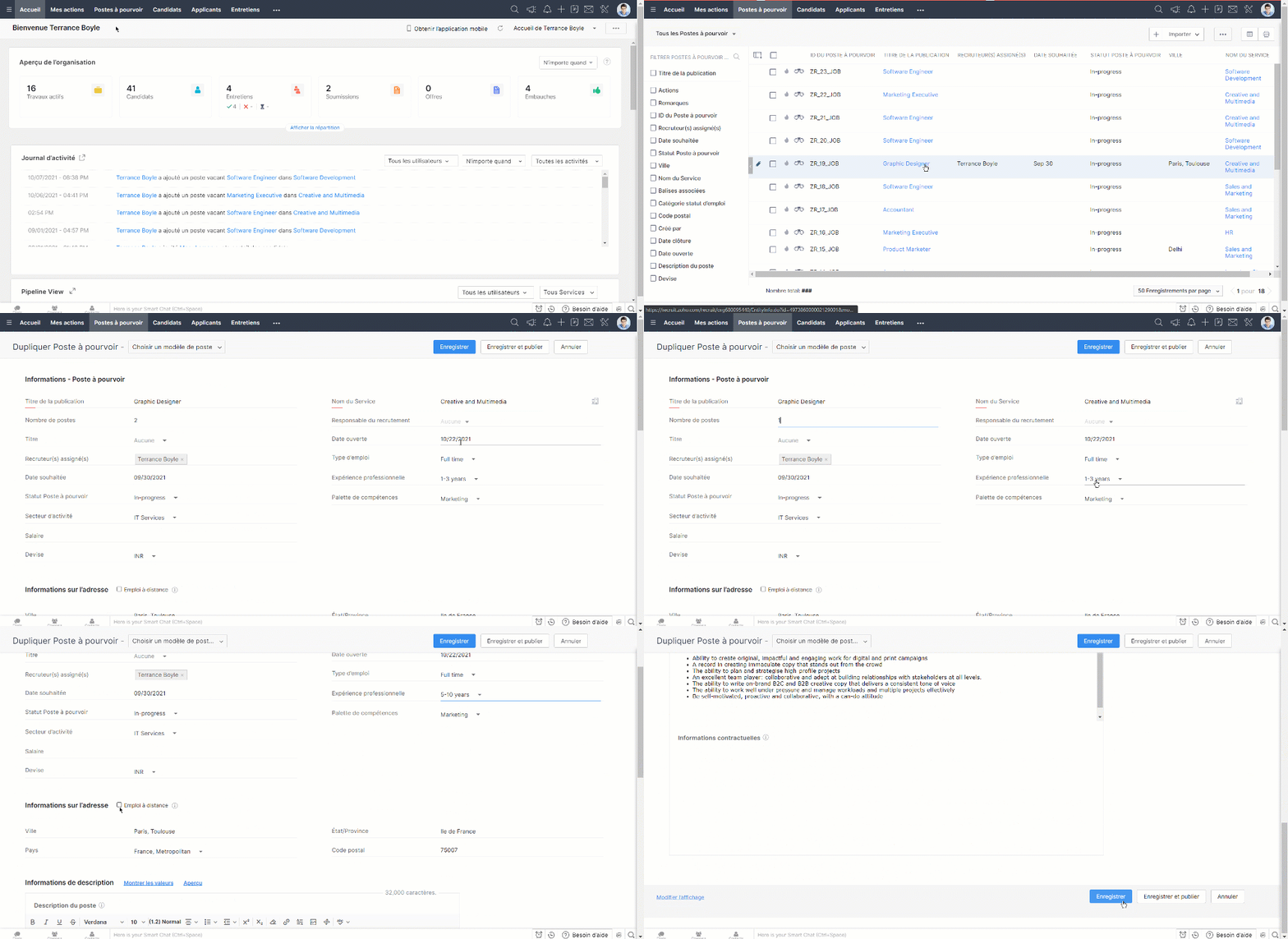
- Sélectionnez le poste que vous voulez cloner à partir des anciens postes créés.
- Cliquez sur " Plus " en haut de la page et cliquez sur "cloner".
- Modifiez des détails si nécessaire et enregistrez.
Intérêt d'un site-web carrière
Le recrutement est en constante évolution et recruter les meilleurs talents sur un marché est toujours un travail complexe pour le ou la responsable RH. Les sites de carrière ne sont plus seulement les pages d'offres d'emploi statiques ; un bon site de carrière fonctionnel peut effectivement servir de centre de recrutement pour faire connaître aux candidats votre entreprise et vos possibilités d'emploi et interagir avec eux. Quelques avantages d'un site de carrière :
- Créer une visibilité de marque
- Limiter le coût et le temps d'embauche
- Créer et suivre une base de données des candidats
- Toucher un public plus large
- Garder la confidentialité
- Recrutement flexible, durable et accessible
- Compatibilité SEO
Établir votre site d'emploi sur Zoho Recruit
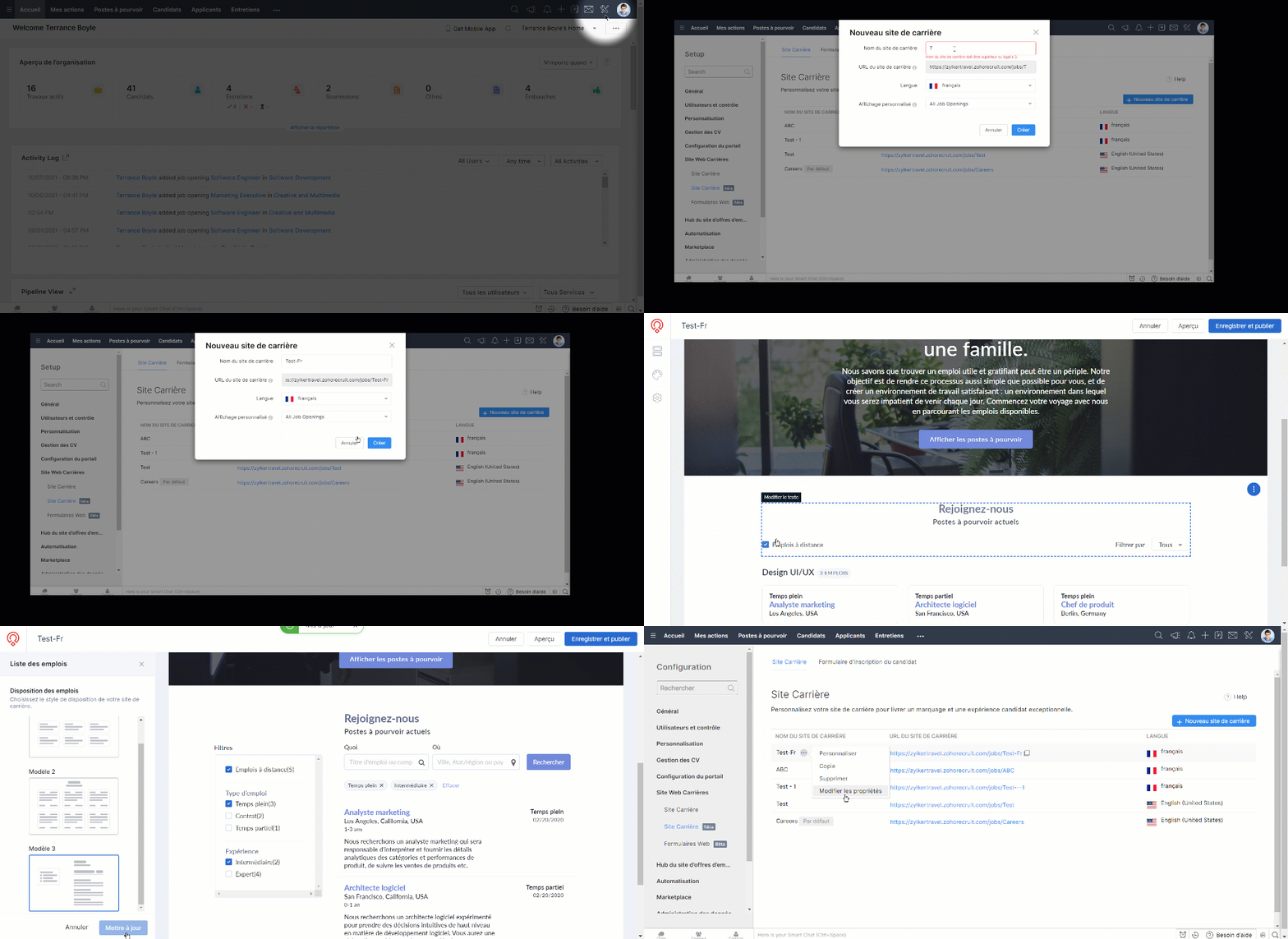
- Depuis l'onglet "Paramètres" sélectionnez "Site Carrière".
- Cliquez sur " + Nouveau site de carrière".
- Saisissez touts les détails demandés tels que le nom, la langue et l'affichage, cliquez sur "Créer".
- Vous serez sur la section éditeur de site-web. Voici, vous pouvez personnaliser votre site-web carrière, et enregistrez une fois que vous avez fini.
Personnaliser les modèles d'emploi
- Allez Paramétres > Career Site
- Depuis plus sélectionnez "Personnaliser" à côté du nom de site-web en question.
- Dans le volet latéral gauche, cliquez sur Sections > Emplois.
- Cliquez sur "Modifier la mise en page".
- Choisissez un parmi les trois modèles proposés.
- Cliquez sur "Mettre à jour".
Intégrer votre site-web carrière existant
Vous pouvez intégrer votre site-web carrière au travers d'API
Intérêt des sites d'emploi
Les organisations et les recruteurs utilisent beaucoup les sites d'emploi pour afficher les postes vacants et consulter les bases de données de CV. Quelques avantages des sites d'emploi pour les organisations :
- Atteindre un large éventail de gens.
- Créer une visibilité de marque.
- Augmenter la visibilité de vos offres d'emploi.
- Rechercher directement des candidats sur une liste de sites d'emploi.
- Accéder rapidement et facilement aux CV.
- Personnaliser la liste des sites d'emploi.
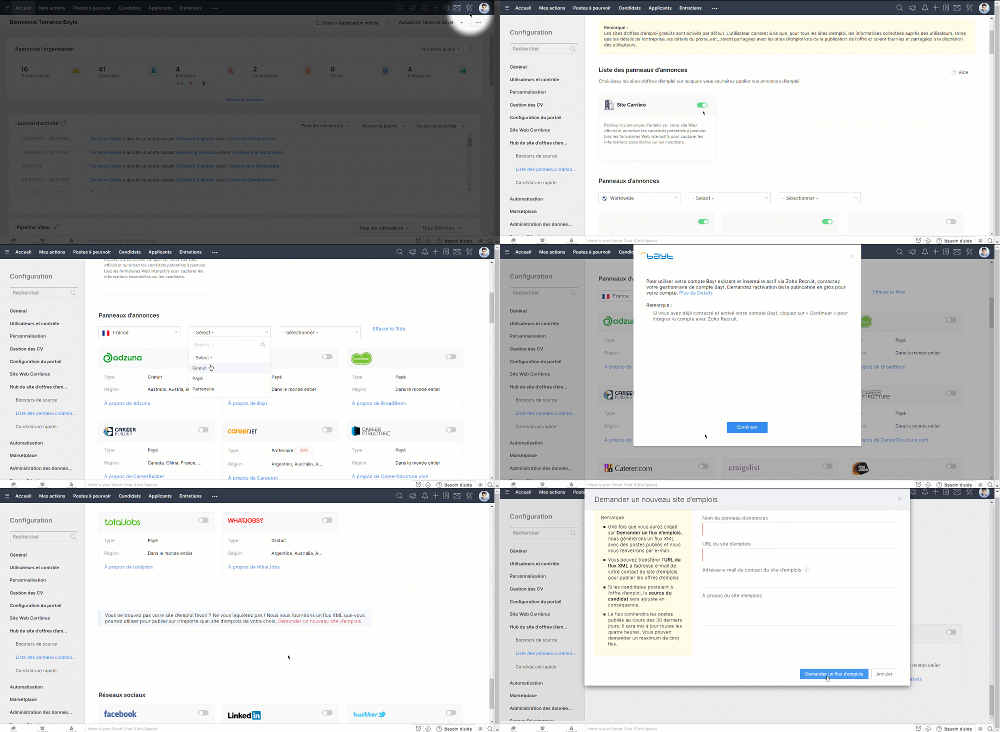
Configurer les sites d'emploi sur Zoho Recruit
- Zoho Recruit s'intègre avec plusieurs sites d'emploi, soit gratuit soit payant, voire Partenaire.
- Allez sur Paramètres > Site d'offres d'emploi > Liste de panneau d'annonce.
- Sélectionnez et activez les sites d'emploi parmi les disponible.
- Lorsqu'un site d'emploi particulier n'est pas disponible dans la liste, vous pouvez le demander depuis l'onglet " Demander un nouveau site d'emploi".
- Saisissez les détails demandés et l'équipe support Zoho One reviendra vers vous.
Publier une offre d'emploi
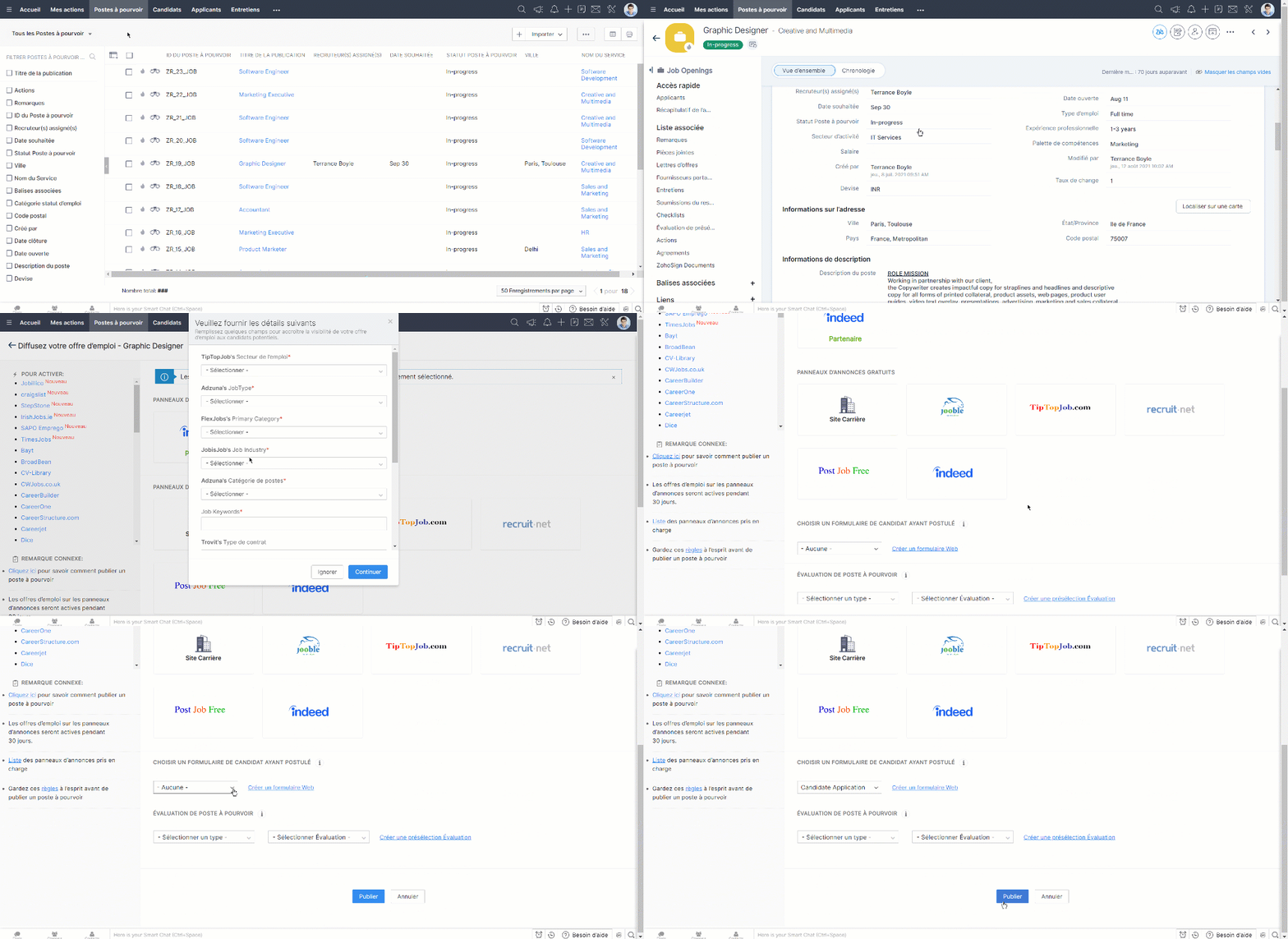
- Depuis l'onglet Postes à Pourvoir, sélectionnez l'offre que vous voulez publier.
- Cliquez sur l'onglet "Publier".
- Vous serez dirigé vers la section de sites d'emploi.
- Sélectionnez l'emplacement où vous voulez publier l'offre d'emploi et publiez.
- Lorsque vous voulez ajouter un formulaire à remplir par les candidats, vous pouvez le faire depuis la section "Choisir un formulaire de candidat" sur cette page.
Nous continuerons d'en découvrir les étapes suivantes dans nos prochains articles. En attendant, n'hésitez pas à poser vos questions en commentaire.
L'équipe Zoho France
Topic Participants
Kinjal Lodaya
Line GIRAUDO
Sticky Posts
Collaboration sans faille avec Zoho One
Bonjour à tous, Dans cet article nous allons voir comment Zoho One permet une collaboration à différents niveaux . La façon dont nous travaillons évolue. À mesure que les entreprises se mondialisent, la plupart des activités sont menées en équipe.
Recent Topics
What's new in Zoho Sheet: Simplify data entry and collaboration
Hello, Zoho Sheet community! Last year, our team was focused on research and development so we could deliver updates that enhance your spreadsheet experience. This year, we’re excited to deliver those enhancements—but we'll be rolling them out incrementally#7 Tip of the week: Delegating approvals in Zoho People
With Zoho People, absences need not keep employees waiting with their approval requests. When you are not available at work, you can delegate approvals that come your way to your fellow workmate and let them take care of your approvals temporarily. Learn more!Admin Tip: Manage sub-domain emails using sub-domain stripping
As an admin, you may need separate domains for different departments such as sales, support, and marketing. While this approach offers flexibility, creating and managing multiple domains can quickly become overwhelming, especially since each domain requiresBring Zoho Shifts Capabilities into Zoho People Shift Module
Hello Zoho People Product Team, After a deep review of the Zoho People Shift module and a direct comparison with Zoho Shifts, we would like to raise a feature request and serious concern regarding the current state of shift management in Zoho People.Quick Copy Column Name
Please add the ability to quickly copy the name of a column in a Table or Query View. When you right-click the column there should be an option to copy the name, or if you left-click the column and use the Ctrl+C keyboard shortcut it should copy theAbility to Edit YouTube Video Title, Description & Thumbnail After Publishing
Hi Zoho Social Team, How are you? We would like to request an enhancement to Zoho Social that enables users to edit YouTube video details after the video has already been published. Your team confirmed that while Zoho Social currently allows editing theHow do I remove a data source from Zoho Analytics?
I am unable to find a delte option on a datasource that i put in the system as an error. On teh web it refers to a setup icon but I do not see that on my interface?Add Employee Availability Functionality to Zoho People Shift Module
Hello Zoho People Product Team, Greetings and hope you are doing well. We would like to submit a feature request to enhance the Zoho People Shift module by adding employee availability management, similar to the functionality available in Zoho Shifts.Bigin, more powerful than ever on iOS 26, iPadOS 26, macOS Tahoe, and watchOS 26.
Hot on the heels of Apple’s latest OS updates, we’ve rolled out several enhancements and features designed to help you get the most from your Apple devices. Enjoy a refined user experience with smoother navigation and a more content-focused Liquid GlassReally want the field "Company" in the activities module!
Hi team! Something we are really missing is able to see the field Company when working in the activities module. We have a lot of tasks and need to see what company it's related to. It's really annoying to not be able to see it.🙈 Thx!Delay in rendering Zoho Recruit - Careers in the ZappyWorks
I click on the Careers link (https://zappyworks.zohorecruit.com/jobs/Careers) on the ZappyWorks website expecting to see the job openings. The site redirects me to Zoho Recruit, but after the redirect, the page just stays blank for several seconds. I'mIs Desk Down?
Across department - always an error. [Status Mode] - error [Table View and the rest] - workingWe Asked, Zoho Delivered: The New Early Access Program is Here
For years, the Zoho Creator community has requested a more transparent and participatory approach to beta testing and feature previews. Today, I'm thrilled to highlight that Zoho has delivered exactly what we asked for with the launch of the Early AccessCan the Product Image on the Quote Template be enlarged
Hello, I am editing the Quote Template and added ${Products.Product Image} to the line item and the image comes up but it is very tiny. Is there anyway that you can resize this to be larger? Any help would be great! ThanksHow do I change the wording of the tile of SignForm?
When my user opens a SignForm url, the title that is presented is always "SignForm signer Information" and a form is displayed asking for the username and email address. This can be confusing to the end user. How can I change the title at least (Or atHow to link tickets to a Vendor/Vendor Contact (not Customer) for Accounting Department?
Hi all, We’re configuring our Accounting department to handle tickets from both customers and vendors (our independent contractors). Right now, ticket association seems to be built around linking a ticket to a Customer / Customer Contact, but for vendor-originatedProblem with CRM Connection not Refreshing Token
I've setup a connection with Zoom in the CRM. I'm using this connection to automate some registrations, so my team doesn't have to manually create them in both the CRM and Zoom. Connection works great in my function until the token expires. It does not refresh and I have to manually revoke the connection and connect it again. I've chatted with Zoho about this and after emailing me that it couldn't be done I asked for specifics on why and they responded. "The connection is CRM is not a feature toAutomatic Matching from Bank Statements / Feeds
Is it possible to have transactions from a feed or bank statement automatically match when certain criteria are met? My use case, which is pretty broadly applicable, is e-commerce transactions for merchant services accounts (clearing accounts). In theseClone Recurring Expenses
Our bookkeeping practices make extensive use of the "clone" feature for bills, expenses, invoices, etc. This cuts down significantly on both the amount of typing that needs to be done manually and, more importantly, the mental overhead of choosing theUnify Overlapping Functionalities Across Zoho Products
Hi Zoho One Team, We would like to raise a concern about the current overlap of core functionalities across various Zoho applications. While Zoho offers a rich suite of tools, many applications include similar or identical features—such as shift management,Automation #7 - Auto-update Email Content to a Ticket
This is a monthly series where we pick some common use cases that have been either discussed or most asked about in our community and explain how they can be achieved using one of the automation capabilities in Zoho Desk. Email is one of the most commonlyTicket to article and Ticket to template
Hello! I would like to know if it is possible (and how) to do the following actions: 1. To generate an article from a ticket (reply + original message) 2. Easy convert an answer to an email templateIs there API Doc for Zoho Survey?
Hi everyone, Is there API doc for Zoho Survey? Currently evaluating a solution - use case to automate survey administration especially for internal use. But after a brief search, I couldn't find API doc for this. So I thought I should ask here. ThanWindows Desktop App - request to add minimization/startup options
Support Team, Can you submit the following request to your development team? Here is what would be optimal in my opinion from UX perspective: 1) In the "Application Menu", add a menu item to Exit the app, as well as an alt-key shortcut for these menusCreating Parent Child relationship in Accounts
We have customers with multiple locations, I setup the HQ as an account, then I setup the different sites marking the HQ as the parent to that location. If I then do a Deal for one of the locations, is there a way to show by looking at the parent accountKaizen #225 - Making Query-based Custom Related Lists Actionable with Lookups and Links
Hello everyone! Welcome back to another post in the Kaizen series! This week, we will discuss an exciting enhancement in Queries in Zoho CRM. In Kaizen #190, we discussed how Queries bridge gaps where native related lists fall short and power custom relatedWebDAV / FTP / SFTP protocols for syncing
I believe the Zoho for Desktop app is built using a proprietary protocol. For the growing number of people using services such as odrive to sync multiple accounts from various providers (Google, Dropbox, Box, OneDrive, etc.) it would be really helpfulCRM x WorkDrive: We're rolling out the WorkDrive-powered file storage experience for existing users
Release plan: Gradual rollout to customers without file storage add-ons, in this order: 1. Standalone CRM 2. CRM Plus and Zoho One DCs: All | Editions: All Available now for: - Standalone CRM accounts in Free and Standard editions without file storageNon-responsive views in Mobile Browser (iPad)
Has anyone noticed that the creator applications when viewed in a mobile browser (iPad) lost its responsiveness? It now appears very small font size and need to zoom into to read contents. Obviously this make use by field staff quite difficult. This is not at all a good move, as lots of my users are depending on accessing the app in mobile devices (iPads), and very challenging and frustrating.[Free Webinar] Learning Table Series - AI-Enhanced Logistics Management in Zoho Creator
Hello Everyone! We’re excited to invite you to another edition of Learning Table Series, where we showcase how Zoho Creator empowers industries with innovative and automated solutions. About Learning Table Series Learning Table Series is a free, 45-60Learner transcript Challenges.
Currently i am working on a Learner Transcript app for my employer using Zoho Creator. The app is expected to accept assessment inputs from tutors, go through an approval process and upon call up, displays all assessments associated with a learner inCustomizable UI components in pages | Theme builder
Anyone know when these roadmap items are scheduled for release? They were originally scheduled for Q4 2025. https://www.zoho.com/creator/product-roadmap.htmlFeature Request - Set Default Values for Meetings
Hi Zoho CRM Team, I would be very useful if we could set default values for meeting parameters. For example, if you always wanted Reminder 1 Day before. Currently you need to remember to choose it for every meeting. Also being able to use merge tags toAnalytics <-> Invoice Connection DELETED by Zoho
Hi All, I am reaching out today because of a big issue we have at the moment with Zoho Analytics and Zoho Invoice. Our organization relies on Zoho Analytics for most of our reporting (operationnal teams). A few days ago we observed a sync issue with theHow to use Rollup Summary in a Formula Field?
I created a Rollup Summary (Decimal) field in my module, and it shows values correctly. When I try to reference it in a Formula Field (e.g. ${Deals.Partners_Requested} - ${Deals.Partners_Paid}), I get the error that the field can’t be found. Is it possibleZoho Creator to Zoho CRM Images
Right now, I am trying to setup a Notes form within Zoho Creator. This Notes will note the Note section under Accounts > Selected Account. Right now, I use Zoho Flow to push the notes and it works just fine, with text only. Images do not get sent (thereCRM gets location smart with the all new Map View: visualize records, locate records within any radius, and more
Hello all, We've introduced a new way to work with location data in Zoho CRM: the Map View. Instead of scrolling through endless lists, your records now appear as pins on a map. Built on top of the all-new address field and powered by Mappls (MapMyIndia),Error Logs / Failure logs for Client Scripts Functions
Hi Team, While we are implementing client scripts for the automation, it is working fine in few accounts but not working for others. So, it would be great if we can have error Logs for client scripts also just like custom functions. Is there any way thatAutomate pushing Zoho CRM backups into Zoho WorkDrive
Through our Zoho One subscription we have both Zoho CRM and Zoho WorkDrive. We have regular backups setup in Zoho CRM. Once the backup is created, we are notified. Since we want to keep these backups for more than 7 days, we manually download them. TheyZoho Books blocks invoicing without VeriFactu even though it is not mandatory until 2027
I would like to highlight a very serious issue in Zoho Books for Spain. 1. The Spanish government has postponed the mandatory start of VeriFactu to January 1st, 2027. This means that during all of 2026 businesses are NOT required to transmit invoicesNext Page