RBI's new guidelines on collecting recurring payments
If you are a business owner in India that is dependent on collecting recurring payments from your customers - either monthly or yearly, this post is significant for you.
The RBI recently introduced a new regulation for banks to once again authorise mandates for collecting recurring card payments on credit, debit, and other cards that support recurring payments. The rule was brought into law to minimise fraudulent transactions, and it went into effect on 1 October, 2021.
We published a post on how you can collect one-time payments from your customers to ensure business continuity during this time. In this post, we will discuss how you can collect payments through UPI methods.
Collecting recurring payments through UPI:
Select the payment method as UPI
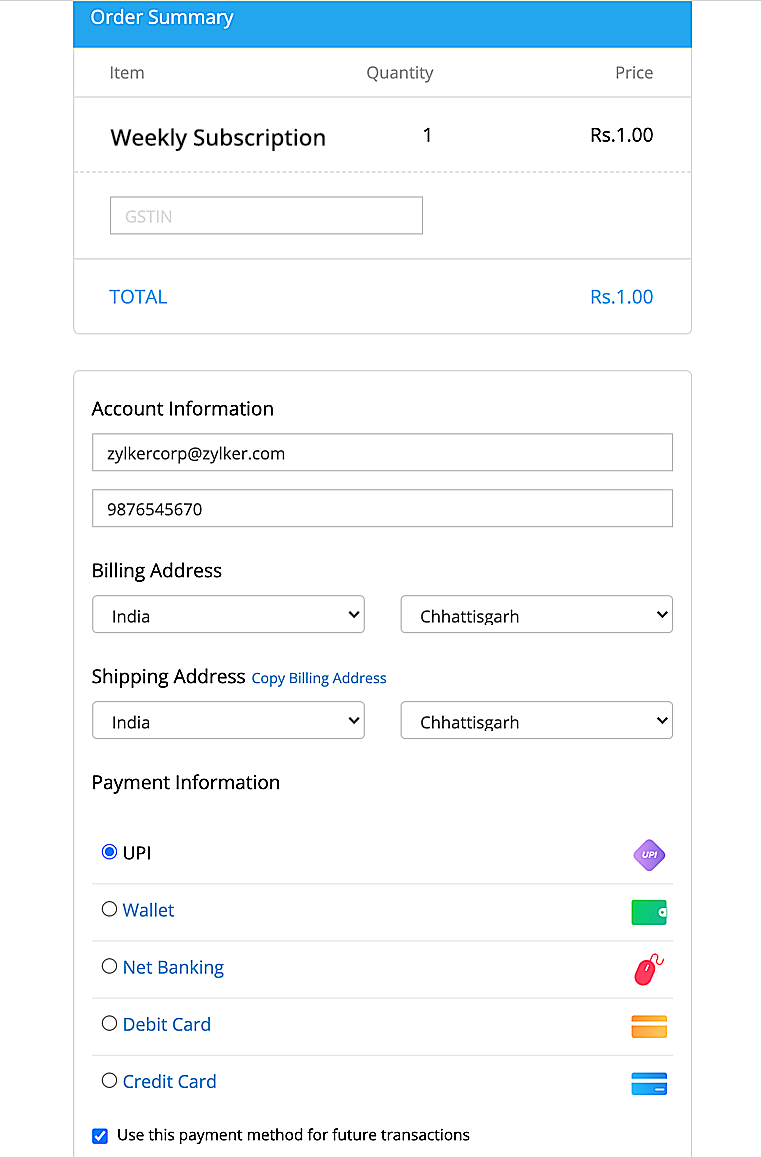
Select the bank that you wish to add as UPI payment method, and add the UPI ID.
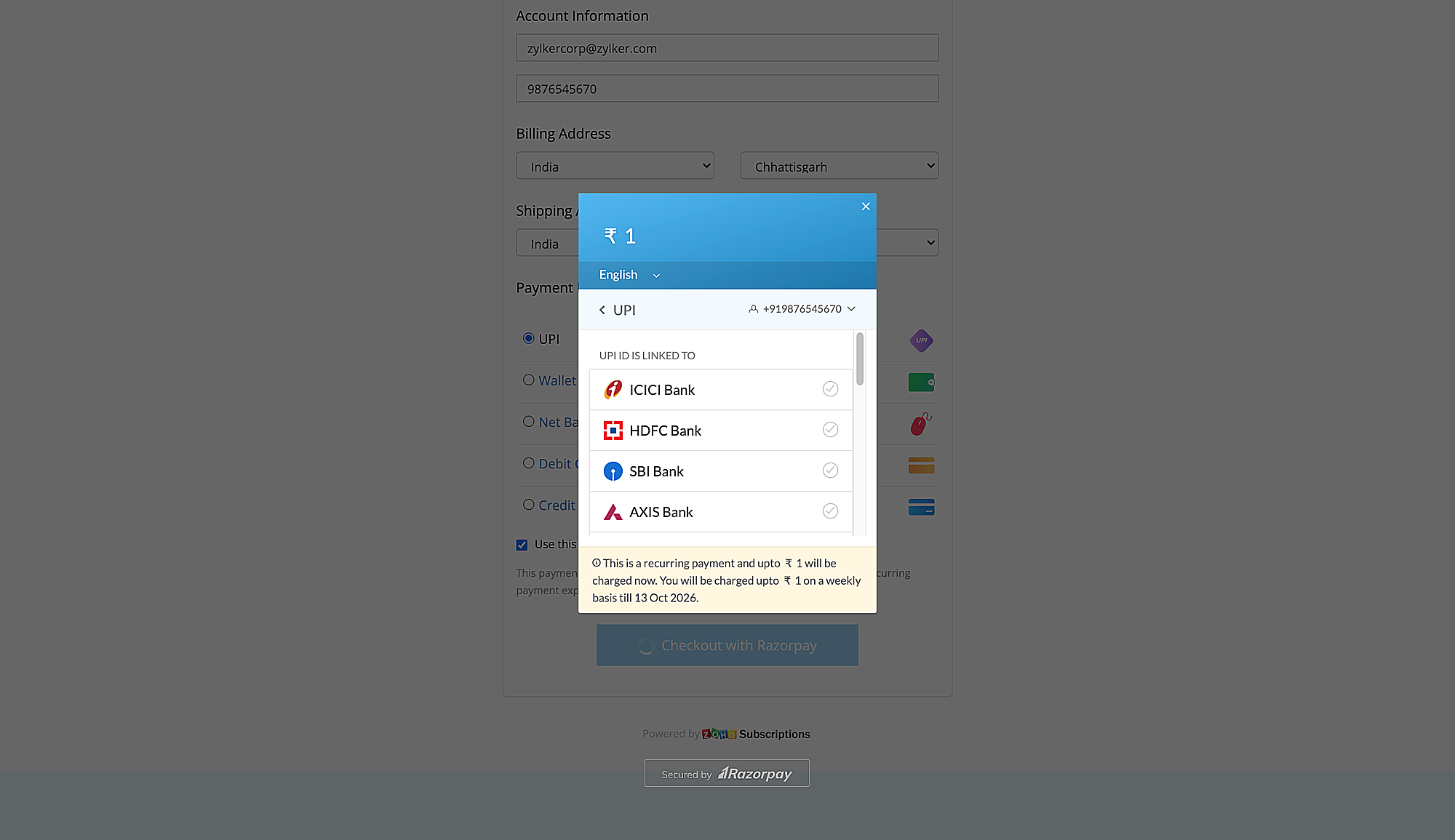
If the UPI mandate is supported by the bank the details can be added successfully. Customers have to authenticate the transaction once with the UPI PIN, so that subsequent recurring payments can be done automatically.
Additionally, customers can pause, resume, or revoke existing mandates, and add new mandates that follow RBI guidelines.
If you have further questions about this, please write to support@zohosubscriptions.com and we'll be happy to help.
Regards,
The Zoho Subscriptions Team
Topic Participants
Christopher Joseph
Sticky Posts
Tip #4 : Refer and Earn Workflow system for your Subscription Business
Hello everyone, We've been coming up with a tip every week to address specific business scenarios which can be implemented for your business. In continuation to the previous post, this week we will be seeing about how you can implement the Refer and Earn Workflow system to acquire more customers. Why are Referrals important? Customer Acquisition is crucial for any business to sustain itself in a constantly evolving market. It involves persuading new consumers to purchase your products. CustomersTip #2 - Cancellation of Offline Subscriptions based on the Expected Payment Date
Hello everyone, As you all know, we are coming up with a custom function workflow every week to address specific business scenarios. In continuation of this previous blog, this week we will be seeing about Cancellation of Offline Subscriptions based on the Expected Payment Date. Business Scenario: In general, for any business, the customers make payments via online as well as offline. In case of subscription where the automatic collection of charge is enabled (aka online subscription), the customer'sTip #3 : Send SMS Reminders for your Subscription Business
Hello everyone, As you all know, we are coming up with a tip every week to address specific business scenarios. In continuation to the previous blog, this week we will be seeing how you can use SMS reminders for your Subscription Business. Using SMS messages for your Subscription Business: While managing your subscription business, more often than not, you need to keep your customers informed about upcoming renewals, payment reminders and cancellations. By keeping them informed in advance, you canTips And Tricks - Announcement
Hello everyone, Every business is unique and each of them follows a specific workflow. While managing your customers' subscriptions with Zoho, you might have some needs unique to your business. Custom Functions helps you address such needs. This is a start to a series of posts, where we will be coming up with a custom function workflow every week that addresses specific business scenarios. Watch this space for further updates! Also, if you have any specific business scenario which needs to be addressed,Tip #6 : Accessing external URLs from Zoho Subscriptions
Hello everyone, We have been sharing a tip every week to address specific business scenarios which you can implement for your subscription business. Last week, we shared a tip about implementing the Approval Workflow system. This week, let's look at how you can access external URLs with the help of Custom Link. Business Scenario: Every business functions differently and has its unique requirements. At times, businesses might want to access other websites or applications by appending specific information
Recent Topics
Client Script | Update - Introducing Subform Events and Actions
Are you making the most of your subforms in Zoho CRM? Do you wish you could automate subform interactions and enhance user experience effortlessly? What if you had Client APIs and events specifically designed for subforms? We are thrilled to introduce{"errors":[{"id":"500","title":"Servlet execution threw an exception"}]}
Here's the call to move a file to trash. The resource_id is accurate and the file is present. header = Map(); header.put("Accept","application/vnd.api+json"); data = Map(); data_param1 = Map(); att_param1 = Map(); att_param1.put("status",51); data_param1.put("attributes",att_param1);Converting Sales Order to Invoice via API; Problem with decimal places tax
We are having problems converting a Sales Order to an Invoice via API Call. The cause of the issue is, that the Tax value in a Sales Order is sometimes calculated with up to 16 decimal places (e.g. 0.8730000000000001). The max decimal places allowed inZoho Canvas - Custom templates for related lists
Hi, I see that the example pages load always one of our related lists in a custom template, but I dont know how to work with that: 1) How can i make my own custom templates for related lists? 2) Where and how can i check out existing custom templates?Kaizen #147 - Frequently Asked Questions on Zoho CRM Widgets
Heya! It's Kaizen time again, folks! This week, we aim to address common queries about Zoho CRM Widgets through frequently asked questions from our developer forum. Take a quick glance at these FAQs and learn from your peers' inquiries. 1. Where can Iopen word file in zoho writer desktop version
"How can I open a Microsoft Word (.doc or .docx) file in Zoho Writer if I only have the file saved on my computer and Zoho Writer doesn't appear as an option when I try 'Open with'? Is there a way to directly open the .doc file in Zoho Writer?"Zoho PDF editor has a lot of issues.
Zoho PDF editor needs a lot of work. It hangs and glitches a lot. Deletes annotations and clearings randomly.Syncing contacts on Android
I'm using the Zoho mail app on Android and although I can see my contacts from within the app, they're not synced to my native contact list and so I can't access them from within the native dialer. Is there any way that I can sync my contacts into my native address book? Regards, MartinZohom mail
Plz resolve the problem . I hope u understand .Zoho sheet desktop version
Hi Zoho team Where can I access desktop version of zoho sheets? It is important as web version is slow and requires one to be online all the time to do even basic work. If it is available, please guide me to the same.ZOHO SHEETS
Where can I access desktop version of zoho sheets? It is important to do basic work If it is available, please guide me to the sameUsing Zoho Flow to create sales orders from won deal in Zoho CRM
Hi there, We are using Zoho Flow to create sales orders automatically when a deal is won in Zoho CRM. However, the sales order requires "Product Details" to be passed in "jsonobject", and is resulting in this error: Zoho CRM says "Invalid input for invalidIs Zoho Sheet available for Linux ?
Is Zoho Sheet available for Linux ?Bharat
ahow to disable staff selection Zoho Booking integrated to SalesIQ?
currently there is only one Consultant in my Zoho Bookings like this I integrate Zoho Bookings into Zoho SalesIQ to create a chatbot. Unfortunately, even though I only have one consultant for a consultation, the user have to pick the consultant. It willZoho Bookings No Sync with Outlook
Zoho Bookings appointments are showing on my Outlook Calendar but Outlook events are not showing on Zoho Bookings. How do I fix this?End Date in Zoho Bookings
When I give my appointments a 30 minutes time I would expect the software not to even show the End Time. But it actually makes the user pick an End Time. Did I just miss a setting?Custom confirmation message
How can I change the message that users see after they submit the booking form? I have to confirm some details before their appointment is officially "confirmed", so I want to change it where it doesn't say their appointment is "confirmed" but ratherIssue showing too many consultations in my workspace link.
Hi Team, I’ve set up two Workspaces to track meetings from different sources. So far, this has been working well, and the two Workspaces are differentiated without any issues. However, when I navigate to Consultations and share the link to my personalDeluge sendmail in Zoho Desk schedule can't send email from a verified email address
I am trying to add a scheduled action with ZDesk using a Deluge function that sends a weekly email to specific ticket client contacts I've already verified the email address for use in ZDesk, but sendmail won't allow it in its "from:" clause. I've attachedunblock e-mail
please unblock my e-mails info@meatnews.gr and myrtokaterini@meatnews.grChanging Corporate Structure - How Best to Adapt Current and Future Zoho Instances
My current company is Company A LLC with a dba ("doing business as" - essentially an alias) Product Name B. Basically, Company A is the legal entity and Product Name B is what customers see, but it's all one business right now. We currently have a ZohoHow to Install Zoho Workdrive Desktop Sync for Ubuntu?
Hi. I am newbie to Linux / Ubuntu. I downloaded a tar.gz file from Workdrive for installing the Workdrive Desktop Sync tool. Can someone give me step by step guide on how to install this on Ubuntu? I am using Ubuntu 19.04. Regards SenthilHow to upload own video?
How can you upload your own video on your zoho website? I do not want to use another host, but i want to insert my own files. how can i do this?Support new line in CRM Multiline text field display in Zoho Deluge
Hi brainstrust, We have a Zoho CRM field which is a Muti Line (Small) field. It has data in it that has a carriage return after each line: When I pull that data in via Deluge, it displays as: I'm hoping a way I can change it from: Freehand : ENABLED ChenilleAnnouncing new features in Trident for Windows (v.1.32.5.0)
Hello Community! Trident for Windows just got better! This update includes new features designed to improve and simplify email and calendar management—and it includes a feature you’ve been waiting for. Let’s dive into what’s new! Save emails in EML orHow to render either thumbnail_url or preview_url or preview_data_url
I get 401 Unauthorised when using these urls in the <img> tag src attribute. Guide me on how to use them!Zoho CRM Calendar | Custom Buttons
I'm working with my sales team to make our scheduling process easier for our team. We primary rely on Zoho CRM calendar to organize our events for our sales team. I was wondering if there is a way to add custom button in the Calendar view on events/meetingCreate Lead Button in Zoho CRM Dashboard
Right now to create Leads in the CRM our team is going into the Lead module, selecting the "Create Lead" button, then building out the lead. Is there anyway to add the "Create Lead" button or some sort of short cut to the Zoho CRM Dashboard to cut outSearching customer field
Hello, When entering a receipt, we select customer information. The customer information is synced with Zoho CRM. However, we can't find the customer information because it searches for words that begin with the entered value. It needs to search for wordsIntroducing Version-3 APIs - Explore New APIs & Enhancements
Happy to announce the release of Version 3 (V3) APIs with an easy to use interface, new APIs, and more examples to help you understand and access the APIs better. V3 APIs can be accessed through our new link, where you can explore our complete documentation,Outgoing blocked: Unusual activity detected.
Hello i can't send email from g.morris@adm-part.com mail, can you please help me.Zoho CRM Tracking Google Enhanced Conversions
Can anyone @Zoho, consultants, or users help me understand if Zoho CRM is going to support Google's Enhanced Conversions? I included some information from Google below about it. We use Google Adwords for our pay per click advertising for lead generation,Billing Management: #5 Usage Billing
After understanding the nuances of Advance Billing and Retainers, we will explore one of the booming billing models. Long ago, villagers drew water from a shared well in a small village. The well was a lifeline for the entire community. Ravi, the wellFunction #10: Update item prices automatically based on the last transaction created
In businesses, item prices are not always fixed and can fluctuate due to various factors. If you find yourself manually adjusting the item rates every time they change, we have the ideal time-saving solution for you. In today's post, we bring you customInventory Adjustments
Hi, How to transfer the material from one head to another ? Like materials purchased for manufacturing the laptop need to transfer from consumption inventory (Quantity of raw materials reduced) to destination inventory ( Quantity of Laptop increased)Zoho CRM Community Digest - August 2025 | Part 1
Hey everyone! The first half of August went by, and we have a few announcements and some good noteworthy discussions. So, let's take a look at them! Product Updates: Introducing Connected Records feature: Zoho CRM’s Next-Gen UI now includes ConnectedPlease make it easier to Pause syncing
right now it takes 3 clicks to get there. sounds silly, but can you make it just 2 clicks to get it done instead? thats how dropbox does it, 2 clicks to pause instead of 3.How to create a Zoho CRM report with 2 child modules
Hi all, Is it possible to create a Zoho CRM report or chart with 2 child modules? After I add the first child module, the + button only adds another parent module. It won't let me add multiple child modules at once. We don't have Zoho Analytics and wouldHow to integrate Zoho Forms with Zoho CRM on Standard Plan
Hello Zoho Support Team, I am using the Standard Zoho Forms plan (USD 30/user) and I would like to integrate Zoho Forms with Zoho CRM so that certain fields in my forms can be automatically prefilled using data from Deals in CRM. Specifically, I wantNext Page