What's New in Zoho Billing - November 2023
Hello everyone,
This month's updates add more flexibility to collecting payments, along with improvements to reports and custom fields. Let's dive in!
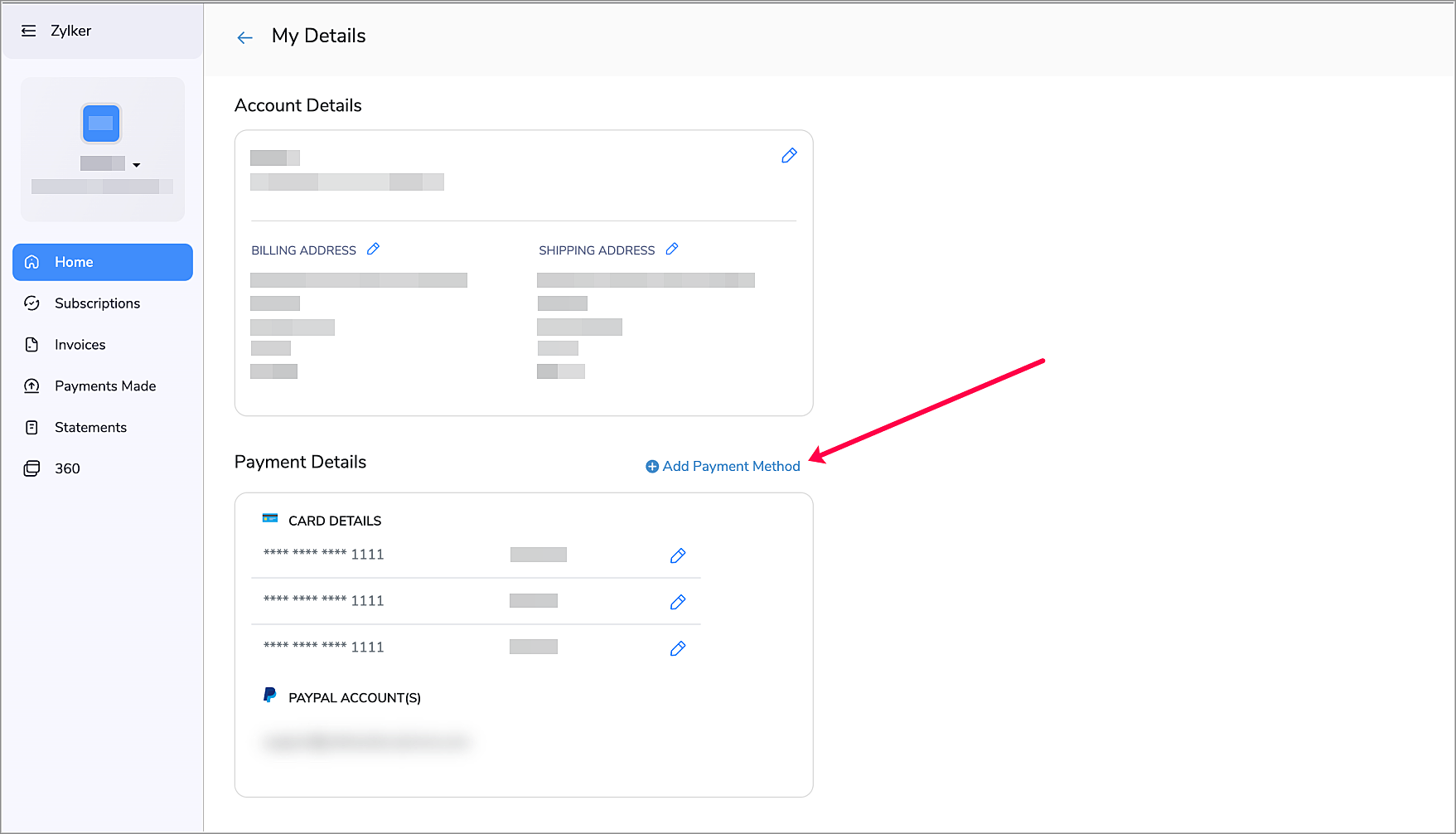
Add Payment Methods from the Customer Portal
Make the payment process more convenient for your customers by allowing them to add payment methods from the Customer Portal. This way, your customers can add new methods when their existing payment methods are about to expire, thus ensuring a smooth auto-charge experience. To enable this:
- Navigate to Settings > Customer Portal > General.
- Enable Allow customers to add payment methods.
Now, your customers will be able to add a new payment method by clicking + Add Payment Method from the Home Screen of their Customer Portal.
Revamped Net Revenue Report

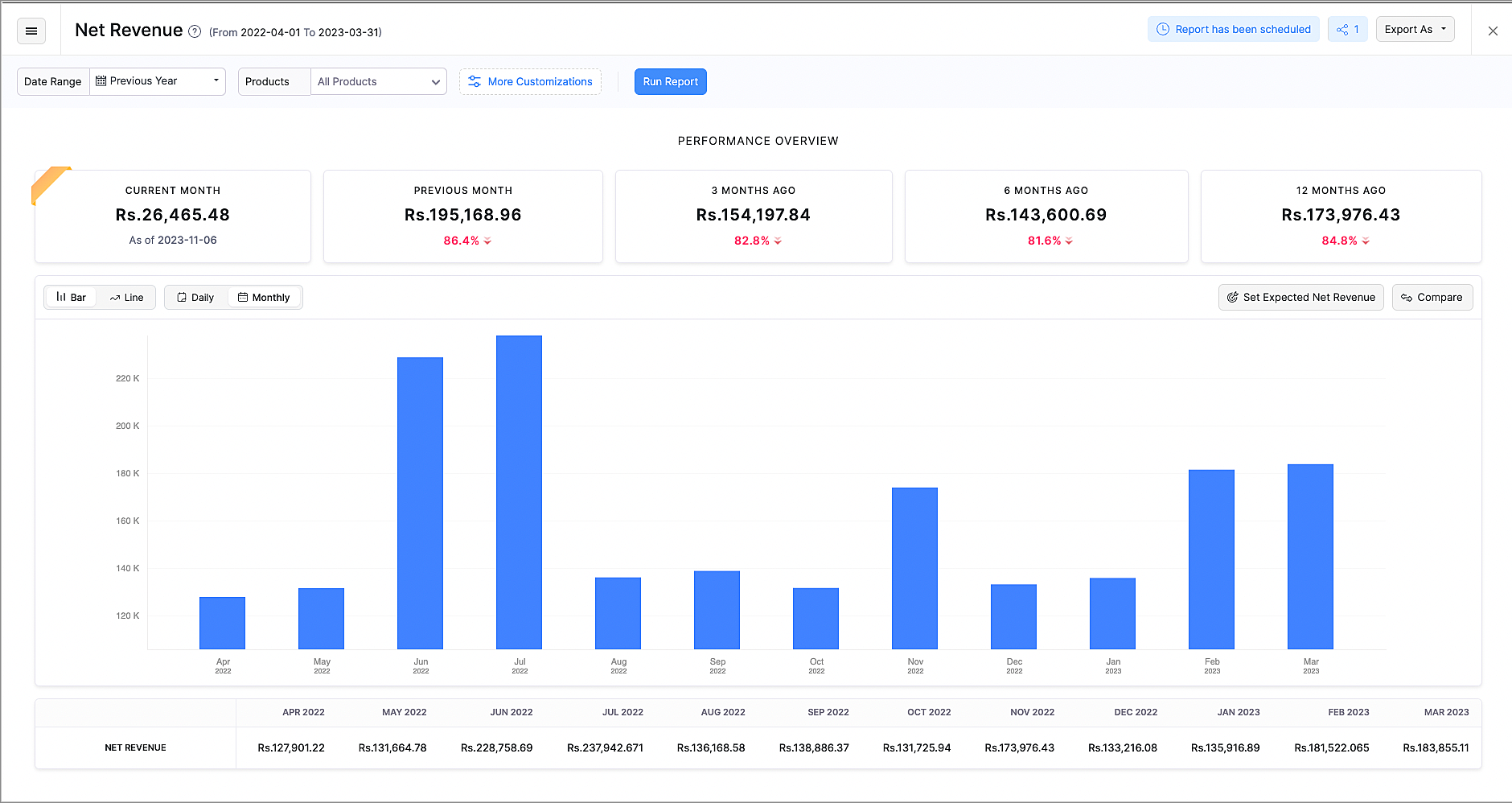
The revamped Net Revenue report gives you more insights about your organization's net revenue.
- The newly added Performance Overview section displays how your business is performing in the current month, compared to the previous months.
- The existing line chart can now also be viewed as a bar chart according to your preference.
- You can also view the data from the chart in the breakdown table below the chart.
- Customize this report with Advanced Filters, such as Country or Customer Name.
- Compare revenue based on products, plans, countries and dates to get further insights.
- You can now export this report as XLS and XLSX, along with CSV.
Make Payments Mandatory for Subscription Updates

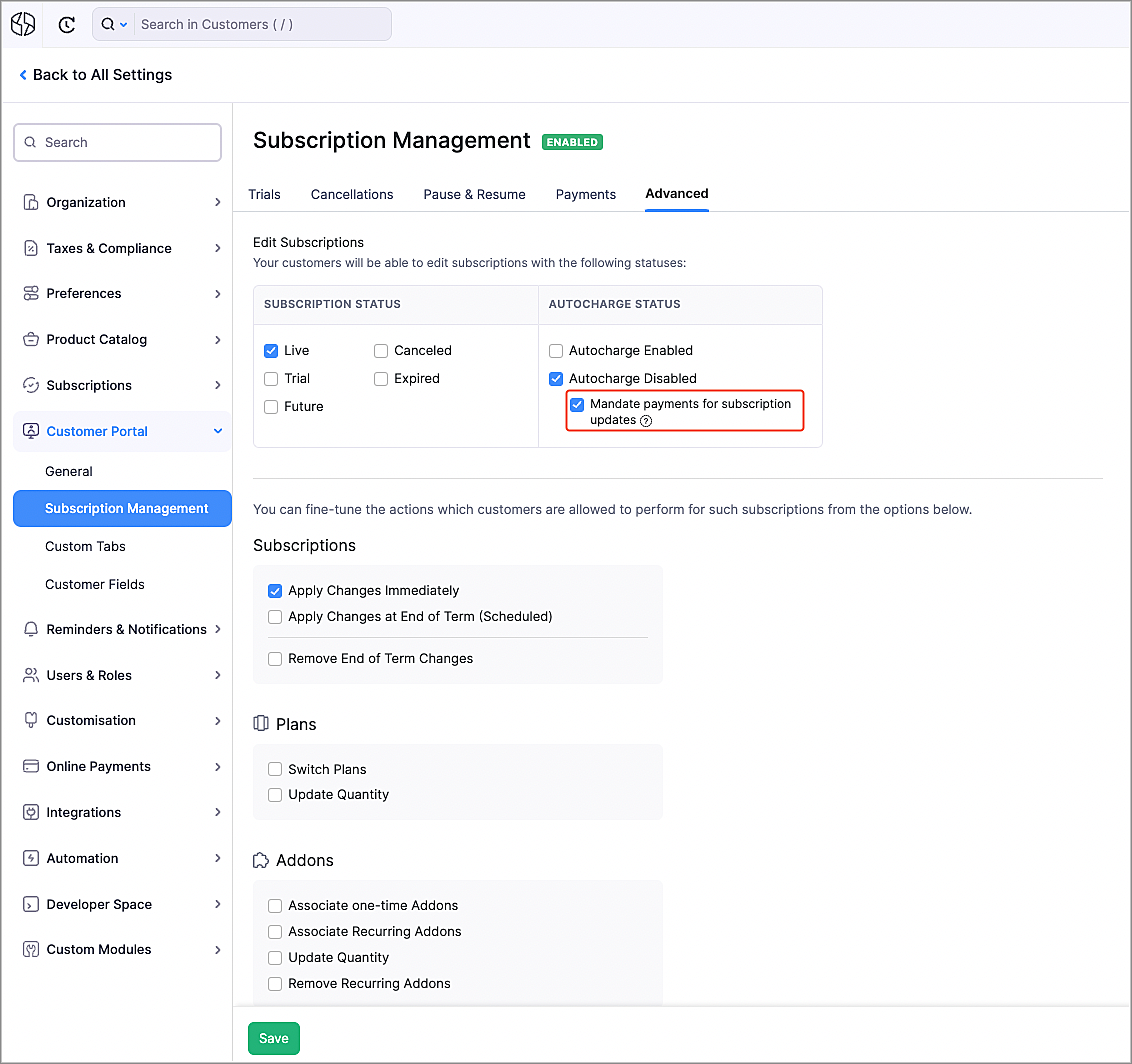
You can get more control over subscription updates in the Customer Portal by making payments mandatory. Once enabled, when your customers make changes to their subscriptions, such as upgrading plans or purchasing addons that would require additional payments, they would have to pay first. To enable this:
- Navigate to Settings > Customer Portal > Subscription Management.
- Go to the Advanced tab.
- Mark the Mandate payments for subscription updates option.
Note: The payment method that is used for such payments will be associated to the subscription. Autocharge will be enabled automatically for this subscription, if the updated payment method supports it.
Prevent Duplicate Values for Custom Fields
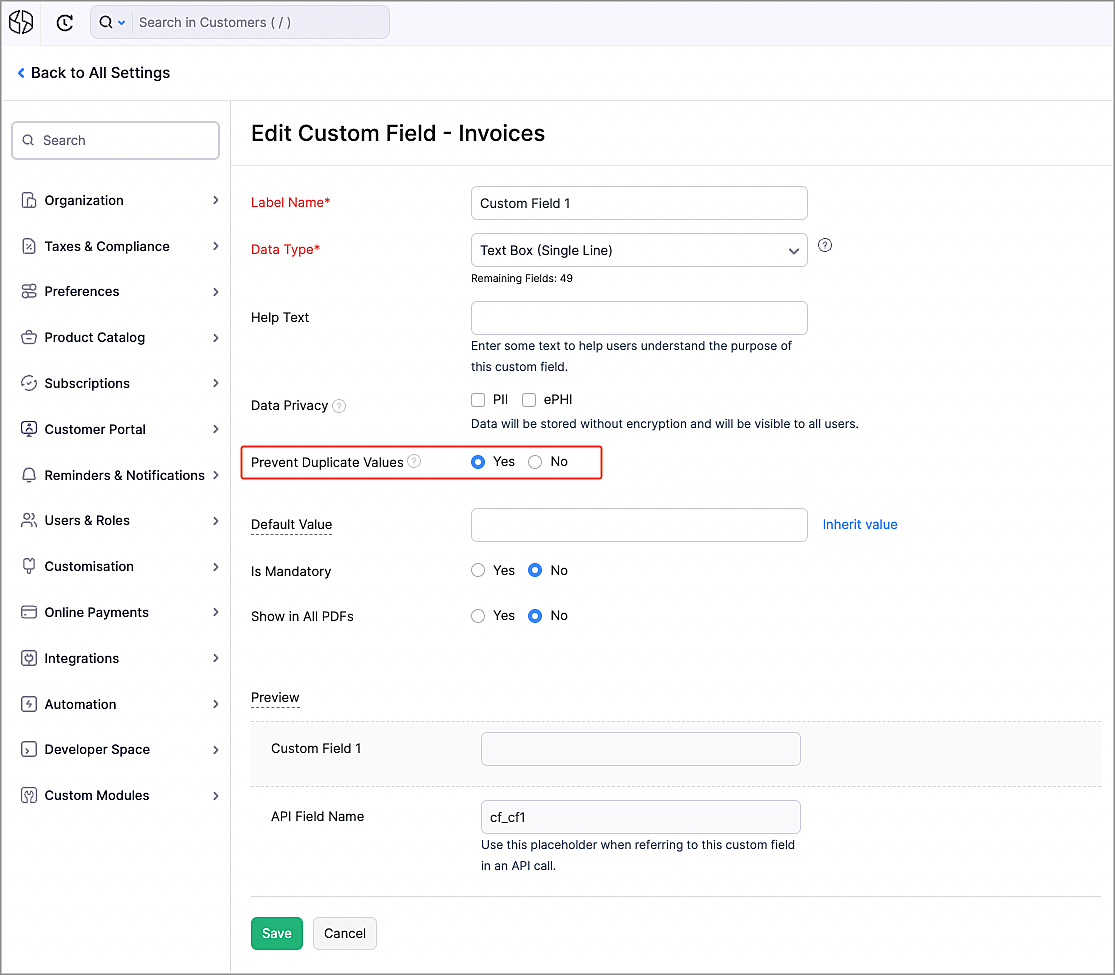
There might be scenarios where you might want unique data for certain custom fields, such as user names or license keys. Now, you can make sure that all the values for the custom fields are unique by selecting Yes next to Prevent Duplicate Values while creating or editing a custom field. Once enabled, when a duplicate value is entered for a custom field, an error will be shown, asking you to enter a unique value.
Zoho Notebook Integration

Zoho Notebook is a general purpose online note-taking app, that lets you organize notes and media in one place. You can now integrate with it to take notes, create checklists, upload images and attach documents to Zoho Notebook directly from Zoho Billing.
To integrate with Zoho Notebook:
- Navigate to Settings > Integrations > Zoho Apps.
- Click Install next to Zoho Notebook.
- Click Install in the popup that appears.
Now, you can add notes from Zoho Billing by clicking the Zoho Notebook icon on the right.

Multi-page Hosted Payment Pages
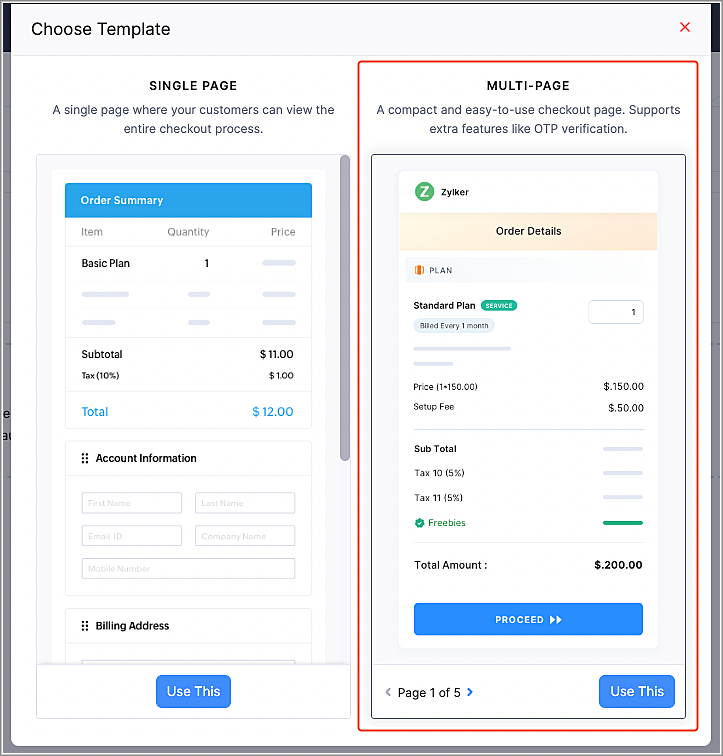
We have added a multi-page template for the Hosted Payment Pages to simplify your payment collection process.
- OTP Verification - You can now mandate your customers to go through OTP verification for their email address. This will help to identify returning customers, ensuring that their payments are processed for the correct customer, instead of creating a duplicate customer. The customer's details, such as their saved payment methods and addresses will also be filled automatically.
- Bite-Sized Pages - The checkout process has been split into multiple, neatly categorized steps, instead of all the information in one page.
- Switch Addresses - If your existing customers have multiple saved addresses, they can switch between them.
Note: You can enable multi-page templates for your organization from Settings > Customization > Hosted Payment Pages. For newly-created organizations, multi-page templates will be the default Hosted Payment Page type.
Hosted Payment Page Enhancements
We have enhanced our Hosted Payment Pages to give you more flexibility in your payment collection process.
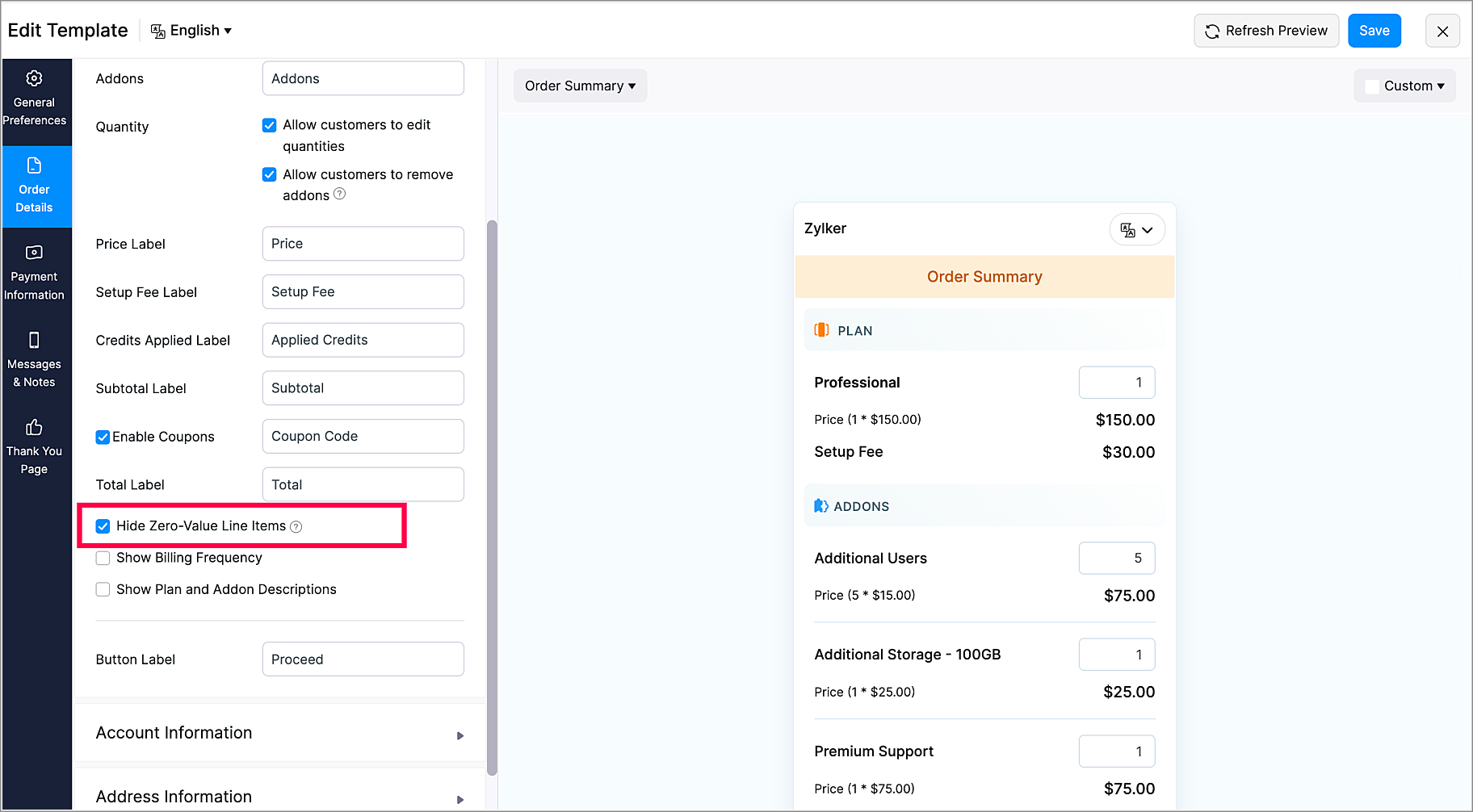
- Show/Hide Zero-Value Items - You can choose to display or hide zero-value plans/addons in the Hosted Payment Pages.
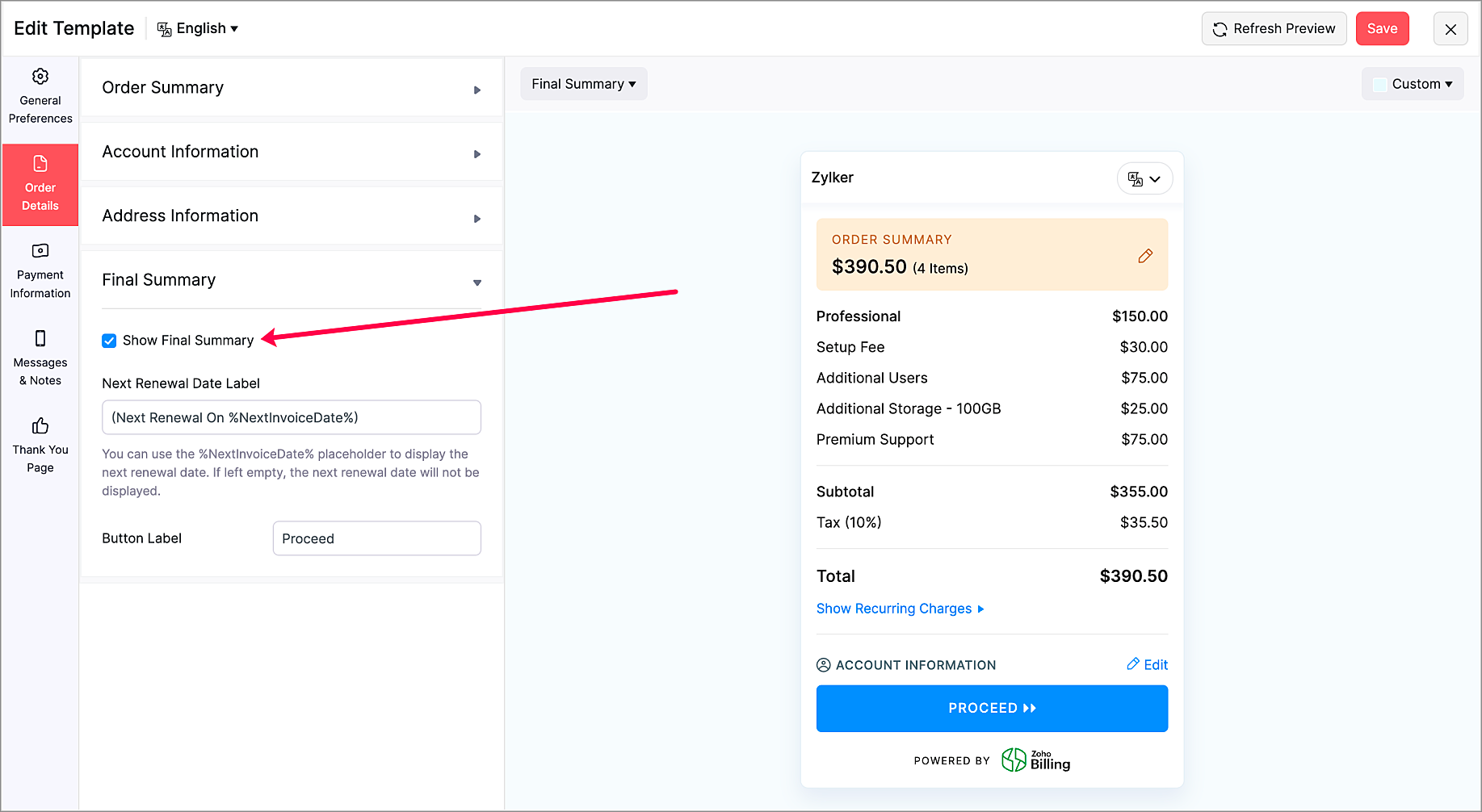
- Show/Hide Final Summary Section - Choose to display or hide the Final Summary section in the Order Details section. This is available only for multi-page Hosted Payment Pages.
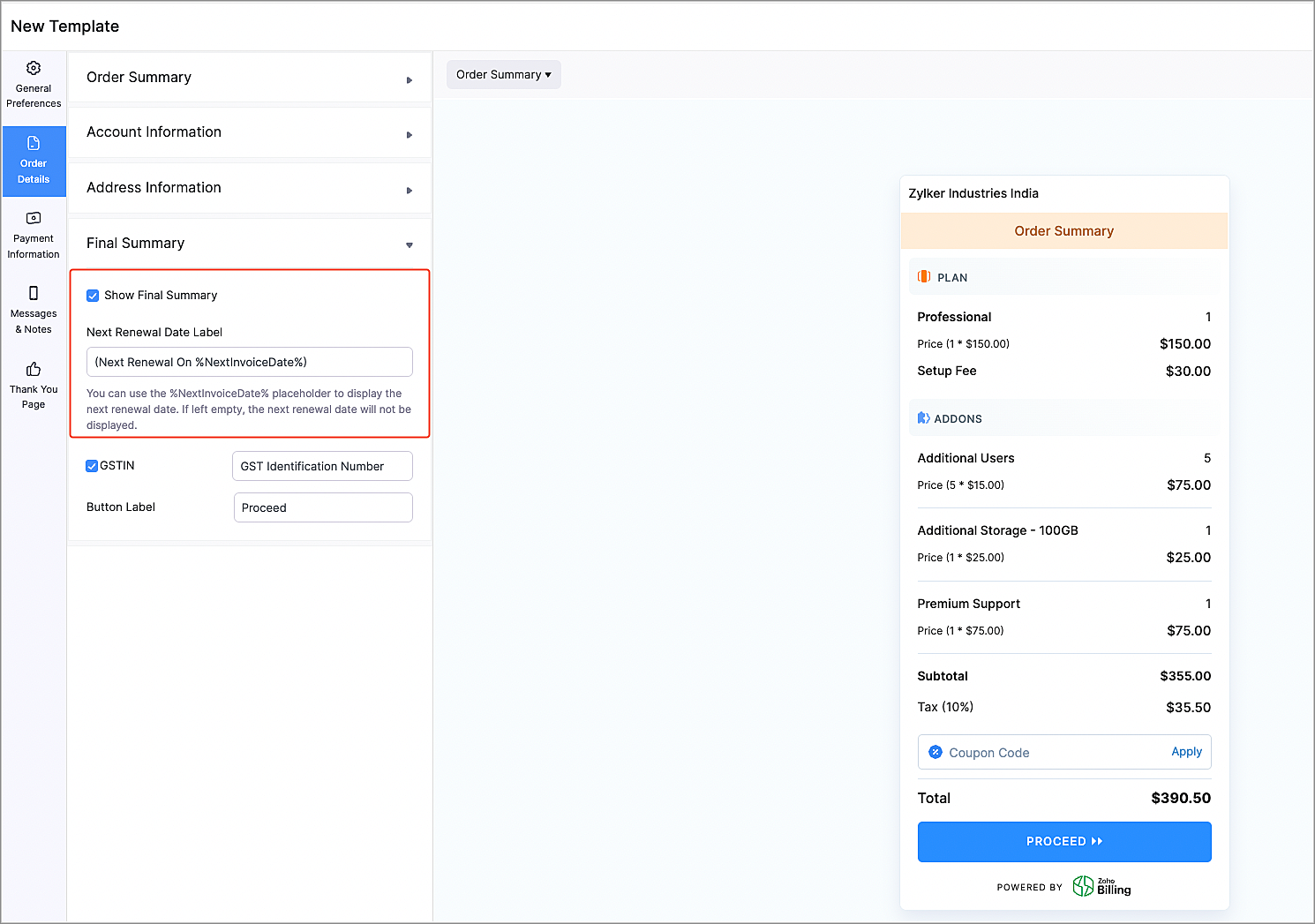
- Next Renewal Date Label Customization - Now, you can choose to display the next renewal date for the recurring charges in the Order Details section. You can also customize the label according to your preferences. This is available only for multi-page Hosted Payment Pages.
Marketplace Extensions
Zoho Cliq Extension
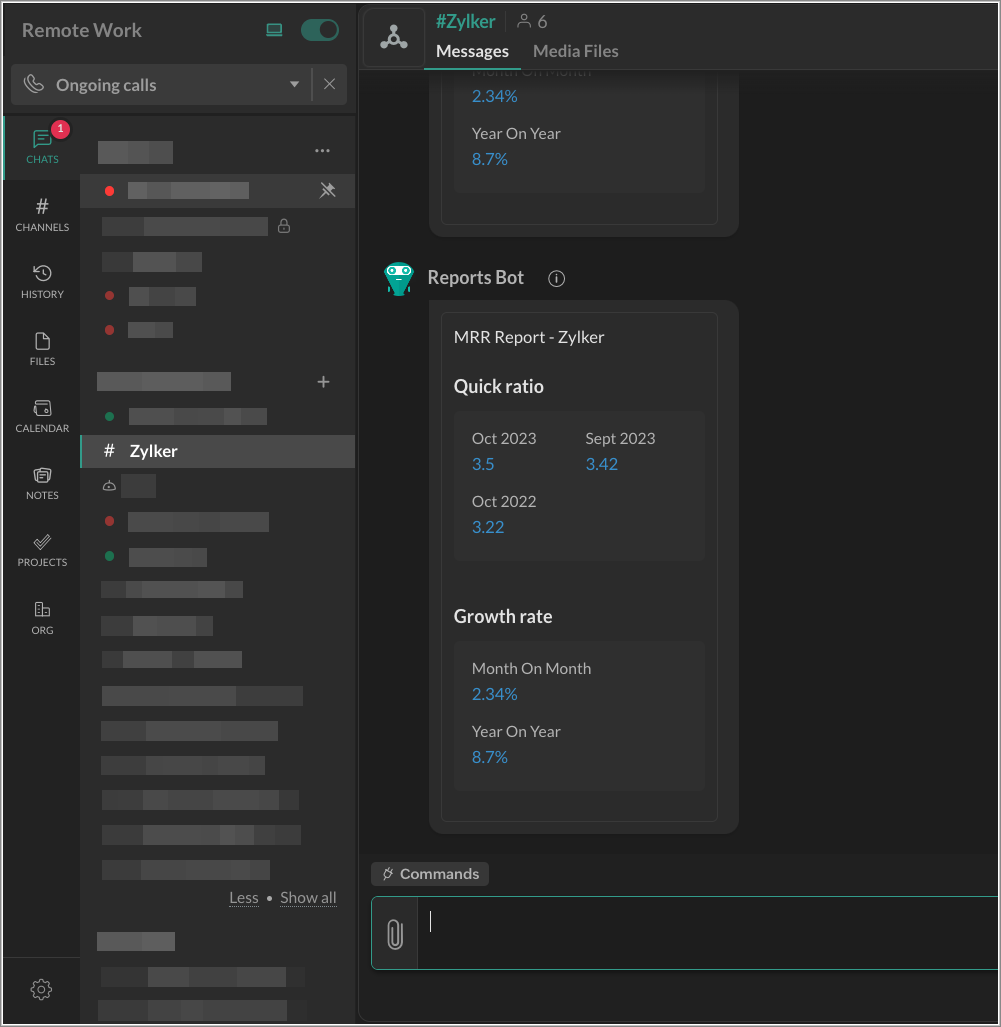
The Zoho Cliq extension for Zoho Billing can show you subscription summary reports for your products in a Cliq channel. Once enabled, you will receive daily notifications about your products' performance for the previous day. You will also receive a short summary of your organization's monthly recurring revenue on the first day of each month.
Telr Extension
Note: This extension was developed by Telr.
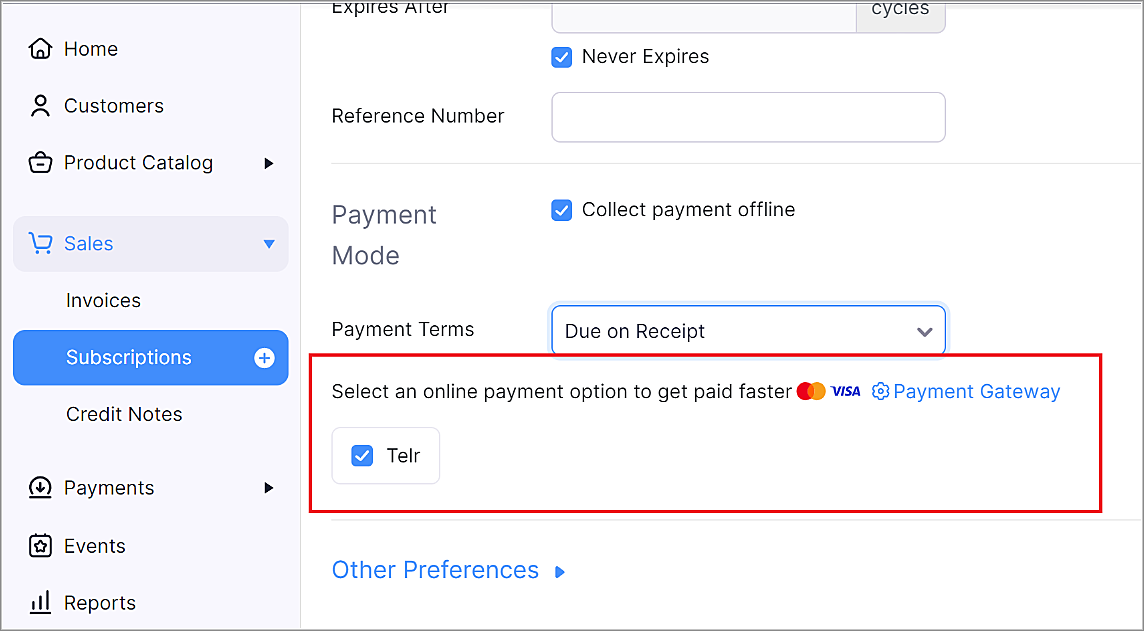
Telr is a payment gateway provider that helps businesses accept and manage online payments. Telr accepts many popular payment methods, such as Visa, MasterCard, American Express, JCB, UnionPay, MADA, STC pay, URPay, SADAD and many more.
Zoho Connect Extension
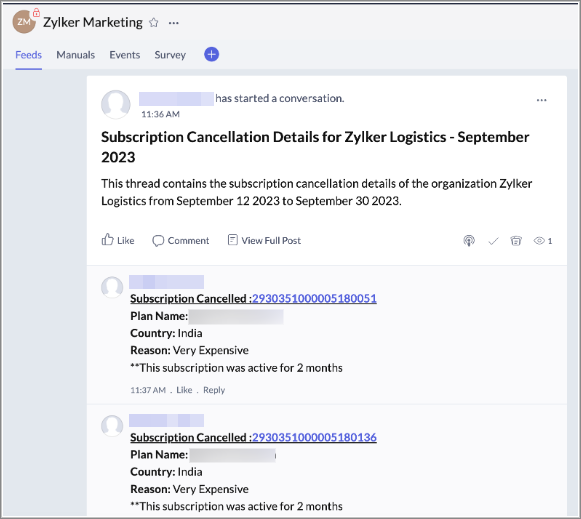
The Zoho Connect extension for Zoho Billing allows your business to track details of subscriptions that were cancelled by your customers in Zoho Connect. Once enabled, every time a subscription has been cancelled, details about it will be posted as a comment in a thread on Zoho Connect.
You can visit our What's New Timeline to view a list of all our previous updates.
We'd love to hear what you think about these features in the comments below. If you require any assistance, please write to our support team at support@zohobilling.com – we'd be happy to help!
Best regards,
The Zoho Billing Team
Topic Participants
Dwaipayan Bose
Mikhail Koval
Hari Hara Sudhan. S
Decorus-Pms
Sticky Posts
What's New in Zoho Billing - February 2024
Hello everyone, We are excited to share the first set of updates for Zoho Billing in 2024. Read along to know more about a wide range of updates, from the Aging Summary in customer statements to Apple Pay support in Stripe. One-Time Invoice with PlansZoho Finance Workshop 2023 is coming to the USA. Get exclusive training on Zoho Finance apps, one-on-ones, and more.
Hello all, We'd like to invite you to our biggest Zoho Finance workshop in the United States. After a brief break, we are excited to be back. This year, we're bringing together our customers and community members for two days of curated hands-on sessions,Zoho Subscriptions wins IDC's 2020 SaaS CSAT Award for Subscription Billing
Dear customers, We're excited to share that Zoho Subscriptions has won IDC's 2020 SaaS Customer Satisfaction Award! As a team, we cherish each and every milestone with our customer community. And this particular award, focusing on customer satisfaction,Introducing: SMS notifications via Zoho Subscriptions
Dear customers, We hope you are doing well! We are happy to announce that you can now send SMS notifications to your customers right from Zoho Subscriptions. To facilitate this, we've integrated with Twilio, a leader in the business communication space.What's new this December in Zoho Subscriptions
The year is almost over and we here at Zoho Subscriptions have released new features and updates on the month of November. Let's take a look at the features we have worked on in the past month. Zendesk Integration The Zoho Subscriptions app for Zendesk allows your customer support executive to access customer details in an instant. You will be able to view the customer information from Zoho Subscriptions right from your ticket view. On enabling the integration, you will be able to: Get your customer
Recent Topics
Zoho → ShipStation Integration – Sales Order–Driven Fulfilment Workflow
Hello All, I’m reaching out to explore the best way to integrate a shipping tool into our inventory which will speed our process up. We are looking to integrate ShipStation into our existing order-to-fulfilment workflow, as we’re keen to standardise onBusiness Day Logic Update: More Accurate Scheduling for Your Workflows
Hello everyone, We’re improving how business-day calculations work in workflows, especially when triggers happen on weekends. This update ensures that offsets like +0, +1, and +2 business days behave exactly as intended, giving you clearer and more predictableConvert Lead Automation Trigger
Currently, there is only a convert lead action available in workflow rules and blueprints. Also, there is a Convert Lead button available but it doesn't trigger any automations. Once the lead is converted to a Contact/Account the dataset that can be fetchedDefault Tagging on API-generated Transactions
If one assigns tags to an Item or Customer, those tags get auto-populated in each line item of an Invoice or Sales Order when one creates those documents. However, if one creates the Sales Order or Invoice via the API (either directly coding or usingUser
If user is already part of manage engine endpoint central , what hapens when i try to add them to another Zoho org / directory? Are these users added as external users?Adding a new section to the related details sidebar when creating a new ticket.
Hello, I was wondering if you can add a new section to the related details sidebar when creating a new ticket. I was wanting to have it to where it also shows the account information related to the contact chosen as well. This is the section I am referringPosibility to add Emoticons on the Email Subject of Templates
Hi I´ve tried to add Emoticons on the Subject line of Email templates, the emoticon image does show up before saving the template or if I add the Emoticon while sending an Individual email and placing it manually on the subject line. Emoticons also showDisplaying only unread tickets in ticket view
Hello, I was wondering if someone might be able to help me with this one. We use filters to display our ticket list, typically using a saved filter which displays the tickets which are overdue or due today. What I'd really like is another filter thatTicket layout based on field or contact
Hi! I want to support the following use-case: we are delivering custom IT solutions to different accounts we have, thus our ticket layouts, fields and languages (priority, status field values should be Hungarian) will be different. How should I setupWhere is the settings option in zoho writer?
hi, my zoho writer on windows has menu fonts too large. where do i find the settings to change this option? my screen resolution is correct and other apps/softwares in windows have no issues. regardsHolidays - Cannot Enter Two Holidays on Same Day
I have a fairly common setup, where part-time employees receive 1/2 day's pay on a holiday and full-time employees receive a full day's pay. Historically, I've been able to accommodate this by entering two separate holidays, one that covers full-timeCRM project association via deluge
I have created a workflow in my Zoho CRM for closing a deal. Part of this workflow leverages a deluge script to create a project for our delivery team. Creating the project works great however, after or during the project creation, I would like to associateHow to manage task lists in Zoho Desk?
Hello, I use Zoho Desk for IT customer support. I have a list of standard operating procedures (SOPs), including SOPs for onboarding new users, offboarding users, losing a device, etc. These are lists of tasks to be performed depending on the situation.How to compare a subform lookup field that allows multiple entries when edited
I have a form with a subform with multiple fields. One of the fields is a lookup field that allows a multi select. On edit validation, I want a workflow to execute only when the entries in that subform field has changed. The old. function is not workingIs Zoho Shifts included in the Zoho One plan?
In case the answer is no: there's any plan to make it available via One? Thank youCreating a Chart from a Report
In Zoho Analytics, is it possible to create a chart from a Pivot View report? We are looking to use Zoho Analytics to replace Excel for Sales reports and would like to be able to show both the table and the chart together.No funcionan correctamente el calculo de las horas laborales para informe de tickets
Hola, estoy intentando sacar estadísticas de tiempo de primera respuesta y resolución en horario laboral de mis tickets, pero el calculo de horas en horario laboral no funciona correctamente cree los horarios con los feriados : Ajusté los acuerdos deZoho Tracking Image location
So we've been having an issue with tracking email opens. Specifically in Gmail. Our emails are not that long either, maybe 4 sections of image/250 characters of text/button per section. But all my test accounts I used via Gmail we're showing opens. But then come to find out the tracking image is at the very bottom of the email. So If the message is clipped (It always just clips our social icons on the bottom) and the user doesn't click the show more button it never tracks the open. Looking at otherHow create a draft via workflow?
I wish to create a workflow rule for specific emails that creates a draft response - not an automatic email reply, but just a draft with a set response ready to be verified by an agent who can then manually select recipients. Alternatively, the workflowIs there a plan to integrate zoho voice with zoho books?
Hello, Is there a plan to integrate zoho voice with zoho books? Right now we are using the Twilio SMS integration into zoho books, but have recently decided to switch to zoho voice for calls and sms. Is there a plan to integrate zoho voice natively intoZoho Tables is now live in Australia & New Zealand!
Hey everyone! We’ve got some great news to share — Zoho Tables is now officially available in the Australian Data Center serving users across Australia and New Zealand regions! Yes, it took us a bit longer to get here, but this version of Zoho TablesIntroducing Dedicated Modules for Plans, Addons, and Coupons in Zoho Billing
We’ve enhanced the way you manage Plans, Addons, and Coupons in Zoho Billing. Previously, all three grouped together under Subscription Items. Now, each one has its own dedicated module, giving you a cleaner and more intuitive experience. This updateSortie de Zoho TABLE ??
Bonjour, Depuis bientôt 2 ans l'application zoho table est sortie en dehors de l'UE ? Depuis un an elle est annoncée en Europe Mais en vrai, c'est pour quand exactement ??Zoho Forms API
Is there any way to get all form entry list using API? Looking forward to hear from youIssue with WhatsApp Template Approval and Marketing Message Limit in Zoho Bigin
We are facing issues while creating and using WhatsApp message templates through Zoho Bigin, and we request your clarification and support regarding the same. 1. Utility Template Approval Issue Until December, we were able to create WhatsApp templatesHow to install Widget in inventory module
Hi, I am trying to install a app into Sales Order Module related list, however there is no button allow me to do that. May I ask how to install widget to inventory module related list?Zoho Social - Feature Request - Reviewer Role
Hi Social Team, I've come across this with a couple of clients, where they need a role which can review and comment on posts but who has no access to create content. This is a kind of reviewer role. They just need to be able to see what content is scheduledZoho Social - Feature Request - Non-US Date Format
Hi Social Team, I have noticed that there is no option to change the date format from US mm/dd/yyyy to others like dd/mm/yyyy. It would be great to see this added as the platform matures. Thanks for considering this feedback.Drop Down Value
Hi, May I know why Zoho Flow treat this drop down as number and not as string. If so, how can I fetch the right value for filtering. This field is from Creator, in Creator upon checking by default it is a string since it's not a lookup field.Zoho CRM's mobile apps: A 2025 Recap
2025 marked a year of steady progress for Zoho CRM's mobile apps. We rolled out several updates and features to improve usability and make everyday CRM work a lot easier to manage. Here’s a look back at some of the key releases from 2025. Android releasesDependent / Dynamic DropDown in ZohoSheets
Has anyone figured out a way to create a Dropdown, the values of which is dependent on Values entered in the other cell ?Facebook follower count doesn't match FB Analytics
Hi all, I am wondering if anyone else has issues with follower counts for Facebook not matching FB's native analytics tool. On the Zoho dashboard, it's showing 1,007, but FB shows 1,060. All the other channels match up. Any insights are much appreciated!Unable to mass update a picklist field
Hello, I have the records within our Accounts module divided between two account types: Parent Accounts & Member Accounts. I am attempting to mass update accounts from one picklist value to the other (within other specific criteria in our custom fields)Meta and Facebook data report discrepancy
I have been currently gathering manually facebook follower data thru meta. In zoho marketing plus the social media reporting only allows for page likes, and so there is a discrepancy with the data. please the difference in files attached. Is there wayDevelop and publish a Zoho Recruit extension on the marketplace
Hi, I'd like to develop a new extension for Zoho Recruit. I've started to use Zoho Developers creating a Zoho CRM extension. But when I try to create a new extension here https://sigma.zoho.com/workspace/testtesttestest/apps/new I d'ont see the option of Zoho Recruit (only CRM, Desk, Projects...). I do see extensions for Zoho Recruit in the marketplace. How would I go about to create one if the option is not available in sigma ? Cheers, Rémi.Unlocking New Levels: Zoho Payroll's Journey in 2025
Every year brings its own set of challenges and opportunities to rethink how payroll works across regulations and teams. In 2025, Zoho Payroll continued to evolve with one clear focus: giving businesses more flexibility, clarity, and control as they grow.Can I export all attachments from Zoho CRM?
Can I export all attachments from Zoho CRM?Please can the open tasks be shown in each customer account at the top.
Hi there This has happened before, where the open tasks are no longer visible at the top of the page for each customer in the CRM. They have gone missing previously and were reinstated when I asked so I think it's just after an update that this featureWhat's new in Zoho Sheet: Simplify data entry and collaboration
Hello, Zoho Sheet community! Last year, our team was focused on research and development so we could deliver updates that enhance your spreadsheet experience. This year, we’re excited to deliver those enhancements—but we'll be rolling them out incrementallyCommunity Digest — Noviembre y Diciembre 2025
¡Hola, Comunidad de Zoho en Español! Cerramos el año de la mejor forma con nuestro último Community Digest de 2025, donde podrás encontrar las últimas novedades de nuestros productos. ¿Todo listo para empezar 2026 con el mejor pie? ¡Vamos a ello! ZohoNext Page