What's New in Zoho Books - May 2024
Hello users,
We've rolled out new features and enhancements to elevate your accounting experience in Zoho Books. Dive in to discover what's new in Zoho Books this May.
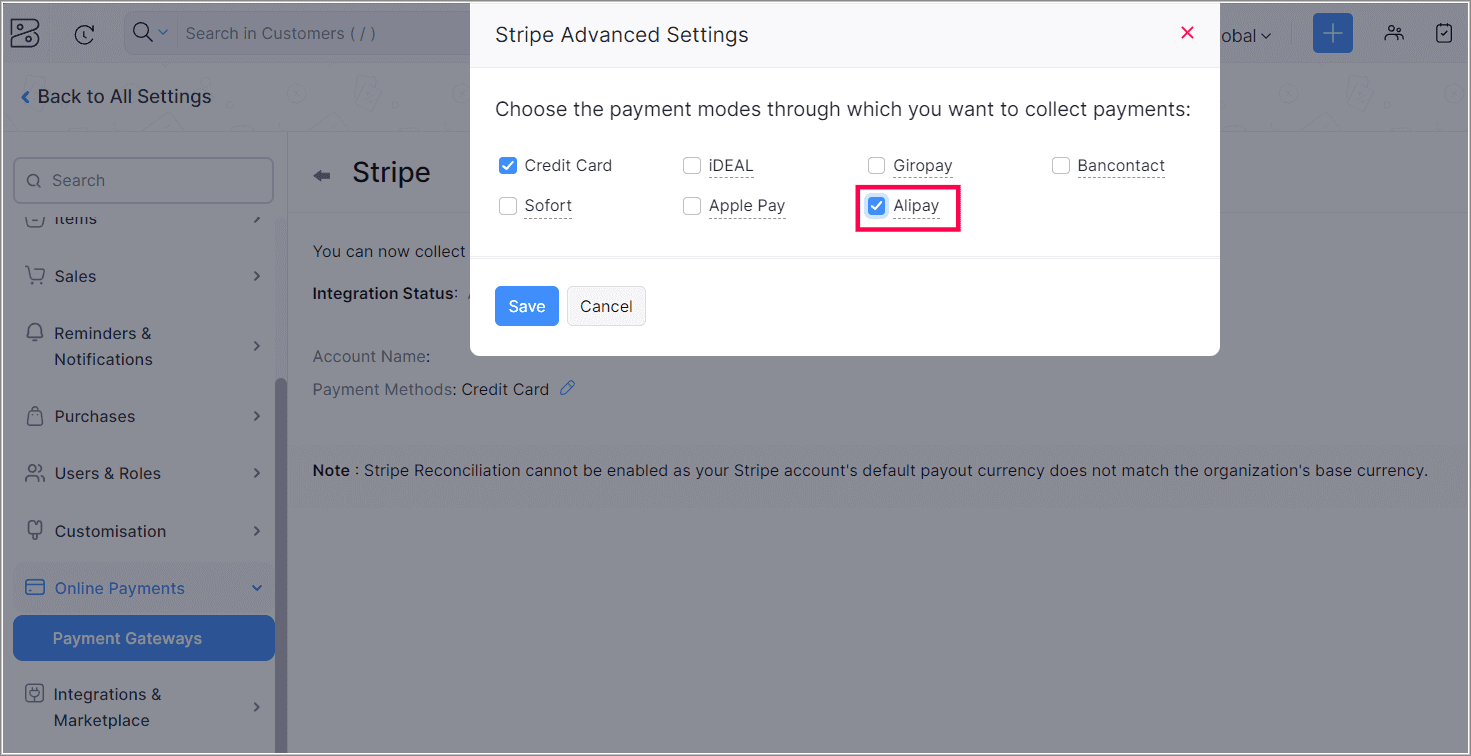
Alipay Payment Method for Stripe
Alipay, a popular digital wallet in China, is now available as a payment method for Stripe payments in Zoho Books. With Alipay, you can securely make payments online or via mobile devices.You can collect payments in CNY currency from any location. Additionally, based on your Stripe account's location, you can receive payments in AUD, CAD, EUR, GBP, HKD, JPY, SGD, MYR, NZD, and USD.
To enable Alipay, navigate to Settings > Online Payments > Payment Gateways, and click Edit Settings under Stripe. Then, select the Edit icon next to Payment Methods, and choose Alipay from the list of payment methods.
Note: This feature is not available for the India edition of Zoho Books.
Generate BACS Files [UK Edition]
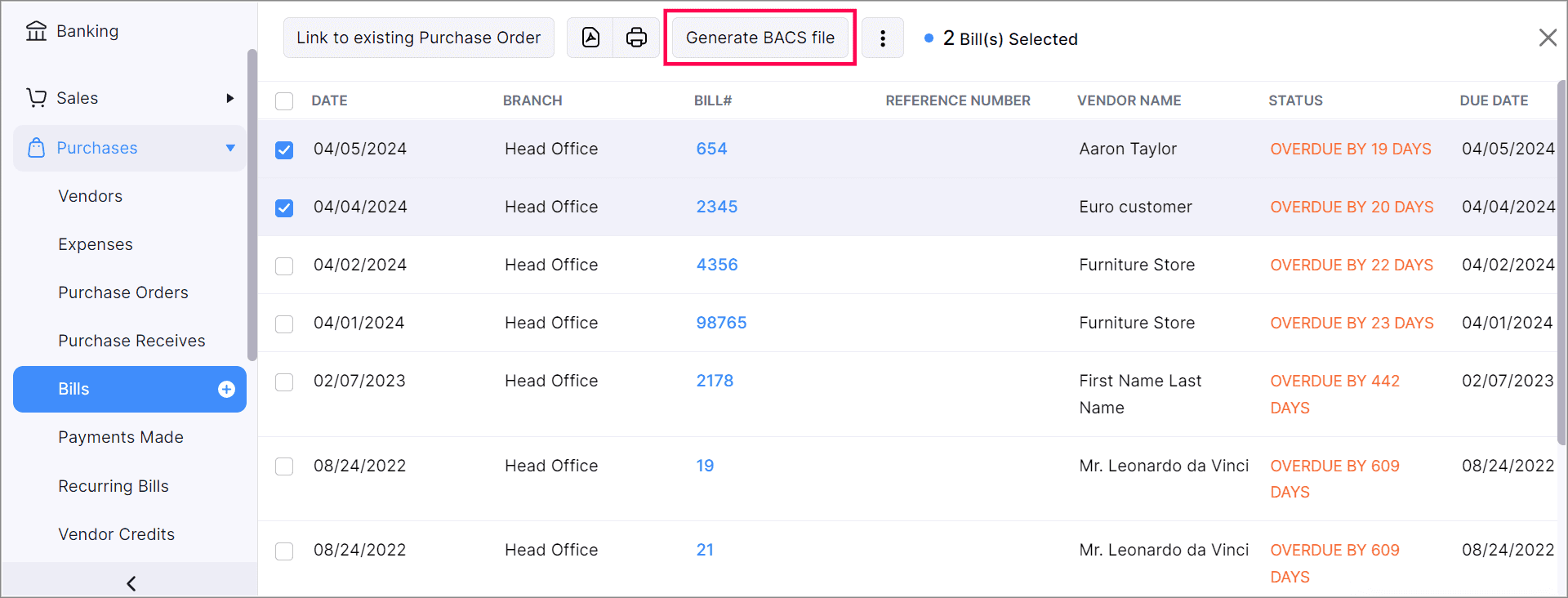
BACS or Bankers Automated Clearing System, is a payment system used for bank transfers in the UK. You can now generate and export BACS files in Zoho Books and use them to make BACS payments for your bills.
To generate a BACS file, go to Purchases from the left side bar and click Bills. Then, bulk select the bills that you want to pay using a BACS file and click Generate BACS File at the top of the page.
Additionally, you can save your organization's Service User Number in the Organization Profile page under Settings.
Split Your Invoice Payments
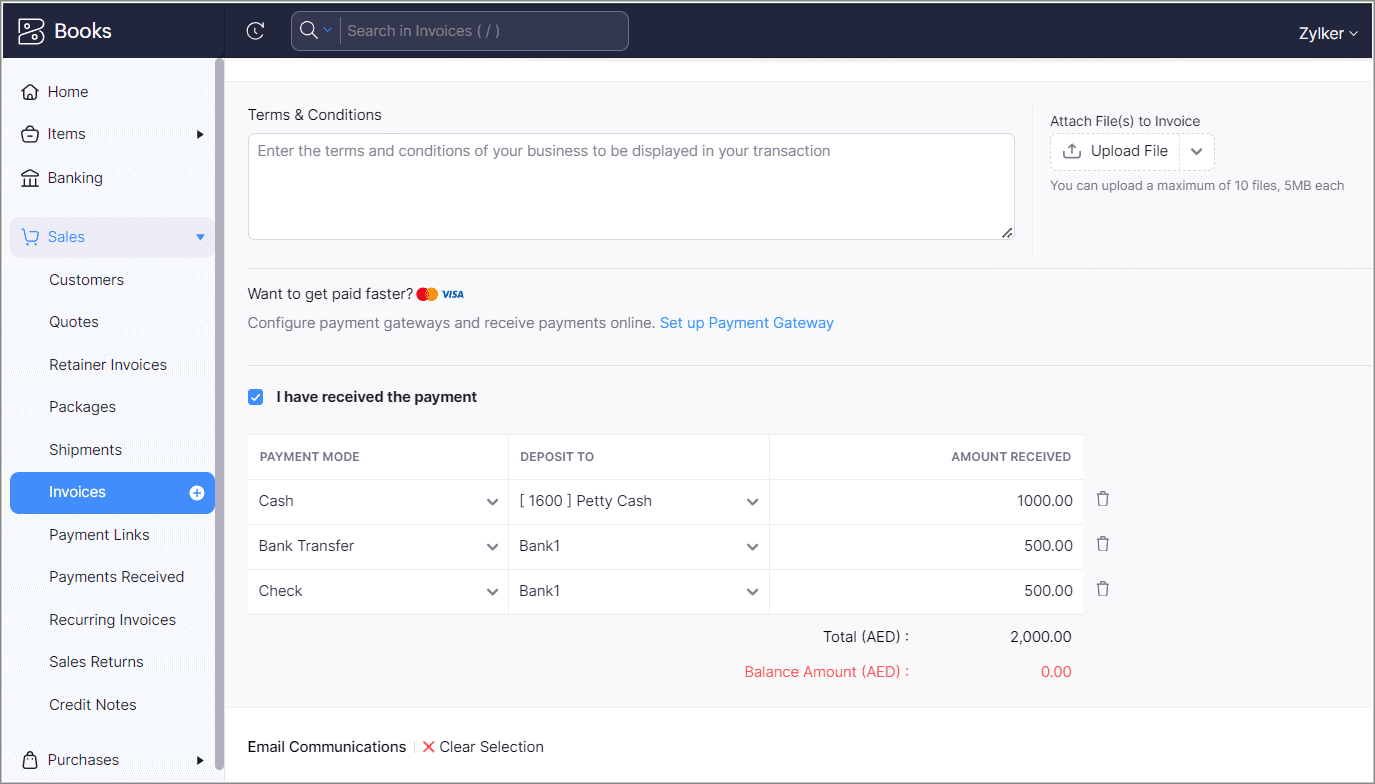
We have introduced an option to split your invoice amount into three parts when creating an invoice. You can assign different payment methods and bank accounts to each part and record separate payments automatically.
To configure split payments, go to Invoices and click +New. In the next page, enter the necessary details and click the I have received the payment checkbox. Add the split amounts and their corresponding payment methods and save the invoice.
Note: This feature is not available for the Mexico edition of Zoho Books.
Other Feature Enhancements
UPI Payment Mode [India Edition]
For new India edition organizations, we've set UPI as the default payment mode to record payments for your transactions. For existing organizations, Cash will remain as the default payment mode.
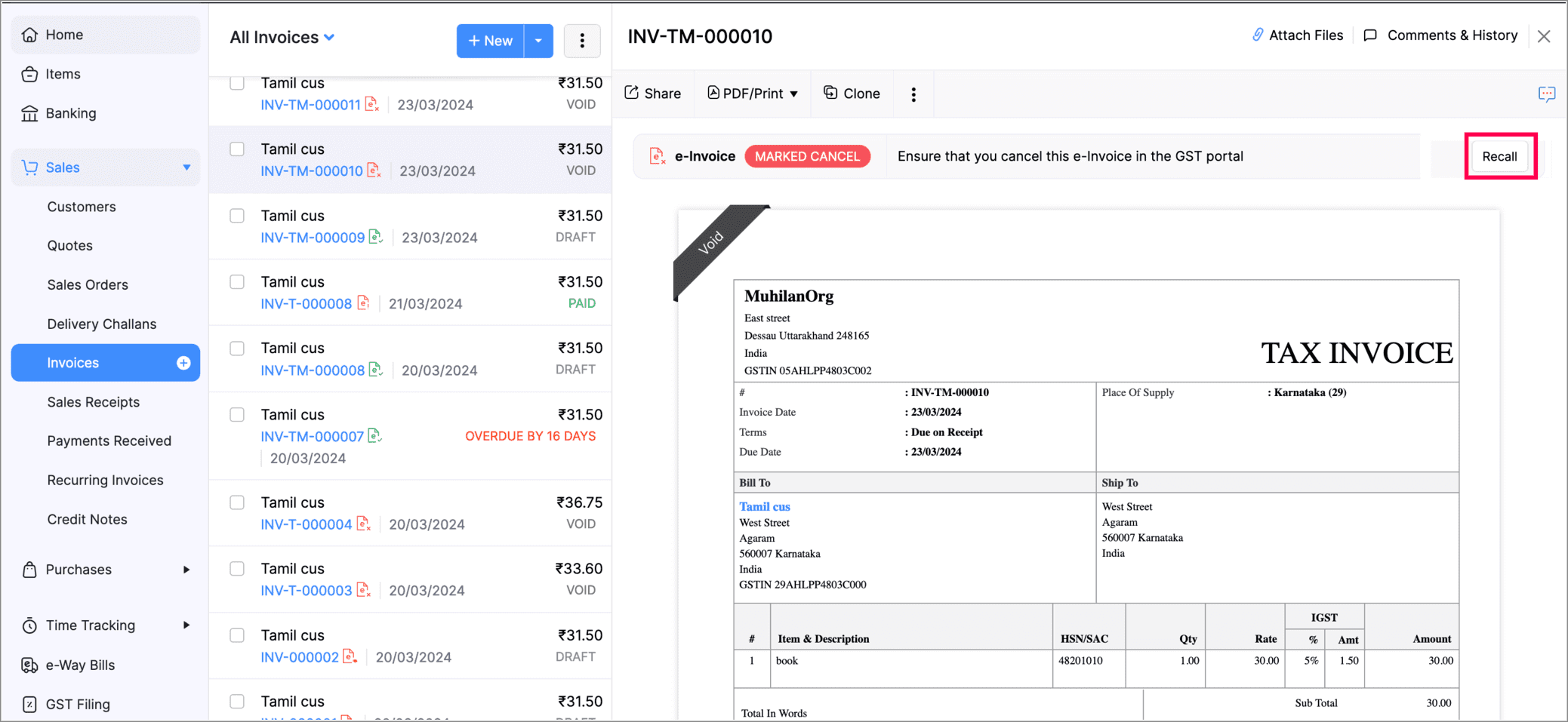
Recall Option for E-invoices [India Edition]
We have introduced the new e-invoice recall option for both invoices and credit notes. This option will be displayed only for invoices marked as cancelled, ensuring accuracy when updating your invoice status. Once recalled, the invoice status will be changed to Draft automatically.
Customer and Vendor Numbers
Assign unique identification numbers to your customers and vendors to avoid any confusions while creating transactions for them.
Go to Settings and select Customers and Vendors under Preferences. In the Customer & Vendor Numbers section, you can choose to enable the feature for your customers, vendors, or both.

Create Transactions in Zimbabwe's New ZiG Currency
We have introduced the new Zimbabwe Gold (ZiG) currency in Zoho Books, which you can associate with your customers, vendors, and transactions. You will also be able to set ZiG as the base currency when you're creating a new organisation.
That's it from us for this month's product updates! We hope the latest enhancements are helpful for your business. You can also visit the What's New timeline for byte-sized information about our previous feature updates and enhancements.
We'll catch you in next month's product updates. Until then, if you require any assistance or need clarifications, feel free to write to us at support@zohobooks.com, we'd be happy to help!
Best regards,
The Zoho Books Team
Topic Participants
Nikhitha Kashyap
Carmelina
Jack Stolkin
Marco Carolli
Madhumitha M
Recent Topics
AI Search and Record Retrieval Inside Zoho Creator – Is This Possible?
Is it possible to integrate an AI assistant into Zoho Creator that can intelligently search, retrieve, and analyze records within the application’s forms and reports? Can AI access and query existing Creator data securely using Deluge or APIs to provideI have a requirement to integrate Zoho Books with Zoho Projects at both project and task levels.
Currently, when i create transactions in Zoho Books (Expenses, Invoices, Bills), we can only map them at the project level. However, our requirement is to: Map records at both project and task levels Sync these transactions back to Zoho Projects underScheduled AU Data Center Database Version Upgrade for Zoho Forms
Dear Zoho Forms' users, We would like to update you on a scheduled AU Data Center database version upgrade for Zoho Forms. Find the schedule below: Migration window: Sunday, 22nd February 2026 12.00 AM to 12.30 AM AEDT This migration is a part of ourCannot get code to work with v2.mergeAndStore!
Please can someone help me pass subform items into a repeating mail merge table row using v2.mergeAndStore? I have a mail merge template created in Writer and stored in Workdrive. This template is referenced by a custom CRM function which merges all ofHotmail is blocking the zoho mail IP
Greetings, Since last Tuesday (5 days ago today) I wrote to Zoho support and I still haven't received a single response (Ticket ID: 2056917). Is this how you treat people who pay for your email service? I am making this public so that those who want toZoho Bookings and Survey Integration through Flow
I am trying to set up flows where once an appointment is marked as completed in Zoho Bookings, the applicable survey form would be sent to the customer. Problem is, I cannot customise flows wherein if Consultation A is completed, Survey Form A would beZoho CRM Community Digest - December 2025 | Part 2
Hello Everyone! During the final weeks of December, Zoho CRM introduced updates that not only enhanced product capabilities but also offered deeper guidance through Kaizen posts. This section highlights what was released and shared in the last two weeksCRUD actions for Resources via API
Hello, is it possible to perform CRUD actions through the API for Resources? We want to create a sync from Zoho CRM Car record to Bookings resources to create availabilities for Car bookings. For Test drives, not only the sales person needs to be available,Kaizen #186 : Client Script Support for Subforms
Hello everyone! Welcome back to another exciting Kaizen post on Client Script! In this edition, we’re taking a closer look at Client Script Support for Subforms with the help of the following scenario. " Zylker, a manufacturing company, uses the "Orders"Unable to Assign Multiple Categories to a Single Product in Zoho Commerce
Hello Zoho Commerce Support Team, I am facing an issue while assigning categories to products in Zoho Commerce. I want to assign multiple categories to a single product, but in the Item edit page, the Category field allows selecting only one categoryオンライン勉強会のお知らせ Zoho ワークアウト (2/19 参加無料)
ユーザーの皆さま、こんにちは。コミュニティチームの中野です。 2月開催のZoho ワークアウトについてお知らせします。 今回はZoomにて、オンライン開催します。 ▶︎参加登録はこちら(無料) https://us02web.zoom.us/meeting/register/6AyVUxp6QDmMQiDGXGkxPA ━━━━━━━━━━━━━━━━━━━━━━━━ Zoho ワークアウトとは? Zoho ユーザー同士で交流しながら、サービスに関する疑問や不明点の解消を目指すイベント「Zohodoubts about customer happiness in zoho desk
Good afternoon, Desk community. The reason for my message is that I have a question regarding the customer satisfaction surveys we can ask our clients to rate our service. I know that in Desk, you can activate Customer Happiness to send a survey to theCOQL API in JS Widget only pulling 200 records
Hello! We've been building a custom homepage widget using the Zoho JS SDK, and it seems that this https://help.zwidgets.com/help/latest/ZOHO.CRM.API.html#.coql only allows 200 records. I thought the limit was 2000 for COQL queries, but am I mistaken?Standard Description Field - Can I change label or add dd tooltip
Is there a way fo you guys to allow the customer to change the label name for the description field in the customer portal when submitting tickets. Or at least allow us to add a tooltip to clarify what description we need from them. I know I can create my own separate multi line description field but if I do that, it doesn't have the nice toolbar with Bold, Italic, Underline, color, font, indent, etc. Can you please allow us to add a tooltip to the zoho standard description field?Introducing parent-child ticketing in Zoho Desk [Early access]
Hello Zoho Desk users! We have introduced the parent-child ticketing system to help customer service teams ensure efficient resolution of issues involving multiple, related tickets. You can now combine repetitive and interconnected tickets into parent-childAntispam validation failed for your domain in Accounts
I tried adding a domain to zeptomail.zoho.com, but the “add domain” operation failed. The front‑end error reads: “Domain could not be added. Please contact support@zeptomail.com.” The back‑end API returned: ``` { "error": { "code": "TM_3601", "details":Different Task Layouts for Subtasks
I was wondering how it would be possible for a subtask to have a different task layout to the parent task.Compensation | Salary Packages - Hourly Wage Needed
The US Bureau of Labor Statistics says 55.7% of all workers in the US are paid by the hour. I don't know how that compares to the rest of the world, but I would think that this alone would justify the need for having an hourly-based salary package option.Customizing Helpcenter texts
I’m customizing the Zoho Desk Help Center and I’d like to change the wording of the standard widgets – for example, the text in the “Submit Ticket” banner that appears in the footer, or other built-in widget labels and messages. So far, I haven’t foundAbility to Edit Ticket Subject when Splitting a Ticket
Often someone will make an additional or new request within an existing ticket that requires we split the ticket. The annoying part is that the new ticket maintains the subject of the original ticket after the split so when the new ticket email notificationAutomatically Update Form Attachment Service with Newly added Fields
Hi, When I have a Form Setup and connected to a 3rd Party Service such as OneDrive for Form Attachments, when I later add a new Upload Field I have to remove and redo the entire 3rd Party Setup from scratch. This needs to be improved, such as when newUnable to produce monthly P&L reports for previous years
My company just migrated to Books this year. We have 5+ years financial data and need to generate a monthly P&L for 2019 and a monthly P&L YTD for 2020. The latter is easy, but I'm VERY surprised to learn that default reports in Zoho Books cannot createReopen ticket on specific date/time
Is there a way that we can close a ticket and setup a reopen of that ticket on a specific date and time? (without using the "on hold" ticket option)API credit COQL COUNT
The docs describe API credits in COQL from the LIMIT perspective: https://www.zoho.com/crm/developer/docs/api/v8/COQL-Overview.html When using aggregate functions such as `COUNT` or `SUM`, is that billed as 1 API credit?Weekly Tips : Save Time with Saved Search
Let's assume your work requires you to regularly check emails from important clients that have attachments and were sent within a specific time period. Instead of entering the same conditions every time—like sender, date range, and attachments included—youRemove 'This is an automated mail from Zoho Sign' in footer
Hi there, Is it possible to remove or change the text under the e-mail templates? I can't figure out how to do that: Would love to hear from you. Kind regards, TristanOrganize and manage PDFs with Zoho PDF Editor's dashboard
Hello users, Zoho PDF Editor's dashboard is a one-stop place to upload, sort, share PDF files, and more. This article will explore the various capabilities that Zoho PDF Editor's dashboard offers. A few highlights of Zoho PDF Editor's dashboard: UploadCustom function return type
Hi, How do I create a custom deluge function in Zoho CRM that returns a string? e.g. Setup->Workflow->Custom Functions->Configure->Write own During create or edit of the function I don't see a way to change the default 'void' to anything else. AddingPassing Info from Function to Client Script
Hello, I have recently started making use of client script for buttons, allowing me to give the user information or warnings before they proceed. This is great. However, I have never quite managed to pass back any extra information from the function toDrag 'n' Drop Fields to a Sub-Form and "Move Field To" Option
Hi, I would like to be able to move fields from the Main Page to a Sub-Form or from a Sub-Form to either the Main Page or another Sub-Form. Today if you change the design you have to delete and recreate every field, not just move them. Would be nice toZoho Payroll for Canada
Is anyone else having problems getting setup for Canada?Passing the CRM
Hi, I am hoping someone can help. I have a zoho form that has a CRM lookup field. I was hoping to send this to my publicly to clients via a text message and the form then attaches the signed form back to the custom module. This work absolutely fine whenOne Contact with Multiple Accounts with Portal enabled
I have a contact that manages different accounts, so he needs to see the invoices of all the companies he manage in Portal but I found it not possible.. any idea? I tried to set different customers with the same email contact with the portal enabled andUser Automation: User based workflow rules & webhooks
User management is an undeniable part of project management and requires adequate monitoring. As teams grow and projects multiply, manual coordination for updating users & permissions becomes difficult and can give way to errors. User automation in ZohoDisable Zoho Contacts
We don't want to use this app... How can we disable it?Default Ticket View - Table?
Guys, We mostly use the table view to queue tickets. Maybe I am missing it - but how can I set that view as 'default" for all our agents? Thanks JVZoho One IS BUGGY
Here are some things that just don't work: - Disabling applications from certain Spaces - Adding users (probably only for me) - Renaming applications in Zoho One Portal (fixed by now) - Reordering applications in Spaces When I try to reorder: It feelsMerge Fields that previously worked are now giving an Error!
Saving a URL Link button on the Deal module. The below fields used to save without issue at all, but now produce an error of "URL contains unsupported merge field!" ${Contacts.Mailing Street} ${Contacts.Mailing City} ${Contacts.Mailing State} ${Contacts.MailingClarification on Zoho Forms 1-User Plan: Multiple Submitters and Approvers
Question Content (Copy–Paste Ready) Hello Zoho Team, I would like clarification regarding Zoho Forms pricing and user limits. I am planning to subscribe to the ₹700/month (1 user) plan. My use case is as follows: Only 1 person (myself) will create andCRM Cadences recognise auto-responses
I have leads in a Cadence. I get an auto-responder reply "I'm out of the office..." Normally Cadences seems to know that isn't a real reply and keeps the lead enrolled in the cadence. However, today, Cadences has UNENROLLED a Lead who sent an auto-reponseNext Page