What's New - March 2025 | Zoho Backstage
Hello there,
We’re thrilled to introduce a much-awaited lineup of powerful features and enhancements designed to fulfill your event management needs. Here's a round-up of the latest updates that will enhance your experience with Zoho Backstage this month.
Offer Tickets
Early bird and limited-time offers are powerful tools to boost ticket sales and generate early revenue. With the new Offer Tickets feature, you can create multiple offers as tiers within a single ticket class, making the process more streamlined and automated.
Previously, you had to create separate ticket classes for each offer and manually manage their availability. Now, you can:
- Add multiple offers under a single ticket class
- Automate the offer start and stop conditions
- Reduce manual intervention
Key benefits
- Increased marketing impact: Time-sensitive discounts create a sense of urgency, encouraging faster ticket purchases.
- Early revenue and cash flow: Early sales provide immediate cash flow to cover event expenses like venue deposits, marketing, and logistics.
- Leverage Psychological Triggers:
- FOMO (Fear of Missing Out): Limited-time availability compels attendees to act quickly.
- Perceived Savings: Attendees feel they are getting a deal, making them more likely to buy.
How to use
Setting up offers

You can add offers as tiers within a ticket class and configure their availability based on:
- Time: Set specific start and end dates for the offer.
- Quantity: Define the number of tickets available at the offer price.
Flexible offer progression
From the second offer onward, you can choose to automatically start the next offer when the previous one ends. Or, set a custom start date for the new offer.
Customizing offer display
You can customize how offers are displayed on your event website using the Website Designer. The offer card can show:

- Current Offer
- Previous Offer
- Next Offer
- Both Previous and Next Offers
This flexibility helps you highlight the most relevant deals and enhance visibility.
Good to know
- During the ticket purchase process, the offer name appears alongside the ticket class name. The order summary clearly displays the applied offer.
- After attendees purchase their tickets, the "Your Orders" section displays the offer name along with the ticket class name. The invoice also reflects the offer name for transparency.
- When manually adding an order, any valid offers associated with the ticket class are applied automatically. There's no need for manual price adjustments.
- During check-in, only the original ticket class amount is displayed.
- Offer-tiered tickets cannot be selected during manual check-in.
Click here to learn more.
Tax Rules - Canada (Early access)
Accurate tax calculation is essential for ensuring compliance and transparency in event management. With the new Tax Rules feature for Canada, you can automatically apply the correct tax rates based on your event location, making tax management simpler and more efficient. Zoho Backstage now allows you to create tax rules for all 10 provinces and 3 territories, which can be selected and applied to an event automatically, ensuring the correct tax rates are applied without manual adjustments. This feature supports in-person, hybrid, and online events, offering flexibility and accuracy.
The Canadian tax rule engine covers 10 provinces, 3 territories, multiple tax agencies, and 12 sales tax rates, providing a comprehensive solution for handling event-related taxes.

How do taxes work on Canadian events?
For in-person and hybrid events, the tax rate is determined by the event’s physical location, based on the Place of Supply, in compliance with Canada Revenue Agency (CRA) regulations. This ensures attendees are charged the appropriate tax rate according to the province or territory where the event takes place.
For online events, where no physical venue exists, the tax is calculated based on the attendee’s location. This ensures the correct sales tax is applied, even when attendees purchase tickets from different provinces or countries.
How to use
To enable Canada Tax Rules, configure your organization’s location:
- Go to Portal Settings > Payments and Tax.
- Select Canada as the organization location.
Once configured, the system automatically populates:
- 12 default tax rates covering all provinces and territories.
- 13 tax rules (one for each region).
- A default rule for online events, applying the correct tax based on the attendee’s location.
- 5 tax agencies for accurate tax handling.
You can create new tax rates, groups, and authorities to meet your event’s specific needs. Additionally, you can add custom tax rules for both in-person/hybrid and online events, giving you full control over how taxes are applied.
Applying Tax Rules to In-Person and Hybrid events
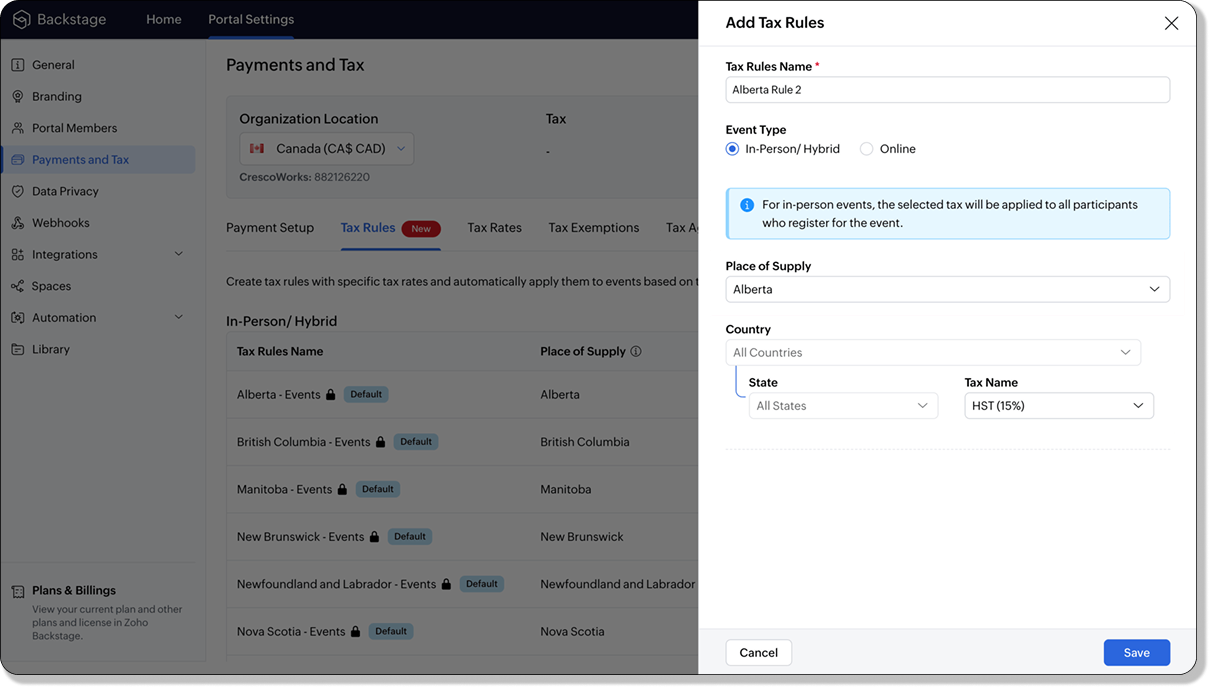
For in-person and hybrid events, Zoho Backstage automatically suggests tax rules based on the event location. The 13 default tax rules cover all Canadian provinces and territories. If the event location changes, the system automatically updates the relevant tax rules to reflect the new region’s rates.
You can also create custom tax rules by selecting a specific province or territory and applying a custom tax rate, offering greater flexibility for managing event taxes.
Applying Tax Rules to Virtual events
For online events, the system uses a default tax rule that covers all Canadian provinces and territories. Taxes are applied based on the attendee's location.
Canadian attendees are charged the applicable provincial tax rate.
International attendees are assigned a zero tax rate by default.
If you need to apply taxes to international attendees, you can create new tax rules tailored for online events, ensuring compliance with international tax regulations.

- Tax rules in Zoho Backstage are flexible and dynamic. You can modify them at any time during your event setup. However, changes will only apply to new transactions. Existing transactions will retain the original tax rule, ensuring previous purchases remain unaffected.
- If you select a non-Canadian location for your event, the Canada Tax Rule will not be applied. This ensures taxes are only charged where applicable, preventing errors in cross-border events.
Event Category

Categorize and filter events based on custom classifications for organizers and attendees to find and manage events easily. This new addition is aimed at improving event management by giving organizers the flexibility to create, manage, and filter events using custom categories. Organizers can now create up to 100 custom categories when setting up an event, giving them the freedom to define categories that suit their specific needs.
Previously, categories selected in Event Info were not utilized elsewhere, and there was no option to add new/manage categories.
Now, organizers can tailor categories to their specific needs and filter them on the Event Directory.
To access:
- While Creating an Event: On the Event Info page.
- For Category Management: Under Portal Settings > Branding > Event Category.
Permissions:
Portal Owners & Admins:
- Add, edit, and delete custom categories.
- Cannot edit or delete default categories.
Event Organizers:
- Can only add new categories.
- Cannot edit or delete existing custom or default categories.
Other Enhancements
Floor plan Focus Area

The Focus Area in the floor plan refers to designated spaces within the event venue that are visually highlighted to draw attention to specific sections, such as booths, stages, or key locations. These areas allow organizers to emphasize important spots, making navigation easier for attendees and improving the overall flow of the event. Focus areas help guide visitors to essential parts of the venue, enhancing their event experience.
Custom Dates for ticket classes (Early access)
In cases where smaller sessions or events (like welcome events, after-event parties, etc.) occur before or after the main event, this feature allows organizers to assign specific dates to separate ticket classes, ensuring tickets are only valid for the selected dates.
Custom dates can be set within 30 days before or after the main event.
New WhatsApp triggers and templates
The WhatsApp Integration, designed to enhance communication and engagement with all event stakeholders, now includes new triggers and templates to facilitate messaging and ensure timely updates for everyone.
For Purchasers:
- Send Registration Confirmation: Instantly confirm registration to enhance the attendee experience.
- Order Canceled: Notify purchasers promptly in case of any order cancellations.
For Speakers:
- Welcome Speaker: Extend a warm welcome to our speakers and set a positive tone for their participation.
- Speaker Added to a Session: Inform speakers when they’re added to a session, ensuring they are well-prepared.
- Speaker Removed from a Session: Provide timely updates should there be any changes to their session involvement.
For Sponsors:
- Thank a Sponsor Before Website is Live: Show appreciation early on, fostering positive relationships with sponsors.
- Welcome and Thank Sponsor After Website is Live: Acknowledge sponsors publicly once the event website goes live.
- Deny Sponsor Proposal: Deliver sensitive information with professionalism and clarity.
- Acknowledge Sponsor Proposal: Confirm receipt of sponsor proposals, keeping communication open and transparent.
For Participants:
- Event Canceled: Quickly inform participants in the event of cancellations, ensuring they’re kept in the loop.
We are continuously refining Zoho Backstage to make your event management experience even more powerful and intuitive. Stay tuned for more updates in the coming months!
If you have any questions, please contact support@zohobackstage.com.
Topic Participants
Jithan Raghuraj
Recent Topics
Canvas Detail View Related List Sorting
Hello, I am having an issue finding a way to sort a related list within a canvas detail view. I have sorted the related list on the page layout associated with the canvas view, but that does not transfer to the canvas view. What am I missing?project name field issue- n8n
Hey guys, I have a question. I want to create a new product using the workflow. The problem is with the product name field; I don't know how to fill it in. The workflow starts with retrieving information from the leads table, retrieving links to scrapeCritical:- Eneble TDS filing for 26Q from the zoho book
We currently extract TDS data from Zoho Books and manually input it into a separate TDS software to generate the FUV file and file returns. Previously, while using Tally, we benefited from an integrated feature that seamlessly recorded transactions andHow to track repeat customers?
I own a food business and every order is entered into Zoho with: a unique Customer ID total order amount date of order With this information, I want to be able to see a list of my "best" customers. In other words, descending lists arranged according to:Zoho Books - Breaking A Working App
We've been using Zoho for many years now. Across all apps, entering phone numbers in standard formats was enabled in all apps. These formats are: xxx.yyy.zzzz xxx-yyy-zzzz (xxx) yyy-zzzz and we were able also to add extension numbers in these formats:Build data protection into your support
At Zoho, privacy is our principle. Every Zoho product is built with privacy as the foundation and the finishing touch, guiding every decision we make. Security, privacy, and compliance are woven into the software development lifecycle, starting from howConditional formatting: before/after "today" not available
When setting conditional formatting, it only allows me to set a specific calendar date when choosing "Before" or "After" conditions. Typing "today" returns the error "Value must be of type date". Is there a workaround? Thanks for any help!Display Client Name in Zoho Creator Client Portal Dashboard
Hello Zoho Creator Team, We hope you are doing well. Zoho Creator recently introduced the option to set a client’s display name in the Client Portal settings, which is very helpful for providing a personalized portal experience. However, there is currentlyCustomizable UI components in pages | Theme builder
Anyone know when these roadmap items are scheduled for release? They were originally scheduled for Q4 2025. https://www.zoho.com/creator/product-roadmap.htmlAmazon.in FBA multiple warehouse integration with Zoho Inventory
My organisation subscribed to Zoho One looking at the opportunity to integrate Amazon.in with Inventory. But during the configuration, we understood the integration has severe limitations when it involves multiple warehouses in the same Organisation.Feature Request - Set Default Values for Meetings
Hi Zoho CRM Team, It would be very useful if we could set default values for meeting parameters. For example, if you always wanted Reminder 1 Day before. Currently you need to remember to choose it for every meeting. Also being able to use merge tagsAbility for admin to access or make changes in zoho form without asking for ownership
Currently in zoho form only form owner can make the changes in the form and if someone else has to make changes then we have to transfer the ownership to them and even admin also cant access it . So i think admin must have the ability or option to accessIssue with WhatsApp Template Approval and Marketing Message Limit in Zoho Bigin
We are facing issues while creating and using WhatsApp message templates through Zoho Bigin, and we request your clarification and support regarding the same. 1. Utility Template Approval Issue Until December, we were able to create WhatsApp templatesZoho CRM Calendar View
Hello Zoho team, We need desperately a calendar view next to list, kandan and other views. I think it should be easy to implement as you already have the logic from Projects and also from Kanban View in CRM. In calendar view when we set it up - we chooseCamera
I can sign on to a meeting and see the other participants, but my screen is dark. The instructions for Zoho "Camera Settings" say "click on lock icon in address bar," but I don't see that icon! Suggestions?What is Workqueue and how to hide it?
Hi, My CRM suddenly have this "Workqueue", may I ask how to set the permission of this tab?Batch/lot # and Storage bin location
Hi I want to ask for a feature on Zoho inventory I own a warehouse and I've gone through different management software solutions with no luck until I found Zoho, it has been a game changer for my business with up to the minute information, I'm extremely happy with it. It's almost perfect. And I say Almost because the only thing missing for me (and I'm sure I'm not alone) is the need of being able to identify the lot number of my inventory and where it is located in the warehouse. Due to the natureAdding Sender Address with Basic Plan
According to the knowledge base, I should be able to add Sender addresses with the Basic Plan. But whenever I try to add an email, it takes me to a search window and I cannot find any emails in the list. Even mine, which is the admin. email.Conditional Field Visibility in Bigin CRM
I would like to request support for conditional field visibility within Bigin CRM. This feature should allow administrators to configure show/hide rules for fields based on predefined criteria (e.g., field values, picklist selections, stage changes,Bill automation in Zoho Books
Hi I am looking for 3rd-party options for bill automation in zoho which are economical and preferably have accurate scanning. What options do I have? Zoho's native scanning is a bit priceyReporting Tags
We've been using reporting tags for years (before itemizing was available) and now we are finding reporting these tags are impossible to track. Reports have changed in the customization and our columns of reporting tags no longer show up. We do not useConsumption based inventory
I am currently using Zoho Books for my hospitality business, which includes lodging and restaurant services. We purchase many items in bulk for storage and consumption as needed. I'd like these items to be recorded as inventory when purchased and categorizedSmarter Access Control: Role-Based Access vs. Responsibility-Based Profiles
Every business has roles, responsibilities, and workflows. While roles help define structure, responsibilities within those roles are rarely the same. As your team grows, some members need access to only a specific set of features. Others require visibilityPartner with HDFC And Sbi Bank.
Hdfc and sbi both are very popular bank if zoho books become partner with this banks then many of the zoho books users will benefit premium features of partnered banks.API in E-Invoice/GST portal
Hi, Do I have to change the api in gst/e-invoice portal as I use zoho e books for my e-invoicing. If yes, please confirm the process.Member role in zoho meeting
does a user with member role can see other users in the organizationHow to post more than 4 Images on Instagram?
Hi I read several articles to the topic od how to post more than 4 images on instagram, but i can't figure out how it works. I can't find the content editor and i installesd the z share extension for google chrome. Could someone please help me? ThanClone Recurring Expenses
Our bookkeeping practices make extensive use of the "clone" feature for bills, expenses, invoices, etc. This cuts down significantly on both the amount of typing that needs to be done manually and, more importantly, the mental overhead of choosing theZoho Books - How to Invoke a Custom Function in Schedulers
We have multiple schedulers that send emails to customers in batches. Currently, we are maintaining the same code across several schedulers. Is it possible to use a custom function inside a scheduler script? If yes, how can we invoke the custom functionSpecial characters (like â, â, æ) breaking when input in a field (encoding issue)
Hey everyone, We are currently dealing with a probably encoding issue when we populate a field (mostly but not exclusively, 'Last Name' for Leads and Contracts). If the user manually inputs special characters (like ä, â, á etc.) from Scandinavian languages,Set Custom Icon for Custom Modules in new Zoho CRM UI
Notes badge as a quick action in the list view
Hello all, We are introducing the Notes badge in the list view of all modules as a quick action you can perform for each record, in addition to the existing Activity badge. With this enhancement, users will have quick visibility into the notes associatedIs Zoho Live Chat compatible with WordPress CMS?
Hello, I have a website called www.jjrlab.com and I'm interested in using Zoho Chat on it. Does it support WordPress CMS? Thanks.Introducing spam detection for webforms: An additional layer of protection to keep your Zoho CRM clean and secure
Greetings all, One of the most highly anticipated feature launches—Spam Detection in webforms—has finally arrived! Webforms are a vital tool for record generation, but they're also vulnerable to submissions from unauthenticated or malicious sources, whichBring your CRM and Desk app inside SalesIQ with widgets
Have you ever been confused and frustrated with multiple open tabs and switching back and forth from SalesIQ to other apps to perform your business-specific operations? How effective would it be to have all the required tools and data of the apps youSpeak Your Customers' Language: SalesIQ's chatbots now support 30 languages 🤖
We're unveiling some major upgrades to our chatbot that are set to revolutionize your experience! Now SalesIQ support 30 languages for both Zobot and Answer bot. By speaking your customers' language, you can enhance engagement, improve customer satisfaction,Repeat Column merge in ZOHO writer columns doesn't allow to set max columns per row
I'm using ZOHO writer to merge data from a ZOHO CRM subform and I want it to make a table. We're using Insert Table for Column Repeat, because this is what we need. (Name of column (Teamname) and underneath that a list of names of teammembers). It worksPersisting email signals to contact timeline?
Hello there. Regarding the email signals that are logged when a contact opens an email, am I correct that these signals are not logged to a contact's timeline? Ideally, I would like to have this context available for future follow-ups, if the contactTrouble with using Apostrophe in Name of Customers and Vendors
We have had an ongoing issue with how the system recognizes an apostrophe in the name of customers and vendors. The search will not return any results for a name that includes the mark; ie one of our vendors names is "L'Heritage" and when entering theReally want the field "Company" in the activities module!
Hi team! Something we are really missing is able to see the field Company when working in the activities module. We have a lot of tasks and need to see what company it's related to. It's really annoying to not be able to see it.🙈 Thx!Next Page