What's New - March 2025 | Zoho Backstage
Hello there,
We’re thrilled to introduce a much-awaited lineup of powerful features and enhancements designed to fulfill your event management needs. Here's a round-up of the latest updates that will enhance your experience with Zoho Backstage this month.
Offer Tickets
Early bird and limited-time offers are powerful tools to boost ticket sales and generate early revenue. With the new Offer Tickets feature, you can create multiple offers as tiers within a single ticket class, making the process more streamlined and automated.
Previously, you had to create separate ticket classes for each offer and manually manage their availability. Now, you can:
- Add multiple offers under a single ticket class
- Automate the offer start and stop conditions
- Reduce manual intervention
Key benefits
- Increased marketing impact: Time-sensitive discounts create a sense of urgency, encouraging faster ticket purchases.
- Early revenue and cash flow: Early sales provide immediate cash flow to cover event expenses like venue deposits, marketing, and logistics.
- Leverage Psychological Triggers:
- FOMO (Fear of Missing Out): Limited-time availability compels attendees to act quickly.
- Perceived Savings: Attendees feel they are getting a deal, making them more likely to buy.
How to use
Setting up offers

You can add offers as tiers within a ticket class and configure their availability based on:
- Time: Set specific start and end dates for the offer.
- Quantity: Define the number of tickets available at the offer price.
Flexible offer progression
From the second offer onward, you can choose to automatically start the next offer when the previous one ends. Or, set a custom start date for the new offer.
Customizing offer display
You can customize how offers are displayed on your event website using the Website Designer. The offer card can show:

- Current Offer
- Previous Offer
- Next Offer
- Both Previous and Next Offers
This flexibility helps you highlight the most relevant deals and enhance visibility.
Good to know
- During the ticket purchase process, the offer name appears alongside the ticket class name. The order summary clearly displays the applied offer.
- After attendees purchase their tickets, the "Your Orders" section displays the offer name along with the ticket class name. The invoice also reflects the offer name for transparency.
- When manually adding an order, any valid offers associated with the ticket class are applied automatically. There's no need for manual price adjustments.
- During check-in, only the original ticket class amount is displayed.
- Offer-tiered tickets cannot be selected during manual check-in.
Click here to learn more.
Tax Rules - Canada (Early access)
Accurate tax calculation is essential for ensuring compliance and transparency in event management. With the new Tax Rules feature for Canada, you can automatically apply the correct tax rates based on your event location, making tax management simpler and more efficient. Zoho Backstage now allows you to create tax rules for all 10 provinces and 3 territories, which can be selected and applied to an event automatically, ensuring the correct tax rates are applied without manual adjustments. This feature supports in-person, hybrid, and online events, offering flexibility and accuracy.
The Canadian tax rule engine covers 10 provinces, 3 territories, multiple tax agencies, and 12 sales tax rates, providing a comprehensive solution for handling event-related taxes.

How do taxes work on Canadian events?
For in-person and hybrid events, the tax rate is determined by the event’s physical location, based on the Place of Supply, in compliance with Canada Revenue Agency (CRA) regulations. This ensures attendees are charged the appropriate tax rate according to the province or territory where the event takes place.
For online events, where no physical venue exists, the tax is calculated based on the attendee’s location. This ensures the correct sales tax is applied, even when attendees purchase tickets from different provinces or countries.
How to use
To enable Canada Tax Rules, configure your organization’s location:
- Go to Portal Settings > Payments and Tax.
- Select Canada as the organization location.
Once configured, the system automatically populates:
- 12 default tax rates covering all provinces and territories.
- 13 tax rules (one for each region).
- A default rule for online events, applying the correct tax based on the attendee’s location.
- 5 tax agencies for accurate tax handling.
You can create new tax rates, groups, and authorities to meet your event’s specific needs. Additionally, you can add custom tax rules for both in-person/hybrid and online events, giving you full control over how taxes are applied.
Applying Tax Rules to In-Person and Hybrid events
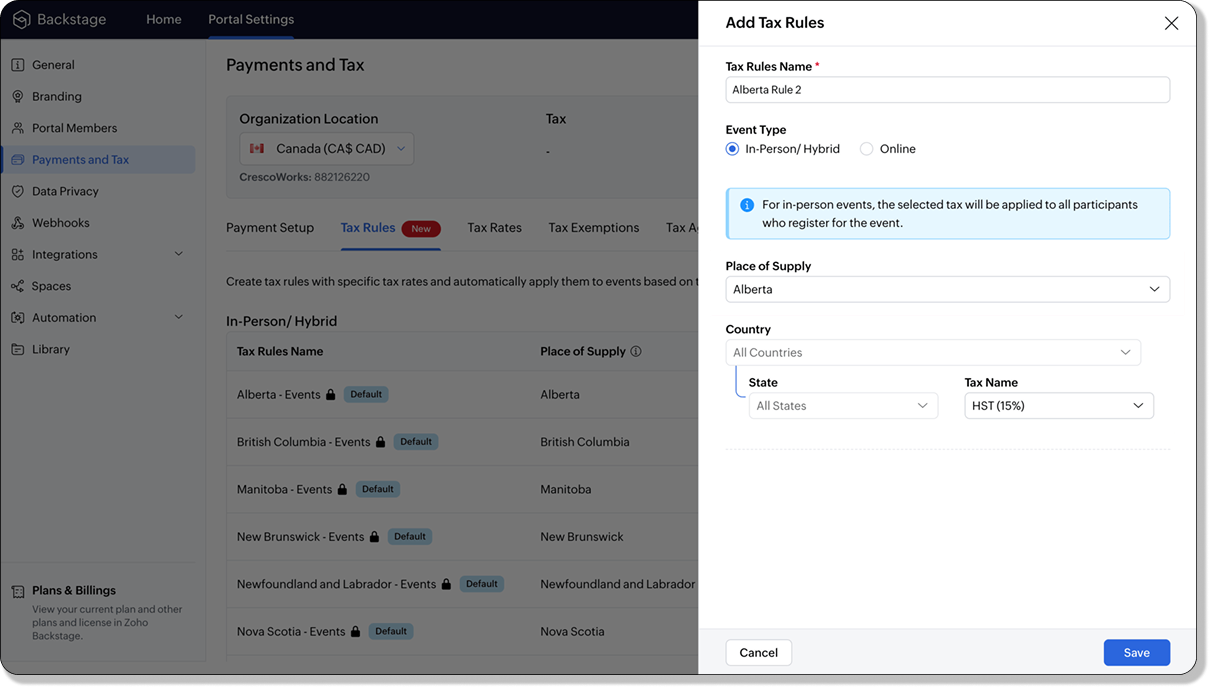
For in-person and hybrid events, Zoho Backstage automatically suggests tax rules based on the event location. The 13 default tax rules cover all Canadian provinces and territories. If the event location changes, the system automatically updates the relevant tax rules to reflect the new region’s rates.
You can also create custom tax rules by selecting a specific province or territory and applying a custom tax rate, offering greater flexibility for managing event taxes.
Applying Tax Rules to Virtual events
For online events, the system uses a default tax rule that covers all Canadian provinces and territories. Taxes are applied based on the attendee's location.
Canadian attendees are charged the applicable provincial tax rate.
International attendees are assigned a zero tax rate by default.
If you need to apply taxes to international attendees, you can create new tax rules tailored for online events, ensuring compliance with international tax regulations.

- Tax rules in Zoho Backstage are flexible and dynamic. You can modify them at any time during your event setup. However, changes will only apply to new transactions. Existing transactions will retain the original tax rule, ensuring previous purchases remain unaffected.
- If you select a non-Canadian location for your event, the Canada Tax Rule will not be applied. This ensures taxes are only charged where applicable, preventing errors in cross-border events.
Event Category

Categorize and filter events based on custom classifications for organizers and attendees to find and manage events easily. This new addition is aimed at improving event management by giving organizers the flexibility to create, manage, and filter events using custom categories. Organizers can now create up to 100 custom categories when setting up an event, giving them the freedom to define categories that suit their specific needs.
Previously, categories selected in Event Info were not utilized elsewhere, and there was no option to add new/manage categories.
Now, organizers can tailor categories to their specific needs and filter them on the Event Directory.
To access:
- While Creating an Event: On the Event Info page.
- For Category Management: Under Portal Settings > Branding > Event Category.
Permissions:
Portal Owners & Admins:
- Add, edit, and delete custom categories.
- Cannot edit or delete default categories.
Event Organizers:
- Can only add new categories.
- Cannot edit or delete existing custom or default categories.
Other Enhancements
Floor plan Focus Area

The Focus Area in the floor plan refers to designated spaces within the event venue that are visually highlighted to draw attention to specific sections, such as booths, stages, or key locations. These areas allow organizers to emphasize important spots, making navigation easier for attendees and improving the overall flow of the event. Focus areas help guide visitors to essential parts of the venue, enhancing their event experience.
Custom Dates for ticket classes (Early access)
In cases where smaller sessions or events (like welcome events, after-event parties, etc.) occur before or after the main event, this feature allows organizers to assign specific dates to separate ticket classes, ensuring tickets are only valid for the selected dates.
Custom dates can be set within 30 days before or after the main event.
New WhatsApp triggers and templates
The WhatsApp Integration, designed to enhance communication and engagement with all event stakeholders, now includes new triggers and templates to facilitate messaging and ensure timely updates for everyone.
For Purchasers:
- Send Registration Confirmation: Instantly confirm registration to enhance the attendee experience.
- Order Canceled: Notify purchasers promptly in case of any order cancellations.
For Speakers:
- Welcome Speaker: Extend a warm welcome to our speakers and set a positive tone for their participation.
- Speaker Added to a Session: Inform speakers when they’re added to a session, ensuring they are well-prepared.
- Speaker Removed from a Session: Provide timely updates should there be any changes to their session involvement.
For Sponsors:
- Thank a Sponsor Before Website is Live: Show appreciation early on, fostering positive relationships with sponsors.
- Welcome and Thank Sponsor After Website is Live: Acknowledge sponsors publicly once the event website goes live.
- Deny Sponsor Proposal: Deliver sensitive information with professionalism and clarity.
- Acknowledge Sponsor Proposal: Confirm receipt of sponsor proposals, keeping communication open and transparent.
For Participants:
- Event Canceled: Quickly inform participants in the event of cancellations, ensuring they’re kept in the loop.
We are continuously refining Zoho Backstage to make your event management experience even more powerful and intuitive. Stay tuned for more updates in the coming months!
If you have any questions, please contact support@zohobackstage.com.
Topic Participants
Jithan Raghuraj
Recent Topics
【Zoho CRM】やりとりの要約機能リリースのお知らせ
ユーザーの皆さま、こんにちは。コミュニティチームの藤澤です。 今回は「Zoho CRM アップデート情報」の中から、新機能のやりとり要約機能をご紹介します。 Zoho CRMのやりとりの要約は、Ziaが生成する機能で、データに関連付けられた最近のやりとりを簡潔にまとめて提供します。 メール、通話、ミーティング、メモなどを1つの明確な要約にまとめ、重要なポイント、過去の話し合いの要点、結果、次のステップを表示することで、日常的な課題に対処します。 Ziaの強みは、単なる要約にとどまらず、内容の解釈も行える点です。やりとりの要約では、顧客との会話に潜む遅延、フォローアップ漏れ、約束、期限、感情、意図を特定します。Recent post analytics not very useful
Hi, I'm enjoying some aspects of the Zoho Social. like being able to schedule posts to multiple channels. However, the recent posts analytics is disappointing. For example, I put up a reel on Instagram and Facebook yesterday. Instagram insights showsWhat happens to the files created by user, whose account is deleted.
Hello, I created a folder in the My folders names "Quote" I shared the same with my colleague. She created some files and folders in that folder over the period of 1 and half year. Now she left company, and I deleted her account from Zoho. What happensInternal Error When Accessing Team Inbox.
All our users are seeing this error in teaminbox. Because its a critical tool kindly resolve this issue ASAP.Sharing URLs and direct access
Hello, I am storing my team's email signature images on Workdrive. I am creating a public image download share and adding “?directDownload=true” so that the image can be accessed without the Workdrive interface. A few questions: 1) Can we generate friendlyZoho Mail Android app update: Calendar enhancements
Hello everyone! In the most recent version of the Zoho Mail Android app update, we have introduced various new enhancements for the calendar module. Let's explore what's new. Drag and drop events to update the date and time We have enhanced the calendarEnhance Delay Configuration in Zoho Flow
Dear Zoho Flow Support Team, We are writing to request an improvement to the delay configuration process within Zoho Flow. Currently, users are required to manually enter the exact delay duration (e.g., "2 days") in the delay block. This can be time-consumingContratação ProdutivosX
Bem-vindo(a) ao processo de contratação da ProdutivosX. Este formulário tem como objetivo coletar informações essenciais para análise de perfil profissional, alinhamento de competências e possível integração ao equipamento ProdutivosX. A ProdutivosX éUnified WhatsApp Number Management in Zoho Desk and SalesIQ
Dear Zoho Desk Support Team, We are currently utilizing both Zoho Desk and Zoho SalesIQ for our customer support operations. While both platforms offer WhatsApp integration, we are facing challenges due to the requirement of separate WhatsApp numbersPlug Sample #15 - Enable Human-Like, Contextual Interactions in SalesIQ with Zia Agents
Zia Agents are conversational AI assistants designed to understand user intent and respond intelligently, helping businesses automate conversations and offer personalized support at scale. While Zia Agents are yet to be publicly released, access is currentlyBest way to schedule bill payments to vendors
I've integrated Forte so that I can convert POs to bills and make payments to my vendors all through Books. Is there a way to schedule the bill payments as some of my vendors are net 30, net 60 and even net 90 days. If I can't get this to work, I'll haveSeamless Round-Trip Navigation for Related Blocks (Detail View)
As highlighted previously in this post (and here, here, here, and here), we still lack a fundamental capability for seamless navigation in Related Blocks. The popup that appears when adding a related record doesn't exist for viewing/editing existing records,Social Profile Logo Format
Hello, I'm using Zoho Sites and am attempting to add a couple of social media accounts to my profile that aren't included in the default platforms that are available. What format is the logo required to be in? I have tried .png and .jpg with no success.How to create Sepa Direct Debit XML file: solution and code
Even though Books provides a payment integration for Stripe and Gocardless (in Europe) there are customers that want to use the Sepa services of their own bank. Mainly because Stripe and Gocardless are quite expensive. In that case they would need a SepaTraditional Spreadsheet vs Zoho Tables
Hello everyone, This article explains the differences between Spreadsheet applications and no-code databases, such as Zoho Tables. While both tools belong to the "grid" family, the core difference lies in their purpose. A spreadsheet (such as Zoho Sheet,RFQ MODEL
A Request for quotation model is used for Purchase Inquiries to multiple vendors. The Item is Created and then selected to send it to various vendors , once the Prices are received , a comparative chart is made for the user. this will help Zoho booksDelegate Access - Mobile iOS/iPad
We’re over the moon that delegate access is now available in Zoho Mail as we were nearly ready to switch platforms because of it! Is there a timeline on when delegate mailboxes will be accessible from the iOS and iPad OS applications? Thanks, JakeRequest For Quotation (RFQ) module
Hello, Do you have any plans to implement a RFQ module in to ZOHO Inventory? I would like to chose items that I require a price for, select a number of different suppliers to e-mail and have them submit there pricing online. I would then like to see aSupport for Developing Zoho Recruit Extensions via Zoho Sigma
Hi, I’m interested in building an extension for Zoho Recruit using Zoho Sigma. However, when I navigate to Sigma and attempt to create a new extension (via the "New Extension" option), Zoho Recruit does not appear as a listed service—only options likeFOLDER DISAPPEARED
Hello Zoho Community. I recently found a problem with no explanation: a folder in Zoho Analytics just disappeared, but the tables and SQL sentences still existed, the folder was not deleted. The solution for me in this case was to create a new folder,How to create estimates/Invoices with sub-totals
Every other accounting package can create estimates and invoices with Sub-totals. How can I do that in ZohoBooks?Deluge scripts
Why is there not a search function to make it easier to find the script of interest when modifications are required.Social media simplified with Zoho Social: Why should brands have a Threads profile?
Just over a year ago, Instagram launched Threads, the all new social media app primarily focusing on sharing text online. It was welcomed by people worldwide with more than 10 million users in just seven hours, and it currently has over 175 million activeAuto tracking URL generation based on Carrier
Hi, While creating a shipment order for a package in Zoho Books, I have a requirement that for example, if the carrier is Delhivery and tracking number is 1234, then can automatically the tracking link/URL be generated as www.delhivery.com/1234. Similary,New Beginnings with Zoho Desk mobile app best practices: Part 3
In focus: Scaling consistency, intelligence, and customization In our third installment, we'd like to share tips to help you elevate your customer experience as you handle support operations seamlessly on mobile. Let's reconnect with Omniserve, the fieldHighlights of 2025: Milestones and moments
Hey everyone! As we step into 2026, it’s a great time to look back at everything 2025 brought to Zoho Social. This year was big, packed with powerful new features, smart enhancements, exciting events, and a major milestone: a whole decade of Zoho Social.Introducing the sandbox environment in Zoho Sign
Hey there! Customer and partners across the globe have been requesting a testing environment—also called a sandbox—for quite some time. Sandboxes help you try out document workflows before using them in your production setup. This new year, we are excitedCan I share the drive with another Windows user?
We use the WorkDrive Sync application on a server with several remote desktop users. Our question is: Can the drive created by WorkDrive Sync be shared from one of these remote users with the other users so they can access the files, or do we need toSyncing Bills in Zoho Books to Zoho CRM
Is there any way to sync the Bills in Zoho Books in Zoho CRMAuto CheckOut Based On Shift.
This Deluge script runs on a scheduled basis to automatically set the 'Actual_Check_Out' time for employees who haven't manually checked out. If the current time is past their scheduled 'Shift_End_Time', the script updates the check-out time to matchERROR: Product type cannot be changed for Items having transactions.
I have mistakenly added a product type as goods for an item that was a digital service. Now when HSN/SAC became mandatory, this brought my attention to this error I did. So I tried changing the product type but it displayed this error message ProductBoost your CRM accuracy with smart Data Enrichment
Hello all! In this post let's look at data enrichment from a holistic perspective to gain more clarity on how you can use it. So, here's a quick recap of what data enrichment is and how you set it up it to enhance your existing module data! What is dataIs it possible to set a region lookup table so that my deal country can lookup this lookup table
Hi there, I would like to be able to add a data lookup table with the following fields: Country, Region. And then in my deal report, i can then lookup this table to fish out the region in my report. This will be important for my sales process to categoriseTest Emails Show Sent "via zcsend.net" in My Gmail Account
I noticed the following info... However, a few email service providers such as Outlook and Gmail will display that the email was sent by zcsend.net (Zoho campaigns’ server) on your behalf instead of just your from email address. In order to prevent this, you can go for either of these options: Do not select the check box meant for DomainKey Signature which is listed under Unverified sender domains. Include our mail servers by advanced authentication method such as SPF/ Sender ID and DomainKey/ DKIM.'UnAuthenticated Connection: zbooks_connection'
I have a zoho connection in Zoho Books, the link name es zbooks_connection, but I like to validate if exist, by example if I use this line in my code: response=zoho.books.getTemplates("", "","zbooks_connection"); But I don't have the connection I likeCalling the new 'Custom API' feature from within a Custom Widget
From what I've learned it is not possible to call an endpoint from the new "Custom API" feature within a Creator Widget. The SDK's doesn't support it yet, when calling it natively you end up with CORS issues or at least I couldn't get it working evenCannot post to Instagram. I get the error: Insufficient permission to publish on this page. Check with your page Admin to update permissions.
We had another admin that left the company. Since he left, we get this error when posting to Instagram.Zoho desk desktop application
does zoho desk has a destop applicaion?Ability to re-order Workflow Rules
We really need the ability to re-order workflow rules within departments. Either the ability to drag/drop them into a different order or something.Create an article template
I have a question concern the Knolwedge Database from Zoho Desk. There is any possibility to create an article template ? Exemple of what I research : TODAY : I want to create a lot af articles with the same baseline > I create one article > I copy/pasteNext Page