【開催報告】東京 ユーザー交流会 Vol.4 | Zoho CRM 自動化のコツ ・Bookings のビジネス活用シーンとおすすめ機能を紹介
ユーザーの皆さま、こんにちは。コミュニティチームの藤澤です。
11月28日(金)に新橋で「東京 ユーザー交流会 Vol.4」を開催しました。ご参加くださったユーザーの皆さま、ありがとうございました。ユーザー交流会の年内開催は、今回が最後でした。
この投稿では、当日のセッションの様子や使用した資料を紹介しています。残念ながら当日お越しいただけなかった方も、ぜひチェックしてみてください😊
ユーザー活用事例セッション:関数やクライアントスクリプトまで、CRMをもっと便利に


Zoho CRM には、ワークフローやブループリントなど、さまざまな自動化に役立つ標準機能が備わっています。さらに、関数(Deluge)のようにスクリプトを記述して高度な自動化を実現することもできます。
そのため「どの自動化機能や手法を、どの場面で使うべきか」迷われる方も多いのではないでしょうか。
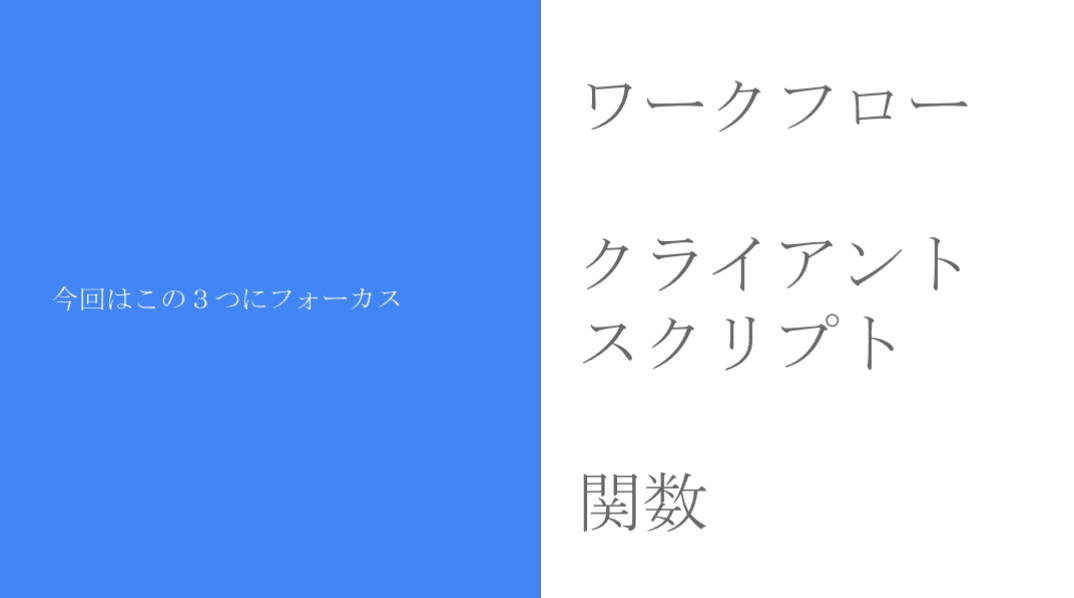
本セッションでは、私自身の経験をもとに、ワークフロー/クライアントスクリプト/関数の3つにフォーカスし、それぞれの特徴と活用シーンをご紹介しました。
今回取り上げる自動化機能 / 手法
それぞれの使用用途と場面
- ワークフロー:設定後も「設定担当者以外の人が見たとしても、直感的に理解しやすい」です。詳細な自動化の設定には最適では無いケースがあります。
- 設定例:CRMで取引先が作成されたら、メールが自動送信されるようにする。
- クライアントスクリプト:設定内容の要件が、画面操作だけで済む場合は本機能を利用します。
- 設定例:CRMの操作画面に、アラート表示を出すことで、記入漏れ等を防ぐ。
- 関数(Deluge):最終手段。ワークフローでも、クライアントスクリプトでも実装できない場合に本機能を活用することで、希望要件の内容で設定できる可能性が出てきます。
- 設定例:添付ファイルを一括アップロードできるようにする。(基本は1ファイルごと手動で添付操作が必要)
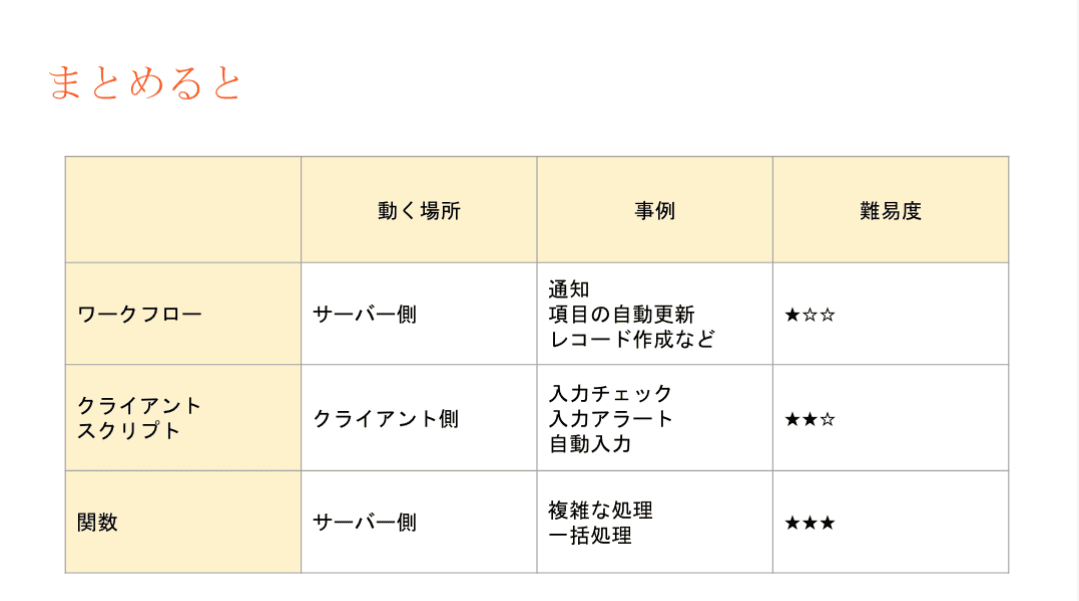
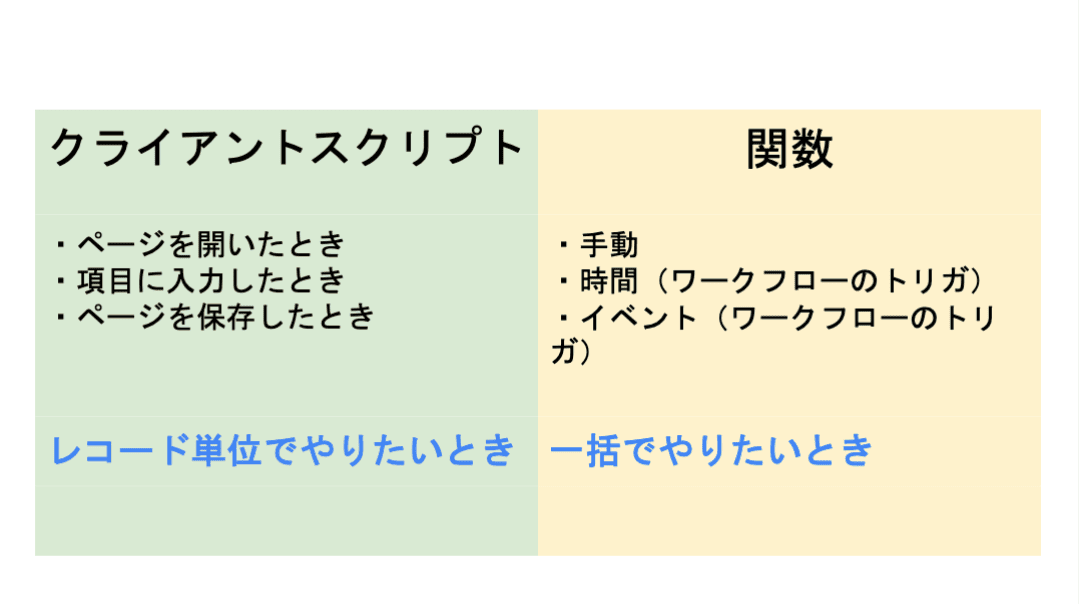
3点の違い
ワークフロー:設定後も「設定担当者以外の人が見たとしても、直感的に理解しやすい」です。詳細な自動化の設定には最適では無いケースがあります。
- 設定例:CRMで取引先が作成されたら、メールが自動送信されるようにする。
クライアントスクリプト:設定内容の要件が、画面操作だけで済む場合は本機能を利用します。
- 設定例:CRMの操作画面に、アラート表示を出すことで、記入漏れ等を防ぐ。
関数(Deluge):最終手段。ワークフローでも、クライアントスクリプトでも実装できない場合に本機能を活用することで、希望要件の内容で設定できる可能性が出てきます。
- 設定例:添付ファイルを一括アップロードできるようにする。(基本は1ファイルごと手動で添付操作が必要)
設定の際の気をつけるべきポイント
関数の設定でつまずきやすいポイントのひとつが、「ワークフローとの連携」です。
引数が間違っていると、ワークフロー自体の設定が正しくても、うまく動作しないという事象が発生します。「何度やってもなぜか動かない…」と感じたときは、ぜひ一度、引数を確認してみてください。
投影資料はこちら
グループワーク:Zoho で"見える化"した / したい、自社の数字
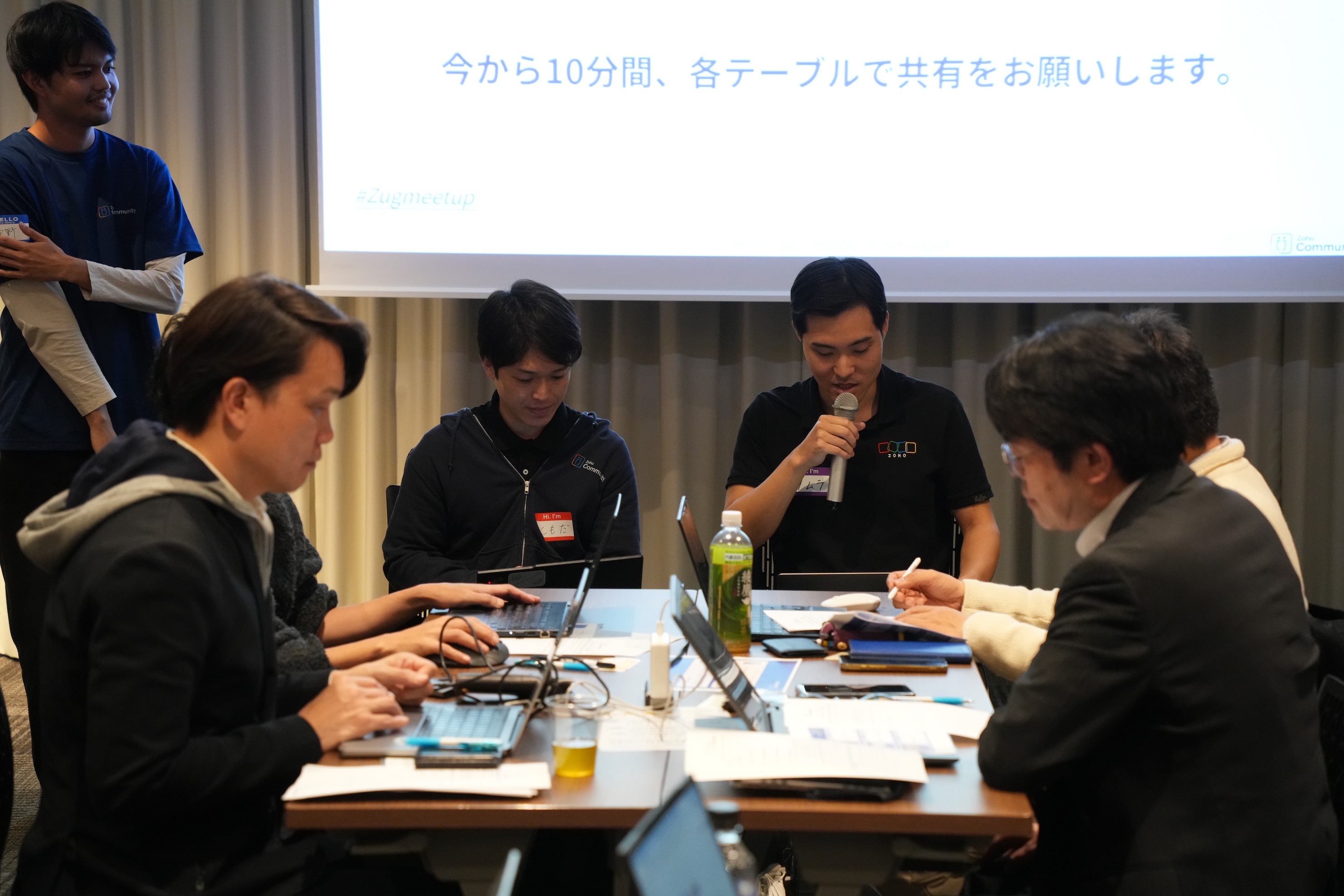
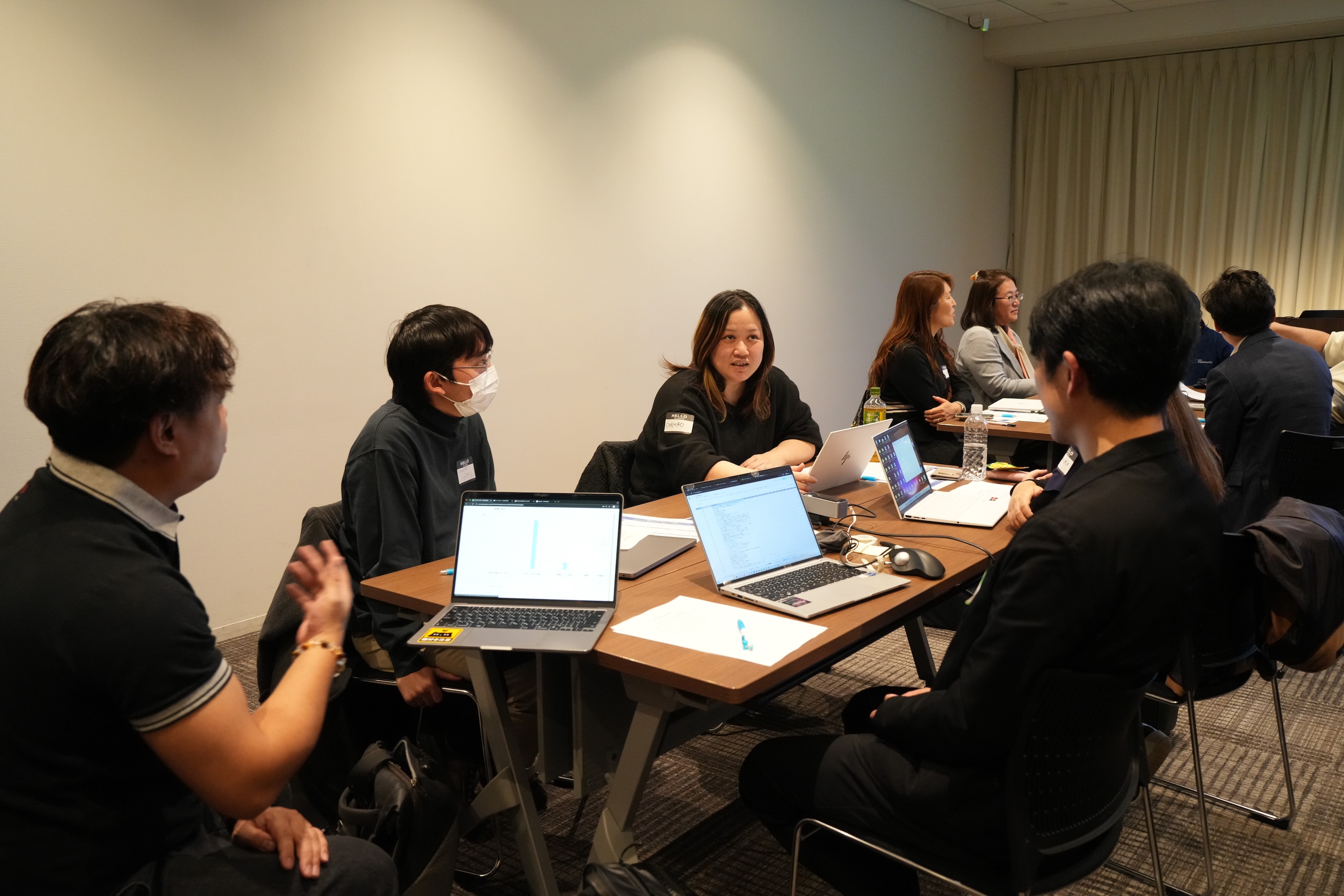
11月に3都市で本テーマのグループワークを実施し、いずれの回も大いに盛り上がりました。ここでは、当日ご参加の皆さまから共有された内容の一部をご紹介します。
- Campaigns や Forms から CRMへデータを取り込み、見込み客がどのような経路でコンタクトしてきたのかを、よりわかりやすく可視化した。
CRM上 で見積書や受注書を作成することで、朝礼の際にiPadなどで簡単に共有・確認ができるようにした。
オフサイトで開催したイベントにかかった費用(展示会など)の参加費・ブース設置費・人件費などをCRMのサブフォームで管理していた。1イベント=1レコードとしてイベントタブにデータを貯蓄することで、各イベントごとの売上や費用対効果を確認できるようになった。

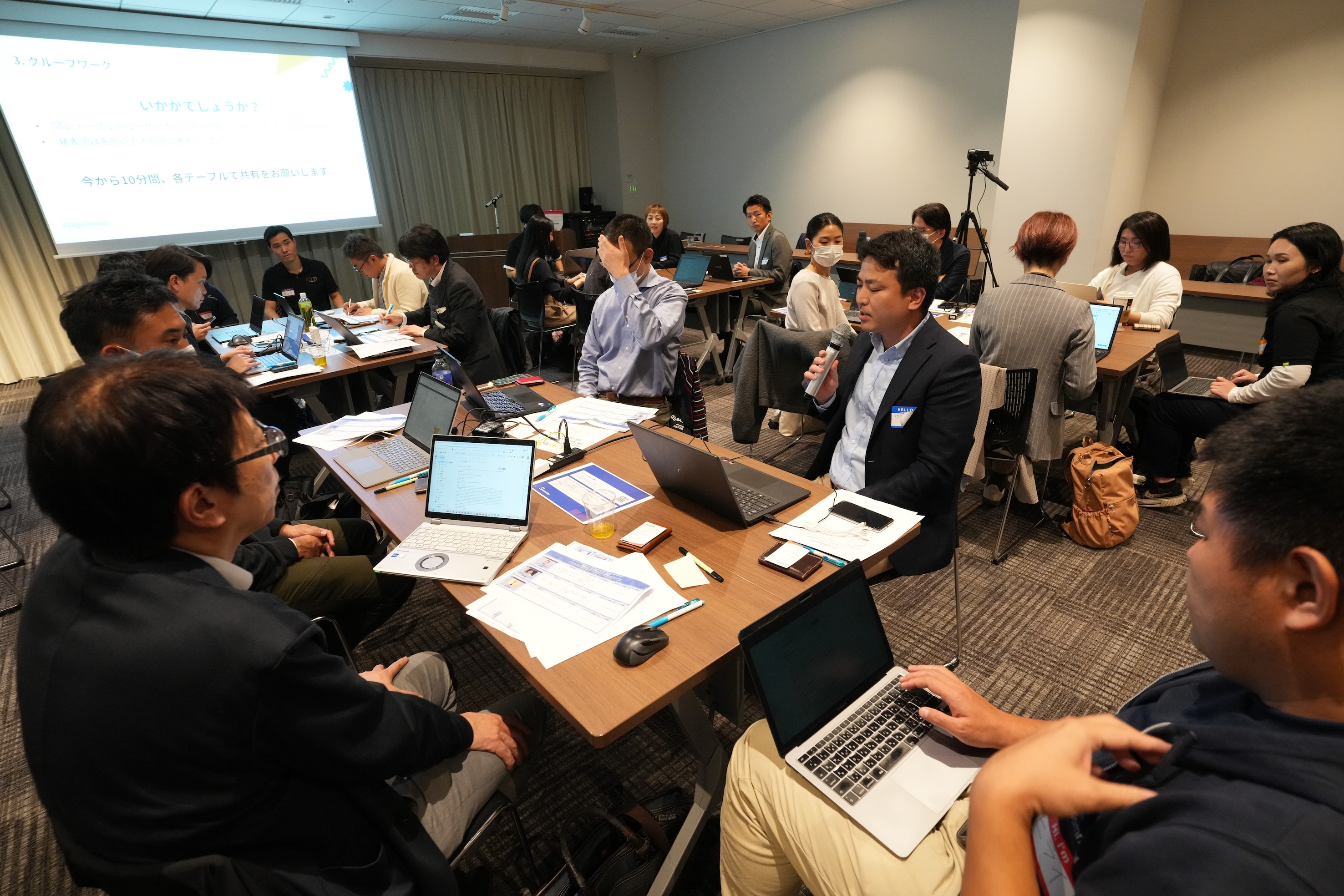
Zoho社員セッション:顧客との日程調整を自動化!Zoho Bookings で営業・サポート対応をスムーズに
11月に3都市で開催したユーザー交流会で本セッションを実施し、ゾーホージャパン技術部の田村より、Zoho Bookings の概要からデモによる活用例までご紹介しました。以下は当日の一部の様子です。


Zoho Bookingsについて
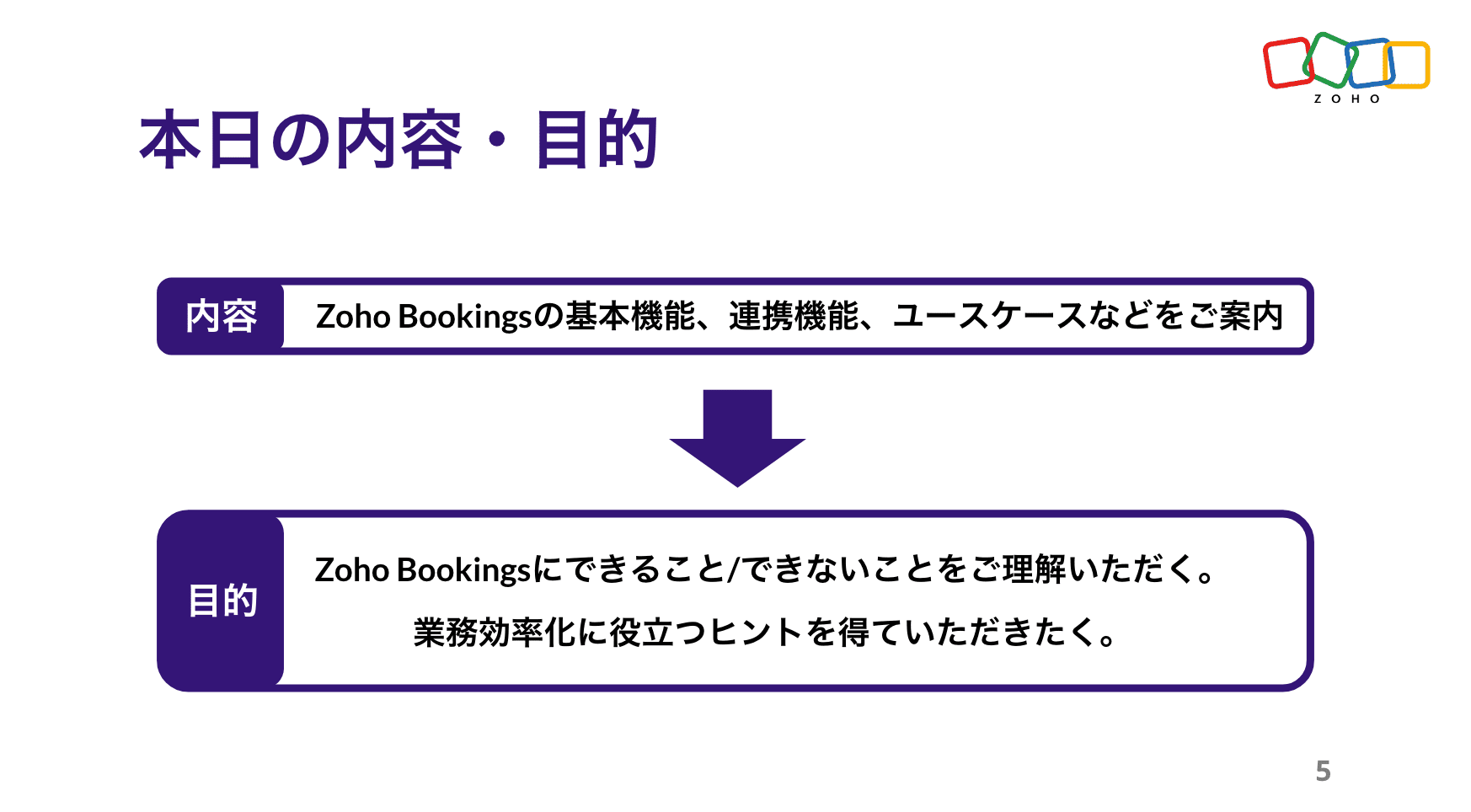


Zoho Bookings の設定について(資料の記載内容を一部抜粋)
Bookings の予約枠は、前後の間隔や時間・期間・営業日、1日あたりの上限などを柔軟に設定できます。
予約ページのデザインも、用途に応じて自由にカスタマイズ可能です。


予約の一覧/カレンダー表示、ステータスについて
※以降は主にデモ動画を投影して説明しました。詳細は、次ページ以降の投影資料をご覧ください。


Zoho Bookings まとめ
Bookingsでは人や物の予約は可能ですが、レストランや宿泊などの日付をまたぐ予約には対応していません。

投影資料はこちら
懇親会の様子
参加者同士で交流されたり、Zoho社員に日頃の悩みや仕様の質問をされたりと、いつも以上に大盛り上がりのイベントでした 😊


お知らせ
2025年度のユーザー交流会は今回で最後です!2026年度の開催予定は、オンラインフォーラムやメールでお知らせします!
※スマートフォンでは、下にスクロールすると「フォロー」ボタンが表示されます。
今後とも、Zoho ユーザーコミュニティをよろしくお願いいたします!
ゾーホージャパン コミュニティチーム


Topic Participants
Emiri Fujisawa
Fujikawa Katsuhiro
Tamura
Sticky Posts
【6/22〜6/24開催】Zoho CRM 管理者向けトレーニングのご案内
「Zoho CRMを導入したばかりで、初期設定や基本操作に不安がある」、「短期間で基礎から理解を深め、運用開始までをスムーズに行いたい」「Zoho CRMを基礎から再度学び直したい」といった課題や要望をお持ちの管理者に向け、Zoho CRM 管理者向けオンライントレーニングを実施します。 2022年6月の開催回よりトレーニング内容を刷新し、有償にて実施いたします。 ─────────────────────────────────── >詳細・お申し込みはこちら:https://www.zoho.com/jp/crm/crmtraining/【12/17(金)Meetup開催】参加者にはノベルティプレゼント!Zoho サービス相談会/情報交換会もあります
こんにちは、Zoho Japan コミュニティチームの今成です。 12月17日(金)16:00から、今年最後のMeetup(ユーザー交流会)を開催します! ●詳細はこちら:https://www.zohomeetups.com/ZohoJapanCommunityMeetup2021vol4/ 前半は今年9月にZoho サービスを導入したユーザー様のセッションとして、現状の利用状況とこれからどのようにZoho サービスを利用していくか、これからの構想談をお話いただきます。 後半では、Zoho CRM【6/29(火) 初心者向け】カスタム関数勉強会のご案内
先日のMeetupでも告知しましたが、以前より多くのユーザーさまからご要望いただいていたZoho の「カスタム関数」に関する基本の勉強会を6/29(火) 17:00に、開催します! 関数の基本的な書き方や、Zoho CRM で活用できる関数例のデモなどについて、Zoho の技術メンバーがわかりやすく解説します。 関数の基本を掴みたい方はぜひ、ご参加くださいませ。 >>申し込みはこちら:attend.zoho.com/luy0 以下詳細です。 ーーーーーーーーーーー 日時:6月29日(火) 17:00~【3/19(金)】Meetup(ユーザー交流会)開催のご案内。Zoho CRM ユーザー事例やZoho Sign の紹介、Zoho CRM 相談会など
こんにちは、Zoho Japan コミュニティチームの今成です。 2021年1回目となるMeetupを、3月19日(金)16:00~ 開催いたします! ●詳細はこちら:https://www.zohomeetups.com/ZohoJapanOnlineMeetup2021vol1 毎回好評のZoho ユーザーさまによる活用事例をはじめ、Zoho の電子署名ツール「Zoho Sign」の製品デモや、グループディスカッションをご用意しています。 前半/後半のみのご参加も可能ですので、お気軽にご参加ください!【12/17(木) 16:00-】ユーザー同士で情報交換を行う、グループディスカッションもあります。オンラインMeetup Vol.4 開催のお知らせ
Zoho コミュニティチームの今成です。最近寒くなってまいりましたが、みなさまいかがお過ごしですか? Zoho Japan Communityでは、今年最後のオンラインMeetup(ユーザー交流会)を開催いたします!以下、詳細のご案内です。 ーーーーーーーーーーーーーーーーーーーーー <日時>2020年12月17日(木) 16:00-18:00 <参加費>無料 <開催方法>オンライン <概要> 前半(16:00〜17:00) 自社活用事例「Zoho 社員は、1日の中でどのサービスをどれくらい使っているのか」(ゾーホージャパン株式会社 コミュニティチーム)
Recent Topics
Tip #47- Stay Ahead with Automated Scheduled Reports in Zoho Assist- 'Insider Insights'
We’ve made it easier for you to stay informed, even when you’re busy managing remote sessions! With Scheduled Reports in Zoho Assist, you can now automatically receive detailed insights about your remote support and unattended access activities directlyColour Coded Flags in Tasks Module List View
I really like the colour coded flags indicating the status of the tasks assigned to a Contact/Deal in the module list view. It would be a great addition to have this feature available in the list view of activities/tasks. I understand you have the DueUploading data to S3
Has anyone successfully uploaded data from Creator to S3 using the InvokeURL command or any other method in Deluge? (keywords: S3, AWS, Amazon, bucket)UPS Label size when generated via Zoho
We've integrated UPS with Zoho inventory. When creating and downloading the shipping labels they are created in a larger paper size. I'd like them to be generated to print on a 4x6 printer. Zoho have told me I need to do this within our UPS portal. UPSCredit Management: #4 Credits on Unused Period
Recall a familiar situation. You sign up for a monthly gym membership. You pay the subscription fee upfront, get motivated, and show up consistently for the first week. Then, suddenly, you get caught up in work deadlines, travel plans, or a dip in motivation.Zoho Analytics Automatically Deletes Queries and Reports When a Synced CRM Field Is Removed
We’ve encountered a serious and recurring issue that poses a massive data integrity risk for any Zoho Analytics customer using Zoho CRM integration. When a field is deleted in Zoho CRM — even an unused one — Zoho Analytics automatically deletes everyPrevent new Record Association
Hello all, We have a small sales organization therefore, it's helpful for everyone on the sales team to be able to view the full list of accounts to assist in preventing duplicate accounts from being created. However we want to prevent people from creatingTip of the Week #73– Automate workflow with Make integration.
Make is a no-code workflow automation platform designed to connect your favorite apps and automate repetitive tasks across services. By integrating Make with Zoho TeamInbox, you can streamline everyday inbox management and save valuable time. With thisViewing attachments
I'm using a Web Form integrated in my web site to collect Leads several info, including a image upload. In order to to approve each lead, we have to view the image uploaded. Unfortunately, in the Leads view, the Attachments can only be downloaded, notKaizen #89 - Color Coding using Client Script
Hello everyone! Welcome back to another exciting Kaizen post. Today let us see how you can apply color codes to the List and Detail Pages of Zoho CRM using Client Script. Need for color code in Zoho CRM When you mark things with different colors as aInstant Sync of Zoho CRM Data?
With how valuable Zoho Analytics is to actually creating data driven dashboards/reports, we are surprised that there is no instant or near instant sync between Zoho CRM and Zoho Analytics. Waiting 3 hours is okay for most of our reports, but there areIs it possibly to directly set the tax amount on order instead of indirectly via tax rates?
We own an eCommerce application and want to funnel submitted orders from that system into Zoho. We're already calculating tax in our application and just need a way to set it in Zoho. We tried to use Zoho's tax objects for tax by setting the rates toZoho account sign in with passkey
Hello, I am trying to sign in using passkey, but the option doesn't show up in the web and is disabled in Oneauth on mobile, saying the admin has restricted the use. On the Admin page in Security MFA I can find no option for passkey. Help would be greatlyRescheduled US meetups: Zoho Desk user meetups are coming to seven U.S. cities in October and November, 2025
Hello to our Zoho Desk users in the United States, We're excited to share the revised dates for the upcoming Zoho User Groups happening across the US this summer. Our product experts are heading to seven cities throughout the country, and for the firstChecklists as templates
Is it possible to save checklists as templates to reuse them in other tasks? Example: I have a web project. I maintain individual web URLs as tasks. Within the tasks the same checklist should be used again and again: - Page created in CMS - PropertiesSend mass email using my secondary email
Hello, When I send an email to just one person from Zoho CRM, a complete email editor appears, where I can choose which of my email addresses I want to use in the From field. When I send a mass email, there is not such option. I can only select the emailZOHO TEAM INBOX Calendar Integration
The Problem: Clients send meeting invitations to our TeamInbox address. TeamInbox receives these invites, but we cannot accept them. We do not use individual inboxes for transparency purposes. Ideal Solution: A way to accept calendar invites sent to ourWhy Can't I add unicode emoji's to my signature?
Why would Zoho Mail prevent me from adding unicode emojis to my email signature? Every time I try to save the signature, Zoho Mail erases the emoji and any nearby content. Every time I setup something with Zoho, I know I'm going to run into some incrediblyUnearned / Deferred Revenue Automatic Calculation for Subscriptions
As a SaaS business, we have multiple active subscriptions with varying dates and amounts. Is there a way to have a monthly automatic calculation for all of them that debits or credits the unearned revenue and revenue accounts accordingly? Alternatively,Zoho Desk Limit for Comma Separated Queries
Hi, I have just discovered a limit that I believed is not mentioned in any of Zoho's documentations. My search query looks like so: "query: {"accountId":"786050000091629966,786050000163589273,786050000163589427,786050000162753705,786050000162112971,786050000161987643,786050000160752868,786050000167089504,786050000167089378,786050000167089024,786050000167070005,786050000166295256,786050000128153693,786050000110560021,786050000046594575,786050000039106461,786050000002225356,786050000076889093,786050000047895103,786050000043365354,786050000044765191,786050000041790249,786050000040359116,786050000037945198,786050000024605077,786050000000525015,786050000155333895,786050000157741437,786050000000718125,786050000011574353,","departmentId":"786050000042648070","status":"Finished","sortBy":"createdTime","customField2":"cf_completion_date:2025-01-28T03:00:00.000Z,2025-10-28T03:00:00.000Z","customField3":"cf_billed:false"}"Module Name doesn't exist
I am trying to create a module named Activity, with plural Activities, but I have an error that module name already exists. This module is doesn't exist, and I don't have a single field called Activity or Activities.Zoho Desk iOS and Android app update: AI powered: Reply Assistance and Refine Messages on IM module.
Hello everyone! We are excited to introduce new AI powered features on the IM module of the Zoho Desk app. Reply Assistance: Reply Assistance generates suggested responses for incoming chat messages, which you can directly insert into the conversationIs it possible to embed Youtube shorts?
Hi Zoho desk support, This is Ryan from Accuver America. While I'm trying to create a knowledge base article with embed video, I ran into this issue. "www.youtube.com refuse to connect" A little bit background is that because this video is recorded onSplit functionality - Admins need ability to do this
Admins should be able to split an expense at any point of the process prior to approval. The split is very helpful for our account coding, but to have to go back to a user and ask them to split an invoice that they simply want paid is a bit of an inDelegates - Access to approved reports
We realized that delegates do not have access to reports after they are approved. Many users ask questions of their delegates about past expense reports and the delegates can't see this information. Please allow delegates see all expense report activity,How to include total km for multiple trips in expense report.
Whenever I create a mileage report it only shows the total dollar amount to be reimbursed. The mileage for each individual trip is included but I also need to see the total distance for all trips in a report? How do I do this?I didn't receive my domain verification mail
I didn't receive my domain verification mailGet logged in user ID in Deluge script
Hello all, How do I get the id of the logged-in user in a deluge script? the "zoho.loginuserid" function actually returns the users email address or whatever the user id they use to login to zoho with and not the id of the user record, and given thatItem Details Field - New Barcode / Document option?
Is this a new feature??? its in both books and inventory.Shared Mailbox - Mark as read for all users
Hi all, Maybe someone can help me out. At the moment we have a shared mailbox without streams. When a users reads an mail or marks it as read other users will not see this. How can we resolve this? We now archive the mails when read and followed up. HoweverCan I export to PDF in Zoho Learn
I have seen help pages where export to pdf options are available but I do not see that option available from the application. I see that exprt is available in my free trial version but that is only to html pages. I need to be able to export my manualsStaff rules
Hi! Do you people know what are the default staff rules when a new booking is created? We have two staff members in my team (me as the admin, and my employee). As we share the same services, I'm wondering how Zoho will pick the staff for new apointments.Add Image Upload Field to Zoho Bookings Registration Form
Hi, We would like to request the addition of an image upload field to the Zoho Bookings registration form. Currently, Zoho Bookings only supports text-based fields (e.g., Single Line, Multi-Line, Email, Checkbox, Dropdown, Radio Button, and Date), butMerge Tags Output Incorrect Placeholder Text After CRM Sync
Hi everyone, I’m experiencing an issue with merge tags in Zoho Campaigns after last sync of contacts and leads from Zoho CRM (days before everything worked perfectly). Here’s the situation (seems like a default configuration in Campaigns) : My leads haveWindows agent 2025_M02 release notes
Agent Version: 111.0.3.300 Release date: 24 February, 2025 Various Major enhancements to improve overall performance and optimize the user experience. Squashed a few bugs to improve overall product quality.Windows agent 2025_M01 release notes
Agent Version: 111.0.3.299 Release date: 05 February, 2025 Major Enhancement: Live Monitor feature compatibility released. Major Enhancement: Updated Scaling for multi technician cases with Android and Web based viewers. Various other bug fixes and performancehow to record deferred revenue?
Dear Zoho Team, We issue invoices relating to 12-month web hosting service. When we issue the invoice, we should record the entire amount of the invoice as DEFERRED REVENUE (ie. $10 x 12 mths = $120, balance sheet item). After the particular month of the hosting service, $10 of revenue has been earned and deferred revenue amount will be $110. We must keep adjusting the balance sheet and income statement over the course of the service until the company has fulfilled its obligation of services andNarrative 13: Importing your data
Behind the scenes of a successful ticketing system: BTS Series Narrative 13: Importing your data When importing data into an application, it is crucial to prevent data loss or duplication. These types of errors can hinder the development of a clean andBlueprint Not Triggering When Lead Status Is Updated by Workflow (IndiaMART Integration)
I have set up a blueprint that triggers when a lead’s status is “New Lead.” Our CRM is integrated with IndiaMART, and when leads are created from IndiaMART, their Lead Status is initially set to None. To handle this, I created a workflow that automaticallyUpdate Subform in specific field(Status) without affecting other fields in Zoho CRM using Deluge?
Scenario: PRODUCT Module(change name Plot) in any product status change From Available to Booked then on PROJECT Custom Module have Subform So, Subform name is Property Details now in that Subform 1 field is STATUS that update according to product statusNext Page