Augmenting subform capabilities
Greetings, everyone!
Finally, the day has come for us to announce some of the most anticipated, requested, and exciting updates to
subforms in Zoho Creator.
As you're aware, subforms are an integral part of Creator forms, as they help in establishing proper modelling of the app, collecting rows of data, and setting up users to enter data that has a parent-child relationship. With this new set of updates, we've bought in a paradigm shift to subforms, as they'll be getting an all-new look for an improved user experience, along with new capabilities for solving challenges. This post will give you a sneak peek into these new subform enhancements.
Do you find it difficult to scroll subforms horizontally? Do you wish you could drag and drop subform rows? Do you want to manipulate subform fields via Deluge script? Then your wait has come to an end—continue reading to learn more on how you can now do all of this in subforms.
Subform list and pop-up view
As announced in the
March 2023 post, the List
view type of subforms will display the subform as a pop-up, and the current method of displaying subforms has been christened
Grid.
To further understand how this can be helpful, let's put ourselves in the shoes of a supply chain manager. Their job requires them to regularly keep track of inventory lists in their warehouses.
Let's assume there's a form collecting warehouse details, like name, location, and stock inventory. For collecting the stock inventory details, a subform is present with these fields—Item No, Name, Manufacturer, Description, Cost Per Item, Stock Quantity, Inventory Value, Units Sold, Reorder Quantity, Reorder Date,
and
Person In Charge.
Now, the default view type will tire you out from scrolling back and forth horizontally, and results in a frustrating time-consuming process. We all long for a new way to avoid this and make data entry swifter.
To achieve this, make use of the new List option under
Subform->Field Properties->View Type.
List view, which looks similar to our list report, is a table-like subform without inline inputs. When you try adding or updating data in each row, a pop-up will be displayed listing out the fields with vertical scrolling, thereby ensuring a vastly superior user experience and more effective space management.
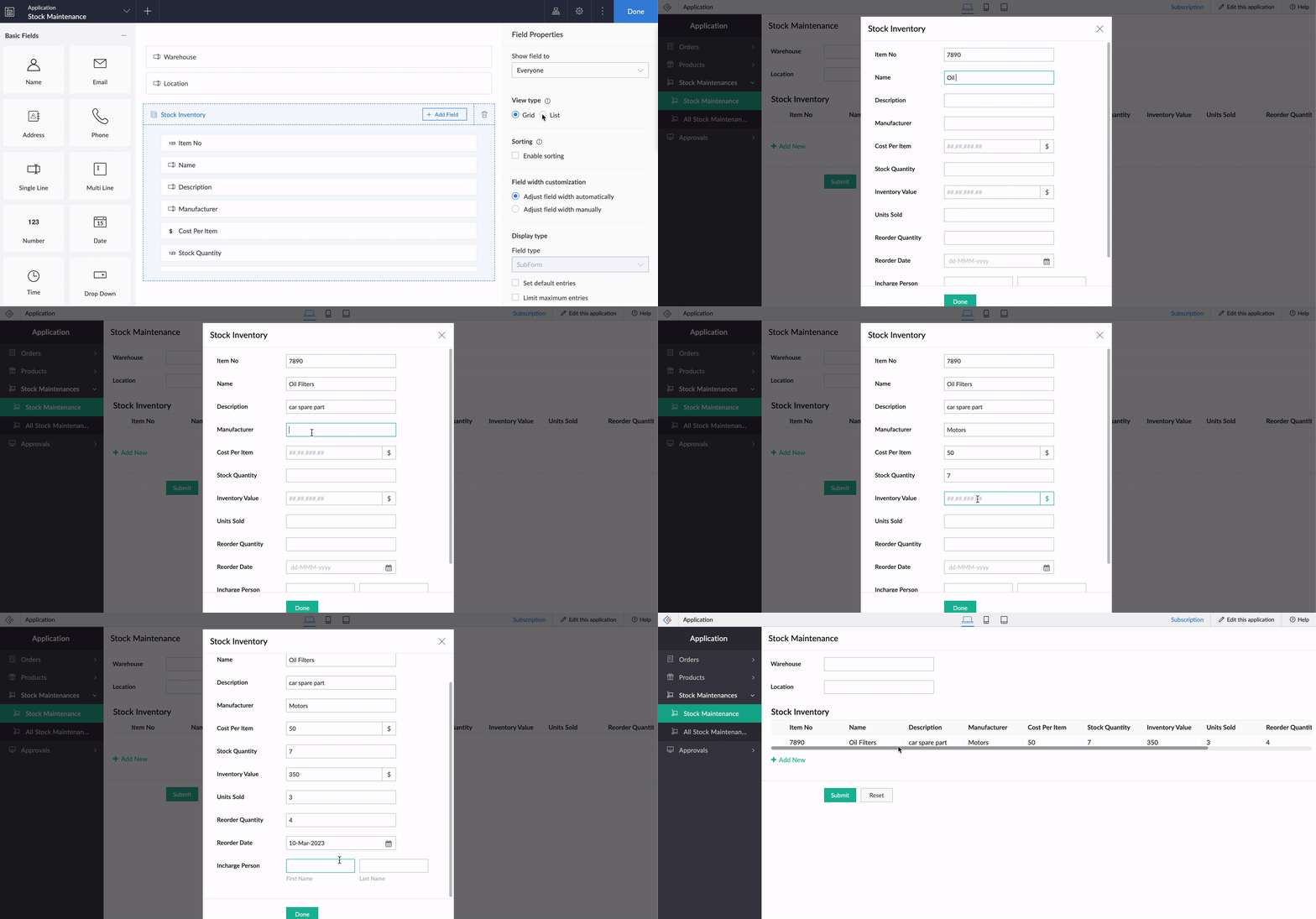
Crucially, it also helps to load subform rows quickly while editing records, by reducing the loading time.
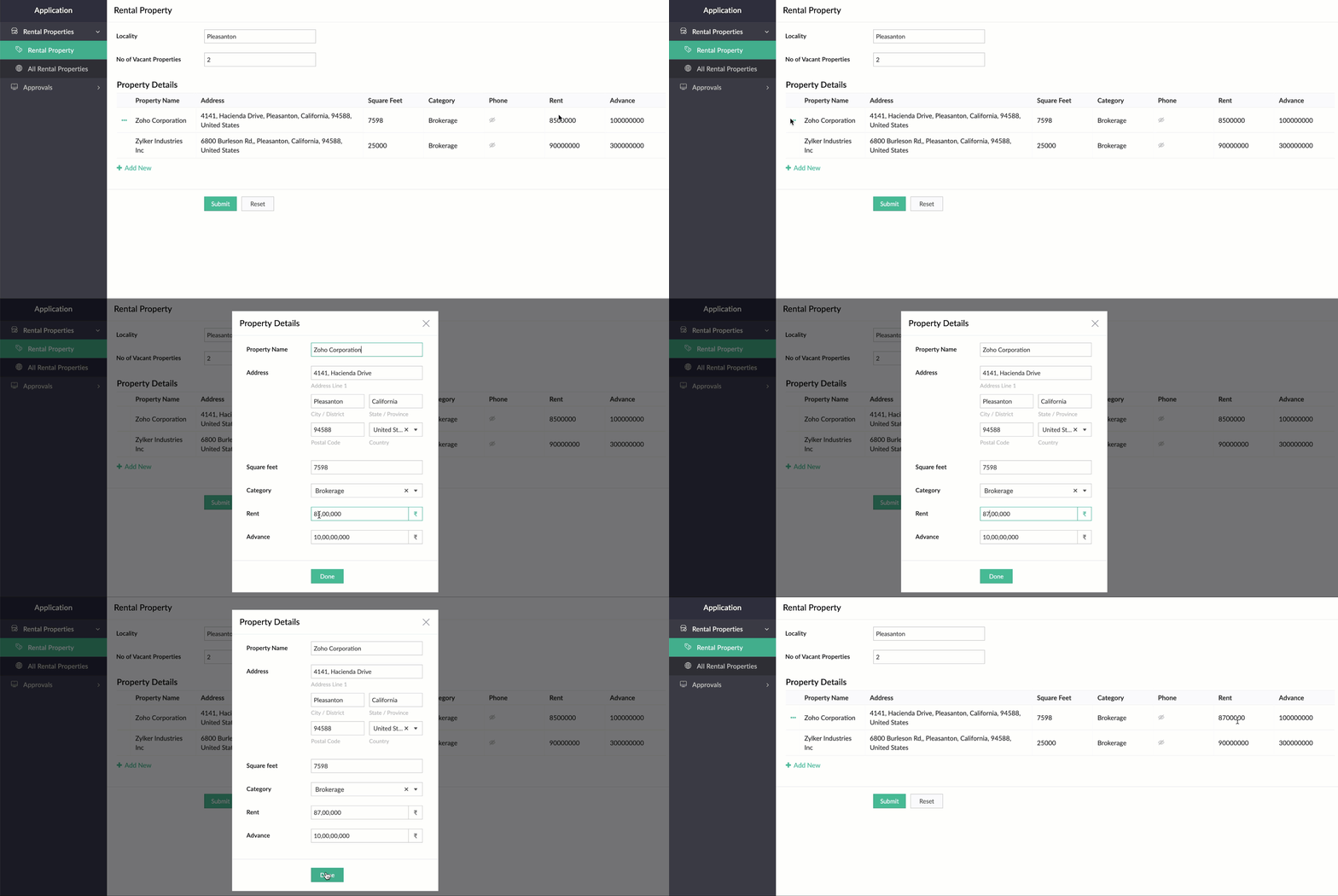
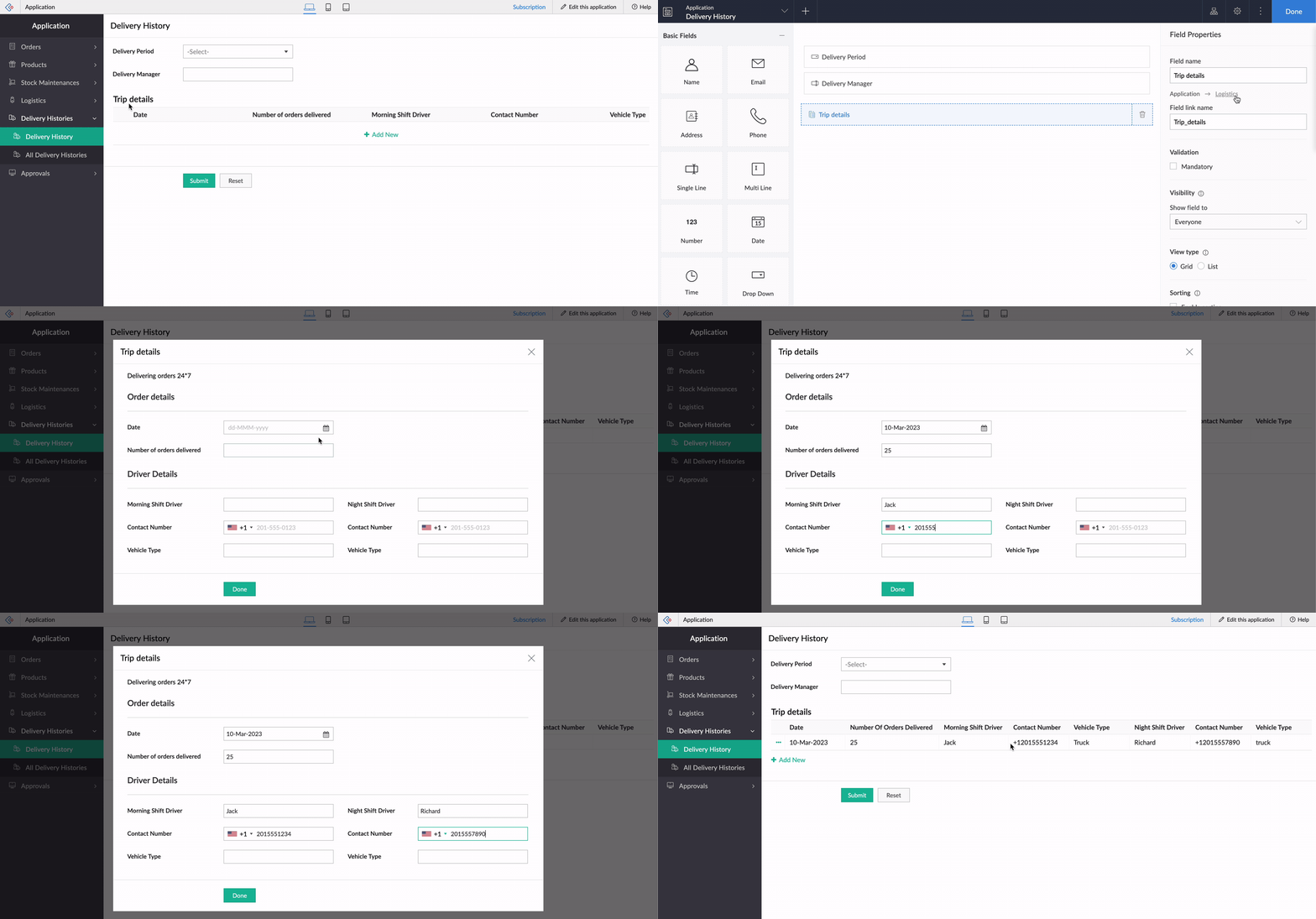
While using an existing form as a subform, the form's exact structure will be replicated in the pop-up, to ensure consistency in the look and feel of the form. To understand this better, let's assume our form has a two-column layout, with
Section
and Note
fields. Now the same customizations will be displayed in the pop-up, too!
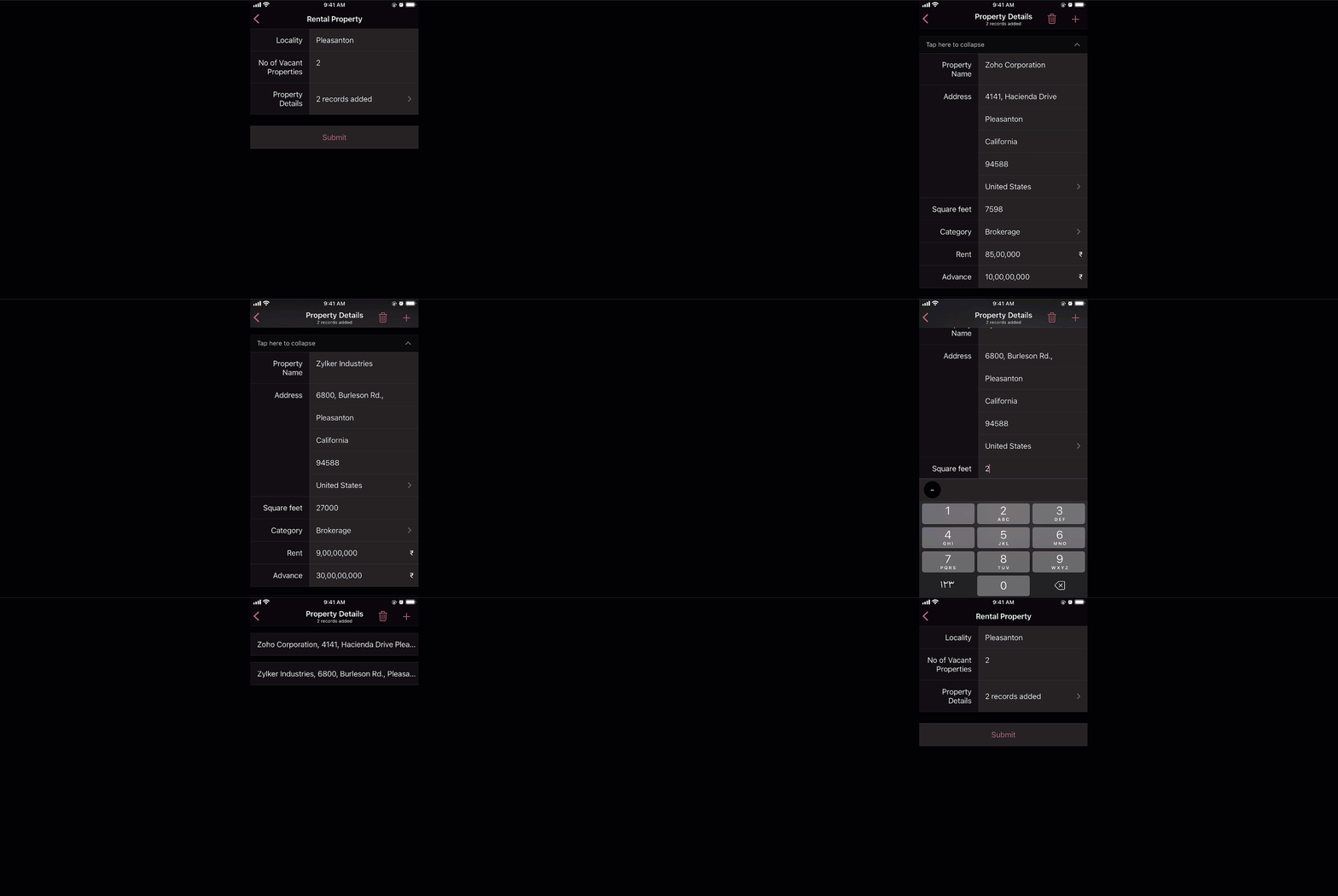
And that's not all—the new List view type is being extended to mobile apps, too. When it's enabled, the subform will be opened in the next screen, where users can add their data. This data will then be added as a subform row.
Custom sorting
Currently, the only sorting option in subforms is
field-based sorting, where you can choose a field based on which rows are sorted, either in ascending or descending order. Though this works well for basic cases, the need may arise in some cases to sort the subform in random order. With the new custom sorting support, you can effortlessly drag and drop subform rows to rearrange them.
To understand how it works, let's consider a task manager working on a To-Do List
form, to plan activities for a current project. For this, they have a main form collecting
project details, date-time,
and
milestones,
and a subform for maintaining the to-do list with the following fields:
Task Name, Description, Category, Status, Deliverables, Priority, and
Deadline. Here, before submitting the list, they want to rearrange some tasks based on their daily routine.
To achieve this, they use the Custom sorting option under
Subform->Field Properties->Sort type.
Now, with custom sorting, all they need to do to reorder the row sequence—both while adding and editing records—is simply drag and drop them in the required position.
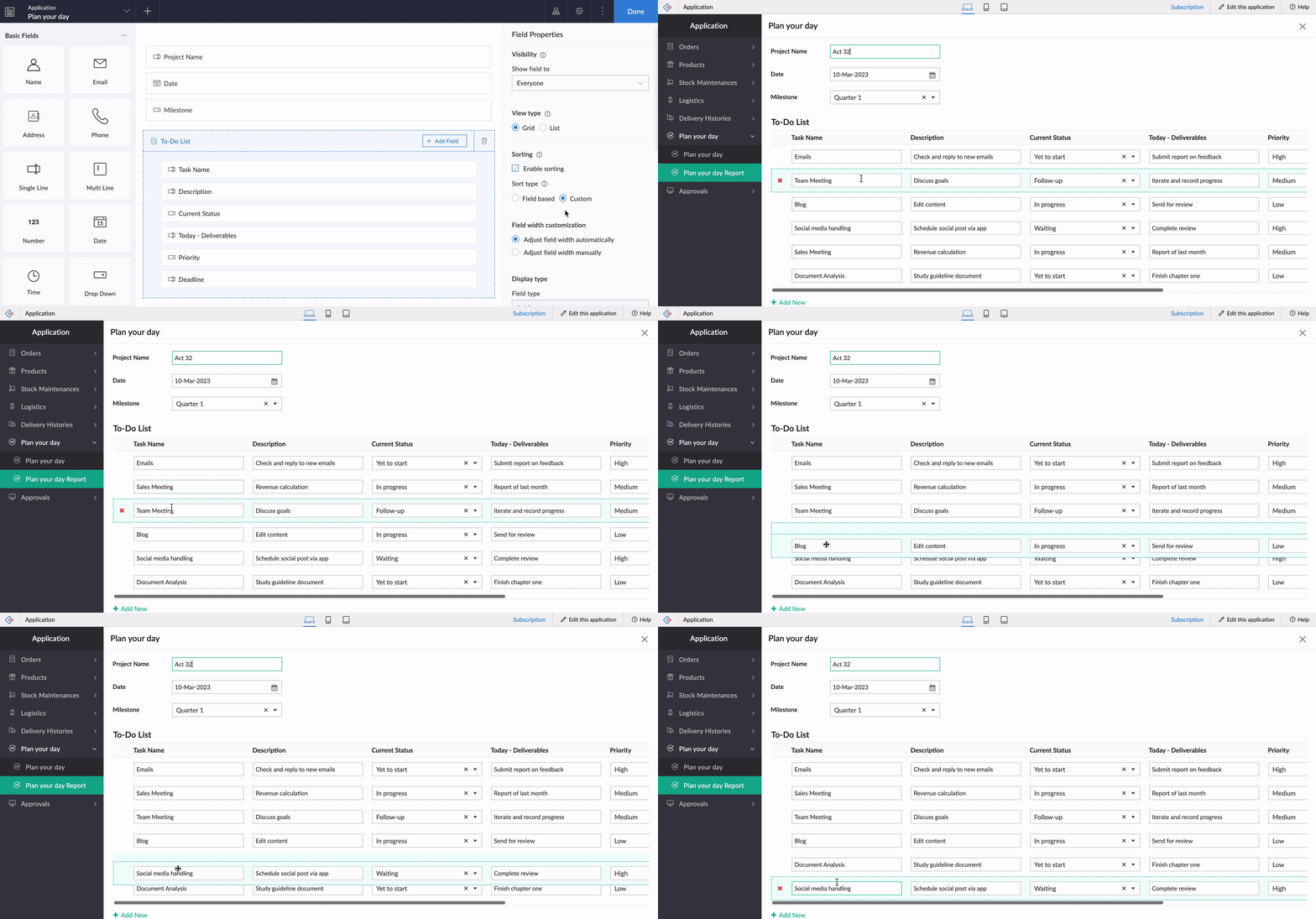
The same order will be retained in reports or while opening the form for updating the list.
Note:
Custom sorting can be used both in List and Grid-type subforms.
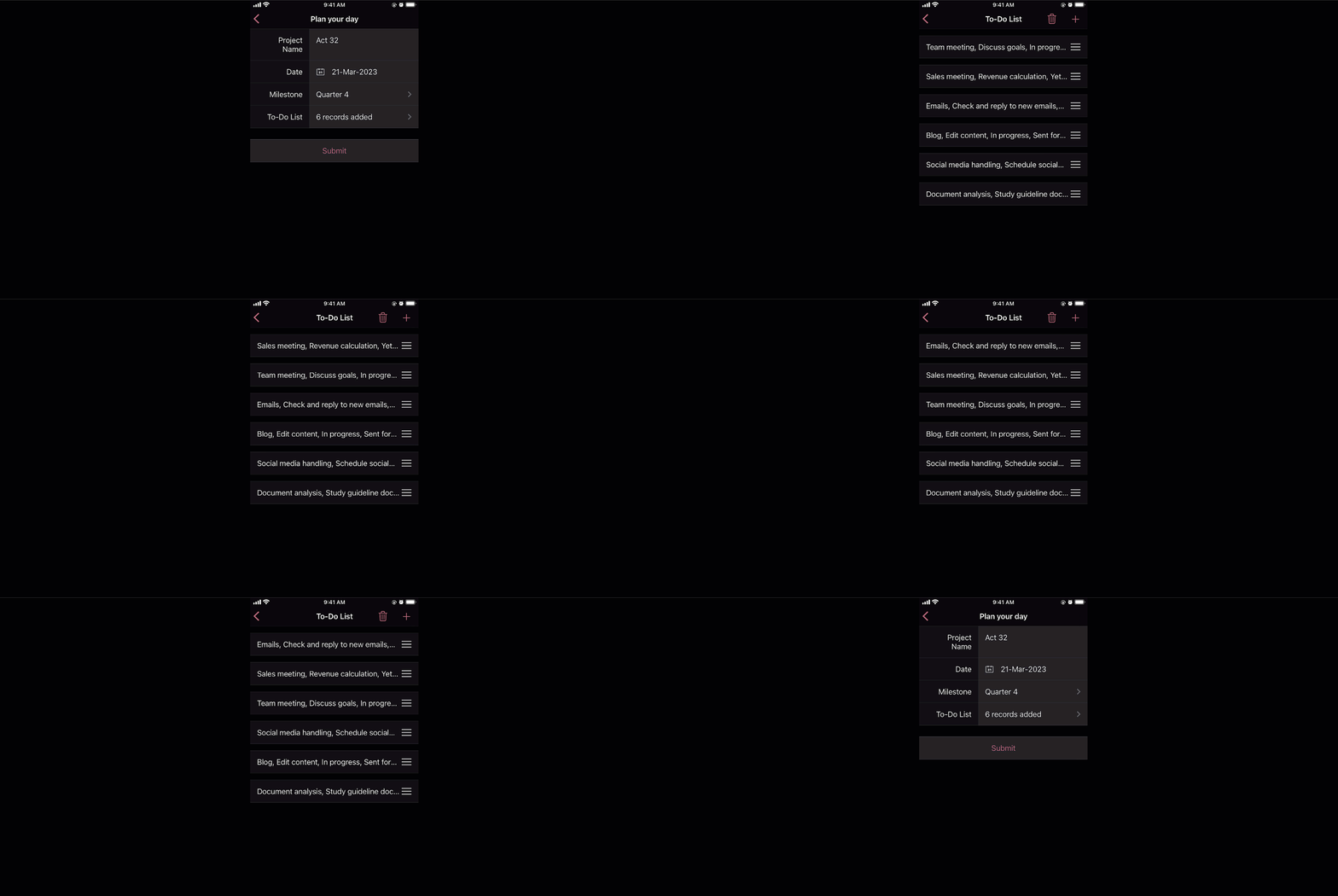
Custom sorting will also be available on the mobile apps and you can effortlessly rearrange fields in subforms.
Deluge tasks for row-level actions
You can use a combination of workflows and Deluge scripts to help your subforms handle complex business logic. With that in mind, we formulated the idea of bringing in actions that help you take control at the row level of subforms.
In the past, you may have come across business scenarios which required you to hide/show or enable/disable a particular field in a specific subform row. Now, with new dedicated Deluge tasks, you can bid adieu to shortcuts and workarounds.
Note:
Deluge tasks can be used both in List and Grid-type subforms.
Enable/disable
The new enable and disable subform Deluge tasks can be used to enable and disable specific fields.
Syntax:
enable row.subform_field
disable row.subform_field
disable row.subform_field
Events:
On add row, On delete row, On user input of subform field
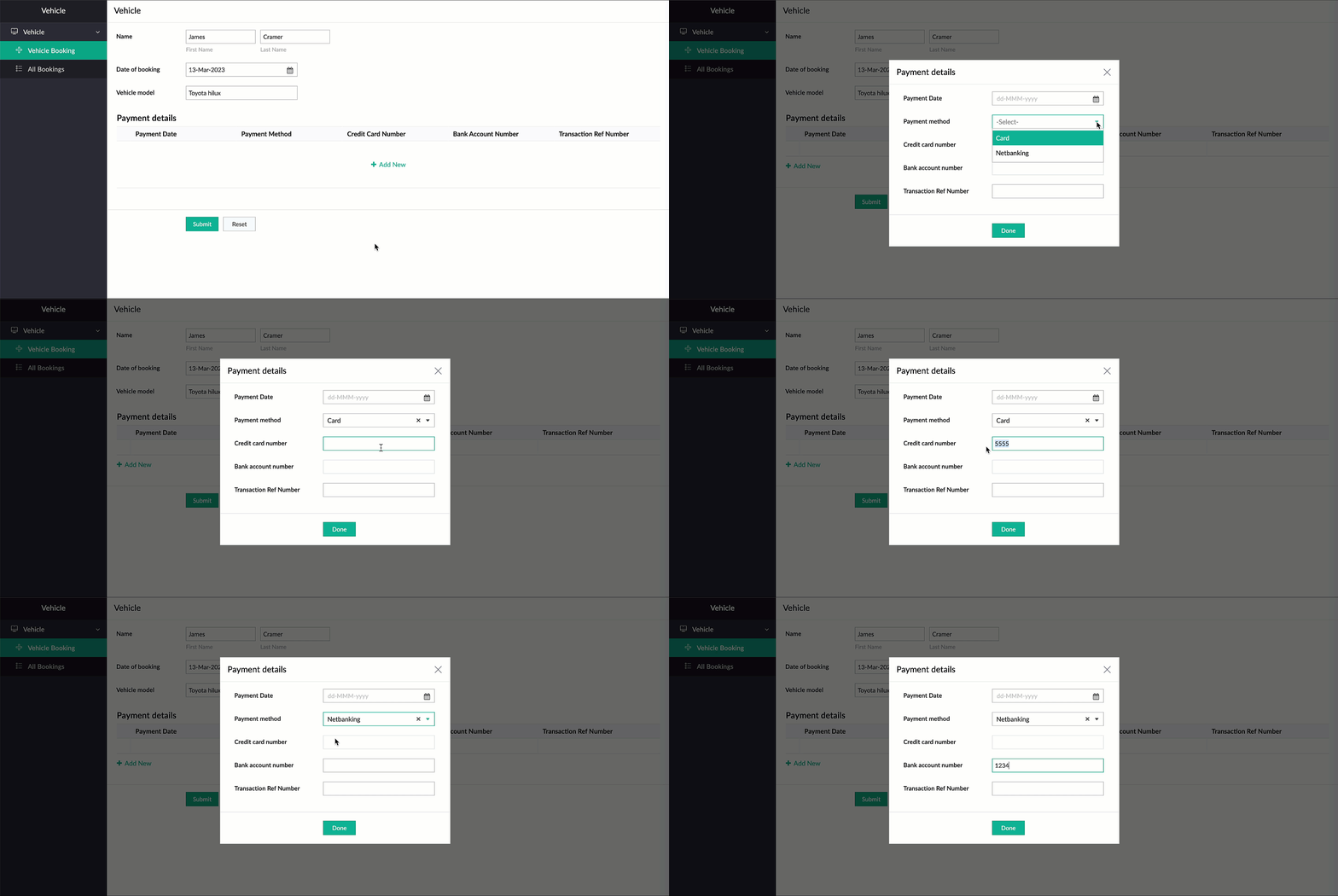
Let's assume a Vehicle form has fields like
Customer Name, Vehicle Model, and Date of Booking,
and a subform to collect payment details with the following fields:
Payment Date, Payment Method, Credit Card Number, Bank Account Number,
and
Transaction Ref Number.
Now, there are two payment options—Card and Netbanking. If Card is chosen, then the Credit Card Number field should be enabled and the Bank Account Number field should be disabled. Similarly, when Netbanking is chosen, then the Bank Account Number field should be enabled and the Credit Card Number field disabled.
Code snippet:
if(Payment_details.Payment_method == "Card")
{
enable row.Credit_card_number;
disable row.Bank_account_number;
}
if(Payment_details.Payment_method == "Netbanking")
{
enable row.Bank_account_number;
disable row.Credit_card_number;
}
{
enable row.Credit_card_number;
disable row.Bank_account_number;
}
if(Payment_details.Payment_method == "Netbanking")
{
enable row.Bank_account_number;
disable row.Credit_card_number;
}
Hide/show
The new show
and
hide subform
Deluge tasks can be used to show and hide specific fields.
Syntax: hide row.subform_field
show row.subform_field
show row.subform_field
Events: On add row, On delete row, On user input of subform field
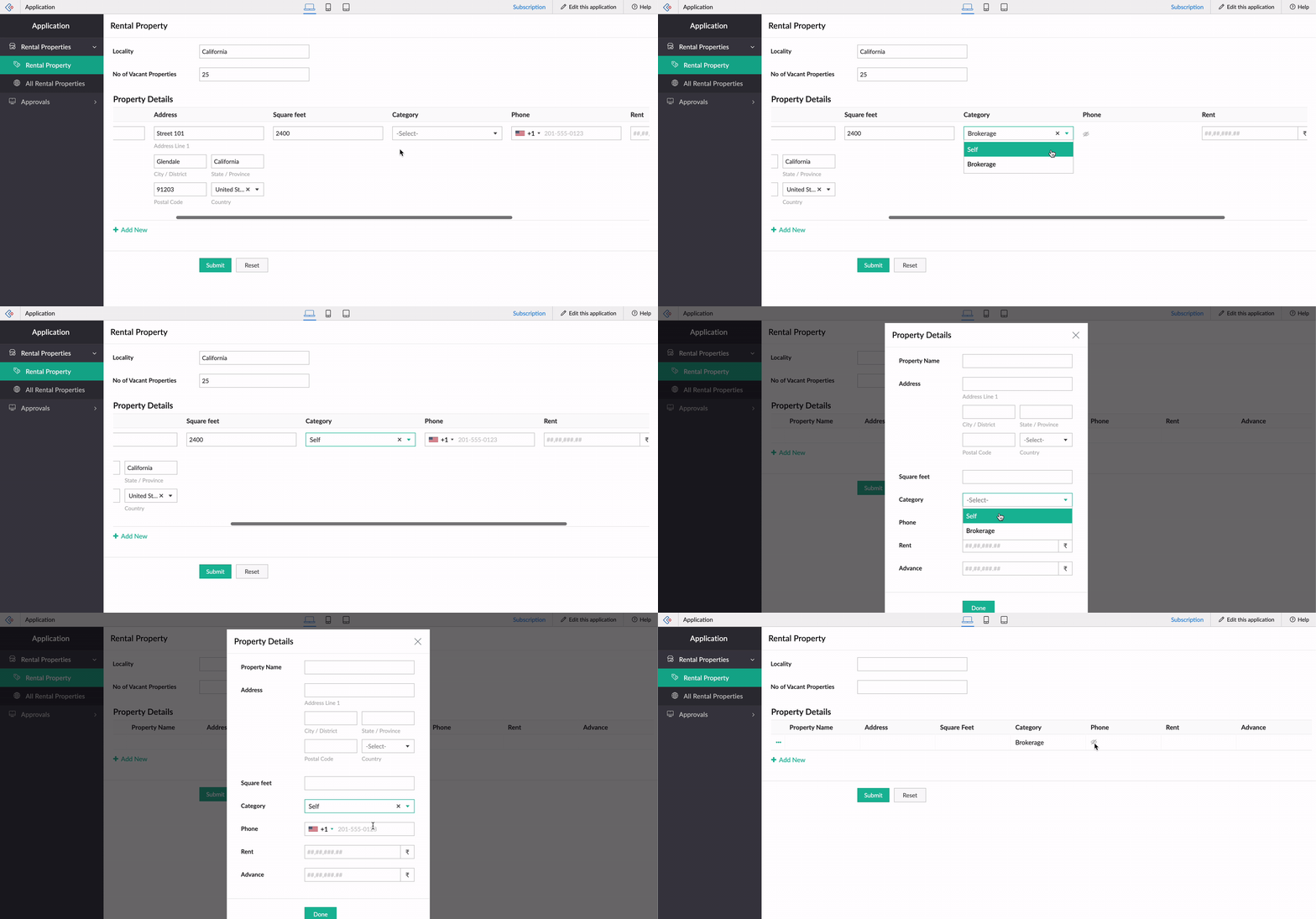
Let's use the example of a rental property manager who needs to keep track of a list of properties that are available in every locality. For this, a form is used for collecting information like Locality and No of Vacant Properties, and a subform will be used to list property details with the following fields: Property Name, Address, Square Feet, Rent, Advance, Category, and Contact Number.
When the category is Brokerage, we need to hide the contact number of the landlord. We can use the new Deluge tasks to achieve this.
Code snippet
:
if(row.Category == "Brokerage")
{
hide row.Phone_Number;
}
else
{
show row.Phone_Number;
}
-----
That's it from us on our subform enhancements! We expect these updates to be rolled out in the upcoming weeks. Once done, we'll pop in a comment below and also update our Release Notes page.
Don't forget—your feedback helps us make Creator better and stronger. We'd love to hear what you think about these updates. Please use the space below or send your feedback to
support@zohocreator.com.
Regards,
Zoho Creator Team
Topic Participants
Ashwin Vishal R
Jean Le Gal
stevesmith41
Darren Burn
Anurag Jaiswal
Sticky Posts
Introducing Zoho Creator's 2025 Release Projection 2
Hello Creators! I'm Prakash, from the Creator product management team, and today I'm delighted to unveil our next set of features as part of Release Projection 2 for 2025. With thoughtful analysis and planning, we've curated powerful new capabilitiesZoho Creator - 2023 Release Projection 1
Hello everyone! A very Happy New Year to you and your family. Hope you're all good and having a great time using Zoho Creator to make your lives easier and your businesses prosper. 2022 was an action-packed year for us at Creator, and we hope to continueZoho Creator User Group meetups in a city near you! - Oct - Nov, 2023
Greetings from the Zoho Creator team! We're hosting a series of Zoho Creator meetups in various cities across the globe, and we'd love to meet you there! Our meetups are a great opportunity to network with industry peers, exchange ideas and best practices,Zoho Creator - 2023 Release Projection 2
Hello everyone! Time truly flies when you're having an incredible journey, and today we mark the completion of an eventful and action-packed six months. It feels like just yesterday when we embarked on this adventure together with the launch of our newUpcoming Updates - August 2022
Hi all, Greetings from the Zoho Creator team! Today we've got news for you on some exciting updates. And rest assured— there’s more to come! In this post, we'll be going over the upcoming features and improvements for this month as mentioned below. A
Recent Topics
Zoho Books Extension: What Happens If Custom Fields Already Exist?
When developing Zoho Books extensions, what happens if the target Zoho Books organization already has a custom field with the same API name as one defined in the extension? I’m asking because we originally created an on-Books version of this functionality,Pricing Strategies: #3 Services never Stop with just Plans
"Hey, while you're here, could you also take a look at the vegetable patch?" Aaron hears that line almost every week. He runs a small gardening service, the kind where customers subscribe to a simple monthly plan that includes basic maintenance, mowing,Cropping Photos for Zoho Sites
Hi, I'm wondering if there is a built in crop tool for zoho sites for my photos so I can crop them and see what the crop looks like on the site?bulk edit records and run internal logic
hi there is few logics in manner "it this than that" logics work well when i edit entry openning it one by one (via workflow "on add/edit - on success" , for custom field "on update/on user input") but when i try bulk edit records - logic does not work. how can i turn on logic to work as programmed - for mass editing records via bulk edit?WebDAV / FTP / SFTP protocols for syncing
I believe the Zoho for Desktop app is built using a proprietary protocol. For the growing number of people using services such as odrive to sync multiple accounts from various providers (Google, Dropbox, Box, OneDrive, etc.) it would be really helpfulPossible for first Signer of Sign Form to specify the next signer in the sequence
We have many use cases where multiple signers need sign the same document. We'd love to be able to use sign forms, where the a signer who uses the Sign Form link can specify the name and email address for the next person in the sequence.BUG: Can't copy-paste data outside Sheet
Currently I can't paste data copied from inside any of my Zoho Sheet files to any other app. Copy-paste works inside the sheet It does NOT work between two different sheets These sheets are built from automation templates Everything works fine if I createZoho CRM Community Digest - November 2025 | Part 1
Hello Everyone! Here’s what came through in the first half of November: new updates and a few helpful community discussions with real, notable solutions. Product Updates: Android App Update: Inctroducing Swipe Actions You can now swipe left or right onUpload own Background Image and set Camera to 16:9
Hi, in all known online meeting tools, I can set up a background image reflecting our corporate design. This doesn't work in Cliq. Additionally, Cliq detects our cameras as 4:3, showing black bars on the right and left sides during the meeting. WhereTruesync for Linux
Is Truesync available on linux ?Hidding/excluding specific picklist options from filter
Hi. Is it possible to hide/exclude specific picklist options from this filter? I don't want them to be shown when someone tries to filter in the leads moduleSubforms to Capture Multi-Row Data in Job Sheets
Subforms transform your job sheets from simple checklists to powerful, data-rich forms. In field service work — whether maintenance, inspection, installation, or repair — a single job can involve multiple repeatable entries: readings, parts used, activitiesAdd "Fetch Composite Item" Action for Inventory
I want to make a Flow that uses information returned in the GET call for Composite Items, and it's not currently available in Zoho Flow. Please consider adding this functionality.Adress Labels for sending of the oder und barcode
We want to print with my address labels to stick on the order of the ware can. there are these options?printing individual labels - Dymo LabelWriter
I am trying to print individual labels to my Dymo LabelWriter - has anyone done this? Latest Update (December 2025): The Canvas Print View is now available! We encourage you all to try it out and share your feedback with us. Learn more here: Zoho CRMZoho Creator for Agriculture
Greetings, I am starting to work on Zoho Creator specifically for the agricultural field, any recommendations, tips or ideas that might be helpful ? Also, if you are interested by any means in working on such project, kindly contact me. The project isCustom Print Layout
I would like to create a custom print layout of a Lead or Contact. Is there a way to do that? What I mean is that if I'm viewing a specific lead or contact I'd like to be able to print or export that lead/contact and only print and/or export certain information.Print View
Nothing happens when I'm in a module , ie; Contacts, and I hit the Print View Button. Even when it does come up and say "loading", nothing loadsGet Holiday ready with Zoho Mail's Offline mode
With the holiday season right around the corner, this is the perfect time to get ready to unplug, relax, and enjoy a well-deserved break. In addition to preparing yourself, you can also make sure your organization members are set for their time away fromSolution to Import PST File into Office 365.
MailsDaddy OST to Office 365 Migration Tool is an outstanding solution to recover OST files and migrate them into Office 365 without any hassle. Using this software users can multiple OST files into Office 365 with complete data security. It offers usersZoho CRM Kiosk issues
Firstly this is for a system on the AU servers if that makes a difference. Issues are as follows (For Kiosk): 1. Re-ordering fields in the screen builder is broken. The fields seem to be re-ordering themselves, unless you order everything by moving theEmail Template Edits Not Saving
I can make an edit, click save, and see the blue bar annimation at the top, but the edits don't actually save. Important, because my email templates are now broken and clients are receiving bad emails. Tried on Chrome, Firefox and IE.Default Ticket View - Table?
Guys, We mostly use the table view to queue tickets. Maybe I am missing it - but how can I set that view as 'default" for all our agents? Thanks JVCan I have different users see different pick list values for Potential Stage?
We have some users focusing on new business and others focusing on existing business, and they follow different sales processes/cycles, so we would like them to see different pick list values for Stage (eventually leading up to Closed Won/Lost in both cases). And just to keep it interesting - some of these users will of course do a combination, so would need to see one pick list for their New business potentials and a different pick list for their Existing business ones. Salesforce does thisTracking Snippet not working in Zoho Marketing Automation!
First off, the fact that you have to wait about 12-24 hours for every response is terrible. How are we supposed to conduct business? Second, we have been trying for several days to get the Tracking Code Snippet in marketing automation to work, to no avail.Is there any way to send an Excel received by email to Dataprep?
Every day I receive an email alert with an Excel file that I want to process through a Dataprep pipeline. To do this, I need to: -Save the file to disk -Open the pipeline -Run the pipeline -Update the source -Several clicks to select and open the savedRead webpage - MSXML2.ServerXMLHTTP
I have the following VBA script, put together from various sources (mainly zoho forum/help/support, so it once worked, I guess): private Sub GetListOfSheets() Dim url As String Dim xmlhttp As Object Dim parameters As String Dim html As String range("B1").valueZoho Creator Form Search
I'm new to Zoho Creator and so far i do like it but im shocked there seems to be no easy way to add a search function and/or navigation to there forms as this readily available in every platform i have used in the past. Anyway i have a form which i haveHow to setup DKIM / SPF in Zoho Mail
Hello there! I'm having a hard time understanding how to setup the TXT records for SPF and DKIM with Zoho Mail. I'm following the instructions here: https://www.zoho.com/campaigns/help/setup-spf-dkim.html Specifically, when it comes to the value for theMass update cant trigger a workflow?
Hello there, Is this a normal Creator behaviour? In a report, if I manually edit each data row, it will pass those changes to all other reports. However, if I perform a Mass Update on a few data rows at once, the new data is not pushed to other reports.search and Smart Bar both missing in Mail
One of the users on my account does not have the search bar at the top right or the Smart Bar at the bottom left of the desktop Mail app. Any ideas how to get those back?Let us add Lookup fields in the Blueprint Transitions
We are unable to add Lookup Fields in the blueprint transitions in Zoho Desk, we wanted to make it a requirement for our workflow but since it's not available in the transition we cannot. The lookup field exists in the Layout: But it cannot be added/selectedZoho Projects API Scope for Issue Attachments
I try to download issue attachments via the API, unfortunately I always get the following error code when trying to download the file from the supplied URL: {"ERROR_MESSAGE":"INVALID_OAUTHSCOPE","ERROR_CODE":401} indicating an auth scope error. I've triedHow to fetch custom fields for time entries in Zoho Project API v3
In the previous Zoho Projects REST API, we were able to retrieve custom field details for time entries, including picklist options, using the endpoint: GET /restapi/portal/[PORTAL_ID]/timesheetcustomfields In the new Zoho Projects API v3, we tried usingZoho Survey Enhancements
We love Survey. We use it a ton. It needs some enhancements. Maybe some of these are already on the roadmap? API - this is crucial. We have some complex surveys that take place and need to update records, trigger other functions/automations, etc. I wouldImages Don't Display on Blog
Hi, I've just posted a new blog entry, but regardless of format (png or jpeg) Images that display in Preview mode do not display on any browser in the published post. I've not done anything different with this post than others regarding images, please advice. Thanks! Edit: I've discovered that moving the image files from a my sub directory folder "Pics for Blog" to the top level of the "Files" folder on my site allows the images to display live. This, even though my other blog posts are correctlyCheckbox Field Mapping Zoho Forms to Zoho Sign
I have an application that will be filled out via Forms that I am mapping into a PDF Filler on Zoho Sign. I need to have a series of checkboxes mapped to the corresponding fields in Sign and I only see single checkboxes available via the mapping, thoughBooks P&L by Customer
Lately, we have found that the Customer field filter for the Profit & Loss report in Zoho Books is no longer available. We have several projects with the same customer and look at the P&Ls by project AND by Customer (overall). Can you please add back in this field selection alongside the Project field to the P&L report filter? Thanks! -GinaSent mail sort by date disappeared
Hello, We used to be able to sort the emails by date in the sent folder, but this feature has recently disappeared. Can we bring it back?I cannot check out to Zoho People.
When I tried to check out today, there's prompt that inhibits me to check out: To add entry in Attendance, log time for any of your jobsNext Page