Augmenting subform capabilities
Greetings, everyone!
Finally, the day has come for us to announce some of the most anticipated, requested, and exciting updates to
subforms in Zoho Creator.
As you're aware, subforms are an integral part of Creator forms, as they help in establishing proper modelling of the app, collecting rows of data, and setting up users to enter data that has a parent-child relationship. With this new set of updates, we've bought in a paradigm shift to subforms, as they'll be getting an all-new look for an improved user experience, along with new capabilities for solving challenges. This post will give you a sneak peek into these new subform enhancements.
Do you find it difficult to scroll subforms horizontally? Do you wish you could drag and drop subform rows? Do you want to manipulate subform fields via Deluge script? Then your wait has come to an end—continue reading to learn more on how you can now do all of this in subforms.
Subform list and pop-up view
As announced in the
March 2023 post, the List
view type of subforms will display the subform as a pop-up, and the current method of displaying subforms has been christened
Grid.
To further understand how this can be helpful, let's put ourselves in the shoes of a supply chain manager. Their job requires them to regularly keep track of inventory lists in their warehouses.
Let's assume there's a form collecting warehouse details, like name, location, and stock inventory. For collecting the stock inventory details, a subform is present with these fields—Item No, Name, Manufacturer, Description, Cost Per Item, Stock Quantity, Inventory Value, Units Sold, Reorder Quantity, Reorder Date,
and
Person In Charge.
Now, the default view type will tire you out from scrolling back and forth horizontally, and results in a frustrating time-consuming process. We all long for a new way to avoid this and make data entry swifter.
To achieve this, make use of the new List option under
Subform->Field Properties->View Type.
List view, which looks similar to our list report, is a table-like subform without inline inputs. When you try adding or updating data in each row, a pop-up will be displayed listing out the fields with vertical scrolling, thereby ensuring a vastly superior user experience and more effective space management.
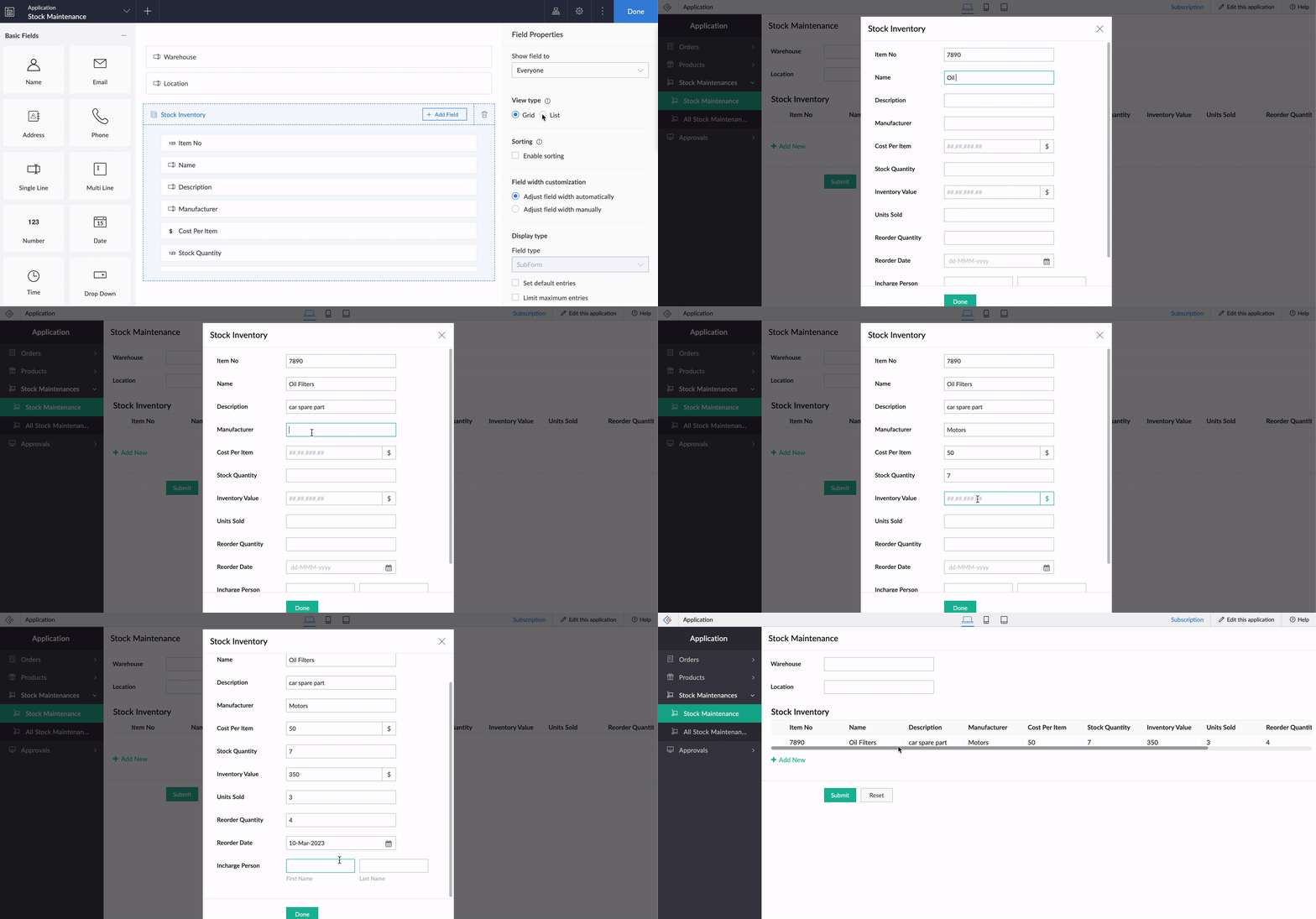
Crucially, it also helps to load subform rows quickly while editing records, by reducing the loading time.
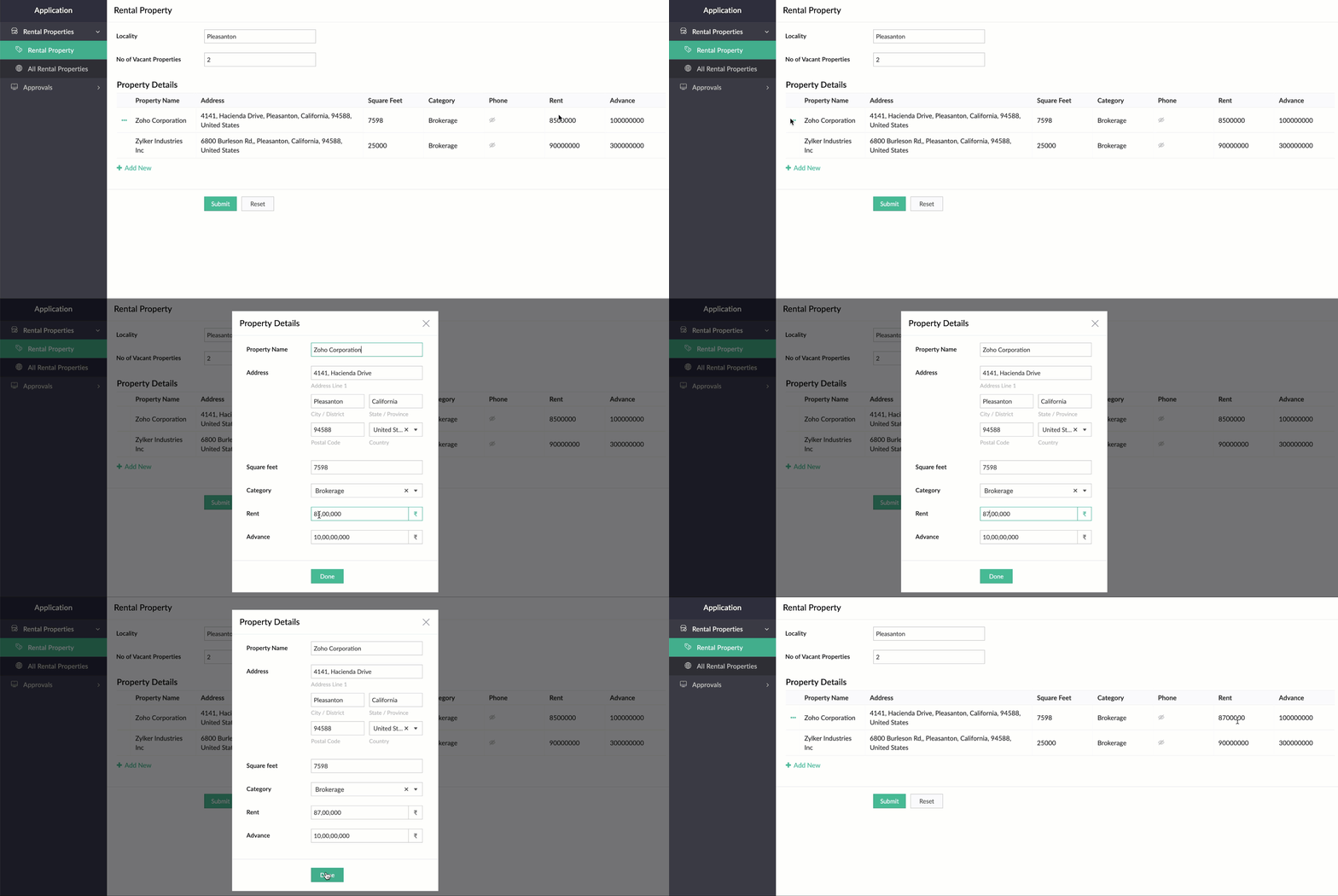
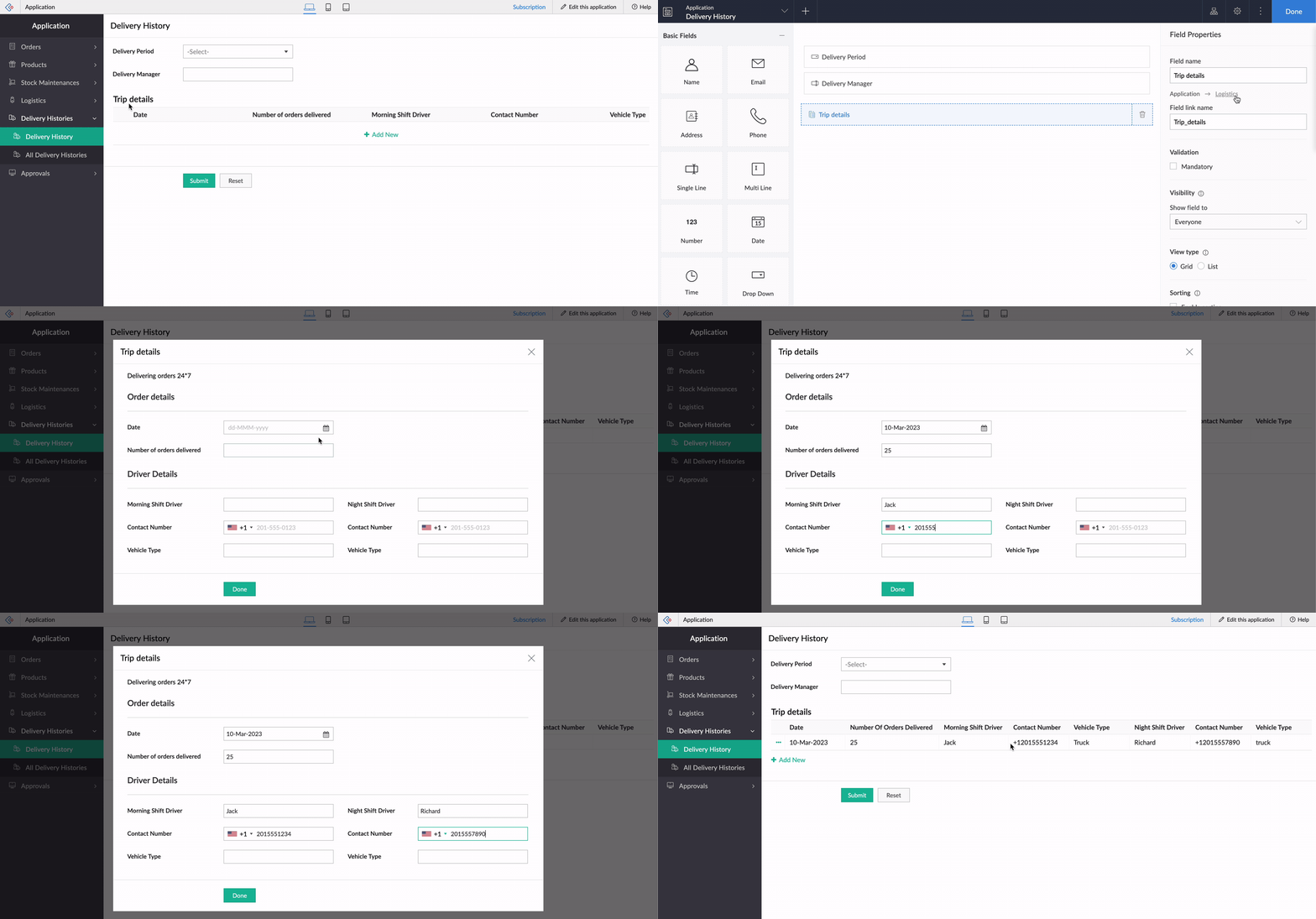
While using an existing form as a subform, the form's exact structure will be replicated in the pop-up, to ensure consistency in the look and feel of the form. To understand this better, let's assume our form has a two-column layout, with
Section
and Note
fields. Now the same customizations will be displayed in the pop-up, too!
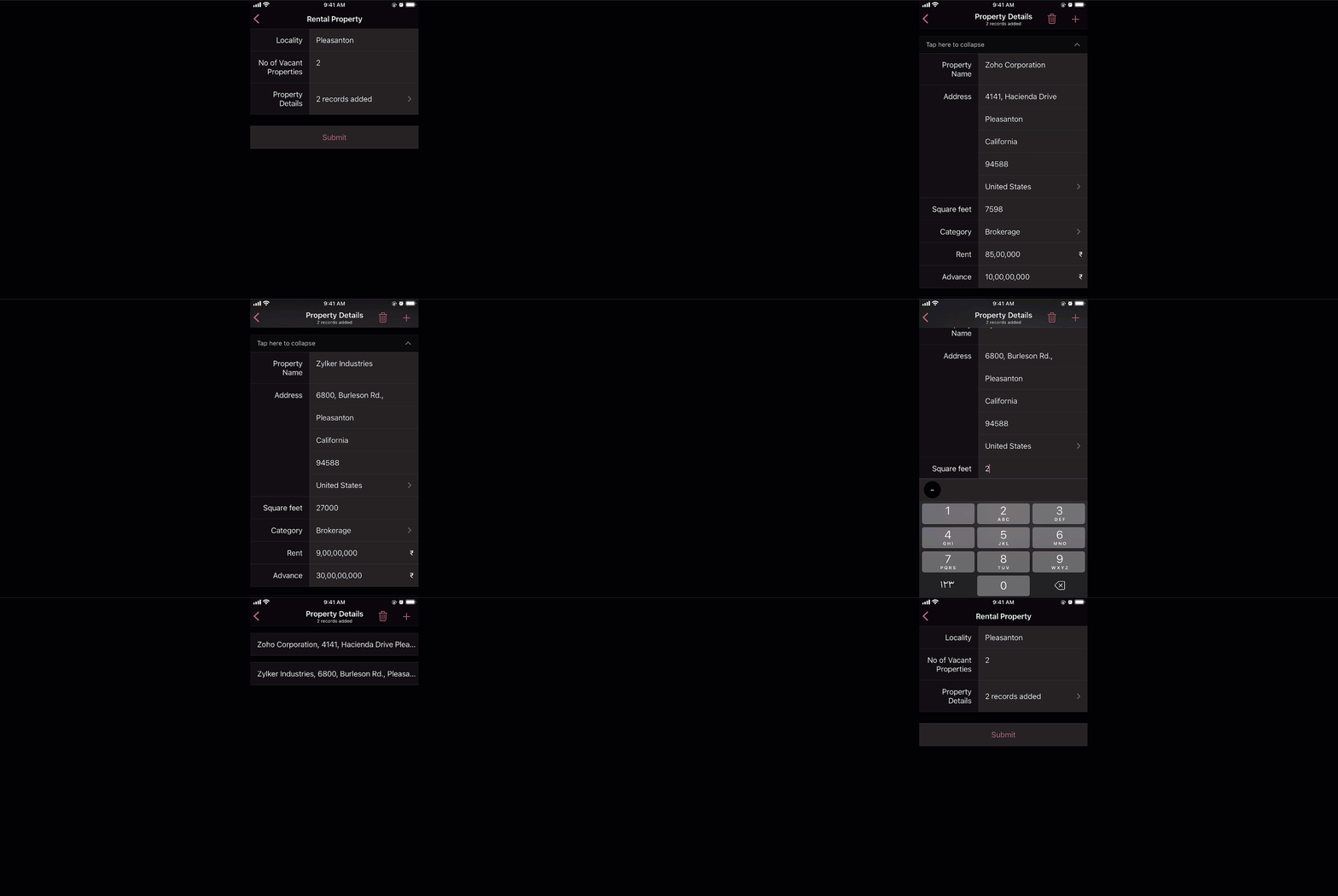
And that's not all—the new List view type is being extended to mobile apps, too. When it's enabled, the subform will be opened in the next screen, where users can add their data. This data will then be added as a subform row.
Custom sorting
Currently, the only sorting option in subforms is
field-based sorting, where you can choose a field based on which rows are sorted, either in ascending or descending order. Though this works well for basic cases, the need may arise in some cases to sort the subform in random order. With the new custom sorting support, you can effortlessly drag and drop subform rows to rearrange them.
To understand how it works, let's consider a task manager working on a To-Do List
form, to plan activities for a current project. For this, they have a main form collecting
project details, date-time,
and
milestones,
and a subform for maintaining the to-do list with the following fields:
Task Name, Description, Category, Status, Deliverables, Priority, and
Deadline. Here, before submitting the list, they want to rearrange some tasks based on their daily routine.
To achieve this, they use the Custom sorting option under
Subform->Field Properties->Sort type.
Now, with custom sorting, all they need to do to reorder the row sequence—both while adding and editing records—is simply drag and drop them in the required position.
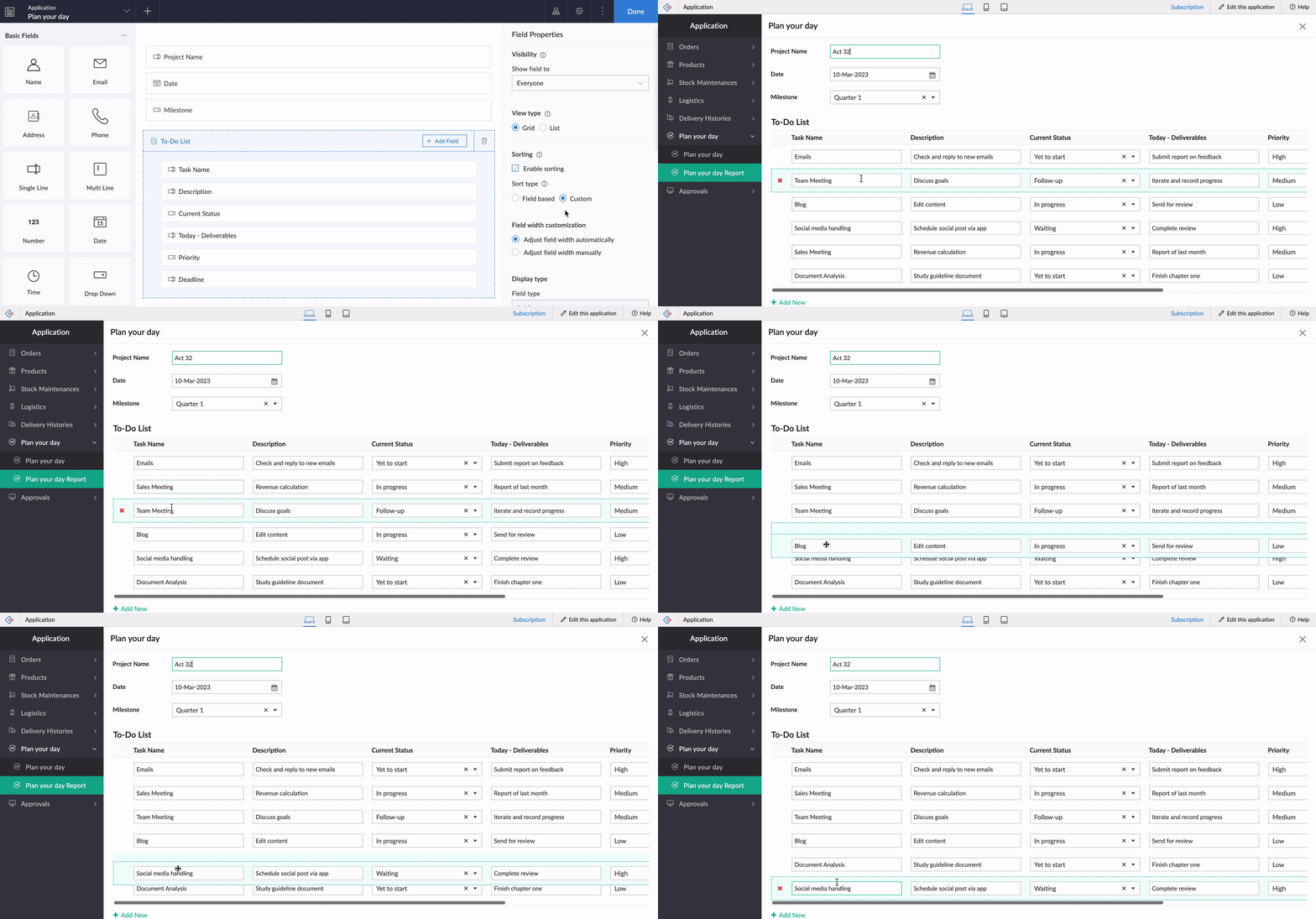
The same order will be retained in reports or while opening the form for updating the list.
Note:
Custom sorting can be used both in List and Grid-type subforms.
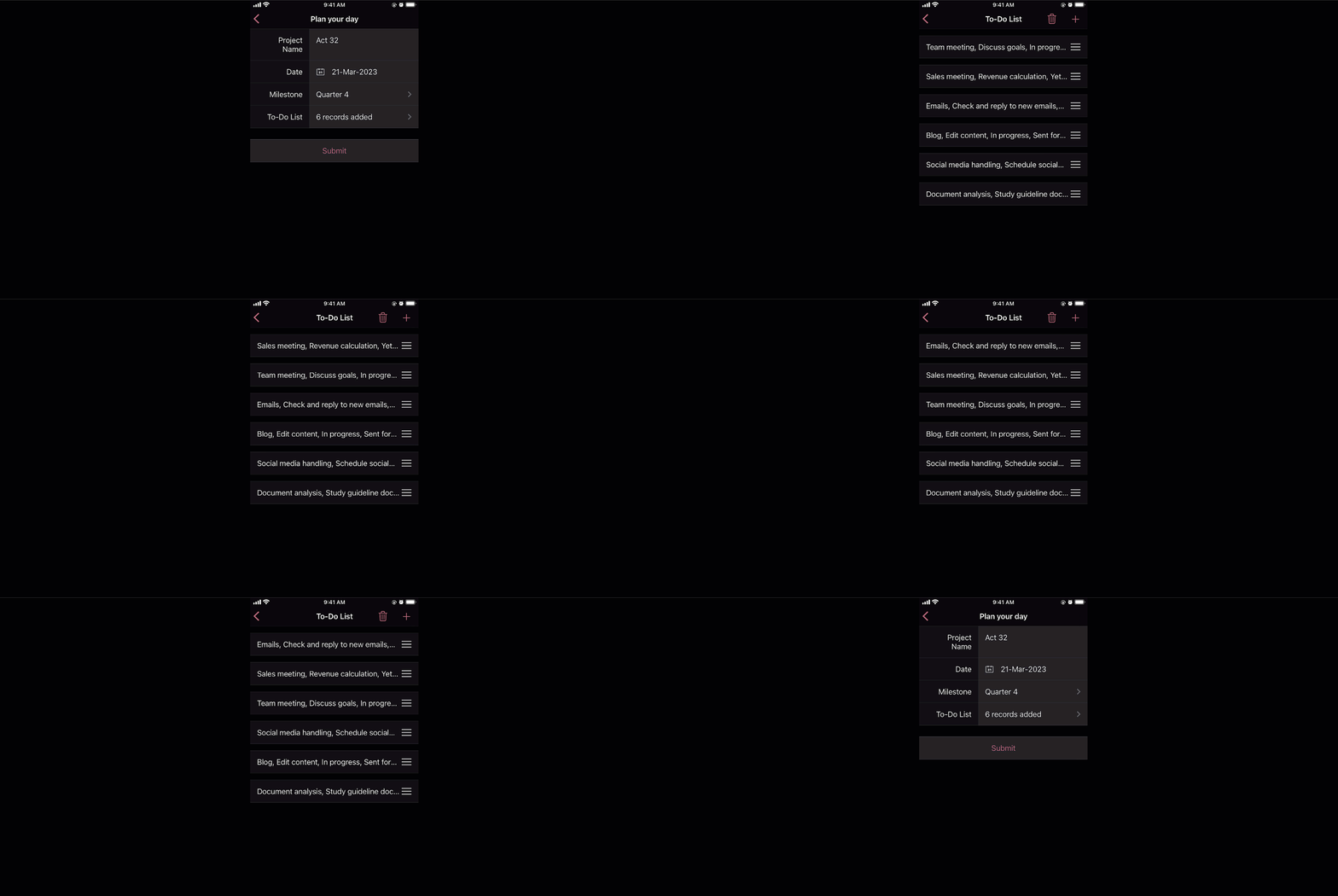
Custom sorting will also be available on the mobile apps and you can effortlessly rearrange fields in subforms.
Deluge tasks for row-level actions
You can use a combination of workflows and Deluge scripts to help your subforms handle complex business logic. With that in mind, we formulated the idea of bringing in actions that help you take control at the row level of subforms.
In the past, you may have come across business scenarios which required you to hide/show or enable/disable a particular field in a specific subform row. Now, with new dedicated Deluge tasks, you can bid adieu to shortcuts and workarounds.
Note:
Deluge tasks can be used both in List and Grid-type subforms.
Enable/disable
The new enable and disable subform Deluge tasks can be used to enable and disable specific fields.
Syntax:
enable row.subform_field
disable row.subform_field
disable row.subform_field
Events:
On add row, On delete row, On user input of subform field
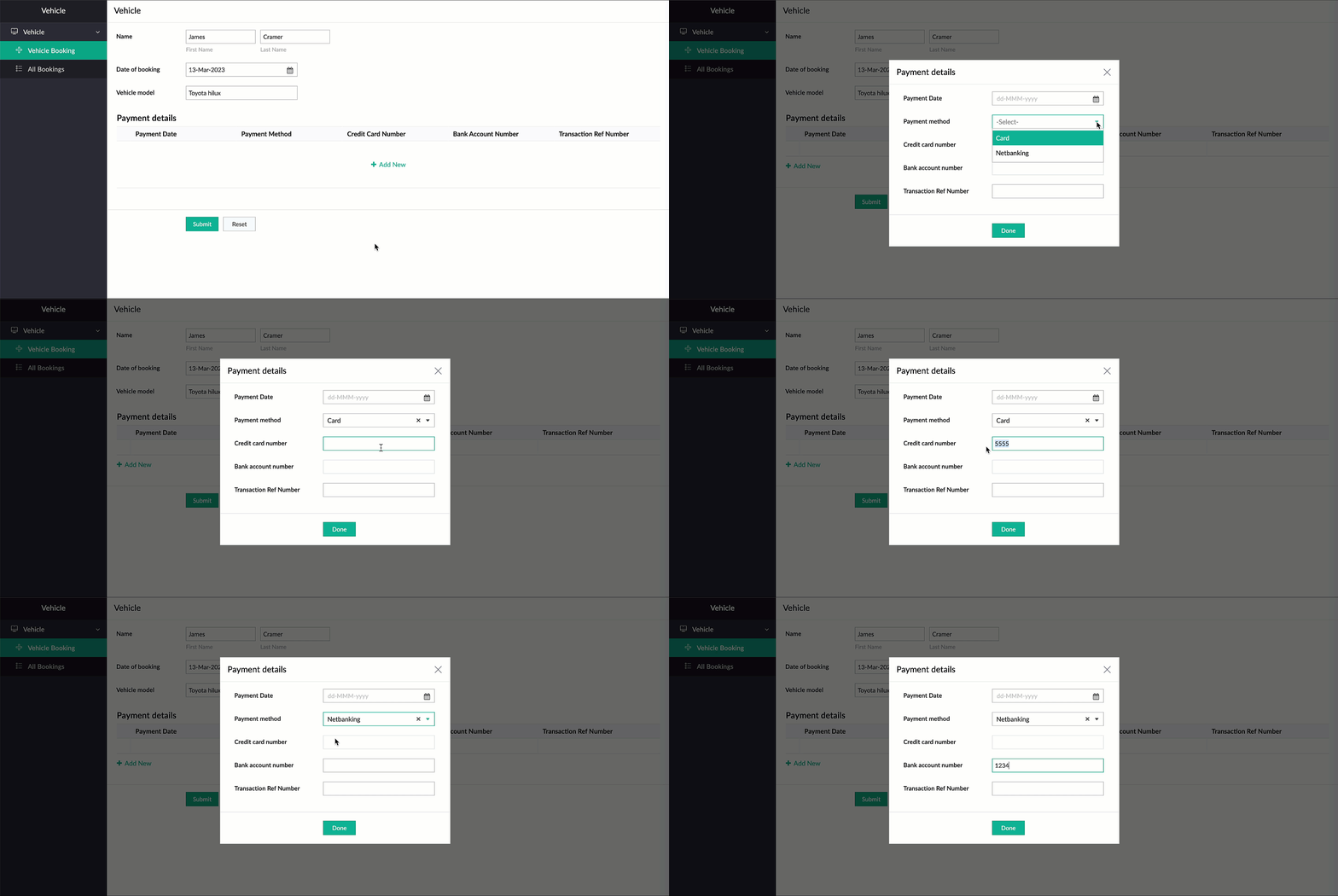
Let's assume a Vehicle form has fields like
Customer Name, Vehicle Model, and Date of Booking,
and a subform to collect payment details with the following fields:
Payment Date, Payment Method, Credit Card Number, Bank Account Number,
and
Transaction Ref Number.
Now, there are two payment options—Card and Netbanking. If Card is chosen, then the Credit Card Number field should be enabled and the Bank Account Number field should be disabled. Similarly, when Netbanking is chosen, then the Bank Account Number field should be enabled and the Credit Card Number field disabled.
Code snippet:
if(Payment_details.Payment_method == "Card")
{
enable row.Credit_card_number;
disable row.Bank_account_number;
}
if(Payment_details.Payment_method == "Netbanking")
{
enable row.Bank_account_number;
disable row.Credit_card_number;
}
{
enable row.Credit_card_number;
disable row.Bank_account_number;
}
if(Payment_details.Payment_method == "Netbanking")
{
enable row.Bank_account_number;
disable row.Credit_card_number;
}
Hide/show
The new show
and
hide subform
Deluge tasks can be used to show and hide specific fields.
Syntax: hide row.subform_field
show row.subform_field
show row.subform_field
Events: On add row, On delete row, On user input of subform field
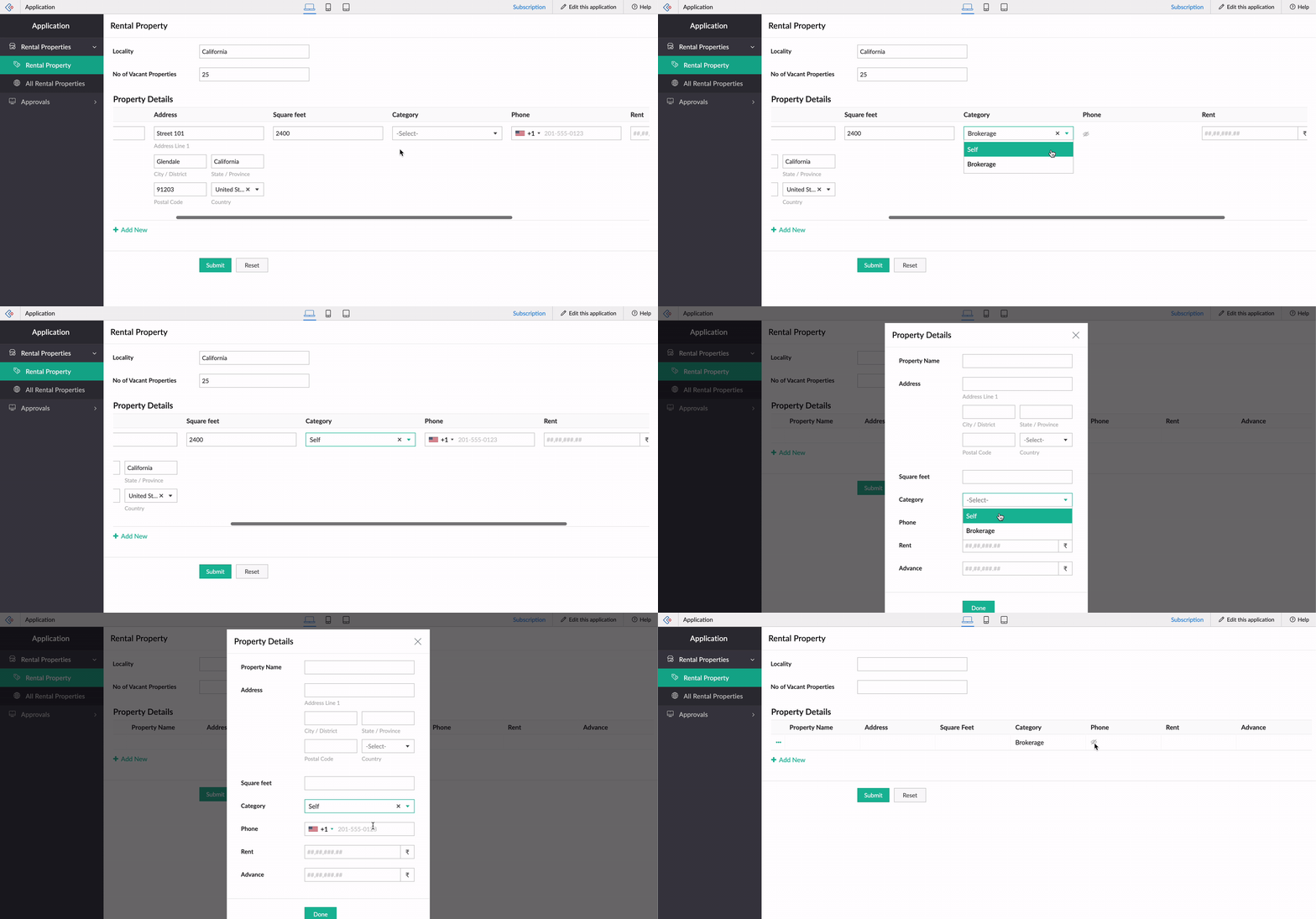
Let's use the example of a rental property manager who needs to keep track of a list of properties that are available in every locality. For this, a form is used for collecting information like Locality and No of Vacant Properties, and a subform will be used to list property details with the following fields: Property Name, Address, Square Feet, Rent, Advance, Category, and Contact Number.
When the category is Brokerage, we need to hide the contact number of the landlord. We can use the new Deluge tasks to achieve this.
Code snippet
:
if(row.Category == "Brokerage")
{
hide row.Phone_Number;
}
else
{
show row.Phone_Number;
}
-----
That's it from us on our subform enhancements! We expect these updates to be rolled out in the upcoming weeks. Once done, we'll pop in a comment below and also update our Release Notes page.
Don't forget—your feedback helps us make Creator better and stronger. We'd love to hear what you think about these updates. Please use the space below or send your feedback to
support@zohocreator.com.
Regards,
Zoho Creator Team
Topic Participants
Ashwin Vishal R
Jean Le Gal
stevesmith41
Darren Burn
Anurag Jaiswal
Sticky Posts
Introducing Zoho Creator's 2025 Release Projection 2
Hello Creators! I'm Prakash, from the Creator product management team, and today I'm delighted to unveil our next set of features as part of Release Projection 2 for 2025. With thoughtful analysis and planning, we've curated powerful new capabilitiesZoho Creator - 2023 Release Projection 1
Hello everyone! A very Happy New Year to you and your family. Hope you're all good and having a great time using Zoho Creator to make your lives easier and your businesses prosper. 2022 was an action-packed year for us at Creator, and we hope to continueZoho Creator User Group meetups in a city near you! - Oct - Nov, 2023
Greetings from the Zoho Creator team! We're hosting a series of Zoho Creator meetups in various cities across the globe, and we'd love to meet you there! Our meetups are a great opportunity to network with industry peers, exchange ideas and best practices,Zoho Creator - 2023 Release Projection 2
Hello everyone! Time truly flies when you're having an incredible journey, and today we mark the completion of an eventful and action-packed six months. It feels like just yesterday when we embarked on this adventure together with the launch of our newUpcoming Updates - August 2022
Hi all, Greetings from the Zoho Creator team! Today we've got news for you on some exciting updates. And rest assured— there’s more to come! In this post, we'll be going over the upcoming features and improvements for this month as mentioned below. A
Recent Topics
Zoho Expense - Report Templates
Hi Expense Team, I do a recurring trip once every week which has the same cost: Per diem Milage Toll Payment It would be great if there was a feature which allowed me to clone a previously submitted report or create a template reports. This would saveHow to add tabular data when execute Add Record API
Hi everyone! I was send api updateRecord follow by this request url : https://people.zoho.com/people/api/forms/json/<formLinkName>/updateRecord with parameters "inputData", "tabularData", "recordId". Ex picture below And response success: But. When ITip #51- Centralized Contact Management for Better Remote Support- 'Insider Insights'
For our final topic of November, we’re diving into one of the most helpful features in Zoho Assist, the Contacts section on Zoho Assist;s dashboard. Whether you’re managing multiple clients, tracking past sessions, or simply looking to streamline yourUsing gift vouchers
We would like to be able to offer a limited number of gift vouchers, of varying values, to our customers, and are looking for the best way to do this. We have looked at Coupons and Gift Certificates, but neither seem to fit the bill perfectly. Coupons:Say Hello to Telephony in Zoho FSM
Zoho FSM now brings complete telephony support so your team can manage inbound and outbound calls without switching tabs. Faster responses, smarter routing, and total call visibility—all in one place. Choose the telephony setup that works for you Zoho’sE-Invoicing in Belgium with Zoho Inventory
Starting January 1, 2026, Belgium is introducing mandatory electronic invoices (e-invoicing) for all B2B transactions between VAT-registered businesses. Invoices and credits notes must be exchanged in a prescribed digital format. How E-Invoicing WorksEmployee ID is not correct in get records api V2 for leave
Hi Team, We are facing an issue when calling the Get Records API V2. The employee.id returned in the response is not the actual employee record ID in Zoho People. As a result, our integration is forced to make an additional Get Record API call for everyFormatting Mailing Labels
I want to use the "Print Mailing Labels" function on the drop down list, but I am not seeing a way to change the formatting on the mailing labels. At the moment, the information that appears on the mailing labels ARE NOT mailing addresses, but randomZoho People. Updating TabularData
I am trying to update tabular data in the record. I always have the same response. I have checked many times. Section ID is correct. May be something wrong with request structure itself. Can someone help me. Body content type: form urlencoded query paramsCanvas View - Print
What is the best way to accomplish a print to PDF of the canvas view? Latest update (27th November 2025): We are excited to announce that the Canvas Print View is now available! We encourage you all to try it out and share your feedback with us. LearnZia Conversation Summary: Context at a glance for every customer interaction
Hello everyone! Every customer conversation tells a story—but in CRM, that story is rarely in one place. A sales rep moving between multiple leads has to reopen long email threads, check call remarks, and revisit meeting notes just to remember what wasHow to set a fixed width of column/cells
Is there a way to set a 'fixed' width for cells in zoho sheet? I know how to adjust the size of the colums.... but after I past a large block of text into a cell, it expands the cell size again. (yes, I have turned off word wrap) How can I set a fixed width so the cells don't change size each time I add data to a cell? Thanks.Workdrive Oauth2 Token Isn't Refreshing
I have set up oauth for a bunch of zoho apis and have never had a problem with oauth. With workdrive i am using the exact same template i usually use for the other zoho apps and it is not working. All requests will work for the first hour then stops soSingle Portal for Multiple Apps
Hello, I'm just getting started with Zoho and I'm very overwhelmed. I am currently using the free trial of Zoho One, but if I can figure it out, I intend to upgrade to the paid version. Zoho One, of course, gives me access to an entire suite of services/applications. One of the things I'd like to do is have a single place for clients (customers?) to log in and view current projects, invoices, contact information, etc. A single login for my clients. A single portal. I've come across documentation【開催報告】 大阪 ユーザー交流会 2025/11/20(木)Zoho CRM Plus 活用のアイデアとデータの“見える化”
皆さま、こんにちは。コミュニティチームの中野です。 11/20(木)に、大阪 ユーザー交流会を開催しました。本投稿では、その様子をお届けします。 当日の登壇資料などもこちらに共有しますので、参加できなかった皆さまもご参照ください。 (Zoho 社員セッションの登壇資料については、11/28(金)に開催予定の東京回の開催報告で共有いたします) 今年2回目の開催となる大阪 ユーザー交流会では、株式会社KDDIウェブコミュニケーションズ 山田さんによる Zoho CRM Plus の事例セッションのほか、「ZohoEvery rating counts: Shaping customer experience
We are back to that beautiful time of the year. It is the season to reflect, be thankful, and appreciate everything that has happened throughout the year. Thanksgiving is a time we connect with our family, friends, and relatives to strengthen relationships,How to remove duplicate contacts
Custom Field for Subscription
Hi, I can't find a way to add a custom field (to contain a license key generated from our software) against a subscription? Is the only place to add this information in the Invoice module (as custom field for invoice)? When a customer views his subscription via the customer portal, there appears no way to display a license key for them? The invoice is not the natural place to store a license key for a particular subscription, so where else can this be stored and displayed?Custom View and Custom Fields on Zoho Books
Hi, I have some custom fields on Estimates and Invoices. I also use Custom Views so I can have a lot of information at a glance. I want to include my custom fields as columns in my custom views of estimates / invoice, but it looks like is not possible.Dropdown data depends on filters in another field.
In my quote form I have a lookup field called Reseller that pulls from Accounts. I would like it to pull from Accounts, but only those accounts with an account field 'Type' where that is 'Reseller'. Does anyone know a way to do this? Similarly, I'd likeIs it possible to adjust the web browser tab title (when a ZoHo Desk ticket is opened)
Hi All, When I open a ZoHo Desk ticket in a web browser, the tab title (text that appears at the top of the browser tab) uses the logic: *company icon picture* (xxxx) #ticket number - company name See below (highlighted in red) for reference. CompanyCollections Management: #7 Common Mistakes during Payment Collection
Payment collection may appear straightforward in most cases. Still, as your customer base expands and transaction volume increases, it becomes clear that even small inefficiencies can lead to delayed payments, increased support load, or even revenue loss.Rename Record Summary PDF in SendMail task
So I've been tasked with renaming a record summary PDF to be sent as part of a sendmail task. Normally I would offer the manual solution, a user exports the PDF and uploads it to a file upload field, however this is not acceptable to the client in thisText/SMS With Zoho Desk
Hi Guys- Considering using SMS to get faster responses from customers that we are helping. Have a bunch of questions; 1) Which provider is better ClickaTell or Screen Magic. Screen Magic seems easier to setup, but appears to be 2x as expensive for United States. I cannot find the sender id for Clickatell to even complete the configuration. 2) Can customer's reply to text messages? If so are responses linked back to the zoho ticket? If not, how are you handling this, a simple "DO NOT REPLY" asCustom Field in Zoho Projects pulling into Analytics
We have a client that we have built our their new business process using Zoho Projects, and we have build a lot of custom fields with their their Projects where they are capturing specific data points that we want to be able to track and pull data, asMarketer's Space - Holiday season email marketing tips you should know
Hello Marketers! Welcome back to another post in Marketer's Space! 'Tis the season—that time of the year everyone eagerly anticipates. While most look forward to relaxing, marketers will be super-busy from late November to early January. Mistakes canZia Competitor Alerts made easy with Zia's suggestions
Hi everyone, In addition to the existing manually added competitors, Zia will now find your competitors for you - instantly. Earlier, you had to identify competitors through research manually, support tickets, or tradeshows—a time-consuming process thatAdd Custom Field Inside Parts Section
How to Add Custom Field Inside Parts Section in Workorder like Category and Sub- CategoryZoho CRM Community Digest October 2025 | Part 2
Hello Everyone! From new mobile capabilities and smarter integrations to real-world workflow fixes and developer insights, all the highlights from the second half of October is covered right here. Let’s dive in. Product Updates: Zoho CRM Mobile Updates:Understanding Zoho Contracts
Effective contract management relies on systems that are structured, organized, and reliable. Every feature, workflow, rule, and restriction in Zoho Contracts are designed the way they are to ensure consistency, compliance, and control across every stageTip of the Week #76– Automate your inbox during vacation in Zoho TeamInbox
When you're on vacation or away from your desk, the last thing you want is for important emails to be missed or left unanswered. The good news is, you can easily set up rules in Zoho TeamInbox to assign incoming messages automatically to a teammate who'sDomain restriction for User Management actions in Zoho One
Greetings, Zoho One Admins! To strengthen account security further and safeguard user management settings, we are imposing domain-based restrictions for user account-focused admin actions in Zoho One. In addition to password reset of user, organizationZoho Mail iOS app update: Signature
Hello everyone! In the latest version(3.1.7) of the Zoho Mail app update, we have brought in support to create, edit and remove signature within the app. You can create signature from the compose screen as well as from within the Settings module(insideDesktop app doesn't support notecards created on Android
Hi, Does anybody have same problem? Some of last notecards created on Android app (v. 6.6) doesn't show in desktop app (v. 3.5.5). I see these note cards but whith they appear with exclamation mark in yellow triangle (see screenshot) and when I try toApproval Button in Subform
Hi Team, I’m working on a subform-based requirement where users will submit requests, and these requests must go through approval by multiple team managers. Each line item in the subform needs to be individually approved or declined based on the user'sSetting checkbox value on template in Sign from Creator
Good day, Please help me understand how do I set a tick from a checkbox in Creator into a checkbox on a Sign template. Below is the only values on the Sign template and the code from Creator, "field_boolean_data": {}, "field_date_data": {}, "field_radio_data":Zoho Projects - Unread Comment Icon
Hi Projects Team, It would be great if there was a notification I con on the comments icon so it's easy to see which tasks have new comments. Something like a red circle with a number of unread comments would be great. Thanks for considering my feedZoho Projects - Update Feed via API
Hi Projects Team, Please consider adding an API to allow update and retrieval of messages to the Feed. Thank youAutomated log-out/session end
I'm concerned about security of our data. Is it possible to set an automatic time-out for user sessions on Zoho CRM, after a certain period of inactivity or when the session reaches a certain duration (12 hours perhaps)?Subform auto populate values
Hi Team, I’m trying to retrieve values from Zoho People using API functions and dynamically populate them into a subform. For example, I’ve created a form with several fields that users will fill out. Based on their input, I need to fetch records fromNext Page