Automate a CRM workflow with Zoho Cliq

Imagine having a virtual assistant that provides rapid updates to your team through Zoho Cliq, helping you stay on top of your sales processes. After returning from a client meeting filled with updates and action items, managing this information together can feel overwhelming, especially when juggling multiple roles and responsibilities.
Business benefits
- Notification of deal closures: Ensures the sales team is promptly informed when a deal is closed to celebrate wins, update forecasts, and maintain team morale.
- Product and development feedback: Quickly communicate client requests or demo glitches to the product and development teams to enhance product offerings and resolve issues.
- Managerial updates: Keep managers in the loop with meeting outcomes to strategize the next steps or escalate issues.
- Syncing with the team: Link CRM updates directly to team chat channels to ensure all team members are updated about lead statuses. This reduces the need for multiple app switches, enhances real-time collaboration, coordinates efforts, and aligns strategies.
Let's examine an example of Zoho CRM workflow automation for a new lead created with a Zoho Cliq bot.
Step 1 : Bot creation
- Navigate to the top right corner of your profile, click on it, and select "Bots and Tools".
- To create a new bot, click on "Create Bot" on the right under the "Bots" section.
- Provide a name and description for the bot, then enable channel configuration settings during setup.
Step 2 : Bot webhook URL retrieval
- Webhook tokens are listed under the Bots & Tools section along with all the other internal tools. When navigated to the webhook tokens module, you will be required to authenticate using 2FA, verify your identity, and click Continue.
- After authentication, you can create, edit, and manage your Webhook Tokens as needed.
- Generate a webhook token and retrieve the bot's webhook URL as specified below.
ⓘ Learn more about webhook tokens in Zoho Cliq
Step 3 : Configuration of CRM workflow rule
Workflow rules in Zoho CRM are actions (email notifications, tasks, and field updates) executed when certain specified conditions are met. These rules automate sending email notifications, assigning tasks, and updating specific fields of a record when a rule is triggered.
ⓘ Learn more about configuring workflow rules in Zoho CRM
Similarly, you can set up and configure new workflow rules for events like the update of a lead status or the assignment of a lead to any sales representative (Lead owner ).

Step 4 : Setting up bot incoming webhook handler
- Go back to Cliq and find the bot you created under the "Bots and Tools" section. Then, access the bot's incoming webhook handler.

- The incoming webhook handler is designed to allow third-party services, such as Zoho CRM, to post messages directly to your bot.
- Copy and paste the below code and click "Save".
Pre-requisites:
To post an alert to the channel, you need the unique names of both the channel and the bot, as we are using zoho.cliq.postToChannelAsBot deluge task in the code below. Follow the steps to retrieve these names.
How to obtain or locate the channel unique name in Cliq?
- Navigate to the top right corner of the preferred channel and locate the three dots. Click it.
- In the menu that appears, select "Channel info" and a pop-up will open, displaying detailed channel information. Hover over the "Connectors" section and click it.
- Under "API Parameters," you will find the channel unique name.
How to obtain or locate the bot unique name in Cliq?
- Navigate to "Bots & Tools", and under the bots section, select the bot you prefer.
- Copy the API endpoint URL. The bot's unique name is located after "bots/" and before the next slash "/".
- Example:
- URL: https://cliq.zoho.com/company/2345678/api/v2/bots/crmupdatesincliq/message
- The bot unique name in the above example is crmupdatesincliq
- info params;
- eventType = params.get("event-type");
- leadName = params.get("Lead Name");
- company = params.get("Company");
- leadStatus = params.get("Lead Status");
- title = params.get("Title");
- email = params.get("Email");
- phone = params.get("Phone");
- leadSource = params.get("Lead Source");
- industry = params.get("Industry");
- leadId = params.get("Lead ID");
- if(eventType.equalsIgnoreCase("Lead Created"))
- {
- response = {"text":"🎯Heads up! A new lead has been successfully added to your list. Prepare to engage and convert!","card":{"title":"🚀 New Lead Added!","thumbnail":"https://i.imgur.com/jDagRms.png","theme":"modern-inline"},"slides":{{"type":"text","title":"Lead Details :","data":"🏆 Lead Name : " + leadName + "\n💼 Company : " + company + "\n⏱️ Lead Status : *" + leadStatus + "*"},{"type":"label","title":"","data":{{"📧 *Email*":email},{"☎️ *Phone*":phone},{"🏢 *Industry*":industry},{"📣 *Lead Source*":leadSource}}}}};
- // Use zoho.cliq.postToChannelAsBot(${channel_unique_name}, ${bot_unique_name}, response);
- zoho.cliq.postToChannelAsBot("clientleadupdates","crmupdatesincliq",response);
- }
- if(eventType.equalsIgnoreCase("Lead Assigned"))
- {
- leadOwner = params.get("Lead Owner");
- response = {"text":"🚀📈Promising prospect assigned to " + leadOwner + ". Opportunity awaits!","card":{"title":"🎯 New lead generated","thumbnail":"https://i.imgur.com/UisAlKn.png","theme":"modern-inline"},"slides":{{"type":"text","title":"Lead Details :","data":"🏆 Lead Name : " + leadName + "\n💼 Company : " + company + "\n⏱️ Lead Status : *" + leadStatus + "*"}}};
- zoho.cliq.postToChannelAsBot("clientleadupdates","crmupdatesincliq",response);
- }
- if(eventType.equalsIgnoreCase("Lead Status Updated"))
- {
- response = {"text":"✅💼 Great news! Lead status is now Qualified. Ready to engage!","card":{"title":"✅ Lead qualified","thumbnail":"https://i.imgur.com/d2jhClm.png","theme":"modern-inline"},"slides":{{"type":"text","title":"Lead Details :","data":"🏆 Lead Name : " + leadName + "\n💼 Company : " + company + "\n⏱️ Lead Status : *" + leadStatus + "*"}}};
- zoho.cliq.postToChannelAsBot("clientleadupdates","crmupdatesincliq",response);
- }
- return Map();
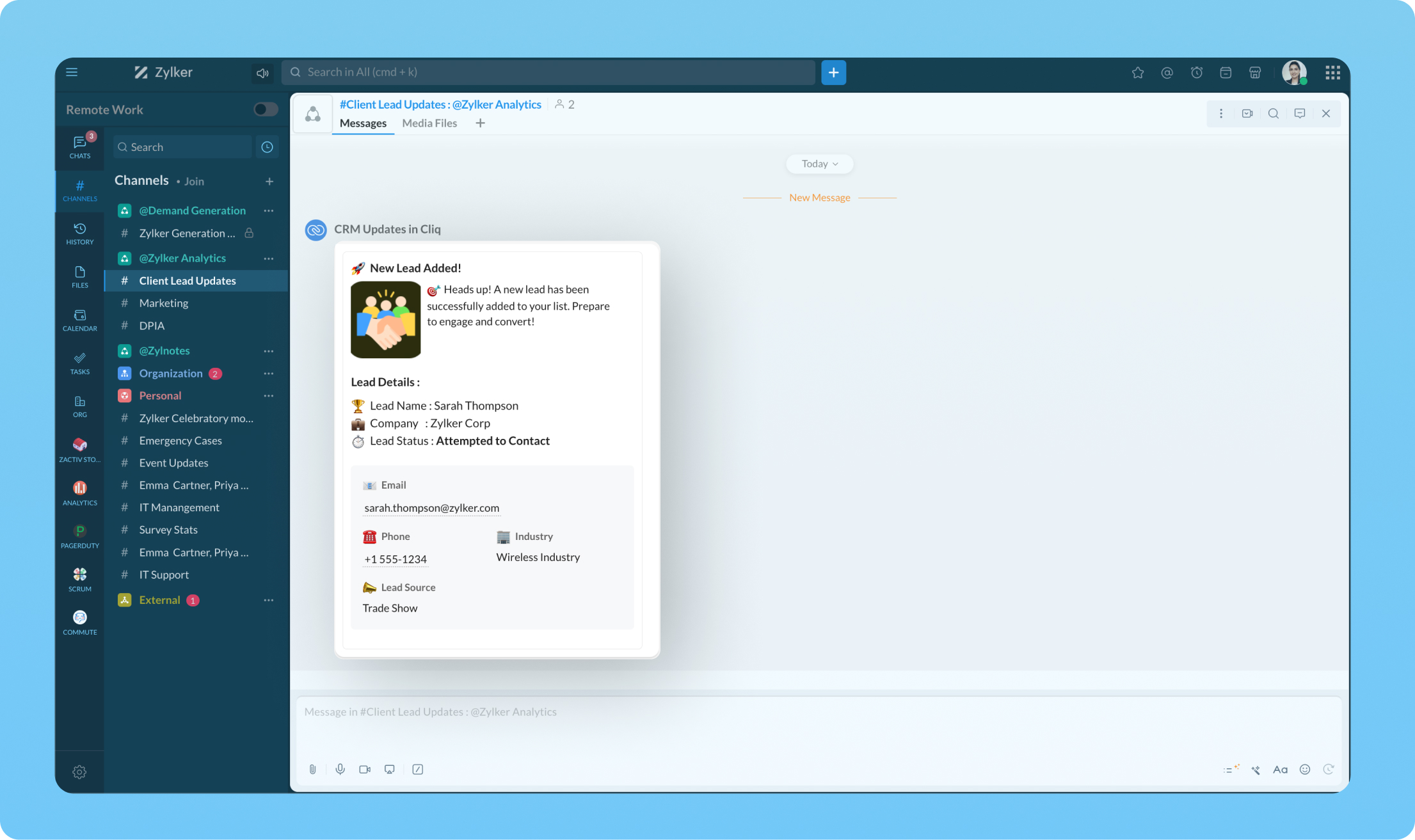
Transform your workflow experience with ease! Imagine having the ability to set up custom automation that sends instant messages to your team channels whenever a deal is sealed or a new lead steps on board.
We're here to help, so don't hesitate to reach out to support@zohocliq.com with any questions or if you need assistance in crafting even more tailored workflows.
Topic Participants
Harsha SS
Sticky Posts
Cliq Bots - Post message to a bot using the command line!
If you had read our post on how to post a message to a channel in a simple one-line command, then this sure is a piece of cake for you guys! For those of you, who are reading this for the first time, don't worry! Just read on. This post is all about howAdd Claude in Zoho Cliq
Let’s add a real AI assistant powered by Claude to your workspace this week, that your team can chat with, ask questions, and act on conversations to run AI actions on. This guide walks you through exactly how to do it, step by step, with all the codeAutomating Employee Birthday Notifications in Zoho Cliq
Have you ever missed a birthday and felt like the office Grinch? Fear not, the Cliq Developer Platform has got your back! With Zoho Cliq's Schedulers, you can be the office party-cipant who never forgets a single cake, balloon, or awkward rendition ofAutomate attendance tracking with Zoho Cliq Developer Platform
I wish remote work were permanently mandated so we could join work calls from a movie theatre or even while skydiving! But wait, it's time to wake up! The alarm has snoozed twice, and your team has already logged on for the day. Keeping tabs on attendanceCustomer payment alerts in Zoho Cliq
For businesses that depend on cash flow, payment updates are essential for operational decision-making and go beyond simple accounting entries. The sales team needs to be notified when invoices are cleared so that upcoming orders can be released. In contrast,
Recent Topics
Introducing a smarter, faster, and more flexible charting experience
Hello Zoho Sheet users, We're delighted to share the latest news about a major update to charts in Zoho Sheet! The new version supports dynamic data ranges, granular styling options, faster loading, and other interesting enhancements that allow you toHow to create a new Batch and update Stock via Inventory?
Hi everyone, We are building an automation where a user enters batch details (Batch Number, Mfg Date, Expiry, and Quantity) into a Custom Module. I need this to trigger an API call to Zoho Inventory to: Create the new batch for the item. Increase theCan't change form's original name in URL
Hi all, I have been duplicating + editing forms for jobs regarding the same department to maintain formatting + styling. The issue I've not run into is because I've duplicated it from an existing form, the URL doesn't seem to want to update with the newHow do I open MSG files in Microsoft Word?
If you want to open MSG files in Microsoft Word is not natively supported, as MSG is an email file format created by Microsoft Outlook. However, there are professional approaches to access MSG content in Word. First, open the MSG file in Outlook and copyUnable to charge GST on shipping/packing & Forwarding charges in INDIA
Currently, tax rates only apply to items. It does not apply tax to any shipping or packing & forwarding charges that may be on the order as well. However, these charges are taxable under GST in India. Please add the ability to apply tax to these charges.How to add packing & forwarding charge in purchase order & quotation???
Hello Zoho Team I have just started using Zoho for my company and I wanted to make purchase order. My supplier charges fix 2% as packing & forwarding on Total amount of material and then they charge me tax. For example, Material 1 = 100 Rs Material 2How to create a boxplot chart in Zoho Analytics?
Hi, I'm looking forward to making a boxplot in Zoho Analytics, either with all my data or with a time segmentation. No documentation or YouTube video explaining that was found. I guess this is a feature gap. How feasible would it be to add this to Analytics?What are the create bill API line item requiered fields
While the following documentation says that the line items array is requiered it doesn't say what if any files are requiered in the array. Does anyone know? API documentation: https://www.zoho.com/inventory/api/v1/bills/#create-a-bill I'm trying to addWorkDrive issues with Windows Explorer Not Responding
We are using WorkDrive to collaborate on editing video content. We have a lot of files and quite a few are a few gigs. Recently anytime I try and work with the files Explorer freezes for a couple minutes whether it's dragging the files into Premiere orConnecting Zoho Inventory to ShipStation
we are looking for someone to help connect via API shipStation with Zoho inventory. Any ideas? Thanks. UriWhere is the settings option in zoho writer?
hi, my zoho writer on windows has menu fonts too large. where do i find the settings to change this option? my screen resolution is correct and other apps/softwares in windows have no issues. regardsUsing IMAP configuration for shared email inboxes
Our customer service team utilizes shared email boxes to allow multiple people to view and handle incoming customer requests. For example, the customer sends an email to info@xxxx.com and multiple people can view it and handle the request. How can I configureWhen Does WorkDrive integrate with Books?
When Does WorkDrive integrate with Books?POP mailbox limits
If I am accessing a remote POP mail server using Zoho Mail is there a mailbox quota for the account or is it all related to my mail account storage limits?Warranty Service and Repair in Zoho FSM
Hi There, We are a retail store that sells products and also performs installations and repairs. Our field technicians handle this work. Some repairs are covered by manufacturers, who reimburse us for both parts and labour. In these cases, we performZoho Sheet for Desktop
Does Zoho plans to develop a Desktop version of Sheet that installs on the computer like was done with Writer?WhatsApp phone number migration
Hi @Gowri V and @Pheranda Nongpiur, Thanks for implementing the promised enhancements to the integration between Zoho CRM and WhatsApp. The previous discussion has been locked, so I'm opening this new one. I am copying below a specificWebDAV support
I need WebDAV support so that I can upload/download (and modify) documents from my local file system. Is anything planned in his direction?Suggestions for Improved Table Management and Dashboard Filter Controls in Zoho Analytics
Dear Zoho Analytics Community, I hope you are doing well. I would like to share a few suggestions based on issues I am currently experiencing while working with visualizations and dashboards. Firstly, when I create a new visualization using the Sales-OrderSPF: HELO does not publish an SPF Record
I am using Zoho mail. Completed all of the required prerequisites from the dashboard to avoid any issues with mail delivery. But when checking on mail-tester.com getting the following error. Can anyone help me solve this?How do I create an update to the Cost Price from landed costs?
Hi fellow Zoho Inventory battlers, I am new to Zoho inventory and was completely baffled to find that the cost price of products does not update when a new purchase order is received. The cost price is just made up numbers I start with when the productPrice Managment
I have been in discussions with Zoho for some time and not getting what I need. Maybe someone can help explain the logic behind this for me as I fail to understand. When creating an item, you input a sales rate and purchase rate. These rates are justActual vs Minimum
Hi all, I am sure I am not the only one having this need. We are implementing billing on a 30-minute increment, with a minimum of 30 minutes per ticket. My question is, is there a way to create a formula or function to track both the minimum bill vs theGenerate leads from instagram
hello i have question. If connect instagram using zoho social, it is possible to get lead from instagram? example if someone send me direct message or comment on my post and then they generate to leadKaizen #234 - Automating Deal Handoff with Zia Assistant API, Workflow, Deluge, and Widget in Zoho CRM
Hello all! Welcome back to a fresh Kaizen week. In this post, we will explore how to automate the deal handoff process in Zoho CRM using Zia Assistant API + Workflow + Deluge + Widgets. Here’s how the final output looks when a deal is reassigned 1. DealHow do you print a refund check to customer?
Maybe this is a dumb question, but how does anyone print a refund check to a customer? We cant find anywhere to either just print a check and pick a customer, or where to do so from a credit note.Ability to assign Invoice Ownership through Deluge in FSM
Hi, As part of our process, when a service appointment is completed, we automated the creation of the invoice based on a specific business logic using Deluge. When we do that, the "Owner" of the invoice in Zoho FSM is defaulted to the SuperAdmin. ThisAll new Address Field in Zoho CRM: maintain structured and accurate address inputs
Availability Update: 29 September 2025: It's currently available for all new sign-ups and for existing Zoho CRM orgs which are in the Professional edition exclusively for IN DC users. 2 March 2026: Available to users in all DCs except US and EU DC. LatestEnhancement to ICR’s field prompting: Preferred data extraction using advanced field prompting
Dear Customers, We hope you’re well A quick background Intelligent Character Recognition (ICR) comes as part of Zia’s optical recognition capability called Zia Vision. When we introduced it last April, the data extraction was training-based and was applicableSee a list of all records enrolled in a cadence?
I am looking for a way to see a list of all leads or contact currently enrolled in a cadence. I do not see any way to do this through the cadence UI.Limitation in chart of accounts
There is a limitation of 4000 accounts in chart of accounts Zoho needs to remove this limitHow do I change the account bank charges are charged to?
I want bank charges charged to my Credit Card Fees account. Is there a way to do this?Real signature in Zoho Expense PDF report ?
Hello ! Is there a way to put a real signature on the signature line when a PDF report is generated in Zoho Expense? Through Zoho Sign or another way? Can't seem to make it work.Copy paste settings
Hello all i have 2 organizations running in ZOHO books in one organization i have customised Tax rates, codes and customized templates instead of manually doing again in org 2 can i have some shortcut to copy paste or export and import??Custom TDS on Vendor Credits via API
Hi, We are using Zoho Books APIs for posting Bills and vendor credits. We are unable to post custom TDS amount posting vendor credits. Can you please share the API spec and Payload that need to be sent for Custom TDS for Vendor Credits."Unlink" Advance from Bill without Deleting the Payment Record
I am writing to highlight a significant workflow issue in Zoho Books (India Edition) regarding Vendor Advances and Bills. The Scenario: I recorded an Advance Payment to a vendor. I matched/reconciled this payment in the Banking module. I received a BillAdvance Payment Record Removed When Deleting Applied Credit from Bill
Hello, So while working with vendor advance payments, I noticed that removing the applied credit from a bill also removes the corresponding entry from the Payments Made section. What I did : Recorded an advance payment to a vendor through Payments Made.What is the best way to convert MSG file to Word format?
The best way to convert MSG files to Word format is by using a reliable and professional tool Aryson MSG file Converter. Manual methods are often time-consuming and may not preserve email formatting, attachments, or metadata accurately. In contrast, ArysonAddress Typeahead Extension for Zoho Books
I installed the Address Typeahead extension for zoho books but when I went to configure it, it said that that version was deprecated. Is there a newer version somewhere?Zoho Projects : Task should auto-update to 'In Progress' if timer started
Namaskaram. Right now, if a Task's timer is started, the Task stays in 'Not Started' status. One has to manually update it to 'In Progress'. From a #uxdesign standpoint, it is an unnecessarily two step process to start working on a task. It would be better that, if I start the timer on a task, it should automatically change to 'In Progress' status. Crafted with ❤️ Zoho Gurus | Zoho One Practice Team @ CubeYogi Zoho Authorised Partner | 7+ Yrs | 200+ Projects | 100+ CustomersNext Page