Automating Attendance Tracking with Zoho Cliq Developer Platform
I wish remote work were permanently mandated so we could join work calls from a movie theatre or even while skydiving! But wait, it's time to wake up! The alarm has snoozed twice, and your team has already logged on for the day.

How does this solution benefit a business?
- Real-time reminders reduce instances of ghost check-ins and ensure accurate recording of everyone's logged hours.
- Essential for attendance tracking, payroll accuracy, compliance with labour laws, and audits.
- The entire team stays informed, fostering a cohesive workflow that eliminates the need for micromanagement.
Before beginning to script the code below, we must create a connection in Cliq with Zoho People. Once a connection is created and connected, you can use it in Deluge integration tasks and invoke URL scripts to access data from the required service.
Create a Zoho People default connection with any unique name with the scopes - ZohoPeople.Attendance.ALL , ZohoPeople.forms.ALL and ZohoPeople.leave.ALL
ⓘ Document for reference : Connections in Cliq
How to obtain or locate the channel unique name in Cliq?
Navigate to the top right corner of the channel and locate the three dots. Click it.
In the menu that appears, select "Channel info" and a pop-up will open, displaying detailed channel information.
- After a successful login in Cliq, hover to the top right corner and click your profile. Post clicking, navigate to Bots & Tools > Schedulers.
- On the right, click the "Create Scheduler" button.
- To learn more about schedulers and their purposes, refer to the Introduction to Schedulers.
- Create a scheduler using your preferred name. Specify the following details: the scheduler name and a description.

- For the recurring period, choose the type "Weekly." Select Monday through Friday and set the time of execution to 11 AM or any other time that aligns with your company's check-in time, or customise the recurring period based on your specific use case.
- Finally, click "Save & edit code" and paste the following code.
- currentDate = zoho.currentdate;
- currentDateString = currentDate.toString("dd-MMM-yyyy");
- fromIndex = 1;
- toIndex = 200;
- // Get all active users
- users = zoho.people.getRecords("employee",fromIndex,toIndex,{},"{CONNECTION_LINK_NAME}");
- usersList = List();
- usersList.addAll(users);
- iterations = {1,2,3,4,5,6,7,8,9,10,11,12,13,14,15,16,17,18,19,20,21,22,23,24,25};
- // Get All Employees ( 4000 MAX )
- if(users.size() == 200)
- {
- for each iteration in iterations
- {
- fromIndex = fromIndex + toIndex;
- toIndex = toIndex + 200;
- users = zoho.people.getRecords("employee",fromIndex,toIndex,{},"{CONNECTION_LINK_NAME}");
- if(users.size() > 0 && users.size() == 200)
- {
- usersList.addAll(users);
- }
- else if(users.size() > 0 && users.size() < 200)
- {
- usersList.addAll(users);
- break;
- }
- else
- {
- break;
- }
- }
- }
- // Get all the employees checkedin from the morning.
- getAttendenceEntries = invokeurl
- [
- url :"https://people.zoho.com/api/attendance/fetchLatestAttEntries?duration=240"
- type :GET
- connection:"{CONNECTION_LINK_NAME}"
- ];
- latestAttendanceRecords = getAttendenceEntries.get("response").get("result");
- checkedInUsers = List();
- for each userRecord in latestAttendanceRecords
- {
- checkedInEmployeeEmail = userRecord.get("emailId");
- checkedInUsers.add(checkedInEmployeeEmail);
- }
- // Get all the employees who applied for leave both approved and pending ( Remove PENDING to exclude only the leave approved employees )
- leaveApprovedEmployees = invokeurl
- [
- url :"https://people.zoho.com/api/v2/leavetracker/leaves/records?from=" + currentDateString + "&to=" + currentDateString + "&dateFormat=dd-MMM-yyyy&approvalStatus=[APPROVED,PENDING]"
- type :GET
- connection:"{CONNECTION_LINK_NAME}"
- ];
- info leaveApprovedEmployees;
- leaveApprovedEmployeesList = List();
- for each member in leaveApprovedEmployees.get("records")
- {
- leaveApprovedEmployeesList.add(member.get("EmployeeId"));
- }
- info leaveApprovedEmployeesList;
- // Add the users to yet to checkin list if they are not checked from the morning and not applied for leave
- usersYetToCheckIn = list();
- for each user in usersList
- {
- employeeEmail = user.get("EmailID");
- employeeId = user.get("EmployeeID");
- employeeStatus = user.get("Employeestatus");
- if(!checkedInUsers.contains(employeeEmail) && !leaveApprovedEmployeesList.contains(employeeId) && employeeStatus.equals("Active"))
- {
- usersYetToCheckIn.add(employeeEmail);
- }
- }
- // Mention the list of users in the channel.
- if(usersYetToCheckIn.size() == 0)
- {
- info "No users were found yet to checked-in at 11 PM today. Great to see everyone wrapping in on time! ✅";
- }
- else
- {
- usersYetToCheckInString = "";
- for each user in usersYetToCheckIn
- {
- usersYetToCheckInString = usersYetToCheckInString + "[" + user + "](mail:" + user + ") \n";
- }
- usersYetToCheckInString = usersYetToCheckInString.subString(0,usersYetToCheckInString.length() - 2);
- response = Map();
- card = Map();
- card.put("title","Employees who haven’t checked in yet ( " + usersYetToCheckIn.size() + " )");
- card.put("thumbnail","https://i.pinimg.com/originals/85/e9/f3/85e9f3f5ac31fc5aab586e208297f43d.gif");
- card.put("theme","modern-inline");
- response.put("card",card);
- response.put("text",usersYetToCheckInString);
- info zoho.cliq.postToChannel("{CHANNEL_UNIQUE_NAME}",response);
- }
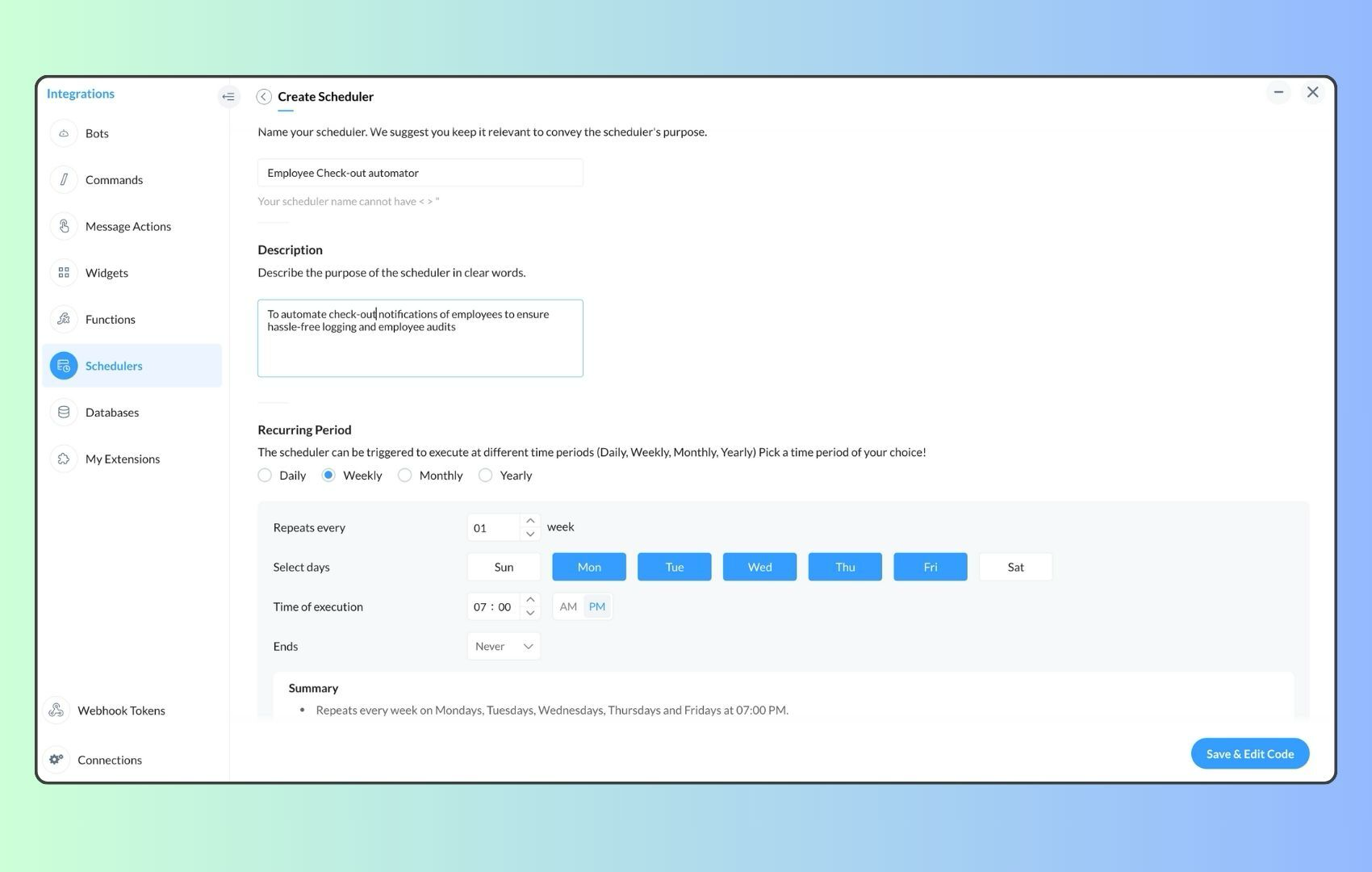
- Now, let's follow the same steps and create a scheduler for checkout reminders. Under the recurring period, choose the type as "Weekly." Select Monday through Friday and set the time of execution to 7 PM or any other time that aligns with your company's checkout time, or customise the recurring period based on your specific use case.
- Click "Save & edit code" and paste the following code.
- attendanceResponse = invokeurl
- [
- url :"https://people.zoho.com/api/attendance/fetchLatestAttEntries?duration=600"
- type :GET
- connection:"{CONNECTION_LINK_NAME}"
- ];
- info attendanceResponse;
- todayDate = zoho.currenttime.toString("YYYY-MM-dd");
- latestAttendanceRecords = attendanceResponse.get("response").get("result");
- usersWithoutCheckout = list();
- if(latestAttendanceRecords.size() > 0)
- {
- for each userRecord in latestAttendanceRecords
- {
- userEmail = userRecord.get("emailId");
- dailyEntries = userRecord.get("entries");
- for each dailyEntry in dailyEntries
- {
- if(dailyEntry.containsKey(todayDate))
- {
- todayEntryDetails = dailyEntry.get(todayDate);
- attendanceLogs = todayEntryDetails.get("attEntries");
- for each logEntry in attendanceLogs
- {
- if(!logEntry.containsKey("checkOutTime"))
- {
- usersWithoutCheckout.add("{@" + userEmail + "}");
- }
- }
- }
- }
- }
- }
- usersWithoutCheckoutString = usersWithoutCheckout.toString("\n");
- if(usersWithoutCheckoutString.trim().length() == 0){
- usersWithoutCheckoutString = "No users were found checked-in after 7 PM today. Great to see everyone wrapping up on time! ✅";
- }
- response = Map();
- card = Map();
- card.put("title","List of users who remain checked in ( " + usersWithoutCheckout.size() + " )");
- card.put("thumbnail","https://media.tenor.com/Hd8nLZZTPRYAAAAi/alarm-clock-alarm.gif");
- card.put("theme","modern-inline");
- response.put("card",card);
- response.put("text",usersWithoutCheckoutString);
- info zoho.cliq.postToChannel("{CHANNEL_UNIQUE_NAME}",response);
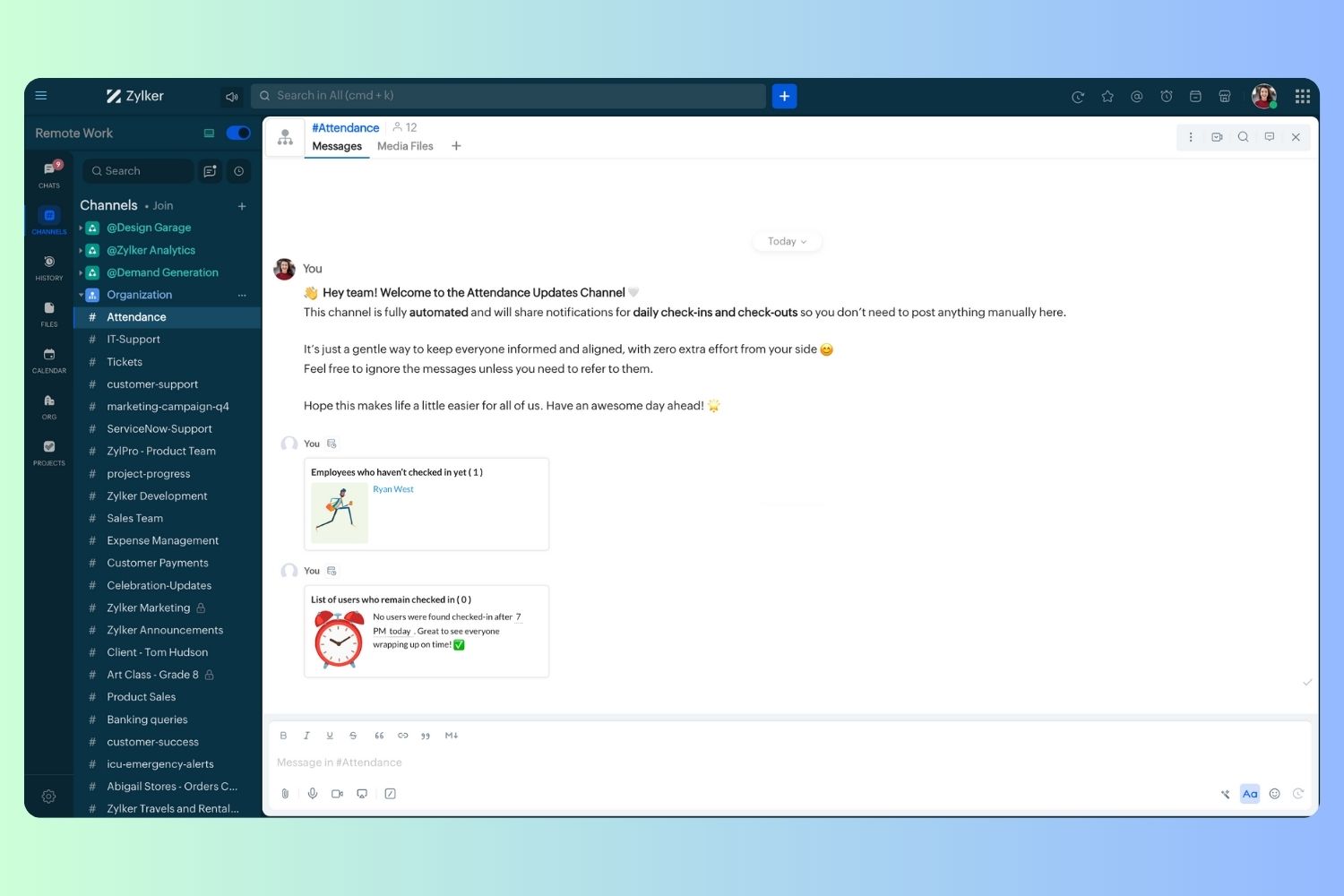
Wrapping up and checking out for the day, hopefully
Topic Participants
Harsha SS
Ram Freedman
Sticky Posts
Automate attendance tracking with Zoho Cliq Developer Platform
I wish remote work were permanently mandated so we could join work calls from a movie theatre or even while skydiving! But wait, it's time to wake up! The alarm has snoozed twice, and your team has already logged on for the day. Keeping tabs on attendanceAutomating Employee Birthday Notifications in Zoho Cliq
Have you ever missed a birthday and felt like the office Grinch? Fear not, the Cliq Developer Platform has got your back! With Zoho Cliq's Schedulers, you can be the office party-cipant who never forgets a single cake, balloon, or awkward rendition ofCustomer payment alerts in Zoho Cliq
For businesses that depend on cash flow, payment updates are essential for operational decision-making and go beyond simple accounting entries. The sales team needs to be notified when invoices are cleared so that upcoming orders can be released. In contrast,Accelerate Github code reviews with Zoho Cliq Platform's link handlers
Code reviews are critical, and they can get buried in conversations or lost when using multiple tools. With the Cliq Platform's link handlers, let's transform shared Github pull request links into interactive, real-time code reviews on channels. ShareApp Spotlight : PagerDuty for Zoho Cliq
App Spotlight brings you hand-picked apps to enhance the power of your Zoho apps and tools. Visit the Zoho Marketplace to explore all of our apps, integrations, and extensions. In today's fast-paced world, seizing every moment is essential for operational
Recent Topics
Best way to share/download presentation files in Zoho without losing formatting?
Hello Zoho Community, I often work with PPT/PDF files in Zoho Docs and share them with colleagues. While PDFs usually give a direct download option, I’ve noticed that PPT/PPTX files sometimes only open in the viewer without a clear download link. Is thereWorkflow Failure - Notifications
Good afternoon, I have just experienced an error whereby a Workflow failed, for a reason currently unknown. The problem is that one of my users had to flag this manually (thankfully he's very thorough) and this otherwise would have flown under the radar.Introducing Bin Locations In Zoho Inventory
Hello users, We are excited to let you know that your wait for the Bin Locations feature has now come to an end! Yes, you heard us right! We are here to introduce the much-awaited Bin Locations now in Zoho Inventory. But before we dive into the featureError "Invalid client task found corresponding properties" only when triggered from workflow ?
Hi All, I am facing an error message I never encountered previously: Error in executing On Add - On Load script Error in executing thisapp.get_all_projects_api_call function. Line:(2) Error in executing thisapp.getAccessTokenFromRefreshToken function.How to interpret Campaign report statistics - definitions/explanation
I am trying to make sure I understand the Campaign report correctly Do you have a list of definitions for: Delivered - it has reached the recipient's inbox Campaign reach - is this the number that have opened the campaign email? Unique Opens Clicks/OpenSchedule a Call by Date and Time when a specific lead status is selected
Hi Wanting to create a workflow where a call can be scheduled by date & time when a specific lead status is selected. Can only currently set the date by Due Date - Trigger Date - Plus 'x' day(s) ThanksZoho CRM's Copy Customization functionality now works across DCs, for customized accounts, and more
Availability This feature is available in Standard, Professional, Enterprise, and Ultimate editions. These changes have been rolled out to all users in all DCs. For more information, please refer to these help documents: Overview | Instructions HelloHow can I bold text on Zoho Forms submit buttons?
In the old theme builder, I could bold the text on a form's submit button. With the new theme builder, I can only change the text of the header or fields in the form, and not the button itself.Hiding Pre-defined Views
You can enhance Zoho with custom views - but you cannot hide the pre-defined views. Most users focus on 4 or 5 views. Right now for EVERY user EVERY time they want to move to one of their 4 or 5 views - they have to scroll down past a long list of pre-defined views - we don't use ANY of the pre-defined views. Adding the feature to allow a predefined view to be hidden completely or only visible to certain users would be a big improvement in usability for Zoho CRM. This feature is already available[Integration Edition] Deluge Learning Series – Third-Party Integrations with Deluge | October 2025
We’re excited to continue this three-month edition of the Deluge Learning Series: Session 1 – Integrating Zoho Apps with Deluge Using Built-In Integration Tasks Session 2 – Integrating Zoho Apps with Deluge Using invokeURL and invokeAPI Session 3 – Third-PartyFeature Request: Tag, Search, and Report on Individual Private Comments
Zoho Desk Team, First, I want to say that we are extensive users of Zoho Desk and it is a core part of our support operations. We rely heavily on the private comments feature for internal communication, knowledge sharing, and maintaining a clear historyZoho CRM Community Digest - August 2025 | Part 2
Hello Everyone! Here's a quick round-up of handy tips, clever workarounds, and product updates from late August. Product Updates: Meeting Enhancements in Zoho CRM! Track whether a meeting is online, in-office, or at the client’s location using the newAssistance Needed: Ticket Status Not Updating and Sorting by Last Customer Reply in Zoho Desk
Hello, I’m facing two issues in Zoho Desk that I’d like your guidance on: Ticket Status Not Updating: When a customer replies to a ticket, the status does not change to Reopened. Instead, it remains in Waiting on Customer, even after the customer’s responseRound robin
Hi, I'm trying to set up a round robin to automatically distribute tickets between agents in my team but only those tickets that are not otherwise distributed by other workflows or direct assignments. Is that possible and if so which criteria should ITime Entry Notifications
Hi All - I have support staff who place notes of their work in the time entry section of Zoho Desk. Is there a specific workflow or setting I need to enable to have the ticket holder updated via email when an entry is saved?Change text in help desk
Hi, Please let me know how can i change the this text, see screenshot.Customer happiness customisation
Hi, I was wondering if it's possible to somehow customise to whom and when customer happiness request is sent? Can you enable it only for selected tickets for example based on workflow or any other criteria (customer name, tag or anything else)? AlsoNo Zoho Support Response in Months
I want to say that I love Zoho FSM, Books, and CRM, but the support is scary bad. About 2-3 months ago, I emailed Zoho FSM support with two specific issues I needed help with, and I have still not received one single response. I also submitted a supportNull
If a result is null how do I make it so that a custom error pops up instead of the default error? Can someone write an example as if I were using the script builder?Format a "return" message
Good day, Is there a way to format the message of the "return" function in CRM deluge script?Having Trouble Opening The Candidate Portal
Recently am having trouble opening the Candidate Portal. It keeps loading but cannot display any widgets. Tried Safari, Chrome and Edge. Non of them work. Please solve the problem ASAP.Tip of the Week - Spot Risky Sales with Conditional Formatting
In Zoho Analytics, small tweaks can lead to big insights. One such feature is Conditional formatting based on other columns, your key to instantly spotting where sales success is overshadowed by product returns. Our tip this week shows you how to applyHow do I duplicate / copy a campaign
I am evaluation Zoho Campaigns and sent an email to one of my personal email accounts from Zoho Campaigns. It went into my junk file in Hotmail. I want to duplicate that same (1-page) campaign and send it to another of my personal accounts to try toFor a Bill, can "Pay via Check" - Can we also "Pay via Check" when documenting refund for payment?
We really like when we have a Bill in Zoho Books that we can record payment by selecting "Pay via Check" and that will cut the check for us from Zoho Books. However, when we have to write checks as a result of invoice overpayment, we can not select "PayCreator Change History: Ways to improve
Hi Everyone, Recently been working in developing this change history(an idea from Zoho Forms) - unlike forms that you can this with a click but using Creator, we can use "old" keyword. The concept I come up with is to put the result in a table however,Suitability of Zoho One (Single User License) for Multi-State GST Compliance & Cost Analysis
Hello Zoho Team, I am an e-commerce business owner selling on platforms like Amazon, Flipkart, and Meesho, and I'm currently using their fulfillment warehouses. I have two GSTIN registrations and am planning to register for an additional 2-3 to expandadd employees and customiz
I want a Zoho software to track employees record. I logged in a demo so now I tried adding employee, first thing when I click on add employee it takes me to a page where it says add user maximum 10 users, my first doubt why users I don't want employeesInactive User Auto Response
We use Zoho One, and we have a couple employees that are no longer with us, but people are still attempting to email them. I'd like an autoresponder to let them no the person is no longer here, and how they can reach us going forward. I saw a similarZoho People Attendance Module - Split Shifts
Hello, Our business employs a number of college students who often split their workdays between work hours and class schedules, resulting in split shifts. For example: Employee 1 works 9am to 11:30am and then leaves for class, returning to work at 3pmZoho One subscription
we have got Zoho CRM for 3 users and we paid for the app , and we have still 9 months to go , but if we join Zoho one , does it mean the payment for that subscription would be a waste? Please help. Thanks.How Zoho CRM Can Enhance Your Faucets Accessories Business Operations?
In today's competitive market, having a reliable CRM system is crucial for managing customer relationships and streamlining business operations. For businesses in the faucets accessories niche, Zoho CRM offers powerful tools to help manage everythingDashboard
I’m currently working on a project using the Zoho IoT Cloud with an ESP32 and MQTT. I’ve successfully connected the ESP32 to Wi-Fi and MQTT, and the data from the ESP32 is displayed in the telemetry section of the cloud. However, when I try to createCan i connect 2 instagram accounts to 1 brand?
Can i connect 2 instagram accounts to 1 brand? Or Do i need to create 2 brands for that? also under what subscription package will this apply?Zoho Forms - Improved Sub-Forms
Hi Forms team, I'm helping a client move from JotForms to Zoho Forms and I've found another opportunity for improvement. In the below screenshot, JotForm left and Zoho Forms right. The Zoho Forms Sub-Form is quite a poor visually. There is no way to makeWhat's New in Zoho Billing | Q3 2025
Hello everyone, We are excited to share the latest set of updates and enhancements made to Zoho Billing in Q3 2025. From the latest GST updates to multi-level discounting, Zia-powered report summaries, and customizable web forms, these updates are designedHow to Delete Personal Account Linked with My Mobile Number in past or by someone else
How to Delete Account Created with My Mobile Number in past or by someone else This is creating issues in making or sync with my credentials mobile and email address..WhatsApp Business Calling API
Dear Zoho SalesIQ Team, I would like to request a feature that allows users to call WhatsApp numbers directly via Zoho SalesIQ. This integration would enable sending and receiving calls to and from WhatsApp numbers over the internet, without the needDoes Zoho Learn integrate with Zoho Connect,People,Workdrive,Project,Desk?
Can we propose Zoho LEarn as a centralised Knowledge Portal tool that can get synched with the other Zoho products and serve as a central Knowledge repository?Marketer's Space - Going beyond basics: Smarter ecommerce marketing with Zoho Campaigns
Hello Marketers, Welcome back to this week's Marketer's Space. In the last post, we discussed the basics of email marketing and how to get started with email marketing in ecommerce. In this part, we'll dive much deeper into some other advanced featuresConnecting two modules - phone number
Hi, I’d like some guidance on setting up an automation in Zoho CRM that links records between the Leads module and a custom module called Customer_Records whenever the phone numbers match. Here’s what I’m trying to achieve: When a new Lead is createdNext Page