Creating a Gmail integration using custom connectors
Hello everyone!
Greetings from Deluge. Following up on our series aimed at exploring the capabilities of Deluge, today we'll take an in-depth look into the Deluge custom connections that can be created across Zoho services.
Deluge boasts an extensive range of over 260 built-in integrations spanning more than 35 Zoho services. These integrations streamline data access and modification with these services, from a single point in Zoho, without having to toggle between services. However, we understand that the needs of our users vary widely, and sometimes existing integrations may not cover every scenario.
That's where custom connections come in. Think of them as the Swiss Army Knife of integrations, enabling connections with hundreds of services—such as Gmail and Outlook—and seamlessly integrating them with your favorite Zoho services. With custom connections, you have the power to build your own integrations with virtually any third-party service and tailor them to meet your requirements. Moreover, since the custom connections use the OAuth 2.0 authentication mechanism, you're getting best-in-class security while integrating with third-party services.
What are connections?
Before we dive into the details of custom connectors, let's take a glimpse at what connections are in Deluge. Connections are a means to connect your Zoho account and any third-party accounts you wish to integrate with. Once a connection is created and connected, you can use it in Deluge integration tasks or invokeURL scripts to perform REST operations on the target service from the required Zoho service. For more information, visit our Connections help doc.
Use case
Assume the sales team of an organization uses Zoho CRM for managing leads, customer retention, and customer acquisition, and uses Gmail for communication purposes, like following up with potential clients via email. While the system works as is, it's time-consuming and prone to error, so an integration between Gmail and Zoho CRM is necessary to improve efficiency.
A custom connection to your Google account will enable you to sync your Zoho CRM and Google accounts, allowing you to perform actions related to your Google account from Zoho CRM. For example, you can invoke the connection using the invokeURL task in Zoho CRM and send an email to your leads from your Gmail address.
Steps to configure the Google custom connection
Configuration video
Configuration steps
Creating Google OAuth credentials
- Visit https://console.cloud.google.com/.
- Click the dropdown and choose the required project.

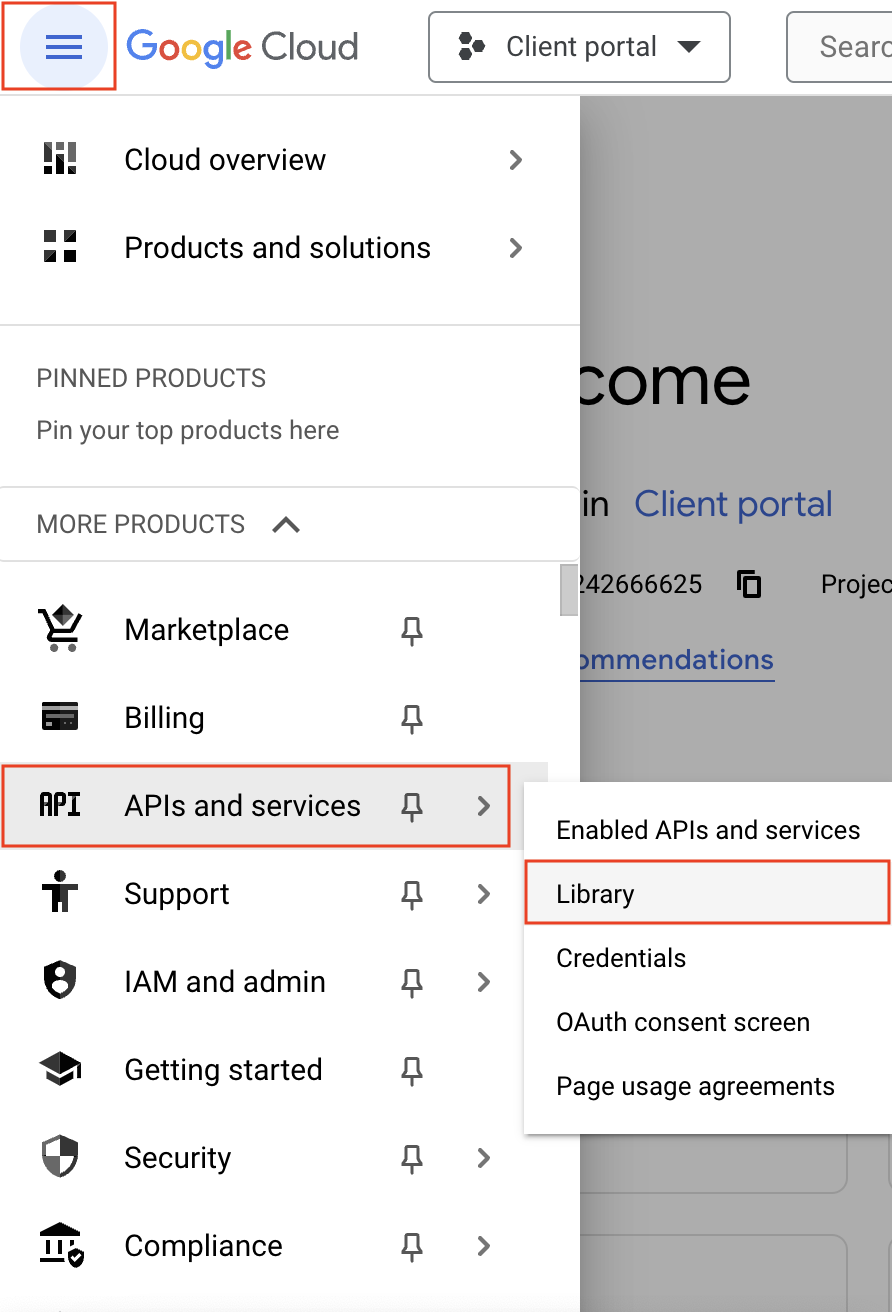
- Navigate to the hamburger menu on the left and click APIs and services -> Library.
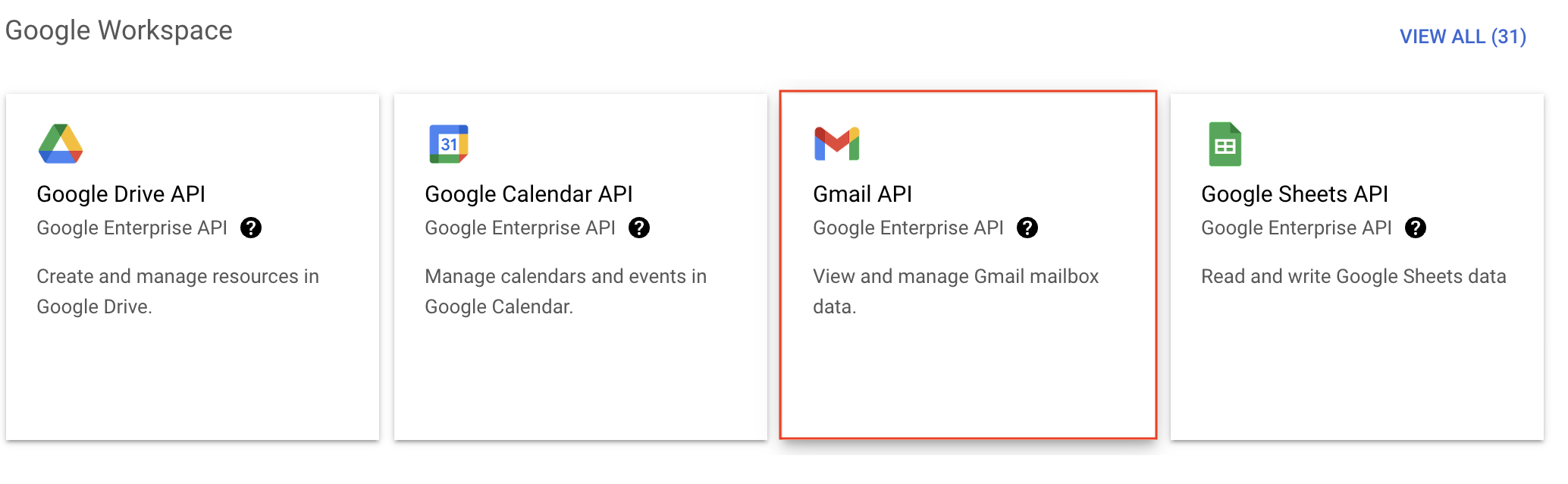
- You'll be taken to the API library page. Navigate to the Google Workspace section and click Gmail API.
- Next, click Enable on the Gmail API product details page.
- In order to use this API, you'll need to create credentials. Click CREATE CREDENTIALS.

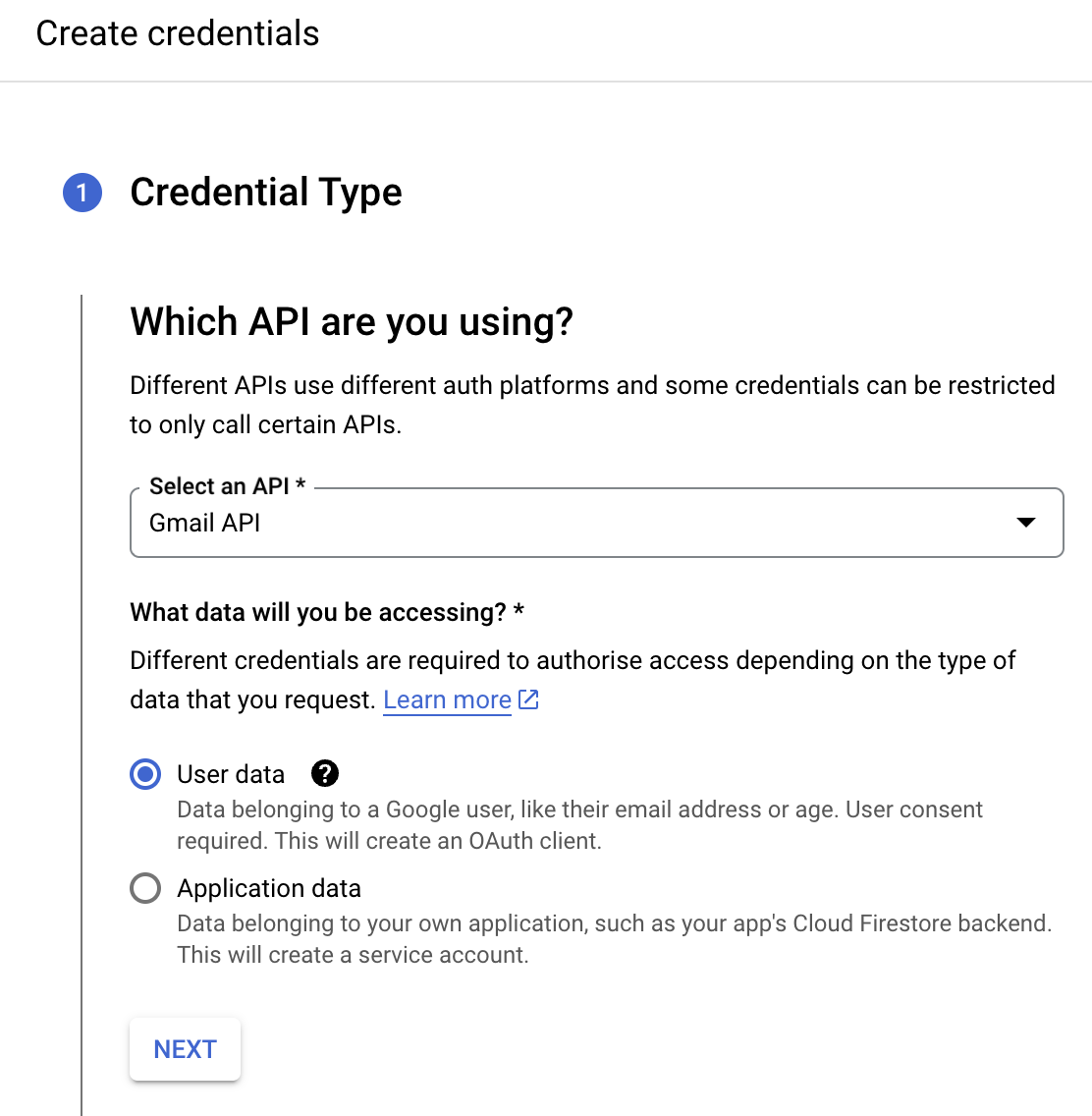
- On the Create credentials page, choose Gmail API in the Select an API dropdown and User Data under the What data will you be accessing? section. Click Next.
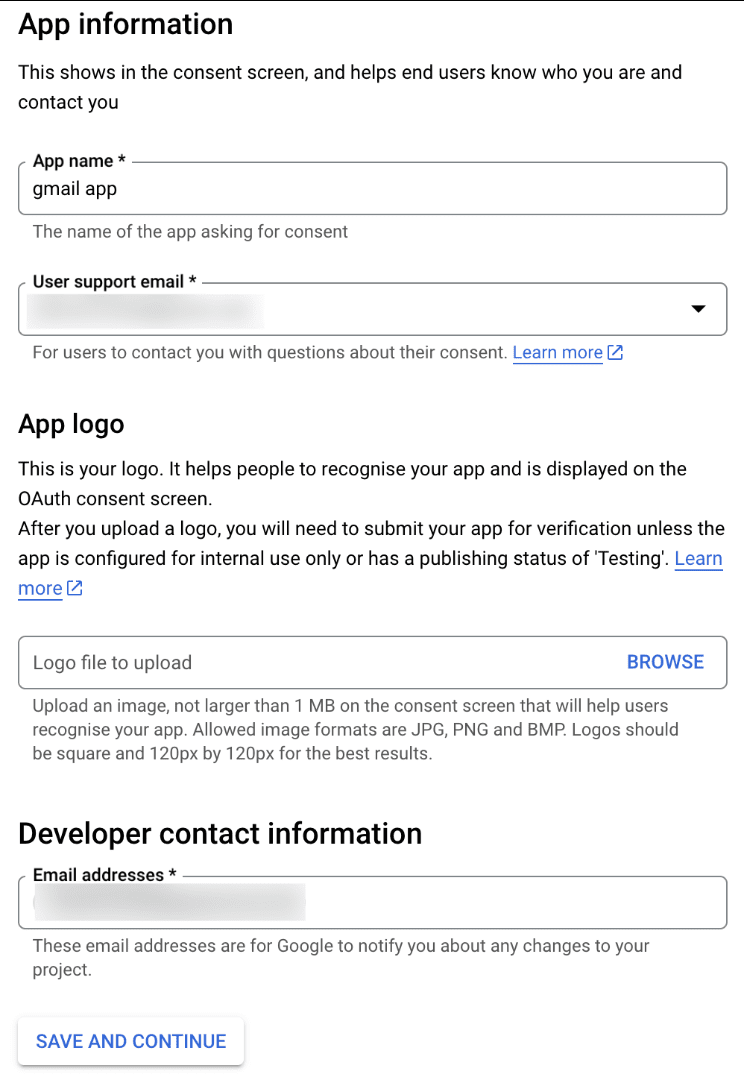
- Next, on the OAuth consent screen, enter the App name, User support email, and Developer contact email address. Then click Save and Continue.
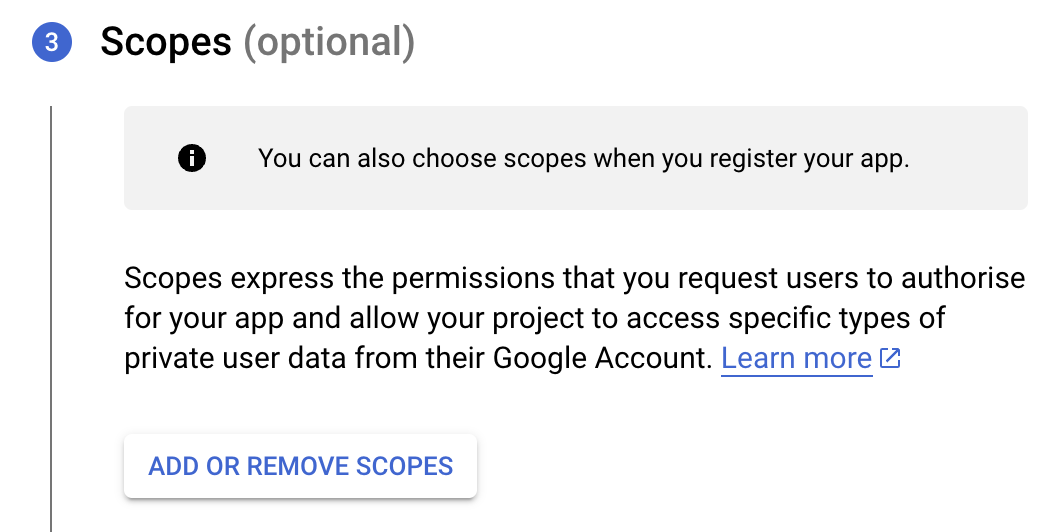
- Next, under the Scopes section, click the ADD OR REMOVE SCOPES button.
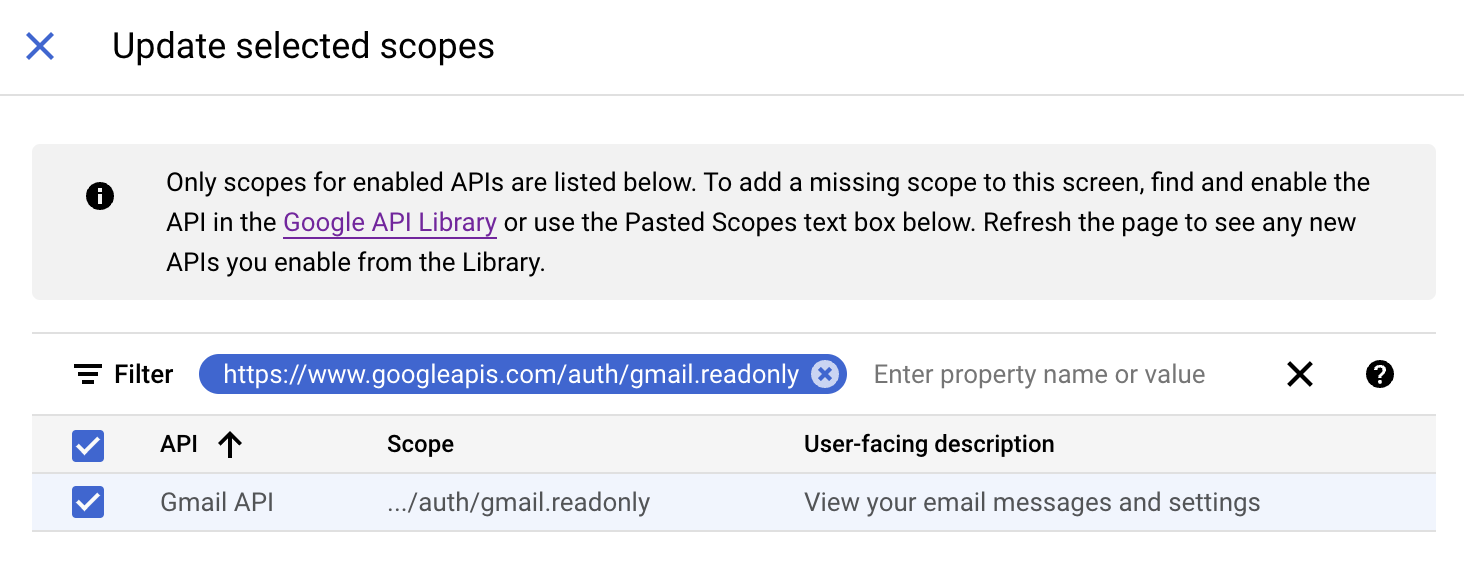
- In the Update selected scopes pane, search and select the gmail.readonly scope. Click Update, and then click Save and continue.
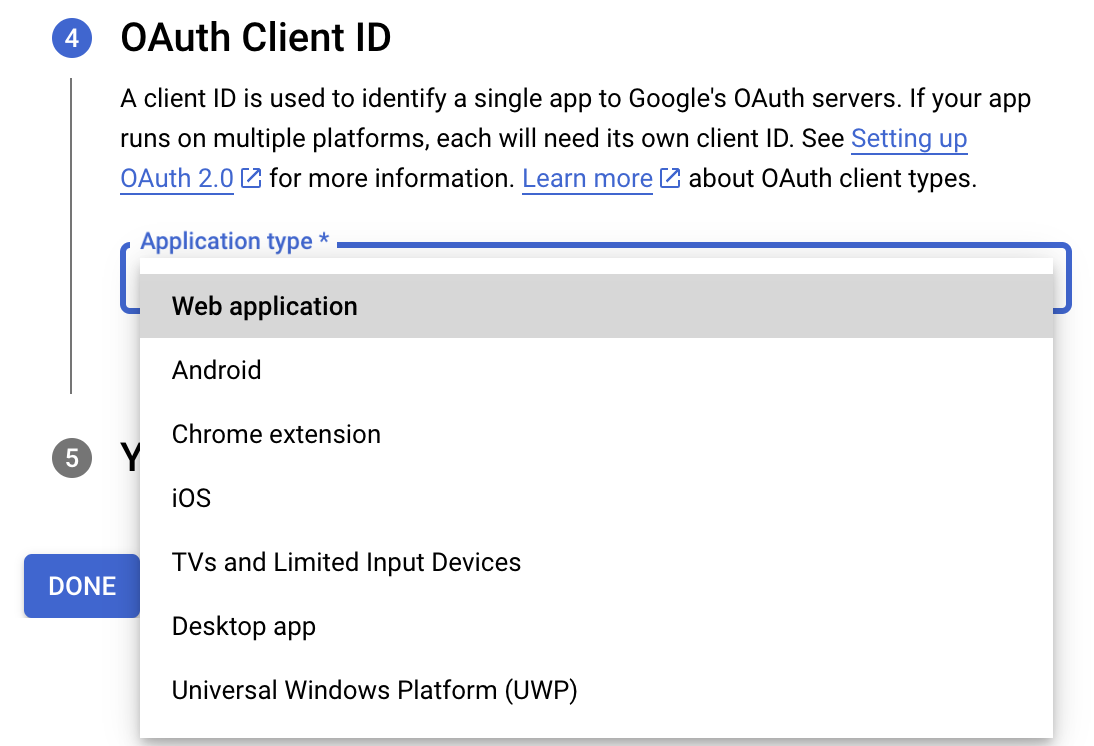
- Now, under the OAuth Client ID section, choose Web application in the Application type dropdown. Then name your app.
- Enter https://deluge.zoho.com/delugeauth/callback as the Authorized redirect URI.
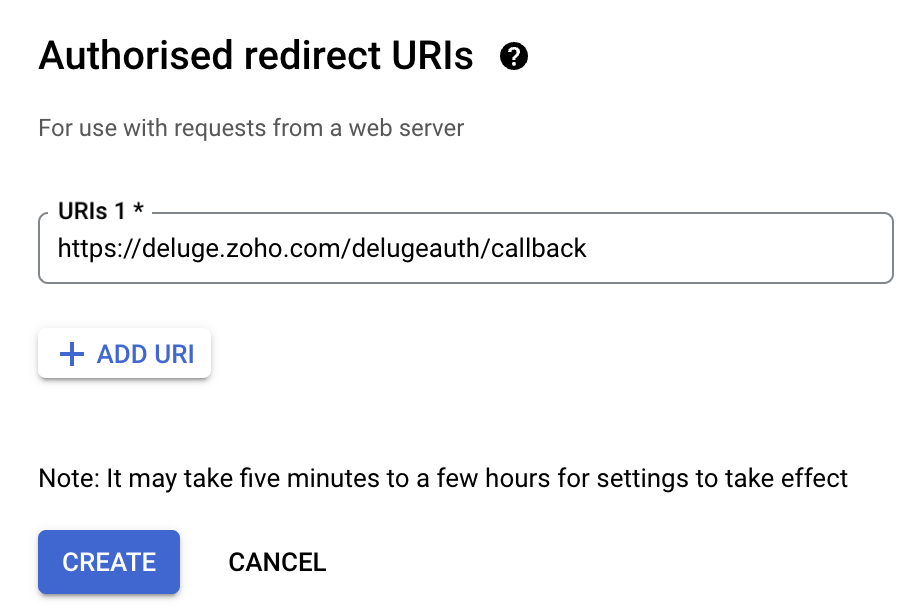
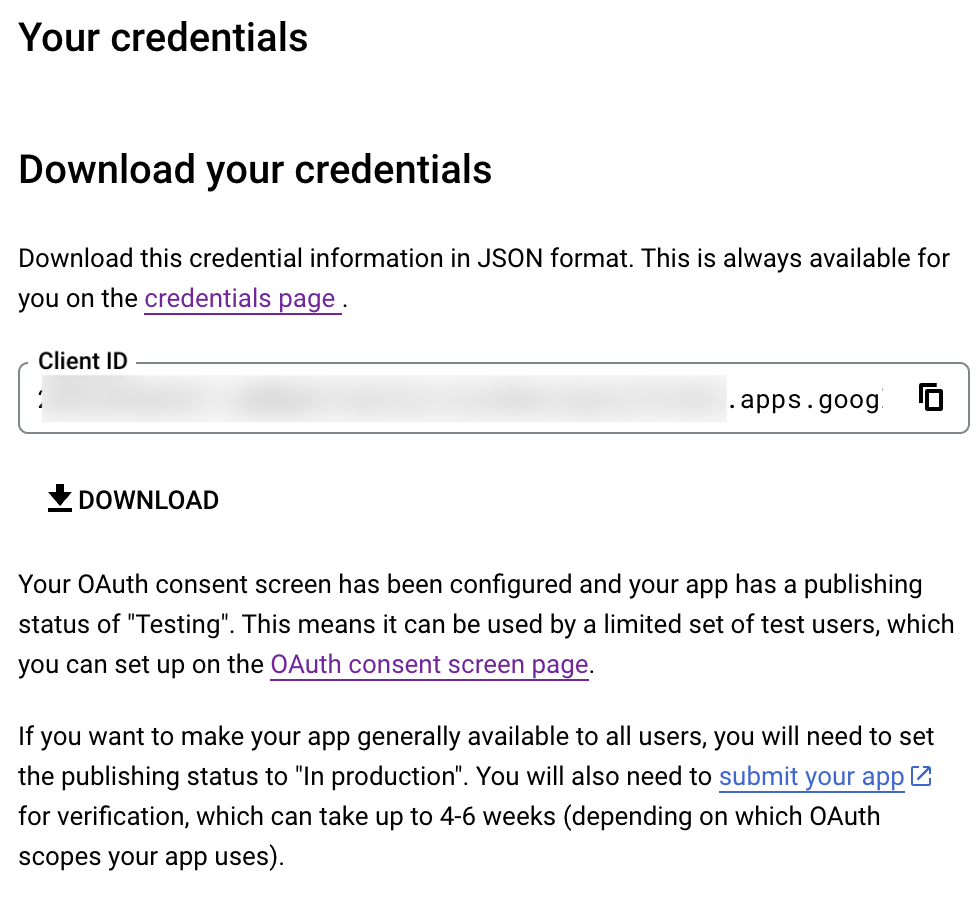
- Click Create and download your credentials. This Client ID and others will be required later, while creating a connection in Zoho CRM.
- Navigate to the OAuth consent screen and click Add users under Test users. Enter the user's email address and click Save.
Creating a custom connector for Gmail
- Now the action shifts to Zoho CRM. Navigate to crm.zoho.com -> Settings -> Connections.
- Choose Custom Services and click Create Service.
- On the Create Service screen, choose OAuth 2.0 as the Authentication type and Header as the Parameter.
- Enter the Client ID, Client Secret, and Authorize URL generated from Google as shown in step 12 above.
Tip: Having the Offline access type will allow your application to refresh tokens even when the user is not actively using the application. - Then enter https://oauth2.googleapis.com/token as the Access token URL and Refresh token URL.
- Specify the necessary scopes like read and create, etc. and then click Create Service.
- On the next page, click Create Connection. Give the connection name and choose the scopes. Then click Create and Connect.
- Finally, authenticate the connection on the Google accounts page. Your custom connection will be created, and the two services can be integrated!
Now that the connection between Zoho CRM and Gmail has been established, you can use the invokeURL task to access and modify data in Gmail using the different APIs.
Sample
You can use the below code in invokeURL task to get the latest emails from Gmail.

userId = "emailaddress@gmail.com";
get_gmail = invokeurl
[
url: "https://gmail.googleapis.com/gmail/v1/users/"+userId+"/messages"
type: GET
connection : "connectionname"
];
messageID = get_gmail.get("messages").get(0).get("id");
get_gmail_withID = invokeurl
[
url: "https://gmail.googleapis.com/gmail/v1/users/"+userId+"/messages/"+messageID
type: GET
connection : "connectionname"
];
Content_of_the_mail = get_gmail_withID.get("snippet");
info "Mail Content : " + Content_of_the_mail;
gmail_values = get_gmail_withID.get("payload").get("headers");
for each headers in gmail_values
{
if ( headers.get("name") == "Subject" )
{
info "Subject of the Mail : " + headers.get("value");
}
if ( headers.get("name") == "From" )
{
info "From Address : " + headers.get("value");
}
}
get_gmail = invokeurl
[
url: "https://gmail.googleapis.com/gmail/v1/users/"+userId+"/messages"
type: GET
connection : "connectionname"
];
messageID = get_gmail.get("messages").get(0).get("id");
get_gmail_withID = invokeurl
[
url: "https://gmail.googleapis.com/gmail/v1/users/"+userId+"/messages/"+messageID
type: GET
connection : "connectionname"
];
Content_of_the_mail = get_gmail_withID.get("snippet");
info "Mail Content : " + Content_of_the_mail;
gmail_values = get_gmail_withID.get("payload").get("headers");
for each headers in gmail_values
{
if ( headers.get("name") == "Subject" )
{
info "Subject of the Mail : " + headers.get("value");
}
if ( headers.get("name") == "From" )
{
info "From Address : " + headers.get("value");
}
}
References
----
And that's a wrap for today! We hope you found this post informative and start using custom connections to experience the full capabilities of Deluge and Zoho.
Kindly let us know if you have any questions, feedback, or suggestions in the comments, or write to us at support@zohodeluge.com!
Regards,
The Deluge Team
Topic Participants
Ashwin Vishal R
Kaushal
Anand M B
Recent Topics
Read Thread Details
Does anyone know how to "read" the complete thread details in a ticket? I figured out how to pull a summary of the threads using a webhook, but it doesn't have all the details I want. I tried to create a loop in flow, which should have worked, but insteadAll new Address Field in Zoho CRM: maintain structured and accurate address inputs
Availability Update: 29 September 2025: It's currently available for all new sign-ups and for existing Zoho CRM orgs which are in the Professional edition exclusively for IN DC users. 2 March 2026: Available to users in all DCs except US and EU DC. 24Associate ORG modules using Connected Records in Zoho CRM For Everyone
Hello Everyone, We are here with a set of new enhancements to Connected Records in Zoho CRM For Everyone. We've made module connections clearer, easier to manage, and less confusing. What's New? Associate Org modules as Connected Records. Clear separationWhat stops me from packaging and shipping an order when the inventory is negative?
It seems if the inventory value is negative, that Zoho Inventory should not allow me to create a Package and Ship it. But, there seems to be nothing to stop me from doing that other than when I go to physically package the item and realize that there is no stock. There also seems to be nothing on the screen that even indicates to me that I should not package and ship. To me this is the fundamental point of an inventory system. Am I doing something wrong?Let us view and export the full price books data from CRM
I quote out of CRM, some of my clients have specialised pricing for specific products - therefore we use Price Books to manage these special prices. I can only see the breakdown of the products listed in the price book and the specialised pricing forDeluge error on updating datetime field
Hi, while updating date-time field , i am getting this error {"code":"INVALID_DATA","details":{"expected_data_type":"datetime","api_name":"Date_Time_1"},"message":"invalid data","status":"error"} Here is the code , i have tried leads = zoho.crm.getRecordById("Leads",inventory based on bills and not physical stock
Hello, I have noticed a very annoying issue with zoho books/inventory. I use composite items. If I have an sub assembly item on back order, I am unable to make up the composite item, even when I have received the goods and it is in my stock. I have to convert the PO into a BILL in order for the item to show as 'Accounting Stock'. The problem is that the supplier Invoice is not shipped with the goods, but can follow even a week later. So I have to make the bill have a 'dummy name and number' untilZoho Inventory. Preventing Negative Stock in Sales Orders – Best Practices?
Dear Zoho Inventory Community, We’re a small business using Zoho Inventory with a team of sales managers. Unfortunately, some employees occasionally overlook stock levels during order processing, leading to negative inventory issues. Is there a way toNo option for pick up in Zoho Books / Inventory but yes on commerce
Is it planned to release soon on books/inventory?Update to CRM Custom Buttons: Collect Users' Location
Hello everyone! Buttons in Zoho CRM allow you to extend the default CRM capabilities for your bespoke business needs. It provides the flexibility to connect to any third-party application to perform necessary actions. Wouldn't it be better, if those buttonsSpeed (again!)
Same old story again: impossible to work at this "speed". Category NOTES!Marketing Tip #27: Add a favicon and social preview image for your online store
Small branding details can make a big difference in how professional your store looks online. A favicon (the tiny icon shown in browser tabs) helps customers recognize your store instantly, especially when they have multiple tabs open. A social previewKnowledge base: The nitty-gritty of SEO tags
A well-optimized knowledge base with great SEO can benefit your company by allowing customers to find help articles and support resources using search engines. This enables customers to quickly and efficiently find the information they need without directZoho Social API for generating draft posts from a third-party app ?
Hello everyone, I hope you are all well. I have a question regarding Zoho Social. I am developing an application that generates social media posts, and I would like to be able to incorporate a feature that allows saving these posts as drafts in Zoho Social.How to list WorkDrive folder contents using API
I'm trying to read folder contents using a Deluge script. The code below returns {"errors":[{"id":"F6016","title":"URL Rule is not configured"}]}". I've tried using the search API and seen similar errors. I have proved that the connection works by creatingAdd Custom Fields only in Customer module and not on supplier module!? Is not there a way to do that!?
I am trying to create custom fields on clients module but it also gets created on suppliers module; which of course does not make sense at all as a lot of custom fields are client or supplier specific but never both. I am missing something? This seemsI want to delete the email but I can't.
I want to delete emails but I can't, please help me. Thanks!The email address you have entered belongs to a different deployment/region.
Hi, I am trying to create the user - mprust@crombiecomputers.co.uk but keep getting the message below - The email address you have entered belongs to a different deployment/region. Please contact support@zohoaccounts.com for assistance. Look forwardSolving the bug in Zoho Writer API for styling
So... the Zoho Writer APIs for programatically creating a document do not respect a template's style. The result is that any document you generate via API needs to be manually, paragraph by paragraph, reformatted. That bug alone is sufficient to renderhow-to insert a new within a cell
If I am in MS excel in a cell that I need to have multiple line, I would use ctrl-enter to create new line within a cell. How can do the same function in ZoHo Sheet?Zoho Books | Product updates | February 2026
Hello users, We’ve rolled out new features and enhancements in Zoho Books. From Advanced Reporting Tags to the ability to mark projects as completed, explore the latest updates designed to improve your bookkeeping experience. Introducing Advanced ReportingPartial payments for retainer invoices
When a customer does not pay the entire retainer invoice there is no way to apply a partial payment. PLEASE add this function.Need to set workflow or journey wait time (time delay) in minutes, not hours
Minimum wait time for both Campaigns workflows and Marketing Automation journeys is one hour. I need one or the other to be set to several minutes (fraction of the hour). I tried to solve this by entering a fraction but the wait time data type is an integerZoho Book - Banking Module - Cash Credit account
I have a CC account with a bank. I initially added the account as a 'Bank Account' under the banking module in Zoho Books. However, this CC Bank Account is showing as an asset instead of a liability. I have added the account as a credit card account butComments aren't visible in shared spreadsheet
I would like to send a spreadsheet to people who can use it to help solve a problem as a one off use unique to them. They will have to enter data in the sheet. I have comments attached to some of the cells to explain the purpose of the data being collected.Custom button for list page
Why is my 'List Page - Bulk Action Menu' button in the Packages module not autopopulating the List argument with selected record IDs?Mail Not Working
Hey. Our mail ID is not working. I’m able to send emails. But if there are any replies that come towards us, I can’t find anything in the inbox. How do I fix this?Designing Multi-Step Workflow System in Zoho Creator + Deluge (Startup Build – Exploring Advanced Architecture + Partnerships)
Hi everyone, I’m currently building a Zoho-based system as part of an early-stage startup, and I’m looking to connect with others who have experience designing more advanced workflows in Creator + Deluge. This started as a standard application, but it’sIs it possible to make tags "required"
We would like to be able to make the tag field a requirement for agents before they can close a ticket. This would help with monthly reporting, where a lot of tickets end up with no tag, causing manual work to go back and add the correct tag for eachI would like to know wich person viewed the file
I have a franchise and my Operative Manual is in WorkdriveI, the user can´t download but despite I know How many views the file had, I would like to know wich person viewed the file Is it possible? thank youCan I write a check in Zoho Books with no associated bill?
This currently does not seem possible, and I have a client that desperately needs this function if I am able to convert them with Quickbooks. Thank you in advance for your reply.Ordering of Teams
Hi there, Currently, we cannot order Teams in Zoho Desk. Teams are ordered as they were created. It would be really helpful if we could customise the order of Teams. For example: We have the following Teams: Shipping Customer Service Sales ComplianceEstimate Module - Contact Field.
Hello Latha and Team, Is it possible to make the Contact field optional in the Estimate module? Best regards, Chethiya.Item with name in different languate
Hello, is there a way to have an item with its name in different languages? For example: I sell an item in different markets and I'd like to have a Proposal and the Invoice with the Item Name in a specific language. Rino Bertolotto Zoho Specialist, STESA srlHow to keep track of bags, cans, drums of inventory?
We buy and sell products that are packaged in bags 🛍️, cans🥫, drums🛢️, etc. with batch numbers. When we get a shipment of one of the products, how do we track we received (say) 10 cans each of 5L of a product and maybe we received 10 cans of anotherThis version of app doesn't support this notecard type Error
So this problem is happening for any notes created within the last week, as well as any note recently edited on Android. I can open them on my phone fine, but they don't open on the website version. They DO work on the desktop app version. It's just webPDF's Give Unsupported Type Error Message
Many of the pdf files I add to Notebook work fine but in some cases when I try to open them on the Android App I get a message saying "Unsupported Type. Psst! You are using an older version of the app which does not support this note format. Please updaterefund
Hey, I need refund for 2 licenses. please helpIs multiple invoice e-mailing possible?
I wonder if following is possible: When you are in the invoice view, assume you have five invoices to five different customers that are pending (you have just created them, but not sent them away yet by email.) To the left of every invoice in the overviewMultiple packages in one shipment
Guys we have been asking for this for years. we want to be able to ship multiple packages for one customer in the same shipment, so as to avoid entering shipping info repeatedly, and avoid customer getting multiple tracking emails. When does this arise?Next Page