CRM : La validation des données
Soyons honnête : il est difficile d'avoir un CRM parfaitement organisé. Le garder dénué d'erreur demande du temps et de l'organisation. La bonne nouvelle est qu'avec une méthode adaptée, vous pouvez arriver à tout et sans trop de difficulté.
En l'occurence, l'une des tâches les plus ardues d'un CRM est de garantir la validité des données qu'il contient.
C'est simple : ce que vous retirerez de votre CRM sera le reflet de ce que vous y mettez. Si des données de mauvaises qualités se retrouvent dans votre CRM, vous pouvez vous attendre à des résultats mitigés. La meilleure façon d'éviter cela est d'utiliser la validation des données.
Qu'est-ce que la validation des données ?
La validation des données est tout simplement un système de processus mis en place pour garantir que toutes les informations saisies dans votre CRM sont correctes et d'actualités. Sans ces données "propres", un CRM peut devenir vulnérable aux erreurs et aux lacunes dans les informations fournies, ce qui se répercute sur votre équipe, et directement sur vos activités.
Zoho CRM possède justement une solution pour répondre à cette exigence : elle se nomme "Règles de validation", et vous aide à surmonter ce problème en stoppant l'insertion de mauvaises données avant même qu'elles ne puissent entrer dans le CRM.
Les données insérées par vos collaborateurs peuvent être automatiquement soumises à l'approbation d'un supérieur, en se basant sur des fonctions personnalisées.
Les règles de validation dans Zoho CRM vous permettent ainsi de définir l'exactitude et la validité des données qui entrent dans le système CRM. Vous allez pouvoir définir les valeurs indésirables d'un champ : si une valeur saisie pour un enregistrement correspond aux critères définis dans la règle, le CRM lancera une alerte et stoppera l'enregistrement.
Prenons cet exemple, que nous allons par la suite vous démontrer à travers des captures d'écran :
- Votre entreprise désire s'introduire sur le marché français, ou y lance un nouveau produit. À cette occasion, elle décide d'offrir une offre promotionnelle de 25% à ses clients Français. Vous pouvez ainsi paramétrer une règle n'autorisant cette réduction uniquement pour le marché "France", et une seconde qui n'autorise aucun dépassement de remise.
Si quelqu'un saisi alors une remise pour un autre pays, ou une remise qui dépasse 25%, l'action sera automatiquement bloquée, et le manager du service sera automatiquement alerté. Pratique non ?
Voici comment appliquer la validation des données, étape par étape :
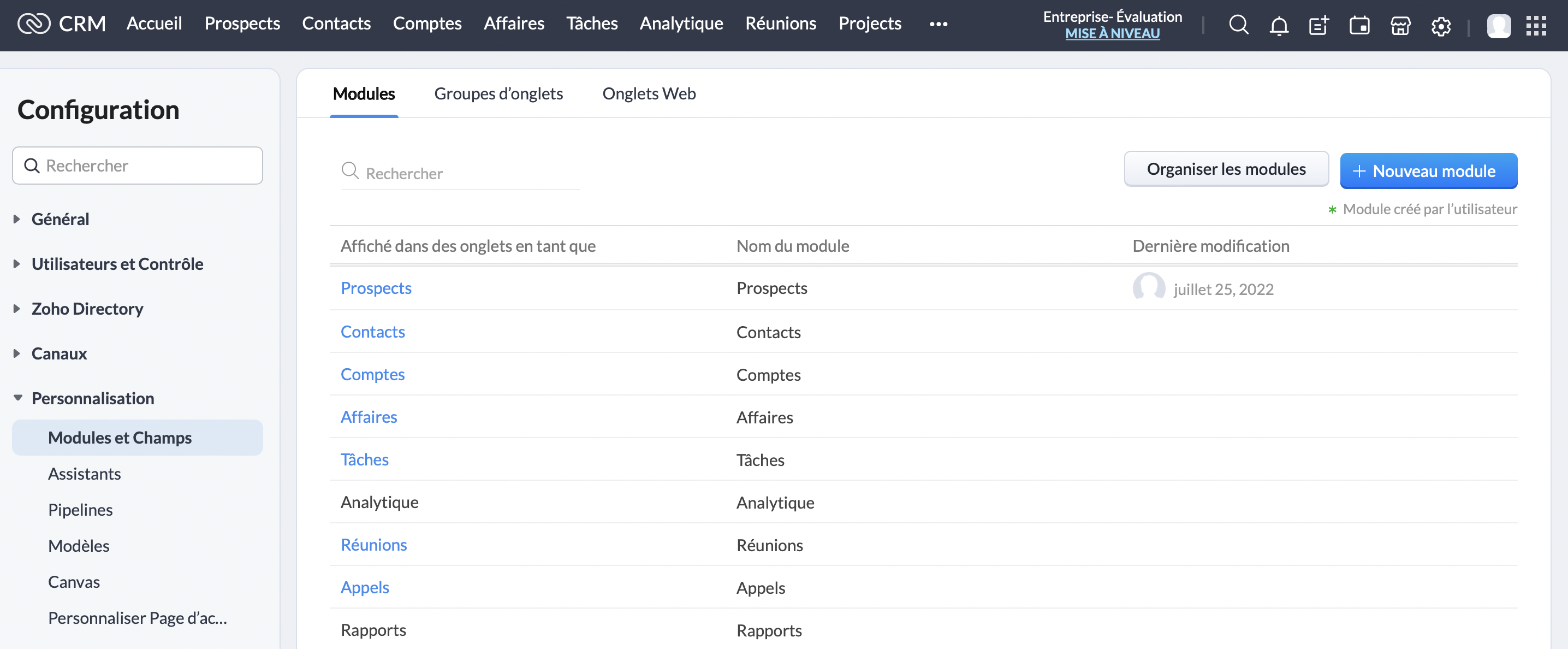
Cliquez sur le module "Prospects" :
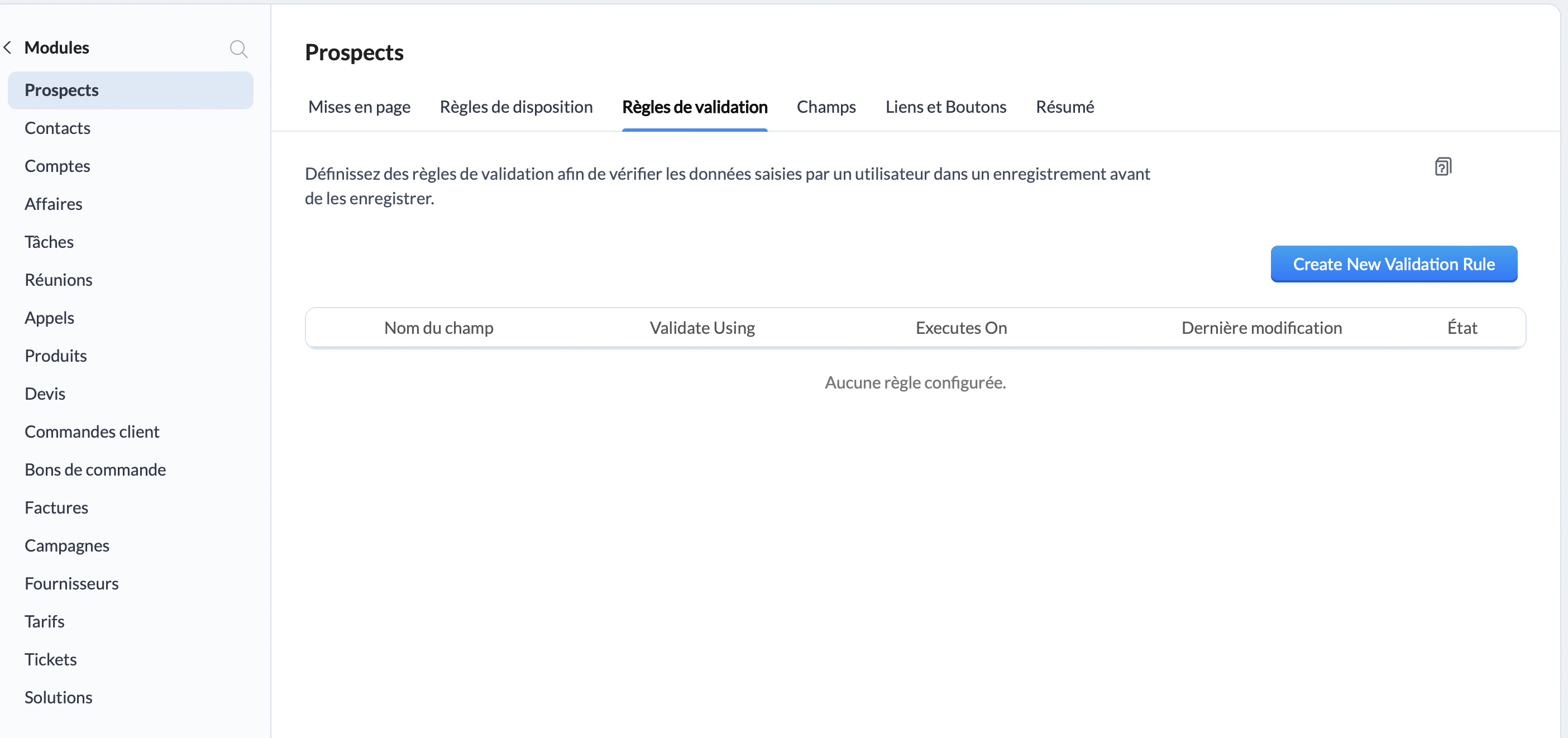
Une fois sur l'interface "Prospects", rendez-vous sur "Règles de validation", et cliquez sur le bouton "Create New Validation Rule" :
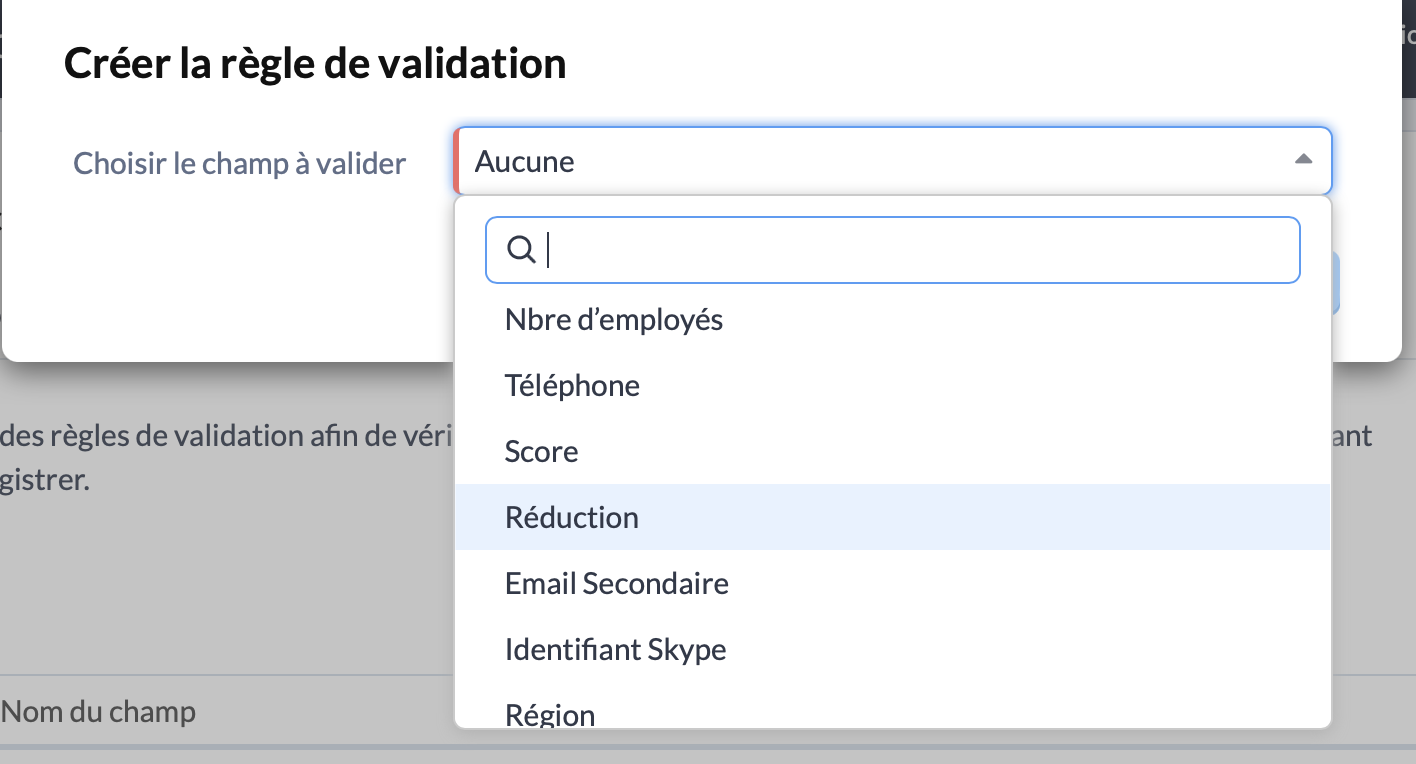
Une fenêtre va alors s'ouvrir, à travers laquelle vous allez pouvoir choisir le champs pour lequel vous souhaitez ajouter une règle de validation. Pour cet exemple, nous allons choisir "Réduction" :
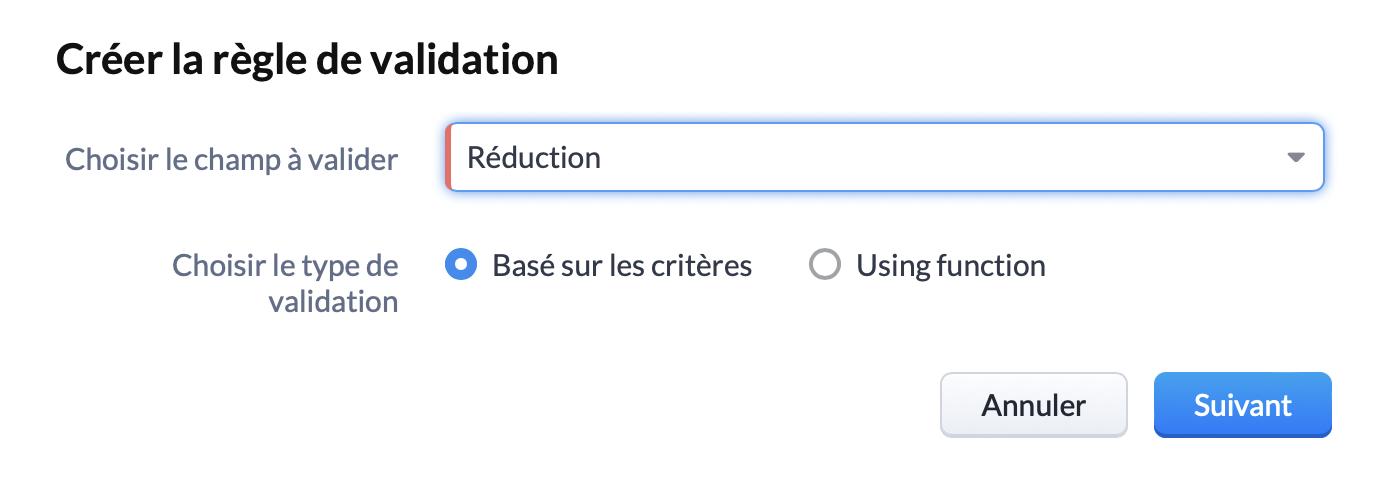
Choisissez le type de validation "Basé sur les critères" et cliquez sur "Suivant" :
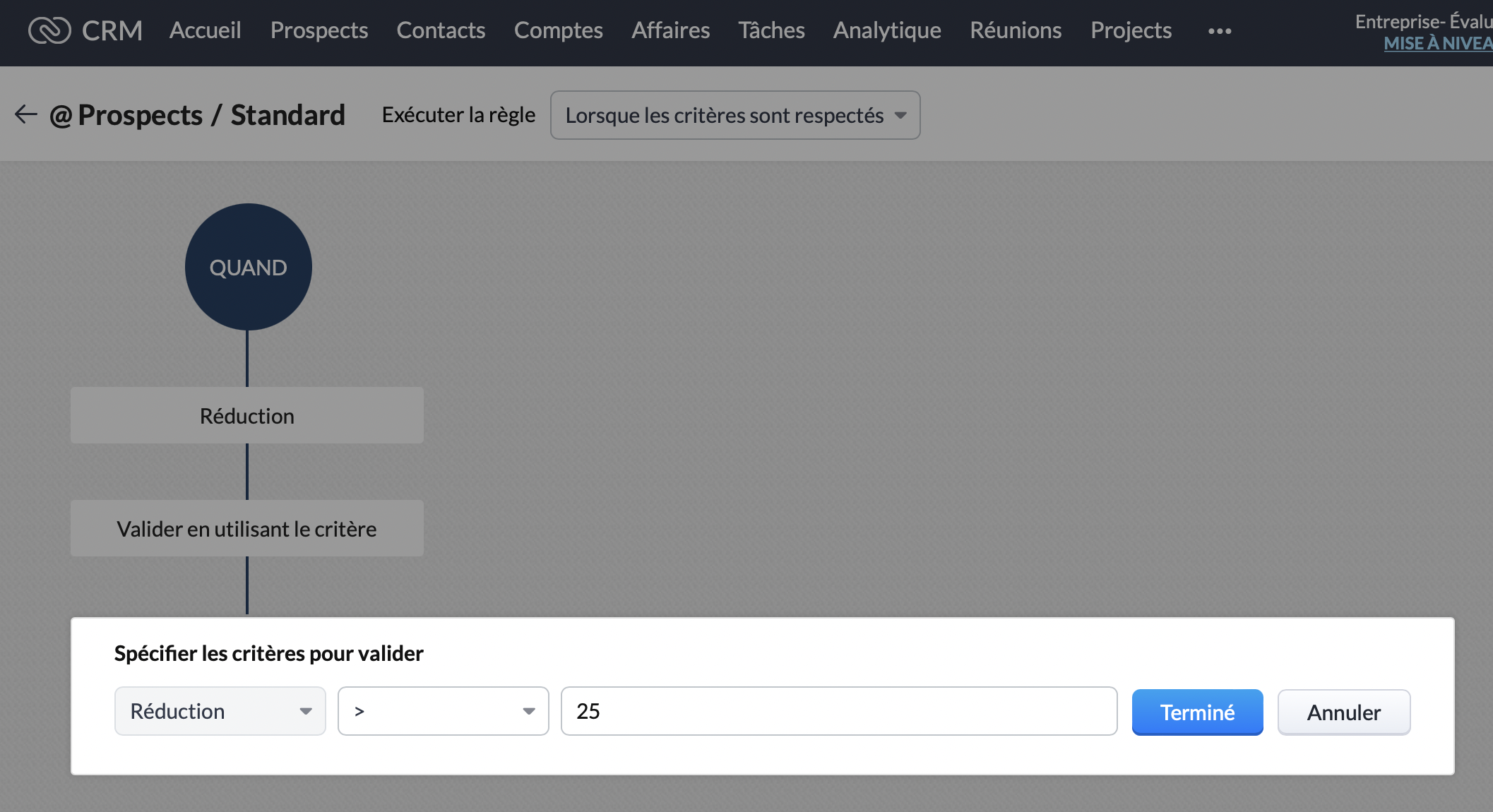
Vous y êtes presque ! Vous voilà arrivé sur l'interface qui nous intéresse. Ici, vous pouvez spécifier le critère de validation. Pour rappel, pour notre exemple nous choisissons une limite de réduction de 25%. Nous allons donc sélectionner "Réduction, Supérieure >, 25."
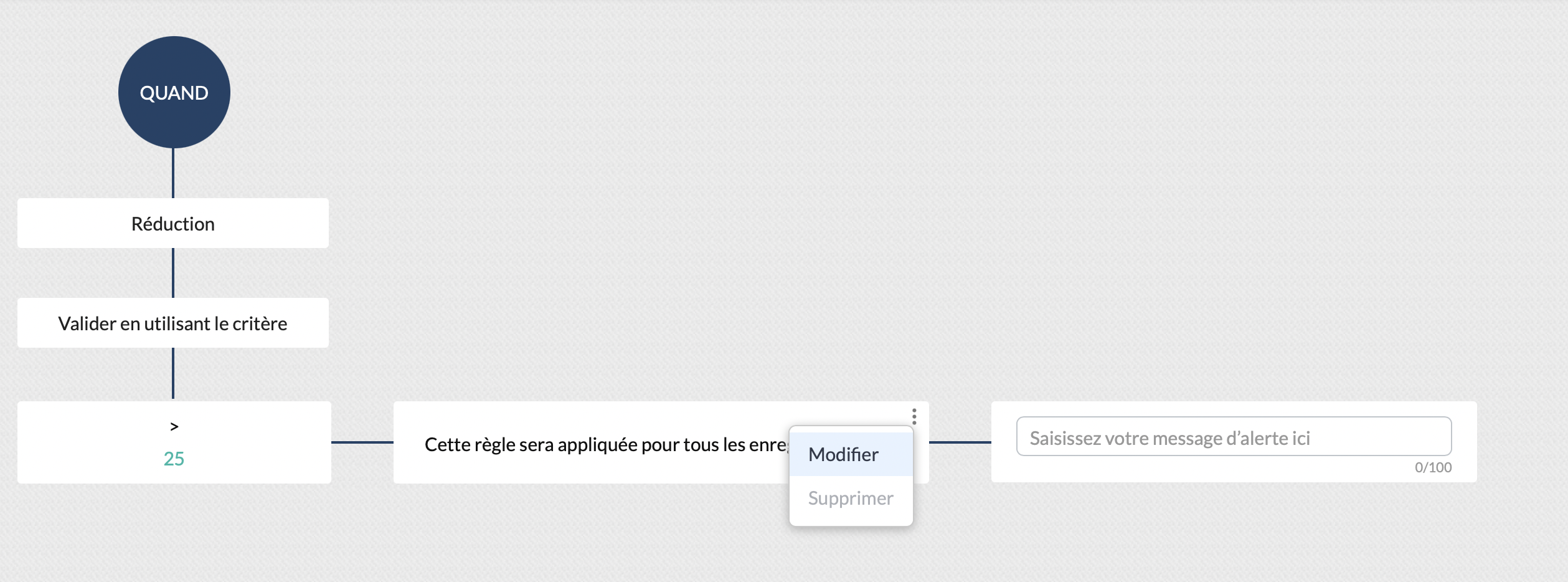
Ensuite, nous souhaitons que cette remise ne soit applicable que pour le marché Français. Dans le bloc "Cette règle sera appliquée pour tous les enregistrements", cliquez sur modifier :
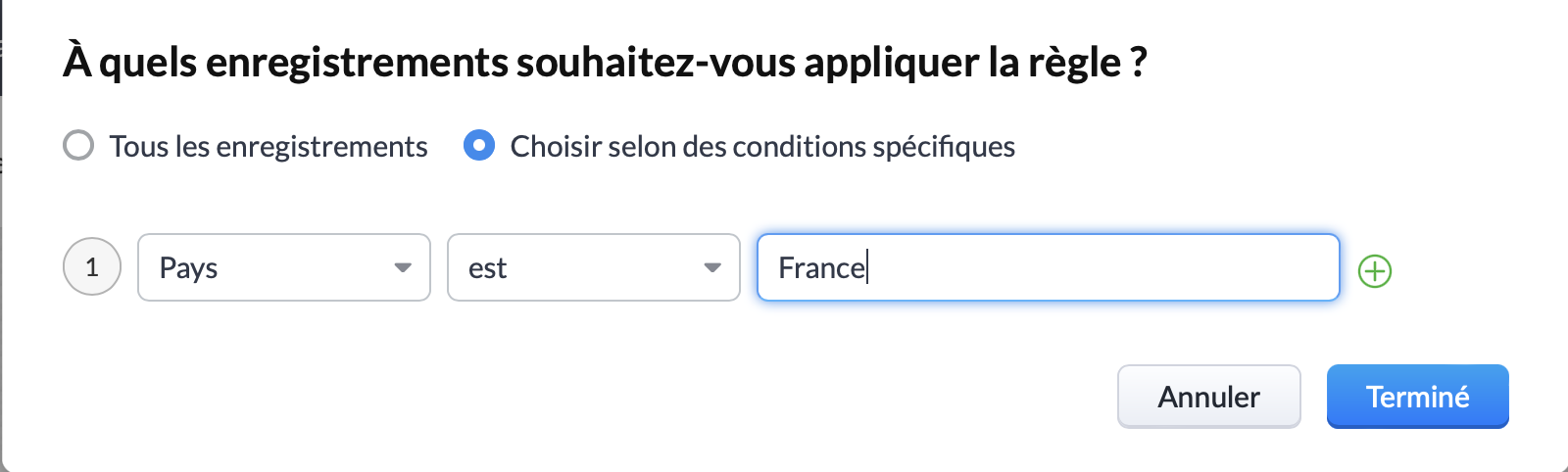
Vous pouvez ainsi sélectionner le critère "Pays, est, "France". Cliquez sur "Terminé" :
Vous pouvez ainsi constater que le critère de réduction est correctement appliqué, et qu'il s'applique bien pour la France. La prochaine et dernière étape consiste à rédiger le message qui sera affiché si l'un de vos collaborateurs dépasse ces critères :
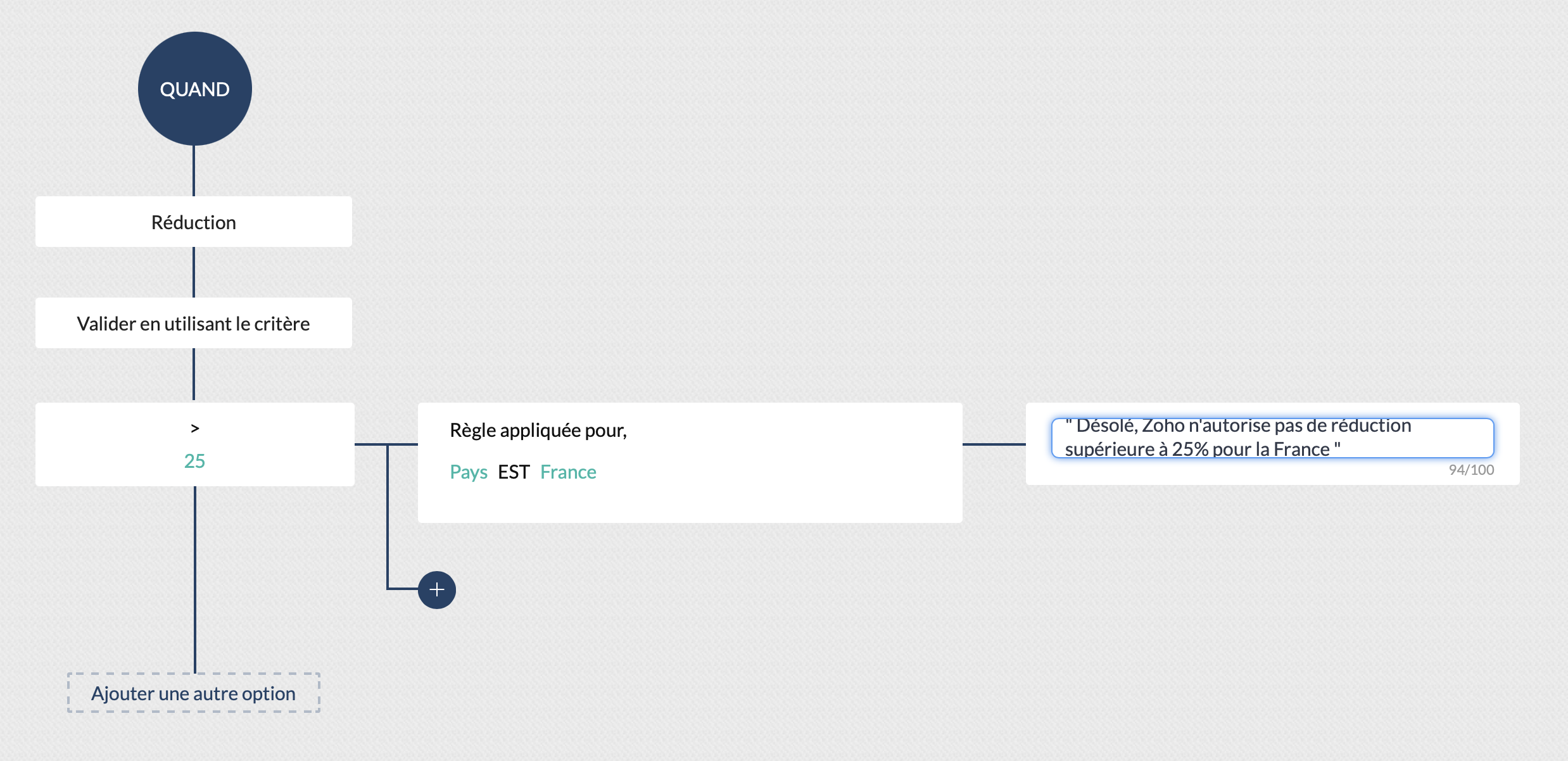
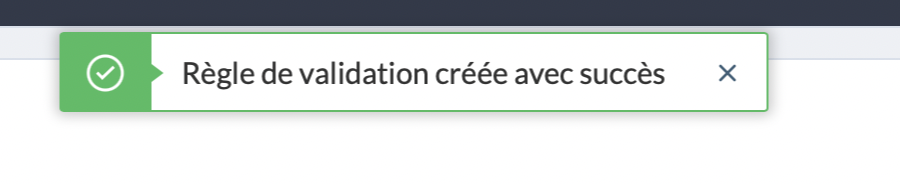
Cliquez sur "Valider" et... Félicitations ! Vous avez créé votre première règle de validation !
Pour s'assurer qu'elle est bien valide, vous pouvez créer un nouveau prospect remplissant la condition d'appartenir au marché Français, et tenter d'appliquer une réduction supérieure à 25%. Ici, nous pouvons voir le message d'erreur s'afficher, la règle de validation est donc bien appliquée :
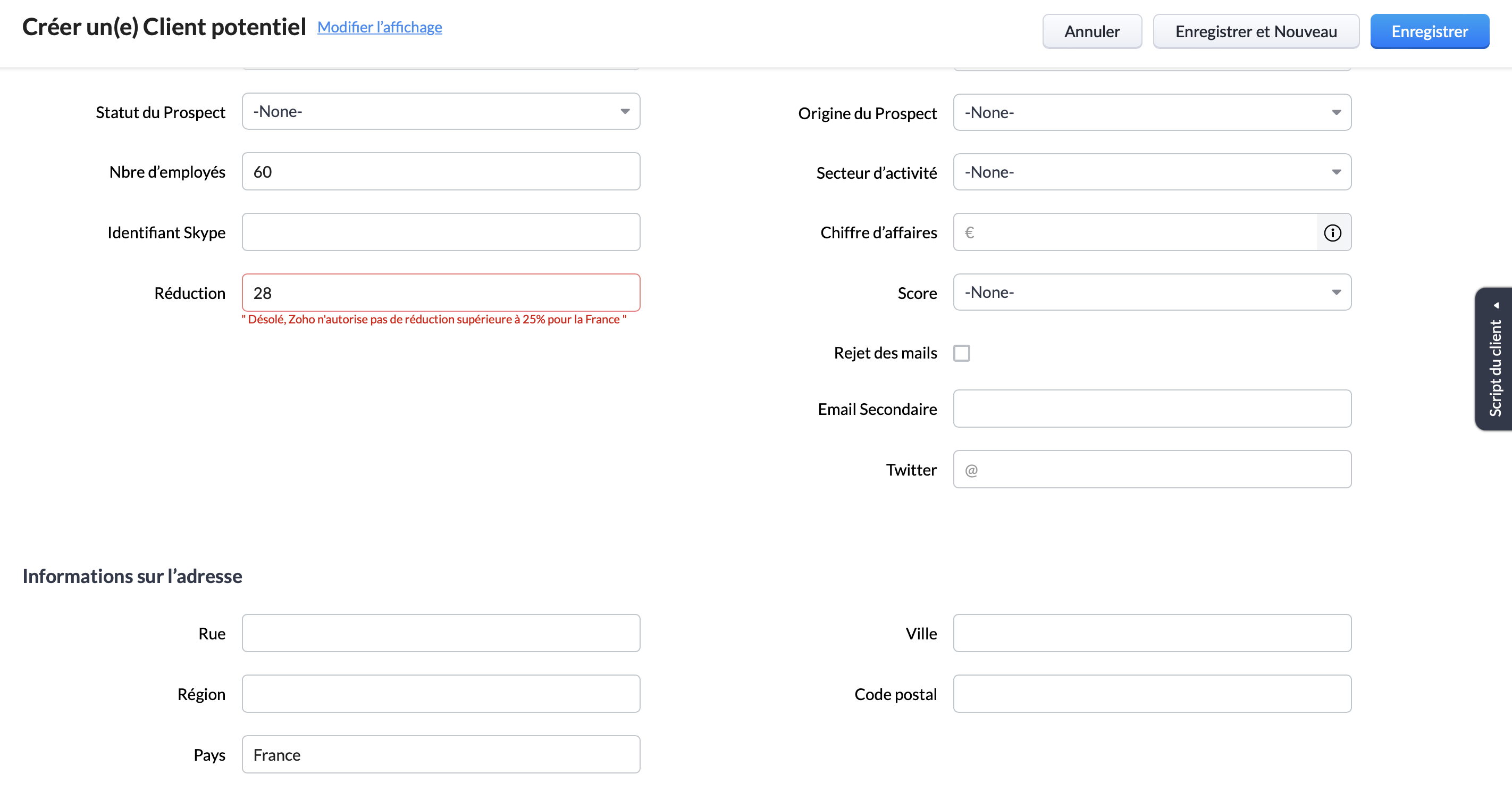
Pour conclure, il est important de rappeler que bien que nous ayons choisi pour cet exemple les critères "pays" et "remise", les règles de validation peuvent être paramétrées pour tout type de critères. Par exemple : numéro de téléphone, nombre d'utilisateur, origine du prospect etc.
Vous pouvez ainsi vous assurer du respect de l'intégralité de vos processus, d'une manière totalement automatisée.
Topic Participants
Antoine Perrault
Sticky Posts
CRM - Astuce #5 : Effectuer des actions en masses
Bonjour à tous, Au programme du jour : éviter les répétitions grâce à la fonction "en masse". Gagnez du temps sur ces actions simples pour vous concentrez sur votre entreprise. Allez dans le module concerné et cliquer sur les : (...) Suppression enZoho CRM - Il y a du nouveau chez les modèles d'e-mails
Bonjour à tous, Nous sommes ravis d'annoncer que les modèles d'email dans Zoho CRM sont désormais adaptés au design pour tous les ordinateurs et mobiles. Le responsive design désigne une méthode selon laquelle les pages sont conçues pour s'afficherNouveautés Zoho CRM : la page d'accueil et le tableau de bord actualisés !
Bonjour à tous, Nous avons apporté quelques améliorations à la page d'accueil des utilisateurs et à l'onglet Tableau de bord, en voici un aperçu. Des composants supplémentaires dans la page d'accueil pour les nouveaux inscrits : Dans l'onglet Accueil,CRM Blueprint #5: Glossaire
Bonjour à tous, Voici le dernier volet de notre série sur les Blueprints : un glossaire pour comprendre tous les termes nécessaire à l'automatisation de votre process. État : fait référence à chaque étape de votre processus. Par exemple : qualification,CRM : Ajoutez de la couleur à vos balises CRM
Bonjour à tous, Les tags sont des identifiants uniques qui peuvent être associés à différents enregistrements ce qui permet de rechercher, trier, catégoriser, filtrer et segmenter efficacement les enregistrements. Cette nouvelle amélioration a pour but
Recent Topics
How to compare a subform lookup field that allows multiple entries when edited
I have a form with a subform with multiple fields. One of the fields is a lookup field that allows a multi select. On edit validation, I want a workflow to execute only when the entries in that subform field has changed. The old. function is not workingIs Zoho Shifts included in the Zoho One plan?
In case the answer is no: there's any plan to make it available via One? Thank youZoho Tracking Image location
So we've been having an issue with tracking email opens. Specifically in Gmail. Our emails are not that long either, maybe 4 sections of image/250 characters of text/button per section. But all my test accounts I used via Gmail we're showing opens. But then come to find out the tracking image is at the very bottom of the email. So If the message is clipped (It always just clips our social icons on the bottom) and the user doesn't click the show more button it never tracks the open. Looking at otherIs there a plan to integrate zoho voice with zoho books?
Hello, Is there a plan to integrate zoho voice with zoho books? Right now we are using the Twilio SMS integration into zoho books, but have recently decided to switch to zoho voice for calls and sms. Is there a plan to integrate zoho voice natively intoZoho Tables is now live in Australia & New Zealand!
Hey everyone! We’ve got some great news to share — Zoho Tables is now officially available in the Australian Data Center serving users across Australia and New Zealand regions! Yes, it took us a bit longer to get here, but this version of Zoho TablesDelivery and handling of documents e-stamped using Zoho Sign
Hello everyone! Zoho Sign makes it easy to pay non judicial stamp duty online and automatically attach the digitally generated e-stamp challan to electronic documents. We also manage the delivery of physical e-stamped papers. We periodically receive theseIntroducing Dedicated Modules for Plans, Addons, and Coupons in Zoho Billing
We’ve enhanced the way you manage Plans, Addons, and Coupons in Zoho Billing. Previously, all three grouped together under Subscription Items. Now, each one has its own dedicated module, giving you a cleaner and more intuitive experience. This updateSortie de Zoho TABLE ??
Bonjour, Depuis bientôt 2 ans l'application zoho table est sortie en dehors de l'UE ? Depuis un an elle est annoncée en Europe Mais en vrai, c'est pour quand exactement ??Issue with WhatsApp Template Approval and Marketing Message Limit in Zoho Bigin
We are facing issues while creating and using WhatsApp message templates through Zoho Bigin, and we request your clarification and support regarding the same. 1. Utility Template Approval Issue Until December, we were able to create WhatsApp templatesHow to install Widget in inventory module
Hi, I am trying to install a app into Sales Order Module related list, however there is no button allow me to do that. May I ask how to install widget to inventory module related list?Zoho Social - Feature Request - Non-US Date Format
Hi Social Team, I have noticed that there is no option to change the date format from US mm/dd/yyyy to others like dd/mm/yyyy. It would be great to see this added as the platform matures. Thanks for considering this feedback.Drop Down Value
Hi, May I know why Zoho Flow treat this drop down as number and not as string. If so, how can I fetch the right value for filtering. This field is from Creator, in Creator upon checking by default it is a string since it's not a lookup field.Zoho CRM's mobile apps: A 2025 Recap
2025 marked a year of steady progress for Zoho CRM's mobile apps. We rolled out several updates and features to improve usability and make everyday CRM work a lot easier to manage. Here’s a look back at some of the key releases from 2025. Android releasesDependent / Dynamic DropDown in ZohoSheets
Has anyone figured out a way to create a Dropdown, the values of which is dependent on Values entered in the other cell ?Facebook follower count doesn't match FB Analytics
Hi all, I am wondering if anyone else has issues with follower counts for Facebook not matching FB's native analytics tool. On the Zoho dashboard, it's showing 1,007, but FB shows 1,060. All the other channels match up. Any insights are much appreciated!Meta and Facebook data report discrepancy
I have been currently gathering manually facebook follower data thru meta. In zoho marketing plus the social media reporting only allows for page likes, and so there is a discrepancy with the data. please the difference in files attached. Is there wayDevelop and publish a Zoho Recruit extension on the marketplace
Hi, I'd like to develop a new extension for Zoho Recruit. I've started to use Zoho Developers creating a Zoho CRM extension. But when I try to create a new extension here https://sigma.zoho.com/workspace/testtesttestest/apps/new I d'ont see the option of Zoho Recruit (only CRM, Desk, Projects...). I do see extensions for Zoho Recruit in the marketplace. How would I go about to create one if the option is not available in sigma ? Cheers, Rémi.Unlocking New Levels: Zoho Payroll's Journey in 2025
Every year brings its own set of challenges and opportunities to rethink how payroll works across regulations and teams. In 2025, Zoho Payroll continued to evolve with one clear focus: giving businesses more flexibility, clarity, and control as they grow.Can I export all attachments from Zoho CRM?
Can I export all attachments from Zoho CRM?Please can the open tasks be shown in each customer account at the top.
Hi there This has happened before, where the open tasks are no longer visible at the top of the page for each customer in the CRM. They have gone missing previously and were reinstated when I asked so I think it's just after an update that this featureWhat's new in Zoho Sheet: Simplify data entry and collaboration
Hello, Zoho Sheet community! Last year, our team was focused on research and development so we could deliver updates that enhance your spreadsheet experience. This year, we’re excited to deliver those enhancements—but we'll be rolling them out incrementallyCommunity Digest — Noviembre y Diciembre 2025
¡Hola, Comunidad de Zoho en Español! Cerramos el año de la mejor forma con nuestro último Community Digest de 2025, donde podrás encontrar las últimas novedades de nuestros productos. ¿Todo listo para empezar 2026 con el mejor pie? ¡Vamos a ello! ZohoZoho Projects Plus’ 2025- the year we launched
We’ve been building project management tools for the past 19 years, and a question we often hear is: Different teams in our organization prefer different project management methods; while the development team prefers agile, the marketing and sales teamsWhy can't we change the Account type from an Expense to an Asset?
Like the question. Why in QuickBooks for example if I mistakenly created an account as an expenses and I already captured information in those accounts, I can just change the account type from expense to assetZoho Books emails suddenly going to Spam since 11 Nov 2025 (Gmail + now Outlook) — anyone else?
Hi everyone, We migrated to Zoho Books in July 2025 and everything worked fine until 11 Nov 2025. Since then, Zoho Books system emails are landing in customers’ Spam (first Gmail, and now we’re seeing Outlook/Office 365 also starting to spam them). ImpactedHow do you print a refund check to customer?
Maybe this is a dumb question, but how does anyone print a refund check to a customer? We cant find anywhere to either just print a check and pick a customer, or where to do so from a credit note.Data Import | Zoho Analytics Custom Query Window Size
Please increase the window size for the Custom Query Data Import. It's impossible to work with such a small query window.Company Multiple Branch/ Location Accounting
Hi All, anyone know whether company can maintain their multiple Branch Accounting in Zoho Books. It will be chart of Accounts & Master Data will be same but different report available as per per Branch. Thanks & regards, Vivek +91 9766906737Zoho Books Invoices Templates
It would be really helpful to have more advanced features to customise the invoice templates in Zoho Books. Especially I´m thinking of the spacing of the different parts of the invoice (Address line etc.). If you have a sender and receiver address inSupport for Developing Zoho Recruit Extensions via Zoho Sigma
Hi, I’m interested in building an extension for Zoho Recruit using Zoho Sigma. However, when I navigate to Sigma and attempt to create a new extension (via the "New Extension" option), Zoho Recruit does not appear as a listed service—only options likeEmail Administrators! Join our tips & troubleshooting series
Greetings to all the admins out there! This announcement is exclusively for you. As we step into the New Year, we’re excited to start a dedicated series of admin-specific tips curated to support you. These posts will help you overcome everyday challengesNotes badge as a quick action in the list view
Hello all, We are introducing the Notes badge in the list view of all modules as a quick action you can perform for each record, in addition to the existing Activity badge. With this enhancement, users will have quick visibility into the notes associatedDeprecation of the Zoho OAuth connector
Hello everyone, At Zoho, we continuously evaluate our integrations to ensure they meet the highest standards of security, reliability, and compliance. As part of these ongoing efforts, we've made the decision to deprecate the Zoho OAuth default connectorPersonalize your booking pages with Custom CSS
Greetings from the Zoho Bookings team! We’re introducing Custom CSS for Zoho Bookings, designed to give you complete control over the look and feel of your booking pages. With this new feature, you can upload your own CSS file to customize colors, fonts,Free Webinar : Unlock AI driven business insights with Zoho Inventory + Zoho Analytics
Are you tired of switching between apps and exporting data to build customized reports? Say hello to smarter & streamlined insights! Join us for this exclusive webinar where we explore the power of the Zoho Inventory–Zoho Analytics integration. LearnNo OR Filter for Views with a Related Modules Criteria
We would like to create a Deal View where the User can see all their deals. For that, we would need an OR to connect the criteria. One of the Fields is a "multiselect User", these (Related Modules Criteria) can only be Filter with an AND. Even betweenImport Function: ONLY update empty fields
When setting up an import from a spreadsheet to CRM, there is a checkbox "Don't update empty values for existing contacts" (see screenshot below). While I see some limited benefit from this functionality, I think there should also be an "ONLY update emptySales IQ Chat Widget is Only Displaying Last Name
Can anyone suggest why the widget is only displaying "last name"?! We have the latest version of the wordpress plugin installed. Thanks Thanks!Free Webinar: Zoho Sign for Zoho Projects: Automate tasks and approvals with e-signatures
Hi there! Handling multiple projects at once? Zoho Projects is your solution for automated and streamlined project management, and with the Zoho Sign extension, you can sign, send, and manage digital paperwork directly from your project workspace. JoinBegin the year with best practices in the Zoho Desk mobile app : Part 2
In focus: Optimizing collaboration and supervision Let's begin 2026 with Part 2 of our tips series on driving your ticketing operations at your fingertips. In Part 1, we explored streamlining operations within tickets. This helped individuals at OmniserveNext Page