Elevate your Radar experience: Best practices part 2

Elevate your Radar experience: Best practices part 2

In the Spotlight: Zoho Desk's Radar app

Hello Everyone,


In part 1 of Zoho Desk’s Radar app best practices, we explored role-based permissions, exceptions handling for critical alerts, daily toasts for a quick view of tickets, and landscape reports for an immersive experience.


In this post, we’ll explore how the Radar app can help your team members working from different locations collaborate and stay connected over your mobile device.

For instance, you might have a few team members on a client visit while you are at your office desk. Zoho Desk's Radar app provides the visibility you need to ensure continuity in customer service and help team members work together to solve problems.
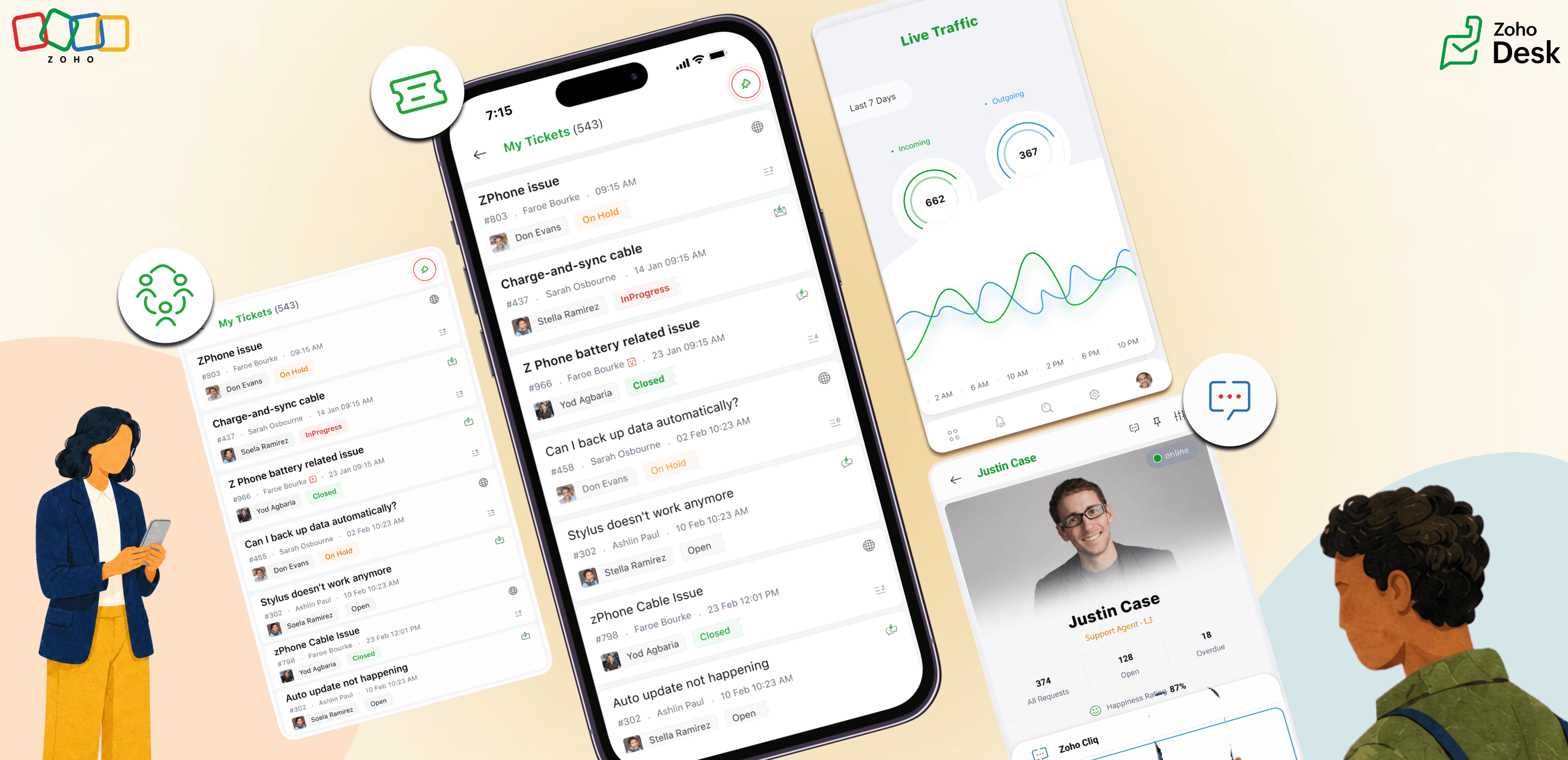
If you haven't started using the Radar for Zoho Desk app yet, download now. iOS | Android


Instant communication through Cliq

In business, feedback or process updates that affect critical functions should always be communicated as early as possible. For this, admins and support teams need to stay connected, no matter where they work from.

Whether it’s a client-facing change or a back-office update, managers/admins can share details with support reps through direct conversations over Cliq. From Agent Details, tap the Cliq icon for a direct conversation. Cliq integration allows communication to happen in real time with relevant insights.

Notes
Note: Please ensure you have an active Cliq subscription, either bundled or standalone, for the Cliq integration to work.

Manage ticket collision 

Sometimes, support reps on the same shift might begin working on the same case or work together on a ticket requiring an emergency response. Ticket collision lets support reps see if another rep is already working on the ticket and refer to actions taken by the respective rep. This enables seamless collaboration and meaningful teamwork by keeping the team aligned.

Pinned entities for quick navigation

While working through multiple tickets across channels, support reps often need to review their recent activities, contact a teammate, or view tickets from a specific channel. Pinned entities serve this purpose. With this feature, you can pin tickets, ticket views, contacts, or activity views. The Radar app adapts to the support reps' workflow by reducing navigation time and increasing operational speed.

Check agent availability 

While support reps handle customer queries, the leads/admins need visibility into their availability so they can connect with the right people and manage support operations effectively during each shift. Whether it's balancing workloads, handling escalations, or assigning new tickets, leads need to know who's available on the floor. Checking in person isn't always practical. Radar apps have the Agent Stats card, which displays the list of reps available. With a quick view of real-time availability, leads can assign work to support reps dependably, quickly, and efficiently.
 
With Cliq integration for quick communication, agent collision for smoother teamwork, pinned entities for faster responses, and the Agent Stats for availability, support teams can coordinate their activities on the move, making the Radar mobile app an accelerator for teamwork.


    • Sticky Posts

    • Register for Zoho Desk Beta Community

      With the start of the year, we have decided to take a small step in making the life of our customers a little easier. We now have easy access to all our upcoming features and a faster way to request for beta access. We open betas for some of our features
    • Share your Zoho Desk story with us!

      Tell us how you use Zoho Desk for your business and inspire others with your story. Be it a simple workflow rule that helps you navigate complex processes or a macro that saves your team a lot of time; share it here and help the community learn and grow with shared knowledge. 
    • Tip #1: Learn to pick the right channels

      Mail, live chat, telephony, social media, web forms—there are so many support channels out there. Trying to pick the right channels to offer your customers can get pretty confusing. Emails are most useful when the customer wants to put things on record. However, escalated or complicated issues should not be resolved over email because it's slow and impersonal.  When you need immediate responses, live chat is more suitable. It's also quick and convenient, so it's the go-to channel for small issues. 
    • Welcome to Zoho Desk Community - Say hello here!

      Hello everyone! Though we have been here for a while, it’s time to formally establish the Zoho Desk Community; we’re really happy to have you all here! This can be the place where you take a moment to introduce yourself to the rest of the community. We’d love to hear all about you, what you do, what company or industry you work for, how you use Zoho Desk and anything else that you will like to share! Here’s a little about me. I am Chinmayee. I have been associated with Zoho since 2014. I joined here
    • Webinar 1: Blueprint for Customer Service

      With the launch of a host of new features in Zoho Desk, we thought it’ll be great to have a few webinars to help our customers make the most of them. We’re starting off with our most talked about feature, Blueprint in Zoho Desk. You can register for the Blueprint webinar here: The webinar will be delivered by our in-house product experts. This is a good opportunity to ask questions to our experts and understand how Blueprint can help you automate your service processes. We look forward to seeing
    • Recent Topics

    • ZohoBooks - "Account transactions" report doesn't have any "Desciptions"

      Hi, I'd like to push for this to be included in ZohoBooks: In a "account transactions" report all the numbers are right, but I'd really like to see the "Description" as part of this report, i.e. the line-item-description as I would see it in the bank statement. Essentially all you see is a list of numbers adding up to the total. It is very difficult to see if things are right without being able to see what exactly each transaction refers to. Going into each transaction one-by-one is not a workable
    • Zoho Projects | Q3 Updates

      Hello everyone, Here's a roundup of everything we released from July to September. We have added some new features as well as improved some of the existing ones. Project Financials Finance Integration Integrate your Project with Zoho Books, Zoho Invoice,
    • Meet your customers on Arattai, from inside Zoho CRM

      Hello everyone, Your customers reach you on the apps they already use. Zoho CRM now supports one more: our very own Arattai! When someone messages your Arattai Business number, the conversation arrives in the Messages module in CRM, right beside your
    • Running Balance

      Please add automatically Running balance in ledger view. Taking lot of time, every time to add manually
    • MAKING ENTRY TIME MORE USER FRIENDLY AND FASTER O PREVENT TAB TIME

      I AM CURIOUS TO KNOW IF WE CAN MAKE IT MORE USER FRIENDLY WHILE MAKING BILLS , I MAJORLY USE OVER DESKTOP SO I AM SUGGESTING TO REMOVE TAB TIME WHILE ENTERING BILL OR MAKING INVOICE DIRECT JUMP TO ONLY REGULAR PARTS OF THE BILL . YOURS RAKESH 782866
    • Unable to export reports despite enabled report export permissions

      Hi Zoho Community, We are unable to export reports in Zoho CRM. When attempting an export, we receive the following error: “Cannot Export Report — You do not have permission to export one or more modules used in this report. Please contact your administrator.”
    • Add Payment Information (like Bank details)

      I am using the Free plan of Zoho Books. I need to add the bank details/ UPI details on the invoice. How can I do that. I have added the details in the Bank Section.
    • account access nahi kar pa raha hoo

      hello sir/maddam, mera naam Indrasen Lodhi hai meri zoho mail id "indrasenlodhi@zohomail.in" hai. main iska authenticator app bhul gaya hu, mere pass bachup code bhi nahi hai. kripya meri madad kijiye.
    • Keep Sensitive Customer Data Private with Field Masking in Zoho CRM

      Hello CRM community, Customer records in your CRM are often accessible across multiple teams, but not every team needs visibility into every field. A non-sales team, for instance, has no real need to see a contact's mobile number, and a support agent
    • Generate a Zoho Sign link

      From time to time I get a response "I never received your you e-document for electronic signature" is there a way to generate a Zoho Sign link to share.
    • E-invoicing setup not completed in Zoho Books

      My status on the EmaraTax portal appears as linked with Zoho. However, when I try to complete the setup on the E-invoicing tab in Zoho Books settings, I receive an error saying: "E-Invoicing could not be enabled as the FTA portal is currently unreachable.
    • Notes - Reaction Buttons

      Using the native notes option within CRM is fine, it works and the RTF features are great, however, would it be possible - if there isnt already something in place, where we can add a reactions button, similar to teams/whatsapp to show that its been read
    • Generate a link for Zoho Sign we can copy and use in a separate email

      Please consider adding functionality that would all a user to copy a reminder link so that we can include it in a personalized email instead of sending a Zoho reminder. Or, allow us to customize the reminder email. Use Case: We have clients we need to
    • Need help with importing expenses

      I'm using the template downloaded from the application. When I try to import my expenses, I get the message: Duplicate entry in the Expense Date column. Ensure it contains unique values. None of the rows will import. There are duplicate dates, but they
    • #12 Bringing In A Second Pair Of Hands

      Meera's studio became a two-person business in month five. Adding the second person took ten minutes. Working out why Meera herself was showing up as Staff took considerably longer. The Usual Way To Do This Covered in our published General FAQ, with the
    • How can I add a Custom Field (or Customer_name) to a picklist?

      Our workflow is Shopify-->SO -->Picklist-->Package-->Shipment. We would like to have the Picklist template to include a custom field "Customer_Notes" (we have created this field already). This way we get alerted when a customer has notes on their account.
    • Header Line in Quote product rows

      I believe this is an essential feature that Zoho should provide us, when adding products we want the ability to add titles for our product, in quotes: The Solution/Category Title Product1 Product2..... and then it would show the sub-total of that title 
    • 👍 Zoho CRM's Notes now gets Reactions and a new look

      Moderation update: Currently available in the following DC's CA, AU, CN, UAE, JP, SA - All Editions EU - Free, Standard and Professional Hello everyone, Notes help users capture important updates, collaborate with teammates, and maintain context for records.
    • Add @Mention Notifications in Zoho Cliq for Zoho Project Mentions

      Hello Zoho Projects Team, We hope you are doing well. We would like to submit a feature request regarding "Projects Bot" Cliq bot notifications for @mentions inside Zoho Projects comments (Tasks and Issues). Current Behavior: At the moment, when someone
    • Can't connect to POP and SMTP over VPN

      I use Thunderbird to access Zoho Mail via POP and SMTP. I have configured an app-specific password for Thunderbird to use. Everything is properly configured and works correctly — until I enable my VPN. I'm using a paid commercial VPN service (Mullvad).
    • Outgoing Mail Blocked – Suspicious Login Activity (Need Clarification and Solution)

      Hello, I’m currently facing an issue where my Zoho Mail account has been blocked due to “suspicious login activity,” and outgoing emails are restricted. Here are the details shown: Block type: Outgoing mail blocked Reason: Suspicious login activity A
    • Online Payment Fees

      We don't take many online credit card payments so the merchant service provider (PayPal) charges us the 2.9% fee for processing the amount. I would like the ability for the fee to be automatically added to the total amount for "ease of payment". We'd
    • O SalesIQ aceita números do Whatsapp Business com coextistência?

      Tenho uma equipe com vários vendedores e cada um deles tem um celular corporativo usando o Whatsapp Business para se comunicar com os clientes. Estamos no plano Zoho One e esses mesmos vendedores também usam o SalesIQ para atender os leads que vem do
    • Losing description after merging tickets

      Hello, We merge tickets when they are about the same topic from the same client. It happens sometimes. We recently noticed that after the merger only the description from the master ticket is left in a thread. And the slave-ticket description is erased.
    • Any update on much requested feature, to delete attachments without deleting the e-mail body?

      People have been requesting the ability to delete e-mail attachments without deleting the e-mail for more than ten years now. The latest I see is marked "Working On It" and a year ago it was supposedly being added, see here: https://help.zoho.com/portal/en/community/topic/is-there-a-way-to-delete-mail-attachments-without-deleting-the-text
    • Undo/redo when composing Mail

      Where is the undo/redo button when composing mail? I've new to Zoho, I've looked, I've searched and can't find it. What am I missing?
    • Mail menu bar items missing in Inbox and folders

      Last night some shortcuts such as Move to Folder, Archive, Delete, Mark as spam, and others, disappeared from my Mail menu bar, along with items in the vertical three dots extension such as Mark as read, Flag as, Mark as unread, etc. What I now have instead
    • ERROR CODE :554 - Your access to this mail system has been rejected due to poor reputation of a domain used in message transfer

      This message was created automatically by mail delivery software. A message that you sent could not be delivered to one or more of its recipients. This is a permanent error. *****, ERROR CODE :554 - Your access to this mail system has been rejected due
    • Sent items with shared folders

      Hello, this is in some way in between a problem and an idea.  When sharing folders (which is actually not any close to a shared mailbox...) the person which the folder has been shared with can access that folder and can send emails when delegation is
    • What's New in Zoho Inventory | July & August 2026

      Hello users, The July and August 2026 releases bring a range of new features and improvements across the product. From the Nigeria Edition and Super Admin enhancements to Sri Lanka IRD-compliant invoicing, Loyalty Program Management, and improvements
    • E-mail com problema

      Não estou recebendo e-mail desde Janeiro. Algo desconfigurou e eu não consigo resolver. Podem ajudar? Aguardo. Wagner Della Aversana Whats 55 11 985119899
    • Account Blocked due to Suspicious Activity.

      Hello, Trying to get access to my account, I have found this message above in the subject of this message. I am unable to log back to my account (see err. mess. below.) and thus cannot get rif of this following the Zoho procedure : I followed the step
    • SAML authentication in Zoho Mail: Simplify and secure your organization's login management

      Managing login credentials across multiple web applications can be challenging for organizations with a large number of users. Without a centralized authentication system, users are required to maintain separate passwords for each application, increasing
    • How to prepare a balance sheet for a company that has no operations yet?

      .
    • Can't create new account in zoho email

      Hello, i'm trying to create some free accounts to my customers... and since yesterday i can't create a new account, what is wrong? why i can't create free account? Thank You
    • Name autocomplete

      Hi, During searching emails the web tool does not always propose the auto-completion of the saved emails. As a result I either have to go to contacts and look up the exact email, or the exact full name including the middle name and any dots, which is
    • Introducing Incentives for Zoho CRM: Build, automate, and track sales commissions

      Dear Customers, We are here with an amazing news! We built a direct solution to help manage your commission provisioning activity in your business. From creating commission plans to issuing payouts, this application leverages your sales reps’ performance
    • Bank Feeds - Again

      Bank feeds broken again for me. I don't see other recent posts on this, so maybe it's just us? Tried: refresh update cred/ deact./react. feeds chat support Nothing. On day 2 without zoho as a result, which is crippling for us. We've used zoho for a year
    • Create a single record from multiple images with ICR

      Hello all, Zia's Intelligent Character Recognition can now create a single record from multiple images based on the configured ICR rule. Users can upload up to three images at once, such as an ID, a passport, and a business card, and Zia will extract
    • SPF failure in android app

      I have no domain. I am not admin of anything. All I want to do is send an email from a zohomail.eu address, using the Zoho android app, with all settings as default. I do not use Office 365, or EOP, or Outlook, and I have no domain or domain registrar.
    • Next Page