Introducing the locking option for CRM records
Last modified on 06/04/2023: Record locking option in CRM is now available for all Zoho CRM users in all DCs. Note that it was an early access feature available only upon request.
Hello All,
Hope you're doing well!
We're thrilled to introduce our latest enhancement to CRM—record locking.
Certain business scenarios demand that records in your organization's modules be safe from editing or deletion once they reach a certain stage in your sales process or satisfy specific conditions.
For example, if a deal has reached the final stage—"closed won" or "closed lost"—then perhaps it shouldn't be further edited or deleted.
Alternatively, let's say a record is in its proposal or review stage. During such a stage, the details of the record need to be verified, and even though a sales rep may be the record's owner, you can't allow them to update the record while the review is ongoing.
There might also be situations where the record doesn't match certain criteria, but the user dealing with the record might want to lock the record to avoid changes. For example, when a sales rep is in touch with a prospect, they may want to temporarily lock the record while prospecting is in progress to prevent other reps from adding incorrect information to the record.
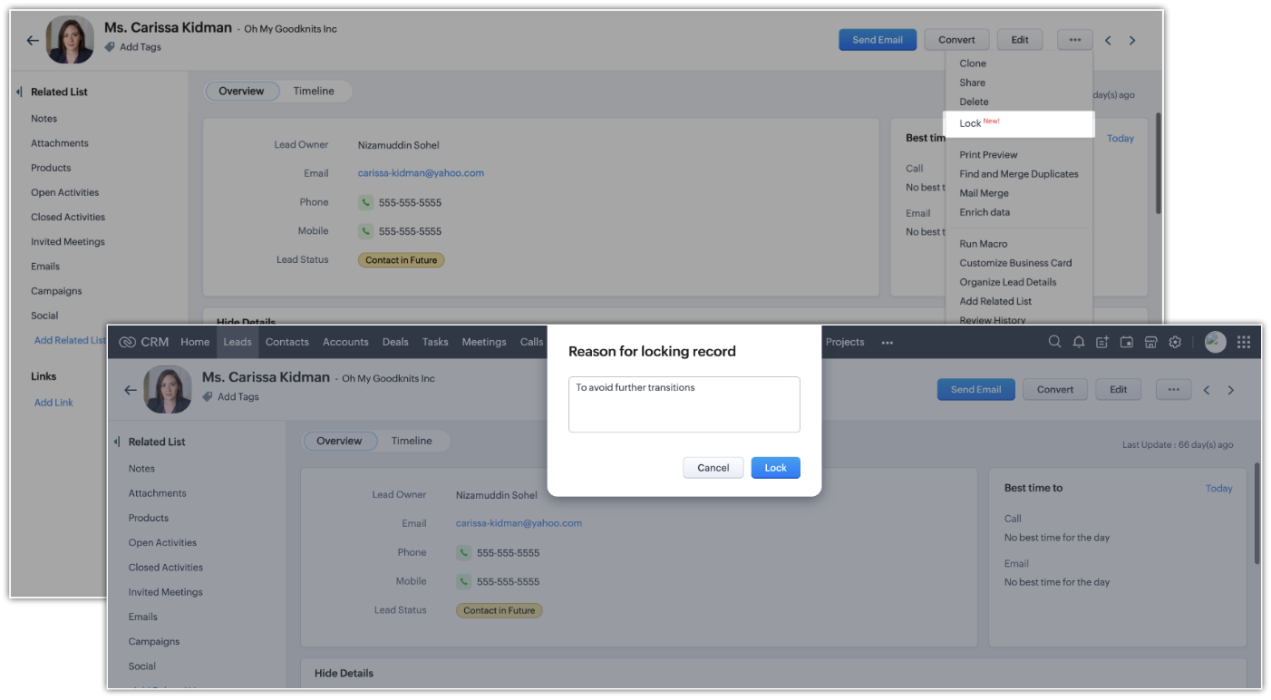
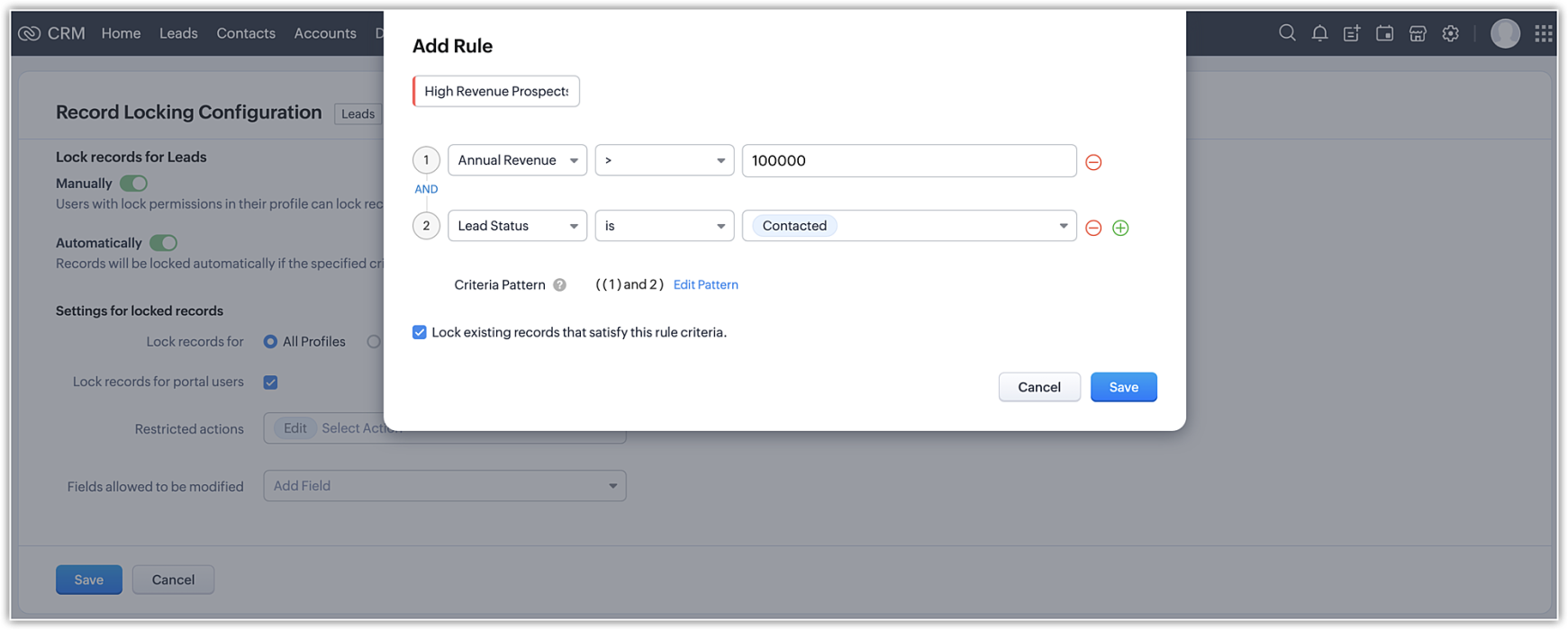
Zoho CRM's record-locking feature enables you to lock records manually or automatically when certain conditions are met.
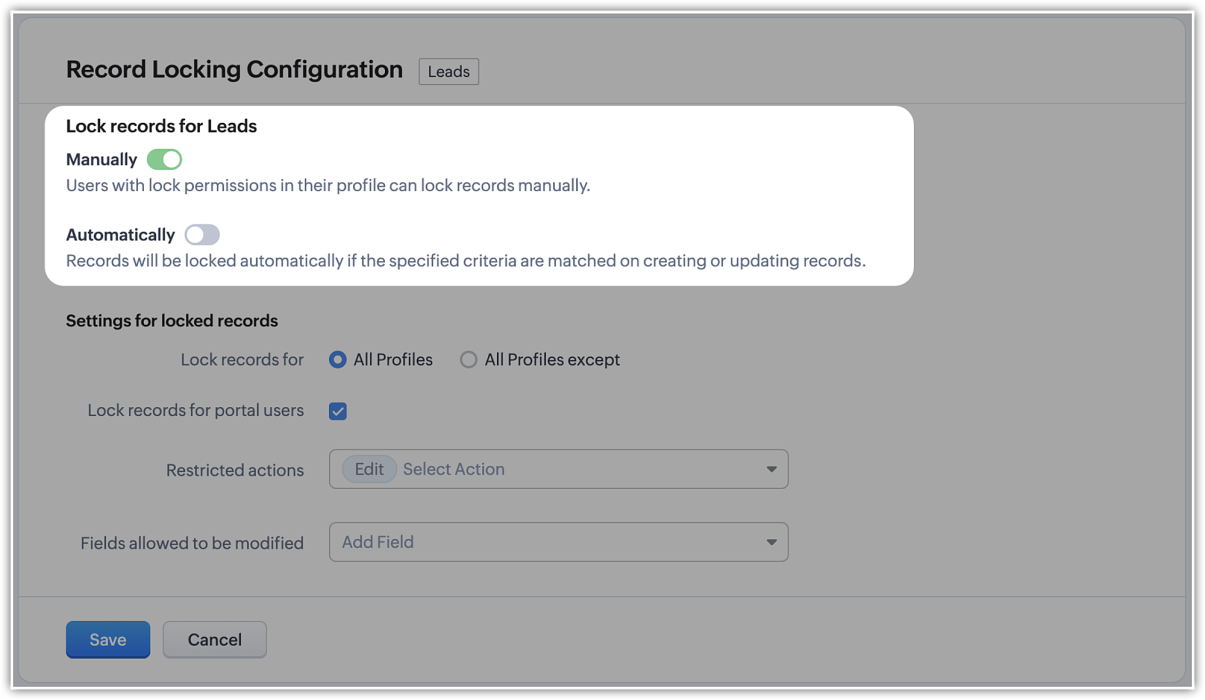
NOTE (added on 02/03/23): The locking configuration must be set up separately for each module. You can navigate to the specific module in Modules and Fields under Customization in your setup page, and you will find the Record Locking Configuration tab.
Record locking configurations
Now that we've established why locking records can be useful or necessary, let's take a quick look at the different configuration options available:
Now that we've established why locking records can be useful or necessary, let's take a quick look at the different configuration options available:
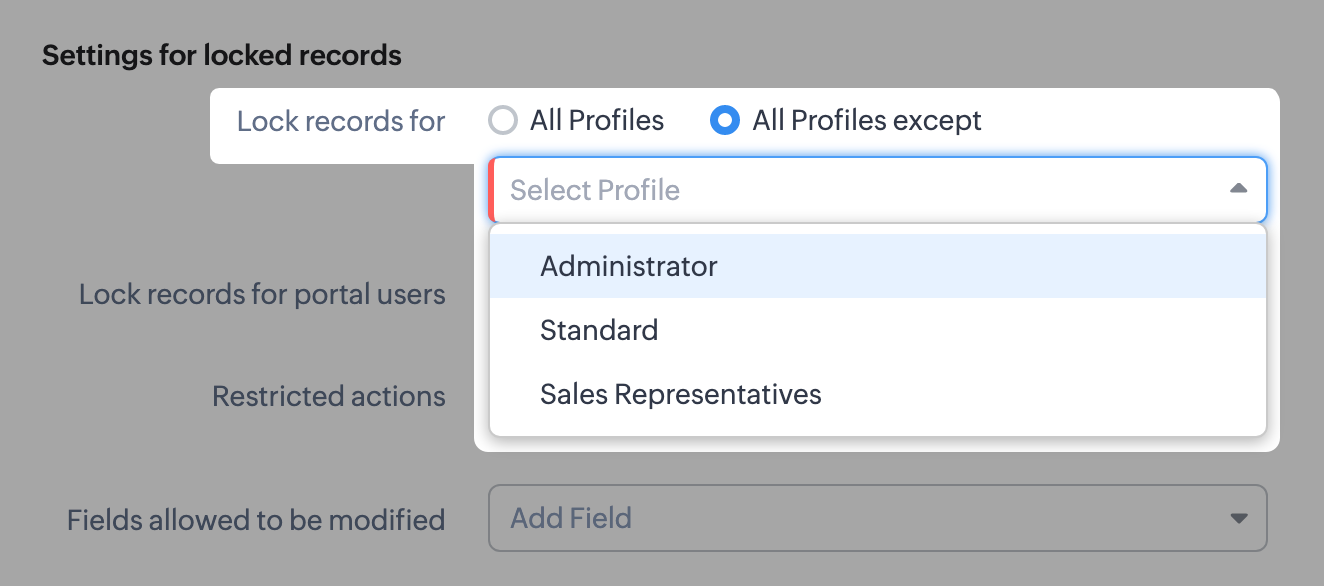
- There might be scenarios where, say, you want members of the accounts team to be able to edit quotes, but not other profiles. You can simply lock the records for all profiles except those belonging to members of the accounts team, any other set of exceptions using the multi-select menu. Additionally, you can also choose to lock records for all profiles.
- You can lock the records that are accessible to your portal users.
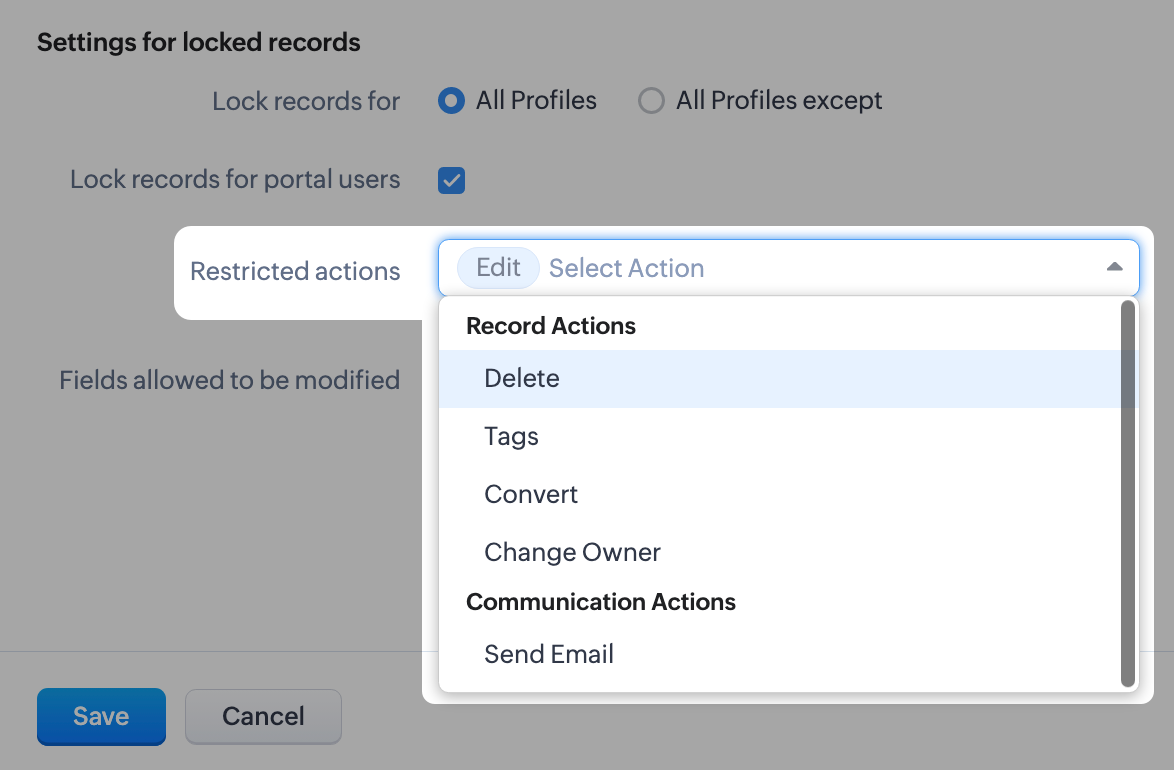
- For locked records, the edit action is disabled by default, but you can restrict other types of native actions, as well as custom buttons.
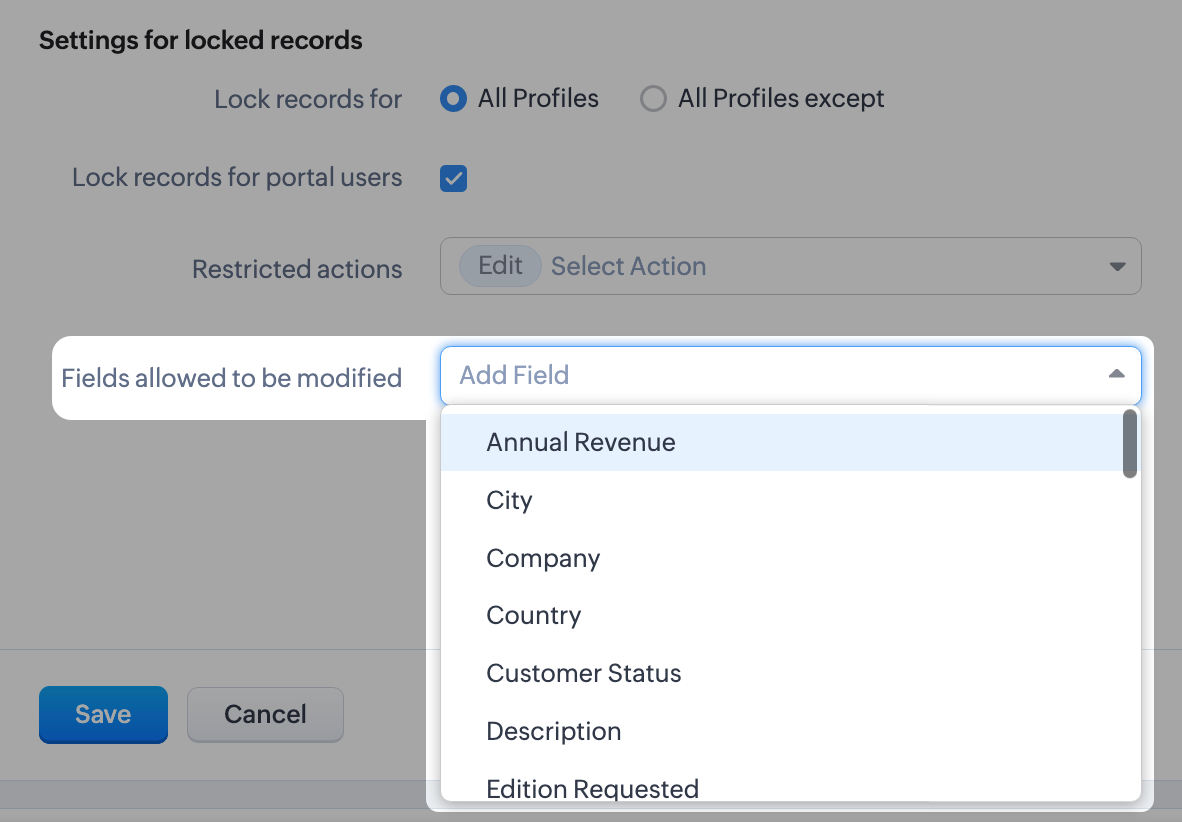
- Even when a record is locked, you can configure certain fields which don't affect your business process to remain editable. For example, you might want the Description or comment fields to remain editable. You can leave a maximum of 15 fields unlocked.
What happens when a record is locked?
Once a record is locked, you will see the lock icon on the record image and in the UI of the record detail page itself. Only fields you've enabled will be available to edit.
Once a record is locked, you will see the lock icon on the record image and in the UI of the record detail page itself. Only fields you've enabled will be available to edit.
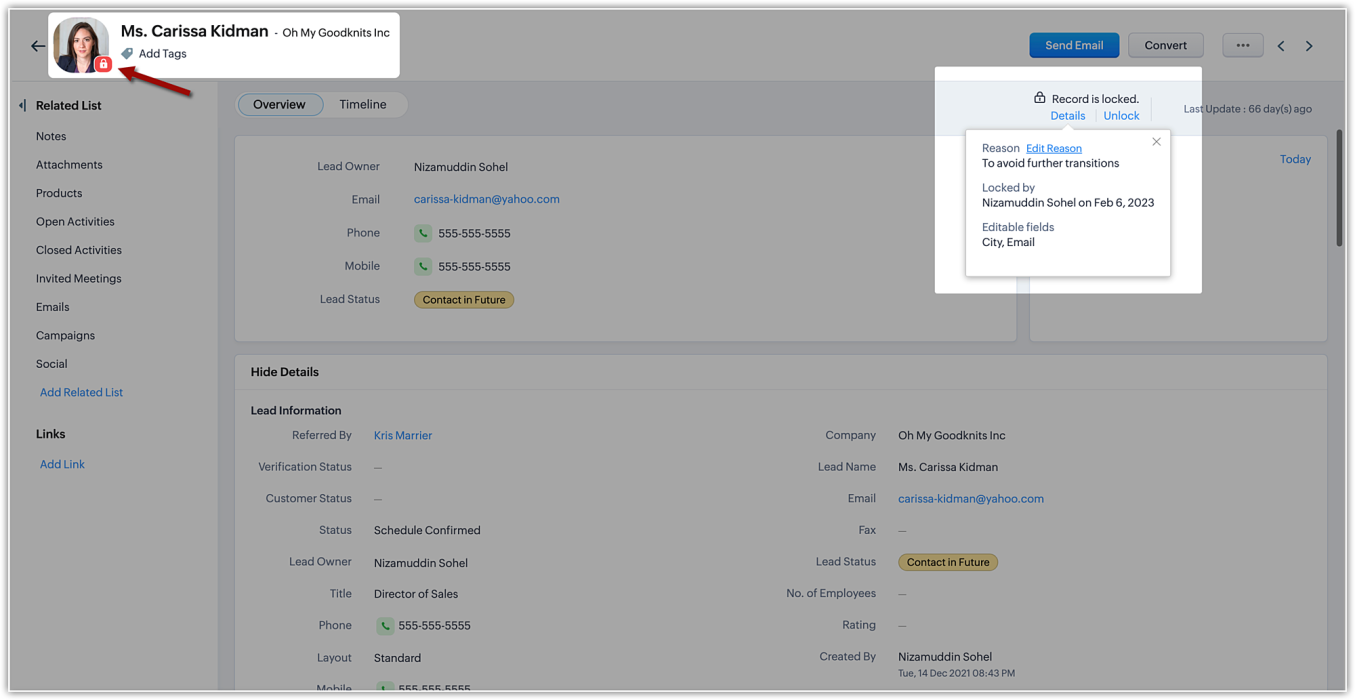
The details of the locking, such as the reason (i.e., the locking condition), locking date, and the fields available for edit will be shown on the details button available on the record detail page.
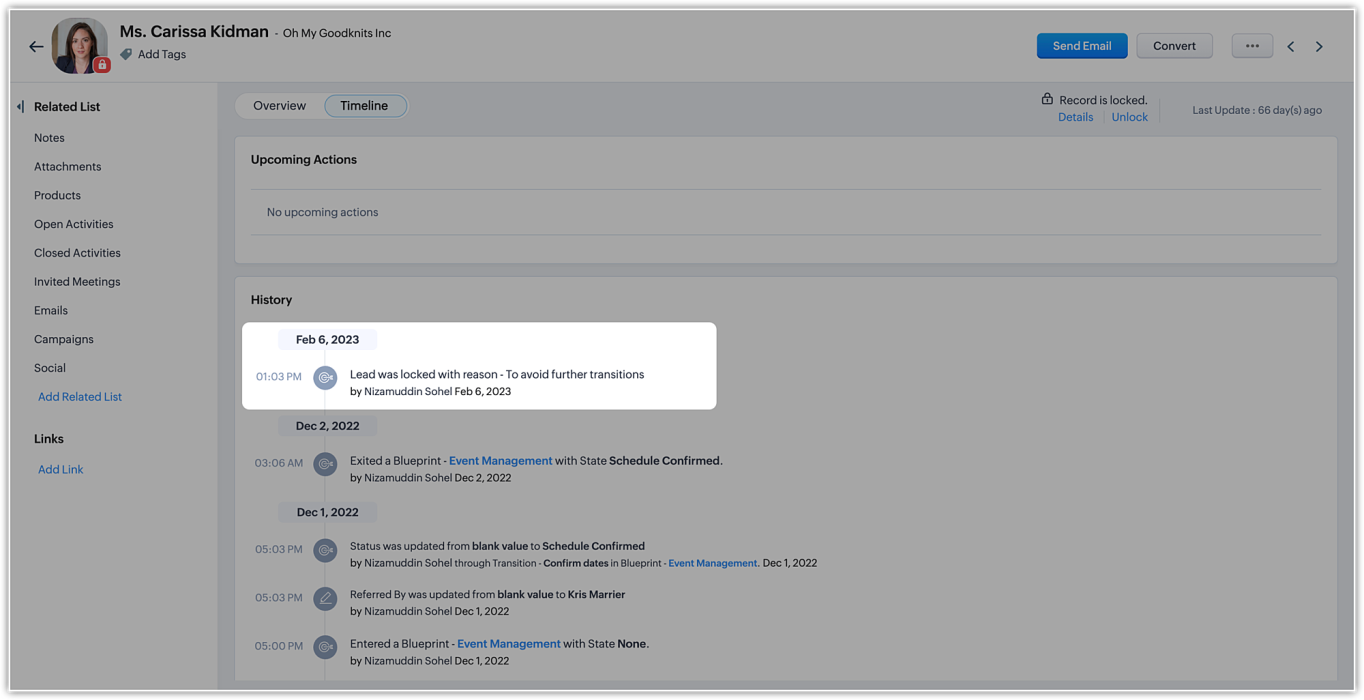
In the record's timeline, you can also see timestamped details like when the record was locked and the condition that was followed.
On the record list view, locked records are indicated by a lock icon.
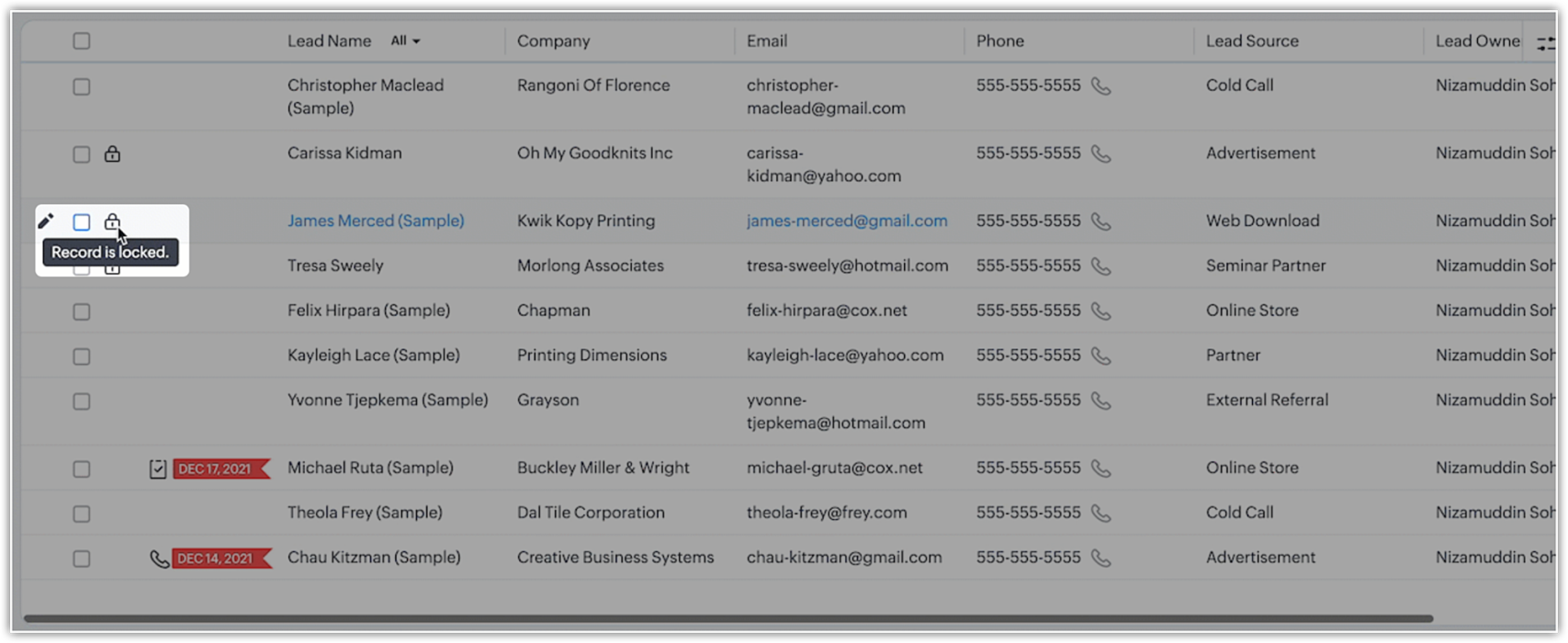
Additionally, you can filter records in the list view based on the pre-defined filter option, as well as based on the system-defined custom view.
Who can unlock records and how is it done?
If a user locks a record manually, they can unlock it themselves. Admins can unlock records, too. On the other hand, automatically locked records will be unlocked only when they're no longer subject to the lock conditions or criteria.
However, deleting a rule or locking configuration will automatically unlock all records the rule or condition had previously locked.
Additional notes
- Set up to five rules per module. Each rule will have a name that is displayed on the record detail page when a record is locked.
- System actions like automation and integration syncs will still be performed on locked records, even when a user who is excluded from locking triggers those processes.
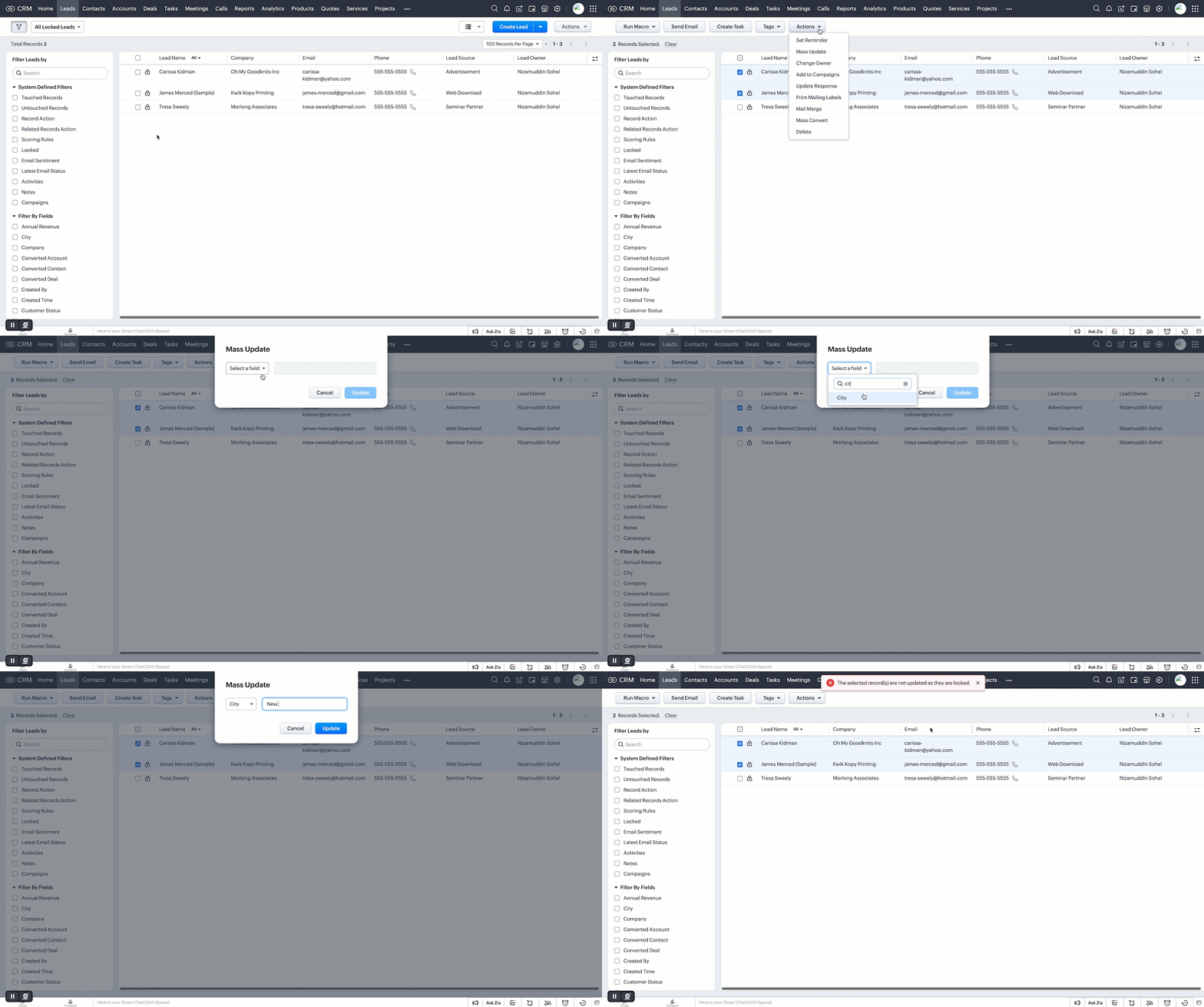
- Locked records are still displayed in list views. However, bulk actions done from list views are not allowed if the respective action is restricted under the record locking configuration.
- Record locking configuration is available for enterprise and ultimate editions of Zoho CRM. If an user downgrades from enterprise edition, locking configurations will be ineffective and all records will be unlocked.
Locked status can not be regained upon upgrading back.
That's all for this exciting new enhancement. Read more about the record locking configurations and its usage in our help doc.
Thanks and have a good one!
Note:
- Manual locking/unlocking of records is not available for the mobile app as yet.
- Auto-locking of records will get reflected on the mobile app, and locked records cannot be updated from mobile app also.
- The locking configuration must be set up separately for each module.
Topic Participants
Saishree T K
Lane Von Pinkston
Jordan Talmor
Amit
Piyush Goyal
Sticky Posts
Announcing Early Access to "Zoho CRM for Everyone" — A new and exciting update to Zoho CRM
Zoho CRM For Everyone is now officially available to all customers, and the Early Access Program has come to a close. We want to extend our sincere thanks to everyone who participated in the program. Your valuable feedback played a key role in shaping[Early Access] Voice of the Customer (VoC) for Zoho CRM
Happy new year, everyone! We have an exciting addition to our suite of features and would like to introduce you to VoC (Voice of the Customer) for Zoho CRM, powered by Zia. 2023 is definitely the best time to be a customer with rapid innovations and advancementsAdding calls as a channel in Voice of the Customer
Dear All, We hope you're well! It's been almost a year since we opened Zoho CRM's Voice of the Customer solution up for early access. We are grateful for the reception and support you have been showing us with regards to its adoption and feedback. Since
Recent Topics
Zoho Inventory - How to pay a supplier up front then receive multiple deliveries
How do we manage situations where we pay a supplier up front, then the receive the products in increments? Example Workflow: Create Purchase Order > Receive Bill for full amount > Receive Items 2 or more deliveries. Currently, once a Bill is created againstIntroducing Configure, Price, Quote (CPQ) in Zoho CRM | Public early access 2023
Greetings Customers! We're excited to announce that the CPQ feature will soon be available in Zoho CRM and accessible to all accounts using the Professional, Enterprise, and Ultimate editions. We've opened this feature to select customers, and it'll beCreate folder is fetch fails
coming from zapier... zapier has a google drive task that searches for a specific folder in google drive, and if it fails to find the folder it will create a folder based on the search criteria, and contine along the singluar path of the flow. Tryinghow to edit the converted lead records?
so I can fetch the converted leads records using API (COQL), using this endpoint https://www.zohoapis.com/crm/v5/coql and using COQL filter Converted__s=true for some reasons I need to change the value from a field in a converted lead record. When I tryZoho Bookings <> CRM integration
Hello Zoho community! We are enabling our Zoho Bookings <> CRM integration. What is the workflow if the integration detects that the contact already exists in the CRM? Does it create a duplicate record? Overwrite the record? Merge the record? (in thisCannot reject empty expense report
Hello, We are currently having issues with two empty expense reports where if we try to reject them, either manually or through the REST API, we get error 114016, which says some of the expenses have already been billed and must be removed. I'd appreciateUse of Zia within Forms
I have noticed that recently you have added Zia to help create forms from scratch. Would it be possible to add Zia functionality to free text fields for form submissions or if this is already on the roadmap an ETA for this please? We have a lot of fieldDefault in fields on Form B based on the user selection in Form A
Hi Everyone, I have added an action button to a form report to bring up a new form based on user selection, see it indicated in red below: Then when the ne form loads, I want to default in some of the fields based on the record the user was selected on.Auto-sync field of lookup value
This feature has been requested many times in the discussion Field of Lookup Announcement and this post aims to track it separately. At the moment the value of a 'field of lookup' is a snapshot but once the parent lookup field is updated the values diverge.Last activity time is acting like last modified time
When i edit the description or any field in the potential, account, contact and lead, the Last Activity Time is being updated like the Modified Time. This is messing all workflows and reports and we are unable to track real last time of activities likeEnhancements to the formula field in Zoho CRM: Auto-refresh formulas with the "Now" function, stop formula executions based on criteria, and include formulas within formulas
Dear Customers, We hope you're well! By their nature, modern businesses rely every day on computations, whether it's to calculate the price of a product, assess ROI, evaluate the lifetime value of a customer, or even determine the age of a record. WithHEX/RGB Color Input in Visual Editor
Hello Zoho Pagesense Team, We hope you're doing well. We’d like to submit a feature request to improve the color selection options in the Pagesense popup editor. Current Limitation: Currently, to set text colors, users must move the color slider manually.Add Comprehensive Accessibility Features to Zoho Writer
Hello Zoho Writer Team, We hope you are doing well. We would like to submit a feature request to enhance Zoho Writer with a full set of accessibility tools, similar to the accessibility options already available in the Zoho Desk agent interface. 🚧 CurrentCRM and Campaigns- tags not integrating?
Hi! I am setting up an automation in zoho campaigns and it says the crm is integrated...but when I want to use a trigger of a certain tag I created for people in the crm to denote those who purchased, it doesnt have that tag available as an option inMaximum limit of rows exceeded
I am trying to add a row to a spreadsheets that has fewer than 60 rows. I keep getting an error message that says I have exceeded the maximum limit of 65,536 rows. Any ideas out there?Can't change form's original name in URL
Hi all, I have been duplicating + editing forms for jobs regarding the same department to maintain formatting + styling. The issue I've not run into is because I've duplicated it from an existing form, the URL doesn't seem to want to update with the new【参加無料】今年最後のZoho ユーザー交流会|東京・大阪・名古屋で開催! 活用事例&ユーザー同士の情報交換
ユーザーの皆さま、こんにちは。コミュニティチームの中野です。 11月に東京、大阪、名古屋の3都市でZoho ユーザー交流会を開催します! 毎回ご好評いただいている本イベントでは、実際の Zohoユーザーによるリアルな活用事例の共有や 参加者同士でノウハウを交換し合うグループワークを予定しています。 「他社の活用を参考にしたい」「Zoho をもっと使いこなしたい」方にぴったりの場です。 初参加の方もぜひお気軽にご参加ください! ーーーーーーーーーーーーーーーーーーーーーーーーーーーーーーーーーーーーーIntroducing parent-child ticketing in Zoho Desk [Early access]
Hello Zoho Desk users! We have introduced the parent-child ticketing system to help customer service teams ensure efficient resolution of issues involving multiple, related tickets. You can now combine repetitive and interconnected tickets into parent-childTip #7: 5 formas de mantener tus listas de correo electrónico
Tips and Tricks #7, adaptado de Susmit Sen ¡Hola, comunidad! Esta semana volvemos con nuestros Tips and Tricks para Zoho Campaigns. En esta ocasión, voy a darte algunos consejos para mantener limpias tus listas de correo electrónico, y empezar el 2021Mail Merge related Lists
When I try to merge an associated list the fields do not have a checkbox to choose them as it does in the tutorials. Am I missing something? Any ideas would be appreciated.create-a-purchase-receive API issues
Hello all, I'm trying to use the create a purchase receive inventory API documented here (https://www.zoho.com/inventory/api/v1/purchasereceives/#create-a-purchase-receive) however when I do am getting the following error {"code":9,"message":"The purchaseZoho Pagesense really this slow??? 5s delay...
I put the pagesense on my website (hosted by webflow and fast) and it caused a 5s delay to load. do other people face similar delays?Heatmap: Missing Content Elements - Zoho Page Sense
Hi there, I'm trying out Zoho Page Sense to generate heatmaps for my Wix pages. My problem: Some parts of my Wix pages don't show on my heatmap, the heatmap is just empty there. Maybe Wix default lazy loading setting causes this error? Is there a wayMarketing Tip #3: Use social proof to build trust
People trust people. Showcasing reviews, testimonials, or “bestseller” badges on your product pages can nudge hesitant buyers toward purchase. Try this today: Add one customer testimonial or highlight your top-selling product on your homepage. Or, doClient scripts for Zoho Books ?
Good day everyone, I am looking for a way to be able to interact with the Quotes and Invoices as they are being created. Think of it like Zoho client script in Zoho CRM. But for the life of me I dont see a way to do this. The issue with having functionExternal download link limit
Can You please help us to understand this For Zoho WorkDrive external users, the download limit is a maximum of 5 GB total download size and a maximum of 50 first-level files and folders What is the meaning of first level? We are using these files inMake CAMPAIGNS email look as simple as possible
Hi there I'm trying to make my Campaigns email look as much like a normal email as possible. I'm a bit stuck with the "justification" of the email email block. Can I LEFT JUSTIFY the "whole email" to make it look "normal"? (Please see screenshot attached)Has anyone integrated SMS well for Zoho Desk?
Our company does property management and needs to be able to handle inbound sms messages which create a ticket for Zoho Desk. We then need to be able to reply back from Zoho desk which sends the user an sms message. This seems like a fairly common thingIntroducing Zoho Creator's 2025 Release Projection 2
Hello Creators! I'm Prakash, from the Creator product management team, and today I'm delighted to unveil our next set of features as part of Release Projection 2 for 2025. With thoughtful analysis and planning, we've curated powerful new capabilitiesZoho Sign Reminder email template
Is there a template we can edit for the reminder emails? I don't see it in Settings / Choose a templateObject required error
Hi, I am getting an 'Object required' error on the line Call HideColumnsOutsideRange(ws, startOfWeek, endOfWeek) when I run the ShowCurrentWeek macro but not when I run the ShowCurrentMonth macro. Any ideas? Regards, GW Option Explicit Sub HideColumnsOutsideRange(wsColor of Text Box Changes
Sometimes I find the color of text boxes changed to a different color. This seems to happen when I reopen the same slide deck later. In the image that I am attaching, you see that the colors of the whole "virus," the "irology" part of "virology," andPreview an upload PDF or File
I have a form where the customer has to upload a file (normally PDF - never jpeg) When in report view I want to be able to preview the uploaded file without having to download it. If I click on the upload it downloads to my computer, I want to be ableHow to filter emails by Reply-to field?
I receive a very particular newsletter from an association A registered on a website W (that is used by many associations), and the emails fields are not great: the From just contains the generic website's W's email, while A is only mentioned in the Reply-toHow to sync from Zoho Projects into an existing Sprint in Zoho Sprints?
Hi I have managed to integrate Zoho Projects with Zoho Sprints and I can see that the integration works as a project was created in Zoho Sprints. But, what I would like to do is to sync into an existing Zoho Sprints project. Is there a way to make thatHow to invite friends on other social media platforms to one of my group chats in arattai?
Hello, I have formed chat groups in arattai. I want to invite my friends on other social media platforms like WhatsApp/ FB to one of my groups. Different friends would be invited to different groups. How to share an invite link of one of my groups toThe Social Wall: June 2025
Hello everyone, We’re back with June Zoho Social highlights. This month brought some exciting feature updates—especially within the Social Toolkit—to enhance your social media presence. We engaged with several MSME companies through community meet-upsLine spacing
I coudn't decrease the line spacing to space smaller then a single line. There is too much space between the lines that make the document look ugly. Please fix that. Liran. fonarGoogle Fonts Integration in Pagesense Popup Editor
Hello Zoho Pagesense Team, We hope you're doing well. We’d like to submit a feature request to enhance Zoho Pagesense’s popup editor with Google Fonts support. Current Limitation: Currently, Pagesense offers a limited set of default fonts. Google FontsControl Position of “X” (Close) Button in Popup Editor
Hello Zoho PageSense Team, We hope you're doing well. We would like to request a customization improvement in the PageSense popup editor. Current Limitation: Currently, the position of the “X” (close) button is fixed and cannot be customized in the popupNext Page