Adding calls as a channel in Voice of the Customer

Adding calls as a channel in Voice of the Customer


Dear All, 

We hope you're well!

It's been almost a year since we opened Zoho CRM's Voice of the Customer solution up for early access. We are grateful for the reception and support you have been showing us with regards to its adoption and feedback. Since the big release, we have been developing more customer-forward features to go with it: the latest one being Voice-based forecast analysis. You can find the help documents here: Voice of the Customer.

Now, to expand the scope of VoC for your business, we have developed the ability to use calls as a source.

Calls as a source

Calls are undoubtedly the common mode of communication in every businesses. On a busy day, calls act as an on-demand recourse to follow-up your leads, clarify doubts, fix problems, and so on and are a potential source to reveal candid customer expressions. Realizing this, we are bringing insights derived from call correspondences in your organization, in addition to the existing sources: Zoho Desk, Zoho Survey, and emails. 

How will this addition benefit you?

The benefits of adding calls as a source are two-fold.

  1. Dashboards that display insights from existing sources will now carry insights from calls as well. This broadens your scope of understanding your customers' opinions and feedback on your business.  
    The dashboards that will have call insights are:

    Response-based sentiment analysis
    The response-based sentiment analysis provides you with intel about common sentiments observed in your customer responses across mediums. The following charts in this dashboard portrays insights from calls as well for greater accuracy in the analysis of sentiments in the responses. To learn more about this dashboard, click here.
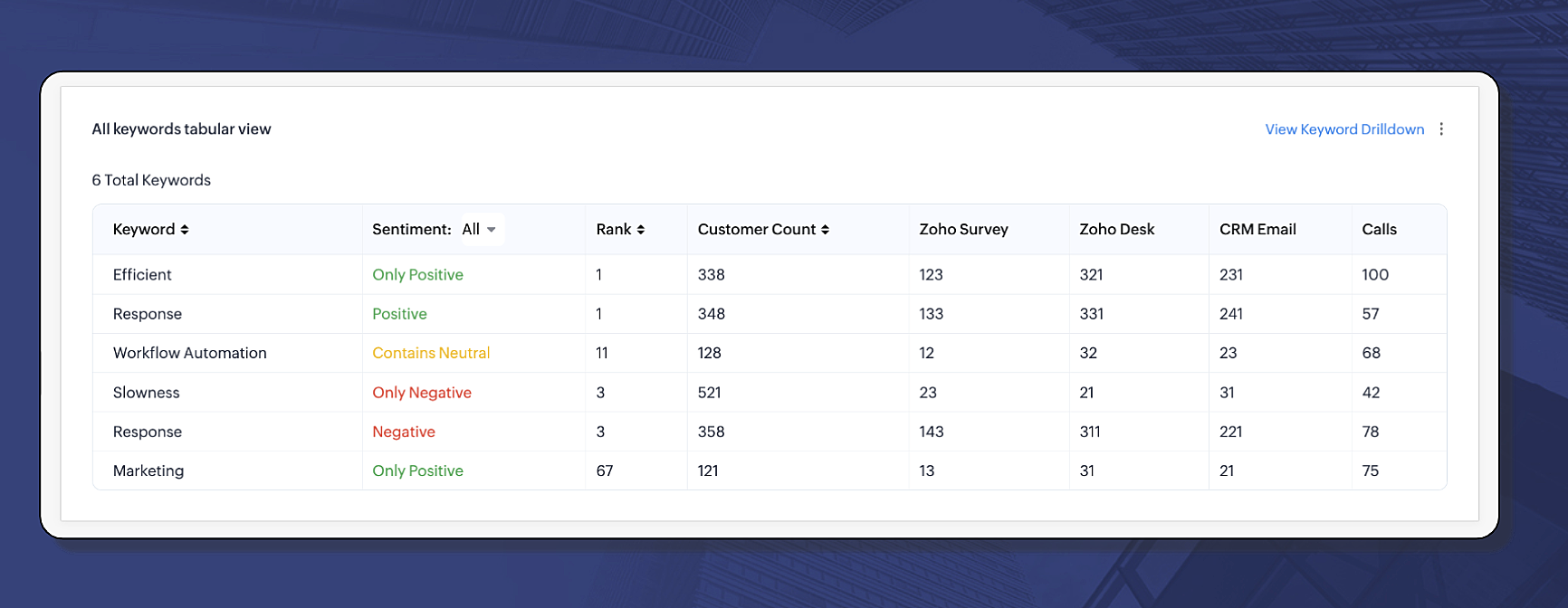
  • All keywords tabular view: The below image tabulates the keywords used by your customers in different mediums and their sentiments. As you can see, "Efficient", with positive connotation, is a keyword ranked top with highest usage across all available mediums. At the same time, you can see another keyword with negative undertone, "Slowness", is also being used across different mediums. With calls now being an added channel, implies the gravity of these keywords' sentiments.
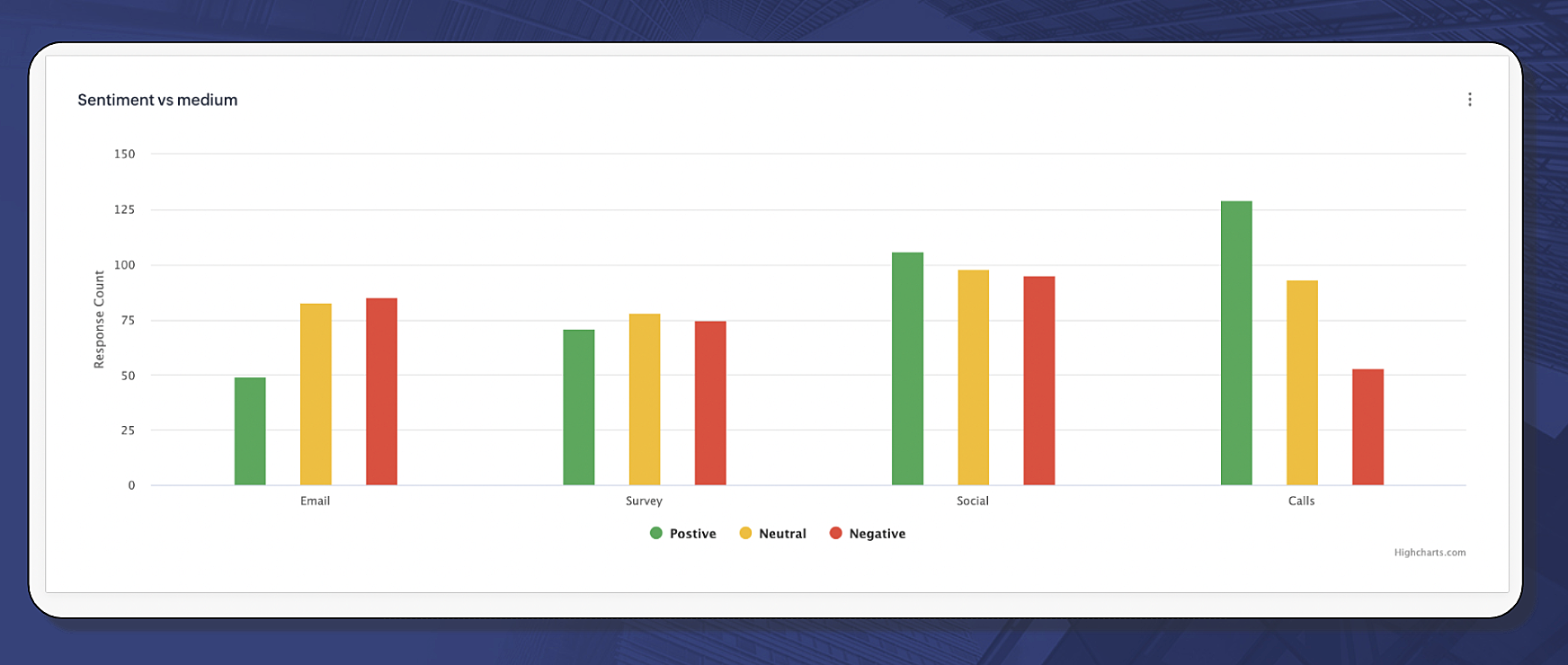
  • Sentiment vs medium: The sentiment vs medium chart is a simple bar diagram comparing different sentiments expressed across different channels. You can ascertain which feedback from which medium has more intensity to it. For example, the below image suggests that customers are more positive through calls than they are in the emails. This means, when there is a critical situation, such as an escalation, calls are the best mode to approach customers and explains that one-to-one verbal communication helps settle a fix.
           
Competitor analysis
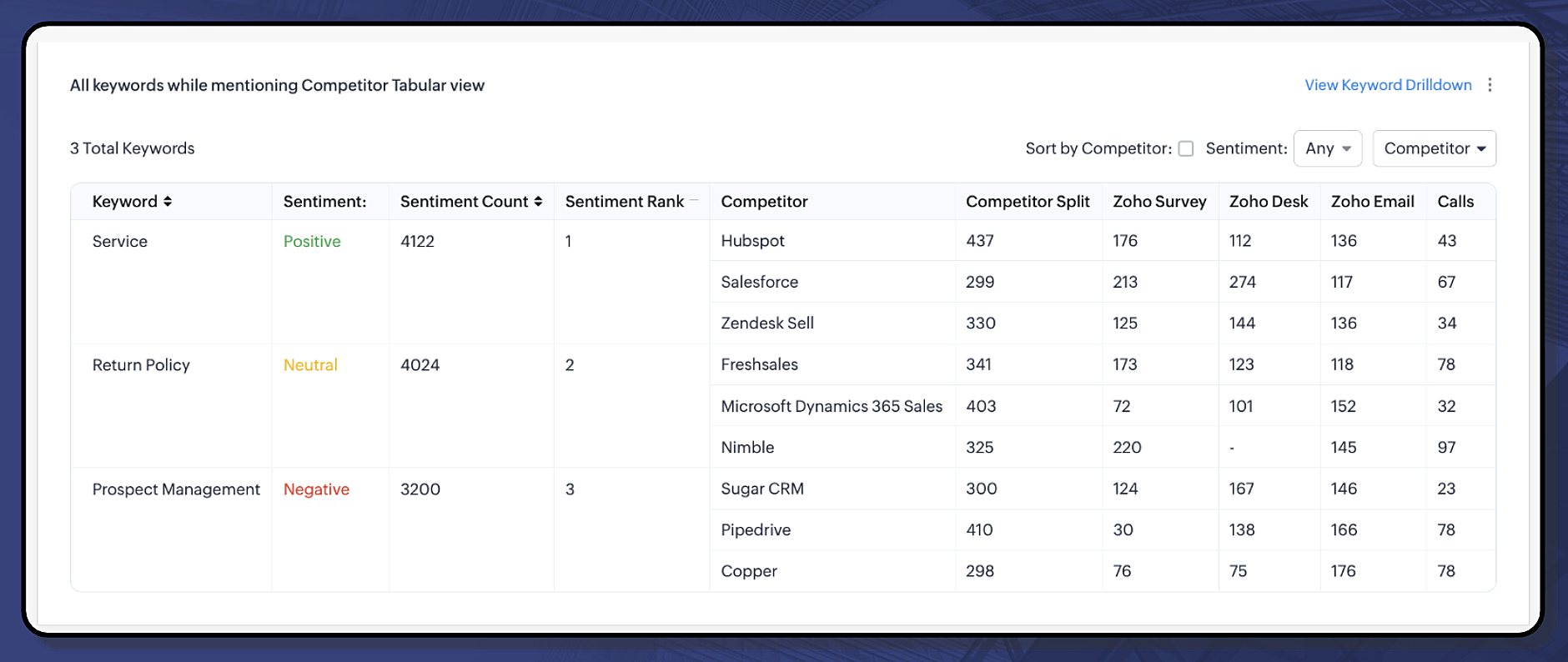
Competitor analysis shows the reality of your customers' perception. It will help you tailor a favorable workaround to approach your prospects and customers and win the deal. The following chart shows the keyword mentions used with respect to the competitors and the underlying sentiments from different mediums, including calls. For more information about competitor analysis, click here.

All keywords related to competitor mention tabular view:
The service offering is positively regarded for certain competitors. There are consistent mentions about them in different channels, including calls.

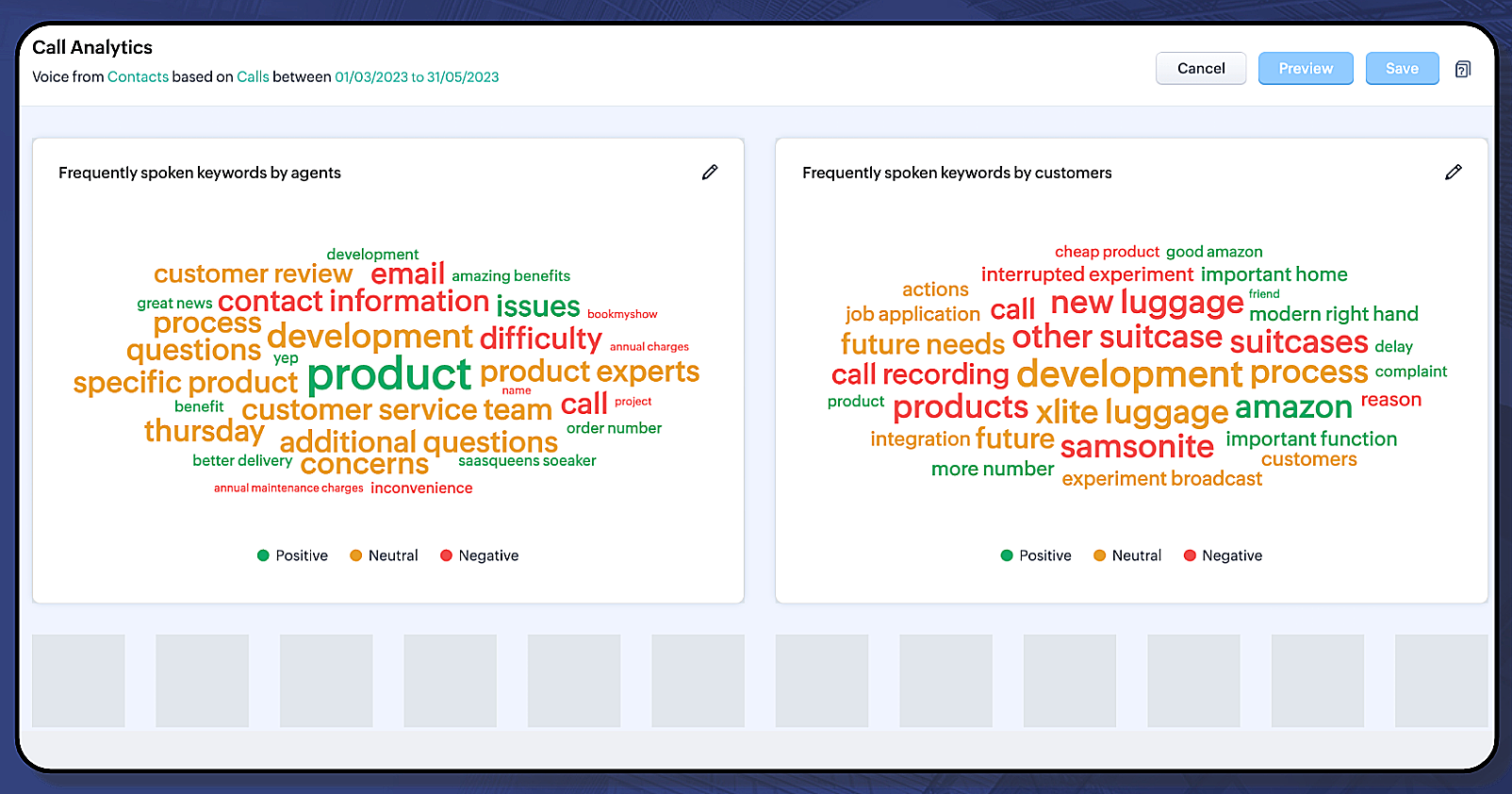
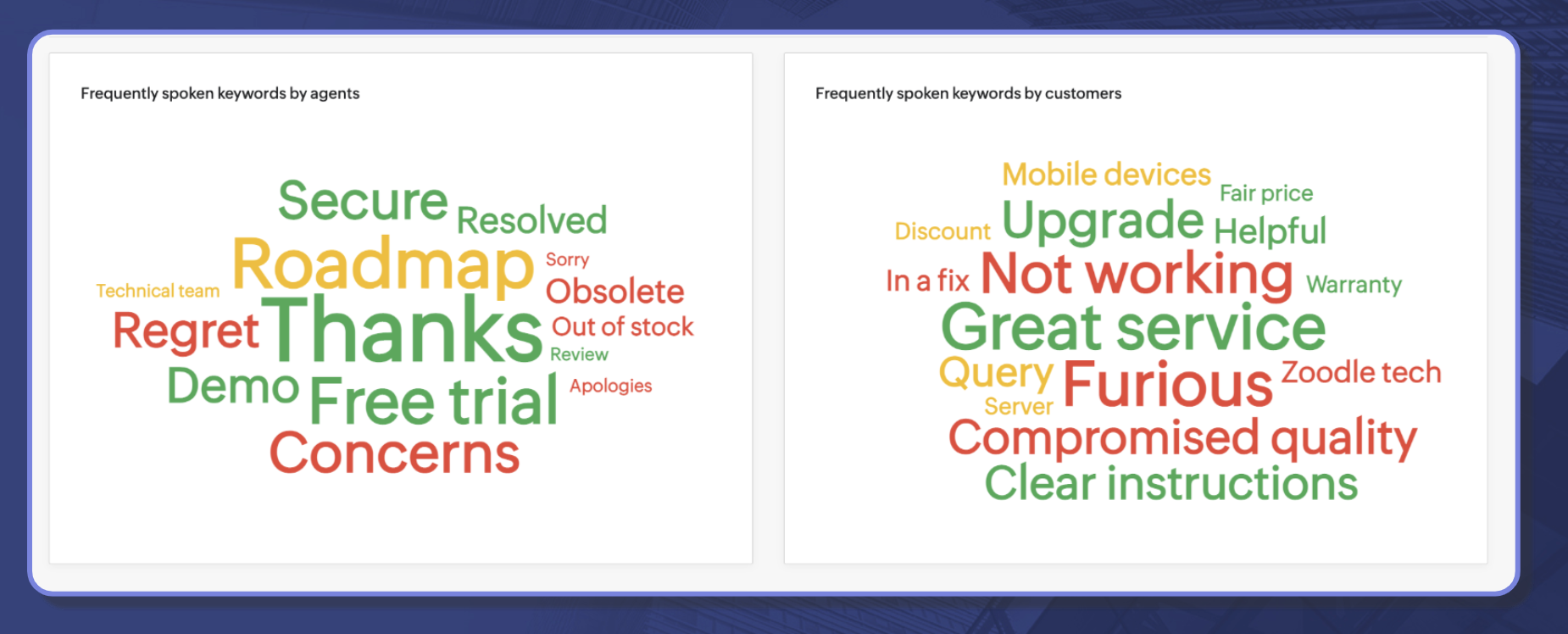
2. A dedicated dashboard for call analytics: A call between your business and your customer contains valuable subjective cues, such as their expectations, interests, sentiments, issues, and more. This dedicated call analytics dashboard will display two charts that will collate frequently used keywords by your agents and your customers through which you can get a quick peek into what is being discussed in your business.
Let's learn more!

Call Analytics dashboard

The call analytics dashboard deals purely with call correspondences in your organization. It displays the following charts:
  • Frequently spoken keywords by agents
  • Frequently spoken keywords by customers 
Cue:  More call-based insights are under development and you will hear about them in the coming days.

How are keywords aggregated?

Using the most recent call transcription features, Zia will be able to facilitate transcription of your recorded calls to text. Using its simple text analysis, Zia will be able to identify who is the customer and who is the agent, and aggregate the top 30 key words used by both your agents and customers.
Here's an illustration as to how Zia works on the call transcription text:
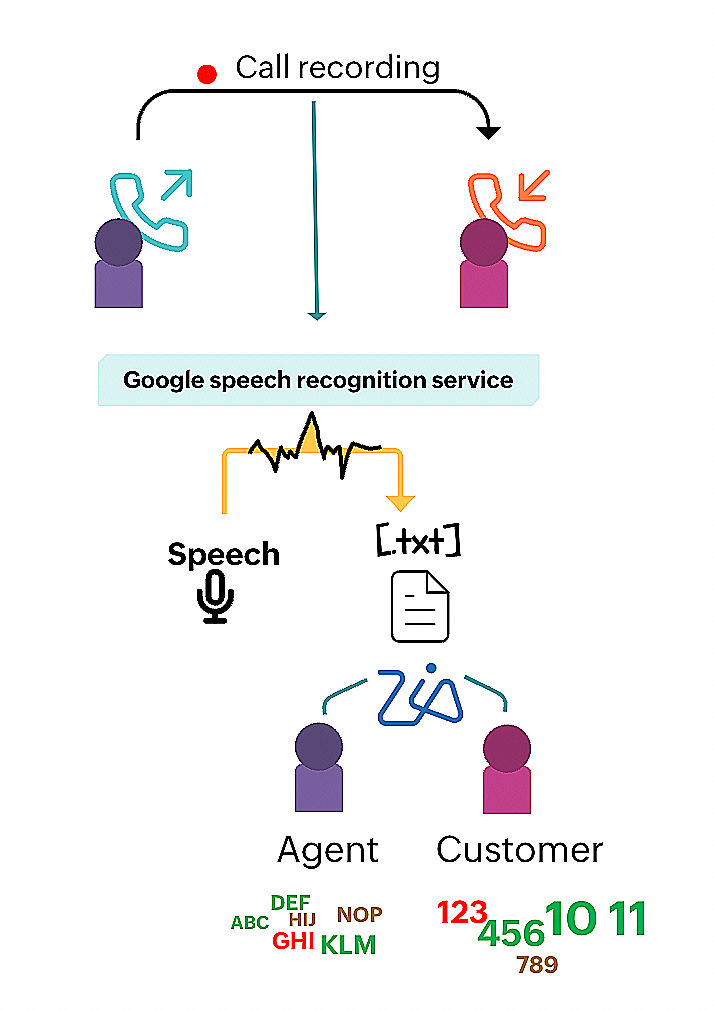

Using call intelligence, Zia can collate keywords to come up with a useful call analytics dashboard.

Notes:
  • Calls will be the default source/channel for this dashboard, and you cannot change it.
  • This dashboard is only available for Leads and Contacts modules.
  • In order to use this dashboard, you need the following facilities enabled:

Managing call analytics dashboard:

You can do the following actions to manage the call analytics dashboard:
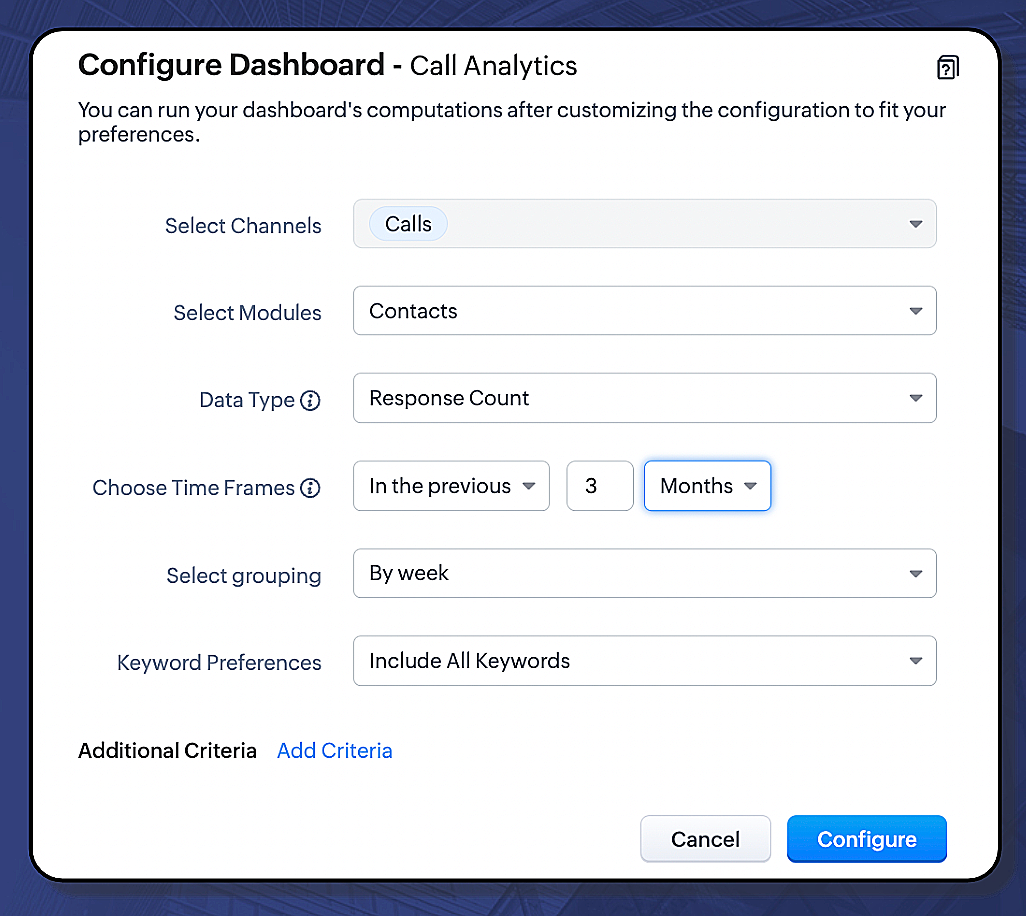
  1. Configure dashboard
    • Choose which module, you want the call analytics to be displayed for.
    • Choose the desired data type
    • Choose the time frame
    • Choose the grouping
    • Enter the keyword preferences

  2. Reorder the charts

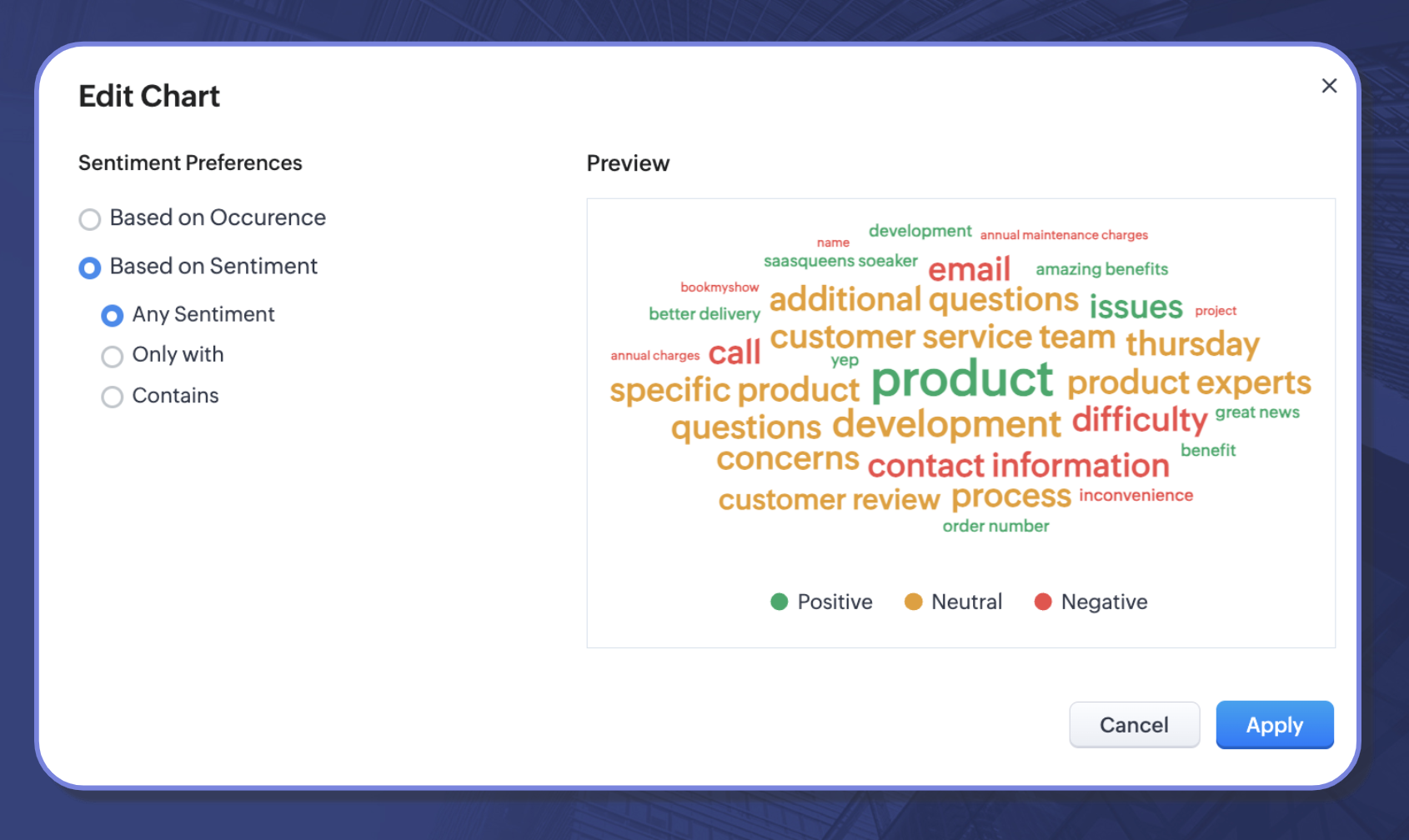
  3. Alter the sentiment preferences for individual charts
Availability: The enhancement will be available for users subscribed to the early access program in the EU, US, and IN DCs.
Resource: Help document

That's all for today's announcement. We hope this new addition will help you get closer to your customer opinions and help you act upon them. Should you have any feedback/questions/doubts, feel free to drop them in the comments section, our experts will be happy to take them.

Thanks and have a good one!

Kind regards,
Saranya Balasubramanian

    • Recent Topics

    • How Does Knowledge Base Search and Article Recommendation Work?

      Hello, I would like to understand how the Knowledge Base search engine works. Specifically, does it search based on: The article title only? The full article content? Both, the article and the content? Keywords? Tags? Also, how does the system determine
    • validation rules doesn't work in Blueprint when it is validated using function?

      I have tried to create a validation rule in the deal module. it works if I try to create a deal manually or if I try to update the empty field inside a deal. but when I try to update the field via the blueprint mandatory field, it seems the validation
    • Bulk Delete Attachments

      Is there a way to bulk delete attachments on the form entries? our storage is full and deleting files one by one is pain taking process.
    • CRM verify details pop-up

      Was there a UI change recently that involves the Verify Details pop-up when changing the Stage of a Deal to certain things? I can't for the life of me find a workflow or function, blueprint, validation rule, layout rule ect that would randomly make it
    • How do I sync multiple Google calendars?

      I'm brand new to Zoho and I figured out how to sync my business Google calendar but I would also like to sync my personal Google calendar. How can I do this so that, at the very least, when I have personal engagements like doctor's appointments, I can
    • Zoho CRM || Unable to Bulk Assignment of Territories for Contacts

      Dear Zoho CRM Support Team, I hope this email finds you well. We recently performed a bulk upload of Contacts into Zoho CRM using the official sample Excel template downloaded from the CRM. The upload itself was completed successfully; however, we encountered
    • Cannot get code to work with v2.mergeAndStore!

      Please can someone help me pass subform items into a repeating mail merge table row using v2.mergeAndStore? I have a mail merge template created in Writer and stored in Workdrive. This template is referenced by a custom CRM function which merges all of
    • Ability to CC on a mass email

      Ability to CC someone on a mass email.
    • Access to Specific Zoho Desk layout for external parties

      Hi, We have a partner who handles for us sales requests from specific markets. He is not a Zoho Desk user. But we want him to b part of a specific Zoho Desk layout to handle inquiries.  How to achieve it in the easiest way possible?
    • Is It Possible to Convert a Custom Module to a Quote?

      I recently created a custom module in our CRM environment for RFQs so that our sales team can submit quote requests directly in Zoho rather than by email/phone. This allows for a cleaner overall process, minimizing potential errors and potentially encouraging
    • Ability to Disable System Banner Messages in Chat Flow Control

      Dear Zoho SalesIQ Team, Greetings, We would like to request an enhancement related to the system banner messages in Zoho SalesIQ chat flow control. Current Behavior: SalesIQ allows configuring various automatic banner/system messages such as: Waiting
    • How do you do ticket add ons in Backstage?

      Hi Everyone, If you wanted to have general admin tickets and allow for add ons, like camping, or car or Carbon offset. What would you do? Peace Robin
    • Writing SQL Queries - After Comma Auto Suggesting Column

      When writing SQL Queries, does anyone else get super annoyed that after you type a comma and try to return to a new line it is automatically suggest a new column, so hitting return just inputs this suggested column instead of going to a new line? Anyone
    • Sort Legend & stacked bar chart by value

      I'd love to see an option added to sort the legend of graphs by the value that is being represented. This way the items with the largest value in the graph are displayed top down in the legend. For example, let's say I have a large sales team and I create
    • Idle Chat Reminders for Agent-Handled Conversations

      Dear Zoho SalesIQ Team, Greetings, We would like to request an enhancement to the Idle Chat Handling functionality in Zoho SalesIQ—specifically for chats that are handled by human agents after a bot-to-agent transfer. Current Behavior: In Zobot settings,
    • Layout Adjustment.

      Hello Latha, Hope you are doing well. I wanted to check with you about adjusting the layout columns in the Service Report from the backend, as currently there is no capability for us to customize the layout from our end. Below is the output that I am
    • Snapchat

      Are there any plans to add Snapchat to Zoho Social or is there any API that we can use to integrate into Zoho.
    • Zoho Sign "An unexpected error occured" when clients trying to sign documents

      We are unable to have clients sign our documents. When attempting to complete the process an error appears saying "an unexpected error occured" and in the document history just shows "signing failure." We are at a complete standstill with no response
    • Service Reports.

      Hello Team, I have a requirement to create multiple service reports for a single AP. That means, in one AP I have 5 service line items, and all line items are linked to assets. Once I complete the AP, I want to generate 5 individual service reports, one
    • ¡Vuelven los Workshops Certificados de Zoho a España!

      ¡Hola usuarios de Español Zoho Community! Hace ya unos días que hemos dado la bienvenida al 2026, y promete ser un año de lo más emocionante. Y es que nos gustaría haceros nuestro particular regalo de Reyes, aunque lleguemos un poco tarde. 🎁 ¡Nos gustaría
    • Cancel Subscription

      Hi , Im want to cancel my account but without success please help me to do it
    • Deprecation Notice: OpenAI Assistants API will be shut down on August 26, 2026

      I recieved this email from openAI what does it means for us that are using the integration and what should we do? Earlier this year, we shared our plan to deprecate the Assistants API once the Responses API reached feature parity. With the launch of Conversations,
    • How to list services on quote instead of products

      I need to create a customer facing estimate that displays our services. The default quote layout only allows products to be listed. Is there a way to correct this?
    • Making an email campaign into a Template

      I used a Zoho Campaign Template to create an email. Now I want to use this email and make it a new template, but this seems to be not possible. Am I missing something?
    • Syncing calendar with Google Calendar doesn't work when events are sent to auto repeat

      Hi... The ZOHO CRM -- GOOGLE CALENDAR sync is broken. If I create a single event on either side, sync works, but if I create an event with auto repeat on either side it doesn't work. Furthermore, events created before the sync don't show up in the calendar.
    • Sync your Products Module for better context.

      In customer support, context is everything. The integration between Zoho Desk and Zoho CRM helps your sales and support teams function as one, delivering better customer experiences. With the latest update to this integration, you can now sync the Product module in your Zoho CRM with your Zoho Desk portal. This feature enables products from Zoho CRM to reflect in the "product" field in Zoho Desk. This can save your support team valuable time and effort.    Some things to note when syncing the two:
    • Invoice status on write-off is "Paid" - how do I change this to "Written off"

      HI guys, I want to write off a couple of outstanding invoices, but when I do this, the status of the invoices shows as "Paid". Clearly this is not the case and I need to be able to see that they are written off in the customer's history. Is there a way
    • CRM gets location smart with the all new Map View: visualize records, locate records within any radius, and more

      Hello all, We've introduced a new way to work with location data in Zoho CRM: the Map View. Instead of scrolling through endless lists, your records now appear as pins on a map. Built on top of the all-new address field and powered by Mappls (MapMyIndia),
    • Creating meetings from an email

      Hi. Similar to Outlook, it would be helpful if a meeting can be scheduled from an email so that the attendees need not be manually entered every time it's created.
    • Please, make writer into a content creation tool

      I'm tired of relying on Google Docs. I'm actually considering moving to ClickUp, but if Writer were a good content creation tool instead of just a word processor, I would finally be able to move all my development within the Zoho ecosystem, rather than
    • ZohoSalesIQ.Chat cannot send messages

      Chat cannot send messages. Our app implements the customer service chat window functionality by integrating the Mobilisten SDK. Recently, we encountered an issue: after successful SDK initialization and visitor registration, when the `startWithQuestion`
    • Missed chats on WhatsApp closing after one minute

      Hi, we have added WhatsApp as a channel. However, if a chat is not picked up within 2mins, the chat is marked as missed and is closed within a minute. Why are they not staying in our "missed" queue for 24 hours as per our WhatsApp preference settings?
    • Feature Request: Add Tax ID Display on Event Tickets

      Hello Backstage Team, I’ve had several clients bring up an issue regarding tax compliance when creating events. For tax purposes, they are required to show their Tax ID on the event tickets. Currently, this isn’t an option, so they have to manually generate
    • Release Notes | January 2026

      We have rolled out a set of powerful new enhancements across Zoho Vertical Studio that bring several long-awaited capabilities to your applications. These updates focus on deeper customization, smarter automation, better reporting, and improved usability
    • Email Alias: To keep emails flowing without disruption

      Email Alias acts like a nickname for a user’s primary email address, allowing multiple email addresses to deliver messages into the same mailbox. Consider the scenario where an employee manages multiple responsibilities, such as responding to sales inquiries,
    • Zoho CRM for Everyone's NextGen UI Gets an Upgrade

      Hello Everyone We've made improvements to Zoho CRM for Everyone's Nextgen UI. These changes are the result of valuable feedback from you where we’ve focused on improving usability, providing wider screen space, and making navigation smoother so everything
    • Prepayment of a sales order

      How does everyone handle this common (at least it is common for us!) situation? We require all our orders to be fully prepaid before shipment since we manufacture made to order, custom products. Since ZOHO does not allow a sales order to be prepaid, we are forced to create an invoice at the time an order is placed to allow the customer to pay it. Our sales category is therefore skewed, since the sale was actually booked at the time an order was placed, rather then at the time it is shipped, which
    • Deposit on a Sales Order

      Good day, 100% of my business is preorders, no inventory. I am trying to run away from QB for one of my businesses, but I require two options that I don't seem to find with Zoho Books. 1 - If there is a way to apply a deposit on a sales order, as with
    • Automating CRM backup storage?

      Hi there, We've recently set up automatic backups for our Zoho CRM account. We were hoping that the backup functionality would not require any manual work on our end, but it seems that we are always required to download the backups ourselves, store them,
    • Archive Option in Conversation View

      Hello, I have a suggestion\request to add an "Archive Thread" button in conversation view of Zoho Mail. The best suggestion I have is to put an "Archive Thread" button next to the "Label Entire Thread" button in conversation view. Most users don't just
    • Next Page