Kaizen #129 : Client Script Support for Blueprints
Hello everyone!
Welcome to another week of Kaizen. Today, let us discuss about how you can use Client Script during a Blueprint transtion to meet your requirements. This Kaizen post will provide solution for the post - Need non-mandatory fields in blueprint pop-up using Client Script.
In this Kaizen post,
- What is a Blueprint?
- Blueprint event in Client Script
- ZDKs and methods available in Client Script related to Blueprint
- Use Case - During a blueprint transition, show a pop up with fields that are not mandatory
- Solution
- Summary
- Related Links
- Kaizen Collection
1. What is a Blueprint?
Blueprint is an online replica of a business process. For instance, leads generation and follow-up, deals closure and order management. Each of these processes has several stages, and different teams may be responsible to complete each stage. At this point, one needs to take a moment to see if the CRM dictates how these processes should be executed. It captures every detail of your entire offline process within the software. Click here to know more about Blueprint in Zoho CRM.
Moving from one stage of a blueprint to the next stage is called as Blueprint transition.
2. Blueprint event in Client Script
Whenever you want to meet your custom requirements in Zoho CRM before a Blueprint transition happens, you can use the beforeTransition event type available in Client Script. This event occurs before the transitions occur, as per the process flow designed in the Blueprint. You can add the "return false" statement at the end of the script to prevent the blueprint transition. Click here to know more about the events in Client Script.
3. ZDKs and methods available in Client Script related to Blueprint
Here is the list of ZDKs and methods using which you can code in Client Script.
ZDK.Page.getBlueprintTransitionByID() - You can get the blueprint transition by id.
ZDK.Page.getBlueprintTransitions(). - You can get all the blueprint transitions in page.
getId() - You can get the id of transition using Blueprint transition object.
getName() - Get the name of transition using Blueprint transition object.
initiate() - Initiate the transition using Blueprint transition object.
Click here to view the detailed documentation of ZDKs and methods related to Blueprint in Client Script.
4. Use Case
Zylker is a manufacturing organisation which uses Blueprint to manage the various updates in the status of Leads. Below is the blueprint configuration. For the transition "Gather details", the field "Alternate Number" will be prompted as mandatory. Without entering this detail, the transition cannot proceed.
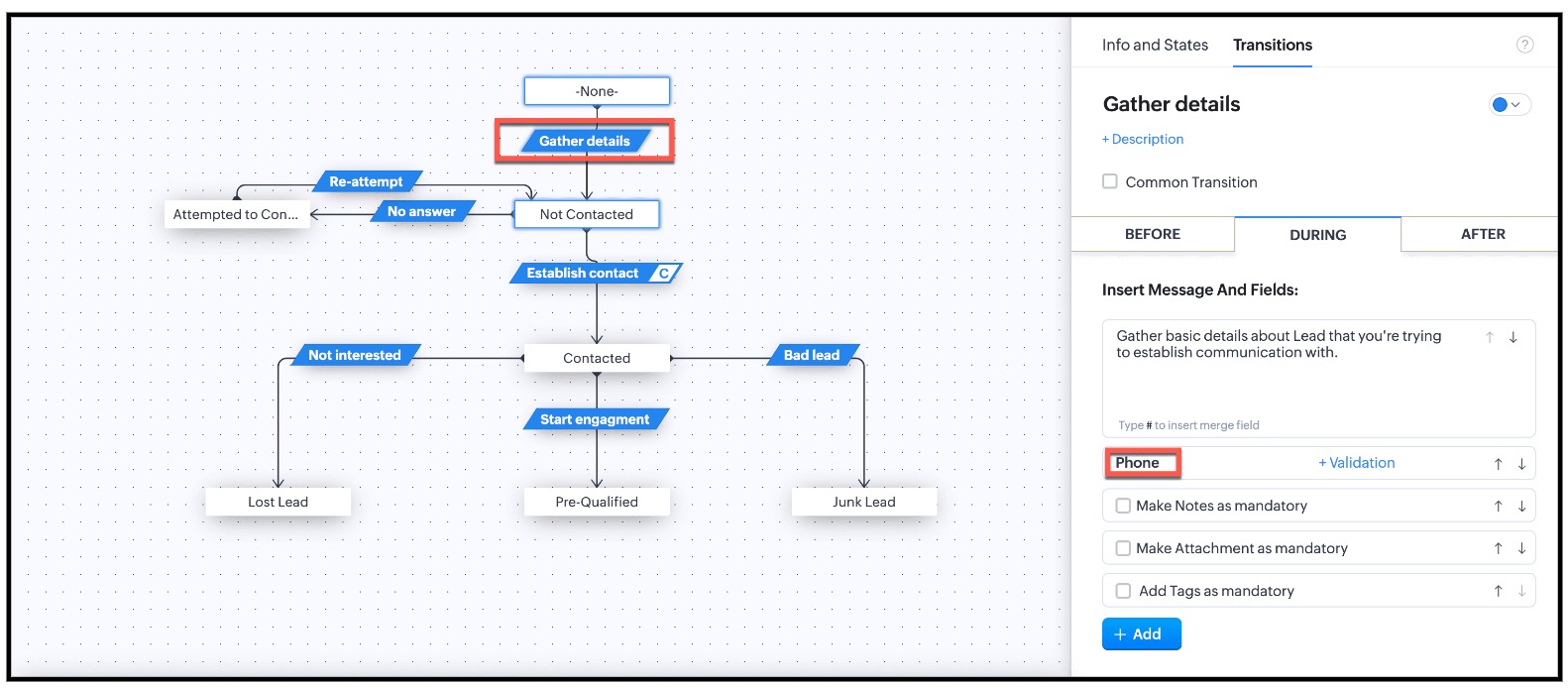
This is the existing Blueprint.
Now, the Admin wants to prompt the user to enter a value for the Alternate Number, but it should not be mandatory for the transition "Gather Details".
4. Solution
Currently in Blueprint the fields in the pop-up are mandatory. You can achieve non-mandatory fields in a pop-up using Client Script and update the values to that record. However you should not add the fields in the "During" phase of the "Gather Details" transition in Blueprint, to achieve this non-mandatory pop-up using Client Script. This solution will work for the requirement raised in this post.
For this, you need to create a Client Script and use the "Before Transition" type of "Blueprint" Event.
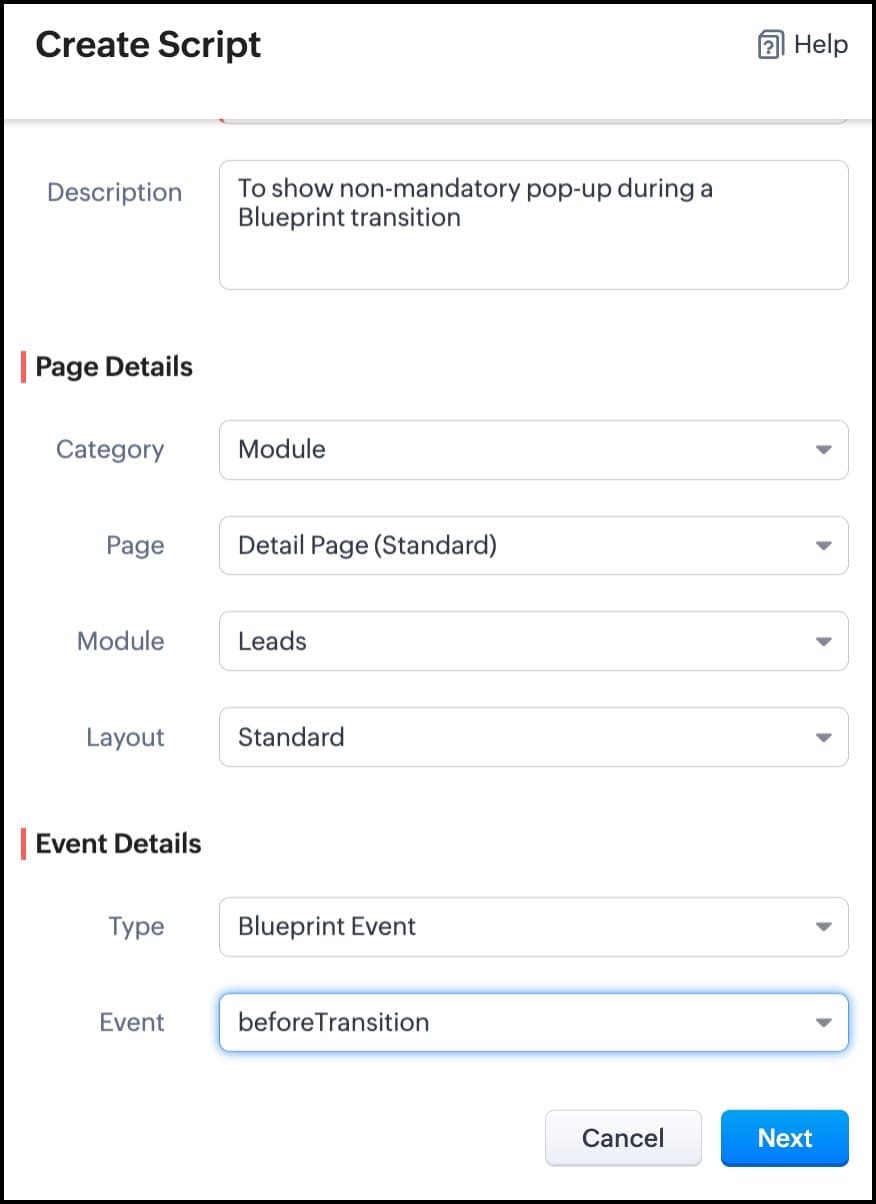
For more details on how to configure a Client Script, click here. Once you give the module and event details, you can see the Client Script IDE's Editor.
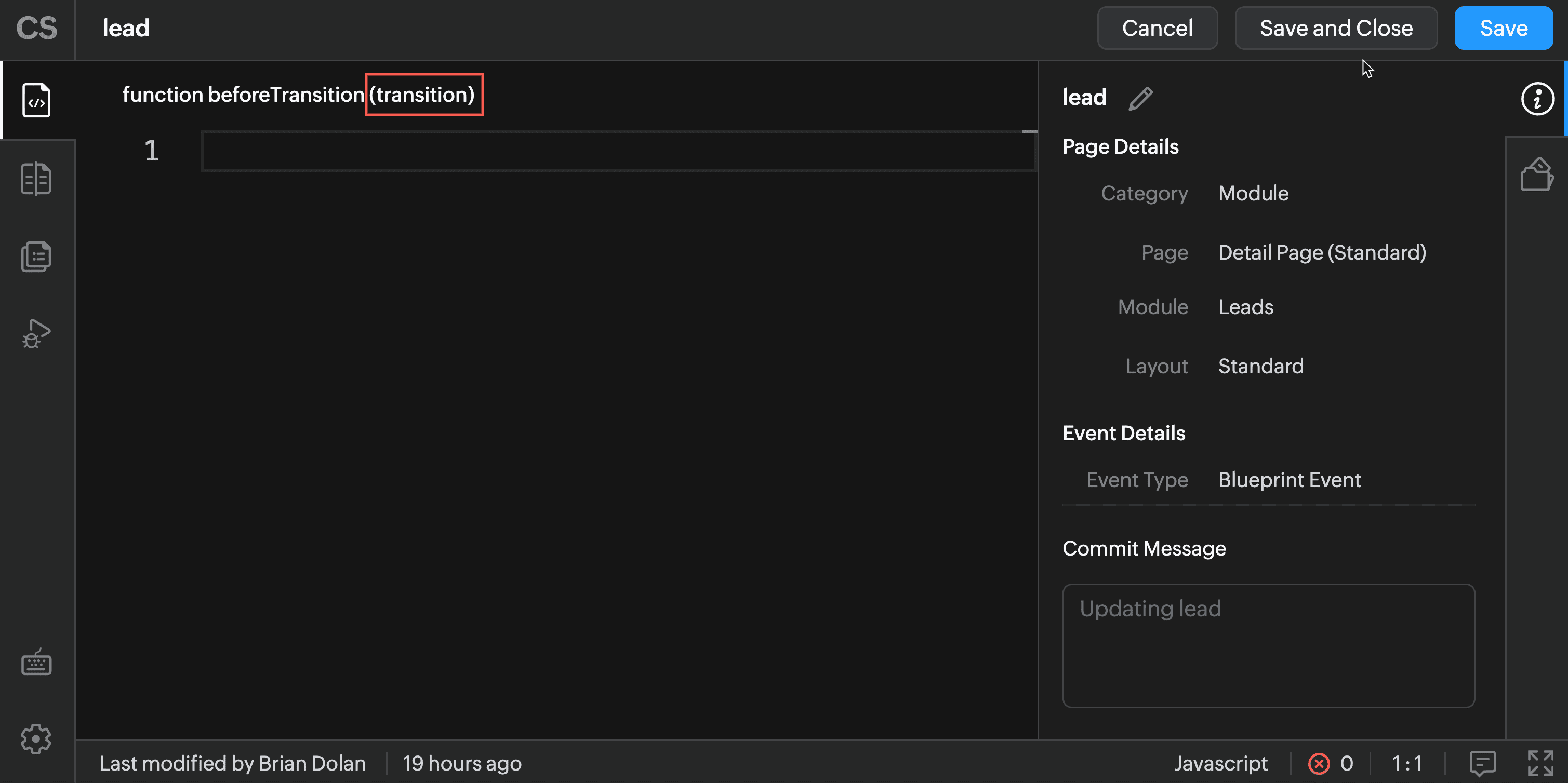
The argument "transition" will hold the the details of current Blueprint transition.
In the Client Script IDE, type the below script and click Save.
if (transition.name == 'Gather details') { // To show pop up and get the Alternate Number and update the //record's Alternate Number var var_alt = ZDK.Client.getInput([{ type: 'text', label: Alternate Number}], 'Give these details', 'OK', 'Cancel'); if (var_alt != null) { var lead = ZDK.Apps.CRM.Leads.fetchById($Page.record_id); lead.alternate_number = var_phone.toString(); var response = lead.__update(); } else { ZDK.Client.showMessage('Details have been gathered successfully' }); } $Client.refresh();// to refresh the page } |
The above script will get executed before every transition happens in the Blueprint. So, in the script, the code is added based on the transition name. As per the requirement, when the transition name is "Gather details" , you can show the pop-up through Client Script's getInput() function. Once you capture this value you can update the alternate number using the CRM API ZDKs. $Page.record_id will return the id of the current Lead record.
Here is how the Client Script works.
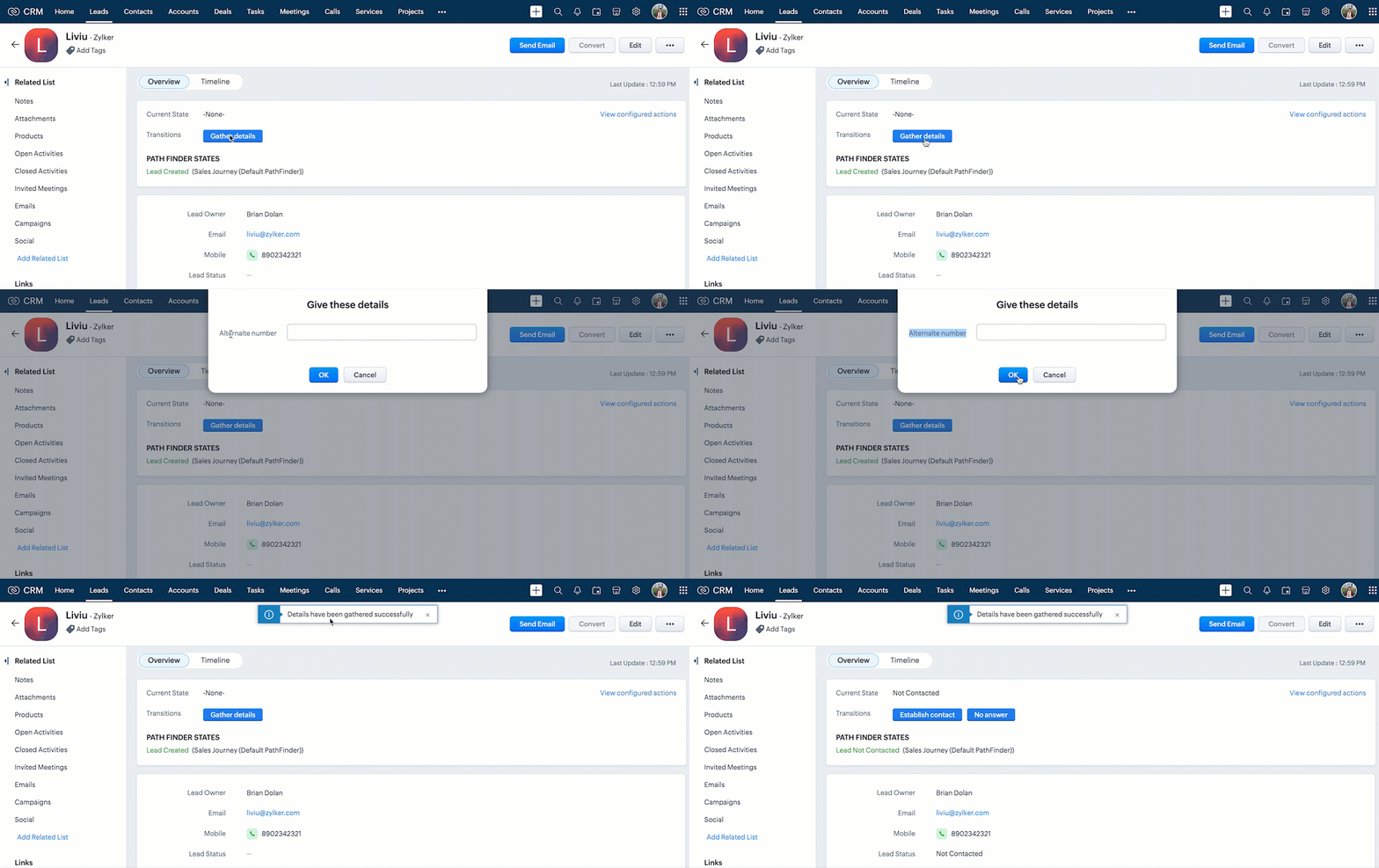
You can see that the transition happens even after the "Alternate Number" field is not filled by the user.

Note :
1. If you want to prevent a Blueprint Transition you need to add "return false" statement in the Script.
2. The blueprint event and the related ZDKs are available only for Detail(Standard) Page and Detail(Canvas) Page.
5. Summary
In this post, we have discussed,
- About Blueprint events in Client Script.
- The ZDKs and methods related to Blueprint.
- How to configure a Client Script to trigger before a Blueprint transition
- How to open a non - mandatory fields pop up before a blueprint transition
- How to update current record using Update Records API through Client Script
- How to refresh a page using Client Script
- How to prevent a Blueprint Transition
6. Related Links
- Client Script Overview
- Creating a Client Script
- Client Script Events
- Client Script IDE
- Use cases of Client Script

Kaizen Collection :
- Click here to view our Kaizen Collection.
- Also, check our previous post - Kaizen #128 - Circuits in Zoho CRM - Part 3
Cheers!
Maadhari M
Topic Participants
Maadhari M
Cameron McEvenue
allan
Maria Antony Betson M
Ishwarya SG
Sticky Posts
Kaizen #198: Using Client Script for Custom Validation in Blueprint
Nearing 200th Kaizen Post – 1 More to the Big Two-Oh-Oh! Do you have any questions, suggestions, or topics you would like us to cover in future posts? Your insights and suggestions help us shape future content and make this series better for everyone.Kaizen #226: Using ZRC in Client Script
Hello everyone! Welcome to another week of Kaizen. In today's post, lets see what is ZRC (Zoho Request Client) and how we can use ZRC methods in Client Script to get inputs from a Salesperson and update the Lead status with a single button click. In thisKaizen #222 - Client Script Support for Notes Related List
Hello everyone! Welcome to another week of Kaizen. The final Kaizen post of the year 2025 is here! With the new Client Script support for the Notes Related List, you can validate, enrich, and manage notes across modules. In this post, we’ll explore howKaizen #217 - Actions APIs : Tasks
Welcome to another week of Kaizen! In last week's post we discussed Email Notifications APIs which act as the link between your Workflow automations and you. We have discussed how Zylker Cloud Services uses Email Notifications API in their custom dashboard.Kaizen #216 - Actions APIs : Email Notifications
Welcome to another week of Kaizen! For the last three weeks, we have been discussing Zylker's workflows. We successfully updated a dormant workflow, built a new one from the ground up and more. But our work is not finished—these automated processes are
Recent Topics
bulk edit records and run internal logic
hi there is few logics in manner "it this than that" logics work well when i edit entry openning it one by one (via workflow "on add/edit - on success" , for custom field "on update/on user input") but when i try bulk edit records - logic does not work. how can i turn on logic to work as programmed - for mass editing records via bulk edit?Limitations on editing a message in Cliq
Hi I've checked the documentations and there's no mention of how many times a message can be edited. When trying with code, I get various numbers such as ~1000 edits or so. Please mention if there's a limit on how many times one can change a message viaemail address autocomplete
Is there a way to eliminate certain addresses from showing up in auto complete when entering an address? Many old and unused addresses currently show up, many of which I would like to get rid of. ThanksHow to use MAIL without Dashboard?
Whenever I open Mail, it opens Dashboard. This makes Mail area very small and also I cannot manage Folders (like delete/rename) etc. I want to know if there is any way to open only Mail apps and not the Dashboard.How can i download and secure all my mails from the archive folders?
Hi, i would like to download all my mails from my archive folders and secure it on my external HDD. Is this possible? Thx. amirHow to open filtered report in popup using Zoho Creator Deluge?
First report: There is so many records in Report, If I click one record, pop up is occur. Second report (Pop up): there is also so many record data, and this pop up is also Report, not Form. First report: It has got "Sales Order" field. when I click anyCan you default reports/charts to report the current week?
Our data table maintains two years of data. Management wants certain report to automatically filter the report to the latest calendar week. I know I can do this manually with filters but I want the report to automatically default to the latest calendarRendering PDF to view on page
My company upload lots of PDF files onto Zoho. But every time we open it, it downloads the file instead of viewing it on the web page. Does Zoho allow uploaded PDF files to be rendered to view on web page yet? I've been trying to use <embed> or <object> but it cannot be loaded. (similar thread: https://help.zoho.com/portal/community/topic/how-to-open-a-pdf-file-of-a-view-in-preview-mode)Overlapping Reports in Dashboards
It's rare, but occasionally it would be a good feature if I were able to overlap reports, either fully or partially in the Dashboards. Also, then having the ability to move objects to the front or rear, or make them transparent/translucent would be goodFeature request - pin or flag note
Hi, It would be great if you could either pin or flag one or more notes so that they remain visible when there are a bunch of notes and some get hidden in the list. Sometimes you are looking for a particular name that gets lost in a bunch of less importantAdmin guide: Handling Mailbox Settings for better user management
Managing day-to-day email scenarios, such as supporting users with multiple email addresses, ensuring uninterrupted email access during employee absences, enabling secure mailbox sharing, and enforcing organizational security and compliance, can be challengingCisco Webex Calling Intergration
Hi Guys, Our organisation is looking at a move from Salesforce to Zoho. We have found there is no support for Cisco Webex Calling however? Is there a way to enable this or are there any apps which can provide this? Thanks!Designing a practical Zoho setup for a small business: lessons from a real implementation
I recently finished setting up a Zoho-based operating system for a small but growing consumer beauty business (GlowAtHomeBeauty), and I wanted to share a practical takeaway for other founders and implementers. The business wasn’t failing because of lackDKIM (Marketing emails) UNVERIFIED (Zoho One)
I'm having a problem with Zoho One verifying my Marketing Email DKIM Record for MYFINISHERPHOTOS.COM. I have removed and re-entered the ownership, DKIM (Transactional emails), SPF and Marketing DKIM and all of them come back verified except the DKIM (MarketingZoho Recruit Community Meet-up - India
Namaste, India. 🙏🏼 The Zoho Recruit team is hitting the road—and we 're absolutely excited behind the scenes. Join us for the Zoho Recruit India Meet-up 2026, a morning designed to make your recruiting life easier (and a lot more effective). Date CityGenerate a Zoho Sign link
From time to time I get a response "I never received your you e-document for electronic signature" is there a way to generate a Zoho Sign link to share.Is it possible to create a word cloud chart in ZoHo Analystics?
Hi there, I have a volume of transaction text that I would like to analyse using word cloud (or other approcah to detect and present word frequency in a dataset). For example, I have 50,000 records describing menu items in restaurants. I want to be ableHow to Fix the Corrupted Outlook 2019 .pst file on Windows safely?
There are multiple reasons to get corrupted PST files (due to a power failure, system crash, or forced shutdown) and several other reasons. If You are using this ScanePST.EXE Microsoft inbuilt recovery tool, it only supports the minor corruption issue[Webinar] A recap of Zoho Writer in 2025
Hi Zoho Writer users, We're excited to announce Zoho Writer's webinar for January 2026: A recap of Zoho Writer in 2025. This webinar will provide a recap of the features and enhancements we added in 2025 to enhance your productivity. Choose your preferredHow to drag row(s) or column(s)?
Hi. Selecting a row or column and then dragging it to a new position does not seem to work. Am i missing something or this is just not possible in Zoho Sheet? Cheers, JayBuilding Toppings #5 - Creating and configuring custom service connections in Bigin Toppings
Hello Biginners, Integrating Bigin with external applications extends its capabilities and enables customized functionalities. In our last post, we saw how to create a default service connection. Today, we'll see how to create a custom service connectionOptimising CRM-Projects workflows to manage requests, using Forms as an intermediary
Is it possible to create a workflow between three apps with traceability between them all? We send information from Zoho CRM Deals over to Zoho Projects for project management and execution. We have used a lookup of sorts to create tasks in the past,Conditional fields when converting a Lead and creating a Deal
Hi, On my Deal page I have a field which has a rule against it. Depending on the value entered, depends on which further fields are displayed. When I convert a Lead and select for a Deal to be created as well, all fields are shown, regardless of the valueATE Session on Payment Gateways: Our experts are live now. Post your questions now!
Hello everyone, Our experts are all excited to answer all your questions related to payment workflows. Please feel free to join this session and learn more about this topic. If you have a query at anytime, please post them here.Upload data deleted all Zoho form data that we manage
Good morning. Let me introduce myself, I'm Iky from Indonesia. I'm experiencing an error or problem using Zoho Forms. I manage Zoho Forms, but I previously encountered an error when I misclicked the delete button in the upload format. It apparently deletedZOHO FORMにURL表示ができない
初心者です。 ZOHO FORM で宿泊者名簿を作っています。 ゲストが、URLをクリックするとStripeで支払いができるようにURLを表示をしたいのですが、 上手くできません。 やり方が分かる方、ぜひ教えてください。No Automatic Spacing on the Notebook App?
When I'm adding to notes on the app, I have to add spaces between words myself, rather than it automatically doing it. All my other apps add spacing, so it must be something with Zoho. Is there a setting I need to change, or something else I can do soHolidays - Cannot Enter Two Holidays on Same Day
I have a fairly common setup, where part-time employees receive 1/2 day's pay on a holiday and full-time employees receive a full day's pay. Historically, I've been able to accommodate this by entering two separate holidays, one that covers full-timeCampaigns set up and execution assistance
Hello Community, Can someone recommend a professional who can assist with the completion of my set up and deployment of Campaigns? Looking for a person or company that is not going to ask for big dollars up-front without a guarantee of performance toKaizen #223 - File Manager in CRM Widget Using ZRC Methods
Hello, CRM Wizards! Here is what we are improving this week with Kaizen. we will explore the new ZRC (Zoho Request Client) introduced in Widget SDK v1.5, and learn how to use it to build a Related List Widget that integrates with Zoho WorkDrive. It helpsRemove Powered by Zoho at the footer
Hi, I've read two past tickets regarding this but it seems that the instructions given are outdated. I assume the layout keeps on changing, which makes it frustrating for me to search high and low. Please let me know how exactly do I do this now? ThUsing email "importance" as workflow-criteria
I'd like to set up a workflow that triggers if an incoming email has been flagged as "high importance" but I'm not seeing any way to do that. Hopefully I'm just missing something obvious...?What is Resolution Time in Business Hours
HI, What is the formula used to find the total time spent by an agent on a particular ticket? How is Resolution Time in Business Hours calculated in Zohodesk? As we need to find out the time spent on the ticket's solution by an agent we seek your assistanceCheck & Unchecked Task Segregation in Export
It must have a feature to represent checked and unchecked tasks as [ ] and [✅] respectively when exporting it to Arratai or WhatsApp ; as Keep Notes by Google contains…WorkDrive Download Issue
My client has been sending me files via WorkDrive, which generally has worked fine. Recently files won't download at all. If you try and individually select and download a file, a popup will appear in the bottom right saying it's preparing and then itResolution Time Report
From data to decisions: A deep dive into ticketing system reports What are time-based reports? Time-based reports are valuable tools that help us understand how well things are going by breaking down key metrics over specific periods. By tracking, measuring,Add RTL (Right-to-Left) Text Direction Button in Zoho Cliq
Greetings Zoho Team, We would like to request the addition of an RTL (Right-to-Left) text direction button in Zoho Cliq, similar to what is already available in other Zoho apps like Zoho Desk. Currently, while using Zoho Cliq with the English interface,Enable Backgrounds and Video Filters for 1:1 Cliq Calls Across All Zoho Entry
Hello Zoho Cliq Team, We hope you are doing well. We would like to request an enhancement related specifically to 1:1 video calls in Zoho Cliq. Current Behavior Zoho Cliq currently provides background and video filter options in the following scenarios:Zoho Flow: Stripe a Zoho Marketing Automation
Hola! Quiero hacer un flujo con Zoho Flow, para que cuando se haga un pago en Stripe, añada el lead en Zoho Marketing Automation. Lo he configurado, configurando el disparador como "Payment created" y mapeando el campo de Stripe "Receipt email address".Zoho email
I need a list of email addresses of all contacts on my zohoNext Page