Hello all!!
Welcome back to a fresh Kaizen week.
This week, we will continue with another Actions API -
Webhooks API in Zoho CRM.
Webhooks in Zoho CRM
A webhook allows Zoho CRM to send real-time information to another application the moment something important happens. Webhooks let CRM push data instantly to an external URL whenever the workflow condition is met.
Webhooks do not notify on every record event by default. They trigger only when specific automations, such as a Workflow Rule you configure, are executed. This helps for specific real-time automation needs, such as sending high-value leads to an external validation service.
Use case
Zylker, an IT solutions provider, uses Zoho CRM to manage all incoming leads. But not every new lead is ready for the Sales team right away. Not all leads need immediate follow-ups. For leads with a high Profit Score (80+), it usually means strong buying intent, but they may contain fake information.
Why does Zylker use Zoho CRM and send these leads to an external validation application?
Before Sales reaches out, Zylker wants to make sure these high-value leads have valid information. While CRM keeps the lead data organized, a specialized third-party validation systems check any fraudulent activities and confirm whether the email, phone number, or other details are real.
To do this quickly, Zylker uses Webhooks in Zoho CRM. The moment a lead crosses the 80+ score, Zoho CRM automatically sends the lead’s data to Zylker’s external validation system. This lets Zylker verify the lead in real time and send back a clean, accurate, sales-ready profile for the Sales team to follow up on.
From here, we will explain every part of Webhooks by showing how it looks in the Zoho CRM UI and how to do the same using the API. Each step will be shown side-by-side, so you can clearly see how the UI setup translates into the API request.
Configuring Webhooks for Zylker’s Use Case - UI Method
- Go to Setup
- Navigate to Automation
- Choose Actions -> Webhooks
- Click Configure Webhook
You will see the window shown below.
Webhook - UI view
The following sections explain what each field means in three parts:
- Basic fields to configure Webhook.
- Configuring Headers
- Configuring Body
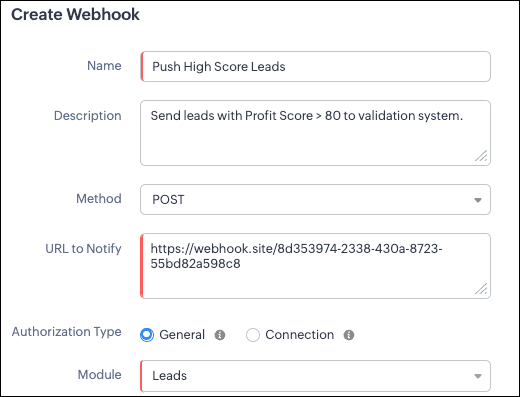
Filling the basic Webhook details via UI
Filling the basic Webhook details via Create Webhook API
Request URL: {{api-domain}}/crm/v8/settings/automation/webhooks
Request Method: POST
Input JSON
{ "webhooks": [ { "name": "Push High Score Leads", "description": "Send leads with Profit Score > 80 to validation system.", "module": { "api_name": "Leads", "id": "5725767000000002175" }, "authentication": { "type": "general" }, "http_method": "POST" } ] }
|
Keys explanation
- name (mandatory): Name of your webhook.
- description: Add a short note about what this webhook does.
- module (mandatory): Select the module from where the external application listens the changes. In our case, select Leads module to push high-score leads.
- url (mandatory): Specify the external endpoint where CRM will send the data. This lets the external application see what CRM sends.
- Note: In this post, we have used an endpoint from Webhook.site
- authentication (mandatory): Specify authentication type for the webhook endpoint.
- Possible types:
- general: The receiving system does not require OAuth. You can pass OAuth tokens manually in headers.
- connections:
- OAuth-based integrations: Systems that use Zoho’s Connections.
- For our Zylker use case, we select General.
Note: In
Zoho CRM API V8, Webhooks currently support only General authentication. Connection-based authentication will be available in a future update.
- http_method (mandatory): Select a HTTP method that allows you to send structured data.
Possible values: POST, GET, PUT, DELETE
In our case, we use POST to create a new record in the external app with the necessary lead details, allowing the external system to run its validation checks.
HTTP methods and their supported parameters - Headers, Body, URL Parameters
HTTP Method | Headers | Body | URL Parameters |
POST | Module parameters Custom parameters
| Type: form-data
Module parameters Custom parameters User-defined parameters
Formats: null
Type: raw
Formats: Text, JSON, HTML, XML | Not Supported |
PUT | Module parameters Custom parameters
| Type: form-data
Module parameters Custom parameters User-defined parameters
Formats: null
Type: raw
Formats: Text, JSON, HTML, XML | Not Supported |
GET | Not Supported | Not Supported | - Module parameters
- Custom parameters
- User-defined parameters
|
DELETE | Not Supported | Not Supported | Module parameters Custom parameters User-defined parameters
|
Each HTTP method supports different parameter types. The above table shows which methods support Headers, Request Body, and URL Parameters. Detailed explanations of these parameter types are provided in the following section.
Creating a Webhook with Headers, Body, and URL Parameters
When a webhook is triggered in Zoho CRM, the data is sent to the external application as part of the HTTP request.
The data can be sent in three places:
- Headers
- Body (Form-Data or Raw)
- URL Parameters
Each part serves a different purpose.
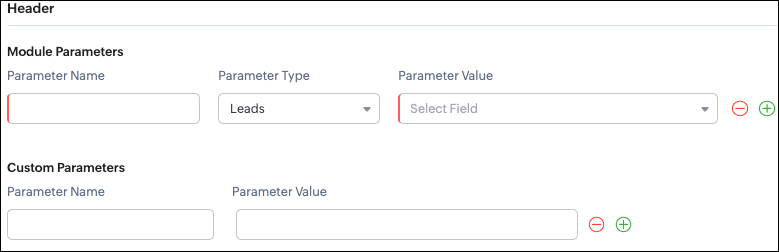
Configuring Headers
UI - Configuration

Headers allow you to send
extra information along with your webhook request. These help when the external app needs extra data like auth tokens or CRM field values.
Zoho CRM supports two types of headers:
- Module Parameters - Dynamic values from CRM fields
- Custom Parameters - Static values you define
Module Parameters - dynamic CRM data
Module parameters allow you to send values from CRM fields inside the header. These values change depending on the record that triggered the webhook.
A module parameter consists of:
- Parameter Name - A unique header key that you define. It does not have to match the CRM field API name.
- Parameter Type - Defines the source of the data you are mapping. It can come from the selected CRM module such as Leads and Contacts, lookup fields, User fields such as Lead Owner, or Organization fields.
- Parameter Value - The merge field value. Example, ${!Leads.Created_By.id}
Note: If you decide to use Headers, then you must add at least one module_parameter. Otherwise CRM will show an error.
Example:
Parameter Name | Parameter Type | Parameter Value |
Lead_Email | Leads | Email |
Annual_Revenue | Leads | Annual Revenue |
Profit_Score | Leads | Profit Score |
Created_By | Created By | User Id |
Custom Parameters - static values
Custom parameters are key-value pairs that never change.
These are useful for:
- API version
- Tags like “zylker-crm”
Name | Value |
source | zylker-crm |
version | v1 |
Request URL: {{api-domain}}/crm/v8/settings/automation/webhooks
Request Method: POST
Input JSON
{ "webhooks": [ { . . . "http_method": "POST", "headers": { "module_parameters": [ { "name": "Lead_Email", "value": "${!Leads.Email}" }, { "name": "Annual_Revenue", "value": "${!Leads.Annual_Revenue}" }, { "name": "Profit_Score", "value": "${!Leads.Profit_Score}" }, { "name": "Created_By", "value": "${!Leads.Created_By.id}" } ], "custom_parameters": [ { "name": "source", "value": "zylker-crm" }, { "name": "version", "value": "v1" } ] } } ] }
|
When should Zylker use Headers?
For the 80+ Profit Score validation use case, Zylker can include module parameters such as Lead Email, Profit Score, and Lead ID, which are helpful for fraud-detection tools.
Similarly, Zylker can include custom parameters like source=zylker-crm and api_version=v1 to help the external system identify where the webhook originated.
Configuring the Body of a Webhook - form-data & raw formats
After setting up the basic details and Headers, the next step is to configure the Body.
The Body is where the main CRM record data is sent, which is different from the Header section that only carries metadata like auth tokens or quick identifiers.
Depending on your needs, the Body can be either Form-Data or Raw. The list below shows the supported options for each format.
- Form-Data:
- Module parameter
- Custom parameter
- User-defined format.
- Raw:
- Text - plain messages
- JSON - structured API payload
- HTML - formatted messages
- XML - traditional enterprise systems
Form-Data Body: key-value
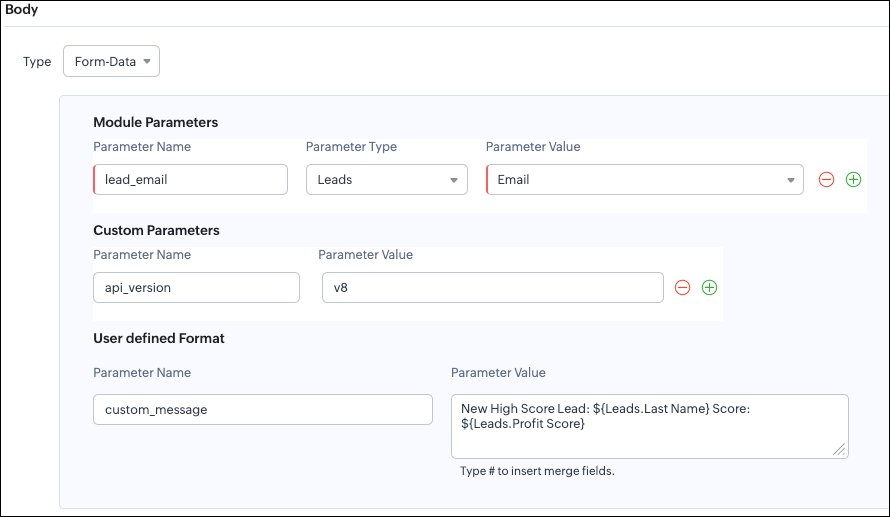
UI - Configuration
Zoho CRM lets you build Form-Data using three types of parameters:
- Module Parameters
- Custom Parameters
- User Defined Parameters
Use Form-Data when the external app expects key-value pairs - similar to how HTML forms submit data.
Note:
- Headers are for sending supporting information that helps the external system understand the request - this can include auth details, source identifiers, or key CRM fields like email or score that help with quick categorization or filtering.
Why do Module and Custom parameters appear again in Form-Data?
The same Module Parameters and Custom Parameters are available in the Body because:
- Headers - Provide supporting details such as identifiers or quick-check values. For example, Lead ID, or source tags that help the external system check and route the request.
- Body - Contains the complete lead information that the external validation system needs to process.
Although the parameter names look the same (Module, Custom), their purpose changes:
Where parameters are used | Purpose | Example |
Headers | Metadata - OAuth,tags, and context | source: zylker-crm |
Form-Data (Body) | Main record data - actual lead details sent to the app. | lead_email=patricia@zylker.com |
So Zoho CRM gives you the same structure, but used differently depending on where the data is placed.
User-Defined Parameters
User-Defined parameters let you build custom, human-readable messages or templates. This parameter is available only in the Body, not in Headers.
Parameter Name | Parameter Value |
custom_message | New high-score lead: ${Leads.First Name}${Leads.Last Name} (Score: ${Leads.Profit Score}) |
This is very helpful if your external app expects a text message, notes, or a description field.
Configuring the Body of a Webhook - form-data via Create Webhook API
Request URL: {{api-domain}}/crm/v8/settings/automation/webhooks
Request Method: POST
Input JSON
{ "webhooks": [ { . . . "body": { "form_data_content": { "module_parameters": [ { "name": "Lead_Email", "value": "${!Leads.Email}" }, { "name": "Annual_Revenue", "value": "${!Leads.Annual_Revenue}" }, { "name": "Profit_Score", "value": "${!Leads.Profit_Score}" }, { "name": "Created_By", "value": "${!Leads.Created_By.id}" } ], "custom_parameters": [ { "name": "source", "value": "zylker-crm" }, { "name": "version", "value": "v1" } ], "user_defined_parameters": { "name": "custom_message", "value": "New high-score lead: ${!Leads.First_Name}${!Leads.Last_Name} (Score: ${!Leads.Profit_Score})" } }, "type": "form_data" }, . . . } ] }
|
Raw Body - JSON / XML / HTML / Text
Zoho CRM’s Webhook Body section allows you to send data to an external application in a Raw format. This is useful when the receiving system expects structured data in the following structure.
You can choose:
- Raw + Text
- Raw + JSON
- Raw + HTML
- Raw + XML
Raw + Text:

Text format is the simplest. You can type any text and insert merge fields.
UI - Configuration
When to use Text?
- When sending a simple message.
- When the external app only expects plain text.
Configuring the Body of a Webhook - Raw - "Text" via Create Webhook API
Request URL: {{api-domain}}/crm/v8/settings/automation/webhooks
Request Method: POST
Input JSON
{ "webhooks": [ { . . . "body": { "raw_data_content": "New high score lead: ${!Leads.First_Name} ${!Leads.Last_Name}, ${!Leads.Email}, ${!Leads.Annual_Revenue}, ${!Leads.Phone}, ${!Leads.Industry}, ${!Leads.Owner}", "format": "Text", "type": "raw" }, . . . } ] }
|
Raw + JSON:
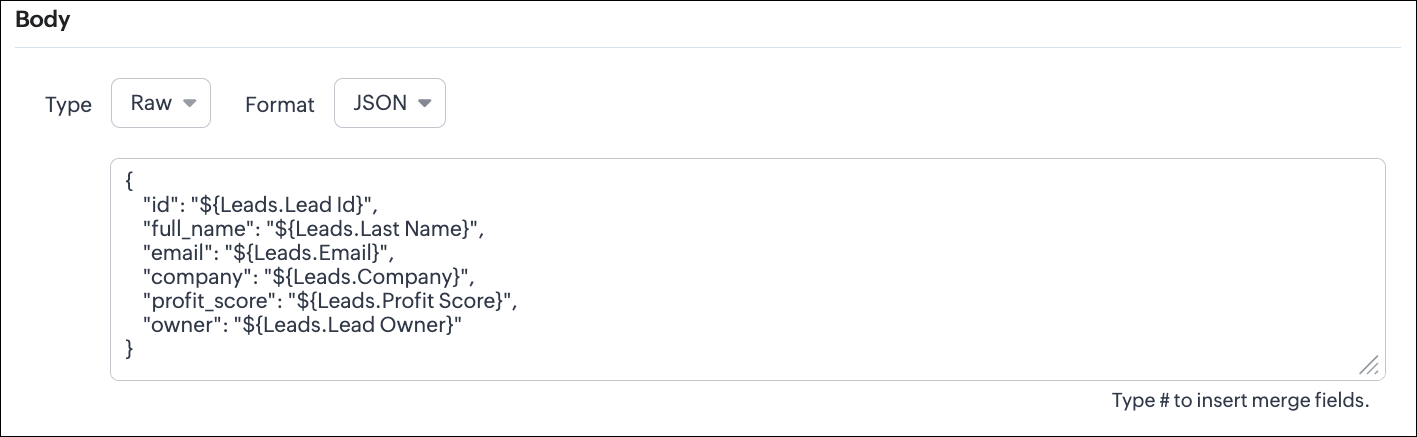
This is the most common format for APIs. Use this when the receiving system expects structured JSON data.
UI - Configuration
Configuring the Body of a Webhook - Raw - "JSON" via Create Webhook API
Request URL: {{api-domain}}/crm/v8/settings/automation/webhooks
Request Method: POST
Input JSON
{ "webhooks": [ { . . . "body": { "raw_data_content": "{\n \"id\": \"${!Leads.id}\",\n \"full_name\": \"${!Leads.Last_Name}\",\n \"email\": \"${!Leads.Email}\",\n \"company\": \"${!Leads.Company}\",\n \"profit_score\": \"${!Leads.Profit_Score}\",\n \"owner\": \"${!Leads.Owner}\"\n}", "format": "JSON", "type": "raw" }, . . . } ] }
|
When to use JSON?
- When the external system expects structured data
- Easier validation
Raw + HTML:
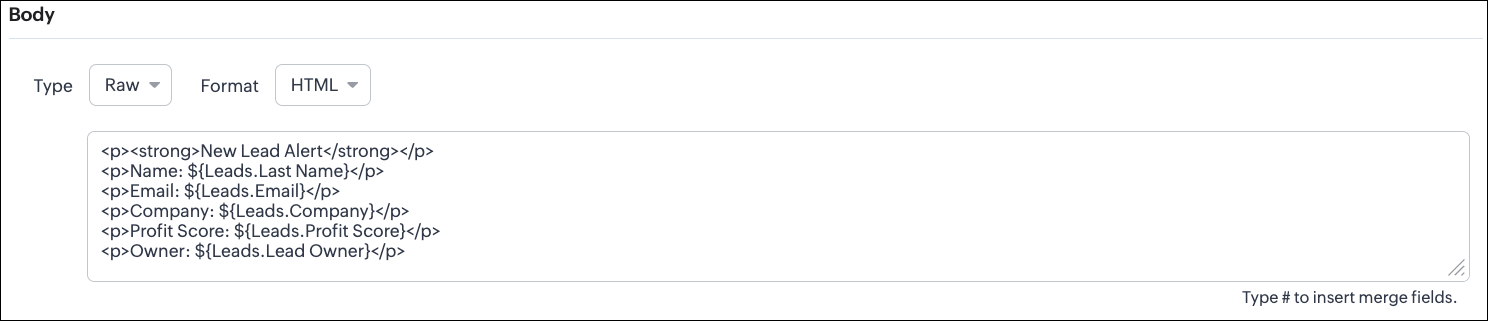
HTML format is useful for sending stylized messages or formatted content.
UI - Configuration
Configuring the Body of a Webhook - Raw - "HTML" via Create Webhook API
Request URL: {{api-domain}}/crm/v8/settings/automation/webhooks
Request Method: POST
Input JSON
{ "webhooks": [ { . . . "body": { "raw_data_content": "<p><strong>New Lead Alert</strong></p>\n<p>Name: ${!Leads.Last_Name}</p>\n<p>Email: ${!Leads.Email}</p>\n<p>Company: ${!Leads.Company}</p>\n<p>Profit Score: ${!Leads.Profit_Score}</p>\n<p>Owner: ${!Leads.Owner}</p>", "format": "HTML", "type": "raw" }, . . . } ] }
|
When to use HTML?
- If the external system displays formatted output
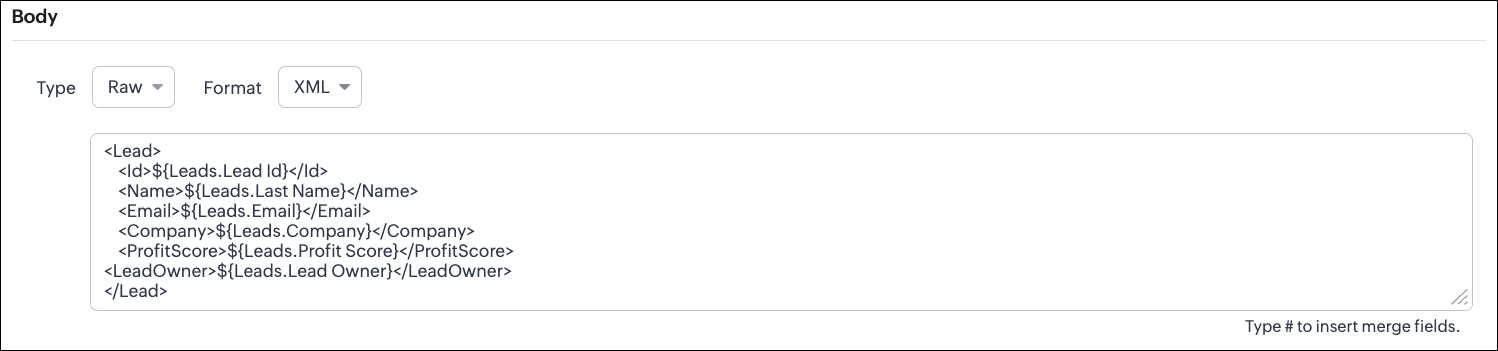
Raw + XML:
Some legacy systems or enterprise applications prefer XML.
UI - Configuration
Configuring the Body of a Webhook - Raw - "XML" via Create Webhook API
Request URL: {{api-domain}}/crm/v8/settings/automation/webhooks
Request Method: POST
Input JSON
{ "webhooks": [ { . . . "raw_data_content": "<Lead>\n <Id>${!Leads.id}</Id>\n <Name>${!Leads.Last_Name}</Name>\n <Email>${!Leads.Email}</Email>\n <Company>${!Leads.Company}</Company>\n <ProfitScore>${!Leads.Profit_Score}</ProfitScore>\n<LeadOwner>${!Leads.Owner}</LeadOwner>\n</Lead>", "format": "XML", "type": "raw" }, . . . } ] }
|
When to use XML?
- With older systems
- When the receiving system only supports XML
Note:
- When you switch the webhook method in the UI, Zoho CRM changes the options you can configure:
GET Method
- Only URL Parameters are available
- Headers are hidden
- Body is hidden
- Because GET requests always send data through the URL and cannot carry a body.
DELETE Method
- Headers are available
- URL Parameters are available
- Body is still not supported
- DELETE requests can include headers, but Zoho CRM does not allow sending a body for DELETE webhooks.
- Date-time format:
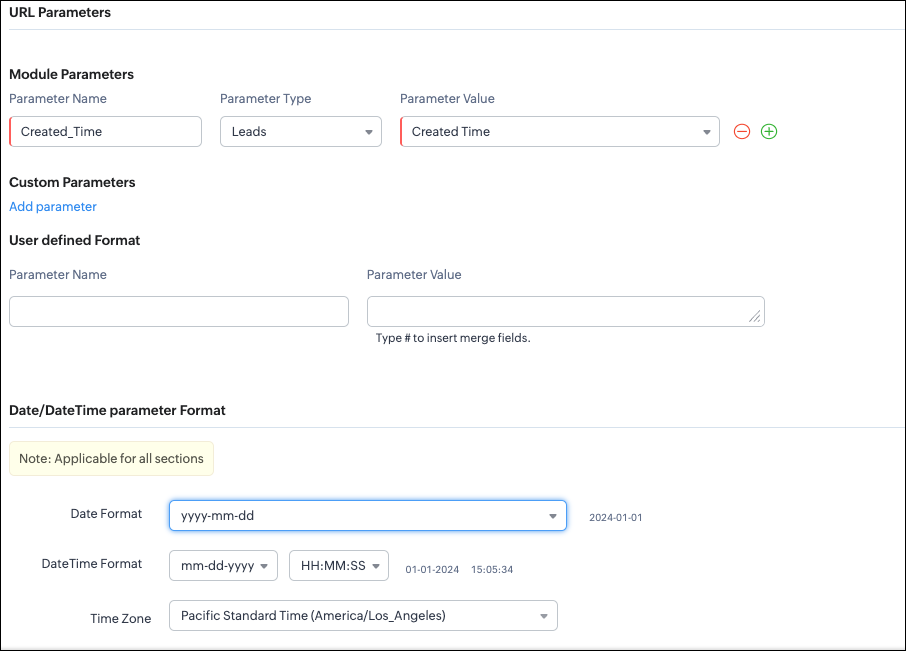
Zoho CRM will format any Date or DateTime fields in your webhook according to the format you select.
UI - Configuration
API - Configuration
{ "webhooks": [ { "module": { "api_name": "Leads", "id": "5725767000000002175" }, "url_parameters": { "module_parameters": [ { "name": "Created_Time", "value": "${!Leads.Created_Time}" } ] }, "description": "Send leads with Profit Score > 80 to validation system.", "http_method": "GET", "name": "Push High Score Leads", "date_time_format": { "datetime_format": "mm-dd-yyyy HH:MM:SS", "date_format": "yyyy-mm-dd", "time_zone": "America/Los_Angeles" }, "authentication": { "connection_name": null, "type": "general" } } ] }
|
With this, we have covered what a
Webhook is in Zoho CRM, how to configure a basic Webhook, how to configure a Webhook with Headers, Body, and URL Parameters, how each component works, how to configure them using the UI, and how the same setup can be created through the
POST Webhooks API.
In Part 2, we will explain
- How to manage Webhooks using the GET, PUT, and DELETE Webhook APIs
- How to associate a Webhook with a Workflow
- How to perform real-time testing by creating records
- How an external application receives data from Zoho CRM via Webhook.
We hope this post helps you understand how to use Webhooks through the Zoho CRM Actions API -
Webhooks API.
Try it out, and let us know your experience in the comments section or reach out to us at
support@zohocrm.com.
Stay tuned for more insights in our upcoming Kaizen posts!
Cheers!
Recent Topics
Custom Fields
There is no way to add a custom field in the "Timesheet" module. Honestly, the ability to add a custom field should be available in every module.
Replies sometimes creating separate ticket
Sometimes when a customer responds to an email coming from Zoho Desk, instead of adding a reply to the original ticket, a separate ticket is created. This happens even though the response subject line contained the ticket number, and the person responding
Workflow Down/Bug
We have a workflow that sends an email to one of our internal departments 10 minutes after a record is created in a custom module. The workflow actually works correctly. However, we have now noticed that on January 8, between 3:55 p.m. and 4:33 p.m.,
Remove the “One Migration Per User” Limitation in Zoho WorkDrive
Hi Zoho WorkDrive Team, Hope you are doing well. We would like to raise a critical feature request regarding the Google Drive → Zoho WorkDrive migration process. Current Limitation: Zoho WorkDrive currently enforces a hard limitation: A Zoho WorkDrive
Translation from Chinese (Simplified) to Chinese (Traditional) is not working. It randomly translated. Google Translate accurately but zoho translate is not working at all
Hi friends, The newly added language for translation. https://www.zoho.com/deluge/help/ai-tasks/translate.html "zh" - Chinese "zh-CN" - Chinese (Simplified) "zh-TW" - Chinese (Traditional) my original text: 郑这钻 (and it is zh-CN) translated traditional
Consultant-Only Booking Page
Zoho Bookings does not allow for Meeting Type OR Workspace-Wide booking pages to be turned off. This is detrimental to organizations that have territory-based or assigned accounts, because if prospects can go to these booking pages and either select the
All new Address Field in Zoho CRM: maintain structured and accurate address inputs
The address field will be available exclusively for IN DC users. We'll keep you updated on the DC-specific rollout soon. It's currently available for all new sign-ups and for existing Zoho CRM orgs which are in the Professional edition. Latest update
Call result pop up on call when call ends
I’d like to be able to create a pop up that appears after a call has finished that allows me to select the Call Result. I'm using RingCentral. I have seen from a previous, now locked, thread on Zoho Cares that this capability has been implemented, but
Custom Sorting based on other columns in table
I need the ability to apply custom sorting to a text-based dimension in the X axis where the sorting is based on another column in the table. For example, I have a chart report where the X axis is a text label. I would like to be able to sort those text
Feature Request: Enable Custom PDF Layout Editor for All Modules (Including Package Slips)
Hello Zoho Community and Product Team, I am writing to share a suggestion that would significantly enhance the customization capabilities within Zoho Books. We all appreciate the power of the Custom PDF Layouts (the "New" template engine) that allows
Is there a way to invoke deluge function from within a widget?
Hi! I have custom functions in deluge and I was wondering whether there is any way to call this function through a widget? Something like on click of a button inside a widget, run the deluge custom function. Would this be possible?
Can a default task Priority be set?
The "Priority" field in the Task layout does not allow a default to be set. Is there another way of doing it? Because the current default is "None" and the Zoho Kanban board design has selected this field as critical information to surface by including
Adding a threshold to a line chart based on date range
I have a line chart that is tracking a percentage over time. It also has a filter for 50 different clients. I would like to create a threshold that is based on a portion of the date range. As I understand it, this would be done by adding a column to the
Resize Signature field dynamically
On the tablet, it is perfect. But on smaller mobile devices and PCs, both web and application, it is too small for people to sign. Is there any plan to make the signature field size dynamically in the future update?
Highlight a candidate who is "off limits"
Hello: Is there a way to highlight a candidate who is "off limits"? I would like to have the ability to make certain candidate and / or Client records highlighted in RED or something like that. This would be used for example when we may have placed a candidate somewhere and we want everyone in our company to quickly and easily see that they are off limits. The same would apply when we want to put a client or former client off limits so no one recruits out of there. How can this be done? Cheers,
Super Admin Logging in as another User
How can a Super Admin login as another user. For example, I have a sales rep that is having issues with their Accounts and I want to view their Zoho Account with out having to do a GTM and sharing screens. Moderation Update (8th Aug 2025): We are working
Zoho Creator Application - New User Not able to access the application
In Zoho Creator, The newly added user not able to access the " Added Application" - User has received the Invitation Email, but while clicking "confirm Account" in the invitation Email, the following error message has appeared. "Sorry! you cannot accept
Deleting Salutation Field
We have updated our lead input screen and 'Salutation' has appeared. This is not visible in the 'Edit Pgae Layout' screen so cannot be moved to 'List of Removed Fields' Salutation is visible in the list in 'Customization - Fields' however I can only 'Edit' or 'Replace' I cannot delete and I do not need this field on my lead input screen. Please can you advise how to get rid of this. Screen shots can be provided if needed. Thank you Tasha
Auto-Generate & Update Asset Serial Numbers using a custom function (Assets Module)
Hello Team, I’ve been working on a script to automate one of our processes in Zoho FSM, and the core functionality has been successfully implemented. However, I’m encountering an issue related to serial number allocation, which is not working as expected.
Partner with HDFC And Sbi Bank.
Hdfc and sbi both are very popular bank if zoho books become partner with this banks then many of the zoho books users will benefit premium features of partnered banks.
Zoho Mail iOS app update: Access Delegated Mailbox.
Hello everyone! You can now access the delegated mailbox from within the iOS version of the Zoho Mail app. To access the delegated mailbox: Open the Zoho Mail app. Go on to the 'Email' module. Tap the profile picture. Choose the delegated mailbox Please
How to convert Lead's country field from Text to Pick List
Hi, I would like to change the default country field in ZCRM from text to pick list. It looks like not I can't delete default country field and recreate it as pick list nor can i create an new custom field country because such a label belong to default field. So what do I have to do? Any ideas? L
Introducing parent-child ticketing in Zoho Desk [Early access]
Hello Zoho Desk users! We have introduced the parent-child ticketing system to help customer service teams ensure efficient resolution of issues involving multiple, related tickets. You can now combine repetitive and interconnected tickets into parent-child
How create a draft via workflow?
I wish to create a workflow rule for specific emails that creates a draft response - not an automatic email reply, but just a draft with a set response ready to be verified by an agent who can then manually select recipients. Alternatively, the workflow
New feature: Invite additional guests for your bookings
Hello everyone, Greetings from Zoho Bookings! We are happy to announce the much-awaited feature Guest Invite, which enhances your booking experience like never before. This feature allows additional participants to be invited for the bookings to make
Link Contacts to Billed Accounts
Hello, I want to do a survey on all my customers of 2025. For that I want to select all contacts linked to accounts who where billed in 2025. How to I create this link to I can then use Zoho Survey with this database of contacts?
Improved Contact Sync flow in Google Integration with Zoho CRM
Hello Everyone, Your contact sync in Google integration just got revamped! We have redesigned the sync process to give users more control over what data flows into Google and ensure that this data flows effortlessly between Zoho CRM and Google. With this
Image field in custom module
Hi guy, Is there any hope of adding a custom image field in the custom module? We created a custom module to keep track of assets, and it would be helpful if we could attach an image to the record. Thanks Rudy
Please can the open tasks be shown in each customer account at the top.
Hi there This has happened before, where the open tasks are no longer visible at the top of the page for each customer in the CRM. They have gone missing previously and were reinstated when I asked so I think it's just after an update that this feature
Using gift vouchers
We would like to be able to offer a limited number of gift vouchers, of varying values, to our customers, and are looking for the best way to do this. We have looked at Coupons and Gift Certificates, but neither seem to fit the bill perfectly. Coupons:
Email Address for Contact not Populating
When I click "Send Mail" from a Contact's page, their email address does not auto populate the "To" field. How do I make this happen?
الخصم على مستوى فاتورة المبيعات
السلام عليكم ورحمة الله وبركاته مطلوب في إنشاء خصم على مستوى فاتورة المبيعات وليس على مستوى البند أريد معرفة الطريقة؟
Assign Income to Project Without Invoice
Hello, Fairly new user here so apologies if there is a really obvious solution here that I am just missing... I have hundreds of small deposits into a bank account that I want to assign to a project but do not want to have to create an invoice every time
Support for Custom Fonts in Zoho Recruit Career Site and Candidate Portal
Dear Zoho Recruit Team, I hope you're doing well. We would like to request the ability to use custom fonts in the Zoho Recruit Career Site and Candidate Portal. Currently only the default fonts (Roboto, Lato, and Montserrat) are available. While these
Seeking help to be able to search on all custom functions that are defined
Hello I have a lot of custom functions defined (around 200) and i would like to search some specific strings in the content of those. Is there a way to accomplish that? If not, is there a way to download all existing custom functions in some files locally
VAT and Taxes option not available
Dear ZOHO Team , The VAT and Taxes options in my ZOHO books account not available,I tried to find how to enable or check the way to use this option but unfortunately couldn't find it anywhere ,I'm in UAE ,kindly let me know what to do to solve this issue
Default Tagging on API-generated Transactions
If one assigns tags to an Item or Customer, those tags get auto-populated in each line item of an Invoice or Sales Order when one creates those documents. However, if one creates the Sales Order or Invoice via the API (either directly coding or using
Direct Feed (Bank)
Is Direct feed integration for AlRajhi and ADCB bank supported by Zoho Books in GCC/Saudi
Sales Order, Invoice and Payment numbers
Hi zoho friends, it is me again, the slow learner. I'm wondering if there is a way to have it so the Sales order, invoice and payment numbers are all the same? It would be easier for me if they were the same number so there is not so many reference numbers
MS Teams for daily call operations
Hello all, Our most anticipated and crucial update is finally here! Organizations using Microsoft Teams phone system can now integrate it effectively with Zoho CRM for tasks like dialling numbers and logging calls. We are enhancing our MS Teams functionality
Next Page