Actions API - Webhooks APIs - Part 1

Webhooks in Zoho CRM
Use case
Configuring Webhooks for Zylker’s Use Case - UI Method
- Go to Setup
- Navigate to Automation
- Choose Actions -> Webhooks
- Click Configure Webhook
 Webhook - UI view
- Basic fields to configure Webhook.
- Configuring Headers
- Configuring Body
Filling the basic Webhook details via UI
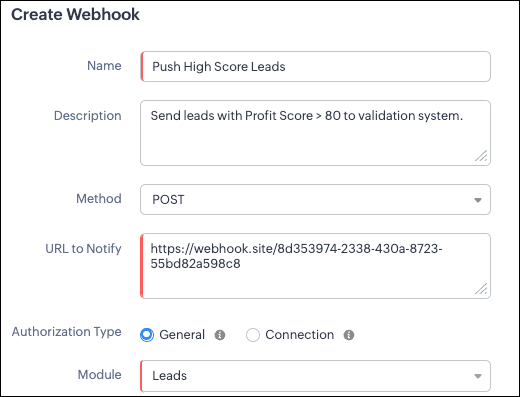
Filling the basic Webhook details via Create Webhook API
{ "webhooks": [ { "name": "Push High Score Leads", "description": "Send leads with Profit Score > 80 to validation system.", "module": { "api_name": "Leads", "id": "5725767000000002175" }, "authentication": { "type": "general" }, "http_method": "POST" } ] } |
Keys explanation
- name (mandatory): Name of your webhook.
- description: Add a short note about what this webhook does.
- module (mandatory): Select the module from where the external application listens the changes. In our case, select Leads module to push high-score leads.
- url (mandatory): Specify the external endpoint where CRM will send the data. This lets the external application see what CRM sends.
- Note: In this post, we have used an endpoint from Webhook.site
- authentication (mandatory): Specify authentication type for the webhook endpoint.
- Possible types:
- general: The receiving system does not require OAuth. You can pass OAuth tokens manually in headers.
- connections:
- OAuth-based integrations: Systems that use Zoho’s Connections.
- For our Zylker use case, we select General.
- http_method (mandatory): Select a HTTP method that allows you to send structured data.
HTTP Method | Headers | Body | URL Parameters |
POST |
| Type: form-data | Not Supported |
PUT |
| Type: form-data | Not Supported |
GET | Not Supported | Not Supported |
|
DELETE | Not Supported | Not Supported |
|
Creating a Webhook with Headers, Body, and URL Parameters
- Headers
- Body (Form-Data or Raw)
- URL Parameters
Configuring Headers
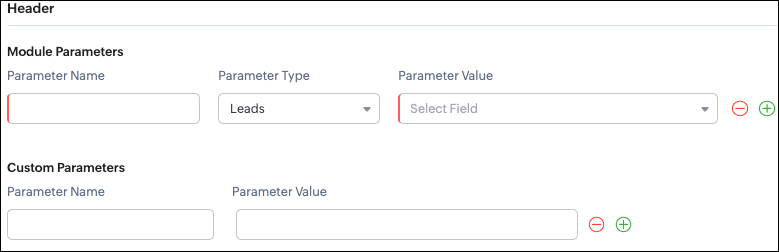
Headers allow you to send extra information along with your webhook request. These help when the external app needs extra data like auth tokens or CRM field values.
- Module Parameters - Dynamic values from CRM fields
- Custom Parameters - Static values you define
- Parameter Name - A unique header key that you define. It does not have to match the CRM field API name.
- Parameter Type - Defines the source of the data you are mapping. It can come from the selected CRM module such as Leads and Contacts, lookup fields, User fields such as Lead Owner, or Organization fields.
- Parameter Value - The merge field value. Example, ${!Leads.Created_By.id}
Parameter Name | Parameter Type | Parameter Value |
Lead_Email | Leads | |
Annual_Revenue | Leads | Annual Revenue |
Profit_Score | Leads | Profit Score |
Created_By | Created By | User Id |
- API version
- Tags like “zylker-crm”
Name | Value |
source | zylker-crm |
version | v1
|
Configuring Headers via Create Webhook API
{ "webhooks": [ { . . . "http_method": "POST", "headers": { "module_parameters": [ { "name": "Lead_Email", "value": "${!Leads.Email}" }, { "name": "Annual_Revenue", "value": "${!Leads.Annual_Revenue}" }, { "name": "Profit_Score", "value": "${!Leads.Profit_Score}" }, { "name": "Created_By", "value": "${!Leads.Created_By.id}" } ], "custom_parameters": [ { "name": "source", "value": "zylker-crm" }, { "name": "version", "value": "v1" } ] } } ] } |
Configuring the Body of a Webhook - form-data & raw formats
- Form-Data:
- Module parameter
- Custom parameter
- User-defined format.
- Raw:
- Text - plain messages
- JSON - structured API payload
- HTML - formatted messages
- XML - traditional enterprise systems
Form-Data Body: key-value
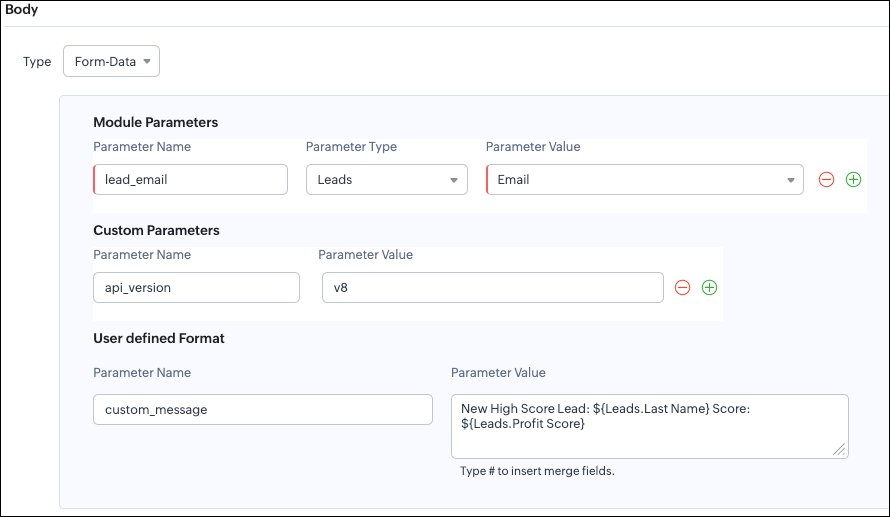
- Module Parameters
- Custom Parameters
- User Defined Parameters
- Headers are for sending supporting information that helps the external system understand the request - this can include auth details, source identifiers, or key CRM fields like email or score that help with quick categorization or filtering.
- Headers - Provide supporting details such as identifiers or quick-check values. For example, Lead ID, or source tags that help the external system check and route the request.
- Body - Contains the complete lead information that the external validation system needs to process.
Where parameters are used | Purpose | Example |
Headers | Metadata - OAuth,tags, and context | source: zylker-crm |
Form-Data (Body) | Main record data - actual lead details sent to the app.
| lead_email=patricia@zylker.com |
Parameter Name | Parameter Value |
custom_message | New high-score lead: ${Leads.First Name}${Leads.Last Name} (Score: ${Leads.Profit Score}) |
Configuring the Body of a Webhook - form-data via Create Webhook API
{ "webhooks": [ { . . . "body": { "form_data_content": { "module_parameters": [ { "name": "Lead_Email", "value": "${!Leads.Email}" }, { "name": "Annual_Revenue", "value": "${!Leads.Annual_Revenue}" }, { "name": "Profit_Score", "value": "${!Leads.Profit_Score}" }, { "name": "Created_By", "value": "${!Leads.Created_By.id}" } ], "custom_parameters": [ { "name": "source", "value": "zylker-crm" }, { "name": "version", "value": "v1" } ], "user_defined_parameters": { "name": "custom_message", "value": "New high-score lead: ${!Leads.First_Name}${!Leads.Last_Name} (Score: ${!Leads.Profit_Score})" } }, "type": "form_data" }, . . . } ] } |
Raw Body - JSON / XML / HTML / Text
- Raw + Text
- Raw + JSON
- Raw + HTML
- Raw + XML
Raw + Text:

- When sending a simple message.
- When the external app only expects plain text.
Configuring the Body of a Webhook - Raw - "Text" via Create Webhook API
{ "webhooks": [ { . . . "body": { "raw_data_content": "New high score lead: ${!Leads.First_Name} ${!Leads.Last_Name}, ${!Leads.Email}, ${!Leads.Annual_Revenue}, ${!Leads.Phone}, ${!Leads.Industry}, ${!Leads.Owner}", "format": "Text", "type": "raw" }, . . . } ] } |
Raw + JSON:
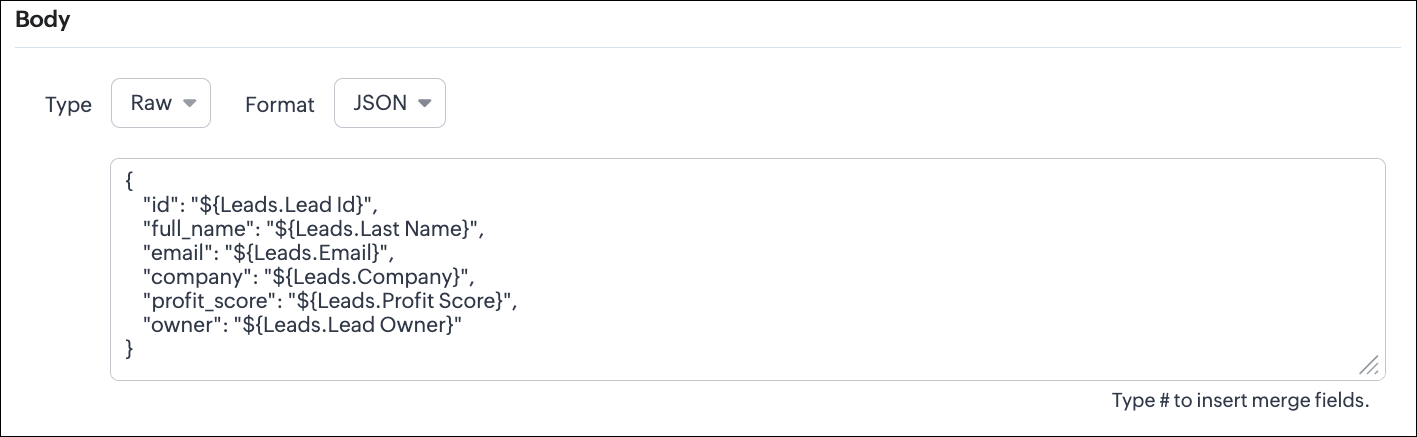
Configuring the Body of a Webhook - Raw - "JSON" via Create Webhook API
{ "webhooks": [ { . . . "body": { "raw_data_content": "{\n \"id\": \"${!Leads.id}\",\n \"full_name\": \"${!Leads.Last_Name}\",\n \"email\": \"${!Leads.Email}\",\n \"company\": \"${!Leads.Company}\",\n \"profit_score\": \"${!Leads.Profit_Score}\",\n \"owner\": \"${!Leads.Owner}\"\n}", "format": "JSON", "type": "raw" }, . . . } ] } |
- When the external system expects structured data
- Easier validation
Raw + HTML:
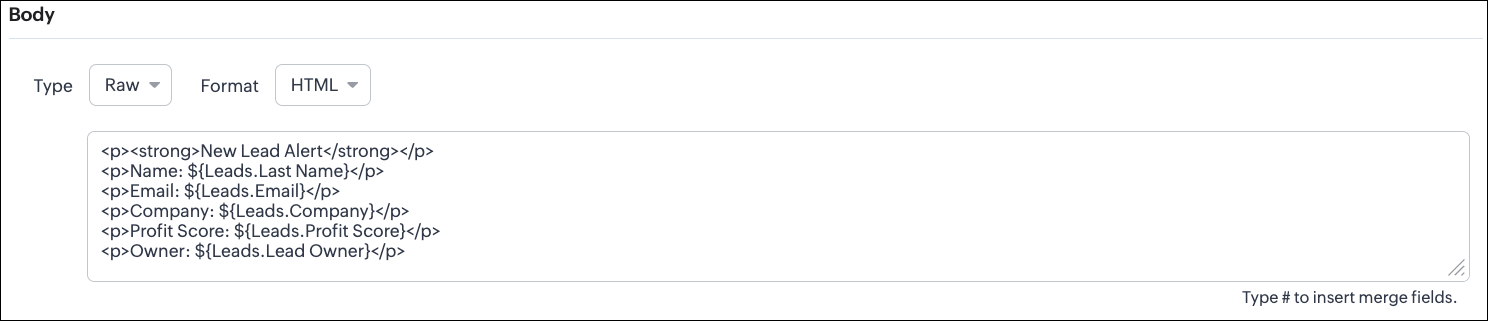
Configuring the Body of a Webhook - Raw - "HTML" via Create Webhook API
{ "webhooks": [ { . . . "body": { "raw_data_content": "<p><strong>New Lead Alert</strong></p>\n<p>Name: ${!Leads.Last_Name}</p>\n<p>Email: ${!Leads.Email}</p>\n<p>Company: ${!Leads.Company}</p>\n<p>Profit Score: ${!Leads.Profit_Score}</p>\n<p>Owner: ${!Leads.Owner}</p>", "format": "HTML", "type": "raw" }, . . . } ] } |
- If the external system displays formatted output
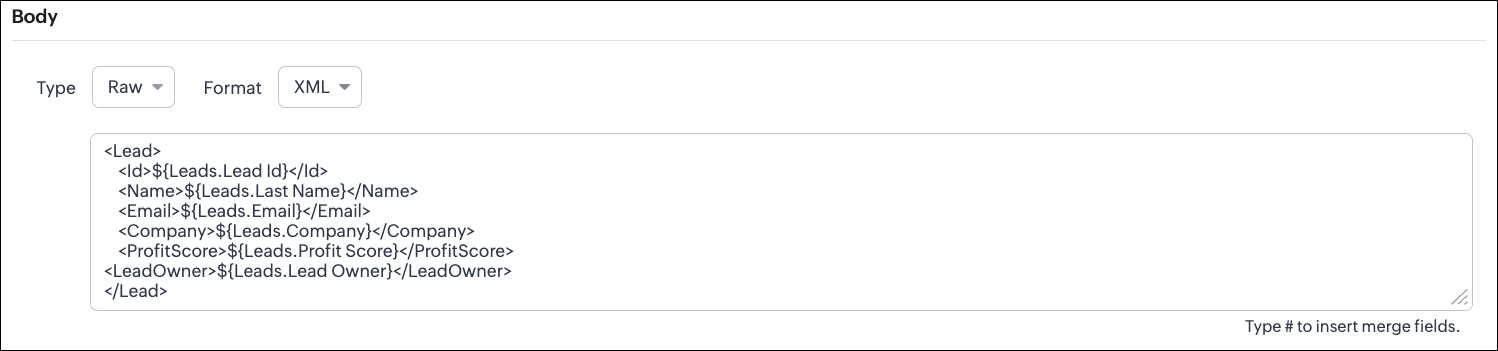
Configuring the Body of a Webhook - Raw - "XML" via Create Webhook API
{ "webhooks": [ { . . . "raw_data_content": "<Lead>\n <Id>${!Leads.id}</Id>\n <Name>${!Leads.Last_Name}</Name>\n <Email>${!Leads.Email}</Email>\n <Company>${!Leads.Company}</Company>\n <ProfitScore>${!Leads.Profit_Score}</ProfitScore>\n<LeadOwner>${!Leads.Owner}</LeadOwner>\n</Lead>", "format": "XML", "type": "raw" }, . . . } ] } |
- With older systems
- When the receiving system only supports XML
- When you switch the webhook method in the UI, Zoho CRM changes the options you can configure:
- Only URL Parameters are available
- Headers are hidden
- Body is hidden
- Because GET requests always send data through the URL and cannot carry a body.
- Headers are available
- URL Parameters are available
- Body is still not supported
- DELETE requests can include headers, but Zoho CRM does not allow sending a body for DELETE webhooks.
- Date-time format:
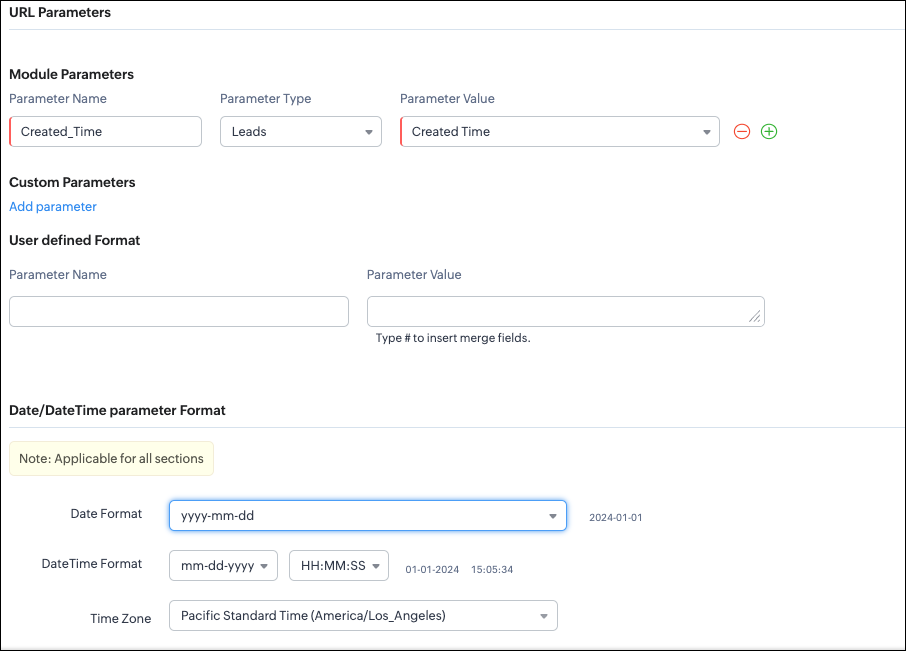
{ "webhooks": [ { "module": { "api_name": "Leads", "id": "5725767000000002175" }, "url_parameters": { "module_parameters": [ { "name": "Created_Time", "value": "${!Leads.Created_Time}" } ] }, "description": "Send leads with Profit Score > 80 to validation system.", "http_method": "GET", "name": "Push High Score Leads", "date_time_format": { "datetime_format": "mm-dd-yyyy HH:MM:SS", "date_format": "yyyy-mm-dd", "time_zone": "America/Los_Angeles" }, "authentication": { "connection_name": null, "type": "general" } } ] } |
- How to manage Webhooks using the GET, PUT, and DELETE Webhook APIs
- How to associate a Webhook with a Workflow
- How to perform real-time testing by creating records
- How an external application receives data from Zoho CRM via Webhook.
- Kaizen #213 - Workflow APIs - Part 1
- Kaizen #214 - Workflow APIs - Part 2
- Kaizen #215 - Workflow APIs - Part 3 - Create and Update Workflow Rules
- Kaizen #216 - Actions APIs : Email Notifications
- Kaizen #217 - Actions APIs : Tasks
- Kaizen #218 - Actions APIs: Field Update
Topic Participants
Subramanian K
Sticky Posts
Kaizen #217 - Actions APIs : Tasks
Welcome to another week of Kaizen! In last week's post we discussed Email Notifications APIs which act as the link between your Workflow automations and you. We have discussed how Zylker Cloud Services uses Email Notifications API in their custom dashboard.Kaizen #216 - Actions APIs : Email Notifications
Welcome to another week of Kaizen! For the last three weeks, we have been discussing Zylker's workflows. We successfully updated a dormant workflow, built a new one from the ground up and more. But our work is not finished—these automated processes areKaizen #152 - Client Script Support for the new Canvas Record Forms
Hello everyone! Have you ever wanted to trigger actions on click of a canvas button, icon, or text mandatory forms in Create/Edit and Clone Pages? Have you ever wanted to control how elements behave on the new Canvas Record Forms? This can be achievedKaizen #142: How to Navigate to Another Page in Zoho CRM using Client Script
Hello everyone! Welcome back to another exciting Kaizen post. In this post, let us see how you can you navigate to different Pages using Client Script. In this Kaizen post, Need to Navigate to different Pages Client Script ZDKs related to navigation A.Kaizen #210 - Answering your Questions | Event Management System using ZDK CLI
Hello Everyone, Welcome back to yet another post in the Kaizen Series! As you already may know, for the Kaizen #200 milestone, we asked for your feedback and many of you suggested topics for us to discuss. We have been writing on these topics over the
Recent Topics
How to retreive the "To be received" value of an Item displayed in Zoho inventory.
Hi everyone, We have our own Deluge code to generate a PO according to taget quantity and box quantity, pretty usefull and powerful! However, we want to reduce our quantity to order according to "To be received" variable. Seems like this might not evenKaizen #211 - Answering your Questions | Using Canvas and Widgets to Tailor CRM for Mobile
Howdy, tech wizards! We are back with the final post in addressing the queries you shared for our 200th milestone. This week, we are focusing on a couple of queries on Zoho CRM mobile configurations and custom payment gateway integration. 1. Mobile SDKRemove "Invalid entries found. Rectify and submit again" modal
Following up on a post from a few years back, but can the Zoho team consider either removing the 'Invalid entries found. Rectify and submit again' modal that displays for empty mandatory fields OR allow an admin to change it? I've built a custom errorCadence reports as front-end reports
Hello everyone, We have built a cadence which is connected to the Leads module. There are 11 steps in total, 7 are automatic emails and 4 are tasks for the Lead owners. As admins, we have access to this (very nicely made) 'View Reports' tab where we canShow elapsed time on the thank-you page?
Is it possible to display the total time a user spent filling out a Zoho Form on the thank-you? I’d like to show the difference between the `form submission timestamp` and the `start time` (currently have a hidden Date-Time field set to autofill the dateEmail Integration - Zoho CRM - OAuth and IMAP
Hello, We are attempting to integrate our Microsoft 365 email with Zoho CRM. We are using the documentation at Email Configuration for IMAP and POP3 (zoho.com) We use Microsoft 365 and per their recommendations (and requirements) for secure email we haveI need to do crud with snippet html
I need to implement a form with an improved user interface. I would like to use snippets to build a CRUD that allows me to create and update records. How could I achieve this using snippets?Allow Stripe Credit Card and Stripe ACH payment methods to be enabled separately on an invoice.
I need to be able to pick at the invoice level whether Stripe Credit Card and/or Stripe ACH payment methods are available. Currently, I'm not able to select from the two Stripe payment methods individually on an invoice. However, there are some largerIncorrect “correct” password on email client apple mail
I have troubleshot this account several times. I have deleted and re added account. It keeps saying incorrect password. Can you check that it is not locked on your end?Is it possible to lock editing subform rows?
Ideally editing would only be locked after the form has been updated but I still want them to be able to add new subform records at any time and they should be able to delete rows from the subform. It is a named subform if that's relevant however theWhat is the maximum file size of a video upload in Zoho chat?
Can I upload a 20 mb video file and share it with my colleagues?Update a field in ALL all calls under a contact
HI guys! I have written some deluge code to update a field in my calls after i have comepleted the call, i need this field to update in all my scheduled calls as well that are comeing up. I just cant seem to get it to work, i have put teh code below,Fat Download of Ulaa Browser
I just observed that Ulaa Browser is offering an one-capsule big download. These days it is a custom to offer a small bootstrap downloader and based on user customization options an appropriate download completes. And this is particularly common withCancelled Transfer order problem
Hello, We've canceled a transfer order, and we can't add the related items to a new Transfer Order. The system tells us that the bin doesn't have the required quantity, but when we check the item, it indicates that there are 2 units in the bin. It alsoBilling Management: #8 Usage Billing in Logistics & Delivery Services
The logistics and delivery industry thrives on movement and precision. Every delivery completed, every kilometre driven, and every ton transported is a measurable activity. However, billing often lags behind. Many logistics companies still rely on fixed-rateTags for New Tickets
Hi there, When creating a new ticket, there is currently no way to choose a tag you would like to associate with the new ticket. Being able to associate a tag while creating a new ticket will be very beneficial as it will save time and flow well withZoho Desk: No Incoming email
Is Zoho Desk services down? No incoming email reflect to desk tickets.Zoho CRM - Widgets | Update #3 : Introducing SDK V1.5 along with new ZDK Methods and ZRC Support
Hello everyone! Widgets in Zoho CRM just got a big upgrade! With the release of SDK v1.5, developers can now create more immersive widget experiences. This update elevates Widget development with new ZDK methods for easier interactivity and ZRC supportUnusual activity detected, account blocked
I am unable to send emails and am getting the error "Outgoing blocked: Unusual activity detected. To unblock your account, please and submit a request. Learn more.". I am unsure as to why this is happening since all my activity is legitimate, mainly confirmationUnable to Send Emails – Outgoing Mail Blocked (Error 554 5.1.8)
Description: Hello Zoho Support Team, I am facing an issue with my Zoho Mail account ( admin@osamarahmani.tech ). Whenever I try to send an email, I get the following error: 554 5.1.8 Email Outgoing Blocked I would like to clarify that I have not doneIssue connecting Zoho Mail to Thunderbird (IMAP/SMTP authentication error)
Dear Zoho Support, I am trying to configure my Zoho Mail account on Thunderbird, but I keep getting authentication errors. Account: info@baktradingtn.com Domain: baktradingtn.com Settings used: IMAP: imap.zoho.com, Port 993, SSL/TLS, Normal Password SMTP:Payment issue with Mail Lite plan – personal NIF not accepted as payment info
Hello, I have already contacted Zoho Support by email regarding this, but since I haven’t received any reply yet, I’m sharing it here as well to see if the community can help. I’m facing a payment issue for my Mail Lite plan. I have a personal accountCustomer payment alerts in Zoho Cliq
For businesses that depend on cash flow, payment updates are essential for operational decision-making and go beyond simple accounting entries. The sales team needs to be notified when invoices are cleared so that upcoming orders can be released. In contrast,Figma in Zoho Creator
Hi Team, I’m creating a form using Figma and would like to know how to add workflows like scheduling, custom validation, and other logic to it. Can anyone help me understand how to set this up for a Figma-based Creator UI form?Not receiving Gmail confirmation email to send emails as Zoho account from Gmail
Hello! I'm having an issue with the "Send mail as" option on Gmail. I am not receiving the confirmation email on my Zoho Mail account. A few days ago, it worked, then it stopped, and now when I try to fix it, I simply don't receive the confirmation emailRestore lost Invoice!
Some time ago I tried to Upgrade from Invoice to Books. I not upgraded and staid n Invoice. Now i tried again and first i deleted the old trial of books. But now all is gone, PLEASE HELP!! i have no backup and i have to have at least 7 years data retention by law.Zoho Desk Down
Not loadinglookup and integrated forms
I might be misunderstanding things but I wanted to integrate our zoho crm contacts into creator. I imagined that when I used the integration it would mirror into creator. It did brilliant. BUT We have a ticket form in creator that we want to use a lookupPartially receive PO without partial Bill?
Most of our inventory is pre-paid. Let's say we purchase 30 pieces of 3 different items for a total of 90 pieces. It is common for our supplier to send us the items as they are ready. So we will receive 30 pieces at a time. How can I partially receive2 users editing the same record - loose changes
Hello, I'm very new to Zoho so apology if this has been addressed somewhere i can't find. I have noticed the following: If we have 2 users put an inventory item in edit mode at the same time: say user1 click on edit and user2 while user1 is still in edit,How to get the Dashboard page to be the first page when you open the app
So when it opens on a tablet or phone it opens on the welcome page, thanks.How I set default email addresses for Sales Orders and Invoices
I have customers that have different departments that handle Sales Orders and Invoices. How can i set a default email for Sales Orders that's different than the default email for Invoices? Is there a way I can automate this using the Contact Persons DepartmentsFormula fields not refreshing until page is reloaded
I need help/advice about the formula fields and how I can refresh the information in real-time. We have two formula fields on our deals page which show calculated prices: One formula is in a subform which calculates the subform total + 1 other field amountHow can I setup Zoho MCP with Chat GPT
I can set up custom connections with Chat GPT but I cat an error when I try to set it up. The error is: "This MCP server can't be used by ChatGPT to search information because it doesn't implement our specification: search action not found" Thoughts?API ZOHO CRM Picket list with wrong values
I am using Zoho API v.8. with python to create records in a custom module named "Veranstaltung" in this custom module I've got a picket list called "Email_Template" with 28 Values. I've added 8 new values yesterday, but if I try to use on of those valuesGroup Emails
I have synced Zoho CRM to Campaigns but there are certain email not synced. showing it is Group Emails, but this email ids belongs to different individuals. please provide a solution as i nedd to sync the same.Enable Password Import option in ulaa browser
Dear Ulaa Team, I noticed that the Ulaa Password Manager currently offers an option to export passwords, but not to import them. This limitation poses a challenge for users like me who have stored numerous credentials in browsers like Chrome. Manually"Is Zoho CRM customer" vs "Is linked with Zoho CRM"
Recently while building a Flow, I was setting up a Decision action following a Zoho Invoice Fetch record action. There were 2 choices that I had not seen as something I could manually action in Zoho Invoice: "Is Zoho CRM customer" and "Is linked withClient Script | Update - Introducing ZRC: Simplified HTTP request library
Hello Developers! Are you tired of juggling different methods to make API calls? Are you confused with multiple syntaxes and version restrictions? Have you ever wished for one simple way to make all API calls in CRM? We heard you :) Here comes ZRC (ZohoSelection Filed for Data Export section
Hi FSM Team, I hope you are all doing well. I would like to share an idea for future development based on my experience. Currently, in FSM, we can only download up to 5,000 records at a time. If the development team could add a selection option to chooseNext Page