Présentons RouteIQ pour Zoho CRM - Économiser du temps et de l'essence avec notre solution de cartographie intelligente
Au cours de vos déplacements professionnels, vous connaissez l'évolution constante de l'emploi du temps des membres de votre équipe. Ils se déplacent souvent, rendent visite à des clients et s'occupent d'une multitude de tâches. La gestion et l'organisation de leurs activités dans ce contexte en constante évolution peuvent s'avérer complexes et rendre leur productivité souvent difficile.
En effet, ils passent trop de temps à planifier et à se déplacer, ce qui entraîne une augmentation des frais de déplacement, une diminution du nombre de visites aux clients et une baisse de la productivité par agent.
Cela présente un gros problème pour vos équipes de vente, de service et de livraison et pourrait se transformer en un problème onéreux au fil du temps.
Nous sommes ravis de vous présenter RouteIQ pour Zoho CRM, une solution de cartographie intelligente qui a été conçue pour résoudre ce problème.
Visualisation cartographique
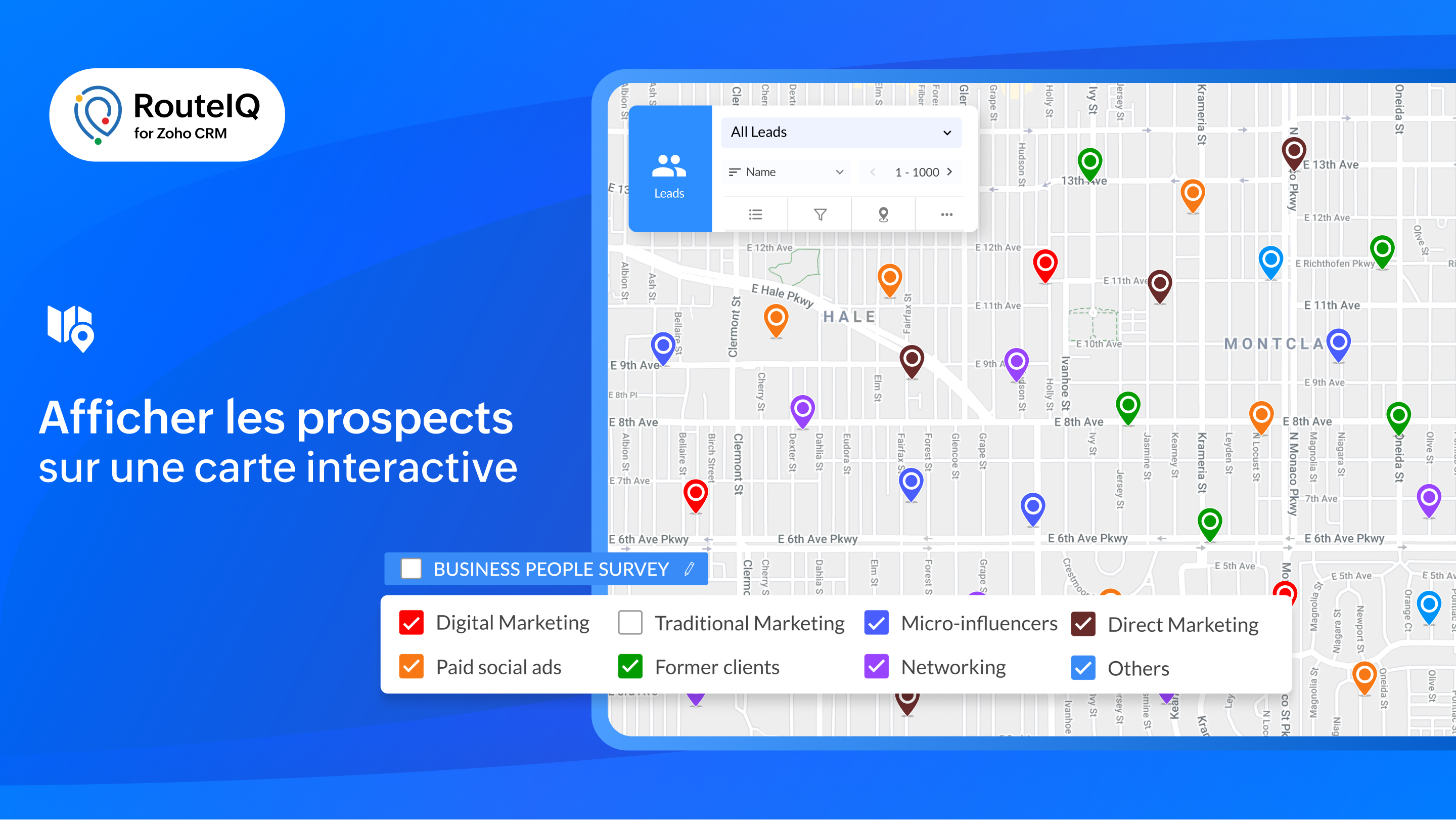
- Présentation des données CRM : affichez vos prospects sur une carte interactive pour obtenir une vue d'ensemble géographique de vos clients potentiels et de vos comptes.
- Explorer : consultez simultanément les contacts de plusieurs modules situés à un emplacement donné.
- Affichage en couleur : attribuez un code couleur à vos prospects en fonction de paramètres tels que le chiffre d'affaires, la date de la dernière visite, la priorité, et bien plus encore, afin de vous permettre de mieux planifier votre journée.
- À proximité : lors d'annulations de dernière minute, recherchez rapidement des prospects près de vous afin de remplacer les visites annulées.
Tracé des parcours
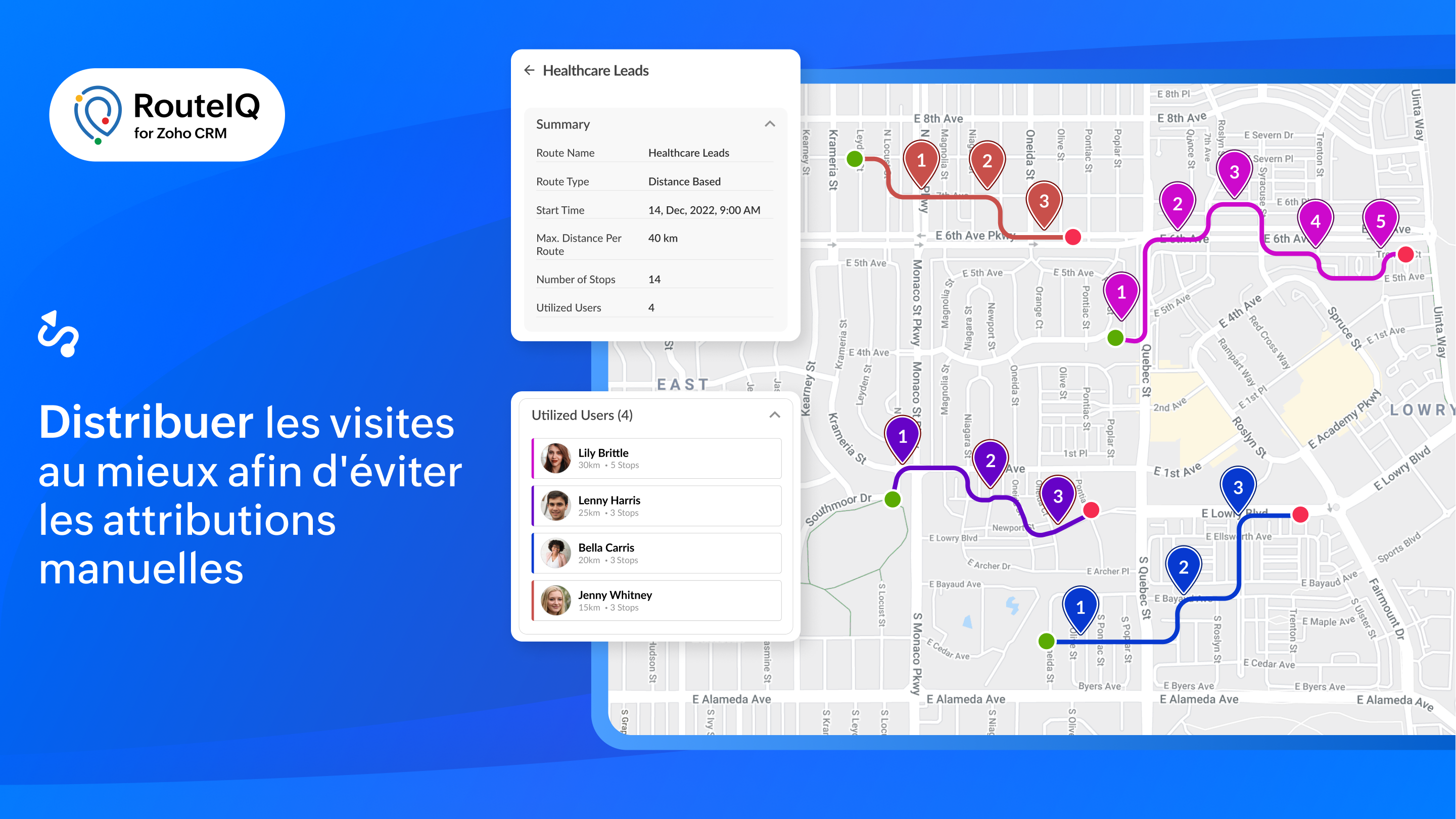
- Parcours flexibles et organisés : créez des parcours optimisés en fonction du temps ou de la durée de vos étapes.
- Distribution des routes : RouteIQ répartit de manière optimale toutes vos visites, vos travaux et vos livraisons entre les membres de votre équipe afin d'économiser du temps.
- Programmation automatique de la route : créez automatiquement des parcours chaque jour pour vos réunions quotidiennes.
- Recherche tout au long du parcours : permettez à l'équipe d'identifier les clients potentiels qui se trouvent sur leur chemin.
Suivi
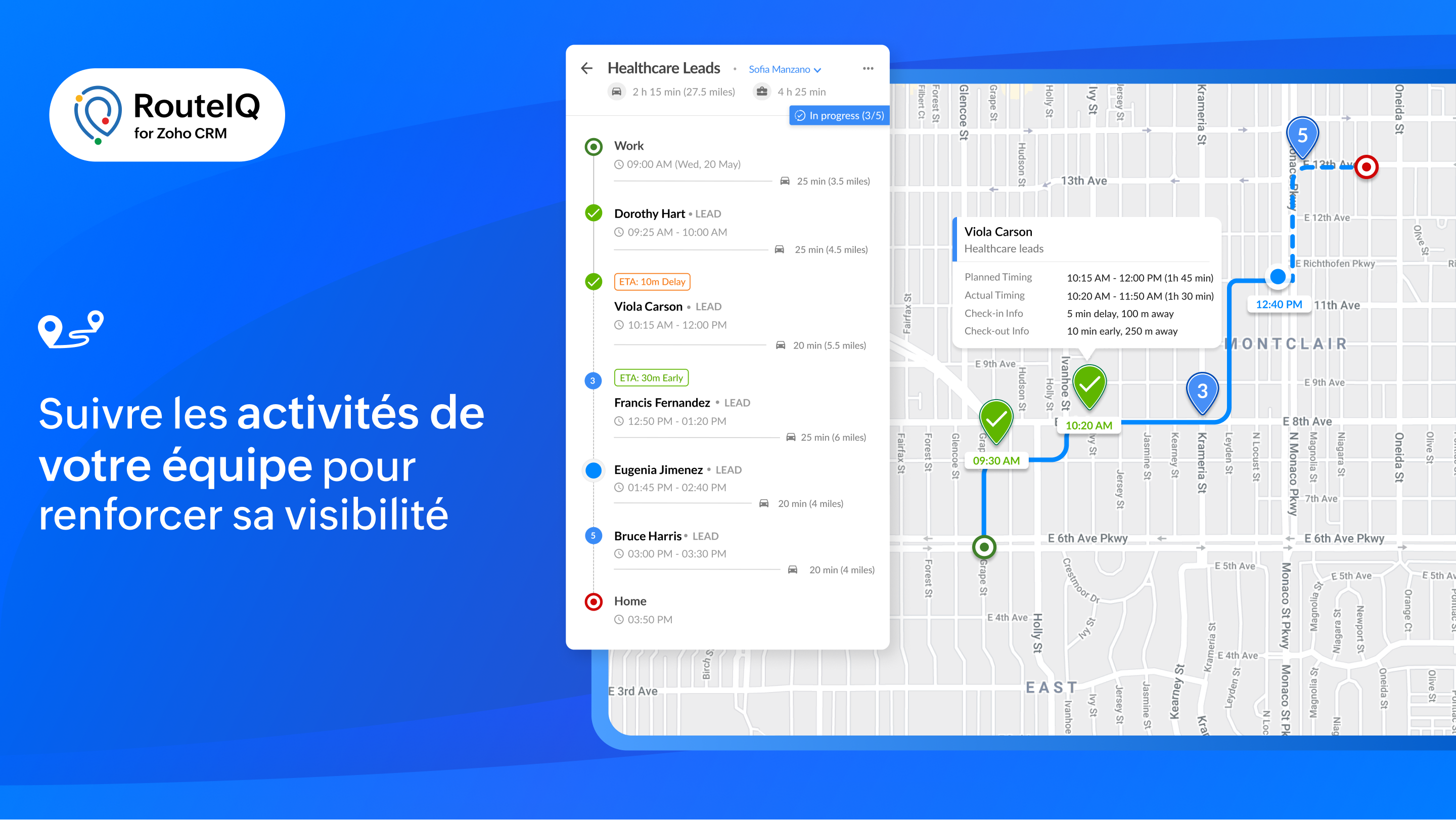
- Suivre le progrès de la route : affichez les progrès effectués sur les parcours de votre équipe en vous basant sur leurs pointages et leurs départs. RouteIQ suit également leur kilométrage et le temps passé.
- Suivi des visites : affichez les visites d'un agent en fonction de la date, y compris le suivi des visites et les écarts.
- Suivi du temps et du kilométrage : suivez la distance parcourue et le temps passé à rendre visite à des clients potentiels en vous basant sur les pointages et les départs.
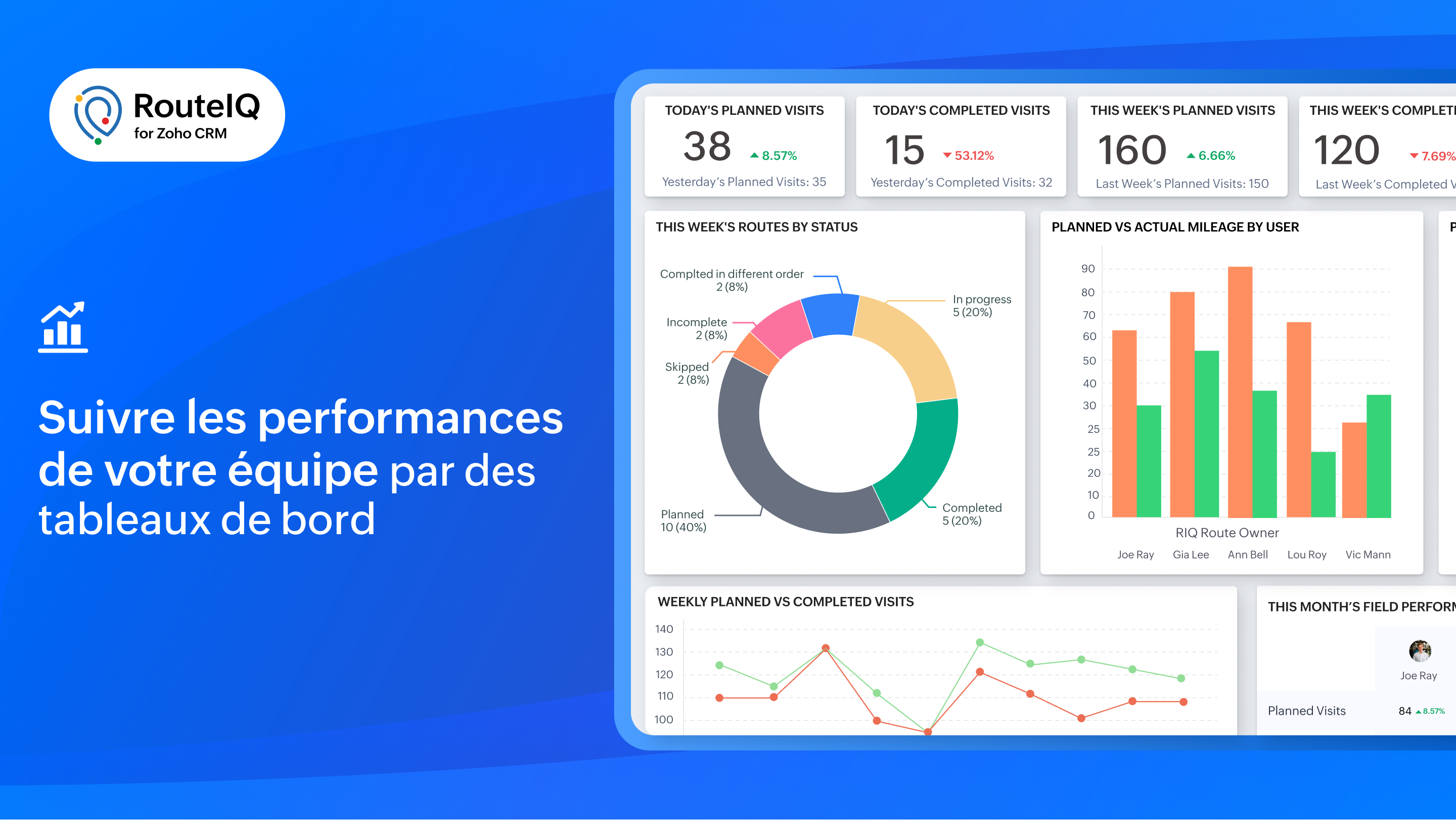
Rapports et tableaux de bord
Profitez d'une visibilité sur les performances de votre équipe grâce à des indicateurs tels que le statut des parcours, les visites achevées, la distance parcourue, la durée, les déviations et bien plus encore.
RouteIQ en déplacement
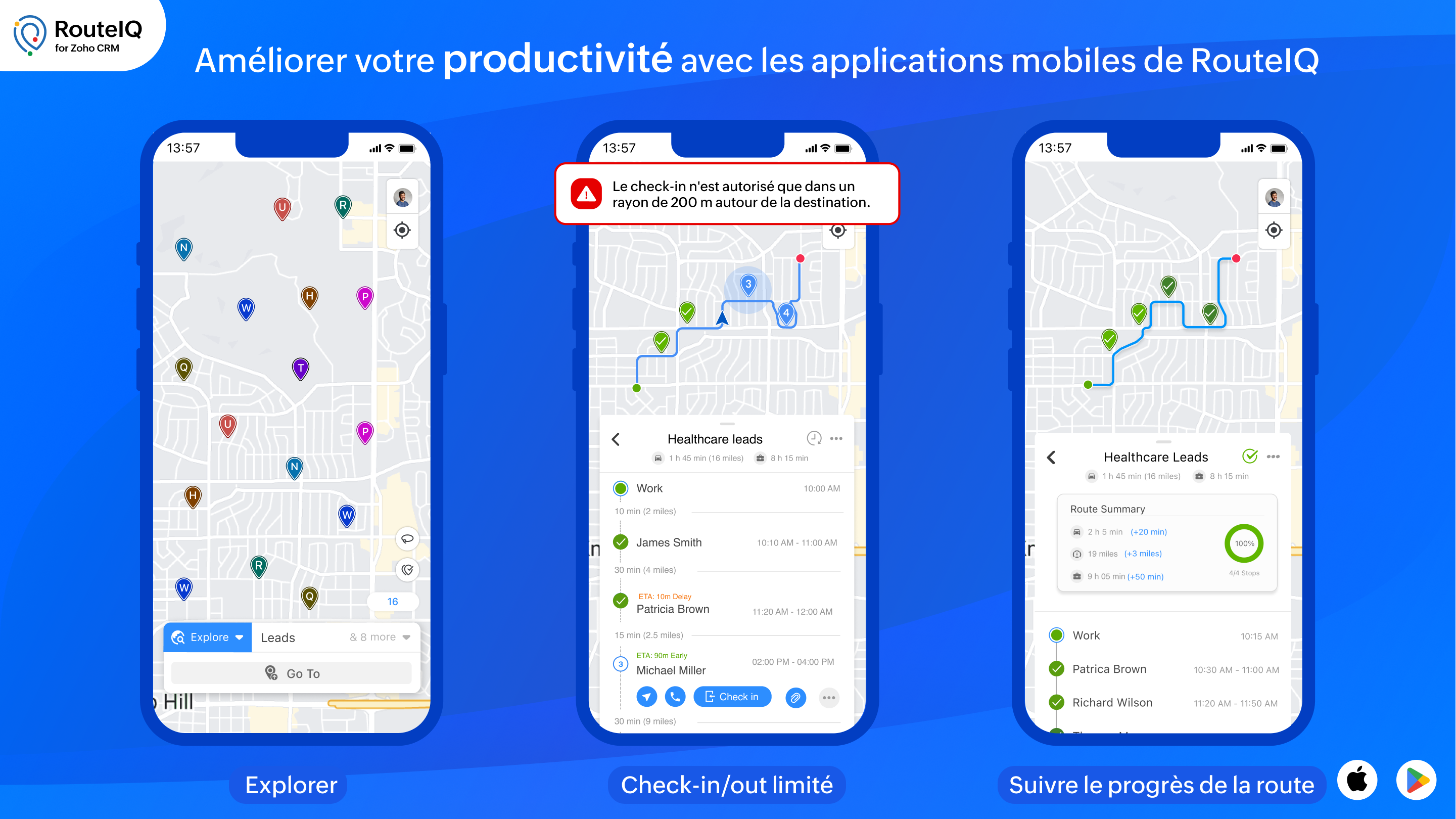
Il est essentiel d'avoir une solution mobile de cartographie pour augmenter la productivité de votre équipe. Voici quelques unes des fonctionnalités particulières de RouteIQ sur mobile, disponibles sur iOS et Android :
- Navigation : parcourez les arrêts avec vos applications de navigation préférées telles que Google Maps, Waze ou Apple Maps.
- Check-in, Check-out, et preuve de livraison : enregistrez les informations d'arrivée et de départ de vos arrêts (heures d'arrivée et de départ, dates, déviations) et saisissez la preuve de livraison.
- Check-in/out limité : autorisez vos agents à s'enregistrer uniquement s'ils se trouvent sur le lieu du rendez-vous.
- Check-in/out automatisé : RouteIQ vous notifie ou enregistre automatiquement votre arrivée et votre départ lorsque vous arrivez ou quittez le lieu d'un client potentiel.
Intégrer RouteIQ pour votre Zoho CRM
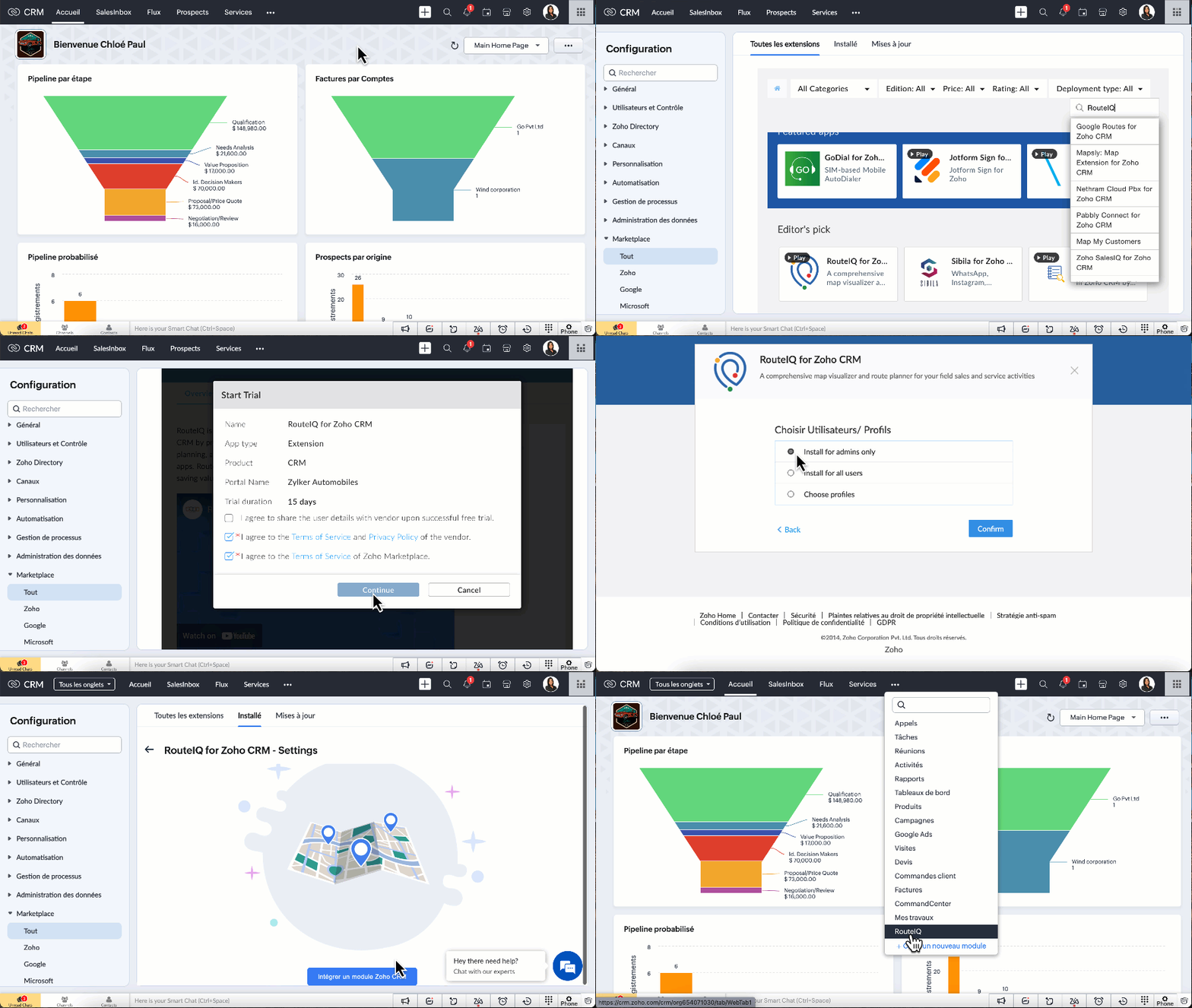
- Vous devez être un utilisateur payant de Zoho CRM pour installer l'extension RouteIQ pour Zoho CRM.
- Paramètres >> Marketplace >> Tout >> chercher "RouteIQ for CRM"
- Suivez les étapes affichées et profitez de la période d'essai de 15 jours.
N'hésitez pas à poser vos questions dans la section des commentaires ci-dessous.
L'équipe Zoho France
Topic Participants
Kinjal Lodaya
Sticky Posts
CRM - Astuce #5 : Effectuer des actions en masses
Bonjour à tous, Au programme du jour : éviter les répétitions grâce à la fonction "en masse". Gagnez du temps sur ces actions simples pour vous concentrez sur votre entreprise. Allez dans le module concerné et cliquer sur les : (...) Suppression enZoho CRM - Il y a du nouveau chez les modèles d'e-mails
Bonjour à tous, Nous sommes ravis d'annoncer que les modèles d'email dans Zoho CRM sont désormais adaptés au design pour tous les ordinateurs et mobiles. Le responsive design désigne une méthode selon laquelle les pages sont conçues pour s'afficherNouveautés Zoho CRM : la page d'accueil et le tableau de bord actualisés !
Bonjour à tous, Nous avons apporté quelques améliorations à la page d'accueil des utilisateurs et à l'onglet Tableau de bord, en voici un aperçu. Des composants supplémentaires dans la page d'accueil pour les nouveaux inscrits : Dans l'onglet Accueil,CRM Blueprint #5: Glossaire
Bonjour à tous, Voici le dernier volet de notre série sur les Blueprints : un glossaire pour comprendre tous les termes nécessaire à l'automatisation de votre process. État : fait référence à chaque étape de votre processus. Par exemple : qualification,CRM : Ajoutez de la couleur à vos balises CRM
Bonjour à tous, Les tags sont des identifiants uniques qui peuvent être associés à différents enregistrements ce qui permet de rechercher, trier, catégoriser, filtrer et segmenter efficacement les enregistrements. Cette nouvelle amélioration a pour but
Recent Topics
form data load issue when saving as duplicate record is made
Hello. I have a form with a lookup when a value is selected the data from the corresponding record is filled into all of the fields in the form. But the form is loaded in such a state that if any value is changed it will take all of the values pre loadedInvoice template, how to change the text under "Notes" and "Terms and Conditions"
In "Invoice templates", there are two text/info sections at the bottom:"Notes" and "Terms and Conditions". It is possible to change the names of these two headings, but how is it possible to change/alter the text under it. As a standard it says "Thank you for your business" under Notes - I need to change it into something different- How? Thank you.Recurring Tasks and Reminders in Projects
Recurring tasks are tasks that are created once, and then recreated automatically after a designated time period. For example, the invoice for your billable tasks is due every week. You can set that task to recreate itself every week. Also, the futureUnable to remove the “Automatically Assigned” territory from existing records
Hello Zoho Community Team, We are currently using Territory Management in Zoho CRM and have encountered an issue with automatically assigned territories on Account records. Once any account is created the territory is assigned automatically, the AutomaticallyImproved Functionality PO Bill SO Invoice
Hello, I need to enter over 100 items, it's frustrating to scroll a few item rows and wait for more to load, then scroll again. It would be nice to have buttons that scroll to the top or bottom with one click. Furthermore, these items I'm adding are VATWishes for 2026
Hello, and a happy new year 2026! Let's hope it's better for everyone. I'd like to share some thoughts on Zoho One and what could be useful in the short, medium, and long term. Some things are already there, but not applied to Zoho One. Others seem likeHow to Integrate Zoho Books with Xero (No Native Connection Available)
Hi everyone, I’m currently facing an issue with integrating Zoho Books invoices with Xero, as I’ve noticed Zoho does not provide a native integration with Xero at this time. I would like to ask: What are the common or recommended solutions for syncingZohoSalesIQ.Chat cannot send messages
Chat cannot send messages. Our app implements the customer service chat window functionality by integrating the Mobilisten SDK. Recently, we encountered an issue: after successful SDK initialization and visitor registration, when the `startWithQuestion`Markup instead of discount??
Is it possible to have the discount field on an invoice or estimate be a markup instead? It's the very same functionality that I am looking for - to be able to markup an individual item by either a $ or a % and have that cost added (instead of subtracted) to the item cost. Currently, I use the tax feature to accomplish this, but it's very awkward to have "Markup 15%" listed after the subtotal. Plus, if I want to markup items at different rates, I end up with several "markup" lines in the totalsPlan switch
I thought I pressed the Free button, but after they set up the account, I see that I am on a Premium trial. Is this usual? How do I get onto the Free version?'Tax registration date'?
The second question in setting up is 'Tax registration date'. My first question: which tax? My second question: why do you need the registration date?What if we don't have an ABN?
Australian business. Setting up. We have no ABN. It's not compulsory. Field not allowed to be blank. What to do?Keeping track of project expenses
I have talked to a few support techs and it is very hard for me to believe that Zoho's project accounting software can't keep accounts for my projects. I must not understand what they're saying. We get a contract to build something. So the project revenueLinking Multi-UOM Barcodes to Products in Zoho Books
Greetings, I'm using Zoho Books for retail shop and I'm running into a bit of a challenge with products that have multiple Units of Measurement (UOMs) and corresponding barcodes. For example, I sell cigarettes both as individual packets and in cartonsHow to change "from" email address when invoicing.
HELP! I'm new to Zoho Books and when I first set it up used a different email address than I currently want to use. I've tried to go to settings and change the default email address but when I generate an invoice it still shows the old email address (although I can't find it anywhere else). I really need to get this changed before I can use the program. Any help would be appreciated.Critical Issue: Tickets Opened for Zoho Support via the Zoho Help Portal Were Not Processed
Hi everyone, We want to bring to your attention a serious issue we’ve experienced with the Zoho support Help Portal. For more than a week, tickets submitted directly via the Help Portal were not being handled at all. At the same time no alert was postedHide/Show Subform Fields On User Input
Hello, Are there any future updates in Hide/Show Subform Fields "On User Input"?Cloning Item With Images Or The Option With Images
Hello, when I clone an item, I expect the images to carry over to the cloned item, however this is not the case in Inventory. Please make it possible for the images to get cloned or at least can we get a pop up asking if we want to clone the images asCustom validation in CRM schema
Validation rules in CRM layouts work nicely, good docs by @Kiran Karthik P https://help.zoho.com/portal/en/kb/crm/customize-crm-account/validation-rules/articles/create-validation-rules I'd prefer validating data input 'closer to the schema'Adding Default Module Image into mail merge field
As with most people finding their way to these forums i have a specific requirement that doesn't seem to be supported by Zoho I have created 2 custom modules to suit my purpose 1 is an inventory type module that lists aluminium extrusions, and all relevantIs it possible to roll up all Contact emails to the Account view?
Is there a way to track all emails associated with an Account in one single view? Currently, email history is visible when opening an individual Contact record. However, since multiple Contacts are often associated with a single Account, it would be beneficialManaging credit cards
Hi, I'm hoping someone on this forum can help me out managing credit card accounts. Transaction are entered as expenses using the credit card account and, as expected, the card balance shows as a negative since this is clearly money I owe them. Once I make a payment, of the full amount owed, I woudl expect the balance to become zero. It doesn't, the negative balance just keeps on increasing even though the payment is reflected correctly in my main operating account. No-one at Zoho seems to understandFree Training - Explore What’s New in Zoho One 2025
Greetings! We hope you have all had a chance by now to get hands-on with the new features and updates released as part of ZO25. Yes, we understand that you may have questions and feedback. To ensure you gain a comprehensive understanding of these updates,Quick way to add a field in Chat Window
I want to add Company Field in chat window to lessen the irrelevant users in sending chat and set them in mind that we are dealing with companies. I request that it will be as easy as possible like just ticking it then typing the label then connectingHow to create a two way Sync with CRM Contacts Module?
Newbie creator here (but not to Zoho CRM). I want to create an app that operates on a sub-set of CRM Contacts - only those with a specific tag. I want the app records to mirror the tagged contacts in CRM. I would like it to update when the Creator appZoho Sheet for Desktop
Does Zoho plans to develop a Desktop version of Sheet that installs on the computer like was done with Writer?How to import data from PDF into Zoho Sheet
I am looking to import Consolidated Account Statement (https://www.camsonline.com/Investors/Statements/Consolidated-Account-Statement) into zoho sheet. Any help is appreciated. The pdf is received as attachment in the email, this document is passwordTrigger Workflow, Approval Process, Blueprint by Deluge in Zoho CRM
#Tips & Trick If you intend to activate your Workflow, Approval Process, or Blueprint through either the deluge script or Zoho CRM API during the creation, updating, or deletion of a record Try this Script mp = Map(); trigger = List(); // Workflow trigger.add("workflow");Zoho Projects Android app: Integration with Microsoft Intune
Hello everyone! We’re excited to announce that Zoho Projects now integrates with Microsoft Intune, enabling enhanced security and enterprise app management. We have now added support for Microsoft Intune Mobile Application Management (MAM) policies throughCant't update custom field when custom field is external lookup in Zoho Books
Hello I use that : po = zoho.books.updateRecord("purchaseorders",XXXX,purchaseorder_id,updateCustomFieldseMap,"el_books_connection"); c_f_Map2 = Map(); c_f_Map2.put("label","EL ORDER ID"); c_f_Map2.put("value",el_order_id); c_f_List.add(c_f_Map2); updateCustomFieldseMapAdmin asked me for Backend Details when I wanted to verify my ZeptoMail Account
Please provide the backend details where you will be adding the SMTP/API information of ZeptoMail Who knows what this means?Kaizen #223 - File Manager in CRM Widget Using ZRC Methods
Hello, CRM Wizards! Here is what we are improving this week with Kaizen. we will explore the new ZRC (Zoho Request Client) introduced in Widget SDK v1.5, and learn how to use it to build a Related List Widget that integrates with Zoho WorkDrive. It helpsSet connection link name from variable in invokeurl
Hi, guys. How to set in parameter "connection" a variable, instead of a string. connectionLinkName = manager.get('connectionLinkName').toString(); response = invokeurl [ url :"https://www.googleapis.com/calendar/v3/freeBusy" type :POST parameters:requestParams.toString()Possible to connect Zoho CRM's Sandbox with Zoho Creator's Sandbox?
We are making some big changes on our CRM so we are testing it out in CRM's Sandbox. We also have a Zoho Creator app that we need to test. Is it possible to connect Zoho CRM's Sandbox to Zoho Creator's Sandbox so that I can perform those tests?I Need Help Verifying Ownership of My Zoho Help Desk on Google Search Console
I added my Zoho desk portal to Google Search Console, but since i do not have access to the html code of my theme, i could not verify ownership of my portal on Google search console. I want you to help me place the html code given to me from Google searchTimeline Tracker
Hi Team, I am currently using Zoho Creator – Blueprint Workflows, and I would like to know if there is a way to track a timeline of the approval process within a Blueprint. Specifically, I am looking for details such as: Who submitted the record Who clickedPrimary / Other Billing Contacts
If you add an additional contact to a Zoho Billing Customer record, and then mark this new contact as the primary contact, will both the new primary and old primary still receive notifications? Can you stop notifications from going to the additional contactsIs it possible to enforce a single default task for all users in a Zoho Projects ?
In Zoho Projects, the Tasks module provides multiple views, including List, Gantt, and Kanban. Additionally, users can create and switch to their own custom views. During project review meetings, this flexibility creates confusion because different users[Free Webinar] Zoho Creator webinars - Learning Table and Creator Tech Connect Series in 2026
Hello everyone, Wishing you all a wonderful new year! May 2026 and the years ahead bring more opportunities, growth, and learning your way 🙂 We’re excited to kick off the 2026 edition of the Learning Table Series and Creator Tech Connect Series ! LearningReply and react to comments
Hi everyone! We're excited to bring to you a couple of new features that'll make your sprint process simpler. A cloud application brings with it an array of social media features that can be efficiently used in your organizational setup. As an agile scrumNext Page