Test software applications efficiently with QEngine
Zoho QEngine is a test automation software that helps test any application built for the web, mobile devices, and APIs. It also helps test custom workflows and integrations with third-party applications.
Why do organizations need to test applications?
• Eliminating bugs and errors - Before rolling out an application to end users, it's critical to eliminate any technical glitches that the application might have. Critical bugs can cause loss of data due to security errors, downtime, financial losses, and more.
• Adding new features/functionalities - The scalability of an application relies on adding new features/functionalities in line with customer requirements. However, this must not hinder existing features, and the new additions must seamlessly work with other integrations.
Choosing test automation or manual testing
Manual testing relies heavily on the tester for organizing extensive use-case scenarios and manually testing them to identify bugs. Complex scenarios can benefit from human intervention, even though these are time-consuming, so that critical bugs don't hinder application performance later.
Most use cases in application/software testing need repetitive tests, so it's prudent to automate these tasks for the optimization of resources. This is why some organizations rely on basic test automation that utilizes Selenium WebDriver and languages like Java and Python to write test cases. However, this basic test automation requires the tester to have technical skills.
Zoho's solution for a complete software testing lifecycle—Zoho QEngine
With QEngine, QA teams at software firms can make the switch from manual testing to automation testing, which reduces maintenance and improves efficiency with optimal resources.
For those firms utilizing test automation, writing test cases in QEngine doesn't require knowledge of Selenium, Java, or Python, as QEngine abstracts this layer of the process. With Zoho QEngine, there are also no infrastructure requirements, as test cases can be run and executed on the cloud—but, if required, test cases can also be executed on a local machine.
Zoho QEngine's robust test automation software helps test any application accessed through web browsers, mobile apps, or APIs. Zoho QEngine can also test custom functions, workflows, third-party integrations, widgets within apps, and more.
Zoho QEngine helps build, manage, execute, collaborate on, and report test cases. Our native test automation software comes equipped with:
• Cross-platform test case management - Write and manage multiple test cases in parallel, across platforms (web browser, Android, iOS, and API).
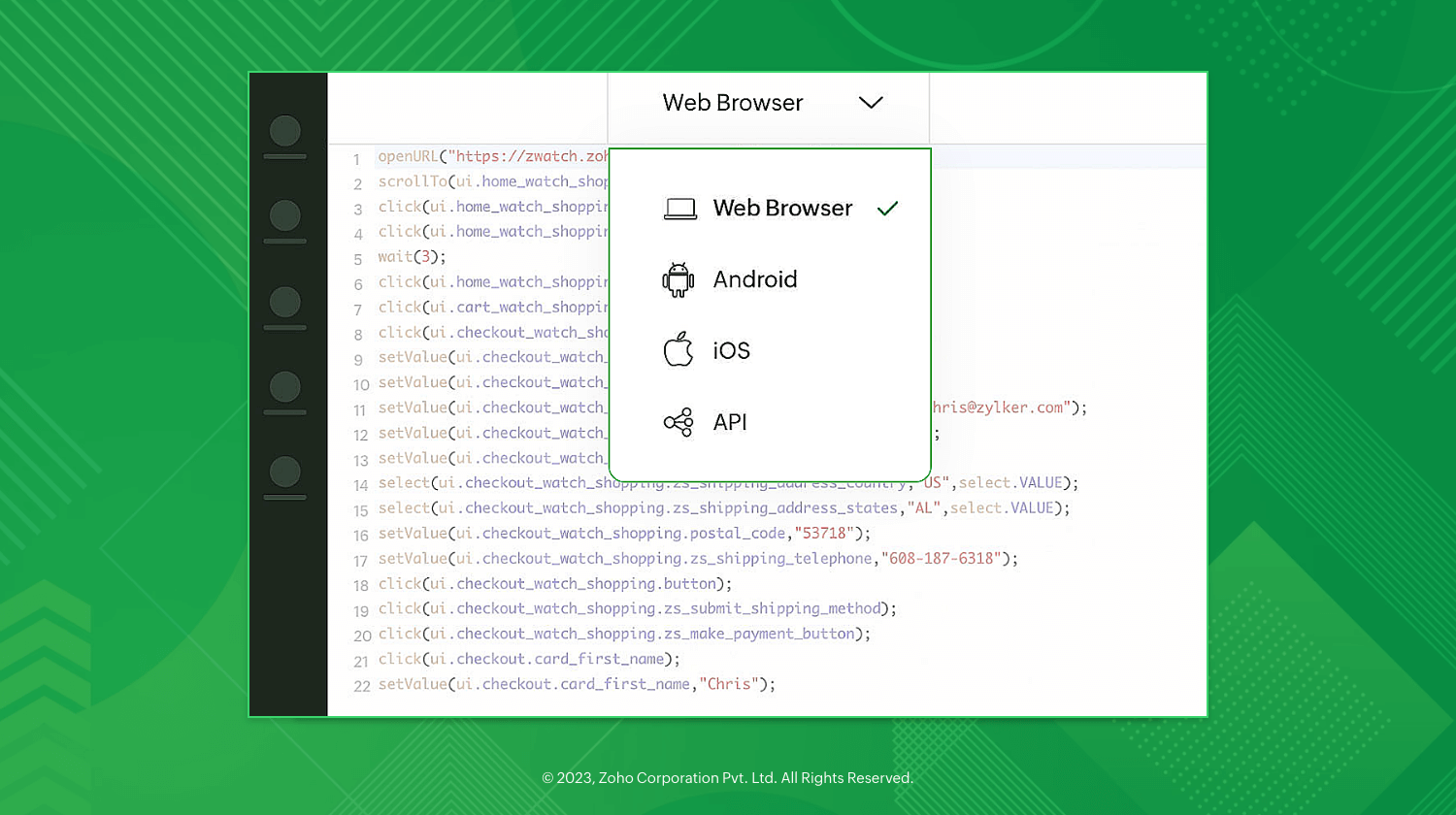
• Flexible test case builder for agile test automation - Zoho QEngine has a no-code recorder, low-code builder, and pro-code editor that help make building test cases easier. With QEngine's recorder option, you can record actions/tasks in applications, and the code for user actions is generated for testing without any manual intervention! The low-code builder enables building test cases with drag-and-drop functionality, while the pro-code editor ensures that users with technical proficiency can write test cases from scratch.
• Web testing, mobile testing, and API testing is made easier with QEngine - QEngine can test any web or mobile application or API integration.
• AI-aided self-healing - Any broken UI elements/locators in test cases are fixed by QEngine's AI algorithm.
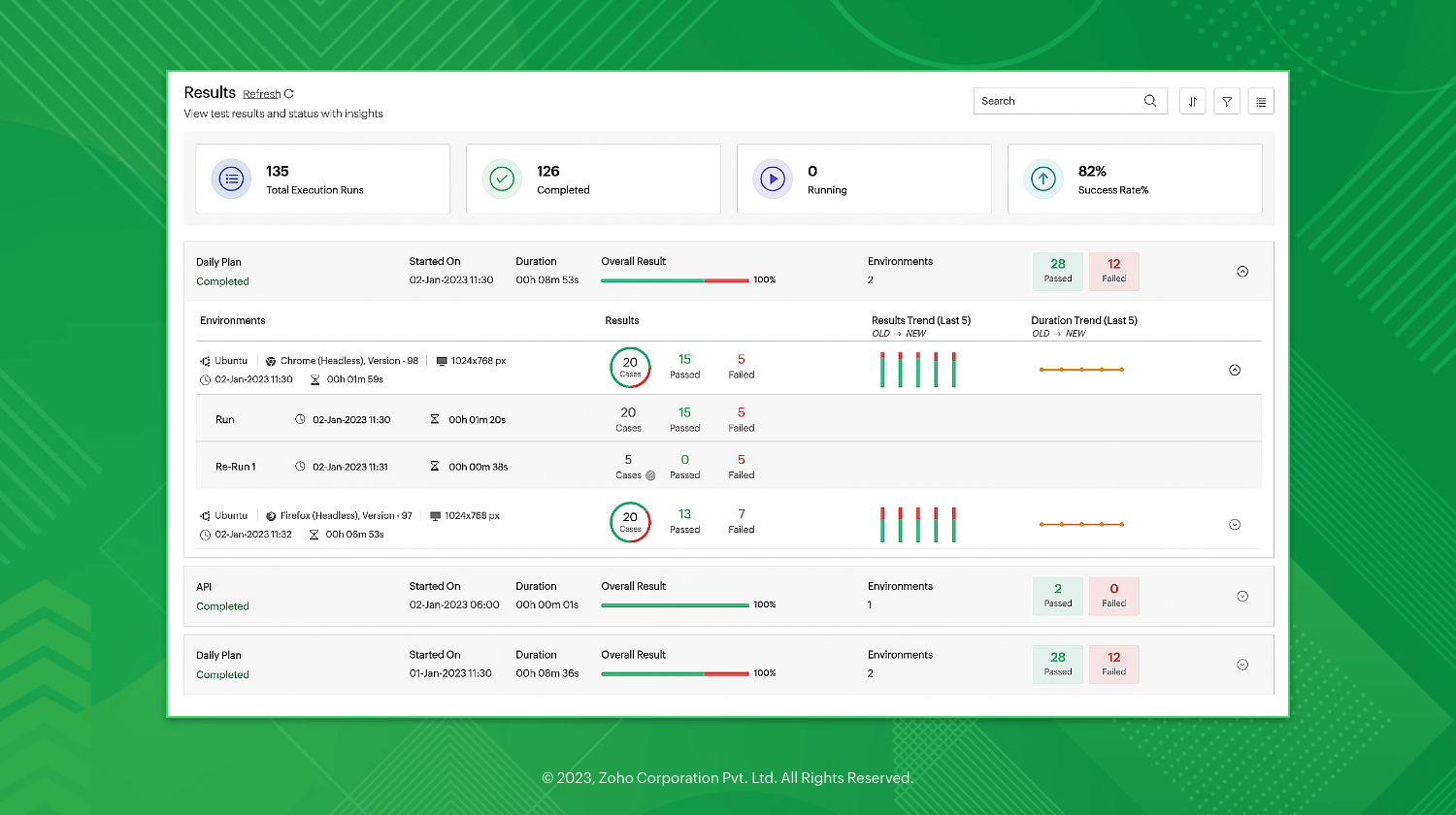
• Insightful reports - QEngine's report feature helps collate the details of test cases run, platforms run on, passed/failed test cases, and more.
• On-prem, cloud, and hybrid environments
- On-premises - Run test cases from a local machine.
- Cloud - Run test cases on Zoho's own servers.
- Hybrid - With absolutely no hosting or server maintenance needed, you can test your local application on the cloud via tunnelling.
Schedule a demo today to explore Zoho QEngine for all your testing needs!
Topic Participants
Surekha Jagadish
Recent Topics
Edit a previous reconciliation
I realized that during my March bank reconciliation, I chose the wrong check to reconcile (they were for the same amount on the same date, I just chose the wrong check to reconcile). So now, the incorrect check is showing as un-reconciled. Is there any way I can edit a previous reconciliation (this is 7 months ago) so I can adjust the check that was reconciled? The amounts are exactly the same and it won't change my ending balance.Choose Component for User Filter
This filter in the Choose Component for User Filter would be better if had an Order or Group by function. Also, the Specify the default filter values: is very confusing and limiting.Zoho Desk - Event Calendar View
Hi Desk team, Are there any plans to introduce a calendar or timeline view for Events in Zoho Desk? It would be very helpful if we could see Events visually in a calendar and/or timeline. This is very helpful when desk side support activities need toRe-Apply SLA When Ticket Reopened from Closed Status?
If you have an SLA applied, timers are deactivated when going to "On Hold" status type and reactivated when going back to an Open status type. What we discovered is when a customer replies to a closed case and it reopens, the SLA is not applied and timersOption to Delete Chats in IM
Currently, there is no option to delete any chats in IM, regardless of their source.Time Zones for Users
I've searched for this topic, but the only answers I see are from years back. We have users all over the country. is there a way for them to set their own time zone? This is important and should be a standard setting, but I do not see how to do it.What is a realistic turnaround time for account review for ZeptoMail?
On signing up it said 2-3 business days. I am on business-day 6 and have had zero contact of any kind. No follow-up questions, no approval or decline. Attempts to "leave a message" or use the "Contact Us" form have just vanished without a trace. It stillShowing the map along with mileage expense
When you use the GPS to track mileage, it shows you the map of the actual path travelled. It would be very useful and practical to save that map with the mileage expense, so that when the report is created, it provides a map of each mileage expense associatedID:2406331
Hello, I have sent the form (ID:2406331) but no answer after two days. This is a paid subscription, I am not allowed to use the eighth paid slot of 50GB email space anymore, only 7 are being used. Is anyone going to help me please so I can use the eighthApproval Workflow for Purchase Orders Abrir
The requirement is , that all purchase orders greater than or equal to 5000 go through an approval process from certain people, but within books I only see that the approvers can be by levels or any approver but we cannot enter a rule like these. CanTransaction Rule Matching
Q1. Is there a method to have the Transaction Rules applied across multiple Bank Accounts? Q2. To match "contains" text in Transaction Rules, is a wildcard or regular expression required? Is it case sensitive? Would searching for "issue" in the followingNotebook on Mac: Fuzzy fonts in list view
Hi, I am running Notebook on Mac OS 26. Generally it works fine, and the font display in the notes themselves is crisp. However, in the notes list (left of the open note) the font of the note titles as well as first lines is noticeable fuzzy. AttachedTrigger workflows from SLA escalations in Zoho Desk?
Hey everyone, I’m currently working with SLA escalation rules in Zoho Desk and ran into a limitation that I’m hoping someone here has solved more elegantly. As far as I can tell, SLA escalations only support fairly limited actions (like changing the ticketZoho CRM Email Templates 100% Width No Background How?
Hi, On the Zoho CRM Email Templates in setup > customization > templates > new templates > I choose blank template, but still it puts in a gray background and a max width for the email. I just want to make an email that looks like an email I would send from gmail that has no background or max width. How do you do this?ZOHO CRM Quote Export / Quote Report
How can I either Export my quote list, or create a Report that shows all quotes AND includes the NOTES field in a column. I attempted to Run a Report which includes ALL FIELDS, however it does not include the Notes Field (but oddly does include the fieldsIntroducing Radio Buttons and Numeric Range Sliders in Zoho CRM
Release update: 1. 2 March 2026: Currently out for CN, JP, AU and CA DCs (Free and standard editions). For other DCs, this will be released by mid-March. 2. 26 March 2026: CA, SA, AU, JP, CN DCs - Free, Standard, Professional, Enterprise, Ultimate, CRMAdding a Mark Up
Can you use the discount column to be a mar up column on estimates and invoices?URGENT. Recovering email without eArchive
Hello, I have deleted some email from my trash but do not have eArchive. Is it possible to recovery without this? many thanks!Subscription Statuses - Dunning
How are other companies handling the scenario when customers don't pay and dunning takes over? Our issue is that in my situations, we want our customers to be able to catch up their late payments and continue their subscription after the dunning processLogo Doesnt appear on email
Hi, 1. PROBLEM: mails sent to customer from zoho invoice ( Estimates and incoices etc.) Logo doesnt appaer on email. 2. SUGGESTION: there must be an option to select from google fonts if we want specific font to the pdf templates. thanksHow to see Statement Details Shown in Unclassified Transactions in All Transactions?
All, The list of Unclassified Transactions show the Statement Details and Descriptions. What is the method to see that column in the All Transactions list? -Thanks!Non-Avalara Tax Automation wtih Zoho Books
We are paying a ridiculous amount for Avalara. Our team wants to make a change, but they're the only software fully integrated with Zoho. We also don't have the bandwidth to do this manually, so we do need some sort of automated software solution. WeMigrating to the new outgoing webhook model in Zoho Connect
Dear User, Outgoing webhooks configured across the Zoho Connect Integrations page, Zoho Flow, and Zapier will stop working after May 31, 2026. This is due to an upcoming upgrade to our outgoing webhook flow. This update is mandatory only for networksCreate formula calculations in Assemblies for scaling quantities
Something we have been encountering with our composite items is dealing with scaling of quantity of one or more items within the composite assembly relative to the number of complete units being sold. I.e. running the equation 2(n-1) on one of the assemblyLastest update
The latest update to notepad has completely trashed all my notes. If I go to view it it just opens up a screen with a box with dotted lines around it for me to add something I can import saved nodes but you can't view them at all. Anybody else havingTip #67- Exploring technician console: Disable Input Devices- 'Insider Insights'
Hello Zoho Assist Community! Picture this: you are in the middle of a critical remote session, carefully configuring a system or running an important update, and the customer accidentally clicks somewhere or types something that undoes your progress.What matters more in Zoho implementations: tools or system architecture?
I recently worked on a full-stack migration for a catering equipment business using Zoho One with Shopify, and it raised a few interesting observations. The setup included migrating a large product catalog (around 9,700+ SKUs), integrating multiple supplierFacturation électronique 2026 - obligation dès le 1er septembre 2026
Bonjour, Je me permets de réagir à divers posts publiés ici et là concernant le projet de E-Invoicing, dans le cadre de la facturation électronique prévue très prochainement. Dans le cadre du passage à la facturation électronique pour les entreprises,[Webinar] Solving business challenges: One tool for documents, forms, PDFs, e-signatures, and more
Hi Zoho Writer users, Most businesses rely on multiple tools, such as a word processor, form builder, e-signature provider, and PDF editor, for their document workflows. Managing multiple subscriptions, switching between tools, and moving data acrossDeposit on invoice
I'm trying to figure out how to customize an Estimate to include a Deposit/Retainer Invoice line within the Estimate. I tried creating my own custom field called "Deposit" where I manually inputted the deposit amount, which was nice. However, my employerZoho NOTEBOOK: What are file size restrictions?
I understand that Zoho NOTEBOOK is a free product, and what it offers is great. But I'm wondering what the file size restrictions are. When I record an audio note in Zoho Notebook, what is the maximum length of recording time/audio file size? When I wish to upload MP4 video, what is the maximum video size I can upload per Zoho Notebook restriction? Moreover, does Zoho Notebook use its own storage structure, or can I upgrade my storage for Zoho Notebook to add larger file attachments, videos and audioConcern Regarding Stock Validation in Inventory Management
Hi Zoho Team, We would like to highlight a concern regarding stock validation in the inventory system. As per standard inventory management practices, if the stock level is zero, the system should not allow users to create a shipment, packing slip, orAutomation Series #2: SLA vs Supervisor Rule in Zoho Desk
SLA vs Supervisor Rule: Keeping tickets on track in Zoho Desk This post is part of the "Desk Automation Series," Chapter 1. Through this series, we will help you choose the right automation type in Zoho Desk by comparing commonly confused automationsZoho Recruit - Email Relay
Good day, Has anyone succeeded in setting up an email relay for Office 365? If I add the details from https://support.microsoft.com/en-us/office/pop-imap-and-smtp-settings-8361e398-8af4-4e97-b147-6c6c4ac95353, I get the connection error. Regards, EkaBetter use of contacts
Zoho inventory has the ability to add multiple contacts to customers. However Zoho inventory doesn't currently provide a way to link a contact to objects like sales orders. This means that while you can tell what company has placed a sales order you can'tNotebook AI limits
Hi folks, Working with the AI transcription tools in Notebook, on the Mac App, which I find quite handy, but the one thing I am struggling with is the inability to either edit or copy the results of the transcript: I can't click in any of the boxes, andDisappointment with Zoho Payments
Dear Gowdhaman, I am writing to inform you that I am removing Zoho Payments from my website. I cannot continue to disappoint my customers due to the lack of UPI support, as has been the case with my experience so far. Please note that the 0.5% transactionZoho Commerce B2B
Hello, I have signed up for a Zoho Commerce B2B product demo but it's not clear to me how the B2B experience would look for my customers, in a couple of ways. 1) Some of my customers are on terms and some pay upfront with credit card. How do I hide/showRename system-defined labels in Zoho CRM
Renaming system-defined labels is now available across all DCs. Hello everyone, Zoho CRM includes predefined system fields across modules to support essential CRM operations. Until now, the labels of these fields were fixed and could not be edited fromIntroducing parent-child ticketing in Zoho Desk [Early access]
Hello Zoho Desk users! We have introduced the parent-child ticketing system to help customer service teams ensure efficient resolution of issues involving multiple, related tickets. You can now combine repetitive and interconnected tickets into parent-childNext Page