Upcoming Updates - August 2022

Upcoming Updates - August 2022

Hi all,

Greetings from the Zoho Creator team! Today we've got news for you on some exciting updates. And rest assured— there’s more to come!

In this post, we'll be going over the upcoming features and improvements for this month as mentioned below. A few of these will be available immediately and the rest are planned for release in the coming weeks.

  • Enabling dark mode for Android apps
  • Introducing presets
  • Customizing display titles for forms
  • Launching a revamped UI for customer portals
  • Announcing strict validation for the max length field property

In addition to the above, Creator 4 will be deprecated, and all the accounts still using it will be automatically upgraded to Creator 5 by August 31, 2022. Scroll down to know more!

Dark mode for Android

One of our most requested features is finally here: Dark mode!

Dark mode, which is currently supported in our iOS apps, has now been extended to Android apps as well. We have carefully designed every component and screen to have an overall balanced color scheme for your mobile apps. Dark mode will be automatically enabled based on your default system settings and has the following benefits:

  • Reduces power usage by a significant amount (depending on your device's screen technology)
  • Improves visibility for users with low vision and those who are sensitive to bright light
  • Makes it easier for anyone to use their devices in low-light environments

Presets - panel configuration reusability

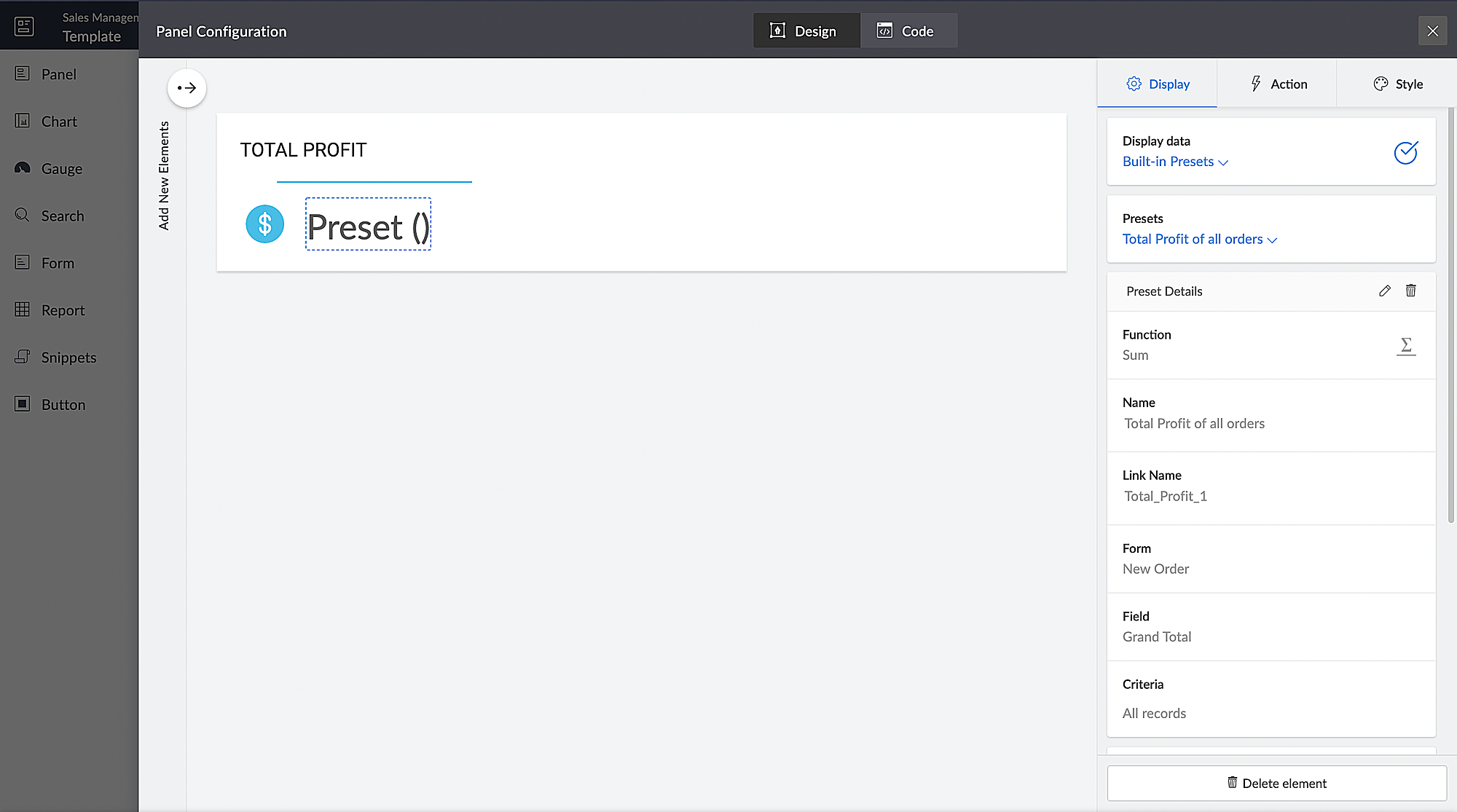
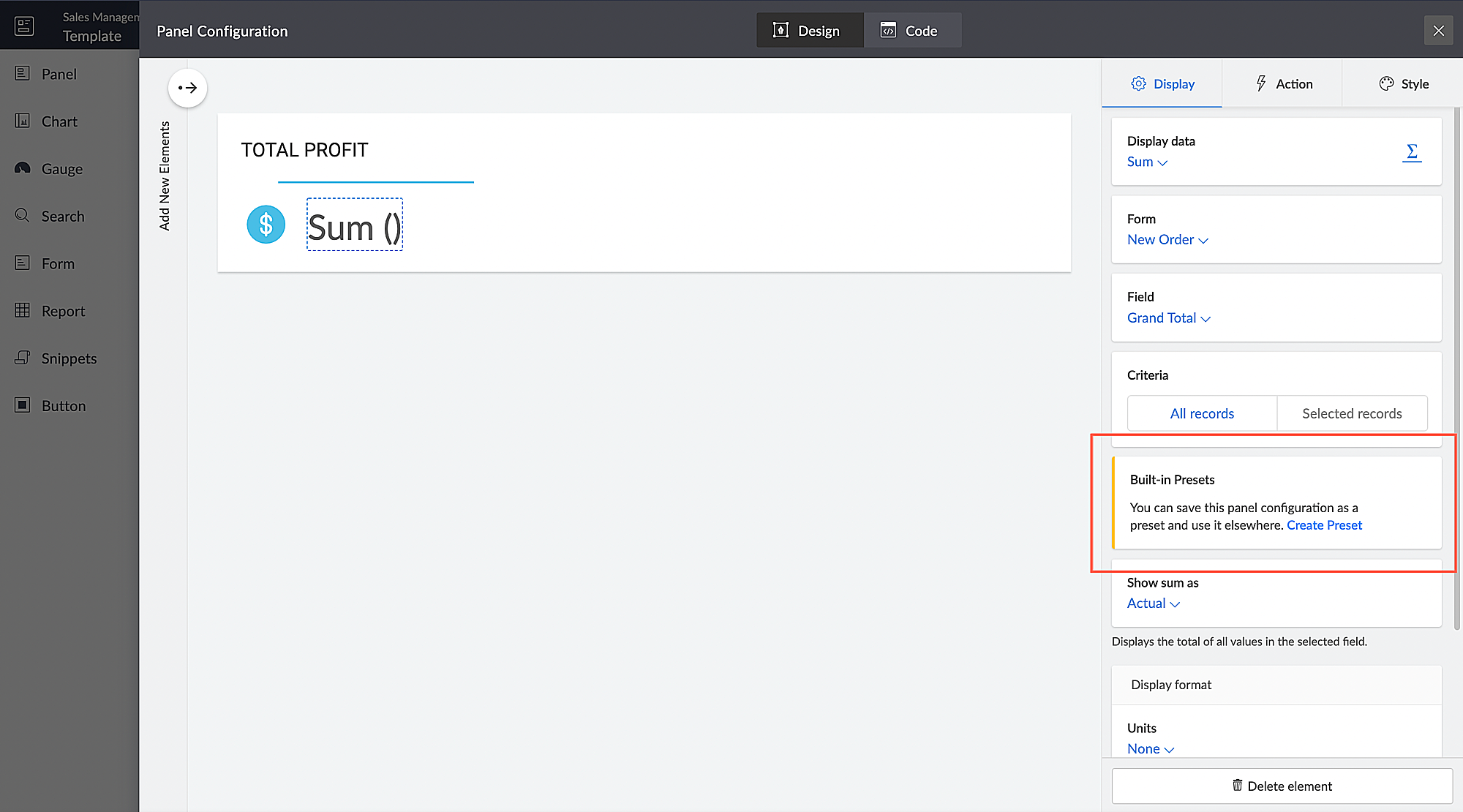
You can configure aggregates to be displayed on page panels. Currently, if such a configuration needs to be reused on a different panel on the same page or on a different page, it has to be manually reconfigured. With presets, the aggregate configuration can now be saved and used across apps in your Creator account, thereby preventing repeated manual configurations. The created presets will be available as a dropdown inside the panel element.

Presets are required in cases, where a configured aggregate value needs to be displayed in more than one panel, like if a user needs to display the Total Profit value in their dashboard, both as an actual value and as a percentage value. In this particular case, the user will have to manually configure the Total Profit value in two panels and choose a different Show As value (Actual in one panel and Percentage of a number in the other panel) in each panel. Using the preset capability, users can save the configuration and reuse it in different panels with only the Show As value being different.


Introducing different display titles for forms

Interacting with forms can become more meaningful when we have contextual information about the actions performed by users. We've introduced form titles that'll enable you to assign different customized titles to the forms displayed when a user is performing the following tasks:

  • While adding record - The title that will be displayed when a user accesses the form to add a record.
  • While editing record - The title that will be displayed when a user is editing an existing record.


By default, the form title for while adding to the form and while editing the form actions will be the same as the form name. Learn more


Revamped UI for customer portals

We're happy to announce the rolling out of a major refinement to the customer portal UI (​sign in​, ​signup​, and ​reset password​ pages).

Portal users will now be able to use a one-time password (OTP) for signing in to your customer portal. Along with Google and Facebook, ​federated login​ can now be set up to allow users to sign in to the portal using their Apple IDs.

These refinements have been designed to ensure compatibility with upcoming features that we are working on. Although the feel and appearance of the new UI will be different from the existing one, we have ensured that it doesn't affect any of your existing portal functionalities. We'll have a separate detailed post on the changes for existing users once the feature is ready to go live.

Announcing strict validation for the max character length field property

In reference to ​this post​, starting from August 31, 2022, maximum character length validation will be implemented strictly across Creator. If a record is added via Deluge, API, or email input, the maximum length property will be validated for all your form fields. This validation ensures that all the records added via various inputs undergo a thorough check for their field characters to ensure they're on par with the predefined character limits that you set, thereby minimizing error handling. After this update, errors might be shown in the following cases:

(i) Existing forms:

While editing/updating a record in an existing form, the maximum length property will be validated for all fields in that form.

(ii) Workflows
  • On validate: Following this update, during the execution of the on validate script for a particular record, the maximum length validation will be strictly performed for all the fields that are associated with the script, and an appropriate error will be thrown.
  • On success: Following this update, during the execution of the on success script, an exception will be thrown for varchar fields (email, single line) when a new record is successfully submitted to the database or when an existing record is updated or deleted from the database. In the case of number fields, the values will be truncated upon successful submission.

(iii) APIs

While adding/updating record values via API requests, the maximum length property will be validated for all fields.

Additionally, if a record is added via ​email input​, the maximum length property for all the fields will be validated. As an admin, you can minimize errors by suitably adjusting your character limits. We also assure you that we've taken all necessary measures to ensure that the transition is seamless, with minimal impact on your end.


Upgradation to Creator 5

The majority of our users have already ​migrated to Creator 5​ from the previous version (Creator 4). As the final step of this process, we'll be automatically migrating the remaining accounts using the older version to Creator 5 by August 31, 2022.

As you all know, ​Creator 5​ empowers developers to customize traditional web-based apps for smartphones and tablets, opening up new possibilities and ensuring an all-around smoother experience. You will be notified via email prior to the migration and this will not affect the data in your existing Creator apps.

We hope this announcement serves to be helpful in planning your upcoming projects and apps. We'd also like to thank you once again for your loyalty and continued support. Please don't hesitate to reach out to us at ​support@zohocreator.com​ if you have any questions or concerns, or need assistance.

That's all for now!

Thanks,
The Zoho Creator Team.


    • Sticky Posts

    • Introducing Zoho Creator's 2025 Release Projection 2

      Hello Creators! I'm Prakash, from the Creator product management team, and today I'm delighted to unveil our next set of features as part of Release Projection 2 for 2025. With thoughtful analysis and planning, we've curated powerful new capabilities
    • Zoho Creator - 2023 Release Projection 1

      Hello everyone! A very Happy New Year to you and your family. Hope you're all good and having a great time using Zoho Creator to make your lives easier and your businesses prosper. 2022 was an action-packed year for us at Creator, and we hope to continue
    • Zoho Creator User Group meetups in a city near you! - Oct - Nov, 2023

      Greetings from the Zoho Creator team! We're hosting a series of Zoho Creator meetups in various cities across the globe, and we'd love to meet you there! Our meetups are a great opportunity to network with industry peers, exchange ideas and best practices,
    • Zoho Creator - 2023 Release Projection 2

      Hello everyone! Time truly flies when you're having an incredible journey, and today we mark the completion of an eventful and action-packed six months. It feels like just yesterday when we embarked on this adventure together with the launch of our new
    • Upcoming Updates - August 2022

      Hi all, Greetings from the Zoho Creator team! Today we've got news for you on some exciting updates. And rest assured— there’s more to come! In this post, we'll be going over the upcoming features and improvements for this month as mentioned below. A
    • Recent Topics

    • using the client script based on the look up filed i wnat to fetch the record details like service number , service rate

      based on selected service look up field iwant to fetch the service serial number in the serice form how i achive using client script also how i get the current date in the date field in the on load of the form
    • Zoho Books/Square integration, using 2 Square 'locations' with new Books 'locations'?

      Hello! I saw some old threads about this but wasn't sure if there were any updates. Is there a way to integrate the Square locations feature with the Books locations feature? As in, transactions from separate Books locations go to separate Square locations
    • Add zoho calendar to google calendar

      Hi I keep seeing instructions on how to sync Zoho CRM calendar with google calendar but no instructions on how to view Zoho calendar in my google calendar.
    • Zoho Commerce - How To Change Blog Published Date and Author

      Hi Commerce Team, I'm discussing a project with a client who wants to move from Woo Commerce / Wordpress to Zoho Commerce. They have around 620 blog posts which will need to be migrated. I am now aware of the blog import feature and I have run some tests.
    • Add RTL and Hebrew Support for Candidate Portal (and Other Zoho Recruit Portals)

      Dear Zoho Recruit Team, I hope you're doing well. We would like to request the ability to set the Candidate Portal to be Right-to-Left (RTL) and in Hebrew, similar to the existing functionality for the Career Site. Currently, when we set the Career Site
    • Does zoho inventory need Enterprise or Premium subsrciption to make Widgets.

      We have Zoho One Enterprise and yet we can't create widgets on inventory.
    • Writing by Hand in "Write" Notes

      Hi there! I just downloaded this app a few moments ago, and I was wondering if there was a way to write things by hand in "Write" mode instead of just typing in the keyboard. It would make things a bit more efficient for me in this moment. Thanks!
    • Remove the “One Migration Per User” Limitation in Zoho WorkDrive

      Hi Zoho WorkDrive Team, Hope you are doing well. We would like to raise a critical feature request regarding the Google Drive → Zoho WorkDrive migration process. Current Limitation: Zoho WorkDrive currently enforces a hard limitation: A Zoho WorkDrive
    • How do I add todays date to merge field

      I don't see any selection of todays date when creating a letter.  Surely the date option of printing is standard? John
    • Handling Agent Transfer from Marketing Automation Journey to SalesIQ WhatsApp

      We are currently using Marketing Automation for WhatsApp marketing, and the features are great so far We have a scenario where, during a campaign or journey, we give customers an option to chat with our sales team. For this, we are using SalesIQ WhatsApp
    • Comment to DM Automation

      Comment to DM automation feature in Zoho Marketing Automation, similar to what tools like ManyChat offer. Use case: When a user comments on a social media post (Instagram / Facebook), the system should automatically: Send a private DM to the user Capture
    • ZMA shows as already connected to Zoho CRM, but integration not working

      When I try to connect ZMA with Zoho CRM, it shows as already connected, but the integration doesn’t seem to be working. I’ve attached the screen recording for reference.
    • Automatic Email Alerts for Errors in Zoho Creator Logs

      Hello, We would like to request a feature enhancement in Zoho Creator regarding error notifications. Currently, Zoho Creator allows users to view logs and errors for each application by navigating to Zoho Creator > Operations > Logs. However, there is
    • Can you default reports/charts to report the current week?

      Our data table maintains two years of data. Management wants certain report to automatically filter the report to the latest calendar week. I know I can do this manually with filters but I want the report to automatically default to the latest calendar
    • How can I check all announce?

      Hiii, May I ask how can I check all the announce based on broadcast date instead of reply date based So that I will not will miss out any new function
    • Recurring Automated Reminders

      Hi, The reminders feature in Zoho Books is a really helpful feature to automate reminders for invoices. However, currently we can set reminders based on number of days before/after the invoice date. It would be really helpful if a recurring reminder feature
    • Zobot Execution Logs & Run History (Similar to Zoho Flow)

      Dear Zoho SalesIQ Team, We would like to request an enhancement for Zoho SalesIQ Zobot: adding an execution log / run history, similar to what already exists in Zoho Flow. Reference: Zoho Flow In Zoho Flow, every execution is recorded in the History tab,
    • Importing into Multiselect Picklist

      Hi, We just completed a trade show and one of the bits of information we collect is tool style. The application supplied by the show set this up as individual questions. For example, if the customer used Thick Turret and Trumpf style but not Thin Turret,
    • I need to know the IP address of ZOHO CRM.

      The link below is the IP address for Analytics, do you have CRM's? https://help.zoho.com/portal/ja/kb/analytics/users-guide/import-connect-to-database/cloud-database/articles/zoho-analytics%E3%81%AEip%E3%82%A2%E3%83%89%E3%83%AC%E3%82%B9 I would like to
    • Password Assessment Reports for all users

      I'm the super admin and looking at the reporting available for Zoho Vault. I can see that there is a Password Assessment report available showing the passwords/weak and security score by user. However I'm confused at the 'report generated on' value. Monitor
    • Allow people to sign a zoho form by using esign or scanned signature

      Allow people to sign a zoho form by using esign or scanned signature
    • Can't change form's original name in URL

      Hi all, I have been duplicating + editing forms for jobs regarding the same department to maintain formatting + styling. The issue I've not run into is because I've duplicated it from an existing form, the URL doesn't seem to want to update with the new
    • How to Print the Data Model Zoho CRM

      I have created the data model in Zoho CRM and I want the ability to Print this. How do we do this please? I want the diagram exported to a PDF. There doesnt appear to be an option to do this. Thanks Andrew
    • Customer ticket creation via Microsoft Teams

      Hi all, I'm looking to see if someone could point me in the right direction. I'd love to make it so my customers/ end users can make tickets, see responses and respond within microsoft teams. As Admin and an Agent i've installed the zoho assist app within
    • Transfer ownership of files and folders in My Folders

      People work together as a team to achieve organizational goals and objectives. In an organization, there may be situations when someone leaves unexpectedly or is no longer available. This can put their team in a difficult position, especially if there
    • Setting certian items to be pickup only

      How do we have some items that are pickup only? I have several items in my item's list that I do not ship. But they need to be on the website to be sold, and picked up in store. Need to be able to do this as one of these products is a major seller for
    • Using gift vouchers

      We would like to be able to offer a limited number of gift vouchers, of varying values, to our customers, and are looking for the best way to do this. We have looked at Coupons and Gift Certificates, but neither seem to fit the bill perfectly. Coupons:
    • Automatically updating field(s) of lookup module

      I have a lookup field, which also pulls through the Status field from the linked record. When the lookup is first done, the Status is pulled through - this works perfectly. If that Status is later updated, the lookup field does not update as well. As
    • Zoho Commerce and Third-party shipping (MachShip) API integration

      We are implementing a third-party shipping (MachShip) API integration for our Zoho Commerce store and have made significant progress. However, we need guidance on a specific technical challenge. Current Challenge: We need to get the customer input to
    • Adding custom "lookup" fields in Zoho Customization

      How can I add a second “lookup” field in Zoho? I’m trying to create another lookup that pulls from my Contacts, but the option doesn’t appear in the module customization sidebar. In many cases, a single work order involves multiple contacts. Ideally,
    • Can you import projects into Zoho Projects yet?

      I see some very old posts asking about importing project records into Zoho Projects. But I can't find anything up to date about the topic. Has this functionality been added? Importing tasks is helpful. But we do have a project where importing projects
    • Allocating inventory to specific SO's

      Is there a way that allocate inventory to a specific sales order? For example, let's say we have 90 items in stock. Customer 1 orders 100 items. This allocates all 90 items to their order, and they have a back order for the remaining 10 items which could
    • Introducing Workqueue: your all-in-one view to manage daily work

      Hello all, We’re excited to introduce a major productivity boost to your CRM experience: Workqueue, a dynamic, all-in-one workspace that brings every important sales activity, approval, and follow-up right to your fingertips. What is Workqueue? Sales
    • Zoho Inventory. Preventing Negative Stock in Sales Orders – Best Practices?

      Dear Zoho Inventory Community, We’re a small business using Zoho Inventory with a team of sales managers. Unfortunately, some employees occasionally overlook stock levels during order processing, leading to negative inventory issues. Is there a way to
    • Automation #10 - Auto Assign Ticket based on Keywords

      This is a monthly series designed to help you get the best out of Desk. We take our cue from what's being discussed or asked about the most in our community. Then we find the right use cases that specifically highlight solutions, ideas and tips on optimizing
    • Automate attendance tracking with Zoho Cliq Developer Platform

      I wish remote work were permanently mandated so we could join work calls from a movie theatre or even while skydiving! But wait, it's time to wake up! The alarm has snoozed twice, and your team has already logged on for the day. Keeping tabs on attendance
    • Reusable Custom Functions Across Department Workflows

      Dear Zoho Desk Team, We appreciate the powerful workflow automation capabilities in Zoho Desk, particularly the ability to create and use custom functions within workflows. However, we have encountered a limitation that impacts efficiency and maintainability.
    • Contact data removes Account data when creating a quote

      Hi, Our customer has address fields in their quote layout which should be the address of the Account. They prefill the information, adding the account name - the address data is populated as per what is in the account - great. However when they then add
    • Feature Request - Gift Cards or Gift Voucher Capability in Zoho Commerce

      Hi Zoho Commerce team, I'm comming accross more and more retail businesses who sell gift cards. As there is currently no way to manage this in Zoho Commerce, it is a blocker to addoption. This is particularly popular in Europe and North America. I recently
    • Don't Allow Customer to Edit Values After Submitting Ticket

      After a customer submits a ticket through the customer portal, they can go into the ticket and see some of the values from the questions they answered in the sidebar. Currently, a customer can edit these values even after they submitted them. This makes no sense. We ask very specific questions that we don't want customers to later change! Please disable the ability for customers to edit the values to their submission questions in the portal. Screenshot attached.
    • Next Page