Zoho Creator | Introducing Augmented Reality
We're delighted to announce augmented reality (AR) in Zoho Creator! Now, you can set up your own immersive 3D experiences—combining a glimpse of the real world with computer-generated graphics. AR technology augments what you see, by superimposing digital data (3D models) on real-life objects, captured by your device camera. This real-time digital interaction provides better data visualization and enhances end-user experiences, providing you with exciting new business opportunities.
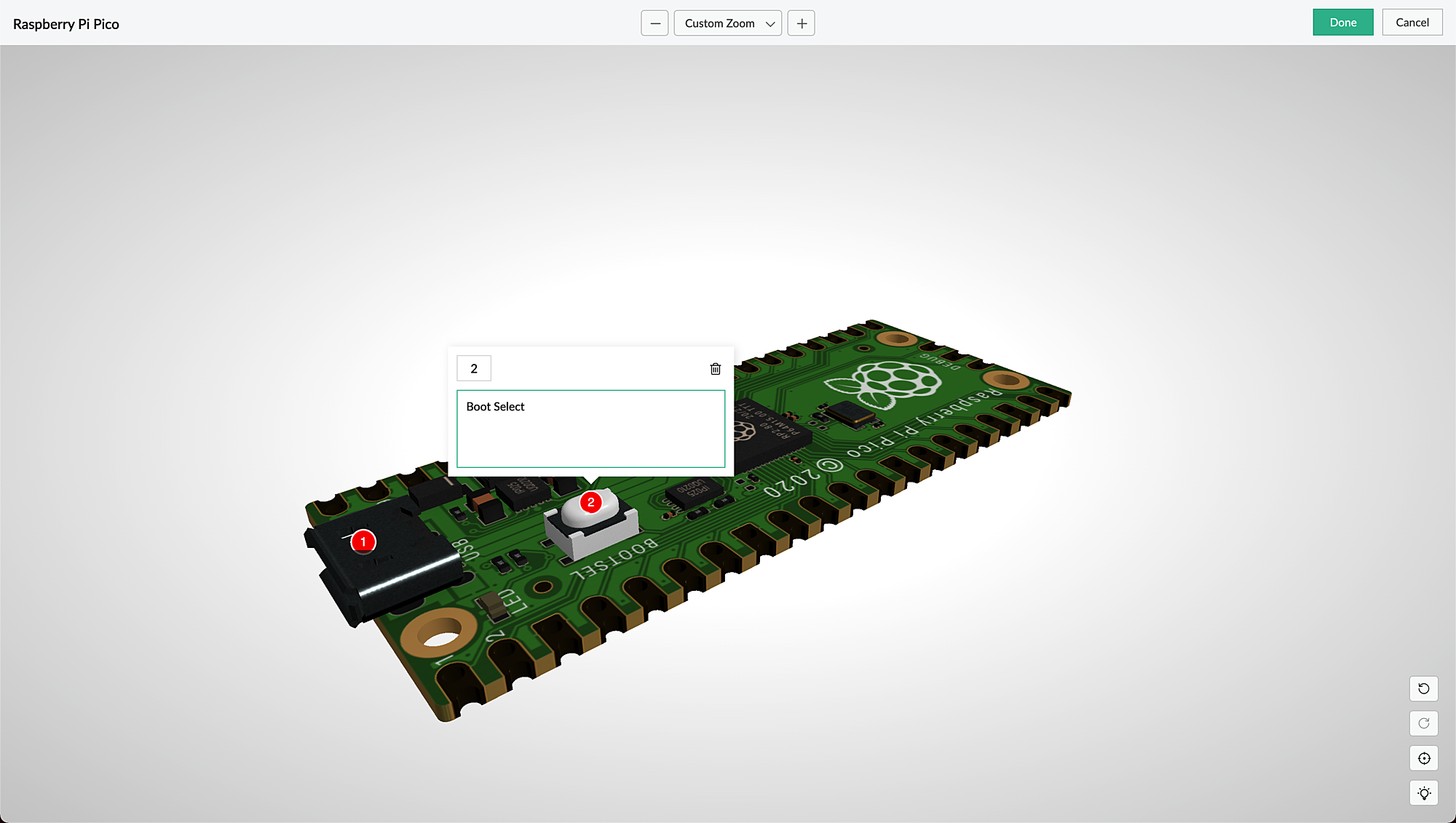
AR is seamlessly accessible via web browsers, smartphones, and tablets, which facilitates the growing interest in multi-experience development platforms (MXDPs). Using AR, your businesses can provide unique approaches to key business challenges in real-world applications.
AR can enhance user experience in many ways:
Organizations can use AR to promote their products or services and launch innovative marketing campaigns.
A rich feedback loop can be created using AR in product customization and quality, where users can select the defective products and also annotate the 3D models by describing the defects.
Users can try out different products virtually, check if a product fits well in their rooms (in the case of furniture products) by either partial or full replacement of the original view of a product with an augmented view of the same product, and make informed choices, all within the comfort of their homes.
AR types in Creator
Marker-based AR: This AR-type relies on the recognition of images (referred to as markers). Markers are unique, visual patterns that your device cameras can easily recognize and process. For example, you can point your devices at markers such as scan codes or logos to seamlessly activate the AR experience. Marker-based AR works by scanning a marker, which triggers the content to be overlaid on the camera upon visuals matching the marker image For example, students can scan a diagram in their textbook and view its 3D model (projected on the diagram) through their digital devices.
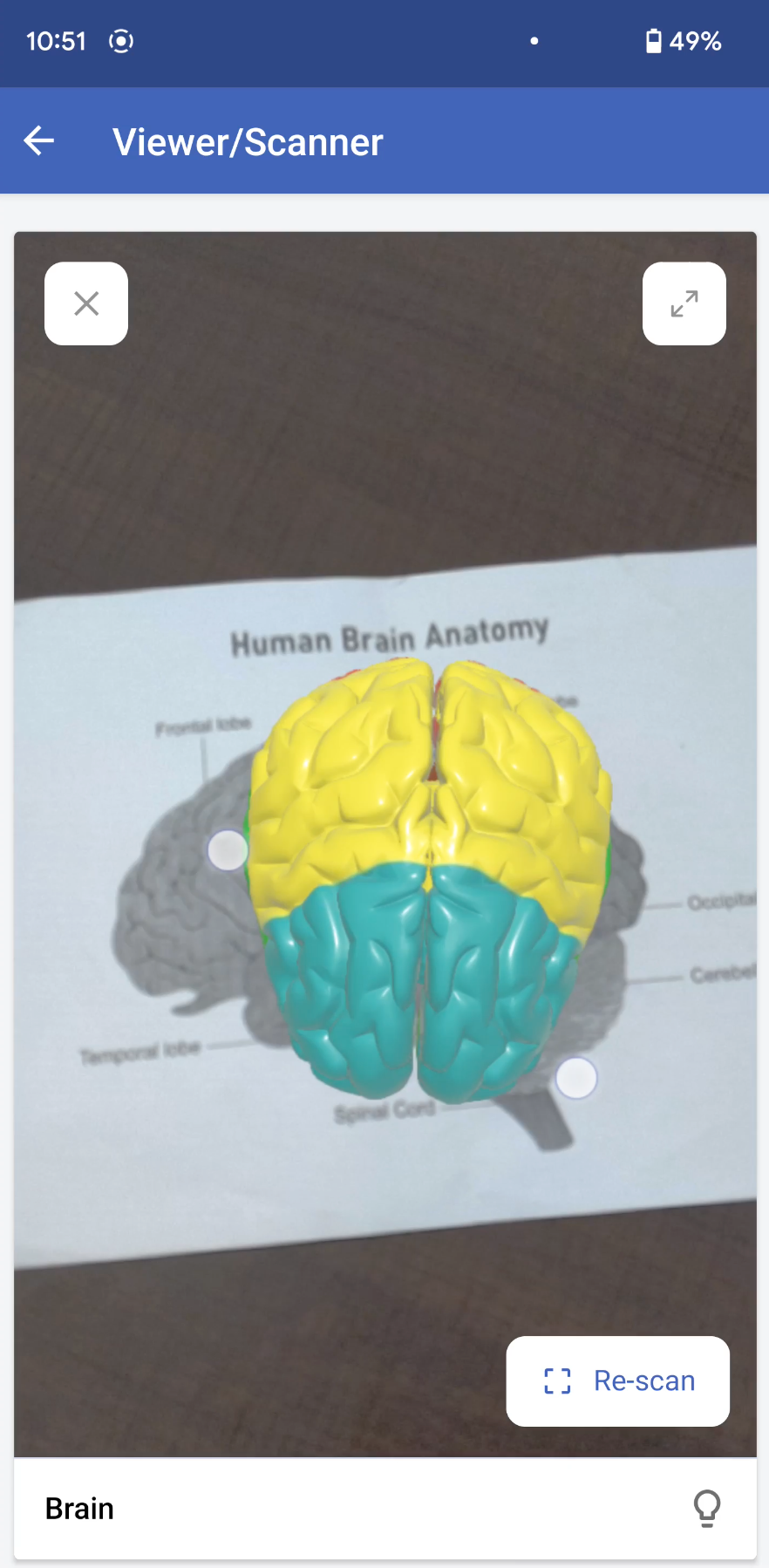
Markerless AR: This AR type does not use a marker. Instead, it allows you to scan the real environment and place digital elements on the recognized (flat) surface. This offers more control to users, as it allows them to choose where they would like to place the virtual object (including real-life placement of virtual augmented objects). For example, furniture companies can enable customers to virtually place their furniture in their homes to check if it would fit well.
In the markerless AR type, users can preview the models in the following two modes:
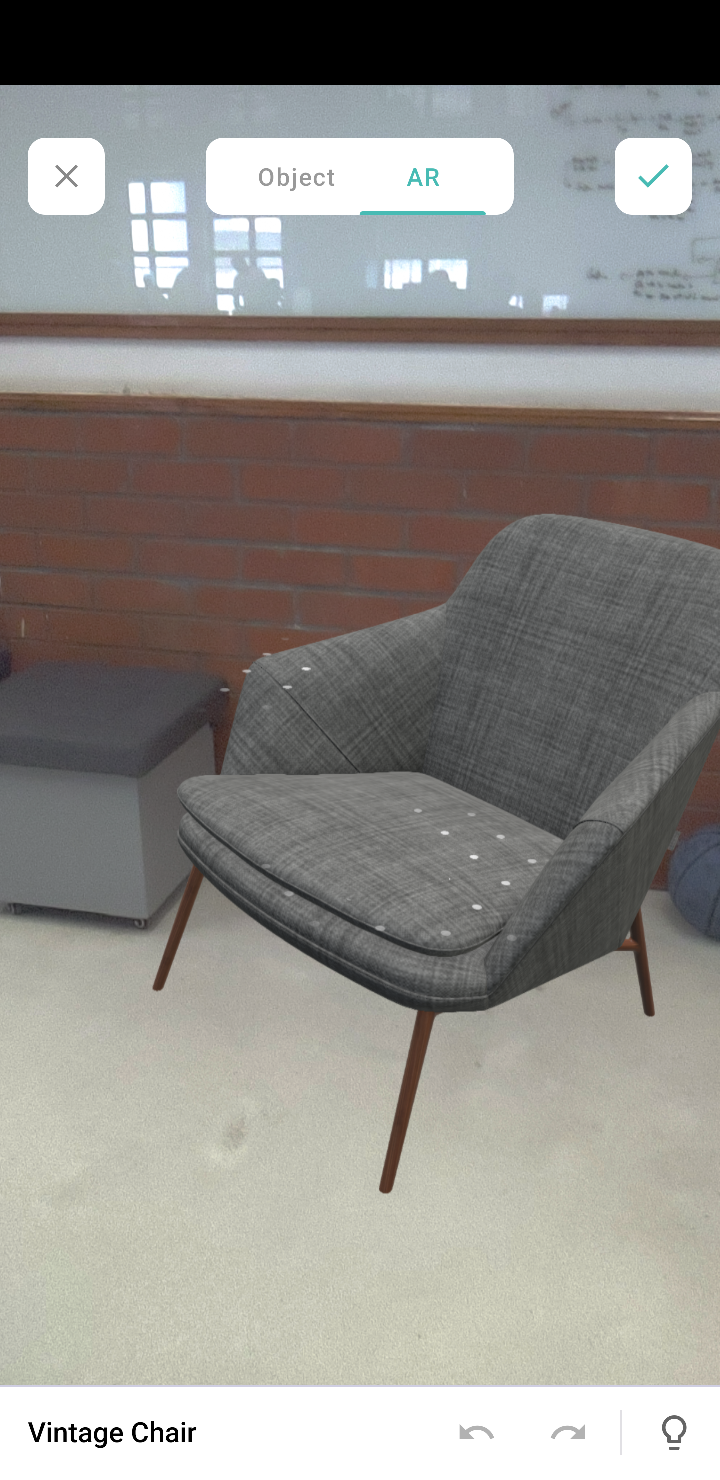
AR mode: This mode displays the 3D model as superimposed on its environment. Users can rotate/move their devices to view the plotted model.
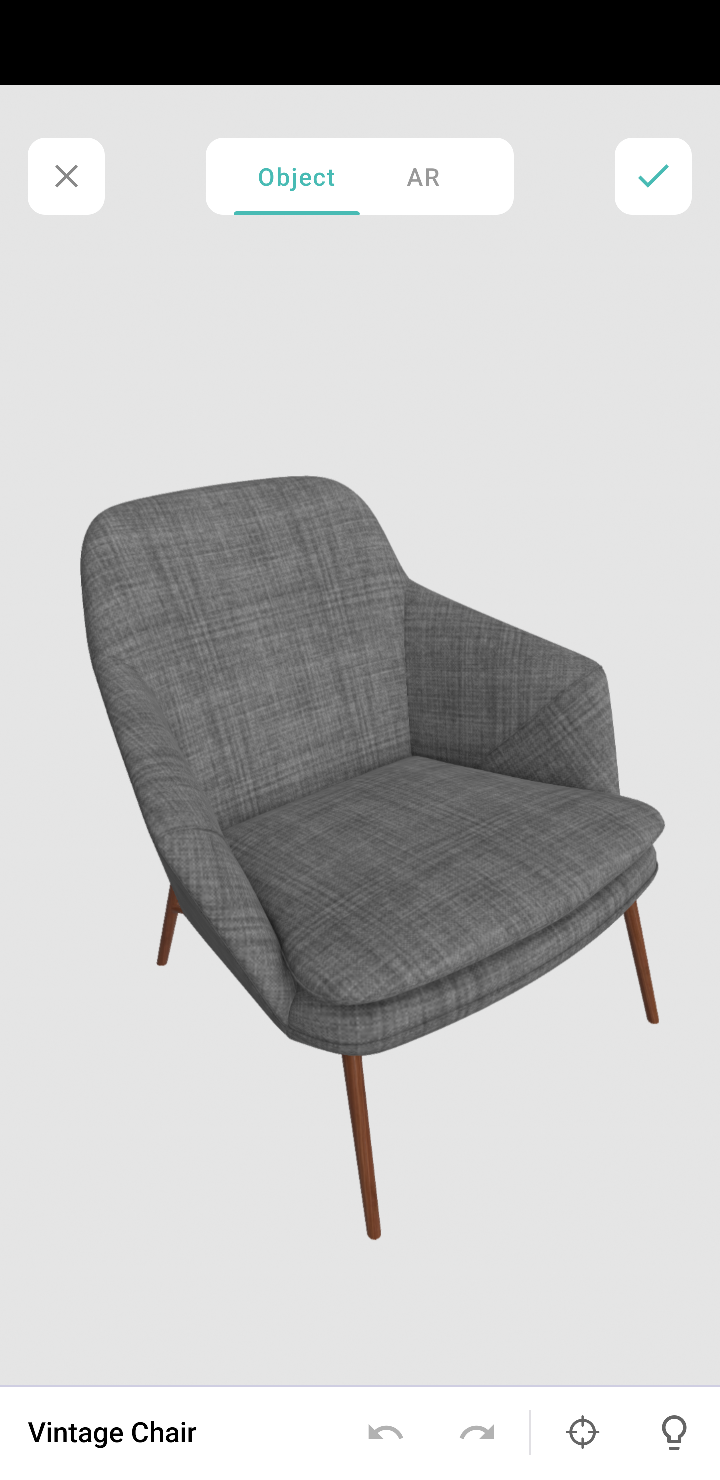
Object mode: This mode displays only the 3D model. It allows you to view the selected/scanned model in a 360˚ rotation. You can also zoom in and zoom out the model, as per your convenience.
Note: These modes are available in the AR field and AR viewer (only for markerless inputs).
AR in Creator
In Creator, AR has been introduced across three modules:
Microservices - AR Library
Form fields - AR field
Pages - AR Viewer
AR Library
AR library stores AR sets of all the apps in your Creator account. You can add and manage AR sets from here. An AR set consists of AR elements such as 3D models and their markers.
AR field
The AR field in a form displays the AR sets (3D models) from the AR library as a dropdown. You can add the AR sets in the AR Inputs field property. When you access your app in live, you can choose a model from either marker-based or markerless AR sets, and you can annotate it.
AR Viewer
The AR Viewer acts as an interface for your device's camera. This interface is used to invoke the camera (only in mobile) to scan a marker for your marker-based AR sets. In your app's page, you can configure the AR Viewer's input in two ways:
Marker-based AR Sets: To scan the marker and plot the respective 3D model.
Passing the 3D model's name through page parameters to load a 3D model directly.
Illustration
1. Imagine you've created an app named Zylker Jewelry. The following flowchart shows how AR is used across this app.
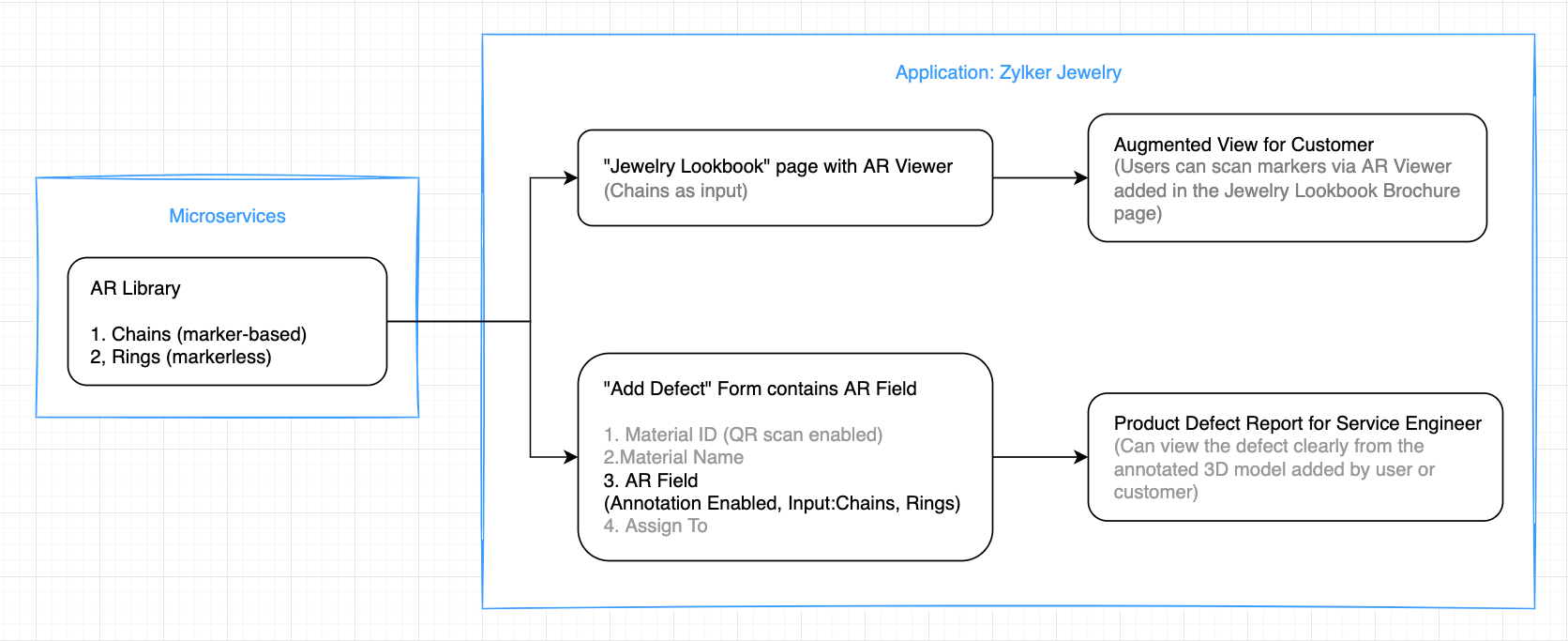
This app enables you to perform the following actions:
(i) Users can use the scanner (AR viewer) on the app's Jewelry Lookbook page to scan the various designs available on your brochure and view them as popup models. They can rotate, zoom in and zoom out, and view the models in full-screen as well.
(ii) Quality assurance engineers can select 3D models of the defective jewels and also annotate them by describing the defects.
Let's take a look at how the above actions can be configured in the Zylker Jewelry app.
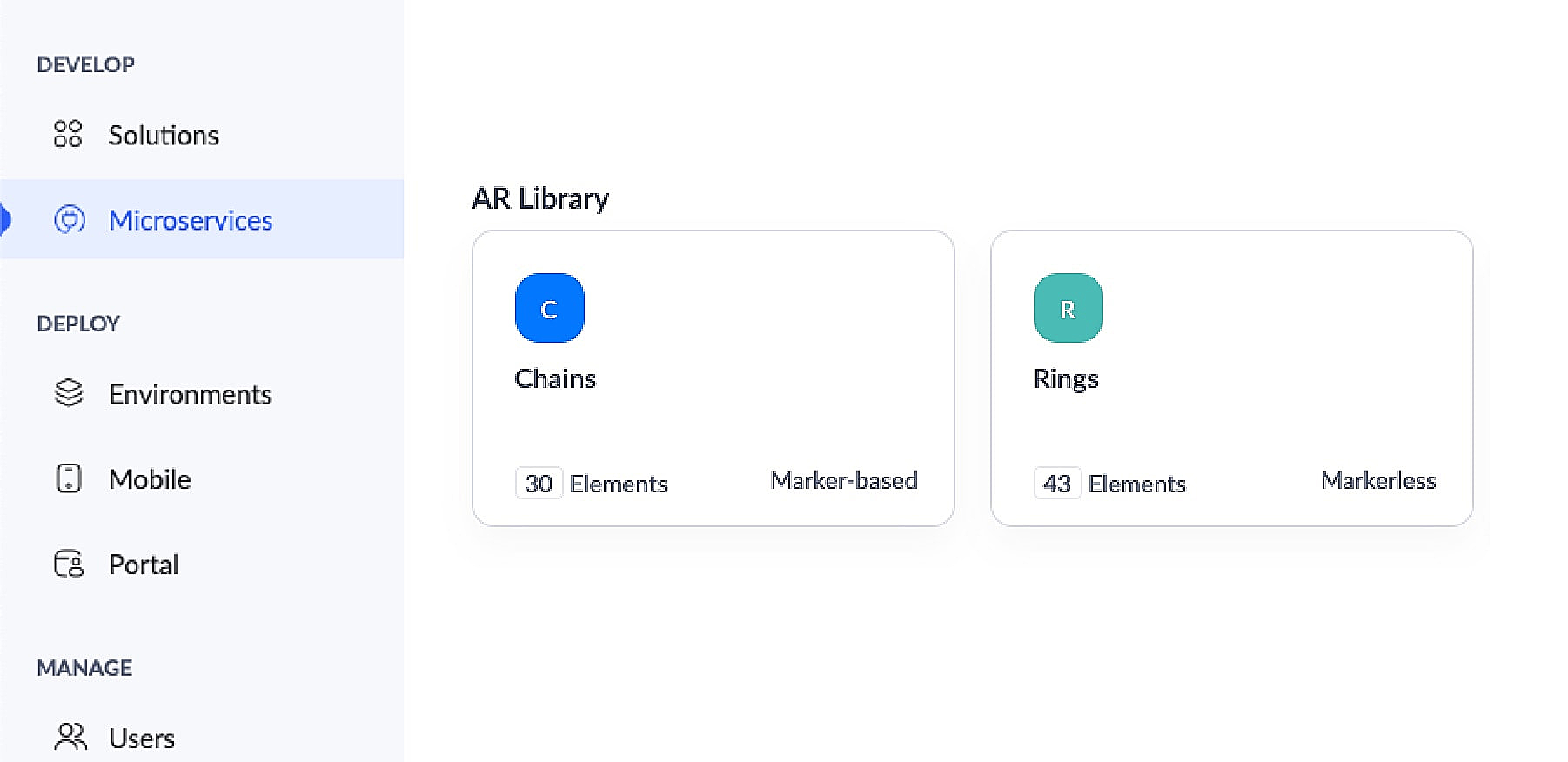
This app has an AR library that contains 3D models of chains (marker-based) and rings (markerless).
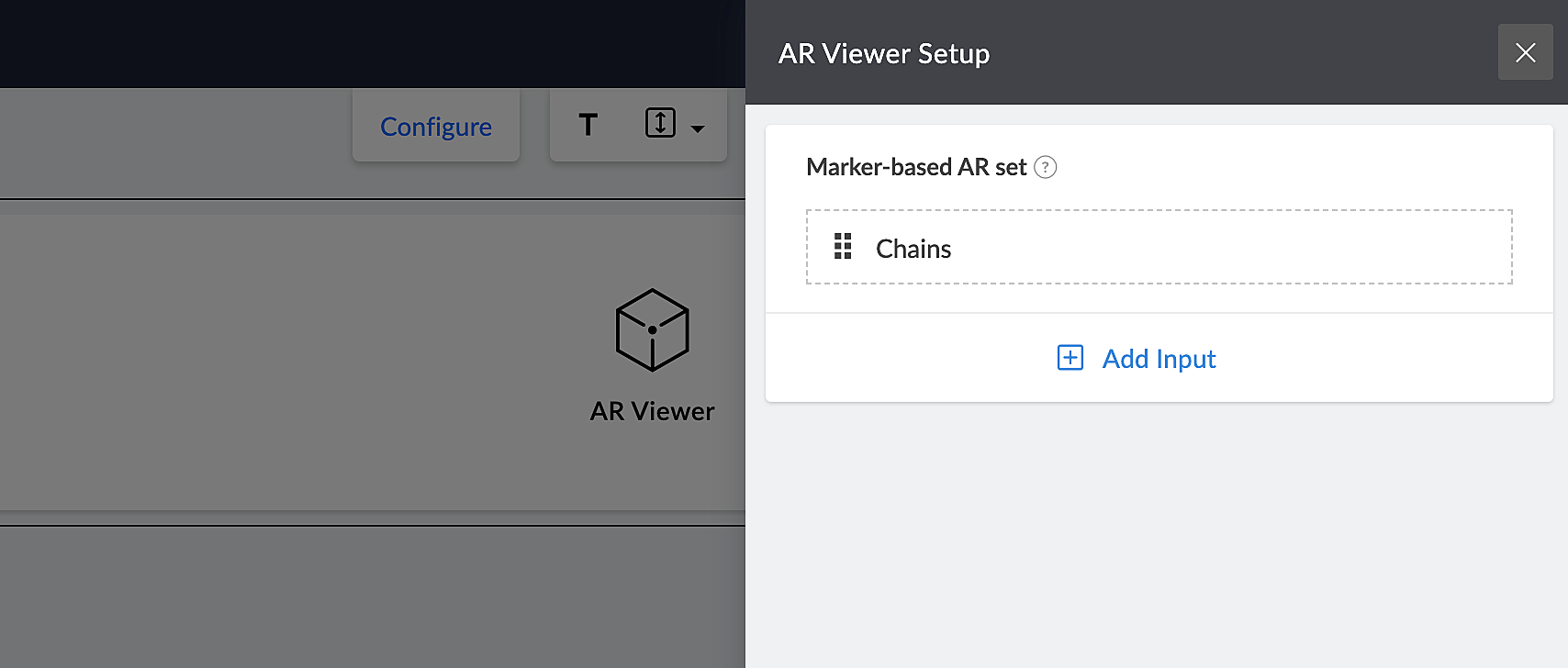
The app's Jewelry Lookbook page has an AR Viewer element with the 3D models of chains as its input. When users access this page, they'll be able to scan the brochure and view the available chain designs on their devices.
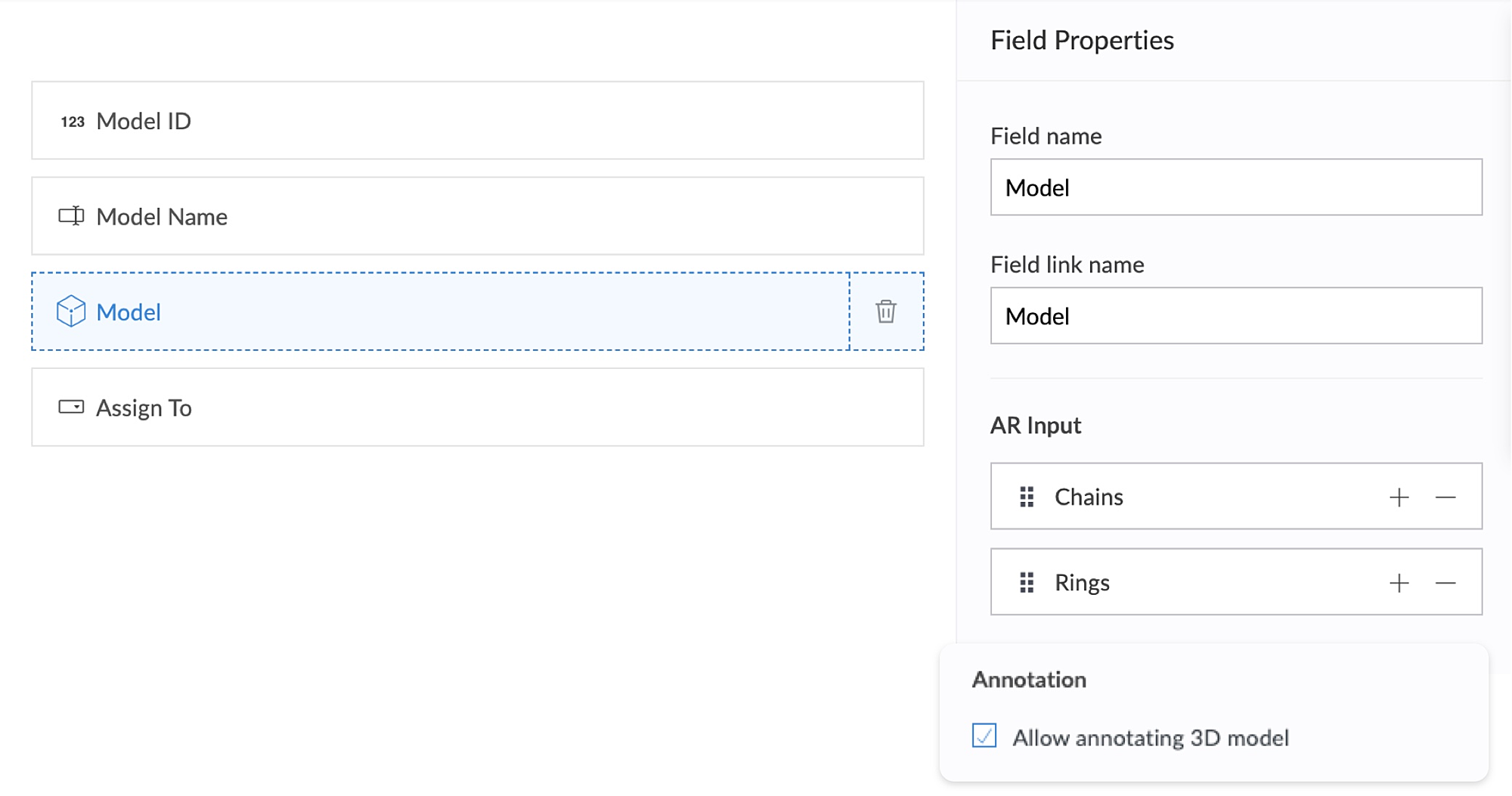
The app's Add Defect form has an AR field containing the 3D models of chains and rings as its AR input. Quality assurance engineers can select the 3D models of defective jewelry from the dropdown and annotate the models by describing the defects. This form also has an Assign To field, that assigns the defect to the designated Service engineer, who can view and take appropriate action.
2. Using AR, classroom education can become all the more intuitive and interactive, as it enables teaching staff to demonstrate virtual examples of textbook concepts. This, in turn, will enable students to engage more actively, learn faster, and memorize information more easily.
Let's take a look at Zylker Schools of Learning, a learning app created for teachers and students. This app facilitates interactive learning through AR technology used across the following components. Apart from these, AR functionality can also be accessed via your mobile applications.
AR Viewer
AR field
AR Viewer:
This app has an AR library that contains textbook diagrams as markers, along with their 3D models. The app's Virtual Book page has an AR Viewer element with the 3D models as its input.
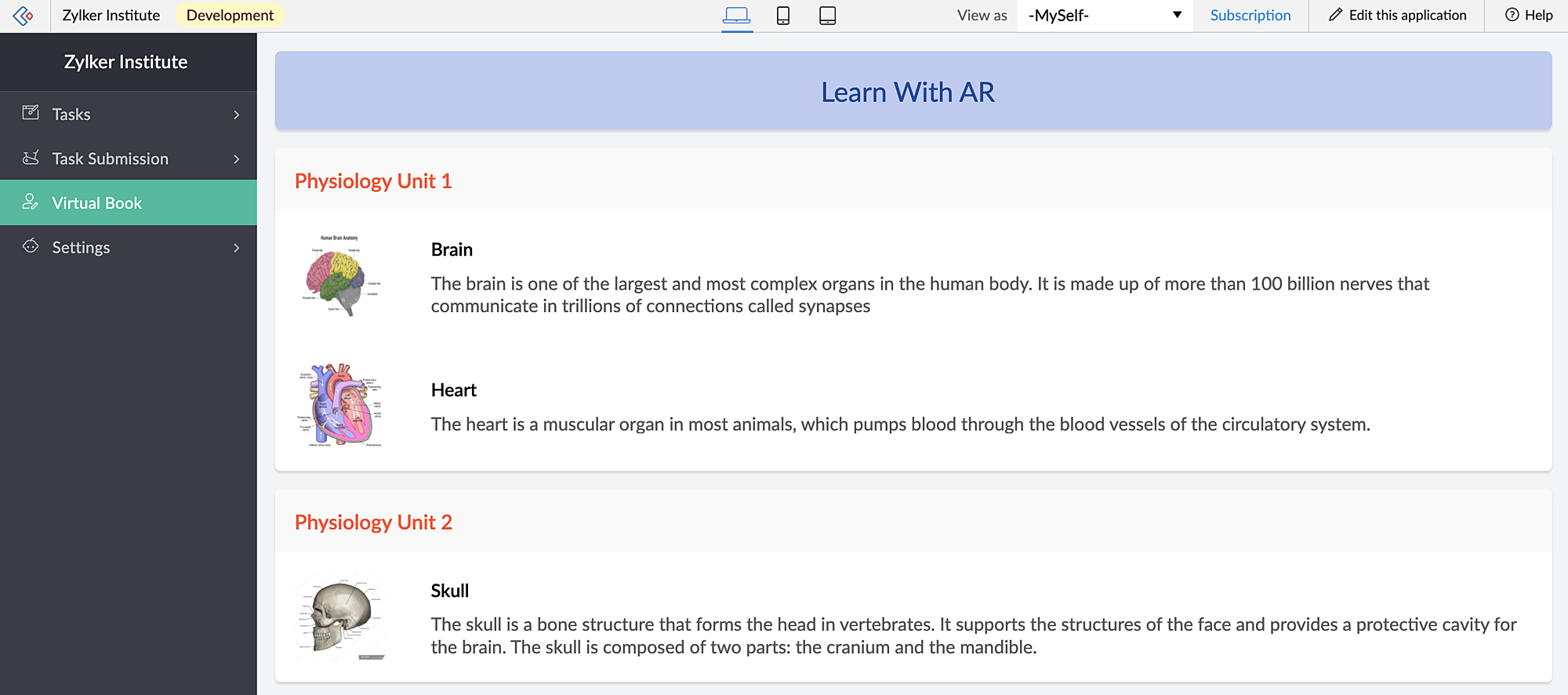
When students access this page, they can click the diagrams and view them in both AR mode and Object mode — rotate, zoom in and zoom out and view in full-screen as well.
When you access the app via mobile, apart from viewing the diagrams in AR Viewer (similar to web), students can also open their device scanner, scan their textbook diagrams and view them as plotted (popup) models on top of their textbook.
AR field:
This app has a New Task form that contains an AR field. This field has 3D diagrams as its input. You can assign tasks to your students, asking them to annotate the 3D models and also view the submitted tasks.
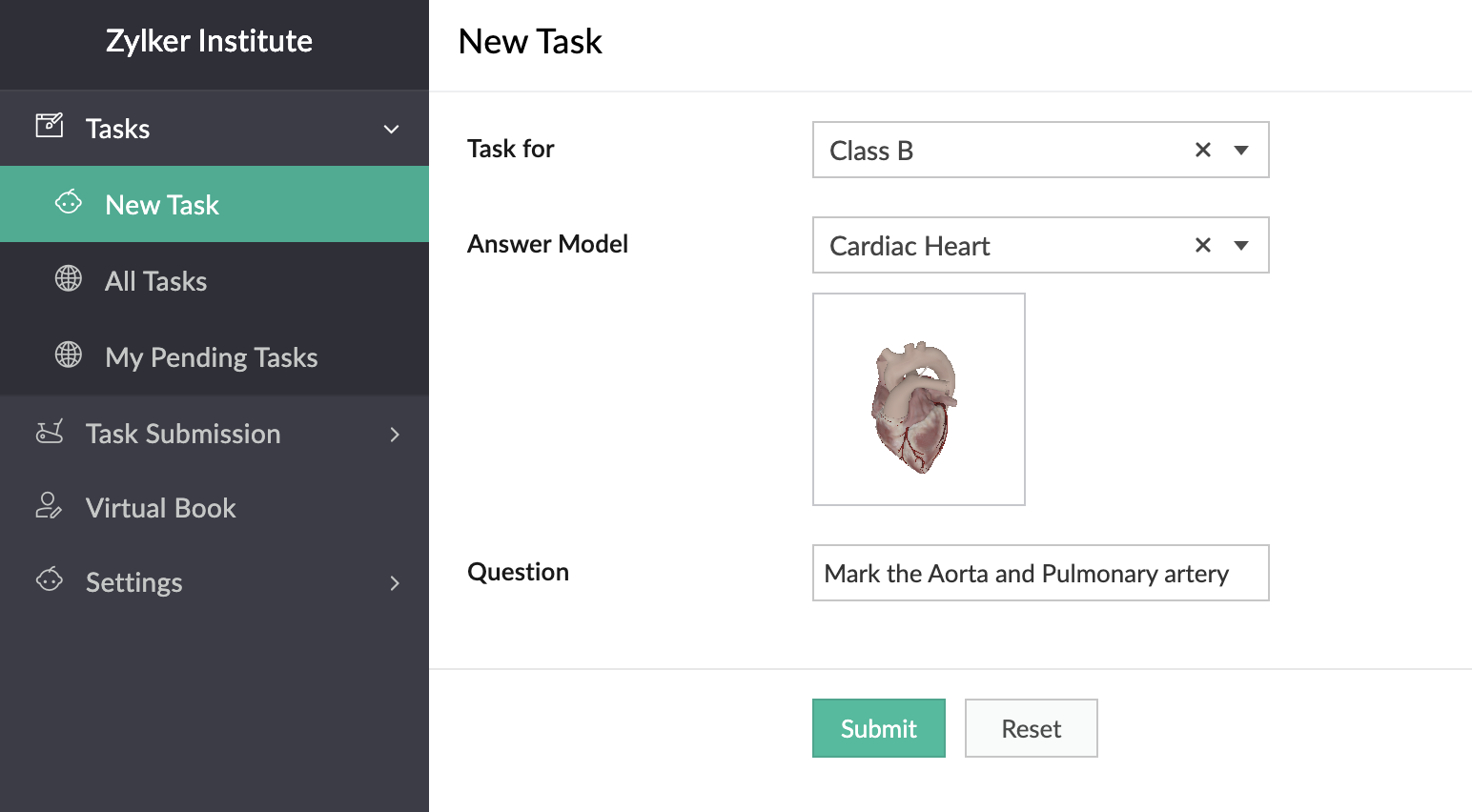
In the below GIF, the demo user Demo 3 is the Teacher profile and Demo 1 is the student profile.
You can also place stickers of the textbook diagrams on your classroom walls, which can be scanned by your students through the provided devices. Upon scanning the sticker, they can view, rotate, and annotate the 3D model of the scanned image which is mapped in the AR Library.
Thus, AR helps in explaining otherwise plain textbook concepts in a visually-appealing manner.
Feature release plan
AR in Creator will be available in C6 for Paid plan users only.
If you have any questions related to AR, please feel free to contact us at support@zohocreator.com.
Regards,
The Zoho Creator Team
Topic Participants
Meghaa Pradyumnan
Catherine
Damien Cregan
PARTHIBAN VALLAVAN
Sriram U
Sticky Posts
Introducing Zoho Creator's 2025 Release Projection 2
Hello Creators! I'm Prakash, from the Creator product management team, and today I'm delighted to unveil our next set of features as part of Release Projection 2 for 2025. With thoughtful analysis and planning, we've curated powerful new capabilitiesZoho Creator - 2023 Release Projection 1
Hello everyone! A very Happy New Year to you and your family. Hope you're all good and having a great time using Zoho Creator to make your lives easier and your businesses prosper. 2022 was an action-packed year for us at Creator, and we hope to continueZoho Creator User Group meetups in a city near you! - Oct - Nov, 2023
Greetings from the Zoho Creator team! We're hosting a series of Zoho Creator meetups in various cities across the globe, and we'd love to meet you there! Our meetups are a great opportunity to network with industry peers, exchange ideas and best practices,Zoho Creator - 2023 Release Projection 2
Hello everyone! Time truly flies when you're having an incredible journey, and today we mark the completion of an eventful and action-packed six months. It feels like just yesterday when we embarked on this adventure together with the launch of our newUpcoming Updates - August 2022
Hi all, Greetings from the Zoho Creator team! Today we've got news for you on some exciting updates. And rest assured— there’s more to come! In this post, we'll be going over the upcoming features and improvements for this month as mentioned below. A
Recent Topics
Date Filters in Zoho Desk Dashboard
Hello Team, Currently, in the Zoho Desk dashboard, the date filter is available only for daily, weekly, and monthly views. Could we also add a yearly date filter to allow filtering by an entire year? Additionally, in the custom date filter, it is currentlyMobile app - offline
If I made a couple of forms and my field guys had the mobile app and were somewhere without signal, could they open the app, complete and sumbit a form and have it upload when they are back in signal (we need different info at different jobs and I'm tryingEditing the Ticket Properties column
This is going to sound like a dumb question, but I cannot figure out how to configure/edit the sections (and their fields) in this column: For example, we have a custom "Resolution" field, which parked itself in the "Ticket Information" section of thisZoho Survey reminder settings are extremely confusing
Hi, I just want to set 3 reminders, one week apart from the first email out. Your form is too confusing and I don't understand. Can you simplify and be more specific regarding the language used on the form ?[Early-access] Introducing Zoho's CommandCenter - Cross-Zoho business process automation
Resources to help Webinar recording | Documentation Feature Restrictions Currently available on early-access only for US data center accounts Features Role CommandCenter as a Service uses signals across Zoho services to propel the movement of recordsShopify - Item sync from Zoho Inventory
Hi team, We’ve connected Shopify with Zoho Inventory. We want that when an item is created in Zoho Inventory, it must create a product in Shopify. But currently, new items created in Zoho Inventory are not getting created in Shopify even after clickingRebranding Options for Zoho One
We need the addition of rebranding and white-labeling settings directly within the Zoho One Admin Panel. This feature should allow organizations to customize the unified portal with their own logo, brand colors, and custom domain mapping (e.g., portal.company.com).Can I share the drive with another Windows user?
We use the WorkDrive Sync application on a server with several remote desktop users. Our question is: Can the drive created by WorkDrive Sync be shared from one of these remote users with the other users so they can access the files, or do we need toZobot drop down list
Hi, I am trying to create a drop down list in Zobot by creating a plug. I think I am close but I just can't get it over the line and was hoping that someone could help me. I had a little bit of help getting the script started (hence the comments) // DelugeHow to compare a subform lookup field that allows multiple entries when edited
I have a form with a subform with multiple fields. One of the fields is a lookup field that allows a multi select. On edit validation, I want a workflow to execute only when the entries in that subform field has changed. The old. function is not workingTranslation of Tooltip Messages
The descriptive help messages should be available to provide translations for.Allow all Company Users to view all projects, but only owner/admins can change projects
I was wondering if there was a permission setting I could adjust to allow all our company users to see all projects created. Then, only the project owners and admins with the change permission. ThanksBusiness Day Logic Update: More Accurate Scheduling for Your Workflows
Hello everyone, We’re improving how business-day calculations work in workflows, especially when triggers happen on weekends. This update ensures that offsets like +0, +1, and +2 business days behave exactly as intended, giving you clearer and more predictableLead Blueprint transition in custom list view
Hi, Is It possible to insert the Blueprint transition label in a custom Canvas list view? I am using Lead module. I see the status, but it would be great if our users could execute the Blueprint right from the list view without having to enter the detailedEmail Notifications not pushing through
Hi, Notifications from CRM are not reaching my users as they trigger. We have several workflow triggers set up that send emails to staff as well as the notifications users get when a task is created for them or a user is tagged in the notes. For the past 6 days these haven't been coming through in real time, instead users are receiving 30-40 notifications in one push several hours later. This is beginning to impact our daily usage of CRM and is having a negative effect on our productivity becauseInternal Error When Accessing Team Inbox.
All our users are seeing this error in teaminbox. Because its a critical tool kindly resolve this issue ASAP.Is there an equivalent to the radius search in RECRUIT available in the CRM
We have a need to find all Leads and/or Contacts within a given radius of a given location (most likely postcode) but also possibly an address. I was wondering whether anyone has found a way to achieve this in the CRM much as the radius search in RECRUITAllow Text within a Formula
Hi, I would like to be able to use this for others things like taking an existing Date Field and copying its value, so by entering getDay(Date)&"-"&getMonth(Date)&"-"&getYear(Date) it results in 01-02-2026. And then when the Date is changed so is thisChange Number Field to Decimal Field
Hi, It would be nice to be able to change the field type without having to delete it and create a new one, messing up the database and history. Thanks DanPipeline.Company Name field shows up as numbers! [Bigin Developer Console > Component > URL]
Hi there, I am setting up to invoke URL to send infromation zoho bigin > zoho forms with company name pre-fill in the form. however when I use : ${Pipelines.Company Name} field it shows up as a string of number instead of words. Help.Ability to Edit YouTube Video Title, Description & Thumbnail After Publishing
Hi Zoho Social Team, How are you? We would like to request an enhancement to Zoho Social that enables users to edit YouTube video details after the video has already been published. Your team confirmed that while Zoho Social currently allows editing theAdd specific field value to URL
Hi Everyone. I have the following code which is set to run from a subform when the user selects a value from a lookup field "Plant_Key" the URL opens a report but i want the report to be filtered on the matching field/value. so in the report there isHow to Move Behavior, Acquisition, Polls & Forms Data from Zoho PageSense to Zoho Analytics?
Hi Zoho Community, I'm looking for a way to transfer data from Zoho PageSense to Zoho Analytics, specifically: Behavioral data (clicks, scrolls, heatmaps, etc.) Acquisition data (traffic sources, campaigns, etc.) Polls and forms data As far as I can tell:Zoho Social - Feature Request - Non-US Date Format
Hi Social Team, I have noticed that there is no option to change the date format from US mm/dd/yyyy to others like dd/mm/yyyy. It would be great to see this added as the platform matures. Thanks for considering this feedback.Google Fonts Integration in Pagesense Popup Editor
Hello Zoho Pagesense Team, We hope you're doing well. We’d like to submit a feature request to enhance Zoho Pagesense’s popup editor with Google Fonts support. Current Limitation: Currently, Pagesense offers a limited set of default fonts. Google FontsIn arattai received message can't be deleted
The issue has been noticed in following: arattai app (Android) arattai app (Window) arattai web While the message posted by me may be deleted, the ones received from others can't be. The item <Delete> change to <Report> when the message is a receivedZoho CRM Community Digest - December 2025 | Part 1
Hello Everyone! In the first half of December, Zoho CRM rolled out auto-invite for portals, smarter CPQ with Zia suggestions and price rules, and Query Workbench for faster query building. We also highlight other noteworthy conversations you shouldn’tCreate static subforms in Zoho CRM: streamline data entry with pre-defined values
Last modified on (9 July, 2025): This feature was available in early access and is currently being rolled out to customers in phases. Currently available for users in the the AU, CA, and SA DCs. It will be enabled for the remaining DCs in the next coupleMarketing Tip #15: Rank better with keyword-rich URLs for product pages
Your product page URL is a small detail that can make a surprisingly big difference. Clean, readable URLs help in two ways: They’re easier for customers to trust and remember (no one likes clicking a link that looks messy or random). They help searchSocial Profile Logo Format
Hello, I'm using Zoho Sites and am attempting to add a couple of social media accounts to my profile that aren't included in the default platforms that are available. What format is the logo required to be in? I have tried .png and .jpg with no success.Zoho Flow Credits
Hi , I would like to ask the reason why every time I added plus credit but few days later I will return back to default? (as below I add credit to 3000 but today It change back to 1000) Most important is, when the credit fully used, not any reminder toCustom Module Send Email not filling To automatically after adding Email field also
I create custom module in zohoCRM but problem is in custom module when i click send email there in popup To is filling automatic its coming empty which i need to manually add an email there. How can I fix it? I already added the Email field there, butIs it possible to set a region lookup table so that my deal country can lookup this lookup table
Hi there, I would like to be able to add a data lookup table with the following fields: Country, Region. And then in my deal report, i can then lookup this table to fish out the region in my report. This will be important for my sales process to categoriseIntroducing Intake Forms
We are excited to announce the release of Intake Forms, a new feature in Zoho Contracts designed to make contract requests simple, structured, and efficient. Intake Forms allow organization members to request new contracts through a web form instead ofManage control over Microsoft Office 365 integrations with profile-based sync permissions
Greetings all, Previously, all users in Zoho CRM had access to enable Microsoft integrations (Calendar, Contacts, and Tasks) in their accounts, regardless of their profile type. Users with administrator profiles can now manage profile-based permissionseIDAS 2.0: What's changed for digital trust in Europe, and where Zoho Sign stands
Hi there! It's that time of year when many of us get our ducks in a row. A new year often makes us reassess priorities, and for businesses in the EU, it means taking a closer look at how digital identities and electronic signatures work across borders,Directly Edit, Filter, and Sort Subforms on the Details Page
Hello everyone, As you know, subforms allow you to associate multiple line items with a single record, greatly enhancing your data organization. For example, a sales order subform neatly lists all products, their quantities, amounts, and other relevantAdd Israel & Jewish Holidays to Zoho People Holidays Gallery
Greetings, We hope you are doing well. This feature request is related to Zoho People - please don't move it to zoho one! We are writing to request an enhancement to the Holidays Gallery in Zoho People. Currently, there are several holidays available,Schedule Zoho CRM reports only on Business Days
Hello, Is it possible to schedule reports only on business days ? We currently get daily sales reports on weekend which has no value since the sales team doesn't work on weekends. ThanksAny update on much requested feature, to delete attachments without deleting the e-mail body?
People have been requesting the ability to delete e-mail attachments without deleting the e-mail for more than ten years now. The latest I see is marked "Working On It" and a year ago it was supposedly being added, see here: https://help.zoho.com/portal/en/community/topic/is-there-a-way-to-delete-mail-attachments-without-deleting-the-textNext Page