【開催報告】 福岡 ユーザー交流会 2025/8/8(金)

【開催報告】 福岡 ユーザー交流会 2025/8/8(金)

皆さま、こんにちは。コミュニティチームの中野です。
8/8(金)に、福岡 ユーザー交流会を開催しました。
本投稿では、その様子をお届けします。当日の登壇資料などもこちらに共有しますので、参加できなかった皆さまもご参照ください。


今年初の開催となる福岡 ユーザー交流会では、CreativeStudio樂合同会社 前田さんによるZoho CRM / Sign / Survey の事例セッションのほか、
Zoho社員セッションでは、Zoho Forms の活用法を解説。
さらに、「見込み客・顧客データの管理/活用方法」をテーマに参加者同士でZoho の活用方法を共有し合うグループワークを行いました。
登壇いただいた前田さん、そして参加いただいたZoho ユーザーの皆さん、ありがとうございました!


Zoho サービス活用事例セッション:

Zoho CRM / Sign / Survey を活用した業務効率化 〜労働時間削減に向けた取り組み事例〜

ITインフラ構築から運用保守サービスなどを展開する、CreativeStudio樂合同会社 前田さんに、
業務効率化を目的とした、Zoho の活用方法についてご紹介いただきました。


1. Zoho の利用全体イメージ
2.5人の会社で、常に効率的に業務を行うことができるかを考えてサービスを運用しています。
スライド内のサービスを中心に利用中ですが、本セッションでは「CRM / Survey /Sign」について取り上げます。


サービスの利用を進める上で、以下の点を強く意識して運用しています。


2. 具体的なZoho 活用法:案件・商談管理 レイアウト編 (Zoho CRM)
※本投稿では一部内容を抜粋してご紹介します。

案件・商談管理については、Zoho CRM で管理する前は以下のような課題を抱えていました。


Zoho CRM 導入後は、自社のサービス毎で 見込み客タブのレイアウトや項目をカスタマイズ し、WordPress の Contact Form 7(フォームビルダープラグイン)と連携。
フォームから送信された申し込み内容が、自動で CRM の見込み客タブに追加されるようにしています。

また、見込み客から商談への変換時には関連付けで情報を自動で引き継いでいます。


フォーム(Contact Form 7)で取得している情報については、当社案件に関連する内容(例:サーバー会社やインシデント情報など)をお客様に入力いただき、
それを CRM の見込み客タブに反映しています。


まとめ
成果物をしっかり定義するためには、業務知識を持つことが前提として不可欠であると改めて感じました。
また、定期的に業務の棚卸を行い、不要なシステムを増やさないよう、スタッフと共に運用を進めていくことも押さえておきたいポイントであると感じています。


事例セッションスライド:


Zoho 社員セッション:

データ収集から自動処理まで! Zoho Forms の活用アイディア


6月の東名阪開催回および本イベントにて、弊社技術部の朝香がZoho Forms のセッションを実施しました。
以下の通りセッションの一部を抜粋してご紹介します。


1. Zoho Forms 以外のフォーム作成が可能なサービスとの比較
Zohoには、Forms以外にもフォームを作成できるサービスが複数存在します。
「どのサービスを使えば良いのか分からない」という声を多くいただくため、以下スライドにて違いを共有しました。


2. CRM との連携
Zoho Forms で作成したフォームは、CRM上のメール作成画面からリンクを取得することができます。
またFormsから送信されたデータをCRM側へプッシュすることもできます。
具体的には以下に対応しています。
・新規レコードの追加
・既存レコードの更新
・関連リストのデータ更新
さらに逆方向の連携として、CRMに登録されているデータをフォームに自動入力することも可能です。
これは「Zoho CRM項目」を利用することで実現できますのでぜひ試してみてください。


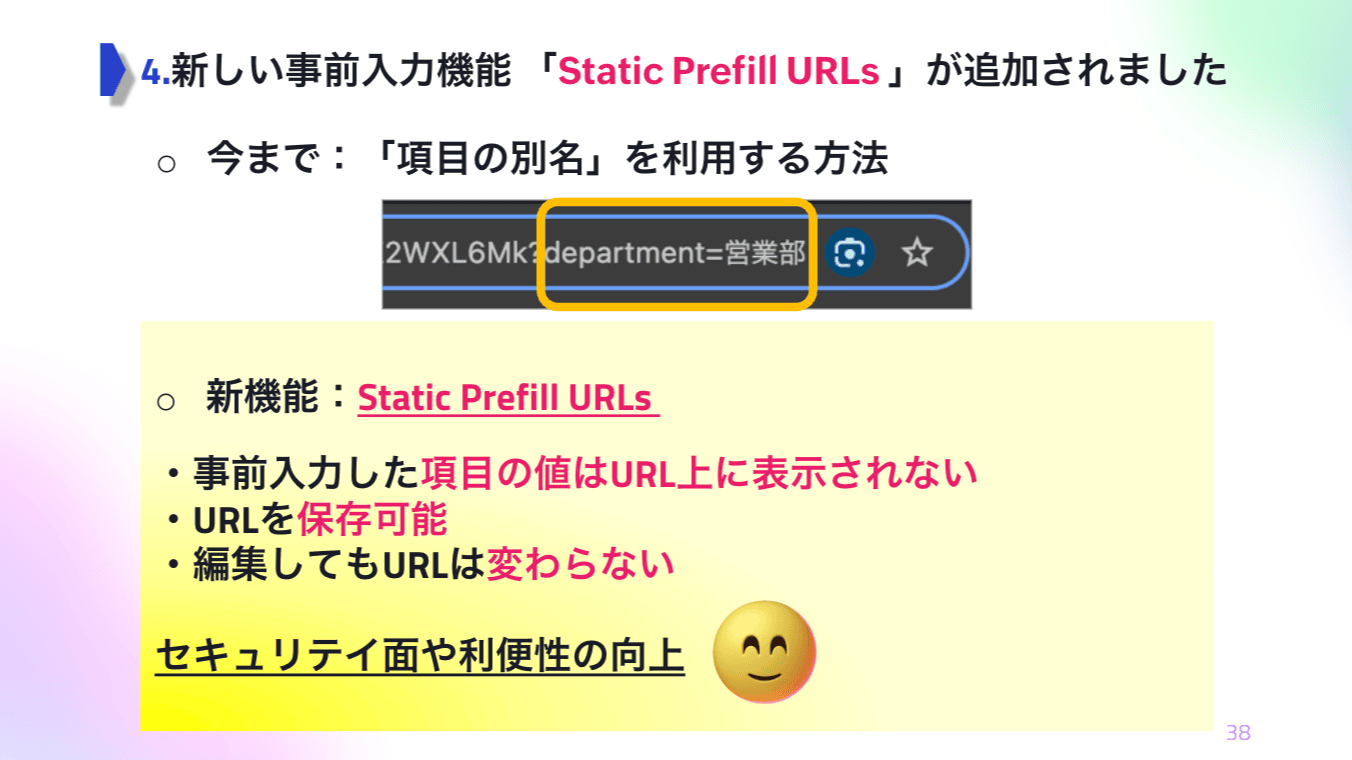
3. 最新アップデート:Statistic Prefill URLs
直近のアップデートの中でユーザーさんから特に反響が大きかったのが、「Statistic Prefill URLs」機能です。
Prefill URLを生成・保存・管理でき、毎回再生成する手間なく繰り返し利用できます。セキュリティ面・利便性の両面で改善がされており、
業務効率化をさらに加速させる機能として活用をおすすめしています。


4. まとめ
気になる機能があればぜひ試していただき、データ収集と処理の負担軽減につなげていただければ幸いです。
なお、フォーム設定は各フォームごとに必要となりますので、ご留意の上ご活用ください。


Zoho 社員セッションスライド:


グループワーク:見込み客・顧客データ、どう貯めて、どう活用していますか?

見込み客の育成方法や、既存顧客へのフォローアップの場面で、どのように Zoho を活用しているのかを参加者同士で共有しました。
BtoB・BtoC の両方における活用法について、活発な議論が交わされました。
  

最後に

今後のイベント情報を共有いたします。

9/19(金) ZOHOLICS Japan 2025
開催日:2025/9/19(金)
会場:JPタワー ホール&カンファレンス
お問い合わせ先:ZOHOLICS 2025 運営事務局 zoholicsjapan@zohoevents.jp


次回以降のユーザー交流会
※セッション等詳細確定次第、当フォーラムで別途告知いたします。

10/17(金)18:00~ 東京 ユーザー交流会 2025 vol.3
11/20(木)18:00~ 大阪 ユーザー交流会 2025 vol.2
11/21(金)18:00~ 名古屋 ユーザー交流会 2025 vol.2
11/29(金)18:00〜 東京 ユーザー交流会 2025 vol.4

今後取り扱ってほしいトピックや、今回参加されたご感想など、ぜひ本投稿のコメント欄にてお寄せください。励みになります!
今後ともZoho コミュニティをよろしくお願いいたします!

ゾーホージャパン コミュニティチーム

      Zoho Campaigns Resources


        • Desk Community Learning Series


        • Digest


        • Functions


        • Meetups


        • Kbase


        • Resources


        • Glossary


        • Desk Marketplace


        • MVP Corner


        • Word of the Day


        • Ask the Experts


          • Sticky Posts

          • 【6/22〜6/24開催】Zoho CRM 管理者向けトレーニングのご案内

            「Zoho CRMを導入したばかりで、初期設定や基本操作に不安がある」、「短期間で基礎から理解を深め、運用開始までをスムーズに行いたい」「Zoho CRMを基礎から再度学び直したい」といった課題や要望をお持ちの管理者に向け、Zoho CRM 管理者向けオンライントレーニングを実施します。 2022年6月の開催回よりトレーニング内容を刷新し、有償にて実施いたします。   ─────────────────────────────────── >詳細・お申し込みはこちら:https://www.zoho.com/jp/crm/crmtraining/
          • 【12/17(金)Meetup開催】参加者にはノベルティプレゼント!Zoho サービス相談会/情報交換会もあります

            こんにちは、Zoho Japan コミュニティチームの今成です。 12月17日(金)16:00から、今年最後のMeetup(ユーザー交流会)を開催します! ●詳細はこちら:https://www.zohomeetups.com/ZohoJapanCommunityMeetup2021vol4/ 前半は今年9月にZoho サービスを導入したユーザー様のセッションとして、現状の利用状況とこれからどのようにZoho サービスを利用していくか、これからの構想談をお話いただきます。 後半では、Zoho CRM
          • 【6/29(火) 初心者向け】カスタム関数勉強会のご案内

            先日のMeetupでも告知しましたが、以前より多くのユーザーさまからご要望いただいていたZoho の「カスタム関数」に関する基本の勉強会を6/29(火) 17:00に、開催します! 関数の基本的な書き方や、Zoho CRM で活用できる関数例のデモなどについて、Zoho の技術メンバーがわかりやすく解説します。 関数の基本を掴みたい方はぜひ、ご参加くださいませ。 >>申し込みはこちら:‌attend.zoho.com/luy0 以下詳細です。 ーーーーーーーーーーー 日時:6月29日(火) 17:00~
          • 【3/19(金)】Meetup(ユーザー交流会)開催のご案内。Zoho CRM ユーザー事例やZoho Sign の紹介、Zoho CRM 相談会など

            こんにちは、Zoho Japan コミュニティチームの今成です。 2021年1回目となるMeetupを、3月19日(金)16:00~ 開催いたします! ●詳細はこちら:https://www.zohomeetups.com/ZohoJapanOnlineMeetup2021vol1 毎回好評のZoho ユーザーさまによる活用事例をはじめ、Zoho の電子署名ツール「Zoho Sign」の製品デモや、グループディスカッションをご用意しています。 前半/後半のみのご参加も可能ですので、お気軽にご参加ください!
          • 【12/17(木) 16:00-】ユーザー同士で情報交換を行う、グループディスカッションもあります。オンラインMeetup Vol.4 開催のお知らせ

            Zoho コミュニティチームの今成です。最近寒くなってまいりましたが、みなさまいかがお過ごしですか? Zoho Japan Communityでは、今年最後のオンラインMeetup(ユーザー交流会)を開催いたします!以下、詳細のご案内です。 ーーーーーーーーーーーーーーーーーーーーー <日時>2020年12月17日(木) 16:00-18:00 <参加費>無料 <開催方法>オンライン <概要> 前半(16:00〜17:00)  自社活用事例「Zoho 社員は、1日の中でどのサービスをどれくらい使っているのか」(ゾーホージャパン株式会社 コミュニティチーム)

          Zoho CRM Plus Resources

            Zoho Books Resources


              Zoho Subscriptions Resources

                Zoho Projects Resources


                  Zoho Sprints Resources


                    Zoho Orchestly Resources


                      Zoho Creator Resources


                        Zoho WorkDrive Resources


                          Zoho CRM Resources

                          • CRM Community Learning Series

                            CRM Community Learning Series


                          • Tips

                            Tips

                          • Functions

                            Functions

                          • Meetups

                            Meetups

                          • Kbase

                            Kbase

                          • Resources

                            Resources

                          • Digest

                            Digest

                          • CRM Marketplace

                            CRM Marketplace

                          • MVP Corner

                            MVP Corner


                            Zoho Writer Writer

                            Get Started. Write Away!

                            Writer is a powerful online word processor, designed for collaborative work.

                              Zoho CRM コンテンツ


                                ご検討中の方

                                  • Recent Topics

                                  • Actual vs Minimum

                                    Hi all, I am sure I am not the only one having this need. We are implementing billing on a 30-minute increment, with a minimum of 30 minutes per ticket. My question is, is there a way to create a formula or function to track both the minimum bill vs the
                                  • Users may not pick the fields to be shown as columns in the Choose Account window when creating a new Deal record

                                    Hi there, by talking with other users I found out that I, as an Admin, am the only one who can pick fields to be shown as columns in the Choose Account window when creating a new Deal record. In fact, if other users click on the "Add Column" symbol on
                                  • Create custom rollup summary fields in Zoho CRM

                                    Hello everyone, In Zoho CRM, rollup summary fields have been essential tools for summarizing data across related records and enabling users to gain quick insights without having to jump across modules. Previously, only predefined summary functions were
                                  • push notification to Cliq when user is @mentioned in CRM notes

                                    push notification to Cliq when user is @mentioned in CRM notes. Currently users that is @mentioned gets an email to be notified. User/s that is @mentioned should get a Cliq notification.
                                  • 【参加無料】東京 Zoho ユーザ交流会 NEXUS ー AI エージェント (Zia Agents)の活用事例 / CRMで実現するマーケティング業務効率化

                                    ユーザーの皆さま、こんにちは。コミュニティチームの藤澤です。 3月27日(金)に東京、新橋で「東京 Zoho ユーザー交流会 NEXUS」を開催します! ーーーーーーーーーーーーーーーーーーーーーーーーーーーーーーーーーーーー ✒️申し込みはこちらから:https://www.zohomeetups.com/tokyo2026vol1#/?affl=communityforumpost2 ーーーーーーーーーーーーーーーーーーーーーーーーーーーーーーーーーーーー ★参加のおすすめポイント ✅ AIエージェント(Zia)のリアルに使える実例を知る
                                  • Canvas View bug

                                    I would like to report a bug. When clone a canvas view from an existing canvas view, if the original canvas view have canvas button with client script. Then the new create canvas view will have canvas button, it is make sense. But when I try to delete
                                  • Zoho CRM for Everyone's NextGen UI Gets an Upgrade

                                    Hello Everyone We've made improvements to Zoho CRM for Everyone's Nextgen UI. These changes are the result of valuable feedback from you where we’ve focused on improving usability, providing wider screen space, and making navigation smoother so everything
                                  • Multiple header in the quote table???

                                    Hello, Is it possible in Zoho CRM to add multiple headers or sections within the Quote product table, so that when the quote is printed it shows separate sections (for example “Products” and “Services”)? To clarify, I’m asking because: This does not appear
                                  • One Support Email Managed By Multiple Departments

                                    Hello,  We use one support email (support@company.com). Incoming emails come to the "Support Department" and based on what the customer is asking, we route that ticket to different departments (billing, technical support, etc.). When users in these different
                                  • big 5 accounts

                                    how do you find what accounts are listed as Big 5 ?
                                  • RSC Connectivity Linkedin Recruiter RPS

                                    It seems there's a bit of a push from Linkedin Talent Solutions to keep integrations moving. My Account Manager confirmed that Zoho Recruit is a Certified Linkedin Linkedin Partner but does not have RSC as of yet., (we knew that :-) She encouraged me
                                  • Error AS101 when adding new email alias

                                    Hi, I am trying to add apple@(mydomain).com The error AS101 is shown while I try to add the alias.
                                  • New UI in Zoho One CRM

                                    Hello, Just switched to the new UI for Zoho One CRM, do not like it, especially the search functions. What are the steps to backstep to the previous UI? UPDATE: I found it.
                                  • ZOHO.CRM.UI.Record.open not working properly

                                    I have a Zoho CRM Widget and in it I have a block where it will open the blocks Meeting like below block.addEventListener("click", () => { ZOHO.CRM.UI.Record.open({ Entity: "Events", RecordID: meeting.id }).catch(err => { console.error("Open record failed:",
                                  • Python - code studio

                                    Hi, I see the code studio is "coming soon". We have some files that will require some more complex transformation, is this feature far off? It appears to have been released in Zoho Analytics already
                                  • 🚀 WorkDrive 6.0 (Phase 1): Empowering Teams with Content Intelligence, Automation, Accessibility, and Control

                                    Hello, everyone! WorkDrive continues to evolve from a robust file management solution into an intelligent, secure, and connected content collaboration platform for modern businesses. Our goal remains unchanged: to simplify teamwork, strengthen data security,
                                  • Introducing Workqueue: your all-in-one view to manage daily work

                                    Hello all, We’re excited to introduce a major productivity boost to your CRM experience: Workqueue, a dynamic, all-in-one workspace that brings every important sales activity, approval, and follow-up right to your fingertips. What is Workqueue? Sales
                                  • Department Overview by Modified Time

                                    We are trying to create visuals to show the work our agents do in Zoho Desk. Using Zoho Analytics how can we create a Department Overview per modified time and not ticket created time? In order for us to get an accurate view of the work our agents are
                                  • Zoho Commerce

                                    Hi, I have zoho one and use Zoho Books. I am very interested in Zoho Commerce , especially with how all is integrated but have a question. I do not want my store to show prices for customers that are not log in. Is there a way to hide the prices if not
                                  • Support Custom Background in Zoho Cliq Video Calls and Meetings

                                    Hello Zoho Cliq Team, We hope you are doing well. We would like to request an enhancement to the video background capabilities in Zoho Cliq, specifically the ability to upload and use custom backgrounds. Current Limitation At present, Zoho Cliq allows
                                  • Upload own Background Image and set Camera to 16:9

                                    Hi, in all known online meeting tools, I can set up a background image reflecting our corporate design. This doesn't work in Cliq. Additionally, Cliq detects our cameras as 4:3, showing black bars on the right and left sides during the meeting. Where
                                  • ISO 27001 Compliance

                                    What are people doing to ensure ISO 27001 compliance for their Zoho environments? It would make sense for Log360 Cloud to integrate natively with the Zoho suite, but that is not the case. It requires a gateway cluster, which is not an option for a fully
                                  • Zoho People - Retrieve the Leave Details - get("LeaveCount")

                                    Hi, Zoho People I need to collect all of an employee's leave requests for the calendar year and check how many half-days they have taken. If I run the script on the query he just modified, I can retrieve the information related to that query and use the
                                  • Export blueprint as a high-resolution PDF or image file

                                    This would be a good feature for organizations that want to share the blueprint process with their employees but don't want them to have access to the blueprint in the system settings. At the moment all that users can do is screenshot the blueprint or
                                  • Importing into Multiselect Picklist

                                    Hi, We just completed a trade show and one of the bits of information we collect is tool style. The application supplied by the show set this up as individual questions. For example, if the customer used Thick Turret and Trumpf style but not Thin Turret,
                                  • What's new in Zoho Sheet: Simplify data entry and collaboration

                                    Hello, Zoho Sheet community! Last year, our team was focused on research and development so we could deliver updates that enhance your spreadsheet experience. This year, we’re excited to deliver those enhancements—but we'll be rolling them out incrementally
                                  • Marketer's Space: New to Campaigns? Some common early mistakes that might occur

                                    Hello Marketers, Welcome back to another post in Marketer's Space. If you're just getting started with Zoho Campaigns, things can feel exciting and slightly confusing at the same time. You're not alone. Most early frustrations come from setup gaps rather
                                  • This user is not allowed to add in Zoho. Please contact support-as@zohocorp.com for further details

                                    Hello, Just signed up to ZOHO on a friend's recommendation. Got the TXT part (verified my domain), but whenever I try to add ANY user, I get the error: This user is not allowed to add in Zoho. Please contact support-as@zohocorp.com for further details I have emailed as well and writing here as well because when I searched, I saw many people faced the same issue and instead of email, they got a faster response here. My domain is: raisingreaderspk . com Hope this can be resolved.  Thank you
                                  • New 2026 Application Themes

                                    Love the new themes - shame you can't get a little more granular with the colours, ie 3 different colours so one for the dropdown menu background. Also, I did have our logo above the application name but it appears you can't change logo placement position
                                  • Workflow Rule - Field Updates: Ability to use Placeholders

                                    It will be great if you can use placeholder tags to update fields. For example if we want to update a custom field with the client name we can use ${CONTACT.CONTACT_FIRSTNAME}${CONTACT.CONTACT_LASTNAME}, etc
                                  • Need a Universal Search Option in Zohobooks

                                    Hello Zoho, Need a Universal Search Option in Zohobooks to search across all transactions in our books of accounts. Please do the needful Thanks
                                  • Implement Date-Time-Based Triggers in Zoho Desk

                                    Dear Zoho Desk Support Team, We are writing to request a new feature that would allow for the creation of workflows triggered by specific date-time conditions. Currently, Zoho Desk does not provide native support for date-time-based triggers, limiting
                                  • Why is my Lookup field not being set through Desk's API?

                                    Hello, I'm having trouble setting a custom field when creating a Ticket in Zoho Desk. The endpoint I'm consulting is "https://desk.zoho.com/api/v1/tickets" and even though my payload has the right format, with a "cf" key dedicated to all custom fields,
                                  • How exactly does "Reply assistance" work in Zoho Desk? What context is sent to the LLM?

                                    Hi, Im trying to better understand the technical behavior of the feature "Reply assistance" in Zoho Desk, and I couldn’t find detailed information in the current documentation. Specifically, I have questions about what data is actually being sent to the
                                  • Deletion Workflows

                                    Hello, Unless I missed it, we can't create deletion workflows. My usecase is to auto-delete junk leads. We have field called lead status, and an agent qualify all our new leads. When it's a junk lead she chose the correspondant value in the picklist. My goal is that the system delete them automatically. Is that possible? Planed ?
                                  • URGENTImpossible to book an appointement

                                    J'essaie plusieurs fois mais aucun créneau n''est disponible Message d'erreur lorsque j'essaie de sélectionner une date
                                  • Sendpulse SMTP/IMAP Issues

                                    It’s possible Zoho made some changes on their side. Sometimes, even if your regular password works, Zoho requires an app-specific password for external apps like SendPulse to connect via IMAP. You can create this in Zoho’s security settings and use it
                                  • Insane mail security

                                    I cannot access my email... anywhere. For some reason the password for the Mail app on my Mac is being rejected, it worked yesterday but now it doesn't? Ok let's try the web interface. I can access my general Zoho login with the password but if I want
                                  • UI issue with Organize Tabs

                                    When looking at the organize Tabs window (bellow) you can see that some tabs are grayed out. there is also a "Add Module/Web Tab" button. When looking at this screen it's clear that the grayed out tabs can not be removed from the portal user's screen
                                  • Task list flag Internal/External for all phases

                                    Phases are commonly used in projects to note milestones in the progression of a project, while task lists can be used to group different types of tasks together. It makes sense to be able to define a task list as either internal or external however the
                                  • Next Page