Enhancements to My Jobs module and Approval process
Dear Customers,
As you might know, approval process is a process automation tool that allows you to automate approvals in your organization and My Jobs is where you approve requests from a single point of view.

Here's how you'd go about it:
- You’d add criteria to send records for approval, add approvers, and determine the respective actions upon approval, delegation, or rejection.
- A record qualified for approval will be sent to the approvers’ queue and will be locked from further edits.
- The approver, on the other hand, will see the list of approval requests queued under their MyJobs module.
Today, we are glad to share with you the list of updates we made to the My Jobs module and majorly to the approvals tab.
Nomenclature change: The My Jobs module will list pending operational actions from different features as tabs and they are named as Blueprint, Approval requests, Review requests, and Image validation requests.
To be relevant, we have renamed them to the following terms: Blueprint transitions, Approvals, Reviews, and Image validations.
 New view to manage approvals
New view to manage approvals
The approval tab used to list the approvals as line items and carry the approve, reject, and delegate buttons against each request. This did let you approve one-by-one.
We now changed the UI of this page. You’d get the ability to
◻ Multi-select approval requests and bulk approve, reject, or delegate.
◻ Use the advanced filter with parameters to find a request from the list of approval requests.
◻ Manage columns and clip text.
◻ Switch views between ‘My Approvals’ and ‘Other Approvals’ in case of an admin. Earlier, the ability to lookup approvals queued for other users as another button in the approver’s view.
Save approval comments as notes
When you approve, reject, or delegate, you can provide approver comments so that the record owner can understand the reason behind the approvers’ actions. This information is available when you hover over the approval status and it largely serves as a notification. However, if you’d like to factor in these approver comments in other decisions, you were not able to include them.
In this enhancement, we brought in the option to add these comments as the records’ notes.
This way, you can include these notes in reports, select records participating in the approval process in the advanced filter, create automations, and more.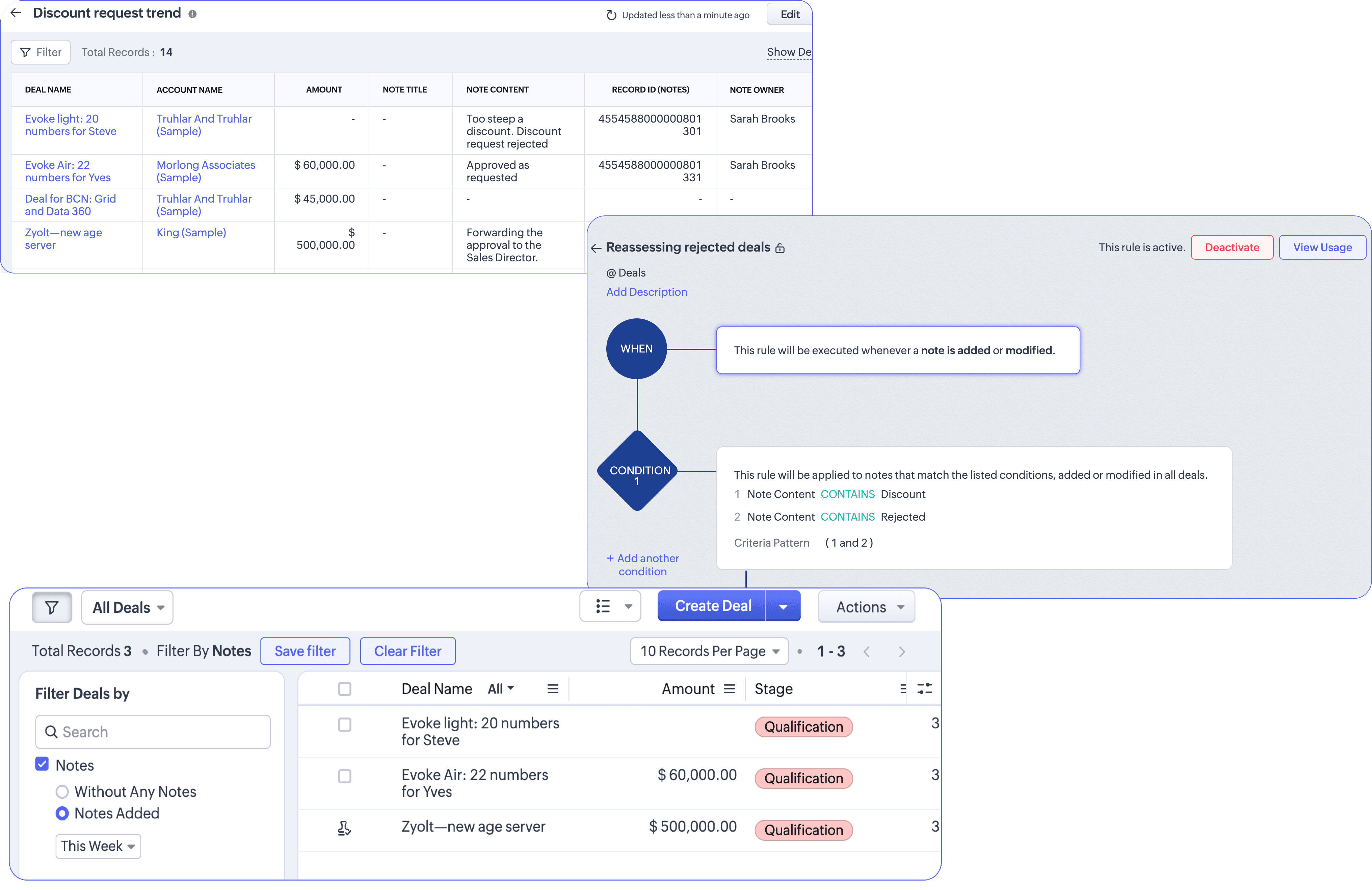
Now, let’s come to the update on the approval process configurator.
Looked up users as approvers
Looked up users as approvers
Thus far, you can select approvers from the following list: users, role, groups, levels, manager, record owner.
Now, we are bringing the ability to use a user lookup field available in the record to send approvals to.
Say, you want to send the record for approval to the architect when the deal stage goes for negotiation. Usually, an architect is a user participating in the process like a sales rep and if they have to have a say on discounting the customization cost, it was not possible. With using user lookup field as an approver, this is now made possible.
There you go! That’s about all the changes made for Approval process in Zoho CRM.
Feature availability:


Release plan:
These changes are open for customers in all DCs.
Resources:
Thanks and have a good one!
Kind regards,
Saranya Balasubramanian
Marketing - Zoho CRM