Enhancements to finance suite integrations

Enhancements to finance suite integrations

Alert
Update on the migration (October 28, 2025):

Starting this week (October 29 tentatively), we’ll begin migrating Zoho CRM users to Zoho Books as integration users. This means actions will now run under each user’s own Zoho Books access, instead of the admin’s.

As an admin, you can also choose to migrate users early from the Integration Settings page in Zoho CRM.

(Refer to the announcement for details).
Alert
Update:

Based on your feedback, we’ve updated the capabilities for integration users. In addition to the Estimates module, they can now create, view, and edit records in all the finance modules including Sales OrderInvoicesPurchase Order.

We're also running a migration and all existing users who have migrated already will receive an email once this change goes live.

Last modified on: May 15, 2025
Info
Please note that Zoho Subscriptions is now Zoho Billing.
Hello everyone!
 
We're delighted to announce some enhancements we've recently made to the finance suite integration with Zoho CRM. These improvements focus primarily on two major integrations:
  • Zoho Books
  • Zoho Subscriptions
We've implemented these updates carefully based on the valuable feedback we've received to ensure that the user experience is smoother. So without further ado, let's dive into the details!

Enhancements to the Zoho Books integration

We've refined some of the integrated features between Zoho CRM and Zoho Books to address previous challenges and enhance user interactions.

What were the challenges? 
  • Users were unable to send emails using their email addresses.
  • Zoho Books sometimes generated inaccurate reports during audits because records created from Zoho CRM weren't being updated with the correct user names in Zoho Books.
  • User-level permissions, field-level permissions and processes such as the Approval process in Zoho Books weren't being properly handled in Zoho CRM.
  • Users who did not have proper authorization to use Zoho Books were able to create transactions from CRM by using admin's permissions.
All of these challenges arose because the integration operated exclusively via the integration owner/admin's authentication (only the admin-level permissions in Zoho Books are handled, while other user-level permissions are not accounted for), which meant that any actions performed in CRM were recorded under the name of the admin in Books.

What have we enhanced? 

1. Introducing Integration users 

Sales personnel typically manage tasks up to the estimates stage in a sales process. Therefore, CRM users who have primarily worked on estimates modules and have not engaged in subsequent activities like invoices can now be added as Integration Users from CRM to Zoho Books without the need for new licenses in Books. In other words, integration users in Zoho CRM are standard CRM users whose admins can grant specific permissions to carry out certain tasks within the Estimates module, as required.
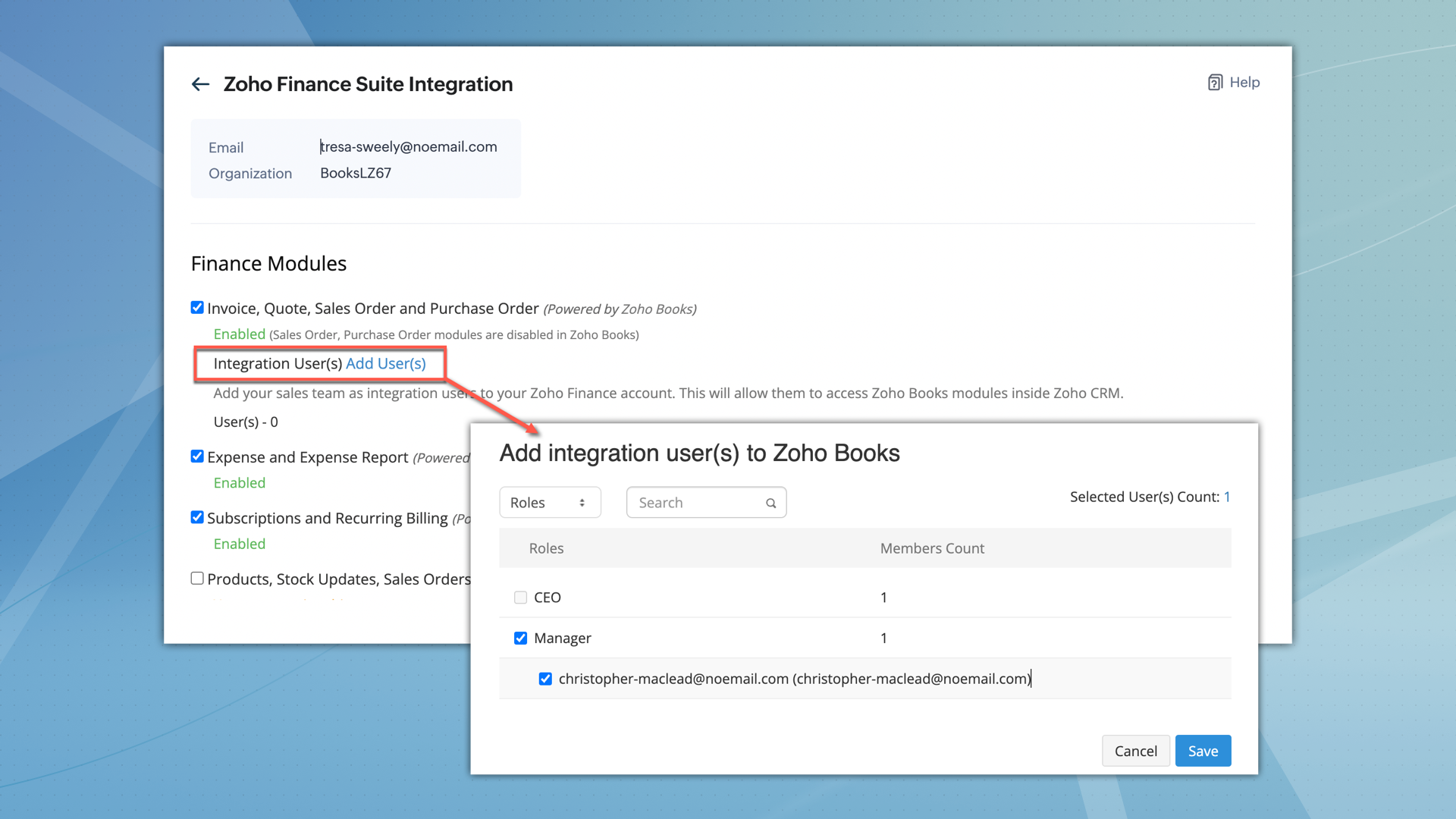


Info
What permissions do integration users have? 
  • After being added, integration users can perform all operations, including creating, viewing, and editing records within the Estimates module.
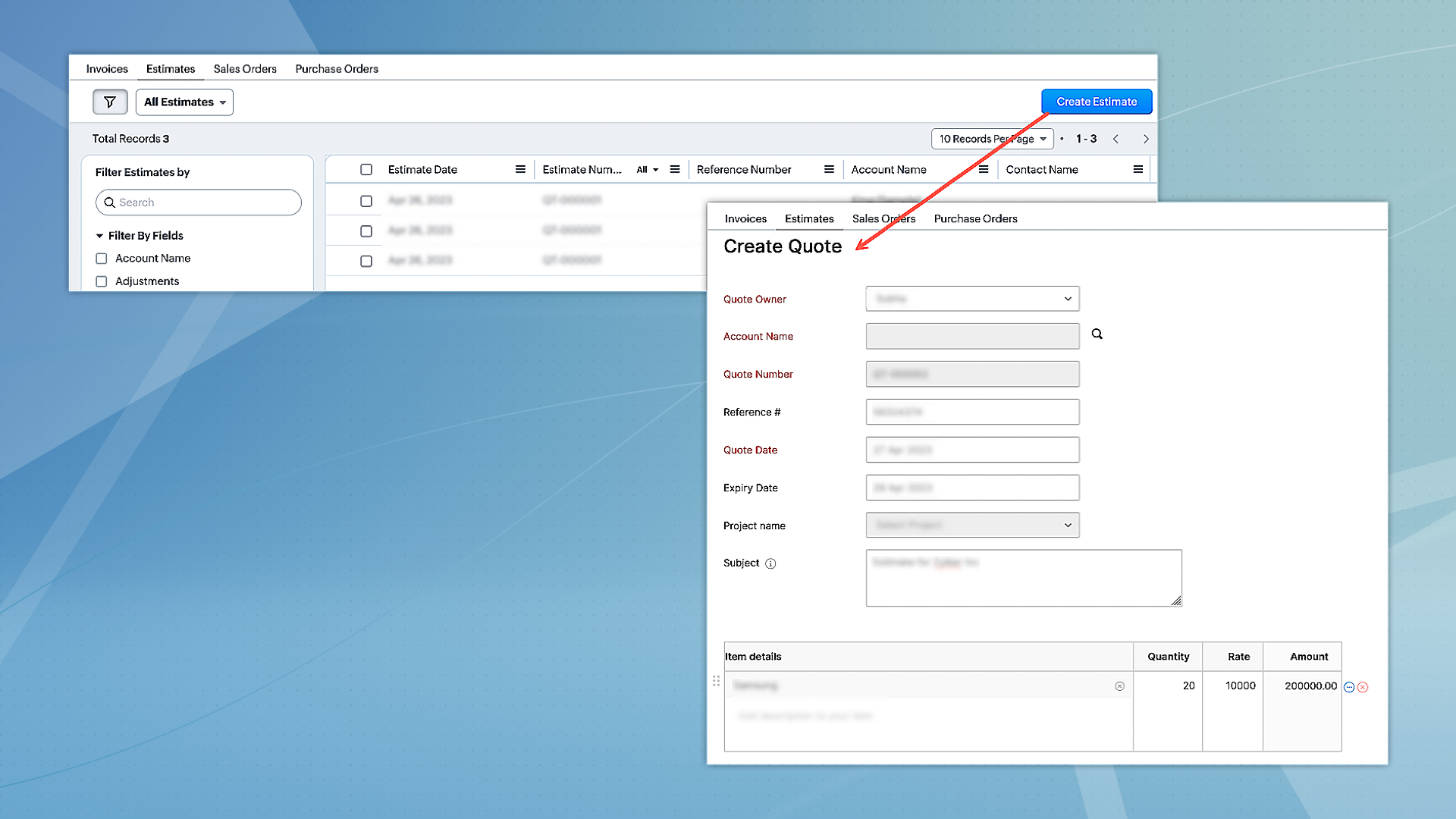
    Notes
  • However, they can only access other modules, such as Invoices, Sales Orders, and Purchase Orders in view mode.
  • Integration users will not have direct access to Zoho Books.
  • When integration users are part of multiple finance suite products, their permissions are collectively applied within CRM.

2. Unified permissions between Zoho CRM and Zoho Books  

For users with access to both Zoho CRM and Books, the integration will now ensure proper management of permissions, covering all aspects. This means if a user is restricted from certain actions or features in Zoho Books, these restrictions will be consistently applied in CRM as well. Previously, users could access and interact with features in CRM that they were not authorized for in Zoho Books, leading to discrepancies. This enhancement will eliminate such inconsistencies, ensuring uniform permission management and preventing unauthorized access or actions across both platforms.

Alert
Migration for existing users
  • For the integration between Zoho CRM and Zoho Books to function seamlessly, and to maintain uniform user permissions,existing users have the option to migrate immediately.
  • Alternatively, they have a three-month window to complete the migration. After this period, users will be automatically added as 'Integration Users' based on their utilization of the finance module.
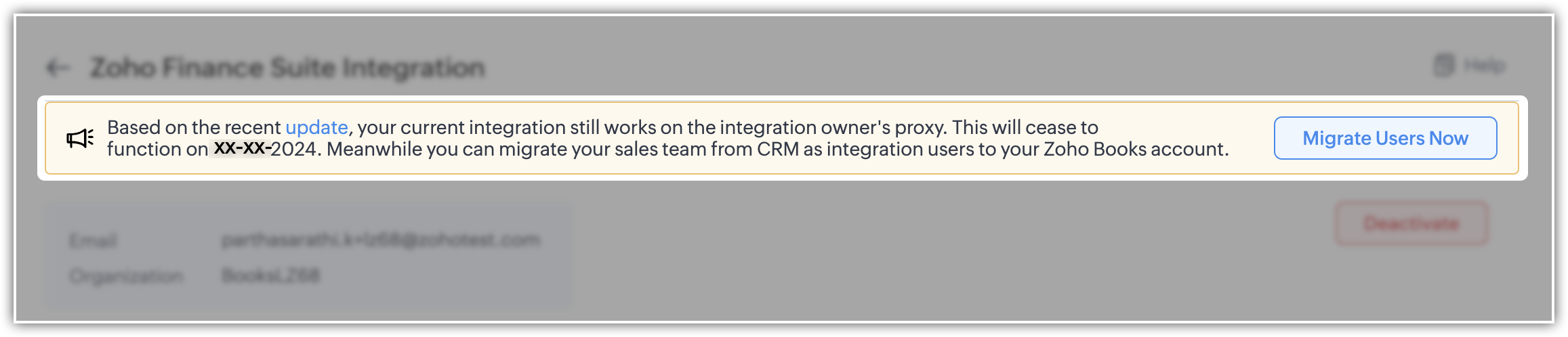
    Notes
  • To facilitate this, select the "Migrate Users" option to view and manage users common to both systems. Upon clicking "Save," the backend migration initiates. Following this, the integration adheres to each user's designated scope and permissions.
  • Users can migrate up to 1,000 integration users initially. If they need to migrate more, they can contact the support team for additional help.
  • Users who are already part of Zoho Books can't be added as integration users.
Please note that for new sign-ups, 'Integration users' will be available by default and they can set it up during the initial integration setup process.

Enhancement to the Zoho Subscription integration

Currently, when Zoho Subscription is integrated with CRM, it automatically adds Zoho Subscription as a related list in the Contacts and Accounts modules. You can view subscription details in a pop-up (iframe). Although users can create new subscriptions, there is a limitation on creating subscription-based reports and dashboards.
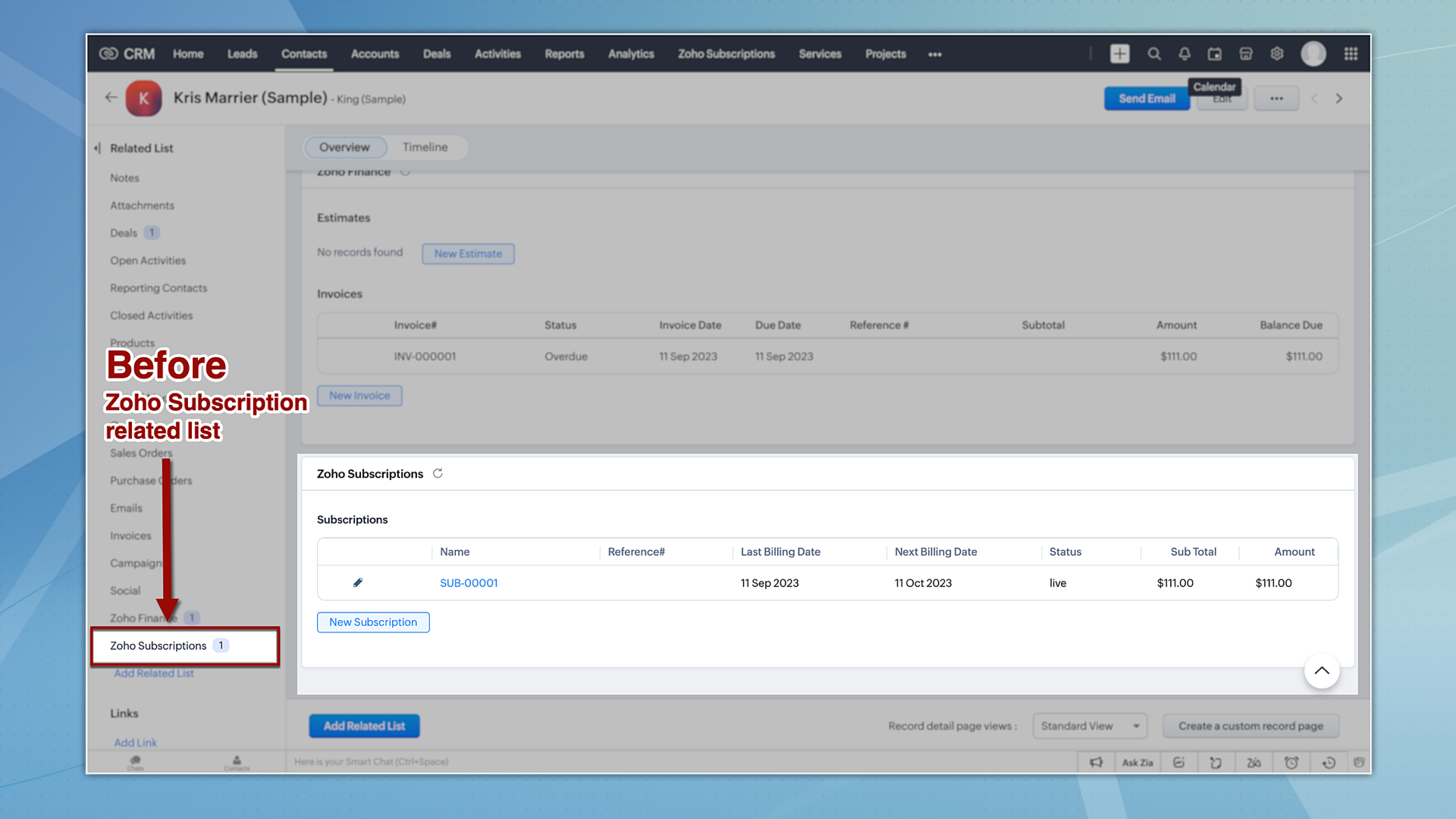


Now let's take a quick look at the enhancements made to the Zoho Subscription integration.

1. Introducing the Zoho Subscription Module

Zoho Subscriptions will now be available as a module in CRM, accessible to users with appropriate permissions. With this update, users now can generate reports based on Zoho Subscriptions data.
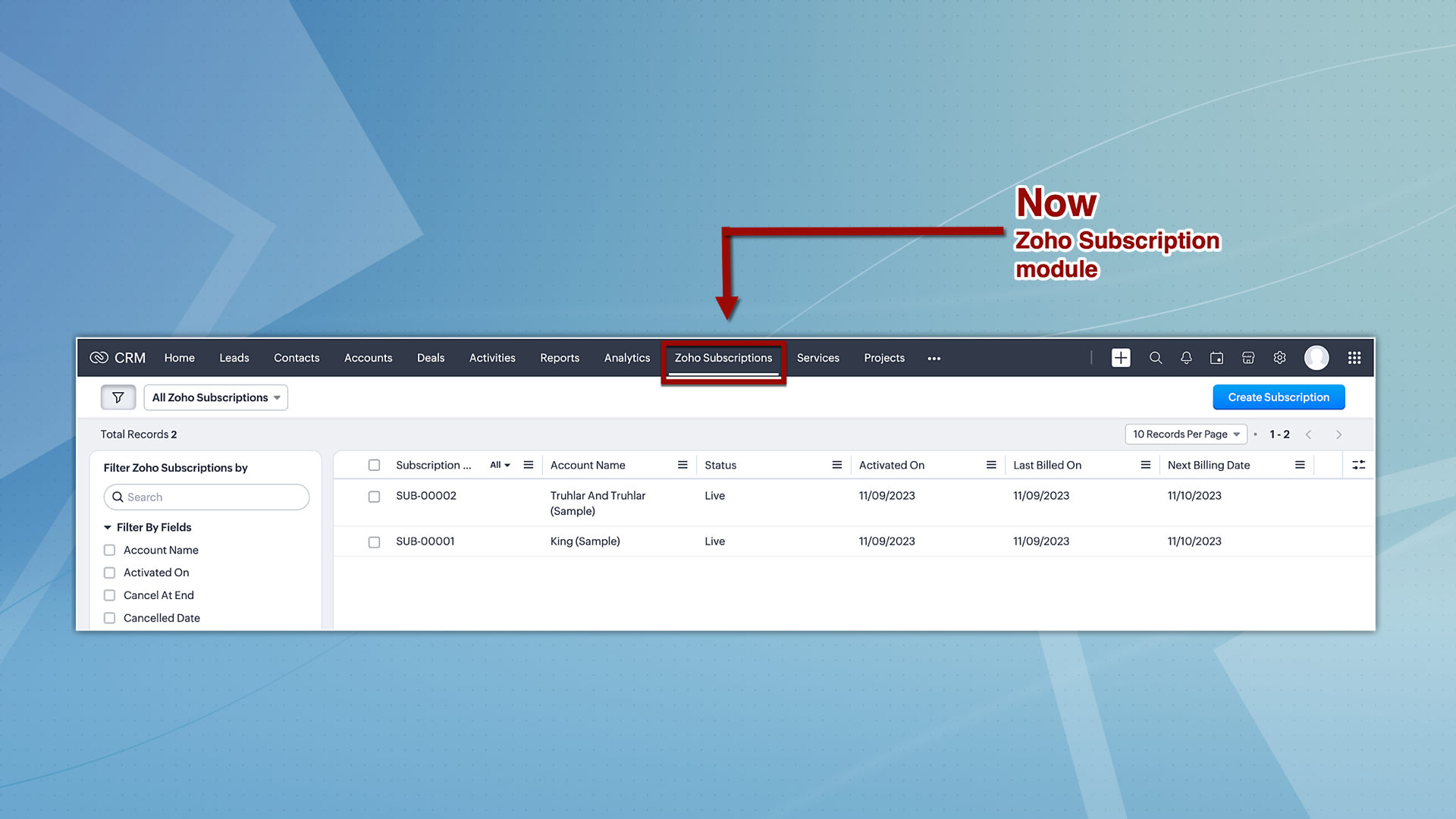


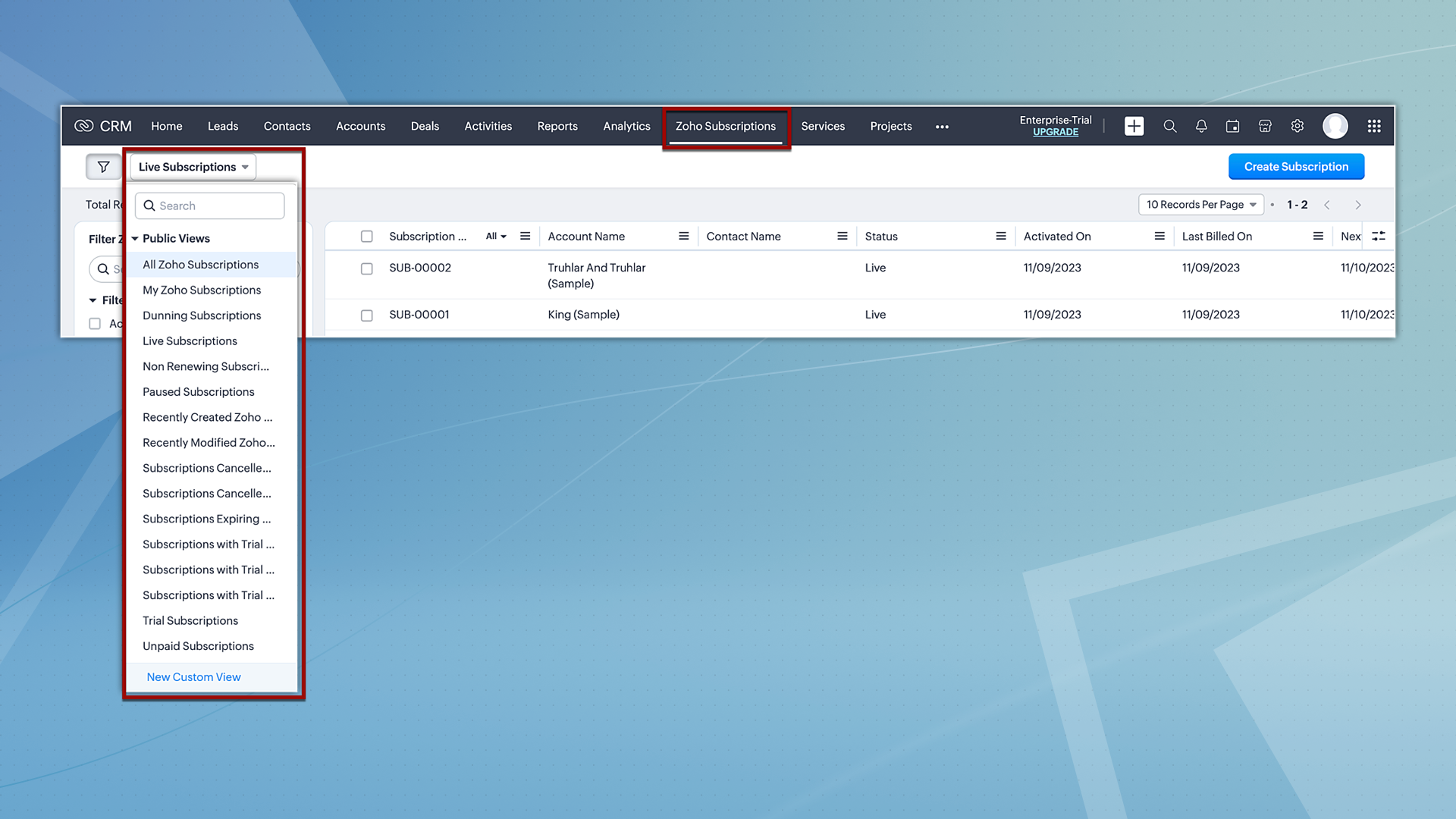
Hereafter, Zoho Subscriptions will be displayed both as a related list and as a module. Users with subscription permissions can currently create and view records in related lists; however, moving forward, they will be able to view and create records from the subscription module as well. Additionally, users will also have the option to view subscription records based on the pre-defined custom views.


2. Reports and analytics for subscriptions 

Zoho CRM offers report and analytical dashboard presets that users can adjust as needed to create personalized reports. In turn, this allows users to gain a better understanding of their customers and track key performance metrics, enabling them to make more informed decisions.
 
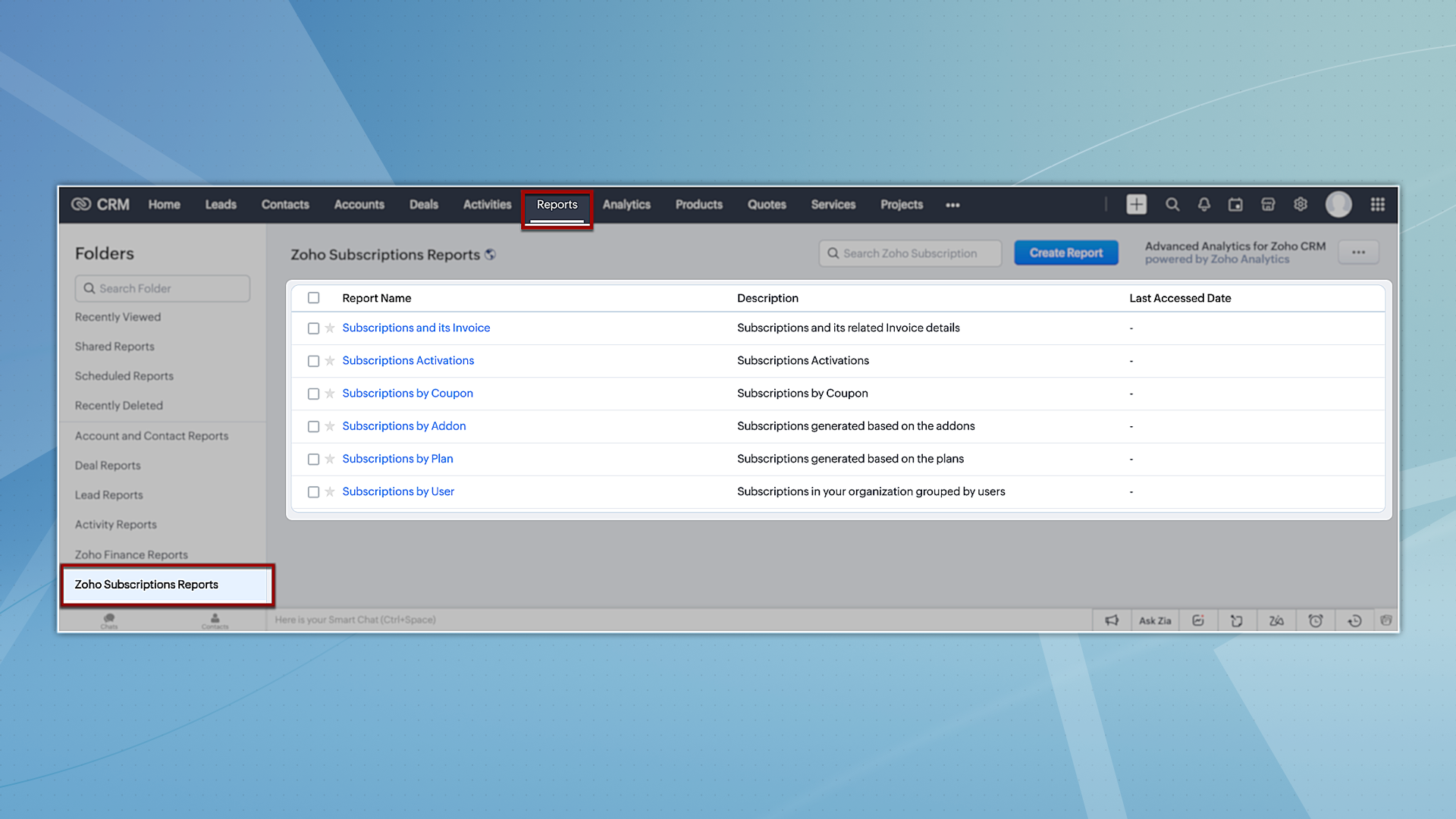
To try out system-defined reports based on Zoho Subscriptions, you can navigate to the Reports module and select any of the reports available under the Zoho Subscription Reports folder.


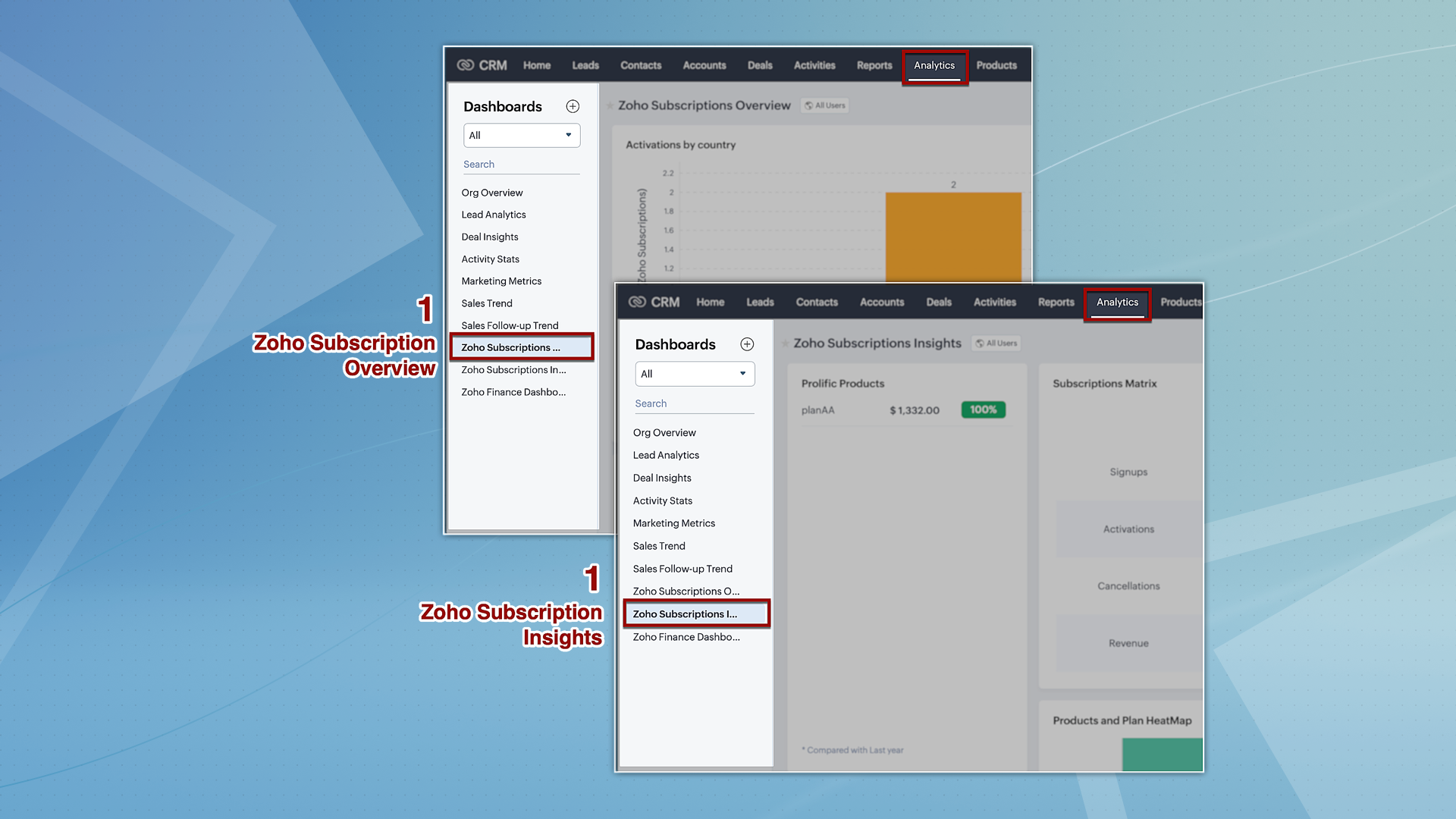
However, for analytics, we're providing two dashboards: Zoho Subscription Overview and Zoho Subscription Insights. You can navigate to the Analytics module and find these dashboards by default on the left panel.


3. Streamlined user permissions

The integration between Zoho CRM and Zoho Subscriptions, which used to be controlled by integration owner/admin permissions, will now operate based on the current users' scope. This guarantees uniformity in user permissions across both platforms, preventing users from accessing CRM features that they do not have authorization for in Zoho Subscriptions.
 
That's all we have for the enhancements in this edition. We'll keep you posted on further updates. Please feel free to share your thoughts and feedback in the comments below.
 

Release Plan: 
  • These enhancements are being rolled out in phases and are now available to all users across all data centres, with the exception of the US DC, where they are currently available only to organizations on editions below Enterprise
Thanks!
Nizamuddin
IdeaP.S. We would like to acknowledge the significant contributions and ongoing recommendations provided by our MVP, @Kevin Flynn. His insights – shared in the community forum – have been instrumental in addressing challenges related to users experiencing difficulties in sending emails with their addresses, as well as issues concerning user and field-level permissions.


      Zoho Campaigns Resources


        • Desk Community Learning Series


        • Digest


        • Functions


        • Meetups


        • Kbase


        • Resources


        • Glossary


        • Desk Marketplace


        • MVP Corner


        • Word of the Day


        • Ask the Experts


          Zoho CRM Plus Resources

            Zoho Books Resources


              Zoho Subscriptions Resources

                Zoho Projects Resources


                  Zoho Sprints Resources


                    Zoho Orchestly Resources


                      Zoho Creator Resources


                        Zoho WorkDrive Resources


                          Zoho CRM Resources

                          • CRM Community Learning Series

                            CRM Community Learning Series


                          • Tips

                            Tips

                          • Functions

                            Functions

                          • Meetups

                            Meetups

                          • Kbase

                            Kbase

                          • Resources

                            Resources

                          • Digest

                            Digest

                          • CRM Marketplace

                            CRM Marketplace

                          • MVP Corner

                            MVP Corner


                            Zoho Writer Writer

                            Get Started. Write Away!

                            Writer is a powerful online word processor, designed for collaborative work.

                              Zoho CRM コンテンツ


                                ご検討中の方

                                  • Recent Topics

                                  • Add Comprehensive Accessibility Features to Zoho Writer

                                    Hello Zoho Writer Team, We hope you are doing well. We would like to submit a feature request to enhance Zoho Writer with a full set of accessibility tools, similar to the accessibility options already available in the Zoho Desk agent interface. 🚧 Current
                                  • Copying a Document with its Citations

                                    When I copy a document that contains citations using File>Make a Copy from the document's menu the text copies but the citations do not (according to Google they should). Is this the correct way to make a complete copy of a document with its citations
                                  • Bing ads integration and tracking

                                    Hi, Is there any way to track Bing ads in the same way that we are able to track google adwords?  It is important for us to be able to determine the conversion rate of our Bing ads.  If this is not possible now, will this feature be added in the future?
                                  • #20 Your Business Shouldn't Stop Just Because You Do

                                    Imagine you are on a well-deserved vacation. Your clients are expecting invoices at the beginning of the month, recurring customers are due for billing, and payments are still coming in. Do you carry your laptop everywhere, hoping you don't miss a billing
                                  • Marketing Tip #26: Optimize product images for SEO

                                    Product images can do more than make your store look good. They can also help customers discover your products through search. Since search engines can’t "see" images, they rely on text signals to understand what an image is about. Two small actions make
                                  • Automation Series: Mandatory Time Logging Before Task Closure

                                    In a project, when users work on multiple tasks simultaneously, they track time in different ways, either by starting a timer or by adding a time log. Sometimes users may forget to add time, which can lead to discrepancies in the timesheet. When timesheets
                                  • Is there a way to show contact emails in the Account?

                                    I know I can see the emails I have sent and received on a Contact detail view, but I want to be able to see all the emails that have been sent and received between all an Accounts Contacts on the Account Detail view. That way when I see the Account detail
                                  • Zoho CRM gets a new email compose and lot more

                                    Dear Customers,  [UPDATE October 21, 2021: We have started opening these features to some of the customers already. And, it will be available to all the customers before November 2nd Week, 2021. Sorry for the delay caused]  [UPDATE February 21, 2022:
                                  • Custom AI solutions with QuickML for Zoho CRM

                                    Hello everyone, Earlier, we introduced Custom AI Solutions in CRM that let you access QuickML for your custom AI needs. Building on that foundation, we’ve now enabled a deeper integration: QuickML models can be seamlessly integrated into CRM, and surface
                                  • CRM gets location smart with the all new Map View: visualize records, locate records within any radius, and more

                                    Hello all, We've introduced a new way to work with location data in Zoho CRM: the Map View. Instead of scrolling through endless lists, your records now appear as pins on a map. Built on top of the all-new address field and powered by Mappls (MapMyIndia),
                                  • Introducing document visibility in Zoho Sign

                                    Hello! Complex document workflows often involve multiple stakeholders with different roles. Sending a separate envelope to every person is time consuming and can lead to administrative bottlenecks. With Zoho Sign's document visibility feature, you can
                                  • Sent email stuck on processing

                                    My sent emails are stuck on processing, whats going on?
                                  • [Webinar] What's new in Zoho Analytics: Q2 2026

                                    Hey data lovers! Our What's New webinar series is bringing you another lineup of exciting features and product enhancements from the past quarter, all designed to help you get more out of your analytics. Get an inside look at new data connectors, Zoho
                                  • Alterar número de telefone para receber o código OTP

                                    Boa tarde! Como posso alterar o número de telefone da minha conta para aceder ao meu email corporativo? Estou tentando logar, mas não consigo, pois está sendo enviado o código OTP para o número antigo, preciso aceder urgente meu email, porque e de trabalho.
                                  • CRM x WorkDrive: We're rolling out the WorkDrive-powered file storage experience for existing users

                                    Release plan: Gradual rollout to customers without file storage add-ons, in this order: 1. Standalone CRM 2. CRM Plus and Zoho One DCs: All | Editions: All Available now for: - Standalone CRM accounts in Free and Standard editions without file storage
                                  • Request to Increase URL Field Character Limit

                                    Hi Arthi, Hope you are doing well. I'm trying to save a URL in the Work Order (WO) module using the URL field, but I receive the following error message: "Please enter a valid Repair File. Maximum 450 characters are allowed." The issue is that the URL
                                  • How to change column headings in pivot table?

                                    Hi, Is there a way to rename the column headers of a pivot table? Now some the columns are named with value labels: 'SUM of .....'. We would like to rename those headers. As of now we couldn't find any direct solution to adjust the headers, besides copying and reformat. We want to avoid these extra steps. Best, Tiemen
                                  • Undelivered Mail

                                    I suspect that there are recipient's servers that blocks my emails. I receive the following email from mailer-daemon@mail.zoho.eu : A message that you sent could not be delivered to one or more of its recipients. This is a permanent error. pantelis.sarantos@unipakhellas.gr,
                                  • Email not loading on PC

                                    Hello, my email opens on but it doesn’t load on PC. I don’t have other issues with the email, all the configurations are ok and I face with following issue in the photo. It says “ mail.zoho.com refused to connect” I will be very thankful if anyone can
                                  • Why are bounce/error emails being sent to info@ instead of contact@?

                                    I have my Zoho Mail and WordPress site configured so that normal website emails should go to contact@hybridbatteryservice.com. However, I keep receiving technical bounce/error emails and delivery failure notifications at info@hybridbatteryservice.com
                                  • Do Not Disturb status not respected when Cliq bar is enabled across Zoho apps

                                    Hi Zoho Cliq team, I want to report what appears to be a bug with how the Do Not Disturb status interacts with the embedded Cliq bar in other Zoho apps. **Issue:** When my Cliq status is set to Do Not Disturb, I continue to receive notification tones
                                  • Zoho Webinar Summer Broadcast 2026

                                    What if your webinar platform could connect directly with your business tools, automate routine tasks, trigger actions across your workflows, and support every stage of your webinar lifecycle? That’s the question we’ve been answering so far this year.
                                  • Zoho CRM Layout Rules: Nine New Actions, Profile-Based Execution, and Interactive Preview

                                    Hello everyone, Availability: This feature is now available for customers in the JP and SA DCs. It is planned to be released for other customers in soon. We’re excited to announce powerful new enhancements to Layout Rules in Zoho CRM - a feature built
                                  • Invalid request when trying to access Mail

                                    When I click on the red button to access Zoho Mail at https://mail.zoho.com/zm/, I get a big yellow warning triangle with "invlid request, The input passed is invalid or the URL is invoked without valid parameters. Please check your input and try ag
                                  • Whats the average response time for ticket submitted?

                                    I submitted a request to unblock my mail accounts. They seem to be blocked for outgoing mail, and I have been waiting for days to have this fixed with no reply. I have submitted 2 tickets and an email. My work has to completely stop. I pay for the service
                                  • All new Address Field in Zoho CRM: maintain structured and accurate address inputs

                                    Availability Update: 29 September 2025: It's currently available for all new sign-ups and for existing Zoho CRM orgs which are in the Professional edition exclusively for IN DC users. 2 March 2026: Available to users in all DCs except US and EU DC. 24
                                  • Is there any way to have Dataprep ingest RSS?

                                    As stated by the title. Does the Zoho environment offer tools that I can use to, directly or using workarounds, have Dataprep ingest an RSS feed? Thanks
                                  • Introducing Color Coding of Picklist Values

                                    Dear Everyone, Greetings!! Zoho CRM is uplifting the user experience. Recently, we had some notable aesthetic improvements in CRM like Kanban View UI enhancement, New List view UI enhancement, color coding of tags, and color coding of picklists in meetings.
                                  • Important updates to your Widget JS APIs

                                    Hello everyone, Greetings from Zoho Creator! This is an urgent notice for developers and Partners who use widgets in their Zoho Creator applications. We previously announced an update to the CDN URLs used for loading the Widget JS API, with a deadline
                                  • Deluge sendmail in Zoho Desk schedule can't send email from a verified email address

                                    I am trying to add a scheduled action with ZDesk using a Deluge function that sends a weekly email to specific ticket client contacts I've already verified the email address for use in ZDesk, but sendmail won't allow it in its "from:" clause. I've attached
                                  • Mailbox delegation “Send As” error

                                    I believe there may be an issue with mailbox delegation. When I create a delegation from the Admin Console, it works correctly if I select Read permissions. However, if I select Send As permission for the delegated user, I immediately receive the following
                                  • Restrict Zoho Cliq Webinars and Announcements to Admins Only

                                    Hi Zoho Team, We hope you're doing well. We would like to raise a feature request regarding in-app announcements in Zoho Cliq, such as the recent webinar popup about the Cliq Developer Platform: While these announcements are useful, they are not always
                                  • how do i get mail.mydomain.com to point to zoho mail web-mail?

                                    I have started using zohomail, and am loving it. With my previous provider, I used to go to mail.mydomain.com, and it would take me to my webmail. I am not able to find the mapping for zoho's webmail to map to it. It is difficult to go to webmail with
                                  • Number of decimal places

                                    Hi Latha, I have added the following three fields to the Company module. Currently, these fields only allow a maximum of 2 decimal places. However, for some of our requirements, we need to enter values with up to 10 decimal places. Could you please help
                                  • zoho imap connection stopped working 05/28 12pm EST

                                    Hi, beginning Thursday, 5/28, ~12 pm est imap to siteground stopped working. When I tried to reconnect the account, connection was failing with the following message: Unable to connect SMTP server:gvam1107.siteground.biz, Port: 587. I did notice that
                                  • User Name in Zoho Cliq Not Updating Across Apps?

                                    We updated the name of a user in Zoho. (From Sue to Taylor) Her name has not been updated in Cliq on all apps. When in Zoho One, if I go to Cliq directly, it is correct, but if I am in another app, and the Cliq bar pops up on the bottom, it will be the
                                  • Service currently unavailable

                                    The Zoho Mail Webmail is working, the Mail Admin Console is not: "Our service is temporarily unavailable, please try after sometime." How long must I wait to retry? edit: To add to this, the Webmail is not working 100% - I can open mail in the inbox,
                                  • Service currently unavailable

                                    Service currently unavailable It is not possible to access email; the entire Zohoworkplace platform is down
                                  • User Permission Log

                                    Our external auditors are asking for a way to view changes made to user permissions (basically, a user permission change log). Is this feature built into Creator? 
                                  • E-mail down

                                    We cannot get into our email inboxes, are you affected by a Microsoft update issue? How long do you think as to restoration?
                                  • Next Page