Narrative 14: The magic bazaar of Desk

Narrative 14: The magic bazaar of Desk

Behind the scenes of a successful ticketing system: BTS Series 

Narrative 14: The magic bazaar of Desk

Marketplace is a centralized platform where users can discover Zoho and third-party applications that can be integrated with their Desk account to facilitate various business processes. It's straightforward: Admins can search for, install, and manage the installed extensions directly from the Marketplace.

How extensions empower teams that use Desk

A popular customer service company began using Desk to help business clients deliver exceptional service. As more companies adopted Zoho Desk for its powerful ticketing and multichannel messaging tools, managers and agents discovered a hidden challenge: every team worked a little differently. One day, a curious help desk manager named Ananya wished she could connect Desk to her favorite CRM, translate messages instantly, and automate ticket follow-up with just a tap. Still, these features were nowhere to be found.

Determined to find a solution, Ananya embarked on a quest. She soon stumbled upon the Marketplace, a lively bazaar filled with hundreds of extensions, like magical artifacts, each crafted by developers around the globe. In the Marketplace, Ananya discovered tools that extended Your Desk’s capabilities beyond her imagination: integrations with web products and ERP systems, project management widgets, private apps designed specifically for her company, and even connectors to keep up with customer reviews on social channels like TripAdvisor and Instagram.

Ananya's team quickly installed helpful extensions: a translation app to respond to international customers, a calendar sync never to miss a follow-up, and a ticket insights tool to visualize performance trends with a single click. Every challenge she faced now had a ready-made solution, and her agents rejoiced as work became easier, customers were happier, and collaboration was more enjoyable. 

Thanks to the ever-growing Marketplace, Ananya turned her help desk into a central hub where everything connected, every workflow flowed smoothly, and every customer felt listened to and valued.

Moreover, the story continues. As more businesses join Your Desk, the Marketplace grows richer, with new integrations appearing each season, each one a step closer to the perfect help desk experience, limited only by the imagination of the people who use it.

How to explore Desk's Marketplace  

The Marketplace home page is a library of applications that users can install to amplify their business processes. 
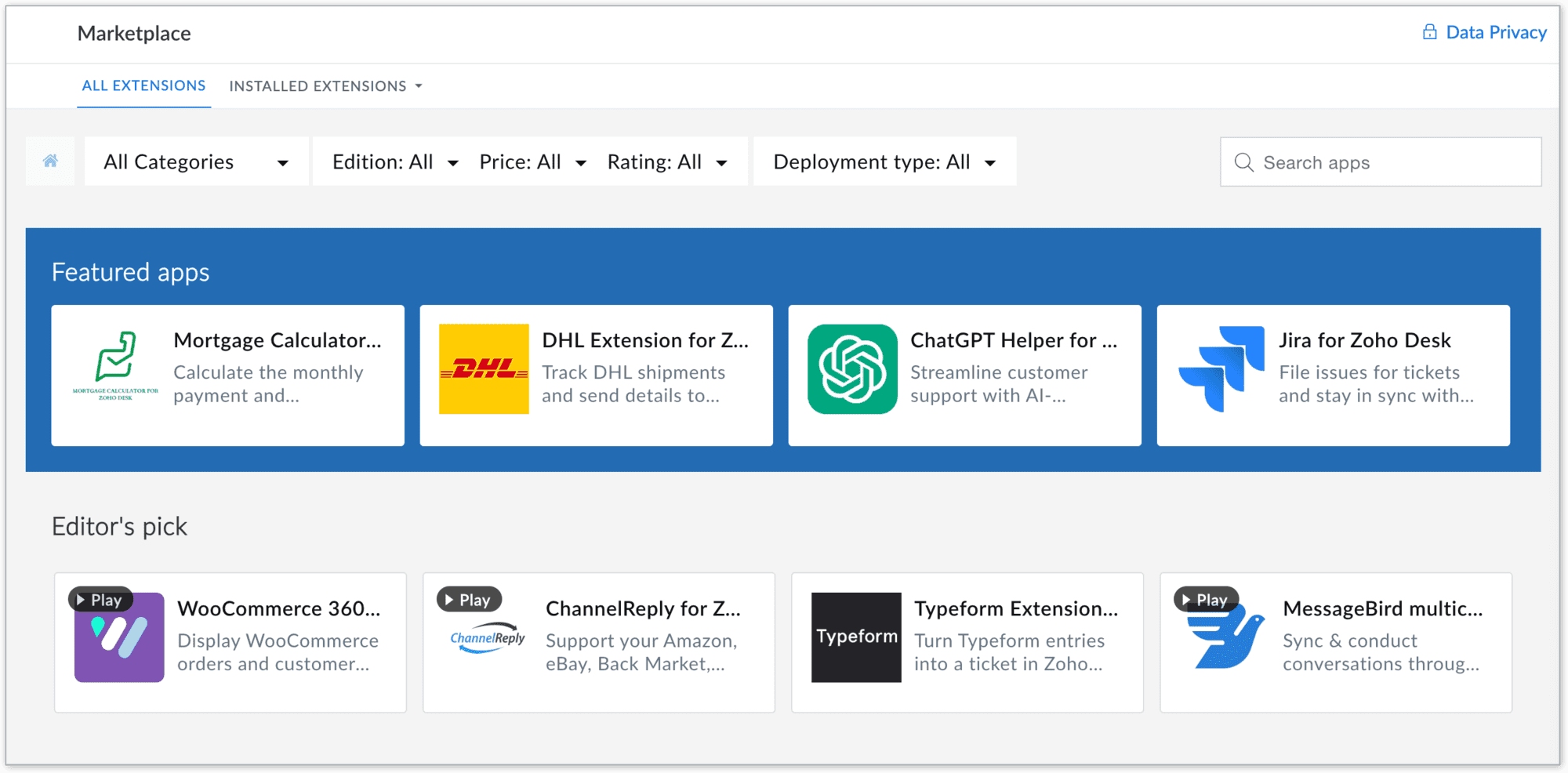
To navigate to the Desk Marketplace home page, go to Setup > Marketplace > All

Marketplace benefits

For users

  • Provide a wide range of solutions to access hundreds of ready-to-use apps and extensions across categories like CRM, finance, IM, HR management, marketing and analytics, catering to your business needs
  • Quick integrations: All the apps are designed for seamless integration with simplified workflows, eliminating the need for complex development or switching between platforms
  • Easy automation of routine tasks, breaking data silos, streamlining processes, and improving team collaboration, resulting in better productivity
  • Apps in Zoho Desk Marketplace are thoroughly vetted for quality and security, ensuring that your business data remains safe and reliable
  • Enables easy customization and deployment of new functionalities to address unique requirements without requiring coding expertise
  • Reduce time and cost by providing out-of-the-box integrations and reducing dependency on expensive custom solutions

For developers

  • Showcase expertise by creating solutions for various business needs and industries, enhancing credibility and opportunities
  • Access developer resources, sandbox environments, and a streamlined publishing process for hassle-free app deployment

Takeaway

In summary, Zoho Desk's Marketplace is a central hub where businesses can discover, install, and manage apps that extend the functionality of their business, making it easier to meet their diverse needs while unlocking opportunities for growth and increased efficiency.


Please stay tuned for more in the Desk behind-the-scenes series.


Regards,


Kavya Rao

The Zoho Desk Team


      Zoho Campaigns Resources


        • Desk Community Learning Series


        • Digest


        • Functions


        • Meetups


        • Kbase


        • Resources


        • Glossary


        • Desk Marketplace


        • MVP Corner


        • Word of the Day


        • Ask the Experts


          Zoho CRM Plus Resources

            Zoho Books Resources


              Zoho Subscriptions Resources

                Zoho Projects Resources


                  Zoho Sprints Resources


                    Zoho Orchestly Resources


                      Zoho Creator Resources


                        Zoho WorkDrive Resources


                          Zoho CRM Resources

                          • CRM Community Learning Series

                            CRM Community Learning Series


                          • Tips

                            Tips

                          • Functions

                            Functions

                          • Meetups

                            Meetups

                          • Kbase

                            Kbase

                          • Resources

                            Resources

                          • Digest

                            Digest

                          • CRM Marketplace

                            CRM Marketplace

                          • MVP Corner

                            MVP Corner


                            Zoho Writer Writer

                            Get Started. Write Away!

                            Writer is a powerful online word processor, designed for collaborative work.

                              Zoho CRM コンテンツ


                                ご検討中の方

                                  • Recent Topics

                                  • Automation#22 Track Ticket Duration at Specific Status

                                    Hello Everyone! Welcome back to the Community Learning Series! Today, we explore how Zylker Techfix, a gadget servicing firm, boosted productivity by tracking the time spent at a particular ticket status in Zoho Desk. Zylker Techfix customized Zoho Desk’s
                                  • Automation#23: Automate Guided Conversations in Zoho Desk with Business Hours

                                    Hello Everyone, This week's edition introduces a custom function designed to automate Guided Conversations in Zoho Desk, based on your business hours. With this feature, you can align the bot's behavior with your business schedule, ensuring a smooth and
                                  • Address changes in quote form

                                    When entering a quote, the first piece of information required is the Account, which properly populates the billing and shipping address fields. Then I use the lookup function to select a contact, and when I do, the billing and shipping addresses are
                                  • Automation#24: Auto-Update custom field from Accounts to Tickets

                                    Hello Everyone! Welcome back to the Community Learning Series! This episode dives into how Zylker Techfix streamlines account-related ticket references. Previously, employees had to manually check account details to retrieve specific customer information,
                                  • Automation#31: Automate Splitting Names for New Contact Records

                                    Hello Everyone, This week, we present to you a custom function, which allows you to split the first and last names from the user's email ID based on the separator used in the ID. Having grown into a large firm, Zylker Techfix aims to optimize its processes,
                                  • The same Contact associated to multiple Companies - Deals

                                    Hi, I would like to know if there is an option to associate the same contact with multiple companies (two or more) deals, using the same contact details for all. This is because we have contacts who are linked to different companies or branches of the
                                  • local file csv import problem

                                    The issue occurs when I upload a CSV file via Databridge. In the preview, everything looks correct — the values are in the proper columns. However, after clicking Import, the first column becomes empty, and the values from that column appear in a new
                                  • Kaizen #227 : Client Script Support for List Page (Canvas)

                                    Hello everyone! Welcome to another week of Kaizen. In today's post lets see how Client Script can be used in Canvas List Page to mask sensitive information from specific roles and add colors to Canvas List Page records based on custom criteria.This use
                                  • Implement Date-Time-Based Triggers in Zoho Desk

                                    Dear Zoho Desk Support Team, We are writing to request a new feature that would allow for the creation of workflows triggered by specific date-time conditions. Currently, Zoho Desk does not provide native support for date-time-based triggers, limiting
                                  • Automation#25: Move Tickets to Unassigned When the Owner Is Offline

                                    Hello Everyone, Welcome to this week's Community Series! 'Tis the holiday season—a time when work often takes a brief pause. The holiday spirit is in full swing at Zylker Techfix too, with employees taking some well-deserved time off. During this period,
                                  • Analytics <-> Invoice Connection DELETED by Zoho

                                    Hi All, I am reaching out today because of a big issue we have at the moment with Zoho Analytics and Zoho Invoice. Our organization relies on Zoho Analytics for most of our reporting (operationnal teams). A few days ago we observed a sync issue with the
                                  • Automation#27: Retain Ticket Owner on Moved Tickets

                                    Hello Everyone! This week, we present to you a custom function that retains the ticket owner when a ticket is moved from one department to another. Here’s more to help you understand the custom function: At Zylker Techfix, Alex, the Support Engineer manages
                                  • Automation#28 Notify Agents on Article Expiry

                                    Hello Everyone! This week, we’re bringing you a feature that notifies your team when articles in the Knowledge Base are set to expire to keep your content relevant and helpful for customers. The Zoho Desk's Knowledge Base is an asset for customers to
                                  • Automation#29 Retain ticket status on moved tickets

                                    Hello Everyone, Hear out Zylker Techfix’s Success Story on Smoother Ticket Transitions! Zylker Techfix, a gadget servicing firm committed to quick repairs and timely deliveries, faced a challenge when ticket statuses changed automatically while moving
                                  • encountering an error when attempting to associate an email with a Deal using the Zoho CRM extension in Zoho Mail.

                                    When I click "Yes, associate," the system displays an "Oops!! Something went wrong" error message. I have attached a screenshot of the issue for reference.
                                  • Automation#32:Auto Add New Portal Users to the Help Center User Groups

                                    Hello Everyone, Introducing a custom function that automates the process of adding new portal users to Help Center user groups, making user management effortless! By default, Zoho Desk allows you to assign new portal users to groups manually. But with
                                  • Using email "importance" as workflow-criteria

                                    I'd like to set up a workflow that triggers if an incoming email has been flagged as "high importance" but I'm not seeing any way to do that. Hopefully I'm just missing something obvious...?
                                  • Automation#34 : Automate Email threading for Ticket notification

                                    Hello Everyone, It's been a while since we've presented an automation. However, our community has been buzzing with ideas, use cases, and discussions with our community experts and Ask the Experts session. So, here we are again, presenting an automation
                                  • Automation#35 : Auto-Add Comments under the Owner's Name in Tickets via Macros

                                    Hello Everyone, This week's custom function provides simple steps to configure a Macro for adding comments to tickets with the name of the Comment owner. When managing tickets, you can use the Comment feature to communicate internally with your team and
                                  • Automation#36: Auto-create time-entry after performing the Blueprint transition

                                    Hello Everyone, This week’s edition focuses on configuring a custom function within Zoho Desk to streamline time tracking within the Blueprint. In this case, we create a custom field, and request the agent to enter the spending time within the single
                                  • Automation#33: Automate Splitting Names for Existing Contact Records

                                    An organized directory – who doesn't love one? Previously, we explored how to split contact names into First Name and Last Name for new contacts in Zoho Desk. But what about existing contacts already in your database? This week, we bring you a custom
                                  • About Meetings (Events module)

                                    I was working on an automation to cancel appointments in zoho flow , and in our case, we're using the Meetings module (which is called Events in API terms). But while working with it, I'm wondering what information I can display in the image where the
                                  • Don't Allow Customer to Edit Values After Submitting Ticket

                                    After a customer submits a ticket through the customer portal, they can go into the ticket and see some of the values from the questions they answered in the sidebar. Currently, a customer can edit these values even after they submitted them. This makes no sense. We ask very specific questions that we don't want customers to later change! Please disable the ability for customers to edit the values to their submission questions in the portal. Screenshot attached.
                                  • import data from Apollo.ai into zoho crm via zoho flow

                                    I might be asking this question in the wrong forum. We use Apollo.ai to find potential new leads for our business, there are around 10000 leads that we have initially found. We have an Apollo.ai account but just to do searches, we dont use it as a crm.
                                  • Fix the speed

                                    It takes ages to load on every step even though my dataset is quite small.
                                  • Workqueue

                                    I really like the idea of the Workqueue generally - it will be really useful. What it seems to lack however, is the ability to customise it properly. I want to be able to show a custom view rather than just "My Leads" and "Leads Assigned in Last 3 hours".
                                  • Webform & spam

                                    Hi, We set up 2 webform on our website, fowarding the content to Zoho CRM. Since it has been opened up, we are getting lot of spam message (for now about 20 a day). To lower the amount of false new leads we added the captcha field and new enquieries are
                                  • Zoho CRM Web form page URL

                                    Hi there, I am getting quite a bit of spam through my Zoho CRM Web form and want to restrict the URLs it is submittable from. I can see that I can add Location URLs but I need to be able to just add a domain so can I enter mydomain.com/* to cover all
                                  • Receiving too many Spam Leads. Why?

                                    I am receiving so many junk leads from web forms created by zoho's platform. The junk queries are increasing day by day and are affecting our business. I am continuously following up with zoho team from the past one year but not getting any satisfactory
                                  • Mail Merge is not working properly as far as the AUTOMATE section is concerned

                                    Hi there, I created a Mail Merge template for the Deal module. I would like Deal owners to mail merge their Deal records, download the Mail Merge document as a Word doc and make a few changes before sending it to the customer. Thing is, neither the "Merge
                                  • Canvas Detail View Related List Sorting

                                    Hello, I am having an issue finding a way to sort a related list within a canvas detail view. I have sorted the related list on the page layout associated with the canvas view, but that does not transfer to the canvas view. What am I missing?
                                  • WhatsApp Business Calling API

                                    Dear Zoho SalesIQ Team, I would like to request a feature that allows users to call WhatsApp numbers directly via Zoho SalesIQ. This integration would enable sending and receiving calls to and from WhatsApp numbers over the internet, without the need
                                  • project name field issue- n8n

                                    Hey guys, I have a question. I want to create a new product using the workflow. The problem is with the product name field; I don't know how to fill it in. The workflow starts with retrieving information from the leads table, retrieving links to scrape
                                  • Function #20: Custom calculation in item table of invoices

                                    When you create an invoice in Zoho Books, the 'Amount' of a line item is typically calculated as the product of the "Quantity" and the "Rate" of the item. For instance, if an item has a sales rate of $50 and a quantity of 5 is sold, then the amount would
                                  • How to track repeat customers?

                                    I own a food business and every order is entered into Zoho with: a unique Customer ID total order amount date of order With this information, I want to be able to see a list of my "best" customers. In other words, descending lists arranged according to:
                                  • How to hide or archive a blog post temporarily in Zoho commerce website builder?

                                    I would like to temporarily hide or archive a blog post in zoho commerce website builder so that it doesnt appear on my website till I enable it again. I tried to look for this option but could not find it.  It only allows me to permanently delete a blog
                                  • Button to Reapply Filters on Sheet(s)

                                    I wrote a macro that I attached to a button to reapply the filters on all my sheets and it says it works, but it doesn't actually do anything. What is wrong with it? Is there another way? Or even make it work for one sheet? Sub UniversalFilterRefresh()
                                  • Zoho Books - Breaking A Working App

                                    We've been using Zoho for many years now. Across all apps, entering phone numbers in standard formats was enabled in all apps. These formats are: xxx.yyy.zzzz xxx-yyy-zzzz (xxx) yyy-zzzz and we were able also to add extension numbers in these formats:
                                  • using the client script based on the look up filed i wnat to fetch the record details like service number , service rate

                                    based on selected service look up field iwant to fetch the service serial number in the serice form how i achive using client script also how i get the current date in the date field in the on load of the form
                                  • Automate pushing Zoho CRM backups into Zoho WorkDrive

                                    Through our Zoho One subscription we have both Zoho CRM and Zoho WorkDrive. We have regular backups setup in Zoho CRM. Once the backup is created, we are notified. Since we want to keep these backups for more than 7 days, we manually download them. They
                                  • Next Page