A LETTER TO THE UNSUNG HEROES OF THE INTERNET

A LETTER TO THE UNSUNG HEROES OF THE INTERNET


Dear social media marketers, this one’s for you…

From the outside, it may look like you're just scrolling through feeds or switching between tabs. But we know better.

Team Zoho Social sees the real story.

We understand the challenges you face—and we’ve been right there with you, every step of the way. For over a decade, Zoho Social has been more than just a tool. It’s been a part of your daily grind, your wins, your routines. So this Social Media Day, we want to walk you through a day in your life and show you how Zoho Social fits right into it.

We know your mornings start early with campaign plans scribbled on notepads, boards filled with content ideas, and market research done over a dose of caffeine. You're not just creating content; you're studying trends, tracking competitors, and trying to hit just the right tone with every piece you post.

But some mornings, the ideas don’t come. You’re staring at a blank screen, the cursor blinking back at you, and the pressure to be creative doesn’t wait.

That’s when Zia, your AI-powered writing assistant, steps in. Whether you're crafting a fresh caption or coming up with tag lines for your new campaign. Zia helps you break through the block. Just give a prompt and let Zia help you keep moving.

Because sometimes, even superheroes need a partner.


Now that you’ve written your post, the next question is: When do I publish it? Timing makes all the difference, and it’s not always easy to get it right.

You’ve worked hard on this post, and it definitely deserves the spotlight. So your SmartQ comes to help you in analyzing your audience’s behavior and recommends the best time to post, so your content gets the attention it deserves. 


For greater clarity, the Reports tab provides a comprehensive view of when your audience is most active.


It’s midday already. You’ve cleared your morning clutter, and after lunch, it’s time to get organized. You’ve got a campaign launch coming up, some posts waiting, and a few brand announcements. Planning all that across multiple platforms? It can feel like solving a big puzzle.

Zoho Social Calendar is built to help you map everything out visually. See your entire content plan at a glance. Check what’s going out when, adjust as needed, and stay ahead. 


And when you’ve got too many posts in the pipeline? Bulk scheduling has you covered. Line up your posts in advance and let them go live exactly when you want—no last-minute rush, no missed windows. 


By the time the afternoon slump hits, it’s probably time for your second coffee. But while you take that much-needed break, your audience doesn’t. The comments are coming in, mentions are building up, and DMs are waiting to be replied to.
We know how overwhelming that can get, and how important it is not to miss a message. Zoho Social Inbox brings all your conversations into one neat, organized space. From every platform. Just clear visibility, faster responses, and a better way to engage meaningfully. 
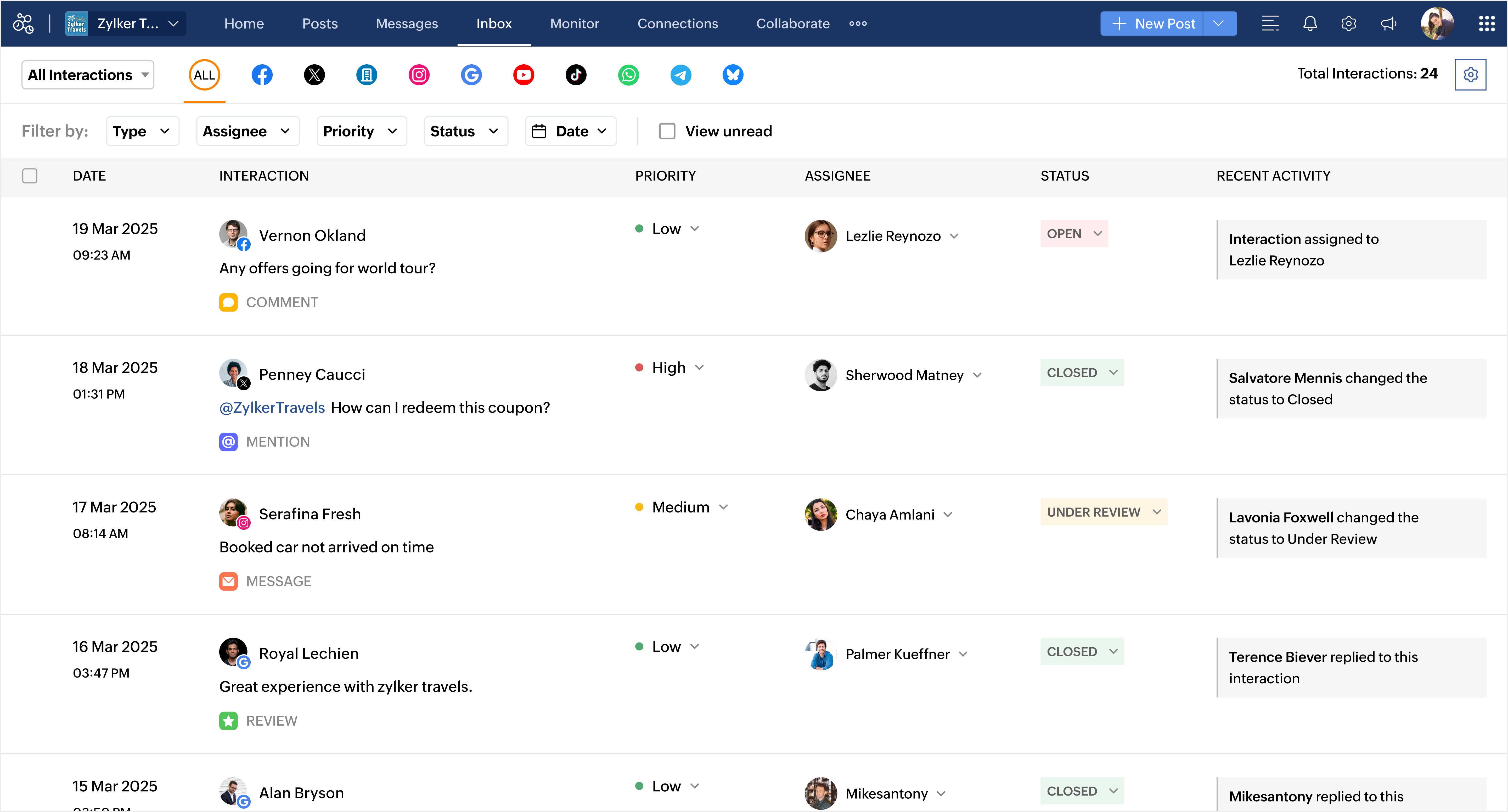


Not every message needs to find you. You can let it find the right person instead. With Inbox Automation, create smart assignment rules that automatically route interactions to the right teammate, so your team can spend less time organizing and more time connecting with customers.


Now it’s late evening. You’ve written, planned, scheduled, and replied. But somehow, your day still doesn’t feel over. Because for you, it’s not just about checking off tasks—it’s about getting it right.

Your day ends when that one post goes live. The one crafted with care, posted with hope, and shared with intention. The one that makes someone pause mid-scroll and connect.

Because that’s what you do every single day. 

This Social Media Day, we just want to say thank you.

Thank you for the creativity you spark, the consistency you bring, and the care you pour into every campaign, every comment, every conversation. We see the effort behind every post. We know the hustle. We hear you. And most importantly, we’re here for you.

Today, we raise our glasses to you. Thank you for everything you do.

With gratitude,
Team Zoho Social

Explore what’s new in Zoho Social and see how it can simplify your everyday marketing routine.
    • Sticky Posts

    • What's new in Zoho Social - Q2 recap

      Hello everyone, We’ve rolled out a bunch of updates in Q2, and we’re excited to walk you through them. Here’s a quick look at everything we released in April, May, and June to help you manage your social media presence more effectively. Threads updates
    • A LETTER TO THE UNSUNG HEROES OF THE INTERNET

      Dear social media marketers, this one’s for you… From the outside, it may look like you're just scrolling through feeds or switching between tabs. But we know better. Team Zoho Social sees the real story. We understand the challenges you face—and we’ve
    • Introducing Inbox in Zoho Social

      Hey everyone, We are excited to introduce the Inbox in Zoho Social to help manage all social media interactions from Facebook, Instagram, X (formerly Twitter), Google Business Profile and YouTube for your brand in one place. You can track and assign them
    • A decade together - Thank you for being a part of the journey with Zoho Social!

      A decade ago, we started Zoho Social with a simple vision: to make social media management easier, smarter, and more impactful for your business. What began as a small idea has grown to a powerful platform that helps businesses across the globe reach
    • Advanced statistics for LinkedIn page, posts and monitor @mentions in Zoho Social

      Hello everyone,   We've made enhancements to the Monitor, Reports tabs, and Post Stats for the LinkedIn channel in Zoho Social, so we wanted to briefly share some information about the updates. Monitor LinkedIn mentions  LinkedIn is one of the most popular

    Nederlandse Hulpbronnen


      • Recent Topics

      • Add a Parameter to the ZOHO CRM Deluge sendmail to denote priority (defaulting to normal if unspecified)

        Hello! There is a similar thread for Creator out there that is 2 years old, but I'd like to raise it in the ZOHO CRM category as well. Would you kindly update the existing Deluge sendmail function to allow a priority parameter? The parameter should allow
      • Set Custom Icon for Custom Modules in new Zoho CRM UI

      • Email outbox is now available in the sandbox

        Hello all! Testing emails without visibility has always been a blind spot in the sandbox. With the new Outbox, that gap is closed. You can now view and verify every email triggered from your sandbox, whether it’s through workflows, approvals, or mass
      • Transform your line of items into line items: ICR can now record your table values as subform values

        Enhancement in Zoho CRM Dear Customers, We hope you're well! Zia Vision’s ICR capability can now recognize, extract, and store tabulated values in your subforms. An ideal example is a university application form. It has printed fields and handwritten
      • is it possible to add more than one Whatsapp Phone Number to be integrated to Zoho CRM?

        so I have successfully added one Whatsapp number like this from this User Interface it seems I can't add a new Whatsapp Number. I need to add a new Whatsapp Number so I can control the lead assignment if a chat sent to Whatsapp Phone Number 1 then assign
      • Add the ability to Hide Pages in Page Rules

        Hi, We have Field Rules to show and hide fields and we have page Rules, but we can't hide a page in Page Rules so it isn't completed before the previous page (And then have the Deny Rules to prevent submitting without both pages completed), we can only
      • Data Export is forcing Creation/Modified date just like reports

        The data export now forces you to select a created or modified date. There is not an All-Time option. This severely cripples the whole function of data export for audit purposes. If the data export (or reports for that matter), requires a date, there
      • Calendar Year View?

        Is there a way I can view the calendar in year view? Maybe create a page with a view like this?
      • Automation Series: Auto-update Project End Date When a Task is Rescheduled

        When a project is planned, tasks are scheduled within the projects timeline. Any delay in the predecessor tasks can delay dependent tasks, which can in turn impact the project timeline. Unless the project is manually rescheduled, the end date might not
      • What is a realistic turnaround time for account review for ZeptoMail?

        On signing up it said 2-3 business days. I am on business-day 6 and have had zero contact of any kind. No follow-up questions, no approval or decline. Attempts to "leave a message" or use the "Contact Us" form have just vanished without a trace. It still
      • Zoho Social | Instagram Integration in Zoho Desk

        Good day Zoho team! I have a question. If we link the Instagram business account to our Facebook page, and we integrate the Facebook to Social in Zoho Desk, the "Messages" from Facebook will be converted into Ticket right? Does it also convert the Instagram
      • Cliq iOS can't see shared screen

        Hello, I had this morning a video call with a colleague. She is using Cliq Desktop MacOS and wanted to share her screen with me. I'm on iPad. I noticed, while she shared her screen, I could only see her video, but not the shared screen... Does Cliq iOS is able to display shared screen, or is it somewhere else to be found ? Regards
      • Rich-text fields in Zoho CRM

        Moderation Update: During the initial release of Rich Text fields, it was supported only in the Enterprise and Ultimate editions. We have gradually extended Rich Text fields to all the paid editions of Zoho CRM. Hello everyone, We're thrilled to announce
      • Bounce rates

        Where can I see my bounce rates for: 1. Each email I send out, and 2. in total?
      • Tip #52: Practical uses of Zia Search in Zoho Sprints

        If your agile team uses multiple Zoho apps, your team members might often find themselves switching between those apps looking for related information. When the data you're looking for is spread across different workspaces within Zoho environment, rely
      • New field in Zoho Forms: Validate structured data with the Regex field

        Have you ever received form submissions where the information looked almost correct but wasn't quite in the format you expected? Maybe an employee ID was missing a character. A PAN number was entered in lowercase. A license number had an extra space.
      • Need to show discount before total after subtotal

        Need to show discount before total after subtotal on my estimate template (see attachment)
      • Import Excel from email into CRM

        I receive a daily Excel file by email and I would like to have it automatically imported into a custom Zoho CRM module. Do you think there's anything that can be done? My first idea was searching for a native option in CRM, such as "send an email to a
      • Approve records efficiently: Useful enhancements to My Jobs module and Approval process in Zoho CRM

        Dear Customers, As you might know, approval process is a process automation tool that allows you to automate approvals in your organization and My Jobs is where you approve requests from a single point of view. Here's how you'd go about it: You’d add
      • Zoho Connect is now even smarter and more personalized

        Hello everyone, We’re excited to introduce new features and enhancements to help you personalize the employee experience, connect workplace knowledge with AI, and create more engaging dashboards. Deliver relevant dashboards with Audience With Audience,
      • Stop Zoho Projects From Automatically Adding Client Users

        I have a custom function that creates a Zoho Project for every Quote attached to a Deal when it moves to Closed Won. Everything works fine, except for the fact that connecting a Zoho Project to the CRM automatically takes the Contact associated with the
      • Global "Search" in FSM

        I'm missing the global Search function like in CRM. This should save us a lot of time. We don't now upfront if the customer is a Contact or a Company. So now we have to guess in what module to start a search/filter. Also looking up an address, phone number,
      • Canvas not working

        I have a canvas running. I selected it as the default for all options, but mainly want it for Portals. It isn't working. I selected Assign Canvas in both the Dtailed View and in the module itself. Nothing has happened. Any help?
      • LinkedIn RSC is now live in Zoho Recruit

        LinkedIn Recruiter System Connect (RSC) is here. Your Zoho Recruit data (candidates, jobs, notes, stage updates, resume attachments, and more) now syncs with LinkedIn in real time. Note: LinkedIn RSC is included with your LinkedIn Recruiter Corporate
      • Add the Zoom Option to the Camera

        Hi, I use the ZOHO Forms Camera so I can manage metadata, compression, etc. but this doesnt have the zoom parameter activated, so when we have photos in a tight space and want to use 0.5 for example, we can't, can this be enabled please. Thanks Dan
      • The Social Wall: July 2026

        Hello everyone! We're halfway through the year, and we bring to you three new updates designed to help you experiment with your content, discover your top-performing posts, and automate your engagement workflow. Instagram Trial Reels Instagram trial reels
      • What's New in Zoho Invoice | April – June 2026

        Hello everyone! We're back with the latest updates and enhancements we've rolled out in Zoho Invoice from April to June 2026. Here's what's new this quarter: Connect Zoho Invoice to AI Using Zoho MCP Customize Accessibility Preferences Attach Annexure
      • Help with SEO

        Hi There, I have recently published a site and added some Keywords in the SEO settings. Searching Google I currently don't find my site though. When do these settings take effect? In the SEO settings there is also a section "Sitemap" I can change settings for "frequency" and "Priority" What do these settings do? Kind regards
      • All new Address Field in Zoho CRM: maintain structured and accurate address inputs

        Availability Update: 29 September 2025: It's currently available for all new sign-ups and for existing Zoho CRM orgs which are in the Professional edition exclusively for IN DC users. 2 March 2026: Available to users in all DCs except US and EU DC. 24
      • HR Helpdesk Cases

        We have Zoho One Enterprise. I'm trying to find HR Helpdesk Cases, but my UI does not match the documentation. I'm not sure how to move forward.
      • Zoho Books Placeholder: Inventory Counts

        I was hoping to figure out how to find the placeholders for inventory counts by item. We use Location based inventory tracking, so I dont know if that affects things. I want my PDF and Printed PICK LISTS to show the Quantity Available to Pick. I have
      • Undocumented Books API error message - 1000 - The requested action could not be completed. Please try again. | Unexpected error

        This code sometimes throws this error 1000 - The requested action could not be completed. Please try again. | Unexpected error What does it mean? result = zoho.books.updateRecord("salesorders",organization.get("organization_id"),salesorder_id,sales_
      • Reporting Tags and COGS

        Is there any way to get COGS recorded against reporting tags? The use cases seems very straightforward to me. If I'm running a P/L report against a specific reporting tag (I use mine for customer type, but it could be used for regions, etc.), the revenue
      • Please critique my CRM design

        I run a disability healthcare business with 2 business units. We run on Zoho One and are re-designing our CRM. We have developed the design concept ourselves, and I am hoping to get some critical feedback: 1) Noting that this is an early design of the
      • CRM x WorkDrive: We're rolling out the WorkDrive-powered file storage experience for existing users

        Release plan: Gradual rollout to customers without file storage add-ons, in this order: 1. Standalone CRM 2. CRM Plus and Zoho One DCs: All | Editions: All Available now for: - Standalone CRM accounts in Free and Standard editions without file storage
      • Error in Batch Details Stock Reportt

        I am a new user of zoho inventory. When extracting batch details stock report as of dec 2025, the report takes into account transactions that happen this year. Thus causing discrepancies when comparing with Stock Report. Is this a global error? Can zoho
      • Invoice template, how to change the text under "Notes" and "Terms and Conditions"

        In "Invoice templates", there are two text/info sections at the bottom:"Notes" and "Terms and Conditions". It is possible to change the names of these two headings, but how is it possible to change/alter the text under it. As a standard it says "Thank you for your business" under Notes - I need to change it into something different- How? Thank you.
      • Zoho Commerce B2B

        Hello, I have signed up for a Zoho Commerce B2B product demo but it's not clear to me how the B2B experience would look for my customers, in a couple of ways. 1) Some of my customers are on terms and some pay upfront with credit card. How do I hide/show
      • Need complete Zoho Commerce theme ZIP example and safe staging workflow

        I want to build a complete custom Zoho Commerce storefront through Edit Code, including: • Global header and footer • Responsive homepage • Category, search and filter pages • Product cards and product-detail pages • Cart and checkout wrapper • Mobile
      • Conflict with Google Sheets

        While I was working on a google sheet in Firefox, I suddenly started getting an error dialog in Google sheets: "Loading issue. Troubleshoot this issue by clearing application resources". It then says to clear cookes etc. etc. which didn't help. Disabling
      • Next Page