Automating Attendance Tracking with Zoho Cliq Developer Platform
I wish remote work were permanently mandated so we could join work calls from a movie theatre or even while skydiving! But wait, it's time to wake up! The alarm has snoozed twice, and your team has already logged on for the day.

How does this solution benefit a business?
- Real-time reminders reduce instances of ghost check-ins and ensure accurate recording of everyone's logged hours.
- Essential for attendance tracking, payroll accuracy, compliance with labour laws, and audits.
- The entire team stays informed, fostering a cohesive workflow that eliminates the need for micromanagement.
Before beginning to script the code below, we must create a connection in Cliq with Zoho People. Once a connection is created and connected, you can use it in Deluge integration tasks and invoke URL scripts to access data from the required service.
Create a Zoho People default connection with any unique name with the scopes - ZohoPeople.Attendance.ALL , ZohoPeople.forms.ALL and ZohoPeople.leave.ALL
ⓘ Document for reference : Connections in Cliq
How to obtain or locate the channel unique name in Cliq?
Navigate to the top right corner of the channel and locate the three dots. Click it.
In the menu that appears, select "Channel info" and a pop-up will open, displaying detailed channel information.
- After a successful login in Cliq, hover to the top right corner and click your profile. Post clicking, navigate to Bots & Tools > Schedulers.
- On the right, click the "Create Scheduler" button.
- To learn more about schedulers and their purposes, refer to the Introduction to Schedulers.
- Create a scheduler using your preferred name. Specify the following details: the scheduler name and a description.

- For the recurring period, choose the type "Weekly." Select Monday through Friday and set the time of execution to 11 AM or any other time that aligns with your company's check-in time, or customise the recurring period based on your specific use case.
- Finally, click "Save & edit code" and paste the following code.
- currentDate = zoho.currentdate;
- currentDateString = currentDate.toString("dd-MMM-yyyy");
- fromIndex = 1;
- toIndex = 200;
- // Get all active users
- users = zoho.people.getRecords("employee",fromIndex,toIndex,{},"{CONNECTION_LINK_NAME}");
- usersList = List();
- usersList.addAll(users);
- iterations = {1,2,3,4,5,6,7,8,9,10,11,12,13,14,15,16,17,18,19,20,21,22,23,24,25};
- // Get All Employees ( 4000 MAX )
- if(users.size() == 200)
- {
- for each iteration in iterations
- {
- fromIndex = fromIndex + toIndex;
- toIndex = toIndex + 200;
- users = zoho.people.getRecords("employee",fromIndex,toIndex,{},"{CONNECTION_LINK_NAME}");
- if(users.size() > 0 && users.size() == 200)
- {
- usersList.addAll(users);
- }
- else if(users.size() > 0 && users.size() < 200)
- {
- usersList.addAll(users);
- break;
- }
- else
- {
- break;
- }
- }
- }
- // Get all the employees checkedin from the morning.
- getAttendenceEntries = invokeurl
- [
- url :"https://people.zoho.com/api/attendance/fetchLatestAttEntries?duration=240"
- type :GET
- connection:"{CONNECTION_LINK_NAME}"
- ];
- latestAttendanceRecords = getAttendenceEntries.get("response").get("result");
- checkedInUsers = List();
- for each userRecord in latestAttendanceRecords
- {
- checkedInEmployeeEmail = userRecord.get("emailId");
- checkedInUsers.add(checkedInEmployeeEmail);
- }
- // Get all the employees who applied for leave both approved and pending ( Remove PENDING to exclude only the leave approved employees )
- leaveApprovedEmployees = invokeurl
- [
- url :"https://people.zoho.com/api/v2/leavetracker/leaves/records?from=" + currentDateString + "&to=" + currentDateString + "&dateFormat=dd-MMM-yyyy&approvalStatus=[APPROVED,PENDING]"
- type :GET
- connection:"{CONNECTION_LINK_NAME}"
- ];
- info leaveApprovedEmployees;
- leaveApprovedEmployeesList = List();
- for each member in leaveApprovedEmployees.get("records")
- {
- leaveApprovedEmployeesList.add(member.get("EmployeeId"));
- }
- info leaveApprovedEmployeesList;
- // Add the users to yet to checkin list if they are not checked from the morning and not applied for leave
- usersYetToCheckIn = list();
- for each user in usersList
- {
- employeeEmail = user.get("EmailID");
- employeeId = user.get("EmployeeID");
- employeeStatus = user.get("Employeestatus");
- if(!checkedInUsers.contains(employeeEmail) && !leaveApprovedEmployeesList.contains(employeeId) && employeeStatus.equals("Active"))
- {
- usersYetToCheckIn.add(employeeEmail);
- }
- }
- // Mention the list of users in the channel.
- if(usersYetToCheckIn.size() == 0)
- {
- info "No users were found yet to checked-in at 11 PM today. Great to see everyone wrapping in on time! ✅";
- }
- else
- {
- usersYetToCheckInString = "";
- for each user in usersYetToCheckIn
- {
- usersYetToCheckInString = usersYetToCheckInString + "[" + user + "](mail:" + user + ") \n";
- }
- usersYetToCheckInString = usersYetToCheckInString.subString(0,usersYetToCheckInString.length() - 2);
- response = Map();
- card = Map();
- card.put("title","Employees who haven’t checked in yet ( " + usersYetToCheckIn.size() + " )");
- card.put("thumbnail","https://i.pinimg.com/originals/85/e9/f3/85e9f3f5ac31fc5aab586e208297f43d.gif");
- card.put("theme","modern-inline");
- response.put("card",card);
- response.put("text",usersYetToCheckInString);
- info zoho.cliq.postToChannel("{CHANNEL_UNIQUE_NAME}",response);
- }
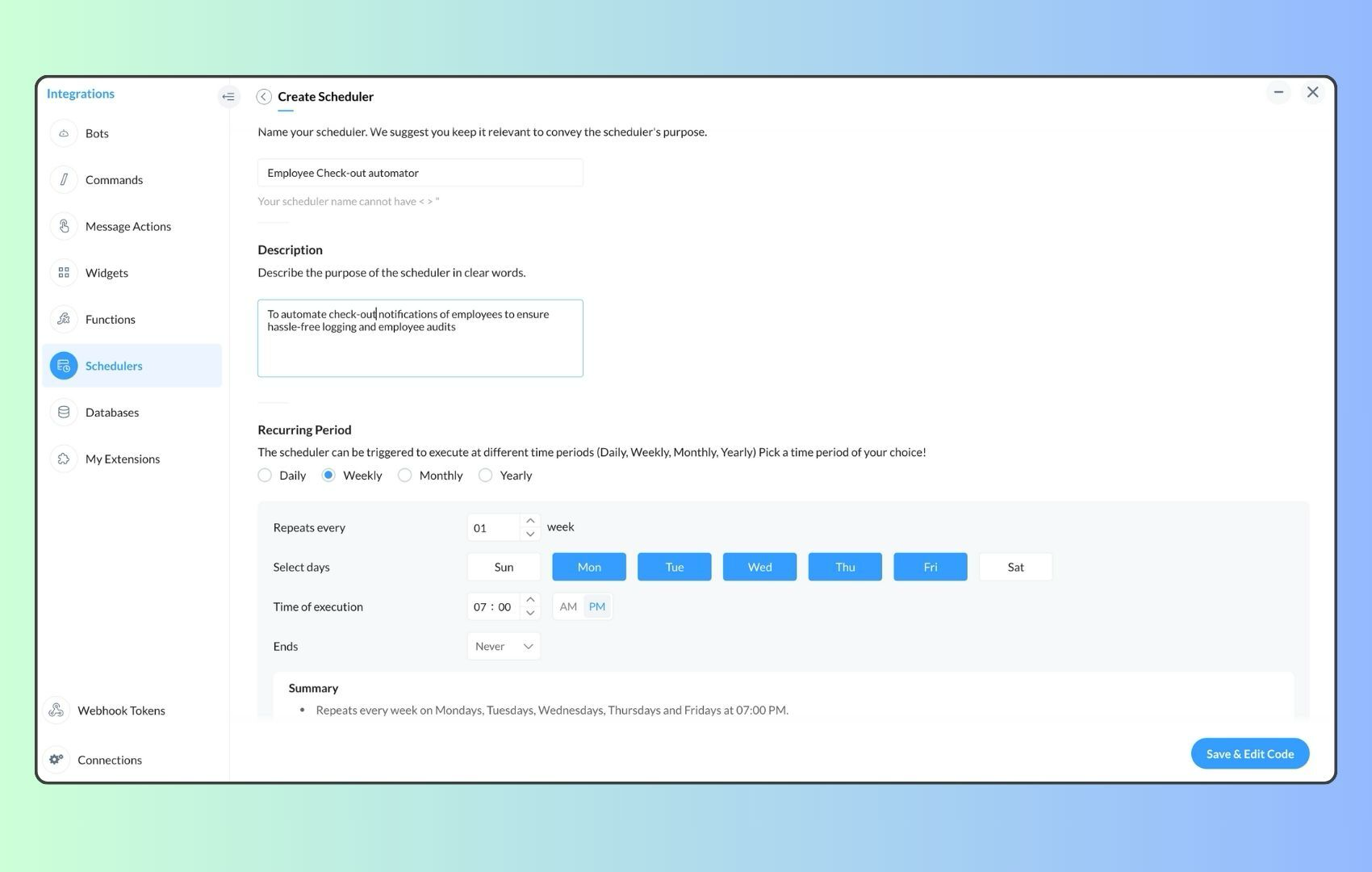
- Now, let's follow the same steps and create a scheduler for checkout reminders. Under the recurring period, choose the type as "Weekly." Select Monday through Friday and set the time of execution to 7 PM or any other time that aligns with your company's checkout time, or customise the recurring period based on your specific use case.
- Click "Save & edit code" and paste the following code.
- attendanceResponse = invokeurl
- [
- url :"https://people.zoho.com/api/attendance/fetchLatestAttEntries?duration=600"
- type :GET
- connection:"{CONNECTION_LINK_NAME}"
- ];
- info attendanceResponse;
- todayDate = zoho.currenttime.toString("YYYY-MM-dd");
- latestAttendanceRecords = attendanceResponse.get("response").get("result");
- usersWithoutCheckout = list();
- if(latestAttendanceRecords.size() > 0)
- {
- for each userRecord in latestAttendanceRecords
- {
- userEmail = userRecord.get("emailId");
- dailyEntries = userRecord.get("entries");
- for each dailyEntry in dailyEntries
- {
- if(dailyEntry.containsKey(todayDate))
- {
- todayEntryDetails = dailyEntry.get(todayDate);
- attendanceLogs = todayEntryDetails.get("attEntries");
- for each logEntry in attendanceLogs
- {
- if(!logEntry.containsKey("checkOutTime"))
- {
- usersWithoutCheckout.add("{@" + userEmail + "}");
- }
- }
- }
- }
- }
- }
- usersWithoutCheckoutString = usersWithoutCheckout.toString("\n");
- if(usersWithoutCheckoutString.trim().length() == 0){
- usersWithoutCheckoutString = "No users were found checked-in after 7 PM today. Great to see everyone wrapping up on time! ✅";
- }
- response = Map();
- card = Map();
- card.put("title","List of users who remain checked in ( " + usersWithoutCheckout.size() + " )");
- card.put("thumbnail","https://media.tenor.com/Hd8nLZZTPRYAAAAi/alarm-clock-alarm.gif");
- card.put("theme","modern-inline");
- response.put("card",card);
- response.put("text",usersWithoutCheckoutString);
- info zoho.cliq.postToChannel("{CHANNEL_UNIQUE_NAME}",response);
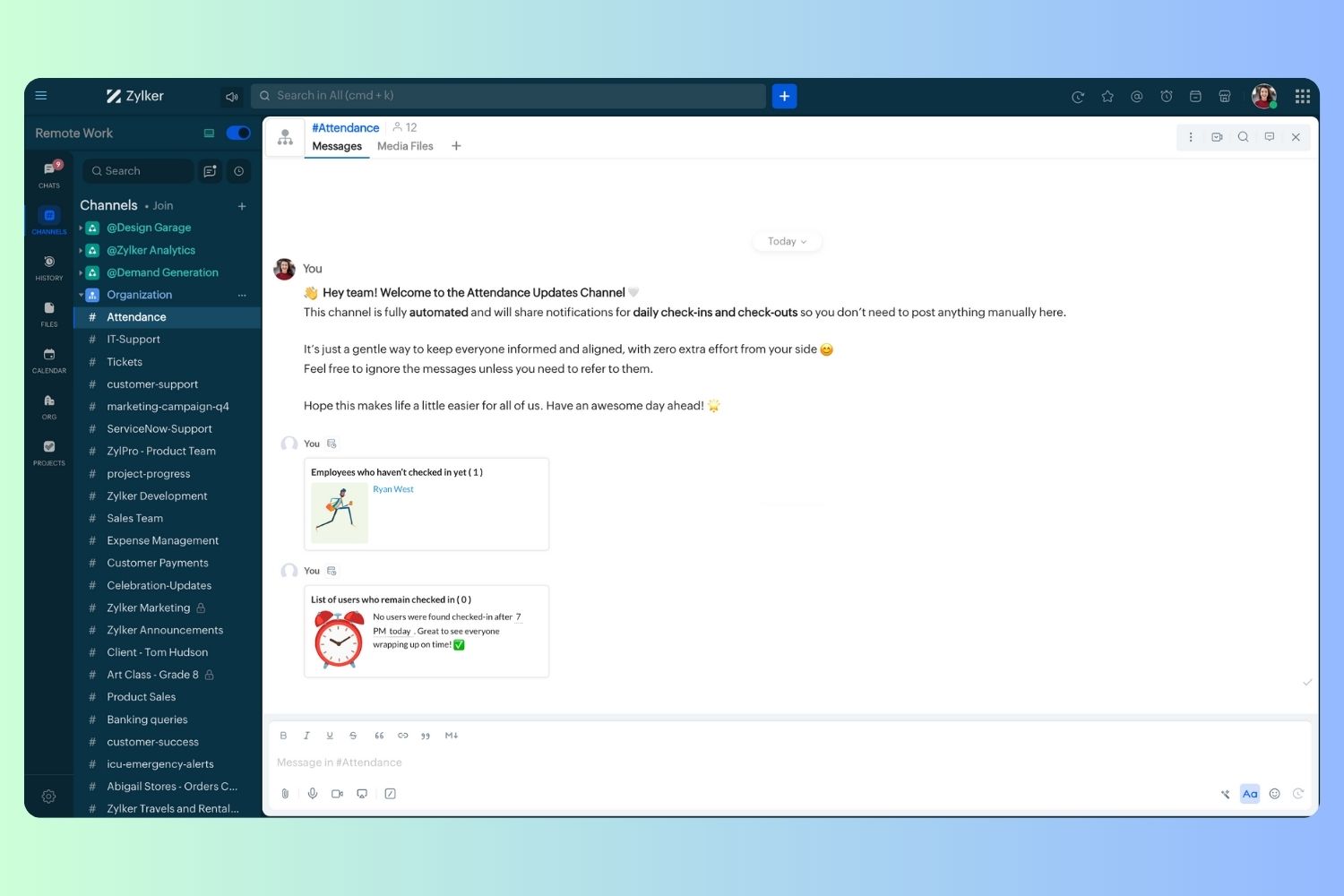
Wrapping up and checking out for the day, hopefully
Topic Participants
Harsha SS
Ram Freedman
Sticky Posts
Automate attendance tracking with Zoho Cliq Developer Platform
I wish remote work were permanently mandated so we could join work calls from a movie theatre or even while skydiving! But wait, it's time to wake up! The alarm has snoozed twice, and your team has already logged on for the day. Keeping tabs on attendanceAutomating Employee Birthday Notifications in Zoho Cliq
Have you ever missed a birthday and felt like the office Grinch? Fear not, the Cliq Developer Platform has got your back! With Zoho Cliq's Schedulers, you can be the office party-cipant who never forgets a single cake, balloon, or awkward rendition ofCustomer payment alerts in Zoho Cliq
For businesses that depend on cash flow, payment updates are essential for operational decision-making and go beyond simple accounting entries. The sales team needs to be notified when invoices are cleared so that upcoming orders can be released. In contrast,Accelerate Github code reviews with Zoho Cliq Platform's link handlers
Code reviews are critical, and they can get buried in conversations or lost when using multiple tools. With the Cliq Platform's link handlers, let's transform shared Github pull request links into interactive, real-time code reviews on channels. ShareApp Spotlight : PagerDuty for Zoho Cliq
App Spotlight brings you hand-picked apps to enhance the power of your Zoho apps and tools. Visit the Zoho Marketplace to explore all of our apps, integrations, and extensions. In today's fast-paced world, seizing every moment is essential for operational
Nederlandse Hulpbronnen

Recent Topics
Custom report
Hello Everyone I hope everything is fine. I've tried to To change the layout of the reports, especially the summary page report, and I want to divide summary of each section in the survey but I can't For example: I have a survey containing five differentZoho Journey - ZOHO MARKETING AUTOMATION
I’ve encountered an issue while working with a journey in Zoho Marketing Automation. After creating the journey, I wanted to edit the "Match Criteria" settings. Unfortunately: The criteria section appears to be locked and not editable. I’m also unableCustom Fields in PDF outputs
I created a couple of custom fields. e.g Country of Origin and HS Tariff Code. I need these to appear on a clone of a sales order PDF template but on on the standard PDF template. When I select "appear on PDFs' it appears on both but when I don't selectHow to create a Service Agreement with Quarterly Estimate
Hello, I'm not sure if this has been asked before so please don't get mad at me for asking. We're an NDIS provider in Australia so we need to draft a Service Agreement for our client. With the recent changes in the NDIS we're now required to also includeZoho Social - Post Footer Templates
As a content creator I often want to include some information at the end of most posts. It would be great if there was an option to add pre-written footers, similar to the Hashtag Groups at the end of posts. For example, if there is an offer I'm runningAllow to pick color for project groups in Zoho Projects
Hi Zoho Team, It would be really helpful if users could assign colors to project groups. This would make it easier to visually distinguish groups, improve navigation, and give a clearer overview when managing multiple projects. Thanks for consideringZoho Books - Quotes to Sales Order Automation
Hi Books team, In the Quote settings there is an option to convert a Quote to an Invoice upon acceptance, but there is not feature to convert a Quote to a Sales Order (see screenshot below) For users selling products through Zoho Inventory, the workflowCan't find imported leads
Hi There I have imported leads into the CRM via a .xls document, and the import is showing up as having been successful, however - when I try and locate the leads in the CRM system, I cannot find them. 1. There are no filters applied 2. They are notCustom Button Disappearing in mobile view | Zoho CRM Canvas
I'm working in Zoho CRM Canvas to create a custom view for our sales team. One of the features I'm adding is a custom button that opens the leads address in another tab. I've had no issue with this in the desktop view, but in the mobile view the buttonThe connected workflow is a great idea just needs Projects Integrations
I just discovered the connected workflows in CRM and its a Great Idea i wish it was integrated with Zoho Projects I will explain our use case I am already trying to do something like connected workflow with zoho flow Our requirement was to Create a TaskZoho Projects MCP Feedback
I've started using the MCP connector with Zoho Projects, and the features that exist really do work quite well - I feel this is going to be a major update to the Zoho Ecosystem. In projects a major missing feature is the ability to manage, (especiallyemail template
How do I create and save an email templateEnhancements in Portal User Group creation flow
Hello everyone, Before introducing new Portal features, here are some changes to the UI of Portals page to improve the user experience. Some tabs and options have been repositioned so that users can better access the functionalities of the feature. FromAlways display images from this sender – Is this feature available?
In Zoho mail, I had my "Load external images" setting set to "Ask me", and that's fine. That's the setting I prefer. What's not fine though is I always need to tick "Display now" for each email I get, regardless if I've done that multiple times from severalZoho Notebook Sync problem
I'm facing a problem with syncing of notebook on android app. It's not syncing. Sometimes it syncs after a day or two. I created some notes on web notebook but it's not syncing on mobile app. Please help!!!!Cant Save Gauge on Creator Page
How to Save Gauge on Creator Page see movie https://vimeo.com/1116410860?share=copy#t=0Apply Advance option not shown in report
We are facing an issue in Zoho Expenses. While approving an Expense Report, the "Apply Advance" option is not appearing under the three dots (More Options). Details: Module: Expense Reports Issue: "Apply Advance" option not visible Status of Report: AwaitingAuto Capitalize First Letter of Words
Hi I am completely new to ZOHO and am trying to build a database. How can i make it when a address is entered into a form field like this: main st it automatically changes is to show: Main St Thank YouFollow-up emails via Workflow Automation not staying in the same thread
Dear Zoho Support Team, I am currently using Workflow Automation in Zoho Campaigns to send follow-up emails. In my test case, I noticed the following behavior: All emails in the automation have the same subject line. If the follow-up email is sent withinClient Script refuses to set an initial value in Subform field
I tried a very simple, 1 line client script to set a default value in a custom subform field when the "Add Row" button is clicked and the user is entering data. It does not work - can someone tell me why? ZDK documentation suggests this should be doable.Help Center IFrame Issue
I have had a working Help Center on my website using an iframe for a while. But now for some reason the sign in page gets a refused to connect error. Can someone please help. If I go to the url manually it works correcltyComment Templates
Is it possible to add a template option for comments? We have some agents in the process who's responses require a pre-formatted layout. It would be incredibly handy to have a template for them where they can insert the template and then add their responsesShared values: From classroom lessons to teaching moments in customer service
While the world observes Teachers’ Day on October 5, in India, we celebrate a month earlier, on September 5, to mark the birth anniversary of Dr. Sarvepalli Radhakrishnan, a great teacher, renowned scholar, educationist, and advocate for empowerment.Create a list of customers who participated in specific Zoho Backstage events and send them an email via Zoho CRM
How to create a list of customers who participated in specific Zoho Backstage events and send them an email via Zoho CRM? I was able to do a view in CRM based on customer that registered to an event, but I don't seems to be able to include the filterZoho Desk blank page
1. Click Access zoho desk on https://www.zoho.com/desk/ 2. It redirects to https://desk.zoho.com/agent?action=CreatePortal and the page is blank. Edge browser Version 131.0.2903.112 (Official build) (arm64) on MacOSI hate the new user UI with the bar on the left
How can I reverse this?Question regarding import of previous deals...
Good afternoon, I'm working on importing some older deal records from an external sheet into the CRM; however, when I manually click "Add New Deal" and enter the pertinent information, the deal isn't appearing when I look at the "Deals" bar on the account'sClient Script also planned for Zoho Desk?
Hello there, I modified something in Zoho CRM the other day and was amazed at the possibilities offered by the "Client Script" feature in conjunction with the ZDK. You can lock any fields on the screen, edit them, you can react to various events (fieldOne person/cell phone to manage multiple accounts
Hi. I have a personal Free account to keep my own domain/emails. Now I need to create a Business account to my company's own domain, but I have only one mobile phone number I use to everything. How do I do to manage this? Can I manage a Free domain andTracking KPIs, Goals etc in People
How are Zoho People users tracking employee targets in People? For example, my marketing assistant has a target of "Collect 10 new customer testimonials every month". I want to record attainment for this target on a monthly basis, then add it to theirZoho Desk: Ticket Owner Agents vs Teams
Hi Zoho, We would like to explore the possibility of hiding the ‘Agents’ section within the Ticket Owner dropdown, so that we can fully utilise the ‘Teams’ dropdown when assigning tickets. This request comes from the fact that only certain agents andCan not Use Attachment Button on Android Widget
this always pops up when I touch the attach button on android widget. going to settings, there is no storage permission to be enabled. if I open the app, and access the attach feature there, I can access my storage and upload normally.Announcing new features in Trident for Mac (1.24.0)
Hello everyone! Trident for macOS (v.1.24.0) is here with interesting features and thoughtful enhancements to redefine the way you plan and manage your calendar events. Here's a quick look at what's new. Create calendar events from emails. In additionMass Mail Statistics - Number of unsent emails
How do I find out which emails were not sent?Est-il possible d'annuler l'envoi d'un mail automatique ?
Bonjour, Lorsque je refuse un candidat, il reçois un mail dans les 24h pour l'informer que sa candidature n'est pas retenue. J'ai rejeté un candidat par erreur. Savez-vous s'il possible d'annuler l'envoi de ce mail ? Merci d'avance pour votre aide.embed a form in an email
Hello, how to embed a form in an email that populates Zoho CRM cases? I would like to send emails to a selected audience offering something. In the same email the recipients - if interested - instead of replying to can fill in a Zoho CRM form that createsHow to add Zoho demo site page designs to my Zoho Sites website
Hi, I would like to add the design from the following demo URLs into my current Zoho website. I have already created two new pages on my site, named “Menu2” and “Menu3.” For the “Menu2” page, I want to use the design from this demo: https://naturestjuice-demo.zohosites.com/menuDigest Août - Un résumé de ce qui s'est passé le mois dernier sur Community
Bonjour chère communauté ! Voici le résumé tant attendu de tout ce qui a marqué Zoho le mois dernier : contenus utiles, échanges inspirants et moments forts. 🎉 Découvrez Zoho Backstage 3.0 : une version repensée pour offrir encore plus de flexibilité,Kaizen #206 - Answering your Questions | Displaying Related Purchase Orders from Zoho Books in CRM Deals using Queries
Hello everyone! We're back with another post in the Kaizen series. We're grateful for the feedback we received from all of you! One of the questions we received was "I would like to see the list of Purchase Orders in Zoho Books for a Deal in CRM." WeAdd Analytics function for Title case (capitalising each word in a string)
At present, you can only capitalise each word in a string in Analytics during data import. It would be really useful to be able to do this with a formula column, but there is no Title Case function.Next Page