Automation#34 : Automate Email threading for Ticket notification

Hello Everyone,
It's been a while since we've presented an automation. However, our community has been buzzing with ideas, use cases, and discussions with our community experts and Ask the Experts session.
So, here we are again, presenting an automation focused on threading ticket notification emails.
Let's see how this automation helped our folks at Zylker Techfix.
Zylker Techfix, a gadget service company, has grown significantly and now serves a large customer base. The support team receives tickets from various customers, some of whom send multiple emails regarding servicing multiple gadgets. With their expanding customer base, Zylker Techfix wanted to effectively track notification emails sent to customers for each respective ticket.
Additionally, Zylker Techfix aimed to inform customers about the engineer assigned to support them with their submitted gadget, helping establish a stronger connection with their customers.
In this post, let's explore how we can adopt Zylker Techfix's customization.
Notify Customers when a ticket is created
The notification rule has an option to notify your customers when a ticket is created.
You can add the details of the ticket owner within the Email template so customers will know the support executive who will be handling the ticket.
How to include Ticket Owner details within the Email template?
You could create a New Email template or use the Existing email template.
Create an Email template
You can either create a New Email template or edit an existing Email template.
To Add a New Template : Go to Setup (S) >> Customization >> Email Templates >> Select the required Department >> Click on Add >> New Template >> Select the Tickets module >> Enter Name > Select Folder, From Address, Enter Reply to address if required, Add Subject and desired description.
To add Ticket owner's name, insert the placeholders First Name and Last Name (if required) ${Case Owner.First Name}${Case Owner.Last Name}, under Ticket Owner.
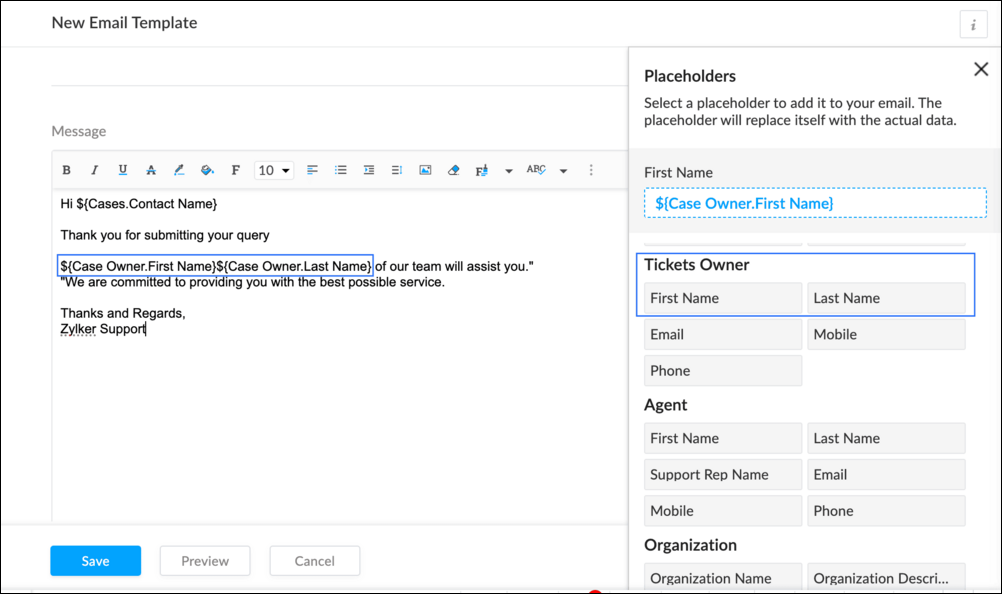
To Edit an Existing Email
To edit an existing Email, Go to Setup (S) >> Customization >> Email Templates >> Select the required Department >> Click on the Edit icon for the existing template or select the existing Template >> Edit description. To insert Ticket owner's name, insert the placeholders for first name and last name (if required) ${Case Owner.First Name}${Case Owner.Last Name}, under Ticket Owner.
Create a connection
1.1 Go to Setup(S) and choose Connections under Developer Space.
1.2 Click Create Connection.
1.3 Select Zoho Desk under Default Services.
1.4 Set the connection name as zohodeskconnection.
1.5 Under Choose Scopes, choose the below scope values:
1.5 Under Choose Scopes, choose the below scope values:
Desk.settings.ALLDesk.tickets.UPDATE
1.6 Click Create and Connect.
1.7 Click Connect.
1.8 Choose the Desk's organization to connect with Deluge, and click Submit.
1.9 Click Accept.
Connection is created successfully.
Configure Custom Function within the Workflow Rule
1. Go to Setup, choose Workflows under Automation.
2. Under Workflows, click Create Rule.
3. Under Basic Information, choose Tickets under Module, give a Rule Name and Description.
4. Click on the Active checkbox to activate the rule once created. Click Next.
5. Under Execute on, select Create.
6. Add Criteria, if required.
7. Under Actions, click on the drop-down in the + icon and select Custom Functions >> New.
7.1 Under Basic Information, enter Name and Description. Choose Tickets under Module.
7.2 Under Argument Mapping, give a desired Method Name. Map the arguments as below:
7.2.1 In the Argument Name field, type ticketId and select Ticket Id in the Tickets Section.
7.2.2 In the Argument Name field, type contactEmail and select Email in the Contacts Section.
7.2.3 In the Argument Name field, type fromEmailAddress, click on Specify Custom Value and type the verified From Address of your department.

7.3 In the script window, insert the Custom Function given below:
- //<<<< User Inputs Section >>>>----
- // Replace ".com" with appropriate domain extension based on customer's location/DC
- deskURL = "https://desk.zoho.com";
- templateId = "xxxxxxtemplateIdxxxxx";
- //<<<< Initial Configs >>>>----
- logs = Map();
- template = invokeurl
- [
- url :deskURL + "/api/v1/templates/" + templateId + "/render?entityId=" + ticketId
- type :POST
- connection:"deskconnection"
- ];
- if(template != null && template.containsKey("body"))
- {
- logs.put("template",template);
- emailContent = template.get("body");
- emailReplyParams = {"channel":"EMAIL","to":contactEmail,"fromEmailAddress":fromEmailAddress,"content":emailContent,"contentType":"html"};
- logs.put("emailReplyParams",emailReplyParams);
- sendReply = invokeurl
- [
- url :deskURL + "/api/v1/tickets/" + ticketId + "/sendReply"
- type :POST
- parameters:emailReplyParams + ""
- connection:"deskconnection"
- ];
- logs.put("sendReply",sendReply);
- }
- info logs;

Note
a. In Line 3, replace .com in the address with .in/.eu/.ca based on your DC.
b.In Line 4, enter the template id within " " of the Email template you created or edited.
To fetch Template id, go to Setup (S) >> select Email Templates under Customization >> click on the Email template and on the Address bar, copy the numeric value at the end of the URL.
8. Click Save to save the custom function.
9. Click Save again to save the workflow.
Now, along with your ticket conversations, you can also track the emails sent as notifications within your ticket conversations.
Until the next post,
Lydia | Zoho Desk
Topic Participants
Lydia | Zoho Desk
Sticky Posts
Register for Zoho Desk Beta Community
With the start of the year, we have decided to take a small step in making the life of our customers a little easier. We now have easy access to all our upcoming features and a faster way to request for beta access. We open betas for some of our featuresShare your Zoho Desk story with us!
Tell us how you use Zoho Desk for your business and inspire others with your story. Be it a simple workflow rule that helps you navigate complex processes or a macro that saves your team a lot of time; share it here and help the community learn and grow with shared knowledge.Tip #1: Learn to pick the right channels
Mail, live chat, telephony, social media, web forms—there are so many support channels out there. Trying to pick the right channels to offer your customers can get pretty confusing. Emails are most useful when the customer wants to put things on record. However, escalated or complicated issues should not be resolved over email because it's slow and impersonal. When you need immediate responses, live chat is more suitable. It's also quick and convenient, so it's the go-to channel for small issues.Welcome to Zoho Desk Community - Say hello here!
Hello everyone! Though we have been here for a while, it’s time to formally establish the Zoho Desk Community; we’re really happy to have you all here! This can be the place where you take a moment to introduce yourself to the rest of the community. We’d love to hear all about you, what you do, what company or industry you work for, how you use Zoho Desk and anything else that you will like to share! Here’s a little about me. I am Chinmayee. I have been associated with Zoho since 2014. I joined hereWebinar 1: Blueprint for Customer Service
With the launch of a host of new features in Zoho Desk, we thought it’ll be great to have a few webinars to help our customers make the most of them. We’re starting off with our most talked about feature, Blueprint in Zoho Desk. You can register for the Blueprint webinar here: The webinar will be delivered by our in-house product experts. This is a good opportunity to ask questions to our experts and understand how Blueprint can help you automate your service processes. We look forward to seeing
Nederlandse Hulpbronnen

Recent Topics
Tracking training certification expirations
Hi Zoho Community! I'm looking for some input on the best and most efficient ways to track training expirations in Zoho CRM. I have a very specific workflow that I am looking for - my company offers trainings, and the certification expires every 2 toKaizen #164 : Client Credentials
Hello everyone, Welcome back to Kaizen. In this post, we will discuss Client Credentials Flow and when it can be used. What is Client Credentials Flow? According to RFC6749, the official specification for the OAuth 2.0 authorization framework, "The clientCRM Email Template Align Left Instead of Center
Is there a way to make a basic template align to the left instead of center? I know I'm likely forced to the 600px wide with the basic templates but I would REALLY like to set the email to the left instead of center. The basic templates make all the emailsClient Script - "Click' Button on Purchase Order - Specify "To Contact" or "To Supplier"
The send email button is unique on the purchase order in that is has an additional submenu to send email "To Contact" or "To Supplier" It appears that the "click" event in Client script doesn't work correctly, probably because the button click didn'tAdd Client Credentials Flow to Python SDK
The Zoho CRM API supports a client credentials flow to automatically generate ephemeral access tokens, and this can be done programatically. The Python SDK however requires you to provide a grant token, refresh token, or access token when initializingConditional display of fields in Zoho Books Custom modules based on another field
We're currently working with a Custom Module in Zoho Books and have a question about improving data entry efficiency and user experience. Our module includes a "Client Type" dropdown field, which determines the type of information to be collected. EachBackground Image for page in Zoho Creator
Is it possible to use an image as the background in a page in Zoho Creator? I see it is possible to use an image as the background within a panel, but about about the page itself?Zoho IP address blocked by Microsoft
Today I tried to send emails to Outlook email addresses and all of them failed. The log displays like this: Reporting-MTA: dns; mx.zohomail.jp Arrival-Date: Fri, 27 Jun 2025 12:52:30 +0800 Original-Recipient: rfc822; ######@outlook.com Final-Recipient:Request to Enable Full DNS Management Access for My Domain
Hello Zoho Support Team, I have purchased the domain "digimarts365.online" through Zoho, and I need to add A and CNAME records to connect it with my Shopify store. However, DNS Toolkit is not allowing me to edit or add any records. Kindly enable fullBackup flow, see change log / history
Hello, I would like to know, how flows can be saved, copied and tracked. If I work on a Flow with multiple other colleagues we need to see the Changes made by others. Is there a history, changelog or something else? Also we need to backup/import flowsProblème de validation du domaine spelam.ma
Bonjour équipe Zoho, J’ai l’honneur de vous contacter car je rencontre un problème technique au niveau de la validation de mon compte ou de mon domaine spelam.ma. En effet, j’ai déjà acheté le domaine, mais la validation ne semble pas être correctementWriter loads as a blank page.
Hi, I'm new to zoho but I liked the idea of an online wordprocessor that I can use from multiple computers. I signed up a few hours ago while at work where our computers use Linus Ubuntu and a Firefox browser and the Writer came up fine. Now I'm home and using my Windows machine with Norton Firewall and Firefox and the writer opens as a blank page. I've checked my security options in both Firefox & Norton and I have received all the cookies from Zoho. What gives?JOB Sheet can not send PDF as service rapports and more info needed other topic
Goedendag, - Jullie hebben nu job sheet erin gedaan en dar is echt super goed, enkel kunnen we de werkbon ( JOB sheet) nu niet verzenden als PDF als een service rapport naar onze hoofdaannemer hoe we dat nu doen als bewijs van de levering van het werkPublish a single Sheet stopped working
I used to have a published sheet on my Zoho Spreadsheet and that stopped working. If I want to publish it again, I only get the message that says "Published externally", but that does nothing, and if I change tabs and come back, the sheet gives me theDoes Zoho Contracts support white-labeling?
As the title says, do you provide us white-labeling solution?Constantly getting error 429 "Too Many Requests" despite not sending many requests.
I am currently working on developing an integration between our company's app and our zoho books setup using the api. When testing new functionality, I am very often having the calls fail with Error 429 'You have made too many requests continuously. PleaseNot receiving emails
I'm able to send emails, but I can't receive any. Please helpCapturing knowledge across many channels
We actively use Cliq for client discussions, product management etc. Often there are great answers to questions or key announcements. We have no way to tag or capture them along the way. Pinning only gets us so far. For example, imagine a product channelZoho Campaigns Account Keeps Shutting Down
Hey hey, I am completely at a loss here. For months we have been back and forth with Zoho Campaigns Support on Spam Trap hits. Each time they can never provide us with a full list of emails, only 1 here or there. So internally we have setup a integrationWhat’s New in 2025 (So Far)
Hey Recruiters, We’ve wrapped up the first half of 2025 with a few focused enhancements in Zoho Recruit—all aimed at simplifying your day-to-day recruitment tasks. Here’s a quick video that walks you through what’s new so far this year: Here’s a briefMulti-Department Approval for a Single Bill in Zoho Books
Hello everyone, Hope you're all doing well. I’d like to ask if anyone has found a good workaround for the following scenario in Zoho Books: Let’s say a corporate credit card bill or vendor invoice covers multiple purchases across different projects orZoho Landing Page "Something went wrong" Error
Hello, Every time I try to create a new landing page, I receive a "Something went wrong" error with no explanation. I cannot create any new pages, which means we cannot use this application. I did create one landing page successfully over a month ago,Composite items are not seen in zoho commerce
Composite items are not seen in zoho commerce. Are you scheduled to fix this error?not able to access Zoho from home WIFI
for some reasone i am not able to access Zoho on my laptop or my iphone while i am connected to my home Wifi, i am able to access these sites both on laptop as well as Iphone and associated apps on any other Wifi as well as when I am on my 4G connectionZoho Books for Service Enterproses
I would like to know how to use Zoho Books for services such as car rental, travel agency, and hotel services. I notice that Zoho Books is good for goods, but for services, it's very difficult to track the profit or loss on each invoice. I need to captureEmail Relay in Zoho Books
I have set up the email relay in Zoho books and the SMTP test was successful. However, I can't figure out how to sent the POs and invoices via the relay so the copy of the message shows in google workspace sent mail. Any guidance is appreciatedE-invoicing/Facturacion Electronica in Peru, SUNAT authority
Hi Zoho, you are promoting your product very actively in south america as well as in Peru, but since few years there is an obligation for e-invoicing, transmitting information directly to peruvian tax authority SUNAT. Do you have any solution for this?Project Accounting
Hello Zoho, Can we also bring project accounting in Zohobooks as a ne feature in upcoming developments? This will be helpful for specific business and industries. ThanksAccounts Payable
hi there i am using the free version to trial the software. I am working on the acrual basis. When i received a vendor invoice, it gets keyed into the systems as an unpaid invoice as the payment to from the vendor is 14 days. the unpaid invoice doesApproval Processes "Record Modification"
I didn't find any information about the "Record Modification" item in Zoho articles and Tutorials. I see that this item didn't exist a year ago. Help understand how it works, I tested it and didn't see any difference between "all fields" and "no fieHow do i add another purchase information heading?
i would like to add another section right here to enter an amount which then link directly to the cost of goods sold accountHelp with Zoho CRM API Integration in C# WinForms (Token Generation Issue)
Hi everyone, I need your help with integrating the Zoho CRM API into a C# desktop application. My goal is to build a WinForms app in Visual Studio that does the following: Fetch the full list of client projects (module: Deals) and display them in a searchableCan we share the URL of My zoho Sheets on other websites?
Hello everyone? I have sheets on Zoho and I want to share them on other websites like daraz, homeshopping, gepco duplicate bills, etc. I don't have much knowledge about online sharing question forums? I am a student and have a short survey about onlineAdd Support to Upload Inventory Items with Categories or Enable Separate Upload for Inventory Categories
Currently, Zoho Inventory does not support uploading new items along with their parent and sub inventory categories using the item import feature. This creates challenges for businesses with structured inventory hierarchies when trying to upload itemsin zoho books while categorizing need to add new name in category by replacing expanses how to edit or make changes need assistance
Tip of the Week #62– Use @mentions to loop in teammates.
Ever been stuck on a customer query because you needed input from someone else on your team? Maybe you were unsure about a refund policy or needed help answering a technical question. So you forward the message … and wait. Or worse, you forget to followSuggestions for Kiosk Functionality Improvements in Zoho People
Hello Zoho Team, I’d like to share some feedback and suggestions regarding the Kiosk functionality in Zoho People, as there are two important points that affect user experience and compliance: Visual Confirmation of Check-In Status It would be extremelyNeeds Separate Permissions levels for Record Attachments
Currently in Zoho Books Record attachments are tied to the general permission level For example if a role don't have the delete permission level they cannot delete the attachment as well If a role doesn't have the edit permission they cannot upload theZoho Books integration with Google workspace
How do I integrate Zoho books with Google Workspace? The steps outlined on the Zoho help sections do not correspond to the actual user interface in Google Workspace. Zoho books is installed on admin level for all users, all users can access it from theFields of Look up in Custom Modules
We need to create a custom module in Books for Proforma Invoices Now I created a Custom Module and added a Table and in the table added a lookup field and chose Items Now I want Specific fields of the item such as Tax, Item Cost etc but it only displaysNext Page