Automation#34 : Automate Email threading for Ticket notification
Hello Everyone,
It's been a while since we've presented an automation. However, our community has been buzzing with ideas, use cases, and discussions with our community experts and Ask the Experts session.
So, here we are again, presenting an automation focused on threading ticket notification emails.
Let's see how this automation helped our folks at Zylker Techfix.
Zylker Techfix, a gadget service company, has grown significantly and now serves a large customer base. The support team receives tickets from various customers, some of whom send multiple emails regarding servicing multiple gadgets. With their expanding customer base, Zylker Techfix wanted to effectively track notification emails sent to customers for each respective ticket.
Additionally, Zylker Techfix aimed to inform customers about the engineer assigned to support them with their submitted gadget, helping establish a stronger connection with their customers.
In this post, let's explore how we can adopt Zylker Techfix's customization.
Notify Customers when a ticket is created
The notification rule has an option to notify your customers when a ticket is created.
You can add the details of the ticket owner within the Email template so customers will know the support executive who will be handling the ticket.
How to include Ticket Owner details within the Email template?
You could create a New Email template or use the Existing email template.
Create an Email template
You can either create a New Email template or edit an existing Email template.
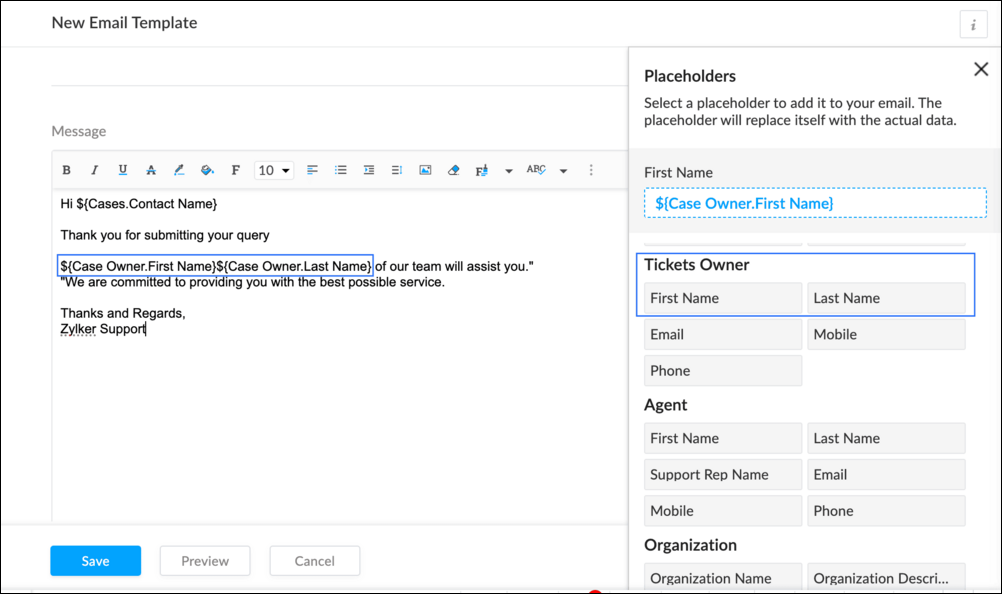
To Add a New Template : Go to Setup (S) >> Customization >> Email Templates >> Select the required Department >> Click on Add >> New Template >> Select the Tickets module >> Enter Name > Select Folder, From Address, Enter Reply to address if required, Add Subject and desired description.
To add Ticket owner's name, insert the placeholders First Name and Last Name (if required) ${Case Owner.First Name}${Case Owner.Last Name}, under Ticket Owner.
To Edit an Existing Email
To edit an existing Email, Go to Setup (S) >> Customization >> Email Templates >> Select the required Department >> Click on the Edit icon for the existing template or select the existing Template >> Edit description. To insert Ticket owner's name, insert the placeholders for first name and last name (if required) ${Case Owner.First Name}${Case Owner.Last Name}, under Ticket Owner.
Create a connection
1.1 Go to Setup(S) and choose Connections under Developer Space.
1.2 Click Create Connection.
1.3 Select Zoho Desk under Default Services.
1.4 Set the connection name as zohodeskconnection.
1.5 Under Choose Scopes, choose the below scope values:
1.5 Under Choose Scopes, choose the below scope values:
Desk.settings.ALLDesk.tickets.UPDATE
1.6 Click Create and Connect.
1.7 Click Connect.
1.8 Choose the Desk's organization to connect with Deluge, and click Submit.
1.9 Click Accept.
Connection is created successfully.
Configure Custom Function within the Workflow Rule
1. Go to Setup, choose Workflows under Automation.
2. Under Workflows, click Create Rule.
3. Under Basic Information, choose Tickets under Module, give a Rule Name and Description.
4. Click on the Active checkbox to activate the rule once created. Click Next.
5. Under Execute on, select Create.
6. Add Criteria, if required.
7. Under Actions, click on the drop-down in the + icon and select Custom Functions >> New.
7.1 Under Basic Information, enter Name and Description. Choose Tickets under Module.
7.2 Under Argument Mapping, give a desired Method Name. Map the arguments as below:
7.2.1 In the Argument Name field, type ticketId and select Ticket Id in the Tickets Section.
7.2.2 In the Argument Name field, type contactEmail and select Email in the Contacts Section.
7.2.3 In the Argument Name field, type fromEmailAddress, click on Specify Custom Value and type the verified From Address of your department.

7.3 In the script window, insert the Custom Function given below:
- //<<<< User Inputs Section >>>>----
- // Replace ".com" with appropriate domain extension based on customer's location/DC
- deskURL = "https://desk.zoho.com";
- templateId = "xxxxxxtemplateIdxxxxx";
- //<<<< Initial Configs >>>>----
- logs = Map();
- template = invokeurl
- [
- url :deskURL + "/api/v1/templates/" + templateId + "/render?entityId=" + ticketId
- type :POST
- connection:"deskconnection"
- ];
- if(template != null && template.containsKey("body"))
- {
- logs.put("template",template);
- emailContent = template.get("body");
- emailReplyParams = {"channel":"EMAIL","to":contactEmail,"fromEmailAddress":fromEmailAddress,"content":emailContent,"contentType":"html"};
- logs.put("emailReplyParams",emailReplyParams);
- sendReply = invokeurl
- [
- url :deskURL + "/api/v1/tickets/" + ticketId + "/sendReply"
- type :POST
- parameters:emailReplyParams + ""
- connection:"deskconnection"
- ];
- logs.put("sendReply",sendReply);
- }
- info logs;

Note
a. In Line 3, replace .com in the address with .in/.eu/.ca based on your DC.
b.In Line 4, enter the template id within " " of the Email template you created or edited.
To fetch Template id, go to Setup (S) >> select Email Templates under Customization >> click on the Email template and on the Address bar, copy the numeric value at the end of the URL.
8. Click Save to save the custom function.
9. Click Save again to save the workflow.
Now, along with your ticket conversations, you can also track the emails sent as notifications within your ticket conversations.
Until the next post,
Lydia | Zoho Desk
Topic Participants
Lydia | Zoho Desk
Sticky Posts
Register for Zoho Desk Beta Community
With the start of the year, we have decided to take a small step in making the life of our customers a little easier. We now have easy access to all our upcoming features and a faster way to request for beta access. We open betas for some of our featuresShare your Zoho Desk story with us!
Tell us how you use Zoho Desk for your business and inspire others with your story. Be it a simple workflow rule that helps you navigate complex processes or a macro that saves your team a lot of time; share it here and help the community learn and grow with shared knowledge.Tip #1: Learn to pick the right channels
Mail, live chat, telephony, social media, web forms—there are so many support channels out there. Trying to pick the right channels to offer your customers can get pretty confusing. Emails are most useful when the customer wants to put things on record. However, escalated or complicated issues should not be resolved over email because it's slow and impersonal. When you need immediate responses, live chat is more suitable. It's also quick and convenient, so it's the go-to channel for small issues.Welcome to Zoho Desk Community - Say hello here!
Hello everyone! Though we have been here for a while, it’s time to formally establish the Zoho Desk Community; we’re really happy to have you all here! This can be the place where you take a moment to introduce yourself to the rest of the community. We’d love to hear all about you, what you do, what company or industry you work for, how you use Zoho Desk and anything else that you will like to share! Here’s a little about me. I am Chinmayee. I have been associated with Zoho since 2014. I joined hereWebinar 1: Blueprint for Customer Service
With the launch of a host of new features in Zoho Desk, we thought it’ll be great to have a few webinars to help our customers make the most of them. We’re starting off with our most talked about feature, Blueprint in Zoho Desk. You can register for the Blueprint webinar here: The webinar will be delivered by our in-house product experts. This is a good opportunity to ask questions to our experts and understand how Blueprint can help you automate your service processes. We look forward to seeing
Nederlandse Hulpbronnen

Recent Topics
Sending Email with Attachment (PDF, Excel file)
Hi, I'm new to Zoho CRM and I'm setting up a flow to send an Email with Attachment when user reaching a certain stage of a Deal. In detail, I've created a Blueprint which requires user to attach a PDF file when reaching a certain point of the stage andBased on the Assign To time task want to trigger also reminder for the task still move form fresh lead
If the leads is assigned To 1 am to 10.55 am task want to create 11am Then reminder want to go the person at 4pm If lead status not moved from fresh lead. From next on wards Reminder want to go 11 Am and 4pm Every day still the person moved to fresh leadEmails Not Sending
This has happened before. I contacted Zoho and it seemed to work, but now my emails are not sending or taking a long time to send and half the time attachments don't attach. It just keeps saying Sending... and I have to keep clicking it to make it send.WhatsApp pricing changes: Pay per message starting July 1, 2025
Starting July 1, 2025, WhatsApp is shifting from conversation-based pricing to per-message billing. That means every business-initiated message you send will count. Not just the first one in a 24-hour window. Pricing updates on the WhatsApp Business PlatformCreate a button that converts Sales Order into a Custom Module
I am looking for a way of creating a button on Sales Orders that would automatically create a record in a custom module I have created called Contracts. The custom destination module "Contracts" has the following fields that I would need to populate [Contracts Name] populate with SalesOrderID [Account Name] populate with related Account Name [Contract Start Date] populate with the date that the record was created Could someone help or point me in the right direction? ThanksRemove all of the junk data that comes with the trial
How would I go about removing all of the junk data that comes with the trial of zoho crm?Video Interview Feature
Please add a text option as well while sending invitations to candidates for video interviews, candidates are missing out on the email. They are more convenient in text and it really helps Hope you would understand, thanksSingapore DBS Bank
Is there any schedule corresponding to DBS of Singapore?Including Contact and Account Information in Zoho Projects.
In Zoho Projects I have created a custom layout which already includes a 'Client Information' section. The 'Client Information' section already includes integrated fields (integrated with CRM) for various account and contact details. Here's what I wantUnable to Download CRM Contact Data: WorkDrive Integration Issues
## Problem Description We need to let users download contact information from CRM as CSV files to their local computers. Since we couldn't implement a direct download option, we're trying to use WorkDrive as a workaround - but we're encountering issuesApp Spotlight : PagerDuty for Zoho Cliq
App Spotlight brings you hand-picked apps to enhance the power of your Zoho apps and tools. Visit the Zoho Marketplace to explore all of our apps, integrations, and extensions. In today's fast-paced world, seizing every moment is essential for operationalCampaigns going to spam folder, how to build so that it goes to inbox
Hello, New to campaigns, now have it functioning correctly. In my test group of 10 email addresses 100% of the emails went to spam/junk folder and/or were blocked/captured by spam filters. What is the process to building a message or format that doesIntegrate QuickBooks with Bigin and streamline your sales and accounting!
If your business relies on Bigin for customer management and QuickBooks for accounting and invoicing, this new integration is here to make your operations more efficient. By connecting these two platforms, you can now manage your CRM and financial processesWhen a ticket is merged, the merged ticket's link should redirect to the remaining ticket.
Zoho Desk deletes merged tickets. Which is not ideal. The issue is if you have a link bookmarked, or even in your inbox from a ticket that was merged, when you visit you receive an error because merging tickets actually deletes the ticket that was merged.Pass data from a Zoho Desk ticket to a Zoho Form as pre-fill data?
Hello, I'm trying to pre-fill a Zoho form with client data based on the Zoho Desk ticket data that would be associated. Work flow i'm trying to create: 1. Ticket created for a sales order 2. order requires a site survey 3. link inside ticket links toGoods total weight in Sales Orders
Hello everyone, We want to automatically calculate the total weight in Sales Orders based on the weight data specified in the Items. Could you please suggest the simplest way to achieve this in Zoho Inventory? I would greatly appreciate any advice andProblem with pagination in Zoho Inventory API
Hello, I'm having an issue with the Zoho Inventory API when I try to use the pagination. When I send a request to https://inventory.zoho.com/api/v1/items?authtoken=XXXXXXXXXX&organization_id=YYYYYY&page=1&per_page=50, I get back 200 items. And when I send the same request for the second page, https://inventory.zoho.com/api/v1/items?authtoken=XXXXXXXXXX&organization_id=YYYYYY&page=2&per_page=50 I'm getting back the same 200 items I get with the first request. So I think neither the page parameterCan a user be assigned to an Account based on email domain?
Hi ZohoDesk, If I have a customer Account already configured is there any way I can use a domain matching rule to assign a new user to the correct account when logging a ticket by email? Many thanks RichCan't track conversions using GTM
We had to move the installation of the SalesIQ widget from GTM to directly do it in our wordpress site. The SalesIQ widget was being blocked by Adblockers which caused a lot of our visitors to not be able to see it. This issue was fixed from deletingWhatsApp Message Pricing Changes (Effective July 1, 2025)
Starting July 1, 2025, Meta will introduce a per-message pricing model on the WhatsApp Business Platform, replacing the current conversation-based billing. This update affects all WhatsApp messages sent through Zoho Marketing Automation. We’ve brokenCC from mail client to Zoho CRM
Hi, Is it possible to have emails sent outside of CRM use a CC that sends them into the CRM and attaches to the record? ThanksDepartment e-mail signatures
Hello everyone, We're just in the process of evaluating various help desk software alternatives and Zoho is looking pretty good to us at the moment. Our set up is a bit strange and I was wondering if this is possible. We have one tech who looks afterHow can I hide "My Requests" and "Marketplace" icon from the side menu
Hello everybody, We recently started using the new Zoho CRM for Everyone. How can I hide "My Requests" and "Marketplace" from the side menu? We don't use these features at the moment, and I couldn't find a way to disable or remove them. Best regards,Sites Speed and Performance Grades
I noticed that there are no recent inquiries or complaints about load speed or performance issues with Zoho Sites websites. However, I wanted to understand what Zoho has done to ensure that speed remains optimized, images are compressed and lazy loaded,Include Audio in Zoho Assist Session Recordings
Hello Zoho Assist Team, We hope you're doing well. We’d like to formally submit a feature request regarding session recordings in Zoho Assist. 🎯 Current Limitation When conducting a Zoho Assist session that includes voice and/or video chatting, the recordingUnable to update Created Date/Time even via upsert
hi all --- running a demo version and "recreating" some data from hubspot. I had tried the method to automatically move data over but it missed A TON of fields and some stuff wouldn't even map correctly so i am simply creating new Deal records to testBlockchain Feature?
Since I'm not an expert in this technology, is there any reason why you would not want to add this option to your Zoho SIgn documents? Is there a downside?Kaizen #196 - Zoho CRM Queries - Best Practices
Nearing 200th Kaizen Post – We want to hear from you! Do you have any questions, suggestions, or topics you would like us to cover in future posts? Your insights and suggestions help us shape future content and make this series better for everyone. GotBest way to account for shipping charges to customer
I have been allocating all our shipping expenses to the "postage" account, but I realise that is probably incorrect, as for the most part, we pass on shipping charges to our customers. So I should probably add the shipping charges into the "shipping charges"Zoho Flow s’enrichit avec les subflows et les actions Webhook
Nous sommes ravis d’annoncer deux ajouts importantsà Zoho Flow : les subflows et les webhooks sortants. Ces nouvelles fonctionnalités ont été conçues pour vous aider à créer des workflows plus facilement et à automatiser davantage de tâches répétitives.How to assign canvas view for portal user
Hi , as a portal user, I can switch to another canvas view, however, I cannot find any field to configure a default canvas view for portal user. May I ask how to set it up in CRM? And if I can view list by sheet view as a portal user?Restrict Leave Application Based on Attendance Cycle (24th to 23rd)
Hi Zoho Team, Our organization follows a custom attendance cycle from 24th of the current month to 23rd of the next month. I would like to configure the system so that: Employees should not be able to apply backdated leave for any date after the attendanceHow do I assign a parent to an existing campaign?
I created a campaign but now I'd like to make that existing campaign a child of another. How can I do this?Categorize Tickets Through The App
I used to be able to categorize and assign tickets through the app without any issues. However, for the past year, whenever I try to edit a ticket, select a category, and click save, it doesn’t actually save the changes. As a result, I haven’t been ableCan't add picture to email template. Says I'm over the character limit.
I tried creating an email template with a picture and it says I'm over the character limit. The picture is pretty small. What can I do?Allow breakdown of per diem for meals provided
Would it be possible to break the per diem down into what you get for each meal. The reason for this is we want to offer per diem but if a meal is provided by a customer or sales we need to remove this from the per diem bucket for that day. We break downAutomatically moving Leads into their corresponding buckets
Hi, I have developed a lead pipeline and created different cadences for various lead segments. After enrolling leads into their respective cadences, each lead goes through a series of follow-ups (in my case, three emails). If a lead does not respond afterTracking Email Template usage
I'd like to be able to track how many times agents/users send an email from Templates. This is so we can track their activity in relation to Campaigns in CRM. ThanksGet employee id of authenticated user via API
Hi, For adding timetracking records an employee id is required. Is there an API Route available to get the employee ID of the current authenticated user? or something like /users/me Currently using https://people.zoho.com/people/api/forms/employee/getRecordsCollect in-app feedback with richer context and granular insights
Hello, Apptics community! From GenAI chatbots to one-tap checkouts, user experience standards keep rising—yet 96% of unhappy users never explain what went wrong; they simply leave. Introducing in-app feedback 2.0 banner In-app feedback 2.0 is here toNext Page