BI & Analytics in Zoho Creator 6.0
An online database called Zoho Creator was first proposed 15 years ago. Its most recent version, Zoho Creator Platform, Zoho Creator 6.0, released on March 3, 2022, seeks to allow everyone to develop application solutions on a unified platform swiftly.
IT is overworked and has less time to codify new processes and update current ones, especially in SMB and midmarket companies. However, most firms seek flexibility and lack clearly defined business procedures. Although low-code has been available for a while, IT has only started using it as a strategy. With IT playing a more significant part, Zoho creator 6.0 has added additional capabilities:
- BI & analytics, integration, and blueprinting are added to the low-code builder, enabling developers to create unique solutions utilizing one or more platform features without using an external application.
- Support solution building development, implementation, and management phases from a single dashboard.
- Scaling low-code adoption throughout the enterprise through onboarding assistance, boot camps, priority support, structured and unstructured learning interventions, and implementation support services
The low-code platform also offers sophisticated features like conversational analytics, predictive analytics, data alarms, what-if analysis, and accessible data blending. You can quickly slice and dice your application data with Zoho Analytics Advanced Analytics for Zoho Creator to produce perceptive reports and dashboards. Then, utilize these analytics from Zoho Analytics to provide your creative applications access to richer analytical capabilities.
With the most recent Zoho Creator 6.0, Zoho Creator app development, you may get application development that specifically meets your business goals while providing more amazing benefits. The new Zoho Creator 6.0 is based on machine learning and artificial intelligence to provide a more creative and straightforward experience.
You'll notice it across various platform features, including the updated intelligent search, intelligent reminders, and intelligent help. The company must continually improve its operations if it wants to stay a competitive player in the industry.
Thanks to business process management software, each process is optimized to achieve optimum performance while preventing increased expenses, unmotivated staff, decreased revenues, and fewer delighted consumers. BPM software is widely available on the market. Because of its distinctive functions and features, Zoho Creator stands out among them as the best BPM tool.
Embedded BI and Analytics Engine in Zoho Creator 6.0
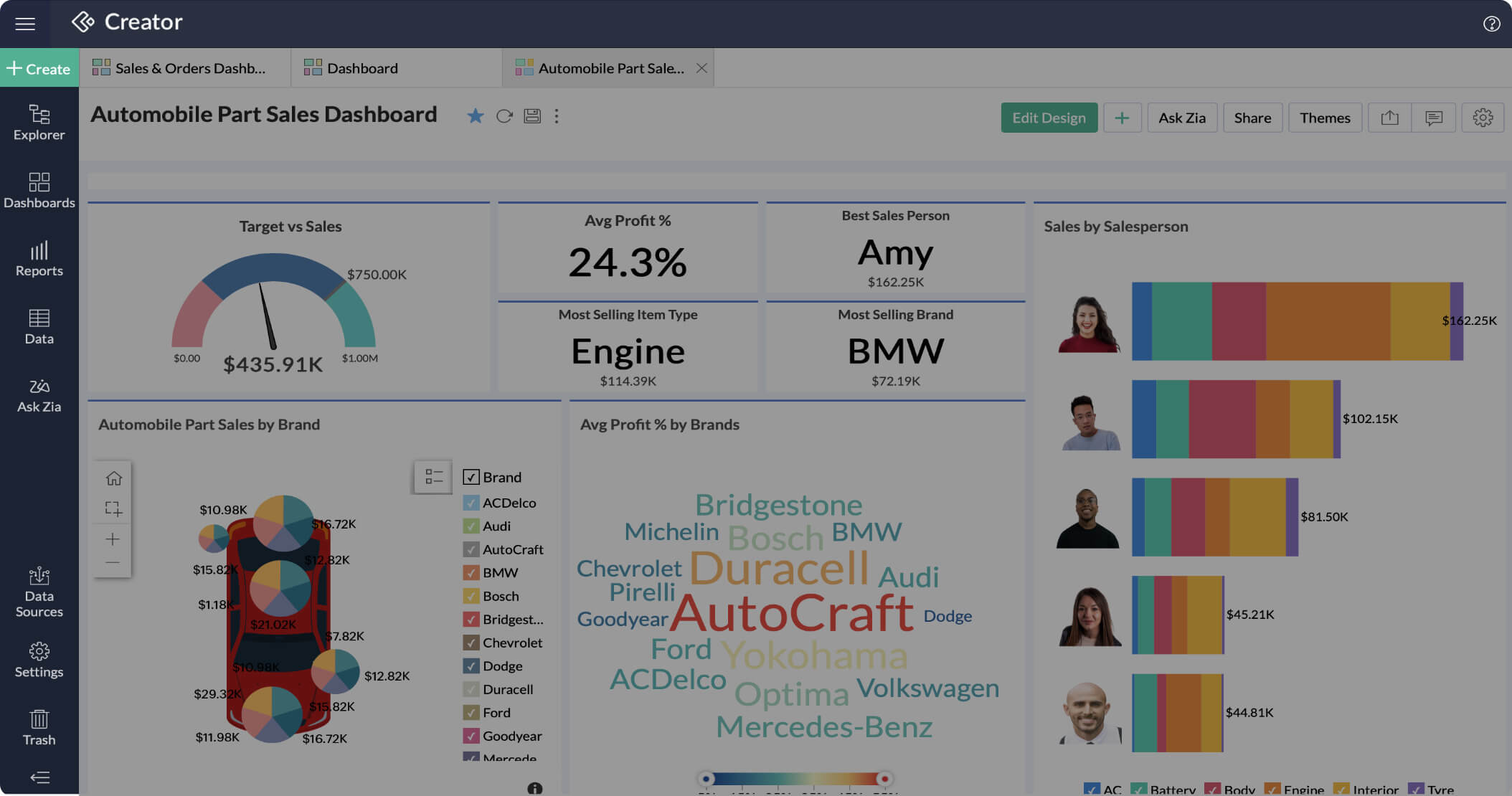
Business intelligence and analytics engine that is a first for the industry is now a part of the Creator, according to Zoho, allowing users to gain business insights from the data stored in their applications without having to bother about adding a new subscription to the mix. In addition, the low-code platform now supports advanced BI features, including predictive analytics, data alerts, what-if analysis, data blending, and conversational analytics.
Using Zoho Creator 6, artificial intelligence (AI) can assist you in creating intelligent and reliable commercial applications. You may import data from anywhere, create data modules on behalf of users, and examine data linkages using AI-based import capabilities. Keyword extraction, sentiment analysis, and predictive analysis are some of the brand-new Zoho Creator capabilities that are ready to use and built-in.
BI and Analytics in Zoho Creator 6.0 offers you the following-
Data visualization
In Zoho Creator, integrations adhere to the reusability principle much as apps and functions do. Once correctly installed, you'll have access to it when travelling. Using Zoho Creator 6.0, you can quickly link every business app.
Integration
You may connect to any data source with Zoho BI & Analytics. APIs can retrieve databases and upload data from spreadsheets or online storage services. As a result, you can consolidate disconnected data spread across several platforms if you have a lot of it.
Faster Decisions
Zoho's conversational AI assistant, Zia, enhances the user experience by automatically providing quick answers to queries and creating images.
Additionally, it helps to enable staff members to analyze data using detailed images and make wise business decisions. The chatbot may also help you create essential indicators with charts and reports.
Collaboration
With fine-grained access controls and specific choices like read-only, report authoring, export, and read-write, collaborative analytics gives you total control over your data. Any report or dashboard can be the subject of discussions with colleagues using the commenting function.
Self-service portals
Integrating the reports into your website may give suppliers, consultants, and clients access to context-specific information through their own websites and reporting portals.
Each customer's or seller's brand identification can be complemented on the portals with the addition of corporate logos and other elements.
Mobile BI
You can allow your personnel to use their mobile phones to access reports, debate important information, and take action. They use reports even when not linked to the internet since they are convenient and they appreciate them.
Conclusion
The most recent version of Zoho Creator 6.0 allows companies to efficiently provide end-to-end business solutions by combining the intense power of application development, business data & analytics, smart integrations, and process automation into one unified platform. By extending low-code capabilities to all phases of software development, C6 also gives you a more direct development experience.
This Zoho Creator feature will enable your teams to create comprehensive business solutions that deliver insightful real-time information and automate processes while in motion.
The Zoho Creator Platform Zoho Creator 6.0 includes Zoho's intelligence and analytics engine, allowing customers to gain business insights from the data in their apps without worrying about adding a new subscription to the mix.
Topic Participants
Abhishek - Zoho Partner
Jmadrid
Sticky Posts
ANZ In-Person Zoho User Group Meetups: Focusing on Zoho Creator & Zoho Flow (September 2024)
Hello, Zoho Community! Calling all Zoho users in Australia! We're thrilled to announce the next series of Zoho User Group (ZUG) Meetups, continuing the success of our previous sessions. These meetups are a great opportunity to learn, network, and engage[SESSION ENDED] Ask the Experts #07| Live Q&A: Building workflows with Blueprint in Zoho Creator |
Hello, Post the release of Zoho Creator Blueprint last month, we're happy to tell you that we'll be launching a new 'Ask the Experts' session on 16th September (Thursday) this month focussing on creating blueprints in Zoho Creator. The session will beZoho Creator Community Webinars | October - November 2020 [Completed]
Hello everyone, I’m happy to announce that Zoho Creator is hosting a new Community Webinar Series starting this October. This series is a learning initiative aimed at our developer community, where every session will take spotlight use cases focused onCommunity Learning Webinar - Zoho Creator Blueprint & other release updates | July 29, 2021
Dear developers, This June, the Creator team unveiled a slew of updates including UI enhancements to the Detail View of reports, an new capabilities in Data Import and Connections, and most important of all, the release of Blueprint in Creator. CustomizeCommunity Learning Webinar: Delve deep into the core concepts of Zoho Creator | 17th June, 2021
Dear developers, Every customer has unique business needs and unique problems to solve. To be able to give solutions to these problems, to get over any stumbling blocks and to be able to build applications expeditiously that tailor to specific needs,
Nederlandse Hulpbronnen

Recent Topics
Performance is degrading
We have used Mail and Cliq for about three years now. I used to use both on the browser. Both have, over the past 6 months, had a severe degradation in performance. I switched to desktop email, which appeared to improve things somewhat, although initialHow to set page defaults in zoho writer?
hi, everytime i open the zoho writer i have to change the default page settings to - A4 from letter, margins to narrow and header and footer to 0. I cannot set this as default as that option is grayed out! so I am unable to click it. I saved the documentAdd Israel & Jewish Holidays to Zoho People Holidays Gallery
Greetings, We hope you are doing well. We are writing to request an enhancement to the Holidays Gallery in Zoho People. Currently, there are several holidays available, but none for Israel and none for Jewish holidays (which are not necessarily the sameUnable to Send Different Email Templates for Different Documents in Zoho Sign
Hello Zoho Community, I am facing a limitation with Zoho Sign regarding email notifications sent to customers when a document is sent for signing. Currently, whenever I send any template/document for signing, the email notification that goes to the customerEnable History Tracking for Picklist Values Not Available
When I create a custom picklist field in Deals, the "Enable History Tracking for Picklist Values" option is not available in the Edit Properties area of the picklist. When I create a picklist in any other Module, that option is available. Is there a specific reason why this isn't available for fields in the Deals Module?ZO25: The refreshed, more unified, and intelligent OS for business
Hello all, Greetings from Zoho One! 2025 has been a remarkable year, packed with new features that will take your Zoho One experience to the next level! From sleek, customizable dashboards to an all-new action panel for instant task management, we’veVault crashes on Android Devices
Vault is continuously closing after entering the master password on my Android device. After several attempts I get a system message that says there is a bug in the app. I've uninstalled and reinstalled the app, and cleared the app cache, but nothing¿Cómo puedo configurar las contraseñas creadas bajo una directiva para que nunca caduquen y no aparezcan como caducadas en los informes?
¿Cómo puedo configurar las contraseñas creadas bajo una directiva para que nunca caduquen y no aparezcan como caducadas en los informes? La razón por la cual contraseña estas no deben caducar es porque su actualización depende de mi cliente y no de mí.Camera access
My picture doesn't appear in a group discussion. (The audio is fine.) The guide says "Click the lock icon on address bar," but I can't find it. Advise, pleaseAre static links available
I'm still using Zoho Meeting in trial mode. My previous webinar software provided a static link, and I made the mistaken assumption that I could send out my link and start a meeting later. Mass confusion, but my fault. With a paid version do you get aPower up your Kiosk Studio with Real-Time Data Capture, Client Scripts & More!
Hello Everyone, We’re thrilled to announce a powerful set of enhancements to Kiosk Studio in Zoho CRM. These new updates give you more flexibility, faster record handling, and real-time data capture, making your Kiosk flows smarter and more efficientWhy is Zoho Meeting quality so poor?
I've just moved from Office 365 to Zoho Workplace and have been generally really positive about the new platform -- nicely integrated, nice GUI, good and easy-to-understand control and customisation, and at a reasonable price. However, what is going onHow to print a label from zoho creator app?
Hello, I would like to print a label from zoho creator app record similar to attached one. Size 74mm x 102mm. I tried record template. It leaves plenty of space around the content and also I couldn't set the height of the page. So it is not printing properly. Could someone please direct me to right direction for this requirement?Integration between "Zoho Sprints Stories" and "Zoho Projects Tasks/Subtasks"
We have two separate teams in our organization using Zoho for project management: The Development team uses Zoho Sprints and follows Agile/Scrum methodology. The Infrastructure team uses Zoho Projects for traditional task-based project management. InWhere can we specify custom CSS in Zoho Forms custom theme ?
I'm using a form with a dark theme. The OTP popup window is unreadable, because for some reason, the OTP popup background fixes color to white, but still takes the font color specified in the custom theme. This ends up as white on white for me, renderingTeam Gamification
Would love to motivate, engage and encourage our team with our social media posts. Would like to include Gamification features of Social Media in Zoho Social or Marketing Automation. And also bring in Social Advocacy tools/tracking/management to these,Sync Data from MA to CRM
Currently, it's a one-way sync of data from the CRM to MA. I believe we should have the ability to select fields to sync from MA to the CRM. The lead score is a perfect example of this. In an ideal world we would be able to impact the lead score of aUpdate CRM record action
Currently, MA only offers a "Push Data" action to push data to a CRM module. This action is built to cover the need to both create a new record and update an existing record. Because it has been implemented this way all required fields on the CRM modulePro Lite Upgrade - Quick Access Tray
Hello, I was going to upgrade to Pro Lite but the Quick Access Tray feature isn't available for Windows. Of the four features not available for Windows, the QAT is what I'm most interested in. Are there plans to add this feature for Windows anytime soon?Boost your CRM communication with new font types, sizes, and default reply-to options while composing emails
Hello Everyone, We’re excited to introduce a series of impactful enhancements to the email composer settings in Zoho CRM. These updates enable you to personalize and optimize your customer interactions with greater efficiency. So what's new? Add custom3 year sick leave cycle
How do you set up a sick leave cycle for South Africa? In SA the sick works like this for the first 6 months you get 0.83 paid sick days a month, then after 6 months you sick leave balance is reset to 30 days that can be used over a 36 month cycle. ThisWorkDrive and CRM not in sync
1/ There is a CRM file upload field with WorkDrive file set as the source: 2/ Then the file is renamed in WorkDrive (outside CRM): 3/ The File in CRM is not synced after the change in WorkDrive; the file name (reference) in CRM record is not updated (hereIs Zoho Communityspaces now part of Zoho One?
Is Zoho Communityspaces now part of Zoho One?How to update "Lead Status" to more than 100 records
Hello Zoho CRM, How do I update "Lead Status" to more than 100 records at once? To give you a background, these leads were uploaded or Imported at once but the lead status record was incorrectly chosen. So since there was a way to quickly add records in the system no matter how many they are, we are also wondering if there is a quicker way to update these records to the correct "Lead Status". I hope our concern makes sense and that there will be a fix for it. All the best, JonathanBigin’s 2025 Evolution: Highlights from 2025 and What’s Ahead in 2026
Dear Biginners, Wishing you a very happy New Year! As we stand at the cusp of endless possibilities in 2026, we would like to take a moment to reflect on what we achieved together in 2025. Your continued support, thoughtful feedback, and kind words ofSend Supervisor Rule Emails Within Ticket Context in Zoho Desk
Dear Zoho Desk Team, I hope this message finds you well. Currently, emails sent via Supervisor Rules in Zoho Desk are sent outside of the ticket context. As a result, if a client replies to such emails, their response creates a new ticket instead of appendingZoho Desk - Change Time Zone for all users and set default for new user
Hi, Is there a way to set a default time zone so that when user creates an account via the Zoho Desk invitation, they don't need to select the time zone via the hundreds of choice? And, for already created users, can we edit the incorrect time zone selected by the user at the account creation ? Thanks ! FredIntroducing WhatsApp integration in Bigin
Greetings! In today's business landscape, messaging apps play a significant role in customer operations. Customers can engage with businesses, seek support, ask questions, receive personalized recommendations, read reviews, and even make purchases—allAllow Manual Popup Canvas Size Control
Hello Zoho PageSense Team, We hope you're doing well. We would like to request an enhancement to the PageSense popup editor regarding popup sizing. Current Limitation: Currently, the size (width and height) of a popup is strictly controlled by the selectedWhy does Zoho’s diff viewer highlight parts of unchanged lines?
Hi everyone, I’ve noticed something odd in the Zoho editor’s diff view. When I delete a single line, the diff doesn’t just mark that line as removed. Instead, it highlights parts of the next line as if they changed, even though they are identical. Example:CRM x WorkDrive: File storage for new CRM signups is now powered by WorkDrive
Availability Editions: All DCs: All Release plan: Released for new signups in all DCs. It will be enabled for existing users in a phased manner in the upcoming months. Help documentation: Documents in Zoho CRM Manage folders in Documents tab Manage filesPassing the CRM
Hi, I am hoping someone can help. I have a zoho form that has a CRM lookup field. I was hoping to send this to my publicly to clients via a text message and the form then attaches the signed form back to the custom module. This work absolutely fine whenAutomating Employee Birthday Notifications in Zoho Cliq
Have you ever missed a birthday and felt like the office Grinch? Fear not, the Cliq Developer Platform has got your back! With Zoho Cliq's Schedulers, you can be the office party-cipant who never forgets a single cake, balloon, or awkward rendition ofDrop Down Value
Hi, May I know why Zoho Flow treat this drop down as number and not as string. If so, how can I fetch the right value for filtering. This field is from Creator, in Creator upon checking by default it is a string since it's not a lookup field.Zoho Survey reminder settings are extremely confusing
Hi, I just want to set 3 reminders, one week apart from the first email out. Your form is too confusing and I don't understand. Can you simplify and be more specific regarding the language used on the form ?Add deluge function to shorten URLs
Zoho Social contains a nice feature to shorten URLs using zurl.co. It would be really helpful to have similar functionality in a Deluge call please, either as an inbuilt function or a standard integration. My Creator app sends an email with a personalisedform data load issue when saving as duplicate record is made
Hello. I have a form with a lookup when a value is selected the data from the corresponding record is filled into all of the fields in the form. But the form is loaded in such a state that if any value is changed it will take all of the values pre loadedRecurring Tasks and Reminders in Projects
Recurring tasks are tasks that are created once, and then recreated automatically after a designated time period. For example, the invoice for your billable tasks is due every week. You can set that task to recreate itself every week. Also, the futureUnable to remove the “Automatically Assigned” territory from existing records
Hello Zoho Community Team, We are currently using Territory Management in Zoho CRM and have encountered an issue with automatically assigned territories on Account records. Once any account is created the territory is assigned automatically, the AutomaticallyGoogle Fonts Integration in Pagesense Popup Editor
Hello Zoho Pagesense Team, We hope you're doing well. We’d like to submit a feature request to enhance Zoho Pagesense’s popup editor with Google Fonts support. Current Limitation: Currently, Pagesense offers a limited set of default fonts. Google FontsNext Page