Kaizen #157: Flyouts in Client Script

Hello everyone!
Welcome back to another exciting edition of our Kaizen series, where we explore fresh insights and innovative ideas to help you discover more and expand your knowledge!In this post, we'll walk through how to display Flyouts in Client Script and break down the key differences between Flyouts and pop-ups in Client Script, including when to use each one.
In this Kaizen post,
1. What are Flyouts in Client Script?2. Flyout- ZDKs and functions in Client Script3. Use Case4. Solution4.a. Create a Widget for EMI Calculator.4.b. Create a Client Script to render the Widget as Flyout.5. Difference between flyout and popup in Client Script6. Summary7. Related links
1. What are Flyouts in Client Script?
Flyouts are floating User Interface that can be moved around and controlled using Client Script. Widgets can be used to render a flyout. The flyout can run independently, and any Client Script can communicate with it.
2. Flyout- ZDKs and functions in Client Script :
- createFlyout(name, config) - Creates a flyout. You can specify the heading, dimensions, and animation type using the config parameter.
- getFlyout(name) - To Fetch the details of a flyout.
- open(config, data) - Opens the created flyout.
- notify(data, options) - Notifies and waits for data in a flyout. The options can be wait: true (Client Script execution will wait for a response from the widget) or wait: false - (Client Script execution will not wait for a response from the widget)
- close() - Closes the active flyout.
Click here for more details about the ZDKs and functions related to flyouts.
3. Use Case :
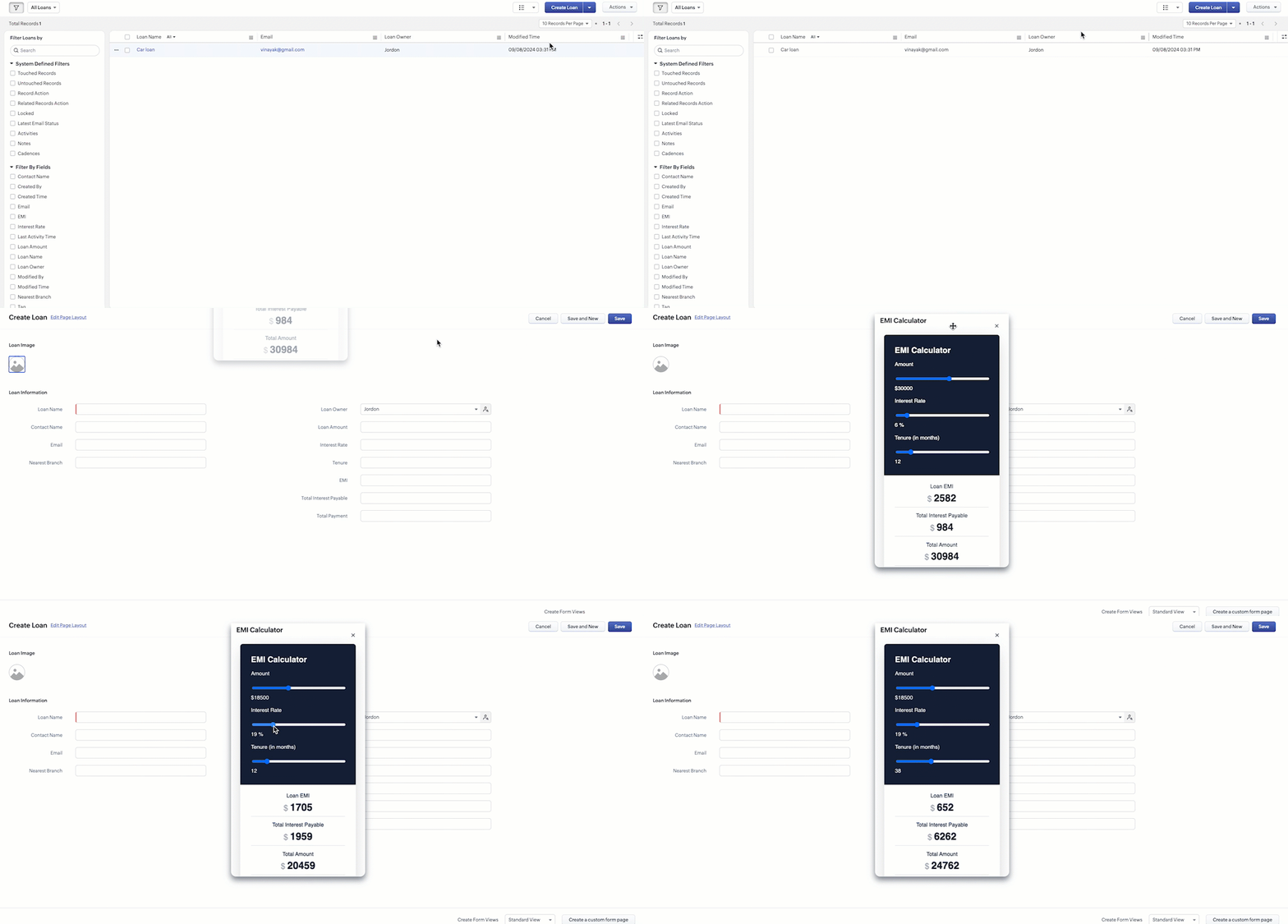
Sales Advisors in a Finance Consulting Company regularly rely on an EMI calculator to help customers with loan queries. To improve their efficiency and eliminate the need to switch between different windows, the admin manager intends to integrate the calculator directly into CRM. The EMI calculator should appear on the Create Page of the Loans module and remain active until the user closes it.
4. Solution:
To achieve this in Zoho CRM, we can use Widgets to create an EMI calculator and render them using flyouts in client script whenever the create Page of Loan page loads.
4.a. Create a Widget for EMI Calculator
Install Zoho CLI, and follow the steps given in this document to create the Widget app folder. Then update the html, javascript, and css code as per your requirement.
index.html
- <!DOCTYPE html>
- <html lang="en">
- <head>
- <meta charset="UTF-8" />
- <meta http-equiv="X-UA-Compatible" content="IE=edge" />
- <meta name="viewport" content="width=device-width, initial-scale=1.0" />
- <title>Document</title>
- <link rel="stylesheet" href="style.css" />
- </head>
- <body>
- <div class="loan-calculator">
- <div class="top">
- <h2>EMI Calculator</h2>
- <form action="#">
- <div class="group">
- <div class="title">Amount</div>
- <input type="range" min="1000" value="30000" max="50000" step="500" class="loan-amount" id="loanAmount" />
- <div class="slider-label">$<span id="loanAmountValue"></span></div>
- </div>
- <div class="group">
- <div class="title">Interest Rate</div>
- <input type="range" min="5" value="6" max="100" step="1" class="interest-rate" id="interesRate" />
- <div class="slider-label"><span id="interesRateValue"></span></div>
- </div>
- <div class="group">
- <div class="title">Tenure (in months)</div>
- <input type="range" min="6" max="100" step="1" value="12" class="loan-tenure" id="tenureMonth" />
- <div class="slider-label"><span id="tenureMonthValue"></span></div>
- </div>
- </form>
- </div>
- <div class="result">
- <div class="left">
- <div class="loan-emi">
- <h3>Loan EMI</h3>
- <div class="value">123</div>
- </div>
- <div class="total-interest">
- <h3>Total Interest Payable</h3>
- <div class="value">1234</div>
- </div>
- <div class="total-amount">
- <h3>Total Amount</h3>
- <div class="value">12345</div>
- <div class="right">
- <canvas id="myChart" width="400" height="400"></canvas>
- </div>
- </div>
- </div>
- <script src="https://cdn.jsdelivr.net/npm/chart.js@3.6.2/dist/chart.min.js"></script>
- <script src="https://live.zwidgets.com/js-sdk/1.2/ZohoEmbededAppSDK.min.js"></script>
- <script src="main.js"></script>
- </body>
- </html>
- Click here to view the complete code.
- Once you have added the code, upload the zip file by following the below steps.
- Go to Setup > Developer Space > Widgets.
- Click Create New Widget and Fill in the details.
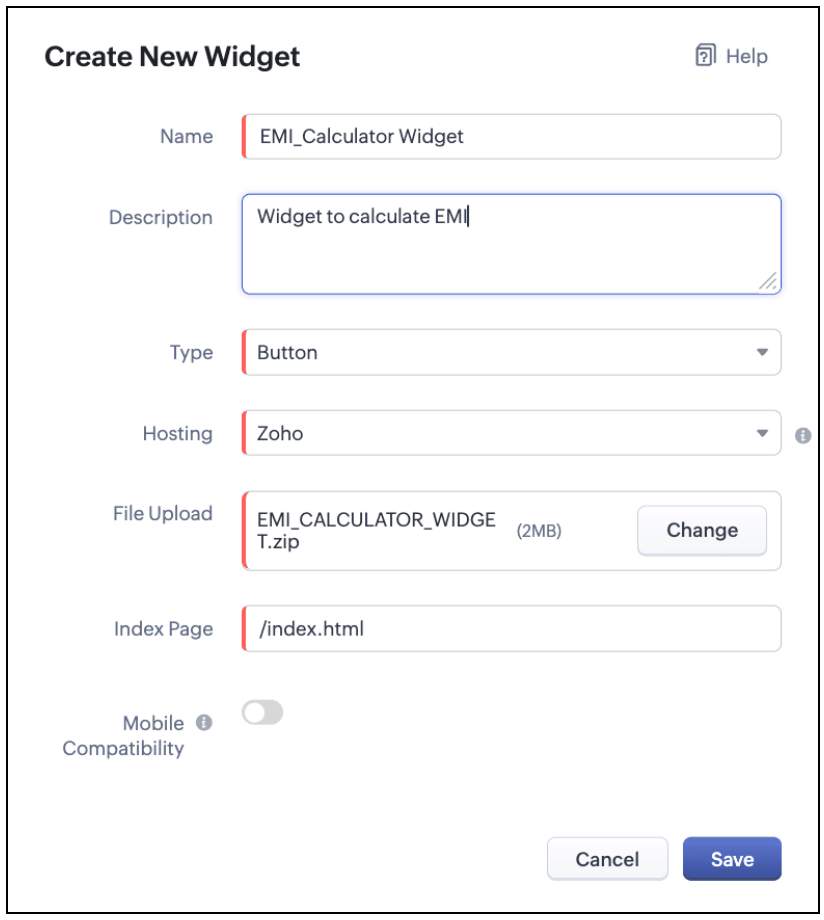
The Hosting should be "Zoho" and mention the html page of the app folder that you uploaded.

Note:
The widget should be of "button" type in order to render through a Client Script.
4.b. Create a Client Script to render the Widget as Flyout
Configure a Client Script for Create Page(Standard) Loans module, that triggers during onLoad event as shown below. Click Next. Click here to know how to configure a Client Script.

Enter the following script and click Save.
- ZDK.Client.createFlyout('EMIFlyout', {
- header: 'EMI Calculator',
- animation_type: 1,
- height: '400px',
- width: '450px',
- close_on_exit: false
- });
- ZDK.Client.getFlyout('EMIlyout').open(
- { api_name: 'EMI_CALCULATOR_WIDGET', type: 'widget' },
- { data: loanDetails }
- );
In the above script, createFlyout() will create a new flyout with header.
Below is the syntax and parameter detail.

Now Open the flyout and render the Widget in the flyout using open() method and specify the api_name of the widget.

Here is how the Client Script renders the flyout.
5. Difference between flyout and popup in Client Script
Flyout | Pop up |
A flyout can be moved around the page. | A pop-up cannot be moved anywhere on the page. |
It can run independently in a separate thread. The user can interact with the background interface without closing the flyout. | The user cannot interact with the background without closing the pop up. |
Use flyouts, when you need to exchange data to and fro between a Widget and Client Script. You can use ZDK.Client.sendResponse() to pass data from a widget rendered as a flyout to the Client Script. | Use popup, when you need to interrupt the screen to gather input from the user or display a message before proceeding. Use $Client.close() to pass data to the Client Script, which will also close the popup. |
In the scenario discussed in this post, if you want to make it mandatory for the user to read or interact with the EMI Calculator before entering any value in the create Page(Standard), then you can use pop-up instead of Flyout. Both pop up and flyout can be used to display widgets, and their dimensions can be altered.
Refer to this post to know how to render widgets as pop up using Client Script.
6. Summary
- In this post, we have seen,
- Flyouts in Zoho CRM.
- ZDKs and methods to render a Flyout(Widget) using Client Script.
- When to use a Flyout and when to use a pop up.
7. Related Links
 Previous Post: Kaizen #156 -Enhancing Mass Communication in Zoho CRM with a Custom Button Widget | Kaizen Collection: Home
Topic Participants
Maadhari M
Jeremy Nagel - www.smooth.tel
Kava Li
Jeganprabhu S
Ishwarya SG
Sticky Posts
Kaizen #198: Using Client Script for Custom Validation in Blueprint
Nearing 200th Kaizen Post – 1 More to the Big Two-Oh-Oh! Do you have any questions, suggestions, or topics you would like us to cover in future posts? Your insights and suggestions help us shape future content and make this series better for everyone.Kaizen #226: Using ZRC in Client Script
Hello everyone! Welcome to another week of Kaizen. In today's post, lets see what is ZRC (Zoho Request Client) and how we can use ZRC methods in Client Script to get inputs from a Salesperson and update the Lead status with a single button click. In thisKaizen #222 - Client Script Support for Notes Related List
Hello everyone! Welcome to another week of Kaizen. The final Kaizen post of the year 2025 is here! With the new Client Script support for the Notes Related List, you can validate, enrich, and manage notes across modules. In this post, we’ll explore howKaizen #217 - Actions APIs : Tasks
Welcome to another week of Kaizen! In last week's post we discussed Email Notifications APIs which act as the link between your Workflow automations and you. We have discussed how Zylker Cloud Services uses Email Notifications API in their custom dashboard.Kaizen #216 - Actions APIs : Email Notifications
Welcome to another week of Kaizen! For the last three weeks, we have been discussing Zylker's workflows. We successfully updated a dormant workflow, built a new one from the ground up and more. But our work is not finished—these automated processes are
Nederlandse Hulpbronnen

Recent Topics
Updating Subform Record from other Form
Just wanted to ask how to properly approach this. I have 2 forms and would like to trigger an auto update on the subform once record submitted. block below only updates 1 row for each recordRow in input.AV_System { AssetRecord = Site_Asset_Services[SOR_NoZoho Books - Hide Convert to Sales Order if it can't be used.
Hi Books team, I noticed that it is not possible to convert a Quote to a Sales Order when a Quote is not yet marked as accepted. My idea is to not show the Convert to Sales Order button when it is not possible to use it, or show it in a grey inactiveCross-Data Center Collaboration and / Or allowing users to choose DC
Dear Zoho Cliq Support Team, We are writing to request a significant enhancement to Zoho Cliq that would greatly benefit our geographically dispersed development team. Current Challenge: Currently, Zoho Cliq automatically routes users to specific dataIs it possible to register webhooks in Zoho CRM using API?
Hello, I am trying to register a webhook in Zoho CRM programmatically (using the API). Specifically, I want to register a webhook that is fired when new Contacts are created in the CRM. I was able to setup a webhook using the UI, by creating a rule thatCalls where the local audio is shared, have echo
When another user is sharing their screen with audio, I get echo from my own voice. We tested this with multiple users, with different audio setups, and there's no obvious way to fix it. Is this a bug you could look into, or are we missing something?Update application by uploading an updated DS file
Is it possible? I have been working with AI on my desktop improving my application, and I have to keep copy pasting stuff... Would it be possible to import the DS file on top of an existing application to update the app accordingly?Markdown support, code cells...
Hi Zoho I'd like to vote for a feature that markdown is supported with: Headings Code highlighting Quoteblocks ... Furthermore a inline card(like inline sketch card) for special text like Code would be great. And just to add my vote as well for "Tags"!Minimise chat when user navigates to new page
When the user is in an active chat (chatbot) and is provide with an internal link, when they click the link to go to the internal page the chat opens again. This is not a good user experience. They have been sent the link to read what is on the page.Zoho Projects app update: Voice notes for Tasks and Bugs module
Hello everyone! In the latest version(v3.9.37) of the Zoho Projects Android app update, we have introduced voice notes for the Tasks and Bugs module. The voice notes can be added as an attachment or can be transcribed into text. Recording and attachingzurl URL shortener Not working in Zoho social
zurl URL shortener Not working in while creating a post in Zoho socialIn the Zoho CRM Module I have TRN Field I should contain 15 digit Number , If it Contain less than 15 digit Then show Alert message on save of the button , If it not contain any number not want to sh
Hi In the Zoho CRM Module I have TRN Field I should contain 15 digit Number , If it Contain less than 15 digit Then show Alert message on save of the button , If it not contain any number not want to show alert. How We can achive in Zoho CRm Using customZoho Bookings know-how: A hands-on workshop series
Hello! We’re conducting a hands-on workshop series to help simplify appointment scheduling for your business with Zoho Bookings. We’ll be covering various functionalities and showing how you can leverage them for your business across five different sessions.Custom report
Hello Everyone I hope everything is fine. I've tried to To change the layout of the reports, especially the summary page report, and I want to divide summary of each section in the survey but I can't For example: I have a survey containing five differentZoho Journey - ZOHO MARKETING AUTOMATION
I’ve encountered an issue while working with a journey in Zoho Marketing Automation. After creating the journey, I wanted to edit the "Match Criteria" settings. Unfortunately: The criteria section appears to be locked and not editable. I’m also unableCustom Fields in PDF outputs
I created a couple of custom fields. e.g Country of Origin and HS Tariff Code. I need these to appear on a clone of a sales order PDF template but on on the standard PDF template. When I select "appear on PDFs' it appears on both but when I don't selectHow to create a Service Agreement with Quarterly Estimate
Hello, I'm not sure if this has been asked before so please don't get mad at me for asking. We're an NDIS provider in Australia so we need to draft a Service Agreement for our client. With the recent changes in the NDIS we're now required to also includeZoho Social - Post Footer Templates
As a content creator I often want to include some information at the end of most posts. It would be great if there was an option to add pre-written footers, similar to the Hashtag Groups at the end of posts. For example, if there is an offer I'm runningAllow to pick color for project groups in Zoho Projects
Hi Zoho Team, It would be really helpful if users could assign colors to project groups. This would make it easier to visually distinguish groups, improve navigation, and give a clearer overview when managing multiple projects. Thanks for consideringZoho Books - Quotes to Sales Order Automation
Hi Books team, In the Quote settings there is an option to convert a Quote to an Invoice upon acceptance, but there is not feature to convert a Quote to a Sales Order (see screenshot below) For users selling products through Zoho Inventory, the workflowCan't find imported leads
Hi There I have imported leads into the CRM via a .xls document, and the import is showing up as having been successful, however - when I try and locate the leads in the CRM system, I cannot find them. 1. There are no filters applied 2. They are notCustom Button Disappearing in mobile view | Zoho CRM Canvas
I'm working in Zoho CRM Canvas to create a custom view for our sales team. One of the features I'm adding is a custom button that opens the leads address in another tab. I've had no issue with this in the desktop view, but in the mobile view the buttonThe connected workflow is a great idea just needs Projects Integrations
I just discovered the connected workflows in CRM and its a Great Idea i wish it was integrated with Zoho Projects I will explain our use case I am already trying to do something like connected workflow with zoho flow Our requirement was to Create a TaskZoho Projects MCP Feedback
I've started using the MCP connector with Zoho Projects, and the features that exist really do work quite well - I feel this is going to be a major update to the Zoho Ecosystem. In projects a major missing feature is the ability to manage, (especiallyemail template
How do I create and save an email templateEnhancements in Portal User Group creation flow
Hello everyone, Before introducing new Portal features, here are some changes to the UI of Portals page to improve the user experience. Some tabs and options have been repositioned so that users can better access the functionalities of the feature. FromAlways display images from this sender – Is this feature available?
In Zoho mail, I had my "Load external images" setting set to "Ask me", and that's fine. That's the setting I prefer. What's not fine though is I always need to tick "Display now" for each email I get, regardless if I've done that multiple times from severalZoho Notebook Sync problem
I'm facing a problem with syncing of notebook on android app. It's not syncing. Sometimes it syncs after a day or two. I created some notes on web notebook but it's not syncing on mobile app. Please help!!!!Cant Save Gauge on Creator Page
How to Save Gauge on Creator Page see movie https://vimeo.com/1116410860?share=copy#t=0Apply Advance option not shown in report
We are facing an issue in Zoho Expenses. While approving an Expense Report, the "Apply Advance" option is not appearing under the three dots (More Options). Details: Module: Expense Reports Issue: "Apply Advance" option not visible Status of Report: AwaitingAuto Capitalize First Letter of Words
Hi I am completely new to ZOHO and am trying to build a database. How can i make it when a address is entered into a form field like this: main st it automatically changes is to show: Main St Thank YouFollow-up emails via Workflow Automation not staying in the same thread
Dear Zoho Support Team, I am currently using Workflow Automation in Zoho Campaigns to send follow-up emails. In my test case, I noticed the following behavior: All emails in the automation have the same subject line. If the follow-up email is sent withinClient Script refuses to set an initial value in Subform field
I tried a very simple, 1 line client script to set a default value in a custom subform field when the "Add Row" button is clicked and the user is entering data. It does not work - can someone tell me why? ZDK documentation suggests this should be doable.Help Center IFrame Issue
I have had a working Help Center on my website using an iframe for a while. But now for some reason the sign in page gets a refused to connect error. Can someone please help. If I go to the url manually it works correcltyComment Templates
Is it possible to add a template option for comments? We have some agents in the process who's responses require a pre-formatted layout. It would be incredibly handy to have a template for them where they can insert the template and then add their responsesShared values: From classroom lessons to teaching moments in customer service
While the world observes Teachers’ Day on October 5, in India, we celebrate a month earlier, on September 5, to mark the birth anniversary of Dr. Sarvepalli Radhakrishnan, a great teacher, renowned scholar, educationist, and advocate for empowerment.Create a list of customers who participated in specific Zoho Backstage events and send them an email via Zoho CRM
How to create a list of customers who participated in specific Zoho Backstage events and send them an email via Zoho CRM? I was able to do a view in CRM based on customer that registered to an event, but I don't seems to be able to include the filterZoho Desk blank page
1. Click Access zoho desk on https://www.zoho.com/desk/ 2. It redirects to https://desk.zoho.com/agent?action=CreatePortal and the page is blank. Edge browser Version 131.0.2903.112 (Official build) (arm64) on MacOSI hate the new user UI with the bar on the left
How can I reverse this?Question regarding import of previous deals...
Good afternoon, I'm working on importing some older deal records from an external sheet into the CRM; however, when I manually click "Add New Deal" and enter the pertinent information, the deal isn't appearing when I look at the "Deals" bar on the account'sClient Script also planned for Zoho Desk?
Hello there, I modified something in Zoho CRM the other day and was amazed at the possibilities offered by the "Client Script" feature in conjunction with the ZDK. You can lock any fields on the screen, edit them, you can react to various events (fieldNext Page